We built Vedain CRM specifically because we saw how broken the buying process is, overpriced platforms locking core features behind expensive tiers, forcing sales teams to pay more just to send automated emails or sync their inbox. That experience gave us a sharp eye for what separates a genuinely useful CRM from one that looks good on a landing page but nickel-and-dimes you after signup. We're putting that perspective to work here, and yes, we included ourselves in the lineup so you can judge us alongside the competition.
This article breaks down 13 CRM platforms built for sales teams, covering real pricing, actual feature sets, and the tradeoffs you'll face with each one. Whether you're replacing a tool that's gotten too expensive or choosing your first CRM, you'll walk away with enough detail to make a confident decision. No filler rankings, no hidden agendas, just an honest look at what's out there right now in 2026.
1. Vedain CRM
We built Vedain after seeing the same pattern repeat in most CRM software reviews: platforms that look affordable upfront but charge extra for automation, email sync, and reporting the moment you need them. Vedain's flat $10/user/month model puts every feature in front of every user from day one, with no tier upgrades required.
Best fit sales teams
Vedain works well for small to mid-sized sales teams that want a full-featured CRM without enterprise complexity. If your team uses Gmail or Outlook, needs pipeline tracking, and wants automation without paying a premium for it, Vedain fits that profile directly.
- •Teams of 5 to 500+ users
- •Startups and SMBs replacing expensive tools
- •Sales teams tired of feature-gated pricing
Standout features
The platform covers the full sales workflow. You get a visual Kanban deal pipeline, two-way email sync, lead forms, custom dashboards, and team leaderboards out of the box. Email warmup is included to protect your domain deliverability over 21 days, a feature most CRMs either don't offer or charge separately for.
Automation and AI
Your team gets a no-code workflow builder for automating repetitive tasks like lead assignment, follow-up reminders, and deal stage updates. The AI Agent Marketplace provides 30+ pre-built agents for data enrichment and content generation, while AI Studio lets you build custom CRM features by describing them in plain English.
The combination of workflow automation and AI agents under one flat-rate plan sets Vedain apart from tools that charge add-on fees for similar capabilities.
Integrations and ecosystem
Two-way email sync works directly with Gmail and Outlook. The platform also includes LinkedIn automation for scheduling and publishing AI-generated posts, which helps sales reps stay active without leaving their CRM workflow.
Pricing and plans
$10 per user per month, all-inclusive. No feature tiers, no add-ons, no hidden fees. Pricing is available in USD, INR, and AED, and you can start a trial without a credit card with setup taking under five minutes.
Watch-outs
Being a newer platform, Vedain's third-party integration library is smaller than Salesforce or HubSpot. Teams that rely on niche tools or need deep enterprise customization may find the ecosystem more limited than what those established players offer right now.
2. HubSpot Sales Hub
HubSpot is one of the most-reviewed platforms in any crm software reviews roundup, and for good reason. It covers a wide range of sales and marketing functions, but that breadth comes with a significant cost jump as your team grows.
Best fit sales teams
Growing sales teams that want marketing and sales under one roof will fit well here. If your team relies on inbound lead generation to fill the pipeline, HubSpot's combination of tools supports that workflow directly.
Standout features
The platform includes a visual deal pipeline, meeting scheduler, email tracking, and built-in calling. Live chat and prospect activity tracking give reps real-time visibility into what potential customers are doing before a conversation starts.
Automation and AI
HubSpot offers workflow automation for deal stage updates, task creation, and email sequences. Its AI tools include content suggestions, call summaries, and a prospecting agent, though most advanced AI features sit behind higher-tier plans.
If you need AI-driven automation without paying for a premium plan, HubSpot's tiered structure will limit your access sooner than expected.
Integrations and ecosystem
With over 1,500 apps in its marketplace, including Slack, Zoom, and major ad platforms, HubSpot connects broadly. Its native Gmail and Outlook sync is solid and included across all paid plans.
Pricing and plans
The free CRM tier is genuinely useful, but Sales Hub Starter starts at $20/user/month. Professional jumps to $100/user/month, making it one of the more expensive options at scale.
Watch-outs
Costs escalate fast once you add users or unlock advanced features. Teams with more than 10 users often find that the total monthly bill far exceeds what they estimated at signup.
3. Pipedrive
Pipedrive built its reputation on pipeline visibility, and that focus shows in how the product is designed. Sales reps who spend most of their time managing deals across multiple stages will find the interface intuitive compared to more complex platforms. It's a dedicated sales tool rather than a full marketing suite.
Best fit sales teams
Small teams focused on deal-centric workflows rather than marketing will find Pipedrive fits their needs well. If your primary goal is tracking opportunities from first contact to close, Pipedrive delivers that without unnecessary complexity.
Standout features
The visual pipeline view is Pipedrive's strongest asset. You also get email integration, activity reminders, and a solid mobile app. Contact and deal history stays connected, so reps can see every interaction without switching between tools.
Automation and AI
On its Advanced plan and above, Pipedrive adds workflow automation for task creation and deal updates. Its AI sales assistant surfaces deal recommendations and activity tips, though the depth of AI tooling falls short of newer platforms built with AI as a core component.
If AI-powered automation is a priority for your team, you'll need to upgrade past the base plan before accessing it.
Integrations and ecosystem
With over 400 third-party app connections, including Slack, Zoom, and Microsoft Teams, Pipedrive covers common sales tools well. Gmail and Outlook sync are available across paid plans with two-way email tracking included.
Pricing and plans
Plans start at $14/user/month on the Essential tier and climb to $99/user/month for the Power plan. Automation capabilities only unlock from the Advanced tier at $34/user/month.
Watch-outs
Pipedrive lacks native marketing features, so teams needing campaigns or lead nurturing will need separate software. Reporting depth also stays limited until you reach higher-tier plans, which adds cost for teams that rely on detailed analytics.
4. Zoho CRM
Zoho CRM is one of the most frequently featured platforms in crm software reviews aimed at budget-conscious teams. It offers a wide range of features across its tiers, but navigating which capabilities live at which price point takes real research before committing.
Best fit sales teams
This platform fits teams that need flexibility across multiple business functions without moving to enterprise software. If your organization already uses other Zoho products like Zoho Books or Zoho Desk, the CRM slots in cleanly within that ecosystem.
Standout features
The platform gives you lead and contact management, deal tracking, web-to-lead forms, and a built-in telephony option. Canvas, Zoho's drag-and-drop interface builder, lets teams customize the CRM layout without touching code, which helps when you want the tool to match how your team actually works.
Automation and AI
Zoho's AI assistant, Zia, handles lead scoring, deal predictions, and email sentiment analysis. Workflow automation is available on most paid tiers, though the depth of Zia's features varies considerably depending on which plan you're running.
Teams on the Standard plan will find Zia's capabilities noticeably limited compared to what higher tiers unlock.
Integrations and ecosystem
Native connections cover Gmail, Outlook, and Google Workspace, alongside hundreds of third-party apps through its marketplace. The Zoho One bundle makes it straightforward to add adjacent tools without managing multiple vendor relationships.
Pricing and plans
Plans start at $14/user/month on the Standard tier and reach $52/user/month on the Ultimate plan, both billed annually.
Watch-outs
The sheer number of settings and modules can overwhelm new users during setup. Teams without a dedicated admin often spend more time configuring the platform than actually using it to close deals.
5. Salesforce Sales Cloud
Salesforce sits at the top of most crm software reviews aimed at enterprise buyers, and that reputation is built on genuine depth. It handles complex sales processes, large teams, and advanced reporting at a scale few platforms match. The tradeoff is that getting Salesforce to actually work for your team requires significant time, budget, and often outside help.
Best fit sales teams
Enterprise sales teams running multi-step, high-value deal cycles will get the most from Salesforce. If your organization has dedicated admins, a customization budget, and complex approval workflows, the platform is built for that level of operational complexity.
Standout features
Salesforce gives you customizable objects, advanced forecasting, and territory management that most mid-market tools simply can't replicate. Its reporting engine lets you build nearly any view of your pipeline, and the AppExchange marketplace extends the platform in almost every direction.
The platform's flexibility is its biggest strength, but that same flexibility means it rarely works well straight out of the box.
Automation and AI
Salesforce's Einstein AI handles lead scoring, opportunity insights, and forecasting predictions. Flow Builder lets you automate complex processes without code, though building reliable automations still takes experienced hands to configure correctly.
Integrations and ecosystem
With thousands of AppExchange listings, Salesforce connects to virtually every business tool you already use. Native integrations cover Gmail, Outlook, Slack, and most major enterprise platforms.
Pricing and plans
Starter Suite begins at $25/user/month, but most teams need the Pro Suite at $100/user/month or Enterprise at $165/user/month to access meaningful features.
Watch-outs
Implementation costs regularly run into the tens of thousands of dollars, and ongoing admin overhead is significant. Smaller teams often find they're paying for capability they'll never fully use.
6. Microsoft Dynamics 365 Sales
Microsoft Dynamics 365 Sales appears in most enterprise crm software reviews as the natural choice for organizations already running Microsoft infrastructure. It integrates deeply with Teams, Outlook, and the broader Microsoft 365 suite, making it a strong fit when your business already lives inside the Microsoft ecosystem.
Best fit sales teams
Large sales teams embedded in Microsoft-heavy environments will get the most value here. If your organization runs Azure, SharePoint, or Microsoft 365 at scale, Dynamics 365 plugs into that stack with less friction than most alternatives.
Standout features
The platform offers relationship intelligence through LinkedIn Sales Navigator integration, deal tracking, and customizable sales processes. Its built-in forecasting tools give managers a clear view of pipeline health without requiring third-party reporting add-ons.
Automation and AI
Microsoft's Copilot AI handles meeting summaries, email drafting, and opportunity scoring. Automation flows are built through Power Automate, which connects Dynamics to hundreds of external services without writing code.
Power Automate's depth is genuinely impressive, but teams without technical resources will spend significant time getting those flows to behave as intended.
Integrations and ecosystem
Native connections cover the entire Microsoft 365 suite, plus LinkedIn, Teams, and Azure services. Third-party connections extend through the Microsoft AppSource marketplace.
Pricing and plans
Sales Professional starts at $65/user/month and Sales Enterprise runs $105/user/month, both billed annually.
Watch-outs
Setup requires real IT involvement, and licensing can get confusing fast when you add Copilot or Power Automate capacity beyond the included limits.
7. Freshsales by Freshworks
Freshsales sits in a middle ground that many crm software reviews overlook: capable enough for growing teams but priced more accessibly than HubSpot or Salesforce. It combines contact management, pipeline tracking, and built-in phone and email in one interface, which reduces the number of tools your reps need to juggle daily.
Best fit sales teams
Freshsales works well for small to mid-sized teams that want built-in calling and email without paying for separate tools. Teams that handle high call volumes or outbound prospecting will find the native phone features particularly useful.
Standout features
The platform includes a visual sales pipeline, contact timeline, and built-in phone system with call recording and voicemail drop. Activity tracking keeps every touchpoint logged automatically, so reps spend less time on manual data entry and more time on actual conversations.
Automation and AI
Freshsales includes Freddy AI for lead scoring, deal health indicators, and next-best-action suggestions. Workflow automation handles task assignments and follow-up triggers based on deal stage or contact behavior.
Freddy AI's lead scoring is genuinely useful, but the full feature set requires upgrading past the base plan.
Integrations and ecosystem
Native integrations cover Gmail, Outlook, Slack, and the broader Freshworks suite, including Freshdesk for support. Third-party connections extend through Zapier for teams needing custom workflows.
Pricing and plans
The Growth plan starts at $11/user/month, with Pro at $47/user/month and Enterprise at $71/user/month, all billed annually.
Watch-outs
Reporting tools stay basic on lower tiers, and teams needing advanced analytics will need to upgrade sooner than the initial price suggests.
8. Zendesk Sell
Zendesk Sell comes up in many crm software reviews as the natural pick for teams that already rely on Zendesk for customer support. It connects sales and support data in one place, giving reps visibility into how customers interact with your business beyond just the pipeline.
Best fit sales teams
Zendesk Sell works best for teams that want their sales and service workflows connected in a single platform. If your reps regularly hand off accounts to a support team, the shared customer history removes a common communication gap that separate tools create.
- •Teams already running Zendesk Support
- •Sales teams where reps and support agents share the same accounts
- •Organizations that prioritize unified customer context over feature breadth
Standout features
The platform includes a visual pipeline, email tracking, and click-to-call functionality built directly into the interface. Its smart lists let you filter and segment contacts based on activity data without constructing complex reports from scratch.
Automation and AI
Zendesk Sell provides task automation and email sequences to keep follow-ups consistent across your team. AI features focus on prospect scoring and activity recommendations, though the depth stays lighter than what dedicated AI-first CRMs offer today.
If your team needs heavy AI-driven automation, Zendesk Sell's current AI tooling will feel limited by comparison.
Integrations and ecosystem
Native connections include Gmail, Outlook, and the full Zendesk suite. Third-party integrations extend through Zapier and the Zendesk Marketplace for teams needing custom workflows.
Pricing and plans
Sell Team starts at $19/user/month, with Grow at $55/user/month and Professional at $115/user/month, all billed annually.
Watch-outs
The platform's value drops noticeably if your team doesn't already use Zendesk Support. Without that connection, you're paying a premium for a CRM that competes directly with more full-featured options at significantly lower price points.
9. monday.com Sales CRM
Monday.com started as a project management tool, and many crm software reviews note that its CRM carries that same visual, board-first design philosophy. That makes it approachable for teams already comfortable in monday.com's work management environment, though it also means the CRM features feel more bolted-on than purpose-built.
Best fit sales teams
Monday.com Sales CRM suits teams that already run operations inside monday.com and want their sales pipeline in the same workspace. If your team blends project delivery with sales, the unified board structure removes some of the context-switching that separate tools create.
Standout features
You get a drag-and-drop pipeline, contact management, and activity tracking tied directly to monday.com's familiar grid and board views. Custom columns let your team shape the CRM to match your exact deal stages without needing technical help.
Automation and AI
Monday.com includes no-code automation recipes for notifications, status changes, and task assignments. Its AI features handle email drafting and deal summaries, though the depth stays lighter than platforms built specifically around AI-driven sales workflows.
Teams prioritizing deep AI automation will find monday.com's current toolset noticeably behind dedicated sales CRMs.
Integrations and ecosystem
Native integrations cover Gmail, Outlook, Slack, and Zoom, with hundreds of additional connections available through its app marketplace and Zapier.
Pricing and plans
The Basic plan starts at $12/seat/month, with Pro at $19/seat/month, both billed annually.
Watch-outs
Sales-specific features like forecasting and advanced reporting require higher tiers, and the CRM still lacks the pipeline depth that dedicated sales platforms provide out of the box.
10. Insightly
Insightly appears in crm software reviews aimed at small businesses that need more than just a pipeline. The platform combines contact and deal management with built-in project tracking, making it useful for teams that continue working with customers after the sale closes.
Best fit sales teams
Insightly fits teams that handle post-sale delivery alongside their sales process, such as agencies, consulting firms, or service businesses. If your reps regularly transition deals into active projects, the built-in project management tools reduce the need for a separate system.
Standout features
The platform gives you a visual pipeline, contact management, and linked project records that connect directly to closed deals. Relationship linking lets you map connections between contacts, organizations, and opportunities, so your team always understands who knows whom before making outreach.
The deal-to-project handoff is Insightly's clearest differentiator against pure-play sales CRMs.
Automation and AI
Insightly includes workflow automation for task creation, lead routing, and email alerts triggered by record changes. AI tools focus on relationship intelligence and field suggestions, though the depth stays limited compared to platforms built around AI as a core function.
Integrations and ecosystem
Native connections cover Gmail, Outlook, and Google Workspace, with additional integrations through Zapier for teams needing custom automation flows.
Pricing and plans
Plus starts at $29/user/month, with Professional at $49/user/month, both billed annually.
Watch-outs
Reporting tools feel underpowered for teams that need detailed pipeline analytics without paying for the AppConnect add-on separately.
11. Copper
Copper shows up in crm software reviews aimed specifically at Google Workspace users. The platform builds its entire experience around Gmail, Google Calendar, and Google Drive, meaning your team works inside tools they already know rather than switching to an unfamiliar interface from day one.
Best fit sales teams
Copper fits teams that run entirely on Google Workspace and want a CRM that stays inside that environment. If your reps spend most of their day in Gmail, Copper's sidebar integration removes the friction of jumping between your inbox and a separate tool to log activity.
Standout features
The platform gives you automatic contact enrichment pulled directly from Gmail, deal tracking, and activity logging without requiring manual data entry. Every email, meeting, and file linked to a contact gets captured automatically, which keeps records clean without relying on your reps to update them consistently.
Automation and AI
Copper includes workflow automation for task creation and lead assignment triggered by deal stage changes or contact activity. AI handles contact data enrichment and email suggestions, though the overall depth stays lighter than platforms built with AI as a primary function.
Copper's automation works reliably within Google Workspace but won't replace a dedicated automation platform for complex multi-step sequences.
Integrations and ecosystem
Native connections cover the full Google Workspace suite, plus Slack and Zapier for additional workflows. Connecting outside Google's ecosystem typically requires third-party connectors rather than direct native integrations.
Pricing and plans
Starter begins at $9/user/month, with Basic at $23/user/month and Professional at $59/user/month, billed annually.
Watch-outs
Copper's tight dependency on Google Workspace becomes a real limitation if your organization ever moves off that stack. Teams using Outlook or other email providers will find the core value proposition disappears entirely without Google Workspace in place.
12. Keap
Keap, formerly known as Infusionsoft, surfaces regularly in crm software reviews aimed at small business owners who need sales and marketing automation without managing two separate platforms. It combines a CRM with email campaigns, invoicing, and appointment scheduling, making it broader than a typical sales-only tool.
Best fit sales teams
Keap fits small business owners and solopreneurs who handle sales alongside other business functions like billing and client communication. If your team wears multiple hats and wants automation to cover the full client lifecycle, Keap addresses that scope directly.
- •Solo operators and very small teams
- •Service businesses managing both sales and delivery
- •Teams that handle invoicing alongside pipeline management
Standout features
The platform gives you contact management, automated follow-up sequences, and built-in invoicing that connects directly to closed deals. Its appointment scheduling tool lets prospects book time with your reps without any email back-and-forth slowing the process down.
Automation and AI
Keap's automation builder handles lead capture, follow-up emails, and task reminders triggered by contact behavior or deal stage changes. AI tools assist with email content suggestions, though the overall depth stays lighter than dedicated sales AI platforms on the market today.
Keap's automation strength sits in client lifecycle management rather than complex multi-stage sales pipelines.
Integrations and ecosystem
Native connections cover Gmail, Outlook, and PayPal, with additional tools accessible through Zapier for custom workflows your team needs.
Pricing and plans
Pro starts at $299/month for up to 3 users, with Max at $399/month for 5 users, billed annually.
Watch-outs
The per-contact pricing model means costs rise sharply as your list grows, and the monthly floor makes Keap expensive for very small teams just getting started.
13. SugarCRM
SugarCRM shows up in crm software reviews aimed at enterprises that want deep customization and flexible deployment options, including on-premise hosting that most cloud-only competitors won't offer. It's one of the older platforms in this roundup, built for organizations that need extensive control over how their CRM behaves rather than accepting a vendor's default configuration.
Best fit sales teams
SugarCRM suits larger enterprise sales teams with dedicated IT resources and complex requirements. If your organization needs custom data models or strict data residency controls, Sugar gives you options that most SaaS-only platforms simply don't.
- •Teams with dedicated CRM admins
- •Organizations requiring on-premise or private cloud hosting
- •Enterprises with advanced compliance and security requirements
Standout features
The platform provides full pipeline management, account hierarchy tracking, and configurable sales workflows that handle complex deal structures. Its time-aware CRM architecture stores historical record states, so you can review exactly how a deal looked at any point in the past, which is a genuine differentiator for audit-heavy environments.
That time-aware data model is rare among CRM platforms and genuinely useful for teams managing long, complex sales cycles.
Automation and AI
SugarCRM includes SugarPredict for AI-powered lead scoring and deal intelligence that surfaces risk signals across your pipeline. Workflow automation handles routing, notifications, and record updates without requiring code.
Integrations and ecosystem
Native connections cover Gmail, Outlook, and Microsoft Teams, with additional integrations available through the SugarOutfitters marketplace and direct API access for custom builds.
Pricing and plans
Sell Essentials starts at $19/user/month, with higher tiers scaling based on deployment type and feature requirements, all billed annually.
Watch-outs
SugarCRM requires real technical investment to configure and maintain properly. Teams without a dedicated admin or IT support will find the platform difficult to manage alongside active selling responsibilities.
Final thoughts
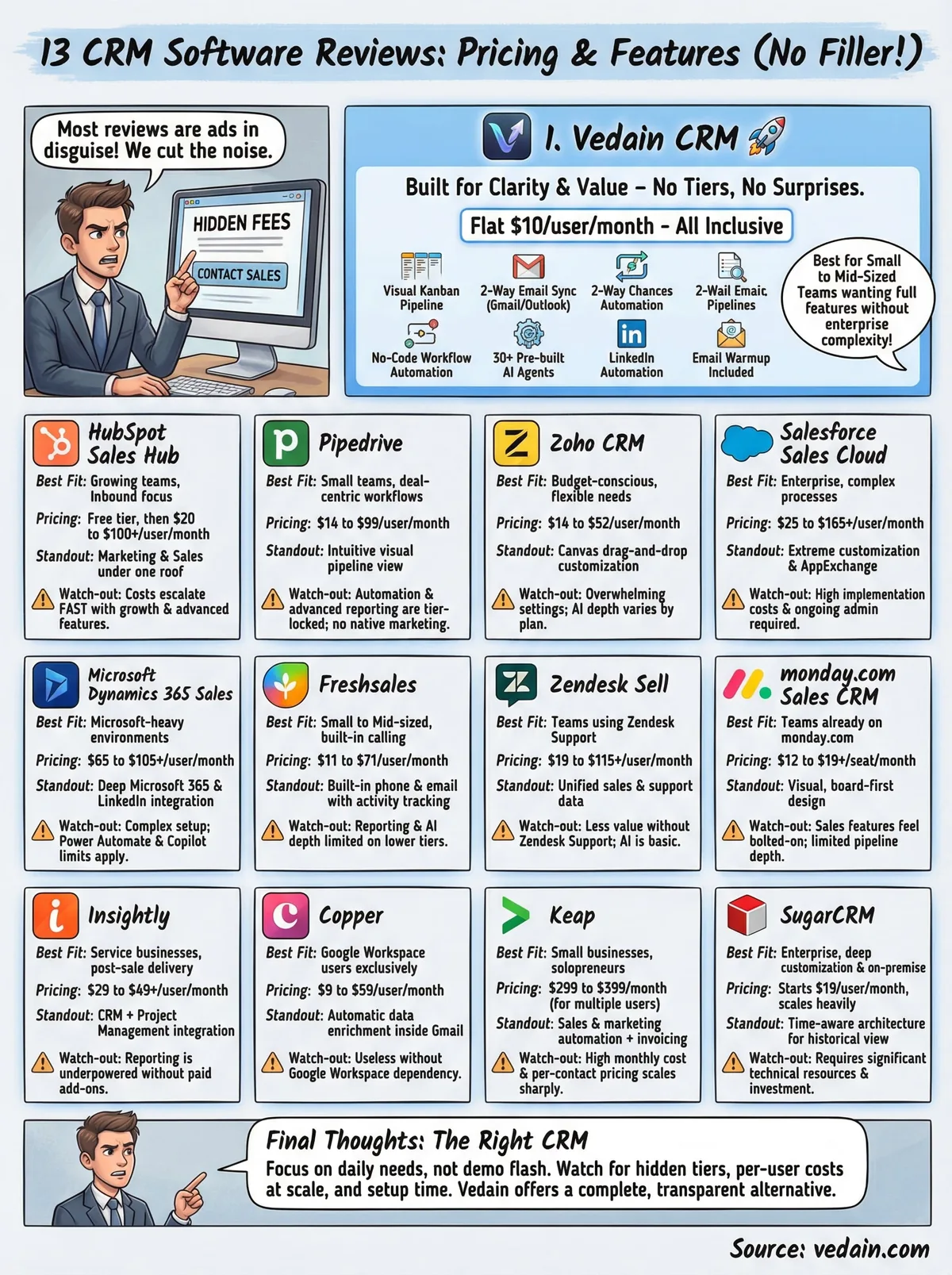
The right CRM comes down to what your team actually needs day-to-day, not what looks impressive in a vendor demo. Most crm software reviews skip the details that matter most: which features are locked behind higher tiers, what the total per-user cost looks like at 20 or 50 users, and how much setup time you'll spend before your team actually uses the tool consistently.
If you run a sales team and want a complete feature set without enterprise complexity or hidden fees, Vedain CRM is worth a serious look. You get email sync, automation, AI agents, and full pipeline tracking for a flat $10/user/month, with no feature gates and no billing surprises waiting at the end of your first quarter.
No credit card is required to get started, and setup takes under five minutes from signup to your first deal in the pipeline. See how it fits your workflow with Vedain CRM.
Related reading
Frequently Asked Questions
What is the cheapest CRM software for sales teams?
Zoho CRM offers the most affordable entry point for sales teams, starting at $14 per user per month, making it significantly cheaper than HubSpot's $50/month and Salesforce's $165/month starter plans. Pipedrive also competes in the budget segment with pricing starting at $11 per user per month. Both Zoho and Pipedrive provide essential sales features like pipeline management and activity tracking at lower price points, though enterprise features may cost more.
Is HubSpot or Salesforce better for small sales teams?
HubSpot is generally better for small sales teams because its free plan includes core CRM features and pricing starts at $50/month, whereas Salesforce's least expensive option begins at $165/month. HubSpot's interface is more user-friendly for teams without extensive IT support, while Salesforce offers greater customization for teams willing to invest in implementation. For teams under 10 people prioritizing ease of use and lower cost, HubSpot typically outperforms Salesforce.
Which CRM has the best mobile app for field sales?
Salesforce and Pipedrive both offer highly-rated mobile apps specifically optimized for field sales teams with offline access and real-time pipeline updates. Freshsales also provides a strong mobile experience with AI-powered insights on the go. Your choice depends on whether you prioritize robust customization (Salesforce) or simplicity and affordability (Pipedrive or Freshsales).
What are the main differences between Pipedrive and Zoho CRM?
Pipedrive focuses on pipeline visualization and sales automation with a visual deal board interface, starting at $11/month, while Zoho CRM offers more comprehensive business features and integrations at $14/month. Pipedrive is ideal for sales teams prioritizing deal tracking, whereas Zoho is better for organizations needing broader functionality like marketing automation and customer support. Both are affordable compared to HubSpot and Salesforce, but Zoho provides deeper customization options.
Does Freshsales compete with HubSpot on features and pricing?
Freshsales is positioned as a more affordable alternative to HubSpot, starting at $15 per user per month versus HubSpot's $50/month, while offering comparable core CRM features like contact management and sales automation. However, HubSpot includes more advanced marketing automation and content tools at its starter tier, making it better for teams needing integrated marketing. Freshsales excels for sales-focused teams looking for better value without sacrificing essential CRM functionality.
Which CRM software has the best AI-powered sales features?
Salesforce, HubSpot, and Freshsales all offer AI-driven sales features, with Salesforce's Einstein AI providing predictive forecasting and deal scoring at an advanced level. HubSpot's AI features include predictive lead scoring and sales insights starting at $50/month, while Freshsales offers AI-powered deal recommendations and conversation intelligence. For teams prioritizing AI capabilities, Salesforce provides the most sophisticated tools but requires higher investment, whereas HubSpot and Freshsales deliver strong AI features at mid-market pricing.