But automation isn't a magic switch you flip. Done poorly, it creates robotic outreach, messy data, and workflows nobody trusts. Done well, it compounds, every automated step saves minutes that stack into hours, then days, across your entire pipeline. The difference comes down to how you set it up and which processes you choose to automate first.
At Vedain CRM, we built our platform around this idea, no-code workflows, automated email sequences, and AI agents that handle enrichment and outreach, all included at $10/user/month with zero feature gates. We've seen firsthand what works (and what backfires) when sales teams start automating.
This article breaks down 12 specific practices that will help you automate smarter, avoid common pitfalls, and shorten your sales cycle without sacrificing the human touch your buyers expect.
1. Use Vedain CRM as your automation hub
Most sales automation failures start with the same mistake: teams automate before they centralize. Your CRM needs to be the single source of truth for contacts, deals, emails, and tasks before any automation runs reliably. Vedain CRM is built to serve as that hub, pulling every touchpoint into one place so your workflows always have clean, consistent data to act on.
What to centralize first in Vedain
Start with your core objects: contacts, companies, and deals. Import your existing lead lists, connect your Gmail or Outlook account for two-way email sync, and make sure every active opportunity lives in a named pipeline stage. If your data is scattered across spreadsheets and inboxes, your automations will fire on incomplete information and create more noise than signal.
Lead source tracking is the other priority at this stage. Tag every record by where it came from, whether that's a web form, outbound campaign, or referral. Without source attribution, you can't measure which channels actually produce revenue.
The minimum setup that prevents chaos later
Before you activate any workflow, configure three things: required fields, pipeline stages, and user permissions. Required fields stop reps from saving incomplete records. Pipeline stages should reflect how your deals actually move, not an idealized version of your process. Permissions ensure reps only see and edit what they own.
Skipping this baseline setup is the fastest way to end up with automation that fires incorrectly and data you can't trust.
High-impact automations to turn on in week one
Your first automations should solve your most painful manual tasks. In Vedain, that typically means lead assignment rules that route new contacts to the right rep instantly and task creation triggers that add a follow-up whenever a deal moves into a new stage. Both eliminate 10 to 15 minutes of manual work per deal and prevent leads from sitting uncontacted.
Activate email sequences as your third priority. Connect your email warmup first to protect domain deliverability, then launch a basic outreach sequence for new leads. Keep it to three or four steps before you iterate.
When to add custom fields, filters, and permissions
Add custom fields once you've run through your process a few times and know exactly what information your reps actually use. Smart filters then let you build saved views by territory, deal size, or risk level. Expand module-level permissions as your team grows, locking down sensitive pipeline data for managers while keeping each rep focused on their own book of business.
2. Define your sales process before you automate it
Automation speeds up whatever process you already have. If that process is unclear, you will automate confusion at scale. Before you build a single workflow, map your sales process on paper and get your team to agree on every step. This is one of the most overlooked sales automation best practices, and skipping it is exactly why most automations eventually break down or produce results nobody trusts.
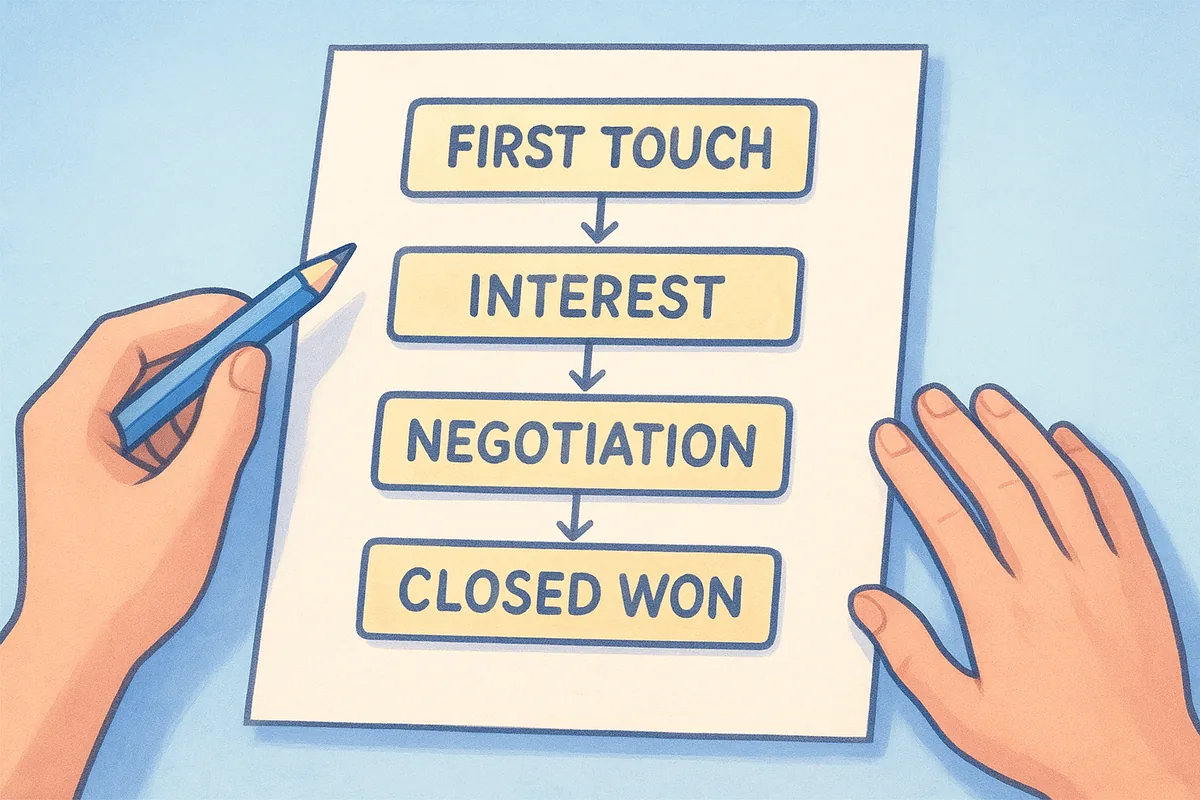
Map stages from first touch to closed won
Write out every stage your deals move through, from the first website visit or cold outreach to a signed contract. Keep the list short and honest. Each stage should represent a real shift in buyer commitment, not just a new internal task for your rep to complete.
Write entry and exit rules for every stage
Every stage needs a clear entry condition (what must be true before a deal enters) and a clear exit condition (what specific action moves it forward). Without these rules, stage movement becomes subjective and your pipeline reports lose their reliability fast.
If two reps define "Proposal Sent" differently, your pipeline data is already unreliable before automation ever touches it.
Create one standard definition for qualified leads
Your team needs one shared definition of a qualified lead, covering budget, authority, need, and timeline. Document it, add it to your CRM as a required checklist, and confirm marketing and sales agree on it. Misaligned definitions send automated sequences to the wrong people and burn your sender reputation.
Spot and remove steps that do not move deals forward
Audit your current process and cut any step that adds time without advancing buyer commitment. Internal approval layers, redundant status check-ins, and low-value meetings are common offenders. Fewer steps produce faster cycles and cleaner automation logic.
3. Keep CRM data clean and consistent
Automation only works as well as the data feeding it. If your CRM holds duplicate records, missing fields, or inconsistent stage definitions, every workflow you build will produce unreliable outputs. Clean data is not a one-time project; it's an ongoing discipline that underpins every one of your sales automation best practices.
Standardize required fields and picklists
Set required fields for contacts, companies, and deals so reps cannot save incomplete records. Use picklists instead of free-text fields wherever possible, for industry, lead source, and deal type. Picklists enforce consistency and make filtering and reporting far more reliable across the entire team.
Prevent duplicate records and messy ownership
Duplicate contacts dilute your reporting and send the same prospect conflicting messages from different reps. Enable duplicate detection rules in your CRM and assign every record a clear owner before any automation runs. Ownership gaps are where leads go quiet and stay quiet.
Unowned records are the single most common reason automated follow-up sequences fail to reach the right person at the right time.
Set rules for notes, next steps, and close dates
Require reps to log a next step and close date every time they update a deal. Notes should capture what the buyer said, not just what the rep did. This discipline gives your automation meaningful context when it triggers tasks or escalation reminders based on inactivity.
Build quick checks that catch bad data early
Run a weekly data audit using saved filters that surface records with missing close dates, blank owners, or deals stuck in the same stage for too long. Fix problems in small batches rather than letting them accumulate. A short weekly review keeps your pipeline accurate enough to act on.
4. Automate lead capture from every channel
Every lead your team misses or responds to slowly is a deal you're unlikely to recover. Manual lead capture creates gaps: a form submission sits in a spreadsheet, an email inquiry goes unlogged, and a calendar meeting never gets attached to the right contact. Automating lead capture across every entry point removes those gaps and ensures your CRM starts working the moment a prospect shows interest. This is one of the most foundational sales automation best practices because every downstream workflow depends on it.
Route web leads from forms in real time
When a visitor fills out your lead form, that record should appear in your CRM instantly, assigned to the right rep, with the source already tagged. Vedain's Lead Forms connect directly to your pipeline, so there's no manual import step between "form submitted" and "rep notified."
Capture email and calendar activity automatically
Two-way email sync with Gmail or Outlook means every sent message, reply, and meeting invite logs against the correct contact record without any rep involvement. Your calendar meetings attach to deals automatically, giving you a complete activity timeline without manual note-taking.
Tag leads by source, campaign, and intent
Assign source tags at the point of capture, whether the lead came from a paid ad, a referral, or an outbound sequence. These tags feed your pipeline reports and let your workflows treat leads from different channels differently.
Leads without source tags produce pipeline data you cannot trust and reporting you cannot act on.
Create instant alerts for high-intent actions
Set trigger-based alerts that notify a rep the moment a prospect opens a proposal, clicks a tracked link, or submits a high-value form. These signals tell your team exactly when to reach out, so responses land while interest is still high.
5. Use lead scoring and routing to speed up response time
Not all leads deserve the same attention at the same time. Lead scoring lets you rank prospects by how well they match your ideal customer profile and how actively they're engaging, so your reps spend their time on the contacts most likely to buy. This is one of the sales automation best practices that directly compresses your response time without adding headcount.
Combine fit signals and intent signals
Fit signals include firmographic data like company size, industry, and job title. Intent signals capture behavioral data like email opens, link clicks, form submissions, and page visits. Score both together to get a complete picture. A prospect who matches your ICP but never engages ranks lower than one who fits and is actively clicking through your content.

Set routing rules that match leads to the right rep
Once a lead crosses your scoring threshold, your CRM should assign it automatically based on territory, deal size, or product line. Manual routing creates delays and disagreements. Automated assignment rules remove both problems and ensure every high-score lead lands with a rep immediately.
The faster a qualified lead reaches the right rep, the higher your conversion rate at every subsequent stage.
Add an SLA for first response and follow-ups
Set a first-response SLA of under five minutes for high-score leads and build an automated alert that fires if a rep misses it. Add a secondary SLA for follow-up tasks so no lead goes cold after the first touch.
Keep scoring honest with regular score reviews
Review your scoring model monthly by comparing lead scores against actual close rates. If high-scoring leads aren't converting, your signals are wrong. Adjust weights based on real pipeline data, not assumptions.
6. Standardize outreach with sequences that still feel human
Automated sequences save hours of manual follow-up work, but they backfire the moment they feel like they were written by a machine. The goal is consistent, repeatable outreach that still reads as if a real person wrote it for that specific prospect. Applying this balance is one of the sales automation best practices that separates high-performing teams from teams that burn their contact lists.
Build a sequence library by persona and use case
Your sequences should reflect the real differences between your buyer types. A VP of Sales at a 200-person company needs a different message than a founder running a five-person team. Build a separate sequence for each primary persona and use case, and give every rep access to the full library so they pick the right one rather than defaulting to a generic template.
Personalize with fields, context, and relevance
Use merge fields to pull in the prospect's name, company, and role automatically. Go further by referencing their specific industry pain point or a recent trigger event like a job change or product launch. A short, specific sentence beats three generic paragraphs every time.
Sequences that feel relevant get replies. Sequences that feel broadcast get ignored or reported as spam.
Add stop rules so automation does not annoy prospects
Set your sequence to pause immediately when a prospect replies, books a meeting, or moves to an active deal stage. Continuing to send automated emails after a prospect has engaged damages trust and clutters their inbox.
Track replies, meetings booked, and stage movement
Measure each sequence by reply rate, meeting conversion, and pipeline stage advancement. Open rates tell you about subject lines. Stage movement tells you whether the sequence actually drives deals forward. Review performance monthly and cut steps that add length without improving conversion.
7. Automate next steps so no deal stalls
Stalled deals rarely die because a prospect lost interest. They stall because a rep forgot to follow up, or the next step never got assigned after a meeting. Applying automated task creation is one of the most practical sales automation best practices you can implement, because it removes the cognitive load of remembering what to do next and replaces it with a system that does the tracking for you.
Create tasks automatically when key events happen
Set your CRM to generate a follow-up task every time a deal enters a new stage, a proposal goes out, or a meeting gets logged. These triggers ensure that a next step always exists, regardless of how busy a rep's day gets. Attach a due date to each task automatically so nothing sits open indefinitely.
Trigger follow-ups from buyer actions and stage changes
When a prospect opens a proposal or clicks a tracked link, that behavior should trigger a rep notification and a follow-up task immediately. Buyer actions signal intent, and your response speed at those moments directly affects your close rate. Stage changes should also generate tasks, keeping the deal moving rather than waiting for a rep to remember.
The deals that close fastest are the ones where the next step is always defined and always owned by a specific person.
Use reminders that escalate when a rep misses an SLA
Build escalation reminders that alert a manager when a task goes overdue past your defined SLA window. This keeps accountability in the system rather than in someone's memory.
Add deal hygiene rules that keep pipelines accurate
Set automated flags on deals with no activity for a defined period, such as seven or fourteen days. These hygiene rules surface at-risk deals before they disappear from the pipeline entirely, giving your team time to re-engage before the opportunity closes.
8. Automate pipeline stages and deal updates
A pipeline full of deals stuck in the wrong stage tells you nothing useful. Manual stage updates rely on rep discipline, and that discipline fades under a full workday. Applying automated stage progression is one of the sales automation best practices that keeps your pipeline data accurate without adding work for anyone on your team.
Define what moves a deal forward automatically
Set specific trigger conditions in your CRM that advance a deal when a real action occurs, such as a signed proposal, a completed demo, or a booked call. Every stage transition should fire based on a logged event, not a rep clicking a dropdown from memory. This turns your pipeline into a reliable record of buyer progress rather than an approximation.
Keep stage changes tied to real actions, not feelings
Reps often move deals forward based on optimism rather than evidence. Stage movement rules that require a completed task or a logged activity before a deal advances remove that subjectivity entirely. Your pipeline reports become credible, and your forecasting accuracy improves as a direct result.
A pipeline where stage changes reflect buyer actions is one your entire team can actually plan around.
Automate risk flags for inactivity and slipped dates
When a deal sits in the same stage past your defined window or a close date passes without movement, your CRM should flag it automatically. These risk alerts surface at-risk opportunities before they disappear from your forecast entirely.
Make handoffs visible with assignments and notifications
Every time a deal changes stage or ownership, automated notifications should go to the receiving rep and the relevant manager. Handoffs that happen silently create gaps. Visible, timestamped assignments keep accountability clear and ensure no deal moves forward without a named owner.
9. Automate quotes, proposals, and approvals
Late proposals and manual approval chains cost you deals. When a rep has to build a quote from scratch, chase a manager for a discount sign-off, and then remember to follow up days later, every delay creates an opening for a competitor. Applying automation to your quoting and approval process is one of the sales automation best practices that compresses the time between a verbal agreement and a signed contract.
Create templates that pull the right deal details
Build proposal templates that automatically populate with the prospect's name, company, product selection, and pricing directly from the deal record. This removes manual data entry from the process and ensures every document that leaves your team carries accurate, consistent information without a rep copying and pasting across multiple tools.
Build an approval flow for discounts and exceptions
Set up a structured approval workflow that routes discount requests to the right manager automatically based on predefined thresholds. Define those thresholds clearly, such as any deal priced below a set margin level, and trigger the request the moment a rep applies that discount. Approval chains should run inside your CRM, not across email threads where decisions get buried and timestamps disappear.
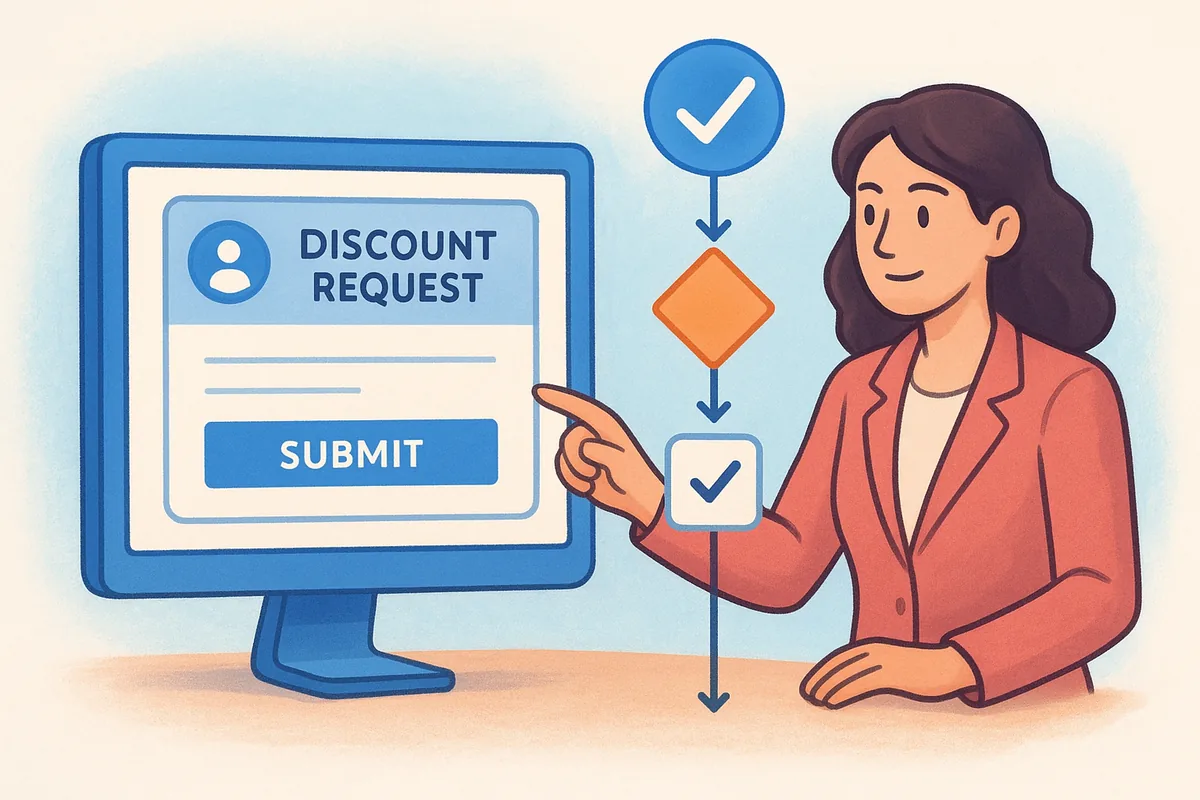
Deals waiting on email approval chains lose momentum. Automated routing cuts that wait time from days to hours.
Track status so reps follow up at the right time
Use automated status tracking to alert reps when a proposal has been opened or has sat unread past a defined window. This replaces guesswork with a clear, timed signal for follow-up.
Reduce errors with standard terms and fields
Lock standard contract terms and required fields inside every template so no proposal ships with missing pricing or incorrect language. Locked fields cut back-and-forth revisions and protect your deal terms from accidental edits during the final stages of a negotiation.
10. Align sales and marketing with automated handoffs
Revenue leaks at the seams between teams. When marketing passes a lead to sales through a spreadsheet or a Slack message, context disappears and response time suffers. Applying automation to these transition points is one of the sales automation best practices that eliminates those gaps without adding coordination overhead.
Best practice 10a: automate marketing to sales handoff
When a lead hits your qualification threshold, your CRM should assign it to a rep, send an alert, and create a follow-up task without any manual step in between. Include the lead's source, campaign history, and engagement activity in the record at the moment of handoff so the rep opens the contact with full context, not a blank slate.
A rep who knows a prospect downloaded a pricing guide and opened three emails will start that first call with a real advantage over one who received only a name and phone number.
Best practice 10b: automate sales to customer success handoff
When a deal closes, trigger an automated onboarding task assigned to the customer success owner, along with a notification that includes deal value, product selection, and key notes from the sales cycle. This prevents the common problem where a new customer has to re-explain their situation from scratch.
Keep context with shared fields, notes, and timelines
Use shared fields and activity timelines that every team can read, so marketing, sales, and customer success all see the same record history. Shared visibility removes the need for status meetings and reduces handoff errors.
Add feedback loops that improve lead quality over time
Route closed-lost data back to marketing automatically, tagging why deals failed. This signal helps marketing adjust targeting and scoring criteria based on real pipeline outcomes rather than assumptions.
11. Measure automation impact with simple reporting
Automation you can't measure is automation you can't improve. One of the less obvious sales automation best practices is treating reporting as part of the system itself, not an afterthought. If you don't track what changed after you automated a process, you have no reliable way to know whether it's working or just adding layers of complexity your team has to work around.
Track speed metrics like response time and cycle time
First-response time and average sales cycle length are your two baseline speed metrics. Measure both before you automate anything and again 30 days after you turn on new workflows. If your automation is doing its job, both numbers drop. If they don't move, your workflow logic or your routing rules need a closer look.
Track conversion metrics by stage and by source
Stage-to-stage conversion rates show you exactly where deals stall in your pipeline. Source conversion rates tell you which lead channels produce buyers versus contacts who never move. Compare both month over month to surface patterns your team can act on immediately.
The metrics that matter most are the ones tied directly to revenue movement, not activity volume.
Build dashboards for reps, managers, and founders
Each audience needs a different view of the same data. Reps need task completion rates and pipeline health. Managers need conversion trends and team SLA adherence. Founders need cycle time and revenue against targets. Build separate dashboards for each role so every person sees what actually drives their decisions.
Run a weekly review that turns insights into changes
Set a fixed 30-minute weekly review where you pull your key metrics and make one targeted adjustment. Fix the workflow with the weakest performance first, rather than rebuilding everything at once. Small, consistent changes compound faster than infrequent overhauls and keep your team from losing trust in the system.
A simple plan to start this week
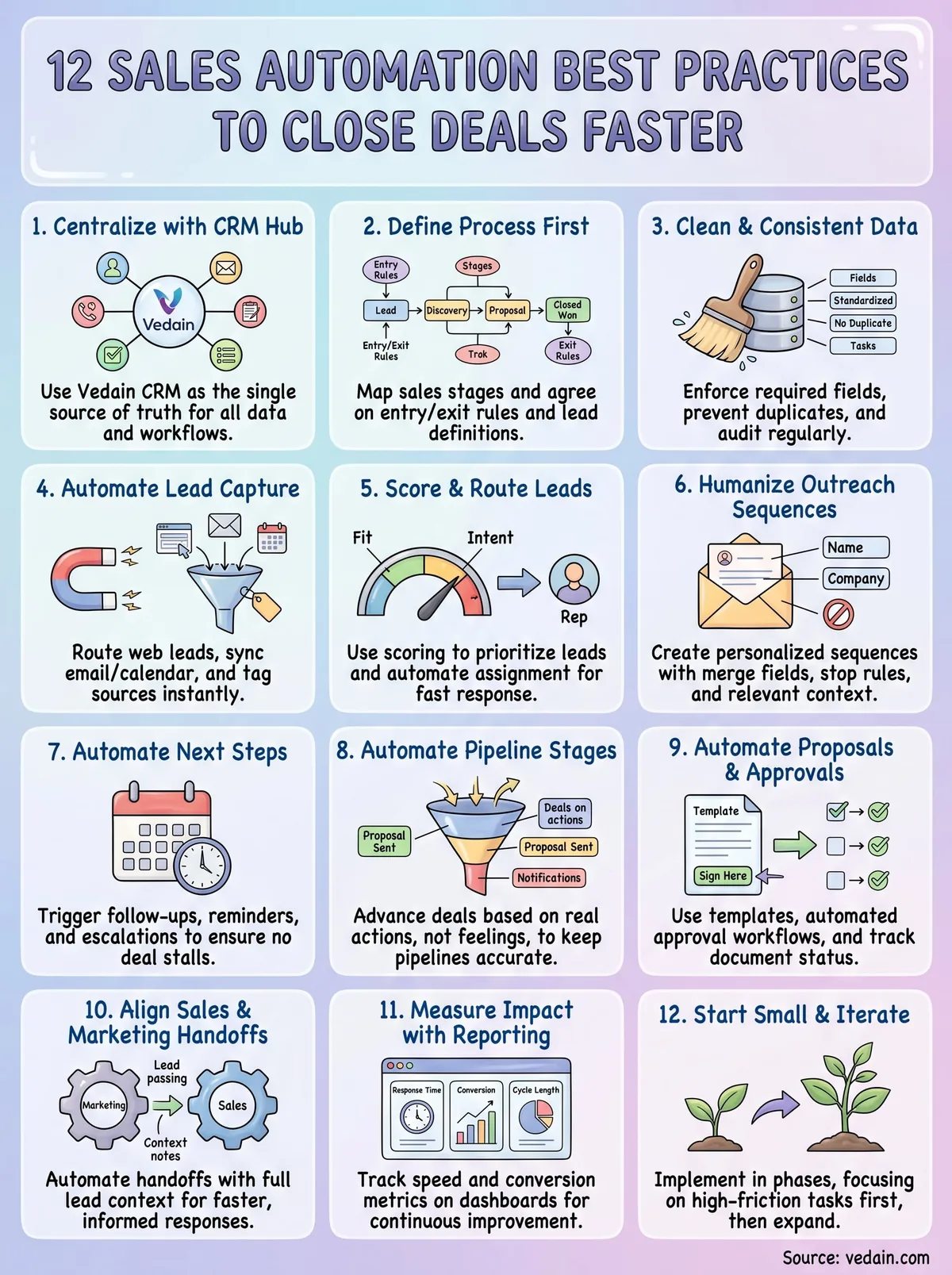
You don't need to implement all 12 practices at once. Start with your CRM setup, get your pipeline stages defined, and turn on two or three core automations in the first week. That sequence matters because each step builds on the one before it.
Pick one high-friction task your team handles manually every day, whether that's lead assignment, follow-up scheduling, or proposal tracking, and automate it this week. Measure the time saved, then move to the next one. These small wins compound quickly, and within 30 days you'll have a pipeline that runs with far less manual work.
The sales automation best practices in this article work because they prioritize process clarity over tool complexity. Clean data, defined stages, and targeted automation beat sophisticated but fragile workflows every time.
If you're ready to put these practices into action, start your free trial of Vedain CRM and build your first automation in under five minutes.
Frequently Asked Questions
What is sales automation and how does it help close deals faster?
Sales automation uses software to streamline repetitive sales tasks like email follow-ups, lead scoring, and pipeline management, allowing your team to focus on high-value activities that close deals. Tools like HubSpot (starting at $50/month), Salesforce (starting at $165/month), and Pipedrive (starting at $14/month) automate workflows to reduce manual data entry and accelerate sales cycles. By automating lead nurturing and follow-ups, teams report closing deals 23% faster on average.
Which CRM has the best sales automation features for small businesses?
Pipedrive and Freshsales offer the most affordable and intuitive sales automation for small businesses, with Pipedrive starting at $14/month and Freshsales at $15/month. Both platforms provide visual pipeline management, automated email sequences, and lead scoring without overwhelming complexity. HubSpot's free tier also includes basic automation, making it ideal for startups testing sales automation before committing budget.
How can sales automation improve lead scoring and qualification?
Sales automation uses behavioral data and predefined criteria to automatically score leads based on engagement, company size, and fit, ensuring your team prioritizes hot prospects first. Platforms like Salesforce and Zoho CRM provide AI-driven lead scoring that learns from your closed deals to identify patterns. This eliminates guesswork and reduces qualification time from hours to minutes, enabling faster sales cycles.
What automation workflows should every sales team implement?
Essential automation workflows include welcome email sequences for new leads, automated follow-ups after meetings, lead assignment based on territory or source, and deal stage triggers that alert managers to stalled opportunities. HubSpot and Pipedrive excel at workflow automation, allowing you to set conditions without coding. Implementing these four workflows typically reduces manual sales tasks by 40% and accelerates deal velocity.
How does sales automation compare between HubSpot, Salesforce, and Zoho CRM?
HubSpot (starting $50/month) offers user-friendly automation with excellent templates; Salesforce (starting $165/month) provides enterprise-grade customization; and Zoho CRM (starting $20/month) delivers cost-effective automation with strong AI capabilities. HubSpot's workflows are easiest for non-technical users, Salesforce dominates complex enterprise automation, while Zoho balances affordability with powerful features. Choose HubSpot for simplicity, Salesforce for scale, or Zoho for value.
Can sales automation integrate with email and calendar tools to save time?
Yes, most modern CRMs including HubSpot, Pipedrive, Freshsales, and Vedain integrate with Gmail, Outlook, and calendar applications to auto-log emails, schedule follow-ups, and sync meetings without manual entry. These integrations eliminate context-switching and ensure your CRM stays updated in real-time. Integration automation alone can save sales reps 3-5 hours weekly on administrative tasks, letting them focus on selling.