We built Vedain CRM specifically to solve this problem: one plan at $10/user/month with every feature included and no tier upgrades to worry about. That perspective, watching small teams get nickel-and-dimed by complex pricing models, is exactly why we put this comparison together. We wanted to give you an honest look at what 12 CRM providers actually charge once you factor in the features most sales teams need.
In this guide, you'll find a side-by-side breakdown of pricing from providers like HubSpot, Pipedrive, Zoho, Salesforce, Close, and others, including Vedain. Each entry covers the monthly per-user cost, what's included at each tier, and where the hidden fees tend to show up. Whether you're buying your first CRM or looking to switch from a plan that's gotten too expensive, this list will help you compare real costs and find a plan that fits your budget and your workflow.
1. Vedain CRM
Vedain is a cloud-based CRM platform built for sales teams that want a complete toolkit without juggling multiple pricing tiers. At $10 per user per month, the platform covers the full sales workflow from lead capture to deal close, with no locked features and no forced upgrades as your team grows.
What you get for a small business team
Vedain gives your team every core CRM feature on a single plan. That includes leads and contacts management with custom fields and smart filters, a visual Kanban deal pipeline, and two-way email sync for both Gmail and Outlook. Your team also gets email campaigns with multi-step automated sequences, a no-code workflow automation builder, and a built-in email warmup tool that improves domain deliverability over 21 days.
Beyond the sales fundamentals, the platform includes 30+ pre-built AI agents for data enrichment and content generation, LinkedIn automation for scheduling AI-generated posts, and an AI Studio that lets you build custom CRM features by typing a plain English description of what you need. Reports cover pipeline health, conversion funnels, and team leaderboards so managers can track performance without pulling data manually. Custom dashboards with drag-and-drop widgets let each team member arrange the metrics they actually use.
Who it fits best
Vedain works best for small to mid-sized sales teams that need a full-featured CRM without the overhead of enterprise software. If your team uses Gmail or Outlook, values fast setup (the platform is live in under five minutes), and wants automation included in the base price rather than sold separately, Vedain matches that profile well.
If competitors have been charging more per user while still gating features like email sync or workflow automation behind higher tiers, Vedain's flat rate is worth a direct comparison.
It's also a practical choice for founders and business owners who want to hand a capable tool to a small team without managing IT complexity, permissions headaches, or contracts that scale poorly as headcount grows.
Pricing and what to watch for
Vedain charges $10 per user per month, all-inclusive. There are no feature tiers, no per-feature add-ons, and no long-term contracts required to access the full platform. The trial requires no credit card, so you can evaluate the complete feature set before making any commitment.
When comparing small business CRM pricing across providers, most charge $10-$25/user for a basic plan and then add costs for automation, email sync, or advanced reporting. Vedain bundles all of that into the base price, which keeps your total spend predictable month to month.
2. HubSpot Starter Customer Platform
HubSpot is one of the most recognized names in CRM, and its Starter Customer Platform is marketed as the entry point for small businesses. The plan bundles tools across marketing, sales, and service, but understanding what you actually get at this tier versus higher tiers requires careful reading of the feature list.
What you get for a small business team
The Starter plan includes contact and deal management, basic email marketing, and a simple pipeline view. You also get live chat, a meeting scheduler, and limited automation. Key limits to know upfront:
- •Up to 10 automated actions across your workflows
- •Email sequences capped at 5 per user
- •Basic reporting only, with no custom report builder
Who it fits best
HubSpot Starter works well for teams that prioritize brand familiarity and want a platform that can scale into enterprise tools later. It fits if you already use HubSpot's marketing products and want your sales and marketing data in one place without managing separate integrations.
If you only need core sales features, paying for HubSpot's bundled platform means funding tools your team may never use.
Pricing and what to watch for
The Starter Customer Platform starts at $20 per user per month billed monthly, with a two-seat minimum, putting your floor at $40/month before you add anyone else. When comparing small business CRM pricing, the main risk here is that advanced reporting, more automation capacity, and higher sequence limits all require upgrading to Professional, which starts at $100/user/month. That's a steep jump. HubSpot also charges mandatory onboarding fees at higher tiers, so factor those costs in before committing.
3. Pipedrive Growth
Pipedrive is a pipeline-focused CRM built around the idea that sales activity drives results. The Growth plan (formerly Advanced) adds meaningful capabilities on top of the entry-level Essential tier, including email sync and workflow automation that are locked out at the base level.
What you get for a small business team
The Growth plan gives your team two-way email sync, email open tracking, and a workflow automation builder with up to 3,000 automated actions per month. You also get meeting scheduling, group emailing, and smart contact data that pulls publicly available information into records automatically. Reporting is more capable here than on Essential, though custom dashboards and advanced revenue forecasting remain locked at higher tiers.
Who it fits best
Pipedrive Growth fits sales-focused teams that think in terms of pipeline stages and want clean visual deal tracking without extra tooling layered on top. It works well if your team's primary need is managing a high volume of deals and tracking activity, rather than running complex marketing or service workflows alongside sales.
If you want email automation and sync included at a reasonable price point, Growth is the plan where Pipedrive becomes genuinely useful for most small teams.
Pricing and what to watch for
At $34 per user per month billed monthly (around $29/user/month on an annual plan), Pipedrive Growth sits in the mid-range of small business CRM pricing. The main friction is that AI-powered tools, phone integration, and advanced revenue forecasting all require upgrading to Professional at $59/user/month. Pipedrive also sells add-ons like LeadBooster and Web Visitors separately, which can push your actual monthly spend well past the advertised rate.
4. Zoho CRM Standard
Zoho CRM is a well-established platform with a large feature set spread across multiple pricing tiers. The Standard plan sits at the entry level of their paid offerings and gives small teams a functional starting point, though several capabilities that most sales teams consider essential are held back for higher tiers.
What you get for a small business team
The Standard plan covers contact, lead, and deal management alongside basic workflow automation and email integration. You also get social media integration and standard reporting, which is a reasonable baseline. Key limits to know before signing up:
- •Up to 5 workflow rules per module
- •10 email templates included
- •No email sentiment analysis or advanced analytics
- •No multi-user portals or territory management
Who it fits best
Zoho Standard fits small teams on tight budgets who need core CRM functionality without advanced automation. It's a strong fit for businesses already using Zoho's broader ecosystem, like Zoho Books or Zoho Desk, where native integrations add real value without extra configuration. If your workflows are straightforward and your team is small, the plan's constraints are manageable on a day-to-day basis.
If your sales process relies on multi-step automation or detailed pipeline reporting, you will hit the limits of Standard quickly and face a forced upgrade.
Pricing and what to watch for
At $14 per user per month billed annually (or $20/user/month on a monthly plan), Zoho Standard sits on the lower end of small business CRM pricing. The main concern is tier fragmentation. Advanced analytics, email intelligence, and multi-user portals all require Professional or Enterprise, and Enterprise doubles the Standard price entirely, which can make long-term cost planning difficult.
5. monday CRM Standard
monday CRM is built on top of the monday.com work management platform, which means it brings a flexible, visual interface to sales pipeline management. The Standard plan is the first tier that gives small teams genuinely useful CRM functionality, with contact management, email integration, and basic automation included.
What you get for a small business team
The Standard plan covers contact and lead management, a visual deal pipeline, and two-way email sync with Gmail and Outlook. You also get email tracking, activity logging, and up to 250 automation and integration actions per month, which covers basic workflows for small teams. Dashboards at this tier let you combine data from up to five boards, giving managers a decent overview of pipeline health without manual reporting.
The 250 automation actions per month sounds reasonable until your team runs recurring workflows daily, at which point that cap fills up fast.
Who it fits best
monday CRM Standard works well for teams already using monday.com for project management who want their sales activity in the same workspace. It also fits small businesses that prefer a highly visual, drag-and-drop interface and don't need deep sales-specific features like email sequencing or lead scoring out of the box.
Pricing and what to watch for
monday CRM Standard costs $14 per user per month billed annually, with a mandatory minimum of three seats, which puts your floor at $42/month before adding anyone. When comparing small business CRM pricing, that minimum seat requirement is the first friction point. Moving to the Pro plan for higher automation limits and CRM-specific features like sales forecasting jumps to $24/user/month, and enterprise-level permissions require the Enterprise tier entirely.
6. Salesforce Starter Suite
Salesforce is the largest CRM vendor in the world, and the Starter Suite is its small business entry point. It bundles basic sales, service, and marketing tools into one plan, but the feature set is intentionally constrained to push growing teams toward pricier tiers.
What you get for a small business team
The Starter Suite covers contact and account management, a basic deal pipeline, and built-in email integration with activity tracking. You also get case management for customer support and pre-built reports to monitor pipeline health. Key limitations at this tier include:
- •No Einstein AI features (reserved for higher tiers)
- •Basic workflow automation only, with no multi-step branching
- •No advanced forecasting or territory management
Who it fits best
Salesforce Starter fits small teams with a clear long-term plan to scale into Salesforce's broader ecosystem. It works best for organizations where leadership has already committed to the Salesforce platform and wants their team trained on familiar infrastructure before expanding to Professional or Enterprise. If you need only core pipeline management without a roadmap to enterprise tooling, there are better-value options available.
If you outgrow the Starter Suite, the next step up is a fourfold price increase, which can disrupt your budget unexpectedly.
Pricing and what to watch for
The Starter Suite costs $25 per user per month billed annually. Within the landscape of small business CRM pricing, that rate looks reasonable until you account for what's missing. Upgrading to Pro Suite costs $100/user/month, meaning teams that need automation depth or AI-powered tools face a steep jump with little middle ground between the two tiers.
7. Freshsales Growth
Freshsales is a CRM platform from Freshworks that targets small to mid-sized sales teams with a clean interface and built-in AI features. The Growth plan is where the platform becomes genuinely capable, adding automation, email sequences, and contact scoring to the core pipeline tools available on the free tier.
What you get for a small business team
The Growth plan gives your team contact, account, and deal management alongside a visual pipeline with multiple stages. You also get AI-powered contact scoring through their Freddy AI engine, two-way email sync, email sequences, and workflow automation. Phone and chat are built in, which reduces the need for separate communication tools. Reporting at this tier covers basic sales metrics and activity tracking, giving managers a workable view of team performance without manual data pulls.
Who it fits best
Freshsales Growth fits small teams that want AI-assisted lead prioritization without paying enterprise prices. It works well for sales teams handling a high volume of inbound leads and needing the system to surface the most promising contacts automatically. If your team relies on phone outreach alongside email, having both channels natively inside the CRM reduces the friction of managing separate tools.
Teams that need both phone and email workflows in a single platform will find Growth more complete than many comparable plans at a similar price point.
Pricing and what to watch for
Freshsales Growth costs $11 per user per month billed annually, or $18/user/month on a monthly plan. Within small business CRM pricing, the rate looks competitive on the surface, but the AI features included at Growth are limited. Advanced forecasting, custom modules, and multi-currency support all require upgrading to Pro at $47/user/month, which is a significant cost jump for teams planning to scale.
8. Less Annoying CRM
Less Annoying CRM takes a different approach from most of its competitors by offering a single plan with no tiers, no add-ons, and no long-term contracts. The platform is built specifically for small businesses that want simple, functional CRM tools without paying for features they will never use.
What you get for a small business team
Less Annoying CRM gives your team contact and lead management, a straightforward pipeline for tracking deals, and a shared calendar for scheduling and activity logging. Every user gets full access to all features, including custom fields, task management, and basic reporting. The interface is intentionally minimal, which speeds up onboarding but also means you will not find advanced automation, email sequencing, or AI-powered tools anywhere on the platform.
Who it fits best
This platform fits very small teams or solo operators who find mainstream CRM platforms overcomplicated for their actual workflow. If your sales process is relationship-driven rather than volume-driven, and your team tracks a manageable number of contacts manually, Less Annoying CRM removes the noise without asking you to configure features you do not need.
When you are evaluating small business CRM pricing, Less Annoying CRM stands out for its total cost predictability, but that simplicity has real feature trade-offs worth weighing carefully.
Pricing and what to watch for
Less Annoying CRM charges $15 per user per month, billed monthly with no annual commitment required. There are no tiers and no hidden fees, which makes budgeting straightforward. The main limitation is the absence of automation and email sequence tools, meaning teams that want to scale their outreach will eventually need a more capable platform rather than a plan upgrade.
9. Capsule CRM Teams
Capsule CRM is a focused contact and pipeline management tool built for small businesses that want a clean, functional CRM without enterprise-level complexity. The Teams plan sits above the entry-level Starter tier and adds shared pipelines, granular user permissions, higher contact limits, and more storage, making it workable for small sales teams that have outgrown a basic spreadsheet setup.
What you get for a small business team
The Teams plan gives your team contact and account management, a visual deal pipeline, and task management with calendar integration. You also get 30,000 contacts, 10GB of storage per user, shared pipelines, and role-based access controls. Integrations with Gmail, Outlook, Zapier, and Xero are included, and reporting covers basic pipeline activity and sales metrics.
One area where Capsule stays minimal is automation. There are no built-in email sequences, no workflow automation builder, and no AI-assisted features at any tier. What you get is clean data management and a reliable pipeline view, without the extra tooling that many sales teams now consider standard.
Who it fits best
Capsule CRM Teams fits small service-based businesses and agencies that manage long-term client relationships rather than high-volume transactional pipelines. If your team spends more time tracking communication history and context than running automated outreach, the platform's straightforward structure supports that workflow without unnecessary overhead.
Teams that prioritize organized, accessible client records over automation will find Capsule's interface easier to maintain than feature-heavy alternatives.
Pricing and what to watch for
Capsule CRM Teams costs $18 per user per month billed monthly, or $16/user/month on an annual plan. Within small business CRM pricing, that rate looks reasonable until you factor in what is missing. Teams that need automation or email sequencing will have to add separate tools, which pushes your actual monthly spend well beyond what a more complete platform charges at a comparable price point.
10. OnePageCRM Professional
OnePageCRM takes a distinct approach to pipeline management by building the platform around a "Next Action" sales method. Rather than displaying a traditional Kanban board, the system prompts each rep to define a single next action for every contact, which keeps deals moving without relying on the rep to self-organize their queue.
What you get for a small business team
The Professional plan covers contact and deal management, a built-in action stream that surfaces the contacts requiring attention each day, and email integration with Gmail and Outlook. You also get email tracking, templates, and basic automation for task creation and follow-up reminders. Reporting at this tier covers deal progress and activity metrics, giving managers a workable read on team performance. There are no built-in email sequences or workflow automation builders, so teams that need multi-step outreach will require additional tools.
Who it fits best
OnePageCRM Professional fits small sales teams that prioritize consistent follow-up over high-volume automated outreach. The action-stream model works particularly well for relationship-driven sales where each deal demands personal attention rather than a scripted sequence. If your team's biggest challenge is letting deals go cold because reps lose track of where things stand, the platform's structure addresses that problem directly.
When evaluating small business CRM pricing, OnePageCRM Professional is worth considering if your team's primary problem is follow-up discipline rather than automation capacity.
Pricing and what to watch for
OnePageCRM Professional costs $29.95 per user per month billed monthly, or around $24/user/month on an annual plan. The main limitation is that the platform's feature set does not scale well for teams that need automation, email sequences, or advanced reporting, meaning growth-stage teams may find themselves switching platforms rather than upgrading a plan.
11. Keap Pro
Keap (formerly Infusionsoft) combines CRM, email marketing automation, and payment processing into a single platform aimed at small businesses that run both sales and client management workflows. The Pro plan sits above the entry-level Ignite tier and is designed for teams that need multi-step automation and deeper pipeline control than basic contact tracking provides.
What you get for a small business team
Keap Pro gives your team contact and pipeline management alongside an automation builder that supports multi-step sequences triggered by contact behavior. You also get email and text message marketing, invoicing, payment collection, appointment scheduling, and a landing page builder included at the plan level. The platform covers a wide range of business operations, which means sales, marketing, and billing can all run from one account without connecting separate tools.
Who it fits best
Keap Pro fits small service businesses and solo operators who handle the full client lifecycle inside a single tool, from first contact through invoicing. It works well if your workflow combines sales follow-up with payment collection and you want to avoid managing separate platforms for CRM, email, and billing. If your team is purely sales-focused and does not need invoicing or scheduling, the platform's broader feature set may feel like more than your workflow actually requires.
The bundled billing and CRM approach makes Keap Pro useful for service-based businesses, but it adds complexity that pure sales teams rarely need.
Pricing and what to watch for
Keap Pro starts at $159 per month for two users, which works out to roughly $80 per user per month. Within small business CRM pricing, that rate sits significantly higher than most alternatives on this list. Adding users beyond the two included in the base price costs extra, making it difficult to predict your total spend as your team grows.
12. Microsoft Dynamics 365 Sales Professional
Microsoft Dynamics 365 is an enterprise-grade CRM platform built for organizations that need deep integration with Microsoft's broader software ecosystem, including Teams, Outlook, Excel, and SharePoint. The Sales Professional plan is the entry-level paid tier aimed at smaller teams, but its positioning still reflects an enterprise product with enterprise expectations.
What you get for a small business team
The Sales Professional plan includes contact, account, and opportunity management alongside a deal pipeline with activity tracking and basic reporting. You also get native integration with Microsoft 365 apps, including two-way sync with Outlook, calendar management, and SharePoint document storage. Sales forecasting and basic workflow automation are included at this tier. The interface is feature-rich, which means it takes longer to configure and learn than most alternatives on this list.
Who it fits best
Dynamics 365 Sales Professional fits organizations already running Microsoft 365 across their business and wanting their CRM to operate within the same environment. It works best when your team uses Teams for communication and Outlook for email daily, and you want your sales data accessible inside tools your reps already have open. If your organization has IT resources to handle setup and administration, the integration depth adds real value.
For most small businesses evaluating small business CRM pricing, Dynamics 365 is more platform than necessary unless a Microsoft environment is already central to how your team operates.
Pricing and what to watch for
Microsoft Dynamics 365 Sales Professional costs $65 per user per month, billed annually. That price sits at the high end of small business options, and the platform requires meaningful setup time and administrator involvement to get running effectively, which adds indirect costs that the sticker price does not capture.
Next steps
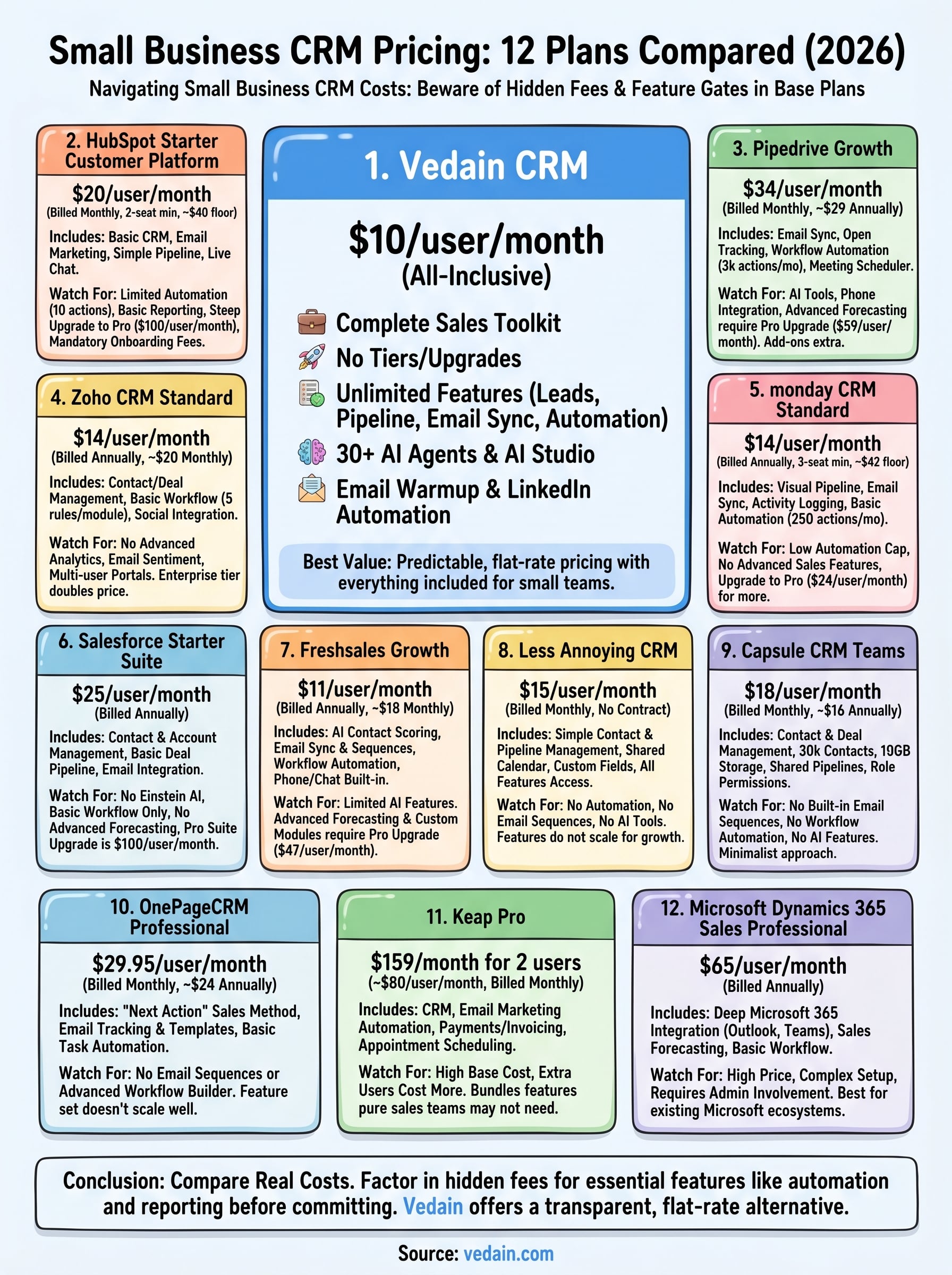
Sorting through small business CRM pricing comes down to one question: what does the plan actually include at the price you see advertised? Most providers charge a reasonable base rate and then gate the features your team needs daily behind higher tiers. That pattern adds up fast, especially once you factor in email sync, automation, and reporting as separate upgrade costs.
Before you commit to any platform, run the real numbers. Take your team size, multiply it by the monthly per-user rate, and then list every feature you would need to pay extra for on top of that. The gap between the advertised price and your actual monthly spend is where most small businesses get caught off guard.
If you want a CRM that includes everything your team needs at a single flat rate with no surprises, start a free trial of Vedain CRM and see the full feature set for yourself before spending a dollar.