The good news: you have options. The CRM market in 2026 is packed with tools that give you pipeline management, email integration, marketing automation, and reporting, often at a fraction of HubSpot's cost. Some even include features HubSpot charges extra for, like email warmup or no-code workflow builders. The challenge is figuring out which one actually fits your team's size, workflow, and budget.
We built Vedain CRM specifically to solve this problem, a full-featured sales CRM at $10/user/month with no feature gates or surprise invoices at the end of the quarter. So we know this space well, and we know what small businesses actually need from their CRM. In this guide, we compared 15 HubSpot alternatives across pricing, features, ease of use, and scalability to help you make a decision based on facts, not marketing pages.
1. Vedain CRM
Vedain CRM is built for sales teams that want a complete platform without paying for features locked behind a paywall. At $10/user/month, it's one of the most transparent options in this comparison, with no feature tiers, no contracts, and no hidden fees regardless of your team size.
What it does best
Pipeline management and sales automation are where Vedain shines. The visual Kanban deal board, two-way email sync with Gmail and Outlook, and a no-code workflow builder are all included at the base price. Teams that need to move fast appreciate that setup takes under five minutes, and the free trial requires no credit card.
Vedain includes features like email warmup and AI agents that most CRMs either charge extra for or don't offer at all.
Key features to compare with HubSpot
HubSpot gates many of its best tools behind higher-tier plans. Vedain gives you all features from day one, including email campaigns with multi-step sequences, a gradual email warmup ramp for domain deliverability, lead capture forms, conversion funnel reports, and team leaderboards. The AI Agent Marketplace offers 30+ pre-built agents for data enrichment and content generation, something HubSpot doesn't match at this price. LinkedIn posting with AI-generated posts is also included natively, a capability HubSpot doesn't offer out of the box.
Trade-offs to consider
As a newer platform, Vedain doesn't yet have the depth of third-party integrations or the volume of customer reviews that HubSpot has accumulated over the years. If your team depends on a large stack of niche tools or needs [enterprise-level compliance features](https://vedain.com/blog/zoho-crm-vs-hubspot-vs-vedain-which-crm-is-best-for-indian-smbs-in-2026), you may run into some gaps. The platform performs best when your core workflow centers on email communication and pipeline management rather than requiring dozens of integrations from day one.
Pricing and free plan or trial
Vedain costs $10/user/month with no feature limits, no contracts, and no setup fees. Your free trial is available without a credit card, and every feature including AI tools, automated workflows, and email warmup is included in that flat rate. There are no upgrade prompts or surprise charges at the end of the month.
Best fit for
Vedain fits small to mid-sized sales teams looking for a capable CRM they can launch the same day. It works especially well for teams migrating away from HubSpot who are tired of paying more every time they need a feature that should have been included from the start. If you're looking for hubspot alternatives for small business that don't sacrifice functionality for affordability, Vedain belongs at the top of your list.
2. ActiveCampaign
ActiveCampaign sits at the intersection of email marketing and CRM, making it a strong contender for small businesses that prioritize marketing automation over pure sales pipeline management. It has built a loyal user base by delivering sophisticated automation tools at a price point that doesn't require an enterprise budget.
What it does best
Marketing automation is ActiveCampaign's core strength. The platform lets you build complex, multi-step email sequences triggered by user behavior, contact activity, or CRM data. If your business depends heavily on nurturing leads through email before they reach a salesperson, ActiveCampaign handles that workflow better than most tools in this price range.
Key features to compare with HubSpot
ActiveCampaign gives you visual automation builders, contact and lead scoring, site tracking, and a built-in CRM with deal pipelines. HubSpot charges considerably more for comparable automation depth. The platform also includes predictive sending, which optimizes email delivery timing based on when individual contacts are most likely to open.
For small businesses that need marketing automation without paying HubSpot's rates, ActiveCampaign delivers real depth at a much lower price.
Trade-offs to consider
The CRM side of ActiveCampaign is functional but thin compared to dedicated sales CRMs. If your team needs strong pipeline reporting, advanced sales workflows, or features like email warmup and AI enrichment, you'll feel the gaps quickly. The interface also carries a steeper learning curve than most hubspot alternatives for small business on this list.
Pricing and free plan or trial
Plans start at $15/month for up to 1,000 contacts on the Starter tier. There's no permanent free plan, but ActiveCampaign offers a 14-day free trial with no credit card required.
Best fit for
ActiveCampaign works best for content-driven small businesses and solopreneurs who rely on email sequences to convert leads, rather than teams that need a dedicated sales pipeline as their primary tool.
3. Pipedrive
Pipedrive is a sales-focused CRM built around the idea that salespeople should spend time selling, not navigating complex software. It has been a popular choice among small business sales teams for years because of its clean pipeline view and low onboarding friction.
What it does best
Pipedrive centers your workflow around visual pipeline management. The drag-and-drop deal board gives your team a clear view of where every opportunity stands, and built-in activity reminders keep follow-ups from slipping. The platform is designed around sales motions rather than marketing, so your team can get productive without a lengthy setup process.
Key features to compare with HubSpot
At its core, Pipedrive includes email sync, custom pipeline stages, activity tracking, and built-in reporting at lower price points than HubSpot. The AI-powered sales assistant flags deals that need attention and recommends next actions, a feature HubSpot limits to higher-tier plans.
For teams that need a clean, reliable pipeline tool without the complexity of a full marketing suite, Pipedrive delivers a focused experience.
Trade-offs to consider
Marketing automation is where Pipedrive falls short. Email campaigns and advanced automation require paid add-ons, which drives up your monthly cost faster than the base price suggests. Teams that need lead enrichment, email warmup, or AI agents built into their core workflow will need to look elsewhere.
Pricing and free plan or trial
Plans start at $14/user/month billed annually. Pipedrive offers a 14-day free trial with no credit card required, but there is no permanent free plan available.
Best fit for
Pipedrive suits sales-first teams that want a dedicated pipeline tool without a built-in marketing suite. If you're evaluating hubspot alternatives for small business specifically for deal tracking and activity management, it's worth testing during that free trial window.
4. Zoho CRM
Zoho CRM sits at the enterprise-feature end of the small business CRM market. It packs a wide range of tools into a platform that competes directly with HubSpot on depth and customization, often at a noticeably lower price per seat.
What it does best
Zoho CRM covers almost every base: contact management, pipeline tracking, workflow automation, and built-in analytics are all part of the standard product. The platform also integrates tightly with the broader Zoho ecosystem, which includes tools for finance, marketing, HR, and customer support. If your team already uses other Zoho products, this becomes an easy addition.
For small businesses that want HubSpot-level feature depth without HubSpot-level pricing, Zoho CRM is one of the strongest arguments in this comparison.
Key features to compare with HubSpot
Zoho CRM includes AI-powered lead scoring, email templates, sales forecasting, and territory management at tiers well below what HubSpot charges for similar capabilities. It also supports multi-channel communication across email, phone, chat, and social, which HubSpot limits on lower-tier plans.
Trade-offs to consider
The biggest friction point with Zoho CRM is the learning curve. The interface packs so many options that onboarding new team members often takes longer than it should. Configuration can feel complex, and smaller teams without dedicated admin support may spend more time setting things up than actually selling.
Pricing and free plan or trial
Zoho CRM offers a free plan for up to three users, which makes it accessible for very small teams. Paid plans start at $14/user/month billed annually on the Standard tier, scaling up based on the features you need.
Best fit for
Zoho CRM works best for growing small businesses that need a broad feature set and plan to scale into a larger tool without switching platforms again.
5. Freshsales
Freshsales is a CRM built by Freshworks, designed to give sales teams a clean, AI-assisted experience without requiring a large budget or a complex setup process. It competes with HubSpot on several fronts, particularly around contact management and built-in communication tools, while keeping pricing accessible for smaller teams.
What it does best
Freshsales handles contact and lead management well, especially for teams that rely on phone and email outreach. The built-in phone dialer, email sync, and live chat integration are all available without switching to a separate tool, which cuts down the number of apps your team needs to manage during the workday.
Key features to compare with HubSpot
Freshsales includes AI-powered lead scoring through its Freddy AI feature, which surfaces your strongest opportunities based on engagement data. You also get visual deal pipelines, workflow automation, and built-in reporting at price points well below what HubSpot charges for similar functionality on its middle tiers.
If your team runs email and call outreach in parallel, Freshsales bundles those channels into one workspace without additional licensing fees.
Trade-offs to consider
Freshsales lacks the marketing automation depth that tools like ActiveCampaign bring at a comparable tier. Advanced features like multi-step email sequences and detailed campaign analytics require upgrading to higher plans, which can push your per-seat cost closer to what you were trying to avoid by leaving HubSpot.
Pricing and free plan or trial
Freshsales no longer lists a free plan on its pricing grid; instead it offers a 21-day free trial (compare other affordable CRM options). Paid plans start at $9/user/month billed annually on the Growth tier, with more advanced automation available on higher tiers.
Best fit for
Freshsales suits small sales teams that run multi-channel outreach, particularly those combining calls with email follow-up. If you're evaluating hubspot alternatives for small business and phone-based selling sits at the center of your workflow, Freshsales is worth testing during its 21-day free trial.
6. EngageBay
EngageBay is an all-in-one CRM built with small businesses in mind. It combines sales, marketing, and customer support tools into a single platform, positioning itself as a direct answer for teams that find HubSpot's pricing out of reach but still want a comparable feature set under one roof.
What it does best
EngageBay consolidates contact management, email marketing, and live chat into one workspace without requiring separate subscriptions for each function. Small teams appreciate that they can manage the full customer journey, from first contact to closed deal to support ticket, without constantly switching between tools.
Key features to compare with HubSpot
EngageBay includes email sequences, landing page builders, lead scoring, and a helpdesk module at price points HubSpot can't match on its entry-level plans. The drag-and-drop email editor and built-in automation workflows cover most of what small businesses need from a marketing and sales stack.
For teams evaluating hubspot alternatives for small business that want marketing and CRM features bundled together, EngageBay offers genuine coverage at a fraction of the cost.
Trade-offs to consider
EngageBay's reporting capabilities and third-party integrations lag behind what HubSpot offers at its mid-tier plans. Teams that rely on detailed analytics or need to connect with a wide range of external tools may find the platform's ecosystem limiting as they scale.
Pricing and free plan or trial
EngageBay offers a free plan for up to 250 contacts, which suits very small lists. Paid plans start at $12.74/user/month billed biennially on the Basic tier, with more advanced features available at higher tiers.
Best fit for
EngageBay fits bootstrapped small teams that need sales, marketing, and support functionality without paying for three separate platforms.
7. Keap
Keap, formerly known as Infusionsoft, is a CRM and marketing automation platform built specifically for small business owners who want to automate their follow-up process without hiring a dedicated marketing team. It has spent years refining tools around client management, invoicing, and automated nurture sequences, giving it a distinct angle compared to most sales-first CRMs in this list.
What it does best
Keap handles automated follow-up workflows particularly well. When a new lead fills out a form or makes a purchase, Keap can trigger a sequence of emails, tasks, and reminders without anyone on your team lifting a finger. The built-in payment and invoicing functionality also makes it useful for service-based businesses that want to manage the full client lifecycle in one place.
Key features to compare with HubSpot
Keap includes contact management, email automation, appointment scheduling, and quotes and invoicing within its core product. Unlike HubSpot, which separates sales and payment tools across different tiers, Keap bundles these into a single workspace. The landing page builder and lead capture forms are also included without requiring an upgrade.
For small businesses that bill clients directly and need CRM and invoicing in the same tool, Keap removes the need for a separate platform.
Trade-offs to consider
Keap's pricing is noticeably higher than several other hubspot alternatives for small business covered in this guide. The platform also has a steeper learning curve upfront, and some users find the automation builder less intuitive than competitors. Teams focused purely on sales pipeline management may find the feature mix doesn't align well with their day-to-day workflow.
Pricing and free plan or trial
Keap starts at $299/month for up to two users, which makes it one of the pricier options in this comparison. A 14-day free trial is available without a credit card.
Best fit for
Keap fits service-based small businesses that need automation, CRM, and invoicing combined, particularly those running coaching, consulting, or agency operations where billing and follow-up happen in the same workflow.
8. Zendesk
Zendesk is a customer support platform that many small businesses evaluate when searching for hubspot alternatives for small business, particularly those running a service-heavy operation where support tickets and customer communication dominate the daily workflow.
What it does best
Zendesk excels at help desk and ticketing management. The platform routes incoming support requests from email, chat, phone, and social channels into a single shared inbox, giving your support team a unified view of every customer conversation. Its automation rules and macros let agents resolve common issues quickly without manually handling every repetitive request.
Key features to compare with HubSpot
Zendesk gives you robust ticket management, customer satisfaction surveys, and detailed support analytics that HubSpot's service tools struggle to match at a comparable price point. The platform also includes a self-service knowledge base builder, which reduces inbound ticket volume by letting customers find answers before they ever reach your team.
For teams where support operations take priority over sales pipeline management, Zendesk delivers a depth of helpdesk functionality that most CRMs treat as an afterthought.
Trade-offs to consider
Zendesk is not a sales CRM. If your primary need is deal tracking, pipeline visibility, or email outreach automation, Zendesk will leave significant gaps in your workflow. Adding sales CRM capabilities requires separate Zendesk Sell licenses, which pushes your total monthly cost up considerably and undermines the affordability you were looking for in the first place.
Pricing and free plan or trial
Support plans start at $19/agent/month billed annually. A 14-day free trial is available, but there is no permanent free plan.
Best fit for
Zendesk suits small businesses where customer support is the core operation, not teams primarily focused on pipeline management or proactive sales outreach.
9. Help Scout
Help Scout is a customer support platform designed specifically for small teams that need a clean, focused shared inbox without the overhead of a full-scale enterprise ticketing system. It sits closer to a Zendesk alternative than a HubSpot replacement, but it earns a spot on this list because many small businesses searching for hubspot alternatives for small business are really trying to solve a customer communication problem rather than a sales pipeline problem.
What it does best
Help Scout centers your team's workflow around a shared inbox that multiple agents can manage simultaneously without confusion. Built-in collision detection prevents two agents from replying to the same customer at the same time, and saved reply templates help your team handle common questions quickly. The interface is intentionally simple, which means your support staff can start handling tickets on day one without training sessions.
Key features to compare with HubSpot
Help Scout includes a self-service knowledge base called Docs, live chat through its Beacon widget, and customer satisfaction ratings that let you measure how well your team is performing. These features are comparable to what HubSpot offers in its Service Hub, but at a significantly lower per-seat cost.
For small businesses where support quality directly drives retention, Help Scout gives you the core tools without forcing you into a bloated platform.
Trade-offs to consider
Help Scout has no sales CRM functionality. There are no deal pipelines, no email sequences, and no contact-level reporting. If your team needs both sales and support in one tool, you will need a second platform alongside it.
Pricing and free plan or trial
Plans start at $25/user/month on the Standard tier, a free plan covers up to 5 users, and a 15-day free trial is available.
Best fit for
Help Scout fits small support-focused teams that prioritize clean customer communication over sales pipeline management.
10. Freshdesk
Freshdesk is a helpdesk and customer support platform built by Freshworks, the same company behind Freshsales. It serves small businesses that need to organize customer support requests across email, phone, chat, and social media without paying enterprise-level rates for the privilege.
What it does best
Freshdesk routes incoming support tickets from multiple channels into one shared workspace, giving your entire support team a single view of every open customer issue. The ticket prioritization system and SLA management tools help small teams stay on top of response times without manually tracking every conversation in a spreadsheet.
Key features to compare with HubSpot
Freshdesk includes a self-service knowledge base, canned responses, and team collision detection that prevents two agents from replying to the same ticket simultaneously. Compared to HubSpot's Service Hub, Freshdesk delivers more helpdesk-specific depth at a lower per-seat cost, particularly around ticket automation, agent performance reports, and multi-channel routing.
For small businesses evaluating hubspot alternatives for small business with a support-first focus, Freshdesk covers the core helpdesk workflow at a price that fits a realistic team budget.
Trade-offs to consider
Freshdesk carries no native sales CRM capabilities. Your team won't find deal pipelines, email outreach sequences, or contact-level sales reporting inside the platform. Teams that need both sales and support in one tool will have to pair Freshdesk with a dedicated CRM, which adds cost and management overhead.
Pricing and free plan or trial
Freshdesk retired its permanent free plan in June 2025 (a 6-month free program for up to 2 agents remains). Paid plans start at $19/agent/month billed annually on the Growth tier, with automation and analytics features unlocking at higher tiers.
Best fit for
Freshdesk suits small businesses running dedicated support teams that handle meaningful ticket volume across multiple channels but have no immediate need for sales pipeline tools inside the same platform.
11. Brevo
Brevo, formerly known as Sendinblue, is an email marketing and automation platform that small businesses use to run campaigns, transactional emails, and basic CRM workflows from one account. Its pricing model charges based on emails sent rather than contacts stored, which makes it stand out from most tools in this comparison when your database is large but your send volume is moderate.
What it does best
Email marketing and transactional messaging are where Brevo delivers the most value. You can store unlimited contacts at every plan level, which means your monthly cost stays flat as your list grows. That structure works well for small businesses building their audience who don't want to pay more just for adding contacts to their database.
Key features to compare with HubSpot
The platform includes email campaign builders, SMS marketing, marketing automation, and a lightweight CRM within its core product. HubSpot charges considerably more to access comparable automation and SMS tools. Brevo also handles transactional email, which is useful if your product sends order confirmations, password resets, or notification emails alongside standard marketing campaigns.
For small businesses that need email marketing and transactional messaging under one roof, Brevo removes the need for a separate sending service.
Trade-offs to consider
Sales pipeline management is where Brevo falls noticeably short. If your team needs deal tracking, email warmup, or AI-powered contact enrichment, the platform won't cover those needs at any tier. Reporting depth and advanced segmentation capabilities also lag behind what HubSpot and dedicated CRM platforms offer at comparable price points.
Pricing and free plan or trial
Brevo offers a free plan that allows 300 emails per day with unlimited contact storage. Paid plans start at $9/month for 5,000 monthly emails, scaling based on send volume rather than user count.
Best fit for
Brevo suits small businesses and solo operators that run regular email campaigns and need transactional email under the same account, without requiring a dedicated sales CRM. If you're evaluating hubspot alternatives for small business centered on email-first workflows at a low monthly cost, Brevo is a practical starting point.
12. Mailchimp
Mailchimp started as an email marketing tool and has grown into a broader platform covering campaigns, landing pages, and basic audience management. It remains one of the most recognizable names in the space, which is why small businesses evaluating hubspot alternatives for small business often put it on the shortlist early in the process.
What it does best
Mailchimp makes email campaign creation straightforward. The drag-and-drop editor, pre-built templates, and audience segmentation tools let your team build and send campaigns without needing a designer. Audience analytics show you open rates, click maps, and unsubscribe trends clearly, which helps you improve your messaging over time.
Key features to compare with HubSpot
Mailchimp includes email automation, A/B testing, and a basic CRM with contact profiles at lower price points than HubSpot's Marketing Hub. The platform also provides landing page and signup form builders that connect directly to your audience, removing the need for a separate lead capture tool when your primary goal is list growth.
For small businesses that run email-driven marketing campaigns and need audience tools without paying HubSpot rates, Mailchimp covers the fundamentals reliably.
Trade-offs to consider
Mailchimp's CRM capabilities are shallow. There are no real deal pipelines, no sales automation, and no email warmup tools. Teams that need both marketing and sales pipeline management will hit the platform's ceiling quickly and require a second tool alongside it.
Pricing and free plan or trial
Mailchimp offers a free plan for up to 250 contacts and 500 monthly sends. Paid plans start at $13/month on the Essentials tier, scaling based on contact count and email volume.
Best fit for
Mailchimp suits small businesses focused on email marketing and audience building rather than sales pipeline management or multi-channel outreach automation.
13. GetResponse
GetResponse is an email marketing and automation platform that has expanded well beyond simple newsletter sending. Small businesses use it to run email campaigns, automated sequences, and webinars without needing multiple separate subscriptions to cover those workflows.
What it does best
Email campaign management and webinar hosting are the two areas where GetResponse pulls ahead of most platforms at this price point. The built-in webinar tool lets your team host live or automated sessions directly inside the same account you use for email, which eliminates the need for a standalone tool if webinar-driven lead generation sits at the center of your marketing strategy.
Key features to compare with HubSpot
The platform includes landing page builders, conversion funnels, and marketing automation at price points that undercut HubSpot's Marketing Hub considerably. Key capabilities available at lower tiers include:
- •AI-assisted email content generation for faster campaign creation
- •A basic website builder included without an add-on fee
- •Automated sales funnels with built-in checkout options
For small businesses that run webinars as part of their sales or education process, GetResponse bundles that capability into the same account as your email marketing.
Trade-offs to consider
Sales CRM features inside GetResponse are limited compared to dedicated platforms. There are no real deal pipelines or contact-level sales tracking at a depth that replaces a standalone CRM. Teams that need pipeline visibility and email outreach automation working together will find GetResponse falls short on the sales side.
Pricing and free plan or trial
A free plan covering up to 500 contacts with basic newsletter functionality is available at no cost. Paid plans start at $19/month on the Email Marketing tier, scaling based on contact count rather than user seats.
Best fit for
GetResponse suits small businesses running email campaigns and webinars as primary marketing channels, especially those evaluating hubspot alternatives for small business that don't require robust sales pipeline management alongside their marketing tools.
14. Ontraport
Ontraport is a CRM and business automation platform aimed at small businesses and entrepreneurs who need more than basic email marketing but aren't ready to commit to an enterprise-level platform. It combines contact management, marketing automation, and payment processing in one place, making it relevant for service-based businesses that sell directly through their marketing funnel.
What it does best
The platform handles marketing automation and contact tracking with a depth that goes beyond simple email sequences. Ontraport monitors contact behavior across your website, emails, and forms, then uses that data to trigger personalized follow-up automatically. Its visual automation map gives you a clear picture of how contacts move through your campaigns, which makes it easier to spot where leads are dropping off before they close.
Key features to compare with HubSpot
Ontraport includes built-in membership site tools, ecommerce capabilities, and affiliate management features that HubSpot doesn't offer natively at any price tier. For small businesses selling digital products or online courses, these additions remove the need for separate platforms to manage customers post-purchase.
For small businesses that run digital product sales alongside their marketing, Ontraport bundles tools that most hubspot alternatives for small business don't include at all.
Trade-offs to consider
The interface and learning curve are steeper than most platforms in this comparison. New users often need time to understand how the automation builder connects different campaign elements. The platform also lacks the AI-powered enrichment and sales pipeline depth that dedicated CRMs bring to your day-to-day workflow.
Pricing and free plan or trial
Ontraport starts at $24/month for a single user. A 14-day free trial is available without a credit card.
Best fit for
Ontraport suits small businesses selling digital products or services online who need marketing automation and payment processing combined under one account.
15. Nutshell
Nutshell is a sales CRM built for small business teams that want straightforward pipeline management without a complicated setup. The platform has built a reputation for ease of use and fast onboarding, making it a practical option for teams that need to get productive within their first week.
What it does best
Nutshell focuses on contact and pipeline management with a clean interface that doesn't overwhelm new users. The platform gives your team multiple pipeline views including list, board, map, and chart formats, so each rep can work in whatever layout fits their selling style best.
Key features to compare with HubSpot
Nutshell includes email marketing, sales automation, and reporting at a flat per-seat cost that undercuts HubSpot on most comparable tiers. The built-in email sequence tool lets your team run drip campaigns without a separate subscription, and the reporting suite covers pipeline conversion rates and team activity without requiring an upgrade.
For small businesses that need both CRM and email marketing in one place without paying HubSpot's rates, Nutshell covers that combination at a reasonable price point.
Trade-offs to consider
Nutshell lacks AI-powered enrichment, email warmup tools, and advanced marketing automation that growing teams often need. If your workflow depends on sophisticated behavioral triggers or multi-channel campaign management, you will hit the platform's ceiling before long.
Pricing and free plan or trial
Nutshell starts at $13/user/month billed annually. A 14-day free trial is available without a credit card requirement.
Best fit for
Nutshell suits small sales teams looking for a clean, no-fuss CRM with basic email marketing included. If you are comparing hubspot alternatives for small business and simplicity is your top priority, Nutshell is worth testing during that free trial window.
Next steps
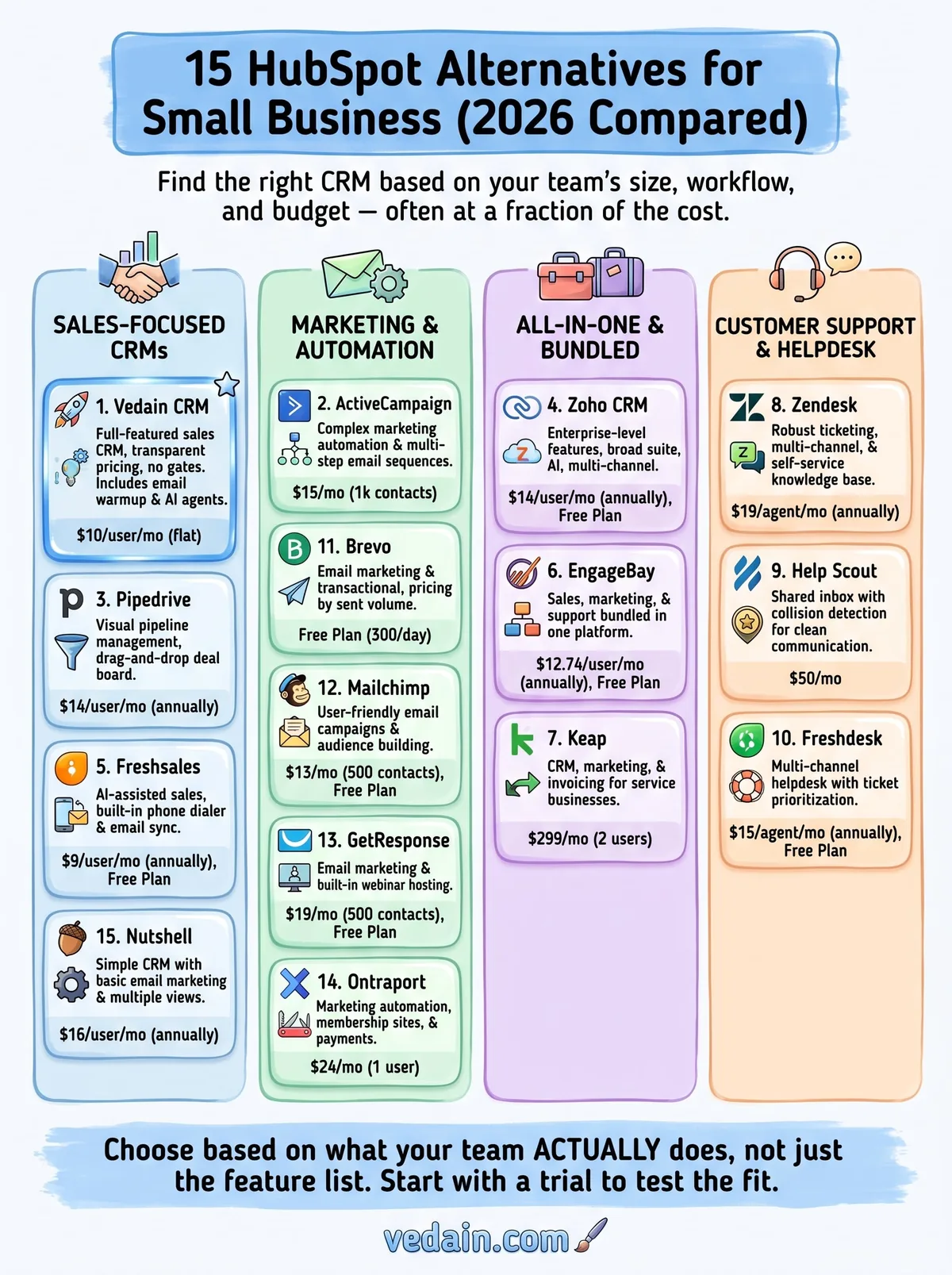
You now have a clear picture of the 15 hubspot alternatives for small business available in 2026. Each platform on this list solves a real problem, whether that's email marketing, customer support, or sales pipeline management. The right choice depends on what your team actually does every day, not on which tool has the longest feature list or the most name recognition.
If sales pipeline management sits at the center of your workflow, and you're tired of paying more every time you need a feature that should have been included from the start, Vedain CRM is worth a serious look. You get every feature at a flat $10/user/month, including email warmup, AI agents, workflow automation, and two-way email sync, with no feature gates and no credit card required to start. Set up takes under five minutes.
Start your free Vedain CRM trial and see how much easier pipeline management gets when the pricing stays predictable.
Frequently Asked Questions
What is the best HubSpot alternative for small business?
The best HubSpot alternative for small business in 2026 is Vedain ($10/user/month, all features included) for the best price-to-feature ratio, Pipedrive ($14-79/user/month) for the best pipeline UX, and Zoho CRM ($14-52/user/month) for the broadest feature set. All three cost 40-90% less than HubSpot Professional ($90/user/month) with comparable sales CRM capabilities. Choose based on your primary need: budget (Vedain), pipeline clarity (Pipedrive), or ecosystem breadth (Zoho).
Why do small businesses switch away from HubSpot?
Small businesses switch away from HubSpot most often for: (1) cost — Professional tier at $90/user/month becomes $900-2,700/month for 10-30 rep teams, (2) feature lock — key automation features require Professional tier, creating a steep price jump from Starter, (3) contact-based pricing — Marketing Hub charges per contact, not just per user, so growing email lists drive unexpected costs, (4) complexity — HubSpot's breadth makes it harder to implement than focused sales-only tools like Pipedrive or Close.
Can you migrate from HubSpot to Pipedrive easily?
Yes. HubSpot exports contacts, companies, deals, and activity in CSV format. Pipedrive imports from HubSpot CSV directly and has a migration guide. What transfers: contacts, accounts, deals, notes, and custom properties. What doesn't transfer: HubSpot workflows (must be recreated as Pipedrive automations), form submissions, landing pages, and email marketing campaigns. Plan 1-2 weeks for a 10-person team migration. Pipedrive's native importer handles the bulk of it in a few hours.
Is Zoho CRM a good alternative to HubSpot?
Yes, Zoho CRM is a strong HubSpot alternative for most small businesses. It covers sales pipeline, email tracking, automation, AI insights (Zia), and reporting at $14-52/user/month — vs HubSpot's $20-150/user/month. Zoho's advantage over HubSpot: lower price, broader integration with Zoho ecosystem (Books, Desk, Projects), and strong support for Indian businesses. HubSpot's advantage: better marketing automation depth, cleaner UI, and stronger brand for US/EU markets.
What HubSpot features are hardest to replace?
The HubSpot features hardest to replicate in alternatives: (1) integrated marketing + sales + service hub in one platform with shared contact records, (2) smart content and personalization across landing pages and email, (3) revenue attribution reporting that ties marketing spend to closed deals, (4) HubSpot Academy and training ecosystem. If you use these marketing features heavily, HubSpot's premium is justified. If you mainly use the sales CRM pipeline, email sequences, and basic automation — any of the 15 alternatives covers it at lower cost.
How much can a small business save by switching from HubSpot?
A 10-person team on HubSpot Sales Hub Professional saves $500-800/month by switching to alternatives: HubSpot Professional = $900/month → Vedain = $100/month (save $800/month = $9,600/year). HubSpot Professional → Pipedrive Growth = $390/month (save $510/month = $6,120/year). HubSpot Professional → Zoho CRM Professional = ~$230/month (save $670/month = $8,040/year). Migration takes 1-3 weeks but the annual savings typically justify the switching effort.