The right CRM should make your sales process faster and clearer, not add another layer of complexity. But with every vendor claiming to be the best, you need a structured way to evaluate your options and cut through the noise. That's exactly what this checklist gives you, nine concrete steps to match a CRM to your actual needs, budget, and team size.
We built Vedain CRM specifically for teams tired of overpaying for features locked behind upgrade tiers, so we know what matters when you're evaluating tools at this stage. Below, you'll find practical criteria and honest comparisons to help you make a decision you won't regret, whether you end up choosing Vedain or not. Let's walk through it step by step.
What a small business CRM should do
A CRM built for small businesses needs to solve one problem above all others: keeping your sales process visible and moving without requiring a dedicated admin to maintain it. Before you figure out how to choose a CRM for small business use, you need a clear picture of what the tool should actually accomplish day to day. The right CRM doesn't just store contacts; it actively supports how your team finds, tracks, and closes deals so nothing slips through the gaps.
Core sales functions you can't skip
Every small business CRM should handle the fundamentals without asking you to bolt on extra tools. Contact and lead management means you can store every interaction, note, and status update in one place and filter your list by any criteria you care about. Pipeline tracking gives your team a visual map of every open deal, so nothing disappears when a rep is out or a prospect goes quiet for two weeks.
The table below shows the functions that separate a usable CRM from a frustrating one:
Features that save time without complexity
Beyond the basics, automation is what separates a CRM that saves time from one that eats it. For small teams, no-code workflow builders let you set up automatic follow-up emails, status changes, and task assignments without writing a single line of code. Email sequence tools take it further by letting you build multi-step outreach campaigns that run on their own, so your reps stay focused on conversations, not manual follow-up.
A CRM that requires IT support or a two-week onboarding process is not the right fit for a small business, no matter how many features it offers.
Reporting is another area where simplicity wins. You don't need 40 dashboard widgets; you need to see pipeline value, deal velocity, and team activity at a glance. Look for a CRM that ships with pre-built reports you can use on day one, rather than one that requires hours of configuration before it tells you anything useful.
What separates a small business CRM from an enterprise tool
Enterprise CRMs are built for IT teams, procurement committees, and organizations with months to spend on implementation. Small business tools prioritize fast setup, flat pricing, and practical defaults that work without heavy customization. When you evaluate options, setup time is a real signal: if a CRM can't get you to a working pipeline in under a day, it's probably built for a different buyer.
Pricing transparency is equally important. Enterprise platforms routinely gate their best features behind higher tiers, which means your $25-per-user starting price quietly becomes $75 once you add automation, reporting, or email sync. A small business CRM should give you the full feature set at a predictable cost so your budget stays intact as your team grows.
Steps 1–3. Define goals, users, and process
The first three steps are about knowing what you need before you look at a single vendor. Most small teams skip straight to demos, then end up choosing a CRM based on whoever gave the best presentation. Taking 30 minutes to answer the questions in this section will save you weeks of rework later, and it's the foundation of learning how to choose a CRM for small business effectively.
Step 1: Write down your sales goals
Start with the outcome you want, not the feature you think you need. If your goal is to reduce deals lost to no-follow-up, you need automation. If your goal is to forecast revenue more accurately, you need a solid pipeline and reporting setup. Write your top two or three goals in plain language before you open any product page.
The clearer your goals, the faster you can eliminate tools that don't address them.
Use this simple template to capture your goals before you evaluate any platform:
Step 2: Map out your users
Identify exactly who will use the CRM and what each person needs from it. A sales rep needs fast contact lookup and activity logging. A manager needs pipeline visibility and team performance reports. List every role that will touch the system and note their core task, because this directly affects which features matter and how many seats you need to budget for.
- •Sales reps: contact management, deal updates, email sync
- •Sales managers: pipeline reports, activity tracking, forecasting
- •Marketing or ops: lead forms, campaign tools, workflow automation
Step 3: Document your current sales process
Sketch out every stage your deals move through, from first contact to closed-won. If you currently use a spreadsheet or whiteboard, write down each column or status label. This becomes your starting pipeline template inside whatever CRM you choose. Teams that skip this step spend weeks reconfiguring a default setup that doesn't match how they actually sell.
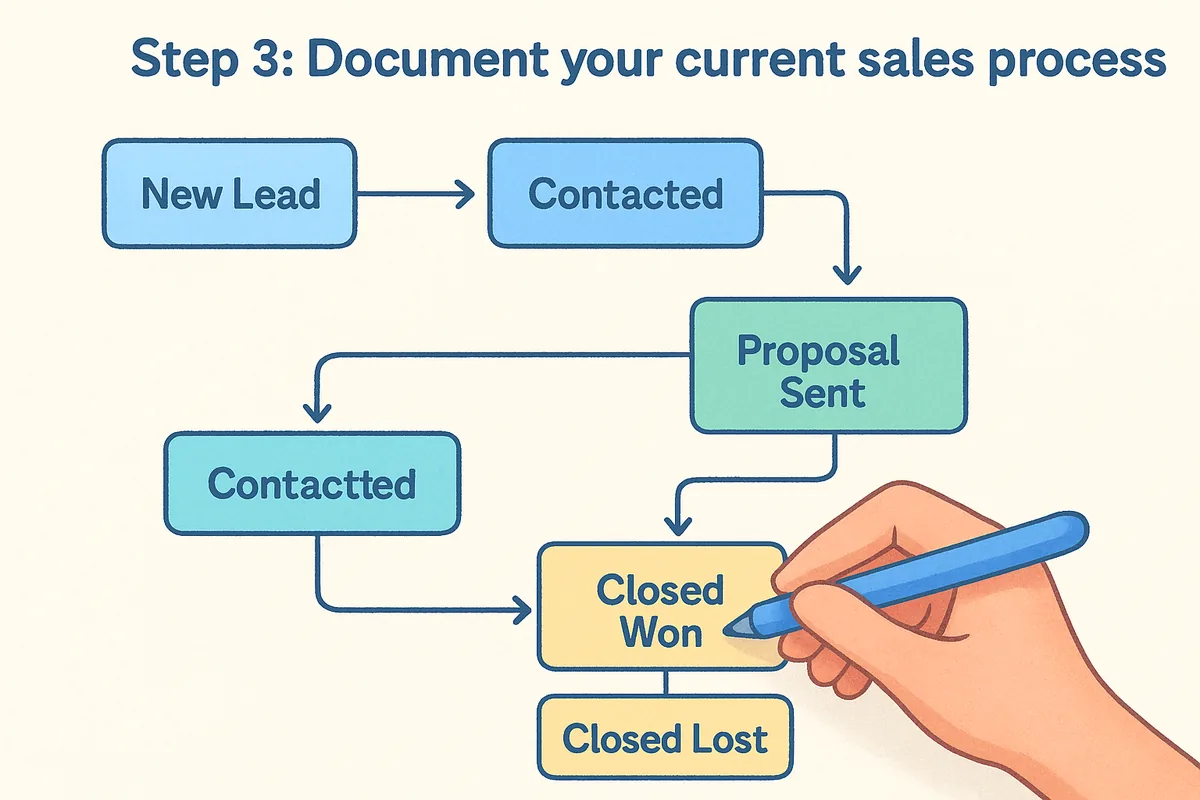
A basic process map looks like this:
New Lead > Contacted > Qualified > Proposal Sent > Negotiation > Closed Won / Closed Lost
Knowing your stages upfront also helps you spot gaps in your process before the CRM exposes them during a live deal.
Steps 4–6. Pick features, data, and integrations
Once you've documented your goals, users, and process, steps four through six focus on the specific capabilities you need, the data you're bringing in, and the tools the CRM must connect with. This is where knowing how to choose a CRM for small business pays off, because you're now evaluating vendors against your real requirements instead of reacting to feature lists designed to impress buyers who haven't done this groundwork yet.
Step 4: Build your feature shortlist
Take each goal from Step 1 and translate it directly into a specific feature. If your goal is faster follow-up, you need workflow automation. If it's better forecasting, you need pipeline reporting with weighted deal values. Rank every feature as either required, nice-to-have, or skip, then use that list to eliminate any tool that falls short on your required column before you request a single demo.
A feature you don't use doesn't add value; it just makes the CRM harder for your team to adopt.
Step 5: Audit your existing data
Before you migrate anything, take a clear look at what you have and where it lives. Pull your contacts, deal history, and notes from your current spreadsheet or old tool and check the quality. Duplicate records, inconsistent field formats, and missing phone numbers will follow you into the new system if you skip this step. Cleaning your data before import saves hours of confusion after you go live.
Run through these three checks before any import:
- •Remove duplicate contacts and merge overlapping records
- •Standardize field formats across phone numbers, company names, and deal stages
- •Flag incomplete records that need enrichment before they enter the pipeline
Step 6: Map your integrations
List every tool your sales team touches on a typical workday and confirm whether the CRM connects to each one natively. Focus on non-negotiables first: your email client, your calendar, and any lead capture forms on your website. If a vendor forces you to abandon your existing workflow and rebuild around their ecosystem, that friction will slow adoption and reduce the ROI of the whole implementation, regardless of how good the feature set looks on paper.
Steps 7–9. Compare pricing, test, and roll out
The last three steps move you from research to a real decision. By this point, you've defined your goals, users, and required features, so your shortlist should be two or three tools at most. These steps give you a structured way to compare what you'll actually pay, confirm the tool works for your team, and get everyone using it without a chaotic rollout.
Step 7: Build a total cost comparison
Vendor pricing pages rarely tell the full story. List every feature from your required column and check whether each CRM includes it in the base plan or charges extra for it. Add up the real per-user monthly cost including any add-ons, then multiply by the number of seats you mapped in Step 2. This is the number that matters when you're figuring out how to choose a CRM for small business on a realistic budget.
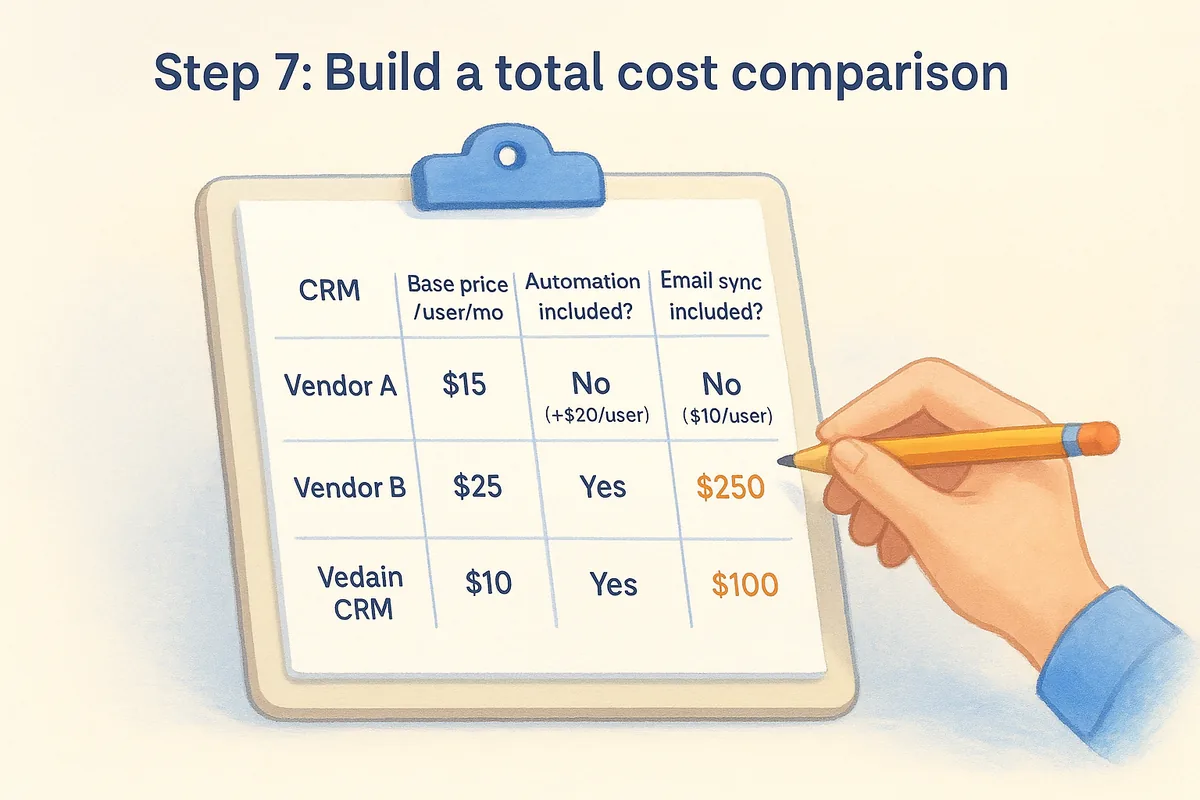
The cheapest starting price rarely reflects what you'll actually pay once your team needs automation and email sync.
Step 8: Run a focused trial
Sign up for a free trial of your top two options and run each one against the same real scenario, using actual contacts, your real pipeline stages from Step 3, and a live workflow. Don't evaluate features you rated as "skip." Give each trial a fixed time limit, two weeks per tool works well, and collect feedback from every user role you identified in Step 2.
Use this checklist to evaluate each trial:
- •Can you import your existing contacts without manual cleanup?
- •Does the pipeline match your documented stages out of the box?
- •Does email sync connect and log conversations automatically?
- •Can you build one workflow without outside help?
- •Does the reporting show what you need on day one?
Step 9: Roll out with a structured plan
Pick your winner and give your team a clear start date, not a soft launch with optional participation. A phased rollout keeps adoption high and gives everyone a clear path to competency. Assign one internal owner to handle questions so confusion doesn't slow momentum before the tool becomes a habit.
Follow this three-week rollout structure:
- •Week 1: Import contacts, set up pipeline stages, and configure user permissions
- •Week 2: Connect email sync, build your first automation workflow, and test lead form capture
- •Week 3: Enable reporting dashboards and review your first pipeline report as a team
Next steps
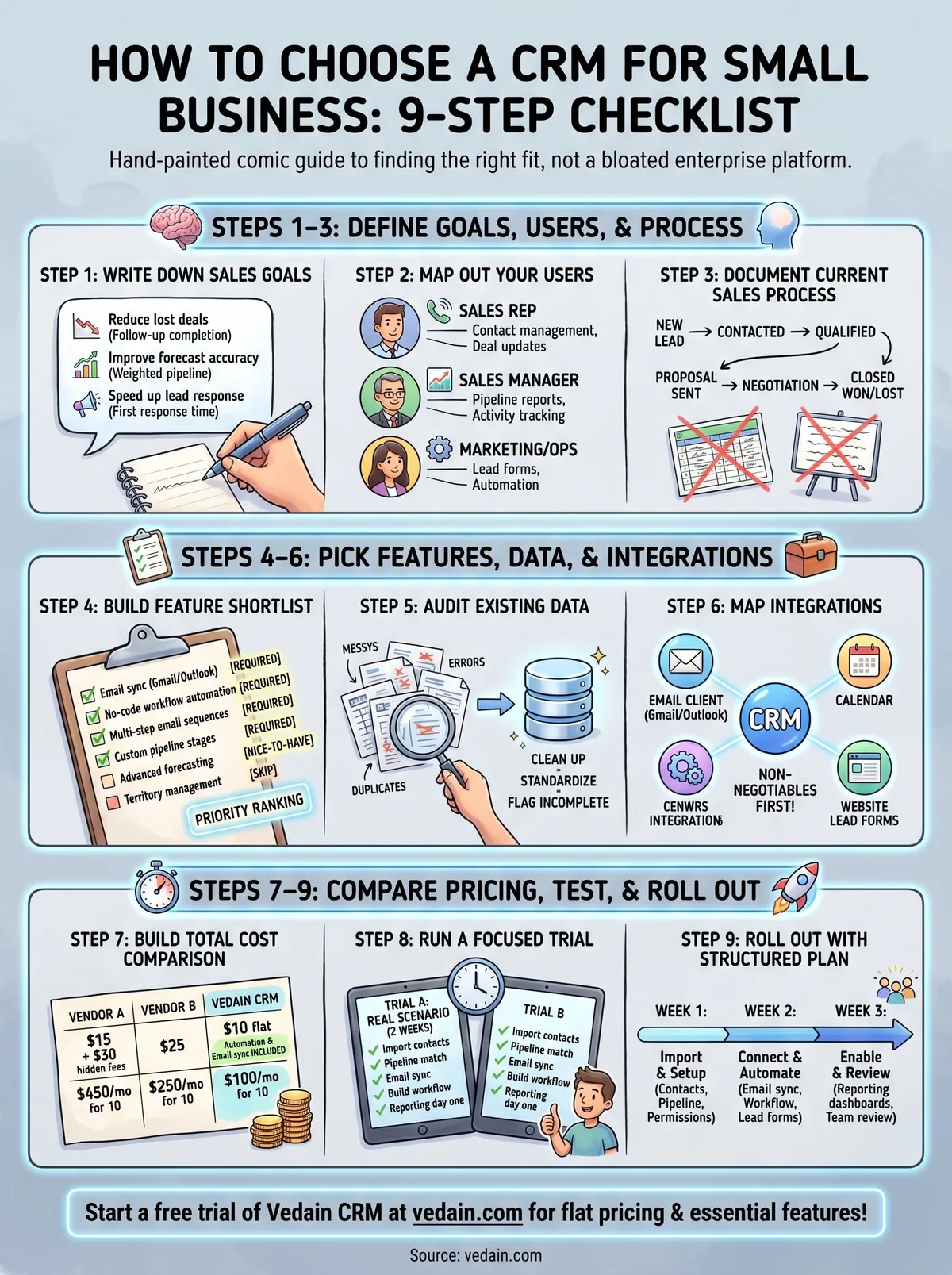
You now have a complete framework for how to choose a CRM for small business use, from mapping your goals and process to running a focused trial and rolling out with your team. The nine steps work in order because each one builds on the last, so resist the urge to jump ahead to pricing comparisons before you've documented your pipeline stages and user roles.
Your immediate action is straightforward: complete Steps 1 through 3 today using the templates in this guide, then build your feature shortlist before you open a single vendor website. That preparation is what separates teams that pick the right tool on the first try from those who switch platforms six months later.
If you want a CRM that covers every feature in this checklist at a flat $10 per user per month with no hidden tiers, start a free trial of Vedain CRM and have a working pipeline set up before the end of the day.
Frequently Asked Questions
How do I choose the right CRM for my small business?
Choose a CRM for your small business by answering: (1) How many users will access it? (2) What's your budget per user per month? (3) Do you need email sequences and automation? (4) Which tools must it integrate with (email, accounting, support)? (5) How complex is your sales process? (6) Do your reps need mobile access? For teams under 15 with a straightforward pipeline, Vedain ($10/user/month) or Pipedrive ($15-25/user/month) fit best. HubSpot works if you need marketing integration.
What questions should you ask before buying a CRM?
Ask these questions before buying a CRM: (1) Does it connect to our email provider (Google Workspace or Microsoft 365)? (2) Can I import our existing contacts from a spreadsheet? (3) Is there a limit on how many contacts or deals we can store? (4) What's locked behind the next pricing tier? (5) How long does onboarding take? (6) Is there phone support or only chat/email? (7) Is the data exportable if we switch? (8) Are there hidden fees (implementation, API calls, storage)? Get answers to all 8 before signing.
Should a small business use Salesforce or a simpler CRM?
A small business (under 50 employees) should almost always choose a simpler CRM over Salesforce. Salesforce requires: a dedicated Salesforce admin ($80-120K/year), 3-6 months of implementation, ongoing customization costs, and licenses starting at $25/user/month rising quickly. Simpler CRMs like Vedain, Pipedrive, or Zoho CRM can be set up in days, require no admin, and cost 80% less. Only move to Salesforce when you have enterprise customers requiring it, or a sales operations team dedicated to CRM management.
What is the most important CRM feature for small business?
The most important CRM feature for small business is email integration — specifically automatic logging of sent and received emails so reps don't have to manually enter activity. The second most important is pipeline visibility: a Kanban board where every rep can see which deals are at which stage. Everything else (AI, advanced reporting, complex automation) matters only after these two basics are working reliably. Most CRM feature lists distract from these fundamentals.
How many CRM options should I evaluate before choosing?
Evaluate 2-3 CRMs in depth, no more. Most businesses that evaluate 6+ options experience 'choice paralysis' and delay implementation by months. The practical approach: pick one platform that matches your budget and key requirements, start a free trial, and import 100 real contacts. Use it for 2 weeks. If it works, pay and migrate. If not, try one alternative. The cost of delayed CRM adoption (missed follow-ups, manual tracking) far exceeds the cost of choosing slightly imperfect software.
Can I switch CRMs later if I choose the wrong one?
Yes, you can switch CRMs, but it's painful — typically 1-3 weeks of data migration, 2-4 weeks of team re-training, and lost activity history that doesn't transfer cleanly. Contacts and deals migrate well; email history, call recordings, and custom workflow logic rarely transfer. To minimize switching cost: (1) export all data before switching, (2) run old and new CRM in parallel for 30 days, (3) migrate in stages by team or region. Choose your first CRM thoughtfully to avoid this.