This guide breaks down Zoho CRM's pricing, core features, and real trade-offs so you can decide whether it's the right fit for your team. We cover everything from lead management and automation to the limitations that tend to frustrate smaller teams, like feature gating, add-on costs, and a learning curve that punches above its weight class.
As the team behind Vedain CRM, we built our platform specifically to solve many of the pain points small sales teams run into with tools like Zoho, things like hidden fees, locked features, and complex onboarding. We'll call out those comparisons where they're relevant, but this article is here to give you an honest look at Zoho CRM so you can make the best decision for your business.
Why small businesses use CRM software
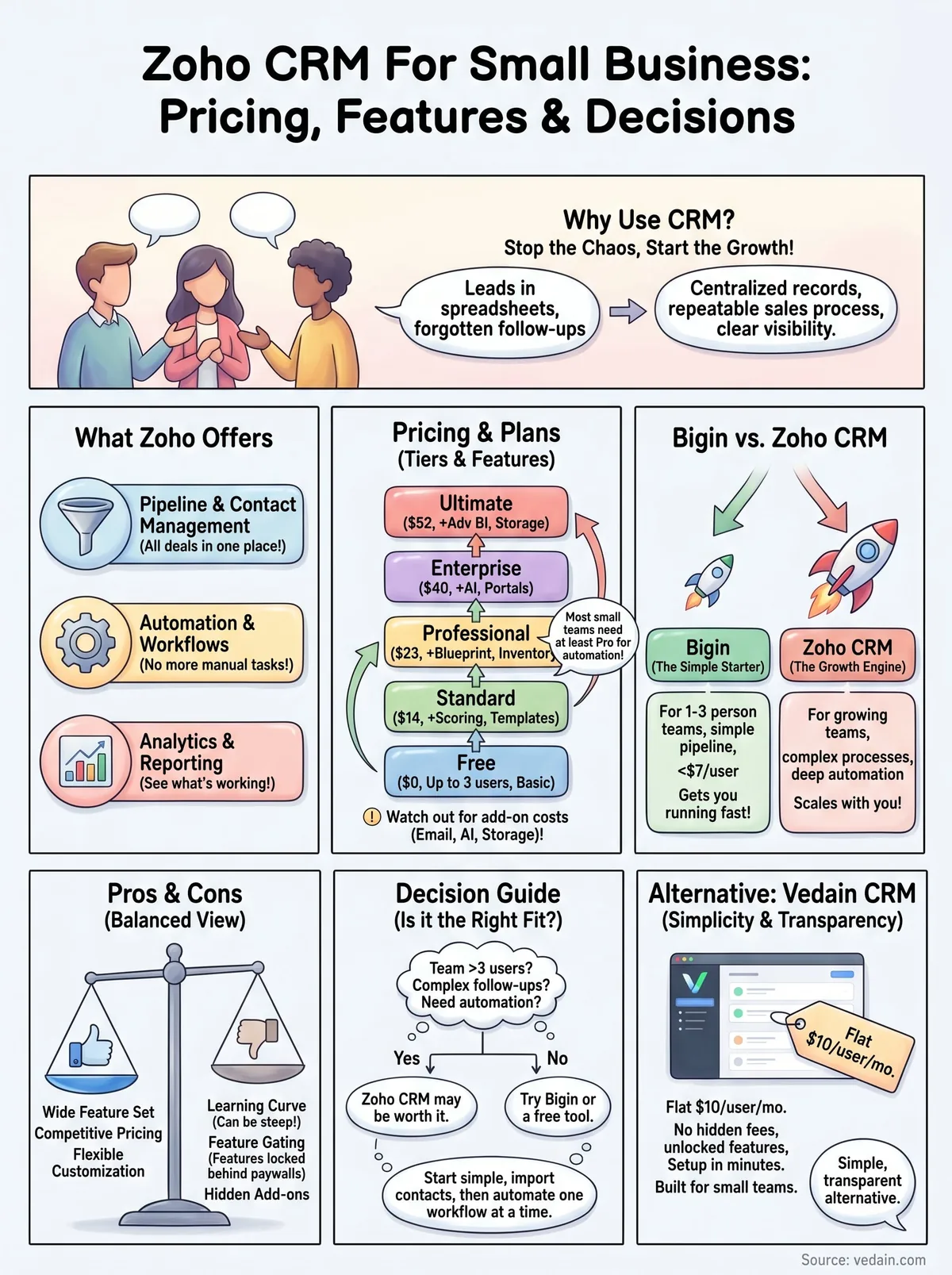
Running sales without a CRM when your business is small feels manageable, until it isn't. You're tracking leads in spreadsheets, following up through memory, and piecing together deal status from email threads. The moment your team adds a second or third rep, or you start handling more than a dozen active deals at a time, that approach starts breaking down fast. A CRM gives your team a single place to track every contact, every conversation, and every deal, so nothing slips through the cracks.
Managing leads without dropping the ball
The most immediate reason small businesses adopt CRM software is lead management. When a potential customer fills out a form, replies to an email, or gets referred by a partner, you need a system that captures that contact and tells you what to do next. Without one, leads pile up in inboxes, get forgotten after one touchpoint, or get worked by two reps at the same time without either knowing it.
A CRM centralizes all of that. Every lead gets a record, every note gets attached to the right contact, and every follow-up gets logged. Whether you're evaluating Zoho CRM for small business use or any other platform, this is the core problem you're trying to solve: keep your pipeline organized so your team can work it without constant manual overhead.
The best CRM for a small business is the one your team will actually use consistently, because a system nobody follows is worse than no system at all.
Building a repeatable sales process
Small businesses often win deals based on individual effort and relationship skills, which works early on. The problem is that it doesn't scale. When your best rep leaves or you hire someone new, all that knowledge walks out the door with them. A CRM lets you define your sales stages, set up follow-up sequences, and build workflows so your process is documented and repeatable, not locked inside one person's head.
Automation plays a big role here. Instead of manually sending a check-in email three days after a demo, you set that up once and it runs on its own. Instead of remembering to move a deal to "proposal sent," you trigger that action when the email goes out. These small efficiencies add up, especially when your team is lean and everyone is wearing multiple hats.
Visibility into what's actually working
Sales without data is guesswork. A CRM gives you pipeline reports, conversion rates, and activity tracking so you can see exactly where deals are getting stuck and which reps are hitting their numbers. That visibility lets you make smarter decisions about where to focus your team's time and which part of your process needs fixing.
Reporting also helps with forecasting. If you know your average deal size, your close rate, and how many open opportunities you have, you can make a reasonable prediction about next month's revenue. Without a CRM, those numbers live in scattered spreadsheets if they exist at all. For a small business trying to plan hiring, marketing spend, or cash flow, that kind of clarity isn't a nice-to-have, it's essential.
What Zoho CRM offers small businesses
Zoho CRM is a broad platform with a lot of moving parts. Before diving into pricing, it helps to understand what's actually included and which features are realistically useful for a small sales team. Zoho targets businesses of all sizes, so not every feature on their list is relevant to a 5-person team, but there's still a solid core worth knowing about.
Lead and contact management
At its foundation, Zoho CRM gives you a centralized database for leads and contacts, with the ability to add custom fields, attach notes, and log activity. You can capture leads through web forms, import them from spreadsheets, or pull them in from integrated sources. Each record shows you a full timeline of interactions, so when a rep picks up a deal mid-cycle, they can see exactly what happened before without hunting through email threads.
A clean contact database is only useful if your team actually keeps it updated, so the simpler the data entry process, the better.
Pipeline and workflow automation
Zoho CRM lets you build a visual deal pipeline with custom stages that match your sales process. You can move deals through stages manually or trigger automated actions, like sending follow-up emails or assigning tasks, based on deal status changes. Workflow automation is available on paid plans, and the depth of what you can automate increases significantly as you move up tiers. For a small team, even basic automation around lead assignment and follow-up scheduling can save meaningful time each week.
- •Automated lead assignment based on rules
- •Email notifications triggered by deal stage changes
- •Task creation when a deal moves forward
- •Follow-up reminders tied to contact activity
Analytics and reporting
Zoho CRM includes pre-built reports for pipeline value, conversion rates, and activity tracking, which gives you a clear picture of where your team stands at any point in the month. You can also build custom reports if the defaults don't match what you need. Dashboards are configurable, so each rep or manager can set up a view that shows what matters most to them without digging through menus every time they log in.
Zoho CRM pricing and what each plan includes
Zoho CRM pricing varies significantly depending on which plan you choose, and for small businesses, that variation matters. Zoho offers five tiers: Free, Standard, Professional, Enterprise, and Ultimate. Each plan unlocks progressively more features, which means some things you'd expect to work out of the box require you to pay more than the base rate.
The free plan and what it actually covers
Zoho CRM's free plan supports up to three users, which makes it one of the few CRMs that gives small teams a no-cost starting point. You get basic lead and contact management, a deal pipeline, and standard reports. What you don't get is automation, email sequences, or analytics beyond the most basic views. For a team of two or three just getting started, the free tier is worth testing. Once you need automation or more advanced reporting, you'll hit the ceiling quickly.
Paid plans and where the features unlock
When evaluating Zoho CRM for small business use, the Standard plan at around $14 per user per month is where most teams start. Professional runs around $23, Enterprise around $40, and Ultimate around $52. The jump between tiers unlocks meaningful capabilities.
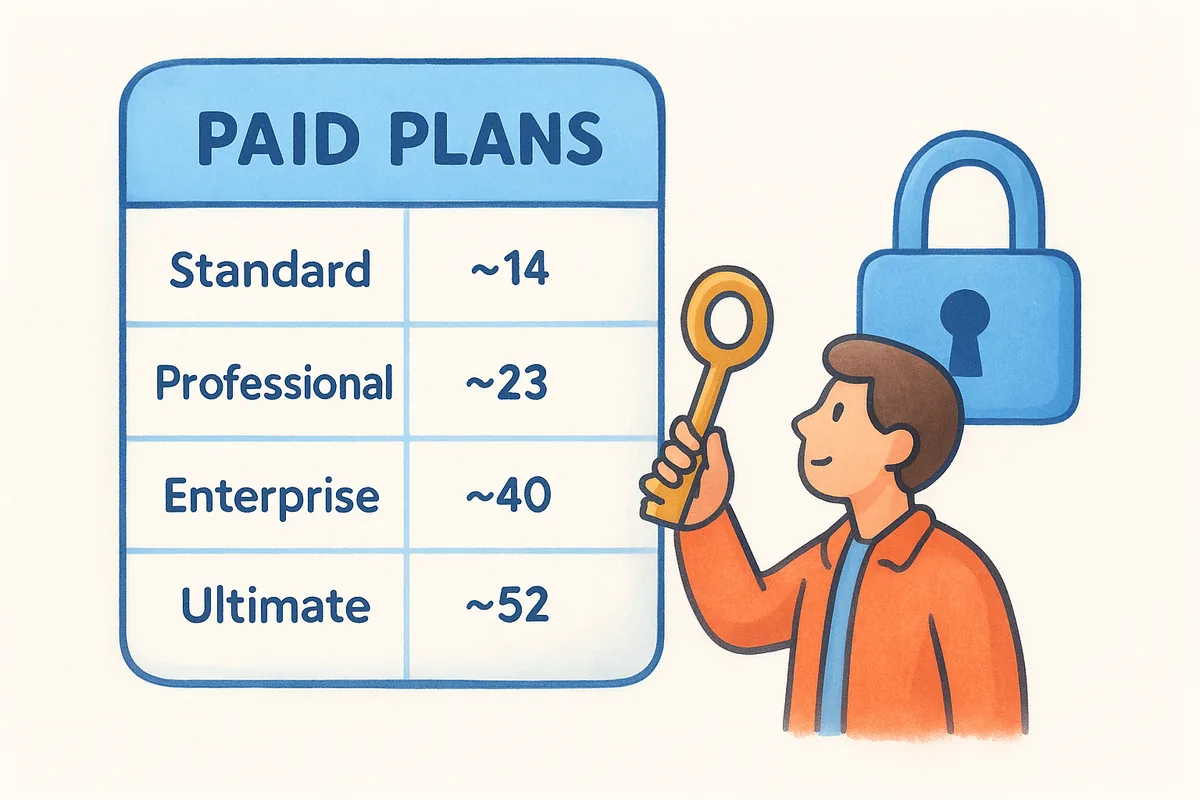
Most small teams find they need at least the Professional plan to get the automation features that make a CRM worth using daily.
Add-on costs to watch for
Pricing listed above covers the base plan, but Zoho charges separately for several features small businesses often need. Email marketing beyond basic limits, advanced telephony, and some AI capabilities come with additional fees. Storage upgrades, premium support tiers, and third-party integrations can push your monthly cost well above what the headline price suggests. Before committing to a plan, map out exactly which features your team needs and confirm whether they're included or priced separately.
Zoho Bigin vs Zoho CRM for small teams
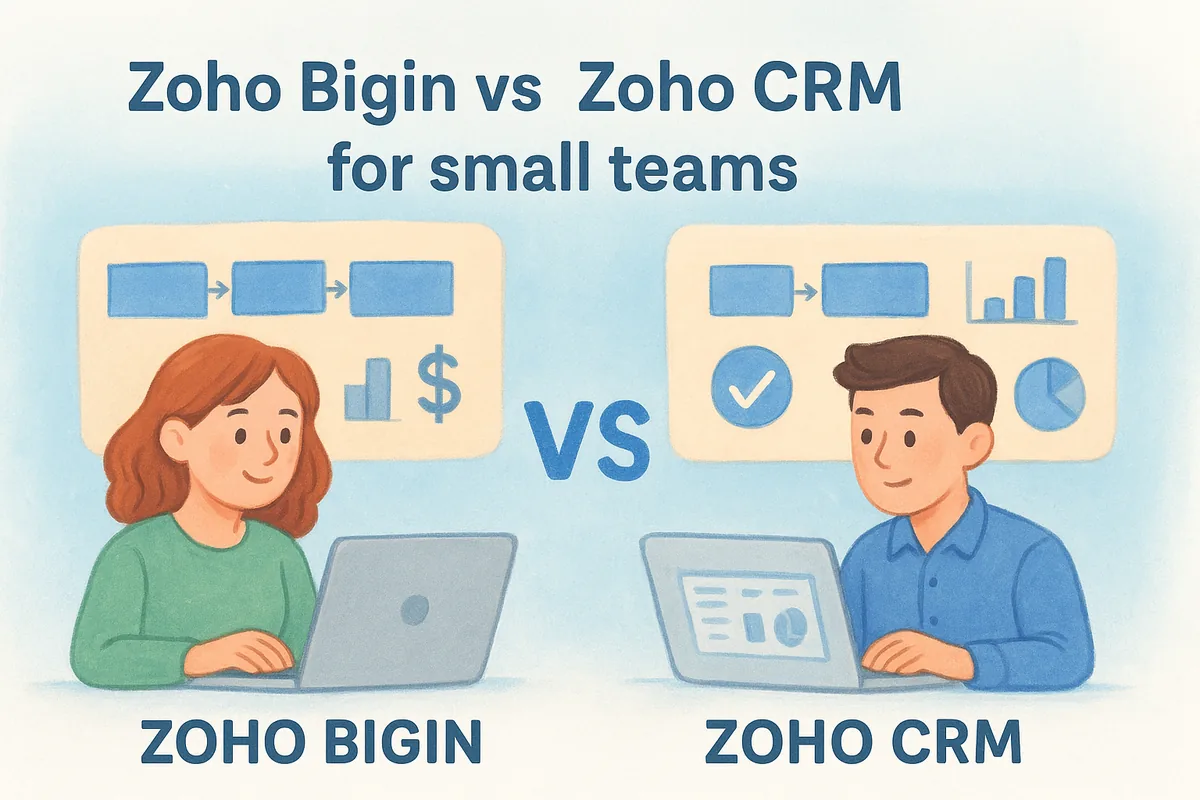
Zoho offers two products that often confuse small business buyers: Bigin, a stripped-down pipeline tool built specifically for small teams, and Zoho CRM, the full platform with a much broader feature set. Both solve sales pipeline problems, but they target different stages of business growth and different levels of complexity. Understanding the difference saves you from paying for capabilities you don't need, or picking a tool that you'll quickly outgrow.
What Bigin is built for
Bigin is Zoho's answer to the "we just need something simple" crowd. It gives you a visual pipeline, contact records, basic email integration, and simple workflow triggers, all at a starting price of around $7 per user per month, with a limited free tier for one user. If your sales process is straightforward and you have a small team that needs to track deals without managing a complex setup, Bigin gets you running in under an hour.
The trade-off is scope. Bigin does not include advanced automation, AI tools, detailed reporting, or multi-pipeline support beyond a basic level. You also won't find built-in email sequence tools or the kind of custom module building that Zoho CRM supports. For a two-person team closing a handful of deals per month, that's likely fine. For a team trying to build a repeatable, scalable sales process, those missing features will start to matter.
When Zoho CRM makes more sense
If you're evaluating Zoho CRM for small business use and your team is growing or your sales cycle involves multiple stages, follow-ups, and reporting requirements, Zoho CRM is the more appropriate choice. It gives you workflow automation, configurable dashboards, and deeper analytics that Bigin simply cannot match. The setup takes more time, but the ceiling is much higher.
Choose Bigin if simplicity is your priority; choose Zoho CRM if you need your tool to grow with your process.
The deciding factor usually comes down to how complex your follow-up process is. If you're sending personalized sequences, tracking deals across multiple pipelines, or managing a team where visibility and accountability matter, Zoho CRM gives you the structure to do that. Bigin does not.
Zoho CRM pros and cons for small business
No CRM is the right fit for every team, and Zoho CRM for small business use is no exception. It has real strengths that make it a legitimate contender, but it also has friction points that consistently show up in how small teams actually experience the platform day to day. Knowing both sides up front saves you from committing to a tool that doesn't match how your team works.
Where Zoho CRM works well
Zoho CRM gives you a genuinely wide feature set at a price point that most small businesses can afford. The combination of pipeline management, workflow automation, and reporting in a single platform means you're not stitching together multiple tools to cover basic sales operations. The customization options are above average for this price range, letting you adjust fields, modules, and workflows to reflect how your team actually sells rather than forcing you into a generic process.
Zoho CRM's breadth is its biggest advantage: most small teams can run their entire sales operation without needing to add other software on top of it.
The free plan also gives you a low-risk way to test the platform before spending anything, which is useful if your team is evaluating multiple options at once.
- •Wide feature set across pipeline, automation, and reporting
- •Competitive pricing relative to feature depth
- •Flexible customization without needing developer support
- •Free tier for up to three users
Where Zoho CRM falls short
The most consistent complaint from small teams is the learning curve. Zoho CRM packs in a lot of options, and navigating the interface takes real time to figure out. New reps don't get up to speed quickly, and that onboarding friction can slow adoption across the whole team. A tool your team finds confusing is one they'll stop using consistently.
Feature gating is the other major friction point. Automation, AI tools, and advanced reporting are locked behind higher-tier plans, which means your actual monthly cost often ends up higher than the entry price suggests. Add-on charges for storage, telephony, and premium support can push costs well past what the headline pricing implies, which catches smaller teams off guard after they've already committed.
How to decide and implement Zoho CRM
Deciding whether Zoho CRM for small business use is the right call comes down to three things: your team size, your sales process complexity, and your tolerance for a setup period. If you have more than three users, need workflow automation, and plan to grow your pipeline in the next year, Zoho CRM is worth serious consideration. If you're a solo operator or a two-person team with a simple follow-up process, Bigin or even a free tier tool may serve you better without the overhead.
Signs Zoho CRM is a good fit for your team
If your sales process involves multiple follow-up touchpoints, deal stages, and more than one rep, Zoho CRM gives you the structure to manage all of that in one place. The platform starts to justify its cost once your team is actively using automation, tracking pipeline by stage, and pulling weekly reports to identify where deals are stalling. Below that level of complexity, you may find yourself paying for features your team never opens.
The right time to adopt Zoho CRM is when your current system (spreadsheets, shared inboxes, or a basic tool) is actively causing you to lose deals, not before.
Ask yourself whether your team is currently dropping follow-ups, losing visibility on deal status, or onboarding new reps slowly because there's no documented process. If yes to any of those, a CRM will solve a real problem. If no, you may not need the full Zoho CRM feature set yet.
Getting set up without wasting time
Start by importing your existing contacts and mapping your current deal stages into Zoho CRM's pipeline before you touch any automation settings. Most small teams make the mistake of trying to configure everything at once and end up with a half-built system nobody uses. Get the core working first, leads in, deals moving, and notes being logged.
From there, add one workflow at a time based on what your team finds repetitive. A follow-up email trigger after a demo is a good first automation. Once that runs reliably, build from there. Zoho CRM rewards teams that implement incrementally rather than all at once.
What to do next
Zoho CRM for small business use is a solid option if your team needs a broad feature set and can handle the setup time and tiered pricing model. Start with the free plan if you have three or fewer users, and move to a paid tier once your team actively needs automation and reporting. If your process is straightforward, test Bigin first before committing to the full Zoho CRM platform.
If you find that Zoho's pricing structure, feature gates, or onboarding complexity don't fit how your team works, it's worth looking at alternatives built specifically around simplicity and transparent pricing. Vedain CRM includes pipeline management, email integration, workflow automation, and AI tools at a flat $10 per user per month with no hidden fees or locked features. You can get your team set up in under five minutes without a credit card. Try Vedain CRM free and see if it fits your sales process better.
Frequently Asked Questions
How much does Zoho CRM cost for small businesses?
Zoho CRM offers a free plan and paid plans starting at $20/user/month for the Standard edition, making it one of the most affordable options for small businesses. The Professional plan costs $45/user/month, while the Enterprise plan is $65/user/month. Compared to HubSpot's $50/month starter plan and Salesforce's higher enterprise pricing, Zoho provides budget-friendly entry points for startups and small teams.
Is Zoho CRM free for small businesses?
Yes, Zoho CRM offers a completely free plan that includes up to 3 users, basic contact and lead management, and email integration. The free tier is more generous than HubSpot's free CRM (limited features) and Freshsales' free plan, making Zoho ideal for solopreneurs and early-stage startups testing CRM functionality before investing in paid tiers.
What are the main pros and cons of Zoho CRM for small businesses?
Zoho CRM's main advantages include affordable pricing, customization flexibility, offline access, and integration with other Zoho apps like Zoho Books and Zoho Desk. The primary drawbacks are a steep learning curve compared to user-friendly competitors like Pipedrive, limited native integrations versus HubSpot, and less robust AI features than Salesforce Einstein. Small businesses seeking simplicity may find Pipedrive easier to implement, while those needing advanced automation might outgrow Zoho quickly.
How does Zoho CRM compare to HubSpot for small businesses?
Zoho CRM is significantly cheaper, starting at $20/user/month versus HubSpot's $50/month, and offers more customization options for small businesses with technical resources. However, HubSpot provides superior user experience, better onboarding support, and more built-in marketing automation features out-of-the-box. Small businesses prioritizing cost savings and customization should choose Zoho, while those valuing ease-of-use and integrated marketing tools may prefer HubSpot.
What small business features does Zoho CRM include?
Zoho CRM includes essential small business features like contact management, sales pipeline tracking, email automation, mobile access, and basic reporting across all paid plans. The Standard plan ($20/user/month) covers these fundamentals, while Professional ($45/user/month) adds advanced features like workflows, forecasting, and custom modules. Unlike Vedain and basic Pipedrive setups, Zoho's free plan already provides robust functionality sufficient for many small teams, reducing the need for immediate upgrades.
Is Zoho CRM better than Pipedrive for small businesses?
Zoho CRM offers better pricing and deeper customization, while Pipedrive excels in user-friendliness and visual sales pipeline management that small teams often prefer. Zoho's Standard plan ($20/user/month) is cheaper than Pipedrive's Essential plan ($39/user/month), but Pipedrive requires less training and setup time. Small businesses with limited IT support should consider Pipedrive's simplicity, while those needing cost-effective, highly customizable solutions may find Zoho the better fit.