The problem isn't that good CRM tools don't exist. It's that finding the right one means wading through dozens of options, each claiming to be the best. Some are full-featured platforms, others are creative workarounds like spreadsheets or project management apps repurposed for sales tracking. Both approaches can work, depending on your team size, budget, and how much complexity you actually need. The key is knowing what trade-offs you're making before you commit.
We built Vedain CRM specifically to solve the pricing trap, every feature included at $10/user/month, no tiers, no surprises. But we also know one CRM doesn't fit every team. So we put together this list of 11 alternatives worth considering in 2026, from dedicated sales platforms to unconventional picks that might be exactly what your small team needs.
1. Vedain CRM
Vedain is a cloud-based CRM platform built specifically for sales teams that want a complete toolkit without hitting feature walls as they grow. It covers the full cycle from lead capture to closed deals, and it's the platform we designed after watching small teams overpay for tools they barely used.
What it is
Vedain gives your sales team a single place to manage leads, deals, pipelines, and email outreach without juggling multiple subscriptions. It was built to be one of the strongest crm software alternatives to enterprise platforms, bringing automation, email sync, AI agents, and reporting together at a flat rate that doesn't punish growth.
Why small teams choose it
Small teams pick Vedain because the pricing model removes the usual friction. Every feature is included at the base price, so you face no surprises when you need to activate automation or run an email campaign. Teams moving from platforms like HubSpot or Salesforce often cut their per-user cost by 80% or more without losing the functionality they actually rely on.
Vedain's flat-rate model means your bill stays predictable whether you're using basic pipeline tracking or running multi-step automated email sequences.
Key features to know
Vedain includes a visual deal pipeline with Kanban boards, two-way Gmail and Outlook sync, no-code workflow automation, and a 21-day email warmup tool to protect your domain's deliverability. The AI Agent Marketplace offers 30+ pre-built agents for data enrichment and content generation, and AI Studio lets you build custom CRM features by describing what you need in plain English.
- •Email Campaigns with multi-step automated sequences
- •Lead Forms for capturing leads directly from your website
- •Reports and analytics including conversion funnels and team leaderboards
- •LinkedIn Automation for scheduling AI-generated posts
- •Custom Dashboards with drag-and-drop widgets
Setup and adoption
Vedain is designed to get your team running in under five minutes, with no credit card required to start a trial. The platform skips the lengthy onboarding calls and complex configuration that slows down adoption on enterprise tools. Most teams can import existing contacts and begin tracking deals on the same day they sign up.
Pricing
Vedain charges $10 per user per month, flat. No feature tiers, no add-ons, no hidden fees. Unlimited records are included at every level, which makes it a practical option for teams that plan to scale without watching their CRM bill climb alongside them.
2. HubSpot CRM
HubSpot is one of the most widely recognized crm software alternatives available, offering a platform that spans sales, marketing, and customer service. It started as a marketing automation tool and expanded into CRM territory, which shapes both its strengths and its limitations for small teams.
What it is
HubSpot CRM is a cloud-based platform that connects sales, marketing, and support functions inside one system. It offers a free tier that many small teams use as an entry point, which explains most of its widespread adoption.
Where it fits best
The platform works well for teams that need marketing and sales tools in the same place and have the budget to grow into its paid plans. It suits companies where marketing runs campaigns and sales manages the pipeline without switching between separate tools.
Key features to know
You get a solid feature set across HubSpot's free and paid tiers. The list below covers what most small sales teams will rely on during daily work.
- •Contact and deal management with activity timelines
- •Email tracking and templates
- •Live chat and chatbot builder
- •Meeting scheduler and lead capture forms
- •Basic reporting on the free tier
Biggest trade-offs
HubSpot's free tier covers contacts but places nearly every advanced feature behind a paid plan. Once your team needs sequences, automation, or detailed analytics, costs climb fast. A five-person team on Sales Hub Professional can spend over $500 per month, which catches many teams off guard after starting free.
HubSpot layers features across multiple hubs and tiers, so your actual bill often looks very different from the entry price.
Pricing
The free CRM tier includes basic pipeline and contact tools. Paid Sales Hub plans start at $20/user/month on Starter and reach $100/user/month on Professional, with separate costs if you add Marketing or Service Hubs.
3. Pipedrive
Pipedrive is a sales-focused CRM built around the idea that salespeople need a clean, visual pipeline without the clutter of marketing or support tools layered on top. It launched in 2010 as one of the early activity-based selling platforms and has grown into a well-known option among small and mid-sized sales teams.
What it is
Pipedrive is a cloud-based pipeline management tool that keeps deals and activities at the center of every workflow. Unlike broader platforms, it narrows its focus to sales, which keeps the interface straightforward and easy to navigate from day one.
Where it fits best
Pipedrive works well for teams that run a clearly defined sales process and want to track deals through predictable stages. It suits outbound-heavy teams where reps manage their own pipelines and need fast visibility into what needs follow-up.
Key features to know
- •Visual drag-and-drop deal pipeline
- •Activity reminders and follow-up scheduling
- •Email sync and tracking
- •Lead inbox for inbound lead management
- •Basic reporting and goal tracking
Biggest trade-offs
Pipedrive keeps things lean, but that simplicity has a cost. Marketing automation, advanced reporting, and email sequences all require add-ons or higher-tier plans, which pushes the real price above what the base plan suggests. If you need a complete sales toolkit as one of your crm software alternatives, you may outgrow it faster than expected.
Pipedrive's core strength is pipeline clarity, but teams that need automation and outreach tools will quickly feel the gaps.
Pricing
Pipedrive's Essential plan starts at $14/user/month. The Advanced plan, which includes email sync and automation, runs $29/user/month, and the Professional plan reaches $59/user/month.
4. Zoho CRM
Zoho CRM is one of the most feature-dense platforms in the mid-market CRM space, built by Zoho Corporation as part of a broader suite of 50+ business applications. It targets teams that want enterprise-level tools at a price point that won't stretch a small team's budget.
What it is
The platform handles leads, deals, contacts, and workflow automation inside a single cloud-based system. It sits in the middle of the market, giving you tools that rival much pricier platforms while keeping costs relatively accessible for small and mid-sized teams looking at crm software alternatives.
Where it fits best
Zoho works well for teams already using other Zoho products like Zoho Books or Zoho Desk, since the integrations between them are tight and well-supported. It also suits teams that need multichannel communication, covering email, phone, and social activity in one place.
Key features to know
- •Lead and contact management with custom fields and views
- •Workflow automation with a visual rule builder
- •Built-in telephony and live chat
- •AI assistant (Zia) for sales predictions and anomaly detection
- •Territory management and multi-currency support
Biggest trade-offs
Zoho's biggest friction point is setup complexity. The platform has so many settings, modules, and configuration options that new users frequently spend days getting it ready before any selling happens. It rewards teams with a dedicated admin but can frustrate smaller groups that lack one.
Zoho gives you a lot of tools, but you'll need real time investment to configure them before your team sees value.
Pricing
Zoho CRM's Standard plan starts at $14/user/month, with Professional at $23/user/month and Enterprise at $40/user/month. A free tier exists for up to three users, covering basic contact and deal management only.
5. Freshsales
Freshsales is a cloud-based CRM platform developed by Freshworks, a company that also builds tools for customer support and IT service management. It entered the market as a sales-focused alternative to more expensive platforms and has built a user base among small and mid-sized teams looking for built-in communication tools.
What it is
Freshsales combines contact management, pipeline tracking, and built-in calling inside a single platform. Unlike tools that require third-party integrations for phone and email, Freshsales packages these communication channels natively, which reduces the number of separate subscriptions your team needs to manage.
Where it fits best
The platform fits teams that do a high volume of phone-based outreach and want call logging handled automatically inside the CRM. It also suits teams already using other Freshworks products like Freshdesk, since those integrations work smoothly out of the box.
Key features to know
- •Built-in phone with auto call logging
- •AI-powered lead scoring (Freddy AI)
- •Visual deal pipeline with drag-and-drop stages
- •Email sync, tracking, and templates
- •Workflow automation on paid plans
Biggest trade-offs
Freshsales limits several key features to higher-tier plans, including workflow automation and advanced reporting. Teams evaluating crm software alternatives on a tight budget may find the free plan too restricted for real sales work, pushing the actual cost higher than the entry price suggests.
The free plan works for basic contact tracking, but most sales workflows will push you onto a paid tier quickly.
Pricing
Freshsales offers a free plan for unlimited users with limited features. The Growth plan starts at $9/user/month, with Pro at $39/user/month and Enterprise at $59/user/month, billed annually.
6. Monday CRM
Monday CRM runs on top of the monday.com work management platform, which started as a project and team collaboration tool before expanding into sales territory. This background gives it a distinct visual approach to pipeline management that appeals to certain team types while limiting its usefulness for others.
What it is
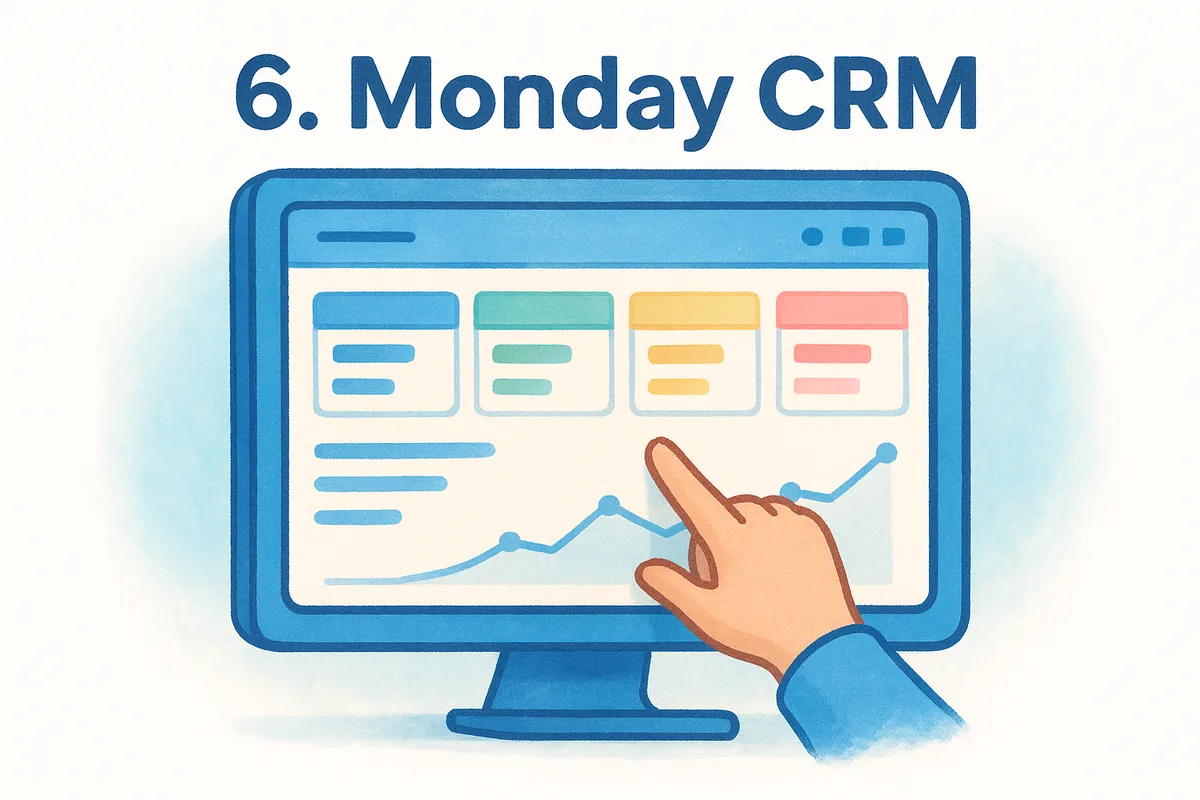
Monday CRM is a customizable sales pipeline tool that adapts the board-based structure familiar to monday.com users for contact tracking, deal management, and basic sales workflows. It positions itself among crm software alternatives by leaning into flexibility rather than out-of-the-box sales functionality.
Where it fits best
The platform suits teams that already use monday.com for project work and want to keep sales activity in the same environment without adding another subscription. It also works for teams with non-standard sales processes that need significant layout customization to match how they actually sell.
Key features to know
- •Visual deal boards with custom column types and drag-and-drop stages
- •Contact and lead management with activity logging
- •Email integration for tracking conversations
- •Automation recipes for routine task triggers
- •Dashboards that pull data across multiple boards
Biggest trade-offs
Monday CRM lacks the depth of native sales tools that purpose-built CRMs offer. Features like email sequences, built-in calling, and lead scoring are absent or require third-party add-ons, which creates gaps for teams running active outbound pipelines.
Teams coming from a dedicated sales CRM often find Monday CRM's feature set too shallow for serious pipeline management.
Pricing
Monday CRM's Basic plan starts at $12/user/month, with Standard at $17/user/month and Pro at $28/user/month, all billed annually. A minimum of three users applies across all paid plans.
7. Less Annoying CRM
Less Annoying CRM is a straightforward contact management tool built specifically for small businesses that want simplicity above everything else. Founded in 2009, it gained a following by giving non-technical teams a clean place to manage contacts and follow-ups without the complexity of most platforms.
What it is
The platform is a web-based tool that strips away the depth found in larger sales systems and focuses on contact and pipeline basics. It doesn't try to compete on features. Instead, it targets small teams that need reliable tracking without a steep setup process.
Where it fits best
Less Annoying CRM works best for very small teams (typically under 10 people) running a modest lead volume without needing automation or advanced reporting. It suits service businesses and solo operators who prioritize relationship management over a structured sales process.
Key features to know
- •Contact management with notes and history
- •Simple pipeline with customizable stages
- •Calendar and task management built in
- •Daily agenda emails showing upcoming tasks
- •Basic reporting on contacts and activity
Biggest trade-offs
The tool earns its name, but it's also limited in scope compared to most crm software alternatives on this list. You get no email sync, no automation, and minimal integrations, which means growing teams hit a ceiling quickly.
Once your process involves sequences, automation, or team reporting, Less Annoying CRM will hold you back more than it helps.
Pricing
Pricing sits at a flat $15 per user per month with no tiers or annual commitment required. The single plan includes all features, which keeps billing simple but doesn't change the platform's narrow feature set.
8. Close
Built for inside sales teams that live on the phone, Close is a sales-first CRM centered around communication. The platform keeps calling, email, and SMS tools working inside a single system without requiring separate subscriptions for each channel.
What it is
Close is a cloud-based CRM that puts outreach tools at the center of the platform rather than treating them as add-ons. It bundles built-in calling, SMS, and email sequences into a single environment so your reps spend less time switching between tools and more time selling.
Where it fits best
The platform fits teams running high call volumes with a structured inside sales motion. If your reps make dozens of outbound calls each day and need detailed communication logs recorded automatically without manual entry, Close handles that better than most options on this list.
Key features to know
- •Built-in VoIP calling with automatic call logging
- •Email sequences and bulk email sending
- •SMS messaging inside the CRM
- •Power Dialer and Predictive Dialer on higher plans
- •Pipeline reporting and activity-based analytics
Biggest trade-offs
Close is purpose-built for inside sales, which makes it a poor fit if your team needs marketing tools or complex workflow automation as part of your crm software alternatives search. The platform also carries a higher price point than most competitors, which puts it out of reach for budget-conscious small teams.
Close delivers strong communication tools, but you'll pay a premium that many small teams find hard to justify against cheaper options.
Pricing
The Startup plan begins at $49/user/month. Professional runs $99/user/month, and Enterprise reaches $139/user/month, all billed annually.
9. Airtable
Airtable sits at the intersection of spreadsheet and database, giving teams a flexible canvas to organize almost any type of information. It attracts users who find traditional CRMs too rigid but want something more structured than a plain spreadsheet. As a non-traditional pick among crm software alternatives, it rewards teams willing to invest setup time in exchange for a fully custom layout.

What it is
Airtable is a cloud-based relational database tool that lets you build custom data structures using a visual, grid-based interface. You create tables, link records between them, and view the same data as a grid, Kanban board, calendar, or gallery depending on what your workflow needs.
Where it fits best
The platform fits teams with unique or non-standard sales processes that don't map well onto the fixed pipeline stages of traditional CRMs. It works particularly well for small teams that already use Airtable for other operations and want to consolidate tools.
How to structure it like a CRM
You can build a basic CRM by setting up a Contacts table linked to a Deals table, then adding fields for deal stage, owner, close date, and priority. Airtable's Kanban view turns your Deals table into a visual pipeline you can drag between stages.
The setup takes real effort, but the result is a pipeline that matches exactly how your team sells rather than forcing you into a preset structure.
Biggest trade-offs
Airtable has no native email sync, built-in calling, or sales automation, so managing active outreach requires layering in additional tools. The more you customize it, the harder it becomes for new team members to get up to speed quickly.
Pricing
Airtable's free plan supports unlimited bases with limited records per base. Paid plans start at $20/user/month on Team, with Business running $45/user/month, billed annually.
10. Notion
Notion is a flexible workspace tool that blends notes, databases, and project management into a single environment. While it isn't a dedicated CRM, many small teams reach for it as one of their crm software alternatives when they want something lightweight, free to start, and already part of their daily workflow.
What it is
Notion is a cloud-based productivity platform built around modular blocks you arrange into pages, nested databases, and custom views. It works as a note-taking app, internal wiki, and basic database tool depending on how you configure it, which is both its biggest strength and its main limitation for sales use.
Where it fits best
The platform fits very early-stage teams that already live in Notion for documentation and want to avoid adding another subscription. It also suits solo founders or small operators tracking a handful of leads where volume stays low enough that manual updates don't create a data problem.
How to structure it like a CRM
You build a basic CRM by creating a contacts database and adding properties for deal stage, follow-up date, company, and owner. A board view filtered by deal stage turns your contacts table into a rough pipeline you can move between columns.
The flexibility is real, but every hour you spend building your Notion CRM is an hour you're not spending on actual selling.
Biggest trade-offs
Notion has no native email sync, no sales automation, and no built-in reporting for pipeline tracking. Every record update is manual, which means your data accuracy drops as your deal volume grows.
Pricing
Notion's free plan covers unlimited pages for individuals. Paid plans start at $12/user/month on Plus, with Business at $18/user/month, billed annually.
11. Excel and Google Sheets
Excel and Google Sheets are the original low-tech CRM, and for the smallest teams, they remain a genuinely functional option. Before dedicated sales platforms existed, sales teams tracked deals and contacts in spreadsheets, and many still do.
What it is
Both tools are grid-based data management applications that let you organize any information you can type into a row and column structure. Google Sheets runs entirely in the browser with real-time collaboration, while Excel gives you more advanced formulas and offline access as part of Microsoft 365.
Where it fits best
Spreadsheets work best for solo operators or teams of two to three people tracking a small, slow-moving pipeline. If your monthly deal volume stays under 30 leads and your sales process requires nothing more than contact info and a follow-up date, a spreadsheet covers that without any setup cost.
How to structure it like a CRM
You can build a basic pipeline by creating columns for company, contact name, deal stage, deal value, last contact date, and next follow-up action. A separate tab for contacts linked by company name adds relational context without requiring a real database.
Once you start filtering by stage manually and updating close dates row by row, you'll feel exactly why purpose-built crm software alternatives exist.
Biggest trade-offs
Spreadsheets have no automation, no email sync, and no activity tracking. Every update is manual, which means your data quality degrades as your pipeline grows. There's no notification system, no deal history, and no reporting beyond what you build yourself.
Pricing
Google Sheets is free with a Google account. Excel is included in Microsoft 365 Personal at $6.99/month or Microsoft 365 Business Basic at $6/user/month for commercial use.
Next steps for picking your CRM
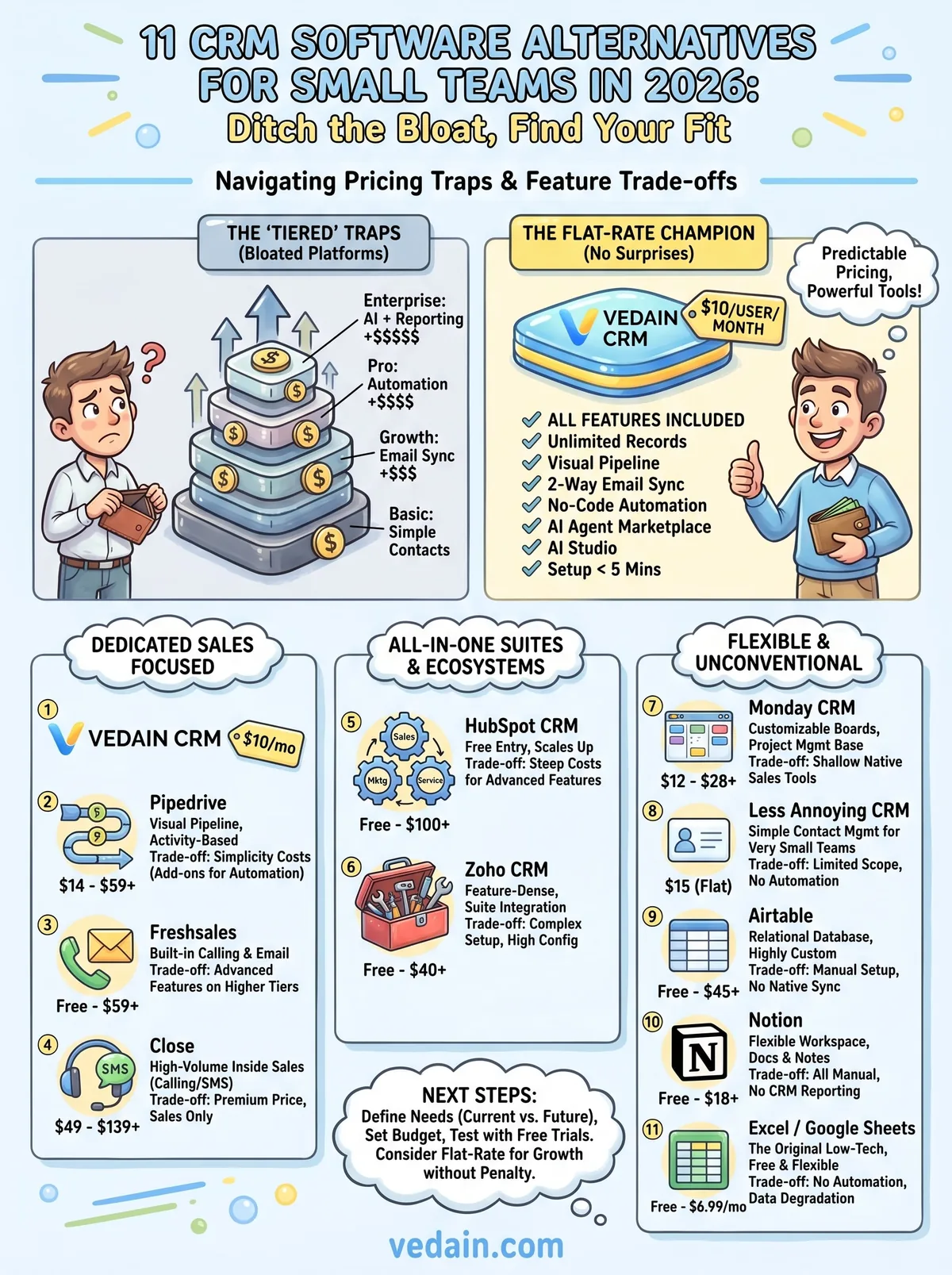
Picking the right tool from this list of crm software alternatives comes down to two questions: what does your sales process actually need right now, and what will it need in six months? If you're tracking fewer than 30 deals a month with a small team, a spreadsheet or Notion gets the job done. If you're running active outreach with sequences and automation, you need a purpose-built platform that handles those workflows without forcing you to upgrade every time you add a feature.
Start with your budget and work from there. Most platforms on this list offer a free trial or free tier, so you can test before committing. If you want a flat-rate option that includes automation, email sync, and AI tools without hidden fees, try Vedain CRM and see how fast your team can get up and running. Setup takes under five minutes, and no credit card is required.
Frequently Asked Questions
What is the cheapest CRM for small teams?
Pipedrive and Zoho CRM offer the most affordable options for small teams, both starting at $14-15/user/month. While HubSpot's free plan provides basic features at no cost, Pipedrive's paid tiers include superior sales automation, making it better value for growing teams. Freshsales and Vedain also compete in the budget segment, though Zoho CRM typically offers the most features at the lowest price point.
Is HubSpot or Pipedrive better for small teams?
HubSpot offers a more comprehensive free plan and better marketing integration, while Pipedrive specializes in sales pipeline management with a more intuitive interface. For small teams focused purely on sales, Pipedrive's $14/user/month plan provides better value, but HubSpot's free tier makes it ideal if you need multi-functional CRM capabilities without immediate investment. The choice depends on whether your team prioritizes sales automation (Pipedrive) or integrated marketing and sales (HubSpot).
Which CRM requires the least training for small teams?
Pipedrive and Freshsales are known for their user-friendly, intuitive interfaces that require minimal training for small teams. Both platforms feature visual sales pipelines and straightforward navigation, allowing team members to become productive within days rather than weeks. While Zoho CRM and Vedain offer more customization, they typically require more onboarding time, whereas HubSpot and Salesforce demand even greater implementation effort.
Can small teams use Salesforce instead of HubSpot?
Yes, small teams can use Salesforce, but it's generally overengineered and expensive for their needs, starting at $165/user/month compared to HubSpot's $50/user/month paid tier. Salesforce is better suited for enterprise organizations with complex workflows, whereas alternatives like Pipedrive ($14-99/user/month) and Zoho CRM ($15-55/user/month) provide better value for small teams. Most small teams find Salesforce's steep learning curve and implementation costs unjustifiable when more affordable, user-friendly options exist.
What's the best free CRM for small teams in 2026?
HubSpot's free plan remains the most robust option for small teams, offering unlimited contacts, basic email tracking, and essential CRM tools at no cost. While Zoho CRM and Vedain offer limited free tiers, HubSpot's free version provides the most functionality without upgrade pressure. For teams needing advanced features, transitioning to Pipedrive ($14/user/month) or Freshsales ($15/user/month) provides excellent value beyond what free plans offer.
Does Zoho CRM work better than Freshsales for small businesses?
Both Zoho CRM and Freshsales are excellent for small businesses, but they differ in focus—Zoho CRM excels in customization and integration with Zoho's broader suite, while Freshsales prioritizes AI-powered sales insights and ease of use. Zoho CRM pricing starts at $15/user/month with deeper automation, whereas Freshsales starts at $15/user/month with stronger AI lead scoring capabilities. For small teams valuing simplicity over customization, Freshsales typically requires less configuration, but Zoho offers better long-term scalability when you need custom features.