Before you dispatch
- •The order must be confirmed. Drafts can’t be dispatched.
- •An order on hold can’t be dispatched. You’ll be asked to resume it first.
- •Goods and services are handled separately. Goods are dispatched; service lines are marked complete.
Dispatch goods, in full or in parts
- Open the order and click Dispatch in the header, or Dispatch goods in the NEXT STEP card. After a part dispatch the step reads Dispatch the rest.
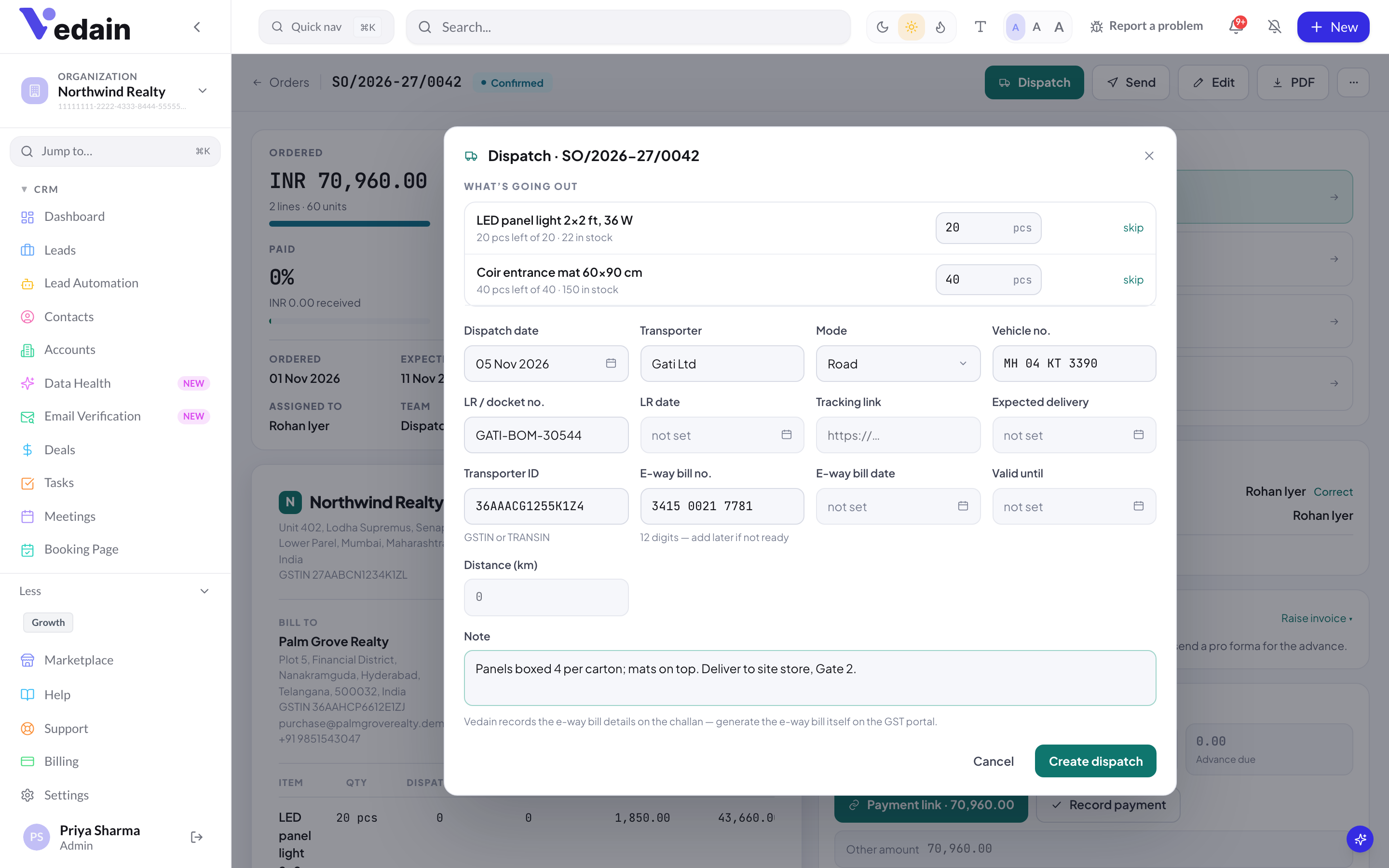
- Under WHAT’S GOING OUT, each goods line shows how much is left and how much is in stock. The quantity is pre-filled with everything left. Lower it for a part dispatch, or click skip to leave a line out. You can’t dispatch more than is left on a line.
- Set the Dispatch date and fill in the transport details you have (see below).
- Add a Note if needed, for example packing or handling instructions.
- Click Create dispatch. The dispatch gets a challan number such as DC/2026-27/0001, and stock is taken out for every stock-tracked product.
If a line says “not enough”, the dispatch would take stock below zero. By default Vedain blocks it. An admin can switch on Allow dispatch without enough stock in Order settings if you ship before recording stock-in.
Transport and e-way bill details
These fields are all optional. They are printed on the challan and included in the dispatch email if you switch that update on.
- •Transporter and Mode: Road, Rail, Air, Ship, Courier or By hand.
- •Vehicle no., LR / docket no. and LR date.
- •Tracking link: the carrier’s tracking URL (http or https). It shows as Track on the dispatch.
- •Expected delivery for this dispatch.
- •India only: Transporter ID (GSTIN or TRANSIN), E-way bill no. (12 digits), E-way bill date, Valid until and Distance (km).
Vedain records e-way bill details; it doesn’t generate or file them. Generate the e-way bill on the GST portal, then add the number here. If it isn’t ready when the goods leave, click Add e-way bill on the dispatch later (it reads Edit details once a number is saved), then Save details.
Delivery challan and packing slip
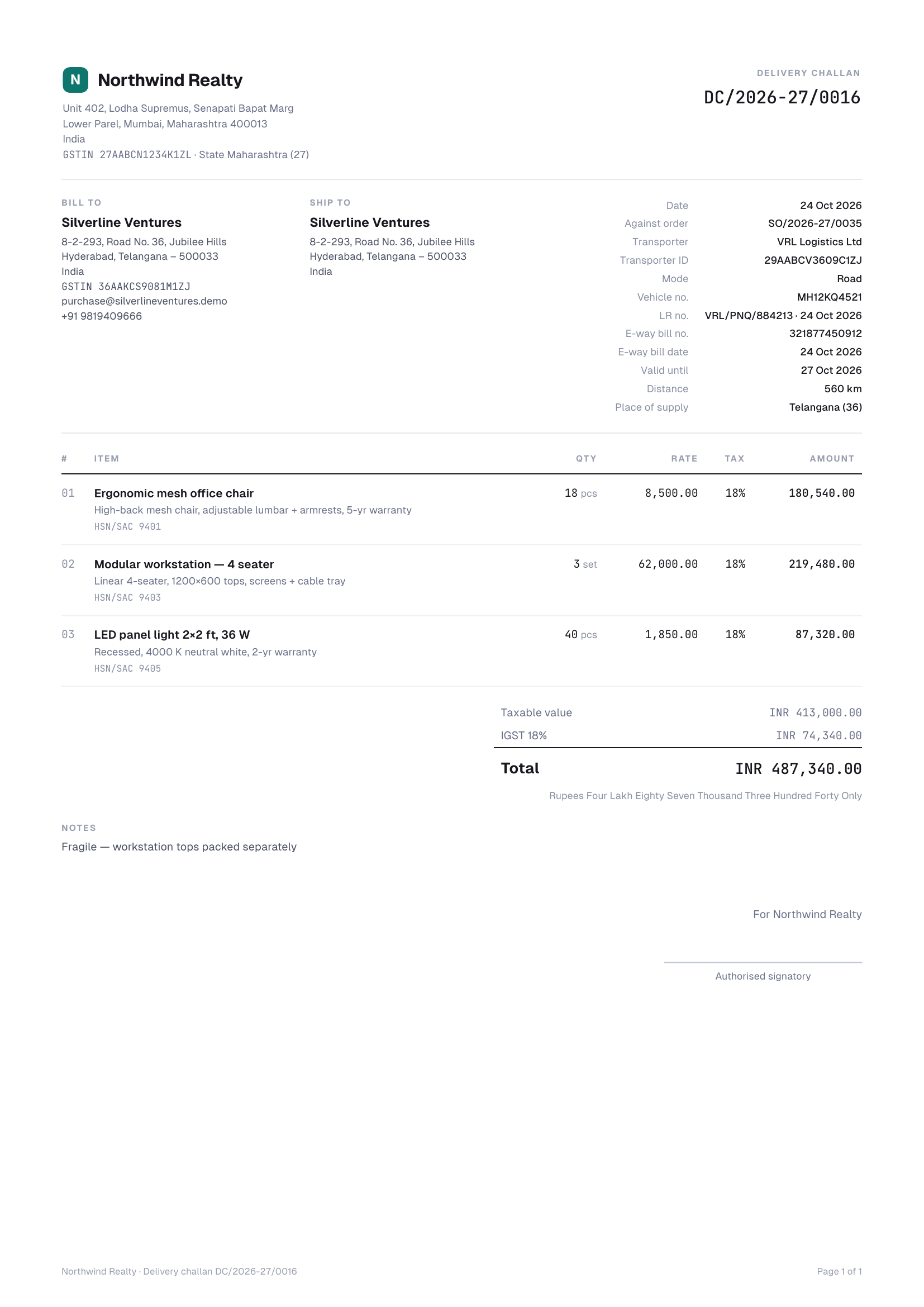
Every goods dispatch is listed in the order’s DISPATCHES card. Click Challan for the delivery challan with values, or Packing slip for the same document without prices. In India the challan shows your GSTIN and state, HSN/SAC per line and the place of supply, plus the transporter, transporter ID, mode, vehicle, LR, e-way bill number, date, validity and distance. Challans use your default invoice template for colours, font and page size.
Mark a dispatch delivered
- In the DISPATCHES card, click Mark delivered on the dispatch.
- Enter who received it if you know (Received by is optional) and confirm.
- When this was the last open dispatch, the order is delivered in full. A message tells you who the post-delivery follow-up was handed to.
Deliveries are marked by your team. Vedain doesn’t read carrier tracking, so a dispatch stays “Dispatched” until someone marks it.
Proof of delivery
Click Upload POD on a dispatch to attach a signed challan, photo or courier receipt: one JPG, PNG, WEBP, HEIC or PDF file of up to 7.5 MB. Each dispatch holds one POD file. Replace POD swaps it for a new file, and View POD opens it.
Failed or rescheduled deliveries
If the customer wasn’t available or the address was wrong, click Delivery failed. Fill in What went wrong? and Attempted on, then choose What happens next?:
- •Try again on a new date: the dispatch stays open, and the order owner gets a reminder on the new date.
- •Back to processing: goods return to stock and the lines reopen for a new dispatch.
- •Put the order on hold: goods return to stock; set a review date.
- •Cancel the order: goods return to stock and the order is cancelled.
Click Record failed delivery. Vedain creates a high-priority “Resolve failed delivery” task and alerts the original sales executive. To move a delivery date without a failed attempt, click Reschedule, pick a New delivery date (today or later) and save. The order owner gets a “Delivery due today” task on that date.
Cancel a dispatch
Click Cancel on a dispatch to undo it: the stock goes back and the lines reopen. A dispatch can’t be cancelled once it is delivered or invoiced. For goods that come back after delivery, raise a credit note with restock (see Invoicing, GST and credit notes).
Service orders
For service lines, click Mark complete (or Mark services complete in NEXT STEP). Enter the quantity done, the Completed on date and a note such as hours or the milestone, then click Mark complete. A completion has no challan number and doesn’t move stock.
Statuses explained
| Order status | What it means |
|---|---|
| Draft | Not confirmed yet. |
| Confirmed | Confirmed, nothing dispatched. |
| Part dispatched | Some quantity has been dispatched or completed. |
| Fulfilled | Every line is fully dispatched or completed. This doesn’t mean delivered: delivery is tracked per dispatch. |
| Closed | Fully dispatched and fully invoiced. Payment isn’t part of this status. |
| On hold | Paused by a person, with a reason and a review date. |
| Cancelled | Cancelled by a person, with a reason. Kept for history. |
Each dispatch has its own status: Dispatched, Delivered, Completed (services), Cancelled, or Delivery cancelled when a failed delivery was resolved by returning the goods, holding or cancelling the order.
Good to know
- •There are no carrier integrations: no live tracking, label printing or courier booking. The tracking link is a stored URL.
- •Dispatch, delivery and failed-delivery events are written to the timeline of the order’s first linked record.
- •Up to 300 lines per dispatch.
- •The post-delivery follow-up starts only when the whole order is delivered, not on dispatch or a failed attempt.
Frequently Asked Questions
Can Vedain generate the e-way bill for me?
No. Vedain has no e-way bill API. Generate the e-way bill on the GST portal and record its number, date and validity on the dispatch so they print on the challan.
Can I attach more than one proof-of-delivery file?
Each dispatch holds one POD file. Uploading again replaces it, so combine several pages into one PDF if you need to.
Does the customer get notified when goods are dispatched?
Only if an admin switches on the Goods dispatched customer update in Order settings. It is off by default. When on, the email carries the challan PDF, transporter, vehicle, LR, e-way bill number and tracking link.
Ship in parts without losing track of what’s left.
Try Orders & Inventory free for 14 days.
Start Free Trial