If you're trying to figure out which one actually fits your sales process, this comparison breaks down where each platform wins. Close takes the lead for outbound-heavy teams that live on the phone and email, while HubSpot makes more sense if marketing and sales need to share one system. We'll walk through feature depth, real pricing at different team sizes, and the type of business each tool was designed to serve.
By the end, you'll know whether Close's simplicity or HubSpot's ecosystem matches your workflow, and we'll also flag where an all-inclusive flat-rate CRM like Vedain closes gaps that both platforms leave in your pricing or feature tiers.
Why the Close CRM vs HubSpot choice matters for your team
Switching CRMs six months after go-live costs more than most teams admit. You've already trained reps on pipeline stages, built email templates, and connected your calling tools. Getting the Close CRM vs HubSpot decision right the first time saves you from re-onboarding your whole sales floor and re-mapping every deal stage from scratch. This isn't a minor software preference. It shapes how your reps spend their day, whether marketing and sales actually talk to each other, and how much of your budget goes toward tools versus commissions.
The real cost of a wrong pick
Migrating deal data, contact history, and email sequences between platforms usually eats two to four weeks of productivity, sometimes more if your data is messy. Reps lose momentum, deals fall through the cracks during the transition, and managers lose visibility into pipeline health right when they need it most. Hidden switching costs rarely show up in a vendor's pricing page, but they show up in your quarterly numbers.
The wrong CRM doesn't just cost you a subscription fee, it costs you weeks of pipeline momentum.
Budget matters just as much as workflow fit. HubSpot's tiered pricing structure means the plan that looked affordable during your demo call can double once you add the workflow automation or reporting your team actually needs six months in. Close avoids that tier creep but charges per user in a way that adds up fast for larger teams, especially once you factor in add-ons for calling minutes or SMS.
What each platform assumes about your workflow
Close was built around the assumption that your reps live on the phone and in their inbox. Everything from the dialer to the activity feed is designed to keep outbound reps moving without switching tabs. If your sales motion is high-volume calling and email outreach with a short cycle, that focus pays off in speed and adoption.
HubSpot assumes something different: that sales, marketing, and sometimes support all need to see the same contact record. That's genuinely useful if your marketing team runs campaigns that feed leads directly into sales, and you want attribution reporting that spans the full customer journey. But that same breadth means reps often navigate more menus and modules than a pure sales tool would ever require.
Before you commit, walk through these questions with your team:
- •Does marketing need to see the same records as sales, or are the teams fully separate?
- •Do reps spend most of their day calling, emailing, or both?
- •Will you need advanced automation within the first year, or is basic pipeline tracking enough for now?
- •Is your budget fixed per seat, or does it need to flex as features get added later?
Growth stage changes the math
A five-person startup selling primarily by phone rarely needs HubSpot's marketing hub, service hub, or CMS tools. Paying for that breadth when you're not using it is money that could go toward hiring another rep. For a lean sales team, Close's calling-first design often gets reps productive in days, not weeks.
Scaling past 20 or 30 reps changes the calculation. At that size, reporting depth, permission granularity, and integration with marketing automation start to matter more, and that's where HubSpot's ecosystem can justify its higher price tag, provided you actually use the extra modules. The mistake most teams make is picking based on where they are today without asking where they'll be in 18 months, which is exactly why this comparison is worth doing carefully rather than defaulting to whichever tool a competitor mentioned first.
How to decide between Close CRM and HubSpot
Deciding between Close CRM vs HubSpot doesn't require a spreadsheet full of feature comparisons if you focus on three things first: how your team sells, how big you'll be in a year, and what marketing actually needs from your CRM. Skip the demo calls until you've answered those questions honestly, because a slick product tour will sell you on features you'll never touch.
Start with your sales motion
Outbound-heavy teams that dial 50 to 100 calls a day should lean toward Close, since its built-in dialer and activity tracking remove the friction of jumping between a phone system and a CRM tab. Inbound or hybrid teams that rely on content, webinars, or paid campaigns to generate leads usually get more value from HubSpot's shared pipeline, because sales can see exactly which campaign or asset touched a lead before it ever reached a rep.
Match the tool to your team size
Team size changes which platform pays for itself faster. A tool that's efficient at 8 reps can become expensive or clunky at 80, and the reverse is also true.
If your team's daily workflow doesn't match the platform's core assumption, no amount of customization will fix that mismatch.
Run a two-week test before you commit
Before signing an annual contract, put both platforms through a short trial with real deal data, not a sandbox demo. Here's a simple checklist to work through:
- •Import 50 real contacts and one live deal pipeline into each platform
- •Have two reps log calls and emails for five business days
- •Check how long it takes to build one automated workflow in each tool
- •Ask a manager to pull a pipeline report without help from support
- •Add up the true monthly cost once you include the features you actually used
Costs and workflow fit only become obvious once real data and real reps are involved. Testing this way also exposes hidden setup time that never shows up in a sales pitch, whether that's HubSpot's steeper learning curve for automation or Close's lighter reporting for teams that need deeper analytics later.
Close CRM vs HubSpot: features side by side
Feature lists look similar on paper until you actually use the tools day to day. Close CRM vs HubSpot feature comparisons often miss that Close builds its entire product around outreach speed, while HubSpot builds around record depth and cross-team visibility. Neither approach is wrong, but the gap shows up fast once your reps start using the software instead of clicking through a demo.
Calling and outreach built in
Close ships with a native dialer that lets reps place calls, log outcomes, and queue follow-ups without leaving the deal record. Predictive dialing and call recording come standard on most plans, which matters if your reps are making dozens of calls a day. HubSpot offers calling too, but it's an add-on layered onto a system designed first for inbound marketing, so the experience feels bolted on rather than central to the workflow.

Automation depth
HubSpot's workflow automation is genuinely powerful once you unlock it, letting you trigger emails, update properties, and route leads across marketing and sales in the same sequence. The catch is that this depth sits behind higher-tier plans, so smaller teams often can't reach it without a bigger contract. Close keeps automation simpler and email sequence based, which covers most outbound playbooks without requiring a dedicated admin to maintain it.
Reporting and pipeline visibility
Both platforms offer pipeline reports, but HubSpot's reporting stretches further when marketing data needs to connect to sales outcomes, like attributing a closed deal back to a specific campaign. Close's reporting stays focused on activity and deal velocity, which is exactly what outbound managers usually want to track anyway.
Feature depth only helps if your team will actually use it, otherwise it's just a bigger bill for the same daily workflow.
Teams that need marketing and sales unified under one roof will keep bumping into HubSpot's strengths no matter how much they like Close's speed. Teams that live on the phone will keep wishing HubSpot's dialer felt as native as Close's does. Weighing these tradeoffs against your actual daily workflow, not the feature list on a pricing page, is what actually settles the comparison.
Close CRM vs HubSpot: pricing and true costs
Pricing pages rarely tell the whole story, and Close CRM vs HubSpot cost comparisons fall apart fast once you factor in seats, add-ons, and annual commitments. Both platforms look reasonable at the entry tier, but the number you see during a demo call is almost never the number you pay once your team actually uses the product.
What the tiers actually cost
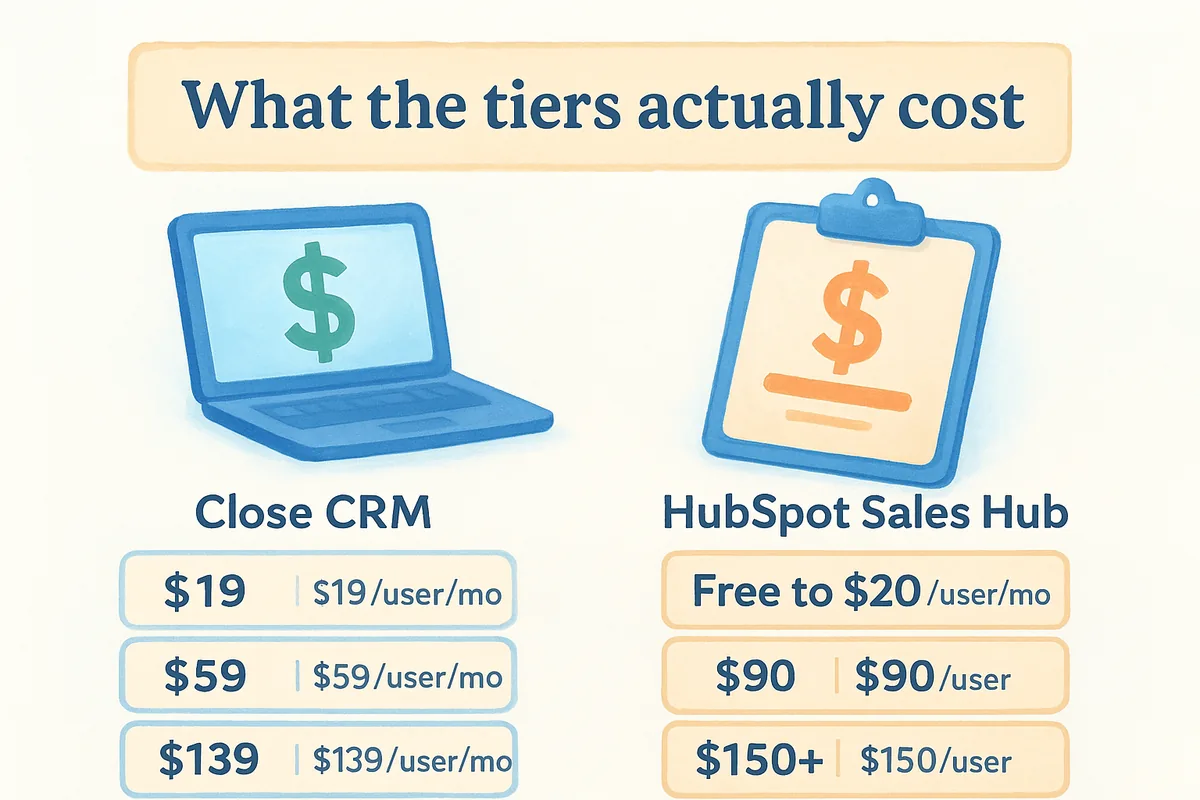
Close starts around $9 per user per month for its single-user Solo plan ($35 for the team-ready Essentials plan), climbing to roughly $99 for Growth and $139 for Scale, billed annually. Those jumps buy you more automation, reporting, and calling features, but a team of 15 reps on the Scale tier is a real line item, not pocket change. HubSpot's Sales Hub starts free, moves to about $20 per seat for Starter, then jumps sharply to around $90 per seat for Professional, where most of the workflow automation actually lives. Enterprise pricing pushes past $150 per seat and often requires a minimum seat count plus a mandatory onboarding fee that can run into the thousands.
Where the hidden costs creep in
HubSpot's tier-gated features mean the plan you need for real automation is usually two steps above the one you demoed, and mandatory onboarding fees on Professional and Enterprise plans can add thousands before you send a single email. Close avoids onboarding fees, but calling minutes, SMS, and some integrations cost extra depending on plan, which adds up for teams that dial constantly.
The sticker price on a CRM's homepage is rarely the price you'll actually pay a year in.
Growing teams feel this the hardest. Adding five reps to Close scales predictably since the per-seat cost stays flat within a tier. Adding five reps to HubSpot can trigger a tier upgrade if those reps need automation or reporting the lower plan doesn't include, turning a small headcount change into a much bigger invoice. Neither platform publishes a truly flat, all-inclusive rate, which is exactly the gap worth checking before you sign an annual contract.
Real-world scenarios: which platform fits which team
Abstract feature lists only take you so far. Seeing how Close CRM vs HubSpot plays out inside real companies makes the decision concrete, because the same feature that's a dealbreaker for one team is irrelevant to another.
The outbound SaaS startup
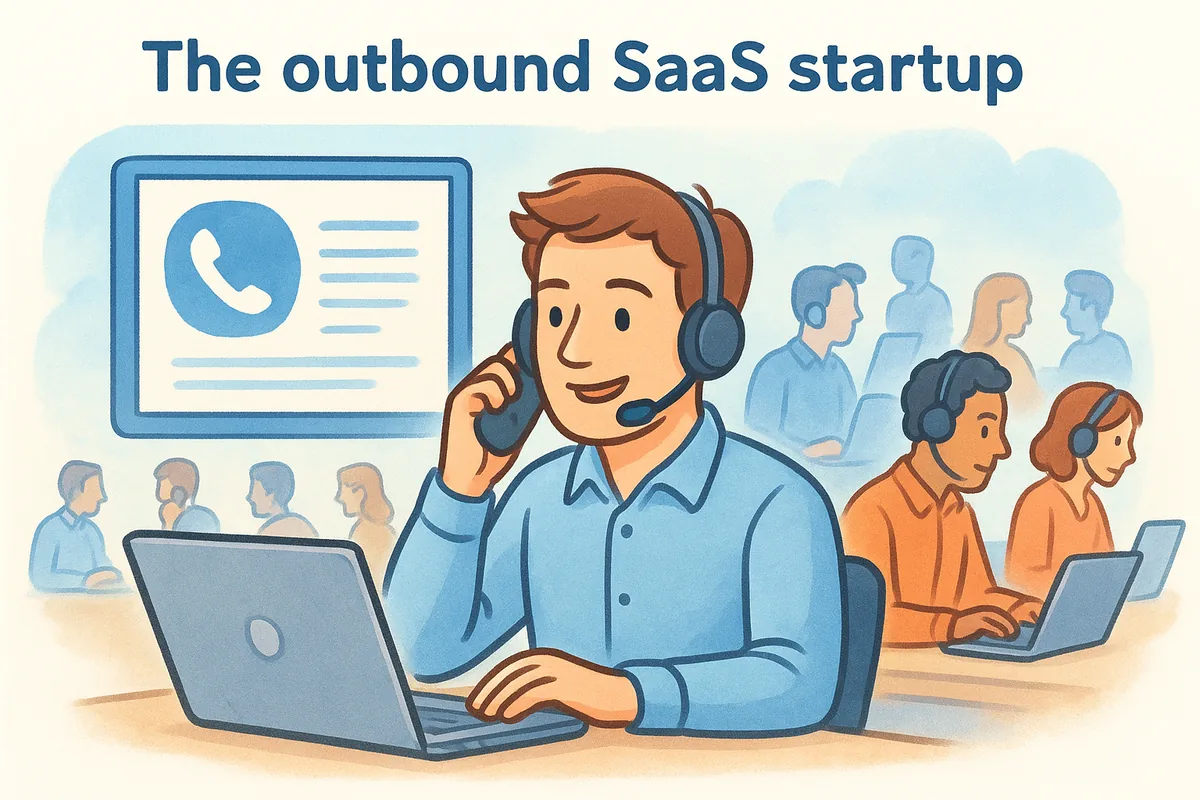
A 12-person sales team selling a $500/month SaaS product spends its day cold calling and following up by email. Close's native dialer lets reps log 80 calls without ever leaving the deal record, and the whole team was making calls within two days of signup. This team doesn't need a marketing hub, a CMS, or campaign attribution. They need speed, and Close's calling-first design delivers exactly that without extra modules sitting unused on the invoice.
The inbound-led B2B company
A mid-sized company running paid ads, webinars, and gated content generates 300 leads a month before sales ever touches them. Here, HubSpot's shared record between marketing and sales earns its keep. A rep can see which webinar a lead attended and which email sequence they opened before making the first call, and marketing can prove which campaigns actually produced closed revenue. That kind of cross-department attribution is exactly what HubSpot was built to do, and it's genuinely hard to replicate in Close without bolting on a separate reporting tool.
The right platform usually reveals itself once you map it against how leads actually arrive, not how the sales team wishes they arrived.
The hybrid services agency
A 25-person agency splits its pipeline between referrals, a small paid ad budget, and outbound prospecting for larger accounts. Neither platform fits perfectly here, which is common for teams in this middle zone.
Agencies in this spot usually decide by asking which channel drives more revenue this year, not next year. If outbound prospecting brings in the bigger accounts, Close's speed wins. If referrals and content are quietly doing more work than the team gives them credit for, HubSpot's attribution reporting will show that clearly within the first quarter of use.
A third option worth considering before you decide
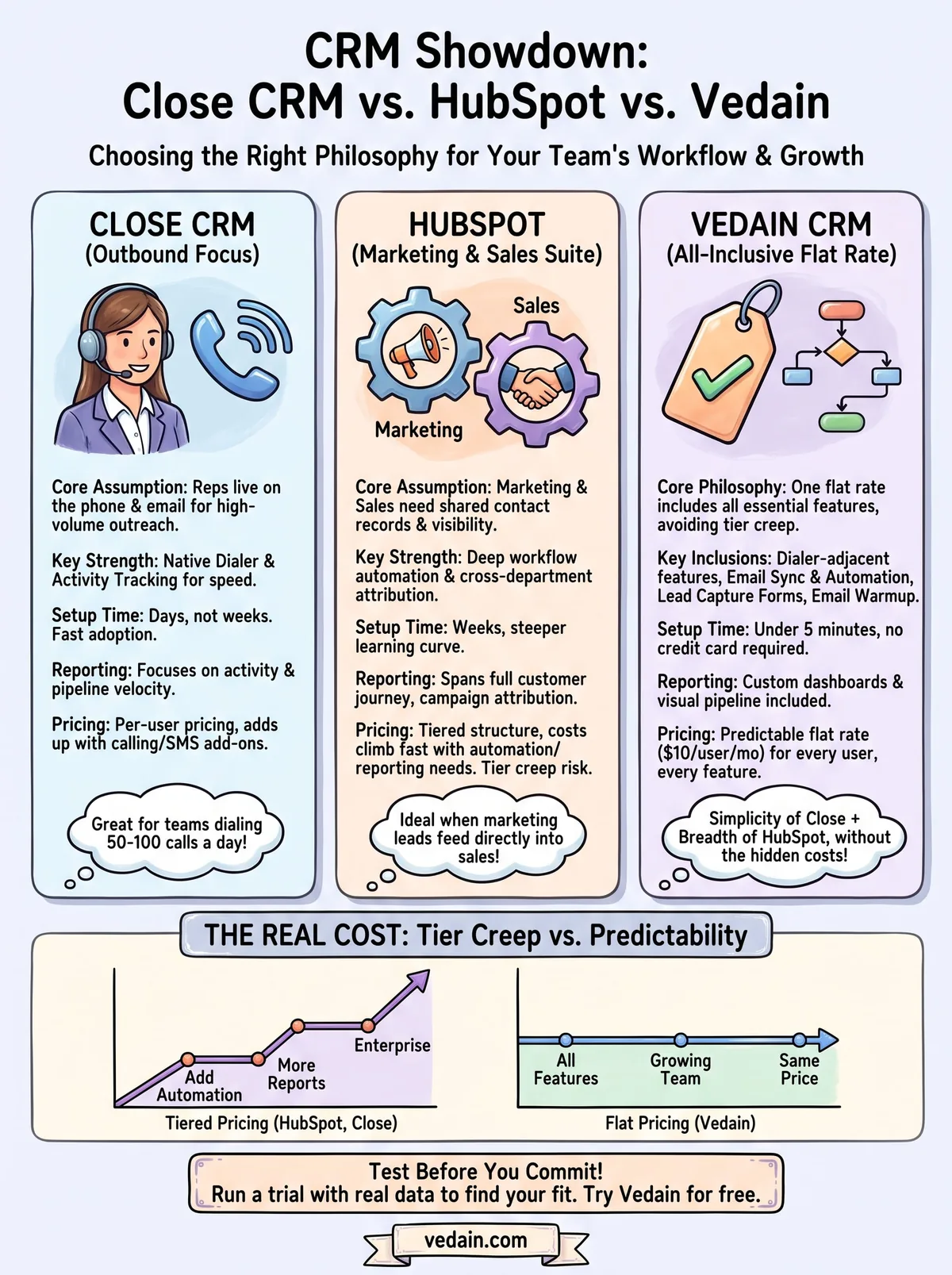
Neither Close nor HubSpot solves the tier-creep problem you just read about in the pricing section. Both platforms eventually push you toward a higher plan once your team needs more automation, better reporting, or a few extra integrations, and that upgrade path is baked into how each company makes money. Vedain CRM takes a different approach: one flat rate of $10 per user per month that includes the dialer-adjacent features, email sync, automation, and reporting you'd otherwise pay extra for on either competitor.
What a flat rate actually buys you
Outbound teams get a visual pipeline, email integration with two-way Gmail and Outlook sync, and a no-code workflow builder without hunting for which plan unlocks them. Inbound-leaning teams get lead capture forms and custom dashboards that would normally require HubSpot's Professional tier. You're not choosing between Close's speed and HubSpot's breadth, because Vedain's all-inclusive pricing puts both sets of capabilities on the same $10 seat.
Paying one flat rate for every feature beats guessing which tier you'll need to upgrade to next year.
Where Vedain fits the gap
Teams that liked Close's simplicity but outgrew its reporting, or teams that wanted HubSpot's shared visibility without the seat-minimum contracts, tend to land here. A quick side-by-side makes the gap obvious:
Setup speed matters as much as the feature list. Vedain's onboarding runs under five minutes with no credit card required to start, which removes the friction that usually delays a CRM switch by weeks. Businesses evaluating a swap from either Close or HubSpot can run a real trial with their own contacts and pipeline the same day they sign up, rather than waiting on a sales call to unlock a demo environment.
Growing past your current headcount doesn't force a plan change either. Adding ten reps to Vedain costs exactly ten times the per-seat rate, with the same feature set every current user already has. That predictability is the piece missing from both platforms covered so far, and it's worth testing before you commit to another year of tier upgrades you didn't plan for.
Finding the right fit for your sales team
The Close CRM vs HubSpot decision really comes down to how your team sells and how fast you're growing. Close wins for outbound reps who live on the phone and want speed without a learning curve. HubSpot wins when marketing and sales need one shared record and deeper attribution reporting. Neither answer is wrong, but both come with tier creep that eventually pushes your invoice higher than the demo suggested.
Before you sign an annual contract with either one, run the numbers on what you'd actually pay once automation, reporting, and extra seats get added in. If tier-gated pricing is the part that bothers you most, it's worth testing a flat-rate alternative first. You can try Vedain CRM free in under five minutes, no credit card required, and see whether one flat seat price covers everything your team actually needs.
Frequently Asked Questions
Is Close CRM better than HubSpot for sales teams?
Close CRM is better than HubSpot for outbound-focused sales teams that make 50+ calls per day — it includes a built-in power dialer, predictive dialer, call recording, and SMS without extra software. HubSpot is better for inbound-led teams that need marketing automation, content management, and SEO tools integrated with CRM. If your reps primarily do outbound calling, Close is purpose-built for it. If your leads come from marketing, HubSpot's integrated approach is more valuable.
How much does Close CRM cost compared to HubSpot?
Close CRM pricing in 2026 (billed annually): Solo — $9/user/month, Essentials — $35/user/month, Growth — $99/user/month, Scale — $139/user/month. HubSpot Sales Hub: Free — $0, Starter — $20/user/month, Professional — $90/user/month. For a 5-person team: Close Growth = $495/month vs HubSpot Professional = $450/month. Close includes a dialer; HubSpot's dialer is an additional $50/user/month add-on. For calling-heavy teams, Close is cost-comparable to HubSpot + dialer while being purpose-built for outbound.
Does Close CRM have a free plan?
No, Close CRM does not have a free plan. It starts at $9/user/month (Solo, single user; Essentials $35/user/month) with a 14-day free trial. This makes it a significant commitment compared to HubSpot's genuinely free CRM plan. If you're evaluating Close, take the full 14-day trial and make 200+ real calls to feel the dialer — that's the core feature that justifies the price over HubSpot or Pipedrive.
What sales teams should choose Close CRM over HubSpot?
Choose Close CRM over HubSpot if: (1) your team makes 30-100+ outbound calls per day (Close's dialer is purpose-built for volume), (2) you sell B2B SaaS via outbound prospecting, (3) you use multi-touch outreach combining calls + emails + SMS, (4) your reps are measured on call volume and connection rate, or (5) you need call recording and coaching features built into the CRM. Choose HubSpot if your pipeline is mostly inbound, marketing-qualified leads.
Can you migrate from HubSpot to Close CRM?
Yes, migrating from HubSpot to Close CRM is supported. Close provides a HubSpot import tool that transfers contacts, companies, deals, and activity history. What gets lost: HubSpot workflow automations (must be recreated as Close Sequences), form submissions, and landing page data. Plan 1-2 weeks for migration: export HubSpot data → import to Close → configure sequences → train team on Close's dialer interface. Most teams migrating to Close report faster adoption because reps prefer the streamlined calling interface.
What is Close CRM best used for?
Close CRM is best used for: outbound B2B sales with high call volume, inside sales teams doing 40-100 calls/day, sales teams that use multi-channel outreach (call + email + SMS in one sequence), and teams where call coaching and recording are important for rep development. Close is NOT ideal for: inbound lead management, e-commerce, real estate, or teams that rely heavily on marketing automation. It's a specialist tool for outbound-heavy teams, not a general-purpose CRM.
More CRM Comparisons