But reputation alone doesn't tell you whether it's the right fit for your team or your budget. Close has gone through several pricing changes over the years, and its feature set, while strong in some areas, comes with trade-offs that aren't always obvious from the marketing page. Whether you're comparing Close against HubSpot, Pipedrive, or a more affordable option like Vedain CRM (which offers all-inclusive features at $10/user/month), understanding what Close actually delivers matters more than surface-level comparisons.
This article breaks down Close CRM's core features, pricing structure, strengths, and limitations. By the end, you'll have a clear picture of who Close works best for, where it falls short, and how it stacks up against alternatives, so you can make a decision based on facts, not sales pages.
Why Close CRM matters for sales teams
Understanding why Close CRM resonates with sales teams starts with knowing what problem it was built to solve. Most CRMs were designed to store data first and support selling second. Close flipped that model, prioritizing communication tools like built-in calling and email sequences so reps could work entirely inside one platform. That core design decision shapes everything about how the product works and who benefits from it. Before you evaluate pricing or compare features, it helps to understand the specific pain point Close was built around.
Built around communication, not just data storage
For sales teams that rely on high-volume outreach, a CRM that forces you to switch between a dialer, an email tool, and a pipeline view creates friction at every step of the day. Close embedded its calling feature directly into the CRM from the beginning, which means your reps can call a lead, log the outcome, and move to the next prospect without ever leaving the app. This is not a bolt-on integration added after the fact. It is the foundation the product was built on, and that distinction matters when you are evaluating whether a tool will actually get used.
Inside sales teams benefit the most from this setup because their work is almost entirely phone and email based. When you do not have field reps or complex multi-channel touchpoints to manage, a tool that keeps communication and pipeline data in the same place cuts down on admin time and increases the hours reps spend actually talking to prospects.
The pipeline and activity tracking angle
Most CRMs track deals, but Close goes further by tracking the activity behind those deals. Every call, email, and SMS your team sends gets logged automatically, so managers can see individual rep activity without chasing down manual updates. That visibility matters because it connects outcomes like closed deals with behaviors like call volume and email response rates, not just pipeline stages that get moved around on a board.
When your CRM ties activity data directly to pipeline outcomes, you stop guessing which behaviors drive revenue and start making decisions from actual evidence.
This kind of activity tracking is particularly useful when you are coaching a team rather than just monitoring headcounts. You can identify which reps are making calls but not booking meetings, and respond with specific, targeted feedback rather than vague direction about "working harder."
Who actually gets value from Close CRM
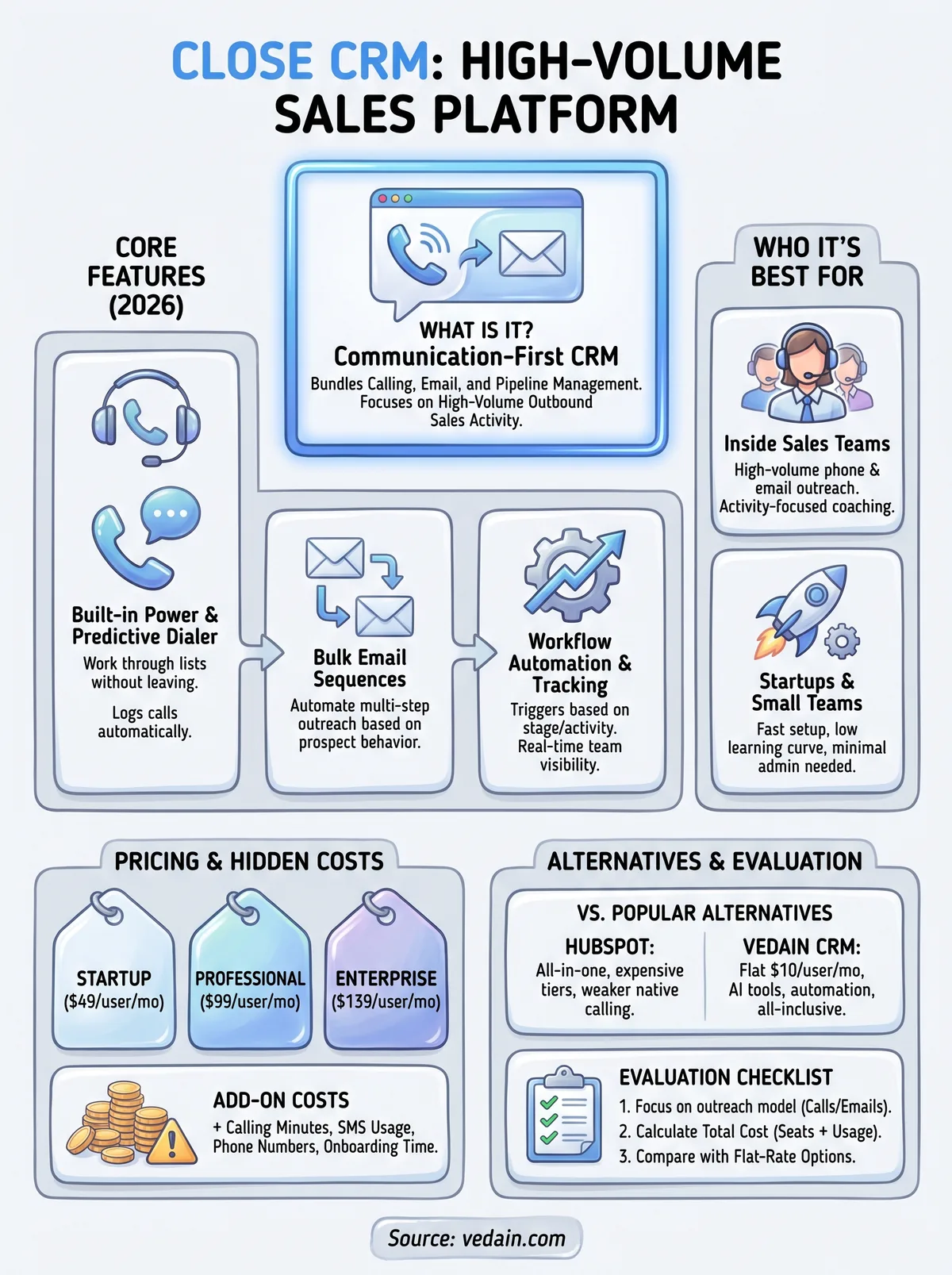
When you research "what is Close CRM good for in practice," the straightforward answer is: inside sales teams running a high volume of outbound work. If your team makes dozens of calls per day and follows those up with multi-step email sequences, Close gives you a single environment to run all of that without juggling separate tabs or tools throughout the day. The reporting gives managers a real-time view of team activity, and the built-in automation reduces the repetitive admin that slows reps down.
Smaller teams also tend to get disproportionate value from Close because the setup is relatively fast and the learning curve is low. You do not need a dedicated admin or a multi-week onboarding process to get reps productive. For a startup or a growing sales team that needs to start generating pipeline quickly, that speed of implementation carries real weight. The tradeoff, as you will see in the pricing section, is that this focused feature set comes at a cost that adds up fast as your team scales.
What Close CRM includes in 2026
If you want a clear picture of what Close CRM is at its core, start with its feature set as it stands in 2026. Close has kept its identity consistent: a communication-first CRM built for inside sales teams. The platform covers calling, email, SMS, pipeline tracking, and automation under one roof, and the product has matured enough that most features work without requiring third-party workarounds.
Core communication and pipeline tools
Close gives your reps a built-in power dialer and predictive dialer so they can work through call lists without switching to a separate tool. Every call gets logged automatically with outcome notes, duration, and recordings, which removes the manual entry step that eats into rep time. Two-way email sync connects to Gmail and Outlook, and bulk email sequences let you set up multi-step outreach that runs automatically based on prospect behavior.
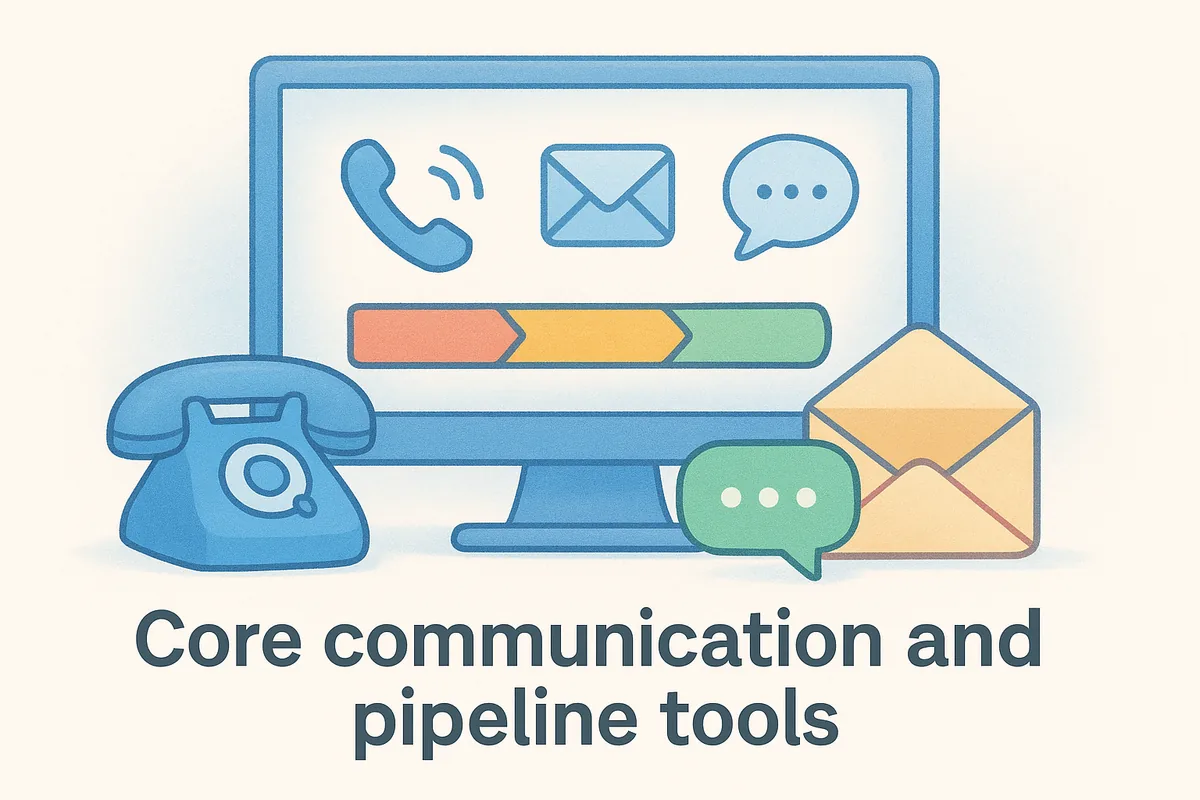
The pipeline view is straightforward: a standard deal board with customizable stages and custom activity tracking tied to individual leads and contacts. Close does not offer a native visual Kanban board with the same flexibility as some competitors, but the list and pipeline views get the job done for teams focused on volume rather than complex deal management.
If your team runs high-volume outbound and wants calling and email in one place, Close's communication stack is genuinely strong compared to most alternatives.
Automation and integrations
Close includes a built-in workflow automation tool that triggers actions based on deal stage changes, lead activity, or time-based rules. You can set up automated follow-up sequences, task creation, and lead routing without needing a separate automation platform. The depth of automation here is solid for standard outbound workflows, though it is less flexible than dedicated tools if you need complex branching logic or multi-channel automation beyond calling and email.
On the integrations side, Close connects to tools like Zapier, Slack, and a range of data enrichment services. The native integration library is smaller than HubSpot's, so if your stack requires deep connections to multiple platforms, you may find yourself leaning on Zapier more than you would prefer. For teams running a focused outbound sales motion with minimal tooling complexity, the integrations available in 2026 cover the essential bases without creating maintenance headaches.
Close CRM pricing and total cost to run it
Pricing is where a lot of teams get caught off guard with Close. The base subscription cost is only part of the picture, and once you factor in seat counts and add-ons, the monthly bill looks different from what the pricing page suggests at first glance. If you are trying to answer what is Close CRM worth for your specific team size, you need to look at the full cost structure, not just the per-seat headline number.
The plan breakdown
Close offers three main tiers in 2026. The Startup plan runs at $49 per month for a single user, which makes it accessible for solo operators or very small teams just getting started. Once you add more reps, the math shifts quickly. The Professional plan costs $99 per user per month, and the Enterprise plan sits at $139 per user per month with expanded automation limits, custom reporting, and priority support.
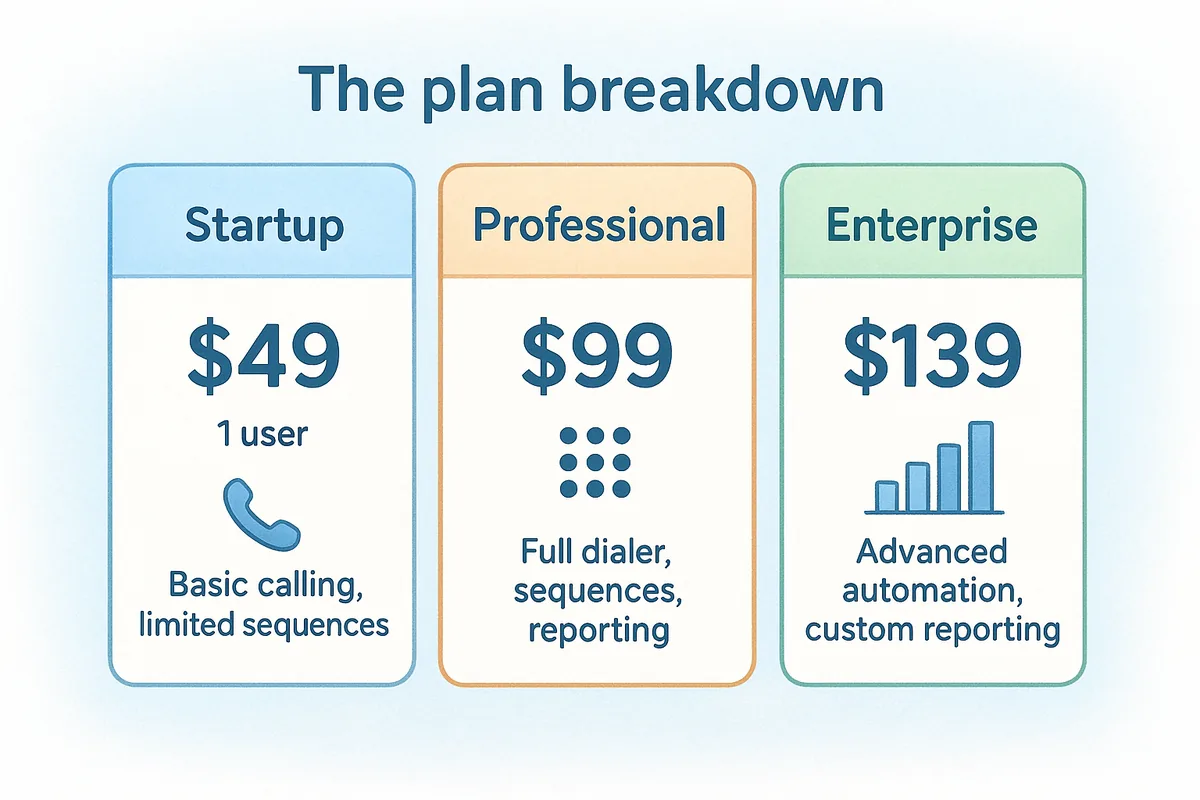
A five-person team on the Professional plan costs $495 per month, which adds up to nearly $6,000 per year before any add-ons or overages.
What drives your actual bill higher
Beyond the base subscription, several factors push the real cost above what you budgeted. Close charges separately for phone numbers and call minutes depending on your plan and volume, so high-call-volume teams will see those line items grow as activity increases. SMS usage also carries per-message costs that accumulate if your team runs text-based outreach alongside email and calling.
Training and onboarding are another cost category most buyers overlook. Close does not offer a free trial that requires a credit card, which is a positive, but setting up workflows, sequences, and custom fields still takes time from someone on your team who could be selling instead. For smaller teams without a dedicated ops person, that time cost is real even if it does not show up on an invoice. When you compare Close against flat-rate alternatives, factor in what your team will actually spend to get productive, not just the monthly seat fee.
Who Close CRM is best for and who it is not for
When you dig into what is Close CRM built to serve, the answer is specific enough that it actually helps you make a faster decision. Close is not a general-purpose CRM trying to cover every use case. It is a focused tool for a specific kind of sales team, and that focus means it fits some organizations extremely well and leaves others looking for a better match.
The teams that get the most from Close
Close works best when your team runs high-volume outbound sales with a heavy emphasis on phone and email outreach. If your reps spend most of their day making calls and following up with email sequences, the built-in communication stack removes the friction of switching between tools. The activity tracking also gives managers real visibility into rep behavior, not just deal stage movement, which makes coaching easier when you are trying to scale a team quickly.
Startups and small inside sales teams tend to get disproportionate value from Close because the setup is fast and the product does not require a dedicated admin to maintain. If you are a founder-led sales operation or a team of five to fifteen reps running structured outbound, Close fits the workflow without unnecessary complexity.
- •Outbound-focused inside sales teams
- •Startups that need fast setup and minimal admin overhead
- •Teams running multi-step call and email sequences
- •Sales managers who want activity-level reporting without manual data entry
Close works best when your team's primary job is making a high volume of calls and emails, not managing complex multi-channel deal cycles.
Where Close falls short
If your sales process is relationship-driven rather than volume-driven, Close starts to show its gaps. Account-based selling, long enterprise deal cycles, and teams that rely on field sales or multi-stakeholder management will find the pipeline features too thin. Close was not designed for the kind of complex deal tracking and custom reporting that enterprise sales teams need, and trying to force that fit usually means building workarounds that slow you down.
Pricing is the other major barrier. Teams with 10 or more reps on the Professional plan cross $1,000 per month fast, and that number climbs before you add calling costs and any additional tooling. If your budget is tight or your team is growing quickly, the per-seat cost at scale makes alternatives worth a serious look.
Close CRM vs popular alternatives
When evaluating what is Close CRM relative to competing options, the comparison comes down to what your team actually needs day-to-day. Close competes in a crowded market where platforms like HubSpot, Pipedrive, and Vedain CRM each take a different approach to the same core problem. The right choice depends on your team's outreach model, headcount, and budget tolerance more than any single feature.
Close vs HubSpot
HubSpot and Close target different ends of the CRM market. HubSpot positions itself as an all-in-one growth platform covering marketing, sales, and customer service, while Close stays narrowly focused on sales execution and outbound communication. That breadth comes with a real cost: HubSpot's automation, sequences, and advanced reporting are locked behind progressively expensive tiers, and teams that need full functionality often find themselves on plans that cost significantly more than Close.

Close wins on built-in calling and communication depth because HubSpot treats its dialer as an add-on rather than a core feature. If your team runs phone-first outbound, HubSpot's broader ecosystem does not compensate for weaker native calling. However, if your organization needs marketing automation, CMS tools, and deep cross-functional integration under one roof, HubSpot is difficult to replicate with Close alone.
Close vs Vedain CRM
Vedain CRM takes a completely different approach to pricing that changes the calculation for growing teams. At $10 per user per month with no feature gates, Vedain includes email sync, automation workflows, email campaigns, email warmup, pipeline management, reports, and an AI agent marketplace at a flat rate. A ten-person team on Vedain costs $100 per month compared to $990 on Close's Professional plan, which is a meaningful difference when you are trying to keep costs predictable as you hire.
That gap widens as your team scales, and no usage-based add-ons or surprise fees compound the difference over time.
The core trade-off between Close and Vedain is communication depth versus total feature value. Close's power dialer and predictive dialer are stronger native calling tools for teams running high-volume phone outreach. Vedain, on the other hand, gives you AI tools, LinkedIn automation, custom dashboards, and email warmup at a price point that covers significantly more ground per dollar. If calling volume is your primary driver, Close's communication stack holds an edge. If you need a broader feature set without paying per-feature, Vedain delivers more for less.
How to evaluate Close CRM for your team
Understanding what is Close CRM is useful, but evaluating it against your actual situation is what determines whether it belongs in your stack. The right evaluation skips the feature checklist and starts with how your team sells today, because a CRM that fits your current motion will get used while one that fights your workflow will get abandoned.
Start with your outreach model
Your team's primary outreach channel is the single most important input into this decision. If your reps make 30 or more calls per day and follow up with structured email sequences, Close's native communication stack earns its cost. The built-in dialer, automatic call logging, and sequencing tools remove friction at every step of a phone-first workflow, and that friction reduction has a real impact on daily rep productivity.
If your team relies more on relationship-based selling, account management, or multi-channel campaigns that go beyond calls and email, Close starts to feel like a partial solution. Before you commit to a trial, map out a typical week for your average rep and count how many hours they spend on the specific activities Close does well. That number tells you more than any feature comparison.
- •Do your reps make high-volume outbound calls daily?
- •Are multi-step email sequences a core part of your process?
- •Does your team need pipeline management without heavy customization?
- •Is your deal cycle short enough that activity volume matters more than relationship depth?
Run the numbers before you commit
Most teams underestimate the total monthly cost of running Close at their actual headcount. Start with the Professional plan rate and multiply it by your current team size, then add a realistic estimate for call minutes and SMS usage based on your team's average monthly activity. That number, not the per-seat headline, is what you are actually signing up for.
If the total cost at your current headcount already stretches your budget, the number will only grow as you hire, so factor in where your team will be in 12 months, not just today.
Then compare that total against what a flat-rate alternative like Vedain CRM charges at $10 per user per month for a comparable or broader feature set. The difference often justifies the time it takes to run a parallel trial before you lock in a decision.
Next steps
By now, you have a clear answer to what is Close CRM and a realistic view of where it fits and where it does not. Close is a strong option for inside sales teams running high-volume phone and email outreach, but the per-seat cost at scale and the narrower feature set make it a poor fit for teams that need more breadth without a matching budget increase.
Your best next step is to run the total cost calculation for your actual headcount, including calling and SMS usage, not just the base plan rate. Once you have that number, compare it against what a flat-rate platform delivers at a fraction of the cost. Vedain CRM gives you email sync, automation, AI tools, and pipeline management at $10 per user per month with no feature gates or hidden fees. Try Vedain CRM free and see how much further your budget goes.
Frequently Asked Questions
How much does Close CRM cost per month?
Close CRM pricing starts at $29 per user per month for the Starter plan, with Standard at $49/user/month and Professional at $99/user/month, all billed annually. Unlike HubSpot's free tier or Salesforce's higher enterprise pricing, Close CRM offers a middle-ground approach focused on sales teams. All plans include unlimited contacts, email integration, and calling features, making it more feature-rich at entry-level prices than competitors like Pipedrive.
Is Close CRM better than HubSpot for sales teams?
Close CRM is better than HubSpot for sales-focused teams because it emphasizes calling, email automation, and deal management without the marketing tools HubSpot prioritizes. While HubSpot excels for companies needing integrated marketing and sales, Close CRM's dedicated sales features and lower price point ($29/user vs. HubSpot's $50/month minimum) make it ideal for small-to-mid-sized sales organizations. Close also includes unlimited calling and SMS, which HubSpot charges extra for through add-ons.
Can Close CRM integrate with my existing sales tools?
Yes, Close CRM integrates with popular sales and productivity tools including Zapier, Slack, Google Workspace, Microsoft 365, and various email platforms. The platform offers native integrations similar to Zoho CRM and Freshsales, though it has fewer pre-built integrations than Salesforce. Close's API is developer-friendly, allowing custom integrations for teams with specific workflow requirements that standard connectors don't cover.
What are Close CRM's best features compared to Pipedrive?
Close CRM's standout features include unlimited calling, built-in SMS messaging, and native email integration at all price tiers, while Pipedrive charges separately for these add-ons. Both platforms excel at pipeline management, but Close CRM offers more advanced activity tracking and automation workflows out-of-the-box than Pipedrive's basic plan. For teams prioritizing communication tools alongside CRM, Close typically offers better value than Pipedrive's à la carte pricing model.
Is Close CRM suitable for enterprise companies or small businesses?
Close CRM is best suited for small-to-mid-sized businesses and sales teams (typically 5-100 users) rather than large enterprises requiring complex customization. While companies like Zoho and Salesforce offer extensive enterprise features, Close CRM prioritizes ease-of-use and affordability over deep customization, making it ideal for growing startups and SMBs. Larger organizations may find Close's feature set limiting compared to Salesforce or Vedain's enterprise-grade solutions.
What makes Close CRM different from Freshsales?
Close CRM differentiates itself with unlimited calling and native email automation included at all price levels, while Freshsales (starting at $15/user/month) requires additional purchases for advanced calling features. Close's interface is more streamlined for sales-only workflows, whereas Freshsales offers broader IT service management and support ticketing capabilities. For pure sales teams focused on outbound calling and email campaigns, Close CRM typically delivers better value than Freshsales' broader feature set.