This article breaks down every plan, tier, and hidden cost so you can see exactly what you're paying for, and what gets held back. We'll compare feature-to-price ratios across both platforms, highlight where each one charges extra, and flag the pricing traps that catch most buyers off guard. Whether you're running a five-person sales team or scaling past 50, the numbers here reflect 2026 pricing pulled directly from both platforms.
Full disclosure: we built Vedain CRM specifically because we saw sales teams overpaying for features that should come standard. At $10/user/month with everything included, we have a clear opinion on CRM pricing, but this comparison gives you the raw data on HubSpot and Pipedrive so you can decide for yourself.
1. Vedain CRM pricing at $10 per user
Before diving into the hubspot vs pipedrive pricing comparison, it helps to have a baseline that shows what a genuinely flat-rate CRM looks like in practice. Vedain charges $10 per user per month with no plan tiers, no feature gates, and no add-on bundles required to unlock the tools your team actually needs to run a sales process.
What Vedain includes in the base price
Every Vedain user gets access to the full platform from day one, not a starter tier with core features held back. That includes leads and contacts management with custom fields and smart filters, visual deal pipelines, two-way email sync for Gmail and Outlook, email campaigns with multi-step automated sequences, a no-code workflow builder, email warmup over 21 days, lead forms, pipeline reports, conversion funnels, team leaderboards, granular permissions, and a 30+ AI agent marketplace for enrichment and content generation. You don't unlock any of that by upgrading because there is no upgrade path to worry about.
At $10/user/month, Vedain includes features that most CRM competitors lock behind plans costing $45 to $100+ per user.
What teams usually pay extra for in other CRMs
Most tiered CRMs deliberately split their feature set across multiple plans to push teams into higher tiers as their needs grow. You typically pay extra for email automation and sequences once you move past basic outreach, and again for advanced reporting once you want anything beyond a simple pipeline overview. AI tools, email marketing, revenue forecasting, and custom permissions all tend to sit behind additional charges or separate add-on bundles.
Some platforms layer on mandatory onboarding fees that run into the thousands before your team has sent a single email from the CRM. These costs rarely appear in the headline plan pricing but show up clearly in the first invoice.
Best-fit scenarios for Vedain vs tiered CRMs
Vedain fits teams that want a complete sales stack without building a spreadsheet to figure out which features they can afford at each plan level. If you need pipelines, automation, sequences, reporting, and AI tools without paying separately for each module, the flat rate removes that calculation entirely. Tiered CRMs make more sense when you need deep enterprise integrations, complex custom objects, or dedicated support infrastructure that justifies a significantly higher per-seat cost.
Quick cost math for 5, 10, and 25 users
The numbers stay predictable with a flat-rate model. Here's what Vedain costs against a typical mid-tier CRM priced at $50/user/month:
These savings scale directly with headcount, and they exclude the add-on costs that tiered platforms layer on after you sign the initial contract.
2. HubSpot pricing in 2026
HubSpot's pricing model is one of the most complex in the CRM space, which makes any hubspot vs pipedrive pricing comparison harder than it first appears. The platform organizes its features into separate products called Hubs, and your total bill depends on which Hubs you buy, which tier you choose within each Hub, and how many contacts or seats you're paying for.
How HubSpot pricing works across Hubs
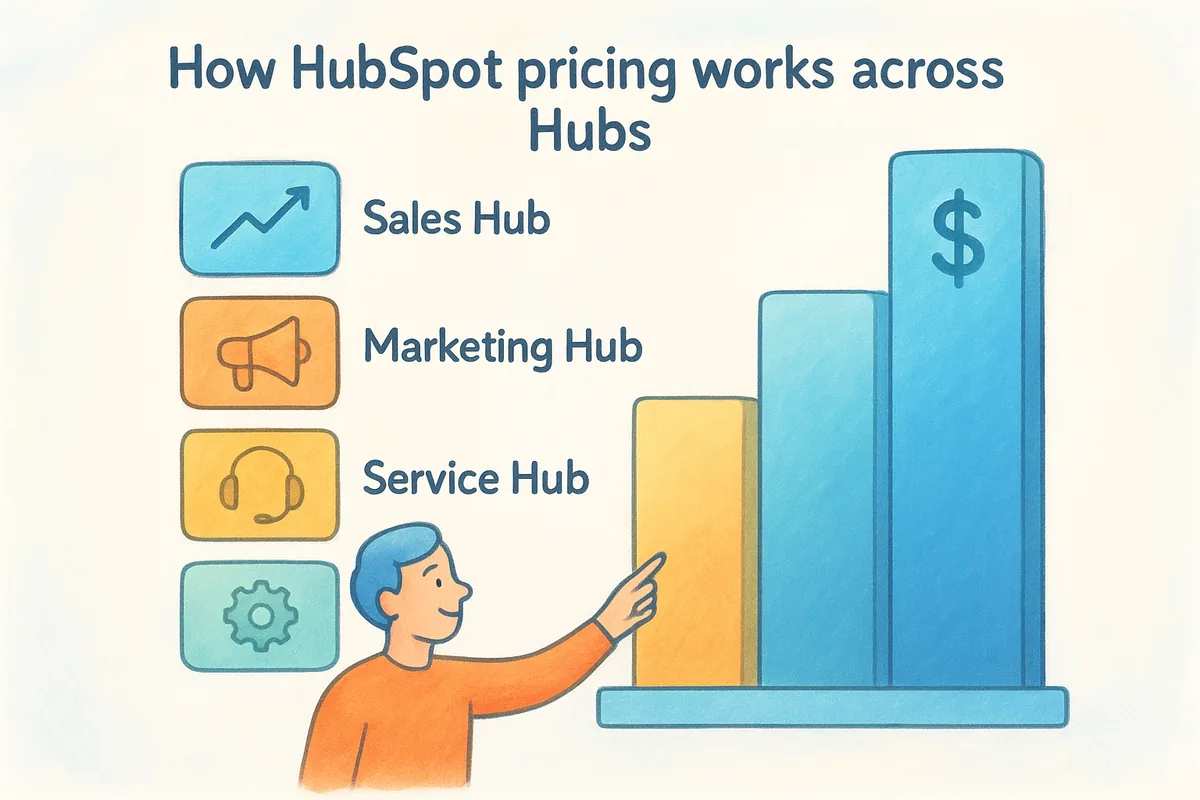
The platform sells its features as a collection of separate products: Sales Hub, Marketing Hub, Service Hub, Content Hub, and Operations Hub. Each Hub carries its own pricing tiers, and most teams need more than one to run a complete operation. Buying multiple Hubs compounds the cost quickly, and even bundled suite pricing runs significantly higher than standalone alternatives.
Free tools vs paid tiers and what changes
The free tier provides basic contact management, limited pipeline views, and restricted forms. Moving to a paid plan lifts those limits on contacts, emails, and automations, but the free tier alone isn't enough to support a real sales process. The jump from Starter to Professional is where the platform becomes genuinely capable for outbound sales teams.
Typical Sales Hub tiers and what they unlock
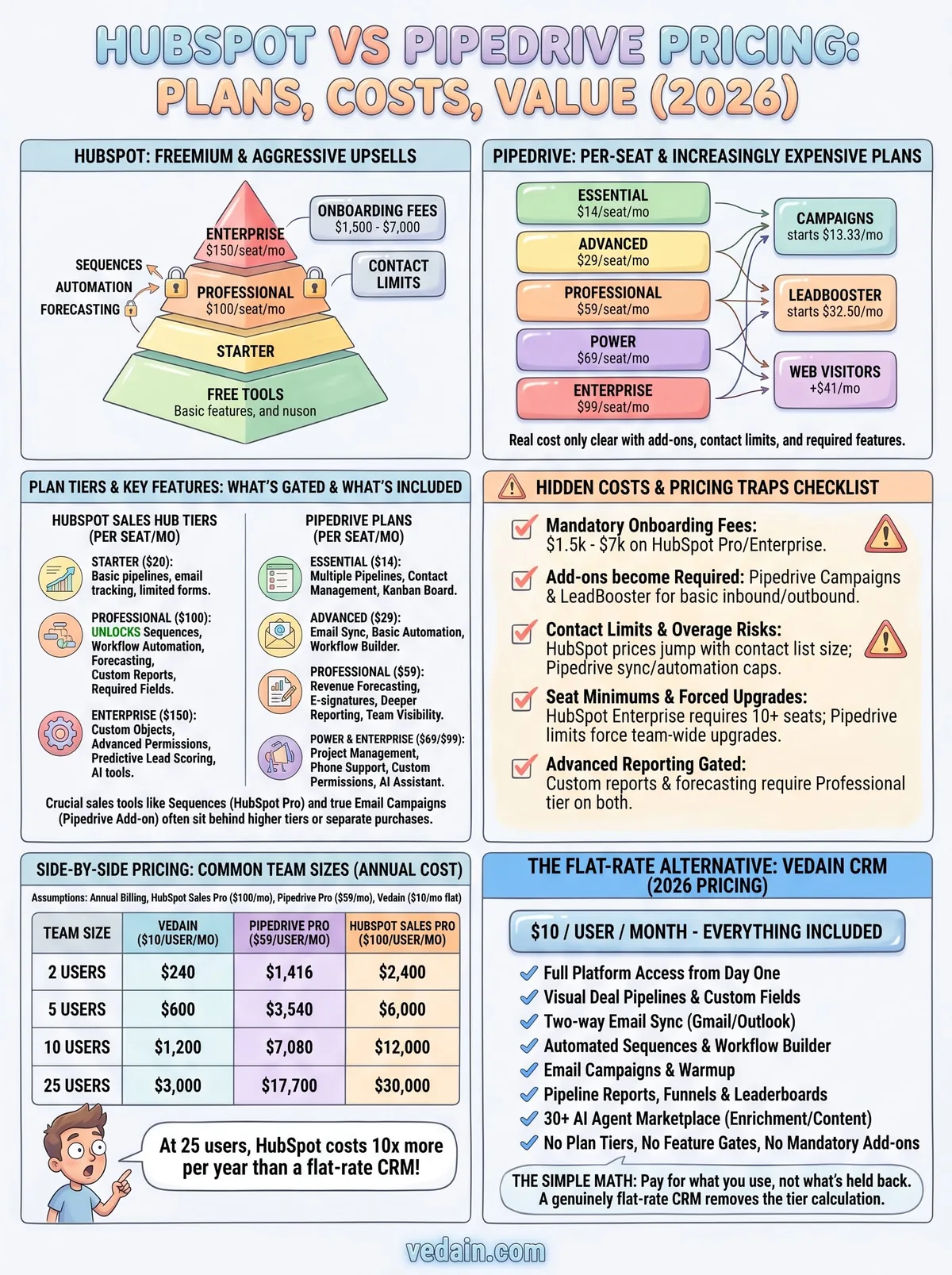
Sales Hub runs across four tiers. Starter begins at $20/seat/month and covers basic pipelines and email tracking. Professional jumps to $100/seat/month and unlocks sequences, forecasting, and workflow automation. Enterprise sits at $150/seat/month and adds custom objects, advanced permissions, and predictive lead scoring.
At the Professional tier, a 10-person sales team pays $1,000/month before adding any marketing or service tools.
Common extra costs like onboarding and usage limits
Mandatory onboarding fees apply at Professional and Enterprise tiers, ranging from $1,500 to $7,000 depending on which plan you choose. Contact limits also affect your bill directly: marketing contacts above your plan threshold trigger automatic cost increases, which catches teams off guard mid-contract.
3. Pipedrive pricing in 2026
Pipedrive takes a simpler approach to packaging than HubSpot does, but the hubspot vs pipedrive pricing comparison still reveals meaningful complexity once you factor in add-ons and feature limits. The platform sells five core plans, all billed per seat, and your actual cost depends heavily on which features your team needs beyond the basics.
Pipedrive plan tiers and what they include
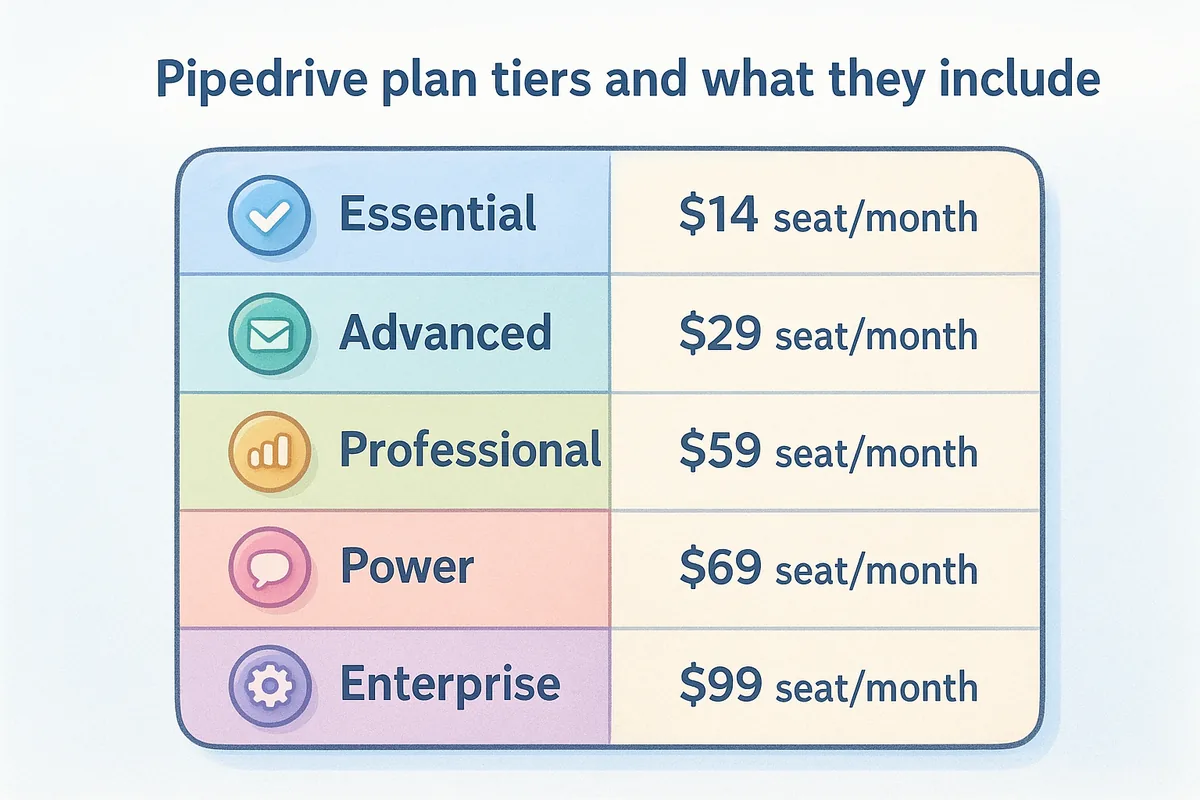
Pipedrive offers five tiers: Essential ($14/seat/month), Advanced ($29/seat/month), Professional ($59/seat/month), Power ($69/seat/month), and Enterprise ($99/seat/month). Essential covers basic pipelines and contact management. Advanced adds email sync and automation. Professional unlocks revenue forecasting, e-signatures, and deeper reporting. Power adds project management and phone support, while Enterprise opens up custom permissions and unlimited feature access across the board.
| Pipedrive plan | Price (per seat/month, annual billing) | Best for |
|---|---|---|
| Essential | $14 | Basic pipeline tracking |
| Advanced | $29 | Email sync + simple automation |
| Professional | $59 | Most active sales teams (reporting, e-sign) |
| Power | $69 | Larger teams needing project + phone support |
| Enterprise | $99 | Unlimited feature access, enhanced security |
Add-ons and bundles that change your total cost
Several high-demand features sit outside the core plans and require separate purchases. Campaigns (email marketing) starts at $13.33/month. LeadBooster, which includes chatbot, prospecting tools, and forms, starts at $32.50/month. Web Visitors tracking adds $41/month on top of your plan cost. These add-ons stack directly onto your per-seat bill and can push a mid-tier plan significantly higher than the headline price suggests.
A Professional plan team of 10 adding Campaigns and LeadBooster pays roughly $750 to $900/month before any annual discount applies.
What Pipedrive charges per seat and how it scales
Every plan charges per seat with no volume discounts at smaller team sizes. Annual billing drops the monthly rate by roughly 20% across all tiers, but those savings only apply if your team commits upfront for the full 12-month term.
Common limits that push teams into higher tiers
Teams often start on Essential or Advanced and hit walls quickly. Automation limits and restricted reporting on lower tiers push most active sales teams toward Professional or higher within the first few months of use, which means the initial plan cost rarely reflects what you end up paying long-term.
4. The fastest way to compare HubSpot vs Pipedrive
Most buyers approach hubspot vs pipedrive pricing by looking at headline plan numbers and picking the lower one. That approach misses the actual cost picture because both platforms structure their pricing so that the base plan rarely reflects what your team ends up paying. A structured comparison process saves you from signing a contract that looks affordable until the first renewal.
Define your must-have features before you price shop
Start with a clear list of features your team cannot operate without, not a wish list of every feature that sounds useful. Write down the specific tools your sales process depends on: pipeline views, email automation, sequences, reporting, and permissions. This list becomes your filter when you read plan pages, and it prevents you from pricing a tier that technically covers those needs on paper but gates them behind a feature your team will hit on day one.
If you can't name your five must-have features before comparing plans, you will buy the wrong tier at least once.
Choose a baseline workflow to compare apples to apples
Pick one complete sales workflow your team runs today and map every tool it requires. A typical outbound sequence involves lead capture, contact creation, an automated email series, pipeline updates, and a reporting view at the end. Run that workflow through each platform's pricing page and identify which plan tier unlocks every step. That gives you a real cost floor rather than a theoretical starting price.
List the real users who need paid seats
Count only the people who actively use the CRM to manage deals or run outreach. Both platforms charge per seat, so adding admin or reporting-only users inflates your bill without adding output. Your seat count drives the final number more than any plan tier decision does.
Decide your billing assumptions and add-on needs
Confirm whether you're budgeting monthly or annually, since both platforms discount annual commitments by around 15 to 20 percent. Then revisit your must-have features list and flag any that require paid add-ons on either platform. Total those add-on costs separately before you compare plan prices.
5. Side-by-side pricing table for common team sizes
Putting actual numbers side by side is the clearest way to cut through the noise in any hubspot vs pipedrive pricing discussion. The table below uses consistent assumptions so you're comparing equivalent plans rather than matching a starter tier on one platform against a professional tier on another.
Scenario assumptions used in the table
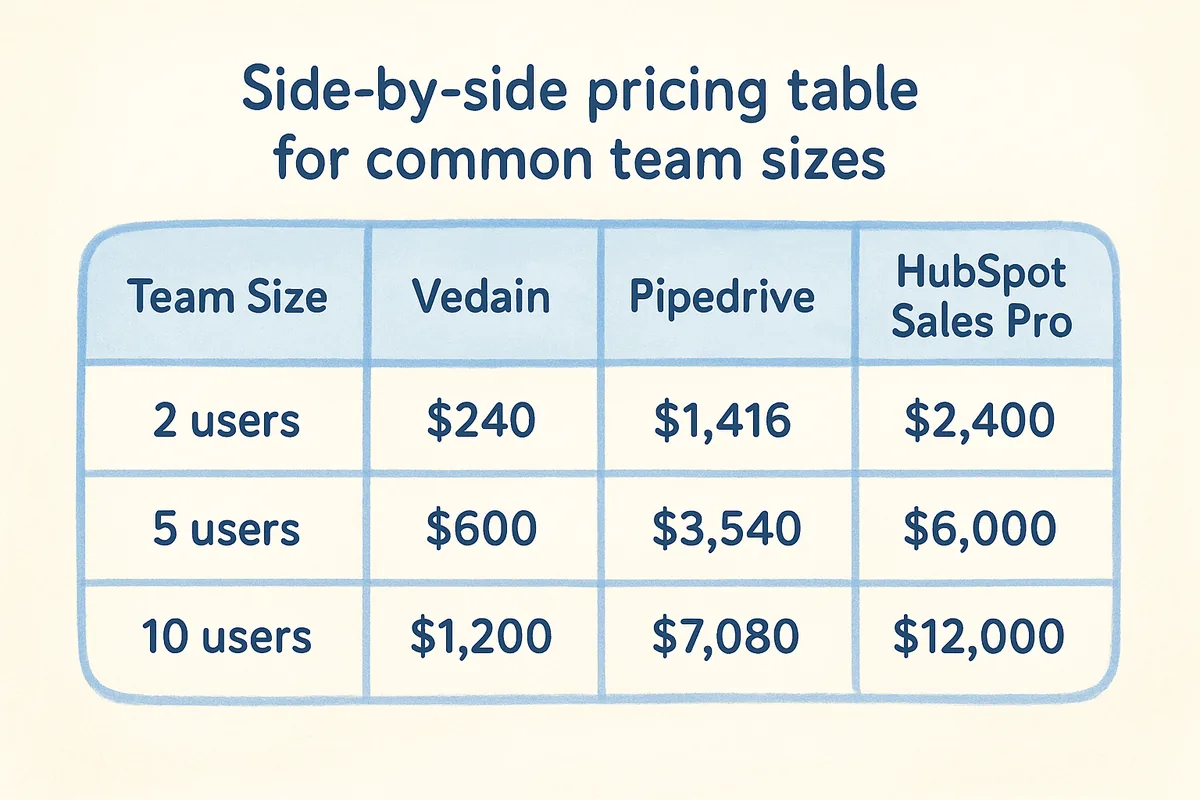
Every number below reflects annual billing, which typically reduces monthly rates by 15 to 20 percent on both platforms. For HubSpot, the comparison uses Sales Hub Professional at $100/seat/month since that's the minimum tier that unlocks sequences and workflow automation for a real outbound process. Pipedrive uses the Professional plan at $59/seat/month for the same reason. Vedain stays at $10/seat/month with no add-ons required since the full feature set is included. Add-ons like HubSpot onboarding fees or Pipedrive's Campaigns bundle are excluded to keep the base comparison clean.
| Team size | Vedain ($10/seat) | Pipedrive Professional ($59/seat) | HubSpot Sales Pro ($100/seat, 5-seat min) |
|---|---|---|---|
| 2 users | $240/yr | $1,416/yr | $6,000/yr (5-seat minimum) |
| 5 users | $600/yr | $3,540/yr | $6,000/yr |
| 10 users | $1,200/yr | $7,080/yr | $12,000/yr |
| 25 users | $3,000/yr | $17,700/yr | $30,000/yr |
2 users cost comparison
At two users, the monthly cost difference looks manageable, but the annual gap already tells a clear story.
5 users cost comparison
Five users is where the numbers start to separate meaningfully. Pipedrive costs nearly six times more than Vedain per year, and HubSpot runs ten times higher on the same Professional tier.
10 and 25 users cost comparison
This is where the cost gap becomes impossible to ignore. A 25-person team on HubSpot Professional pays $30,000 per year before any add-ons, while the same team on Vedain pays $3,000.
At 25 users, HubSpot Sales Professional costs 10x more per year than Vedain with no additional core sales features unlocked at that price difference.
6. What you get for pipeline and deal management
Pipeline management sits at the core of any CRM evaluation, and the hubspot vs pipedrive pricing comparison reveals real differences in what each platform delivers at each tier. Neither platform gives you the full picture on their plan pages, so knowing what's gated and what's included upfront saves you from a painful mid-quarter upgrade.
HubSpot deal pipelines and deal limits by tier
HubSpot's free tier limits you to a single pipeline, which works for solo founders but breaks down the moment your team runs separate processes for inbound and outbound. Sales Hub Starter unlocks additional pipelines, but deal automation, rotating leads, and required fields on deals all sit behind the Professional tier at $100/seat/month. That means a team that wants structured pipeline management with enforced data entry pays Professional pricing from day one.
Paying $100/seat/month just to enforce required deal fields is a cost most small sales teams don't anticipate until they're already locked into a contract.
Pipedrive pipelines and core sales workflow tools
Pipedrive includes multiple pipelines on every paid plan, starting from Essential at $14/seat/month. The core Kanban board, deal rotting indicators, and activity reminders are available across all tiers. What changes as you move up is reporting depth and automation capacity, not the pipeline itself, which makes Pipedrive a more accessible starting point for teams that primarily need deal tracking.
Where teams pay more to remove friction
Both platforms charge more to eliminate the gaps that slow your team down. On HubSpot, required fields and deal-based workflows sit at Professional. On Pipedrive, revenue forecasting and team visibility controls require the Professional plan at $59/seat/month or higher. Small teams hit these limits faster than they expect.
Best value pick for sales-only teams
If your team's primary need is deal tracking and pipeline visibility, Pipedrive delivers more at the Essential or Advanced tier without forcing a jump to a $59+ plan. HubSpot becomes the stronger pick only when you need deep cross-team data connecting deals to marketing contacts.
7. What you get for automation and sequences
Automation is where the hubspot vs pipedrive pricing gap gets expensive fast. Both platforms offer automation tools, but what you can actually build without upgrading your plan depends entirely on which tier you're sitting on. Knowing exactly where each platform gates its automation features prevents you from signing up at a price that doesn't support the workflow your team depends on.
HubSpot workflows vs sequences and where gating starts
HubSpot splits automation into two separate tools: workflows and sequences. Workflows handle internal process automation like deal stage updates, task creation, and contact routing. Sequences handle personalized one-to-one outbound email cadences for sales reps. Both sit exclusively behind the Professional tier at $100/seat/month. Starter-tier users get basic email tracking and task reminders, but no automation that moves deals forward without manual input.
Locking sequences behind a $100/seat/month plan means a 10-person sales team pays $1,000/month just to run automated outbound outreach.
Pipedrive automations vs sequences and what's included
Pipedrive includes basic workflow automation on the Advanced plan at $29/seat/month, which covers trigger-based actions like moving deals and sending notifications. Email sequences, however, require the separate Campaigns add-on starting at $13.33/month, and that add-on handles broadcast-style emails rather than true one-to-one sales sequences. Teams that need proper outbound cadences often find Pipedrive's native toolset limited compared to what HubSpot unlocks at Professional.
What it costs to build similar outbound motion
To run a comparable outbound sequence, you pay $100/seat/month on HubSpot or $42+/seat/month on Pipedrive once you add the Campaigns bundle. Neither option is cheap once your team size grows past five or ten users.
Best value pick for automation-heavy teams
If automation drives your revenue, the cost per automation feature matters more than the headline plan price. Pipedrive costs less per seat, but HubSpot's sequences are more powerful. Teams that need both automation and sequences built into one plan should factor that into their total cost before committing.
8. What you get for email, campaigns, and lead capture
Email tools and lead capture sit at the intersection of sales and marketing, and that's exactly where hubspot vs pipedrive pricing gets complicated. Both platforms include some email functionality, but what you can actually do with it depends on which plan you're on and which add-ons you've purchased.
HubSpot email marketing, forms, and contact rules
HubSpot includes basic email marketing and forms on its free and Starter tiers, but meaningful campaign functionality requires Marketing Hub, which carries its own separate pricing structure on top of Sales Hub. Contact limits drive your Marketing Hub cost more than seat count does, meaning a small team with a large list pays more than a larger team with fewer contacts. Forms work across all tiers, but smart forms that adapt to known contacts require Professional.
Pipedrive email and Campaigns differences by plan
Pipedrive's core plans include two-way email sync starting from the Advanced tier at $29/seat/month, which covers standard email sending and tracking from inside the CRM. The Campaigns add-on enables broadcast email to lists and starts at $13.33/month, priced separately from your seat plan. That structure means you're managing two separate billing lines for what most teams consider basic email functionality.
Pipedrive's Campaigns add-on handles broadcast emails but doesn't replace a dedicated sequencing tool for true one-to-one outbound.
Lead capture tools and when add-ons become required
HubSpot includes forms and landing pages on paid Marketing Hub plans, but chatbot and live chat tools require additional configuration and often a higher tier. Pipedrive's LeadBooster add-on bundles chatbot, web forms, and prospector tools starting at $32.50/month, which becomes a required purchase the moment your team wants any inbound capture capability beyond manual entry.
Best value pick for sales plus basic marketing
If your team needs email campaigns and lead capture inside the same platform, both tools add measurable cost beyond their base plans. Pipedrive keeps per-seat pricing lower but forces add-on purchases quickly, while HubSpot bundles more tools once you commit to a higher-tier suite.
9. Reporting, forecasting, and AI costs
Reporting and forecasting tools are where both platforms in the hubspot vs pipedrive pricing comparison quietly add significant cost. What looks like included analytics on the plan page often requires a higher tier the moment you need anything beyond a basic pipeline summary.
HubSpot reporting depth, forecasting, and AI credits
HubSpot locks custom report builders behind the Professional tier at $100/seat/month, and sales forecasting with deal-level probability requires the same minimum. Free and Starter users get pre-built dashboards with limited filters. AI features like conversation intelligence and predictive lead scoring sit exclusively at the Enterprise tier, which runs $150/seat/month. If your RevOps team needs custom attribution or multi-touch reporting, expect to pay Enterprise pricing before those tools appear.
At $150/seat/month for Enterprise AI tools, a 10-person team pays $18,000 per year before adding any other Hub.
Pipedrive reporting, forecasting, and AI features by plan
Pipedrive includes basic revenue forecasting on the Professional plan at $59/seat/month, which covers weighted pipeline views and goal tracking. The AI-powered sales assistant, which surfaces deal recommendations and next-step prompts, is available across most paid tiers. Advanced reporting with custom fields and cross-team visibility requires the Professional plan or higher, and the full analytics suite lives behind the Power and Enterprise tiers.
What "advanced reporting" really costs in each CRM
Both platforms use "advanced reporting" as a label that conceals a pricing gate. On HubSpot, accessing custom dashboards costs you the Professional upgrade. On Pipedrive, meaningful team-level reporting requires Professional at minimum. Neither platform delivers manager-grade visibility on their entry-level plans.
Best value pick for managers and RevOps
If your team depends on custom reports and forecasting to run pipeline reviews, Pipedrive Professional costs less per seat than HubSpot Professional for comparable visibility. HubSpot only pulls ahead when you need marketing attribution data connected directly to revenue.
10. Hidden costs and pricing gotchas checklist
The headline plan price in any hubspot vs pipedrive pricing comparison tells you less than half the real story. Both platforms use pricing structures that surface additional costs after you've already committed to a contract, and knowing where those costs hide lets you build an accurate budget before you sign anything.
Seat minimums and forced upgrades
Both platforms enforce minimum seat requirements at certain tiers, which means your per-user cost can jump even if your team size stays flat. HubSpot's Enterprise tier requires a minimum of 10 paid seats, so smaller teams pay for seats they don't use. Pipedrive doesn't enforce seat minimums, but feature limits on lower tiers routinely force teams to upgrade every active user simultaneously, which hits your total bill all at once.
Onboarding fees, support levels, and admin overhead
HubSpot charges mandatory onboarding fees of $1,500 at Professional and $7,000 at Enterprise, and these fees apply per Hub you purchase. Pipedrive doesn't require onboarding fees, but phone support only appears on Power and Enterprise plans, which means lower-tier teams rely entirely on email and chat support regardless of how urgent the issue is.
Mandatory onboarding fees can add thousands to your first-year cost before your team logs a single deal.
Add-ons that look optional but become required
Pipedrive's LeadBooster and Campaigns add-ons start as optional purchases but become necessary the moment your team wants inbound capture or email marketing. HubSpot's Operations Hub looks supplemental until your team needs data sync or programmable automation, at which point it adds another monthly line item to your bill.
Data limits, sync limits, and overage risks
HubSpot's marketing contact limits trigger automatic cost increases when your list grows past your plan threshold. Pipedrive caps email sync history on lower tiers and limits the number of automations you can run per account, which pushes active teams into higher plans faster than their seat count alone would justify.
11. Which CRM is the best value for your stage
The right answer in any hubspot vs pipedrive pricing decision depends less on which platform has more features and more on what your team actually needs right now. Each platform has a realistic fit depending on your size, growth rate, and budget tolerance.
Solo founder or very small team
If you're running one to three seats, Pipedrive's Essential plan at $14/seat/month gives you a functional pipeline without overpaying for features you won't use yet. HubSpot's free tier works as a starting point, but you'll outgrow it quickly and the jump to Starter or Professional is steep relative to what you gain at that stage.
SMB sales team growing fast
A five to twenty-person team that needs sequences, automation, and reporting will hit plan ceilings on both platforms within months of signing up. Pipedrive Professional at $59/seat/month delivers solid core functionality, but add-on costs for Campaigns and LeadBooster push your real monthly number significantly higher. HubSpot Professional gives you more in one place, but at $100/seat/month it prices out most SMBs before they've had a chance to see the return.
For fast-growing SMB sales teams, the add-on costs on both platforms often exceed the base plan cost within the first six months.
Multi-team org that wants one platform
If your organization needs sales, marketing, and service teams on one platform, HubSpot is the more complete choice. Just go in knowing that buying multiple Hubs at Professional or Enterprise tier compounds your bill quickly and requires careful budgeting before you commit.
Price-sensitive teams that still need automation
If your team needs pipelines, email automation, sequences, and reporting without paying $59 to $100 per seat, neither HubSpot nor Pipedrive solves that problem cleanly. A flat-rate platform that includes all those tools in the base price removes the tier math entirely and keeps your cost predictable as your team grows.
A simple way to wrap this up
The hubspot vs pipedrive pricing comparison comes down to one core question: how much of your budget goes toward features you actually use versus features that sit behind a tier you haven't unlocked yet? HubSpot gives you more under one roof, but Professional and Enterprise pricing pushes most small and mid-sized teams well past what their revenue can justify. Pipedrive costs less per seat but builds its real total through add-ons that become mandatory faster than the plan page suggests.
Both platforms solve real problems. Neither one solves the problem of paying for the full tool at a fair price from day one. If your team needs pipelines, automation, sequences, and reporting without building a spreadsheet to figure out which plan covers which feature, a flat-rate model removes that math entirely. Try Vedain CRM for free and see what $10 per user actually includes.
Frequently Asked Questions
Is HubSpot or Pipedrive better value in 2026?
Pipedrive is better value for pure sales teams in 2026. Pipedrive Professional ($64/user/month) vs HubSpot Sales Hub Professional ($90/user/month) — Pipedrive is 29% cheaper with comparable sales CRM features. HubSpot's premium is justified only when you need the full HubSpot suite (marketing hub, service hub, CMS) — those integrations are genuinely powerful. For a sales-only team, Pipedrive or alternatives like Vedain ($10/user/month) offer better value.
What is HubSpot's real cost for a 10-person team?
HubSpot real cost for a 10-person sales team in 2026: Free = $0 (limited features). Starter = $200/month ($20/user × 10). Professional = $900/month ($90/user × 10). Enterprise = $1,500+/month ($150/user × 10). Plus: HubSpot charges per marketing contact (not per user) for Marketing Hub — 1,000 contacts = $45/month extra on top of sales licenses. An active team with 5,000 marketing contacts on Sales Professional = $900 + $225 = $1,125/month.
What is Pipedrive pricing in 2026?
Pipedrive pricing in 2026 (billed annually): Essential — $15/user/month. Advanced — $34/user/month. Professional — $64/user/month. Power — $79/user/month. Enterprise — $99/user/month. Monthly billing adds 20-30%. Most small sales teams choose Advanced ($34/user) for email sequences and automation. A 5-person team on Advanced pays $170/month — vs HubSpot Starter at $100/month or HubSpot Professional at $450/month for similar team size.
Does Pipedrive include email marketing like HubSpot?
Pipedrive does not include inbound email marketing (campaigns to marketing database) in its core product. Pipedrive Campaigns add-on ($16/month for 1,000 contacts) provides basic email marketing. HubSpot includes email marketing in Marketing Hub (separate from Sales Hub, starts at $800/month). For pure sales email — sequences to prospects, tracked follow-ups — both platforms are comparable. For marketing email — newsletters, lead nurture campaigns to large databases — HubSpot is purpose-built and Pipedrive Campaigns is a basic add-on.
Can Pipedrive replace HubSpot for a small sales team?
Yes, Pipedrive can replace HubSpot for a small sales team that uses CRM primarily for pipeline management, email tracking, and follow-up sequences. What Pipedrive can't replace: HubSpot's inbound marketing tools (landing pages, SEO, blog CMS), marketing automation with behavioral triggers, and Marketing/Sales/Service hub integrations. If your team uses HubSpot mainly for deal pipeline and email — not marketing — Pipedrive (or Vedain at $10/user) can replace it at 40-90% lower cost.
What HubSpot plan do most small businesses actually need?
Most small businesses (5-25 people) need HubSpot Sales Hub Starter ($20/user/month) which includes: basic email sequences, deal pipeline, email tracking, meeting scheduling, and simple reporting. The jump to Professional ($90/user/month) is only worth it if you need: advanced automation (5+ step workflows), forecasting with AI, call transcription, custom reporting, or multiple currencies. Most small businesses on Professional are paying for features they use less than 20% of — evaluate Starter carefully before upgrading.
More HubSpot Resources