This guide gives you a step-by-step framework you can copy into your own project tracker today. You'll get a realistic timeline, the roles you need to assign, and the data migration checklist most teams skip until it's too late, along with a plan for training that actually sticks instead of one rushed demo call.
We'll walk through each phase in order: setting goals, cleaning your data, configuring the CRM, migrating records, training your team, and measuring adoption after launch. Along the way, we'll flag the mistakes that turn a two-week rollout into a two-month headache, drawing on what actually works for small sales teams switching from tools like HubSpot or spreadsheets to something simpler. By the end, you'll have a working implementation plan, not just a theory of one.
What a CRM implementation plan template should include
A usable implementation plan template isn't a mood board of goals. It's a working document with dates, names, and numbers attached to every task. Before you touch the CRM itself, write down the project scope: which teams are migrating, which legacy systems get replaced, and which integrations (email, calendar, phone) are non-negotiable on day one. Skip this and you'll spend week three arguing about whether marketing was ever supposed to be in scope. Most teams also benefit from treating this as a living CRM implementation checklist rather than a static PDF, something you update as tasks close out.
A CRM plan without dates and owners is just a wish list.
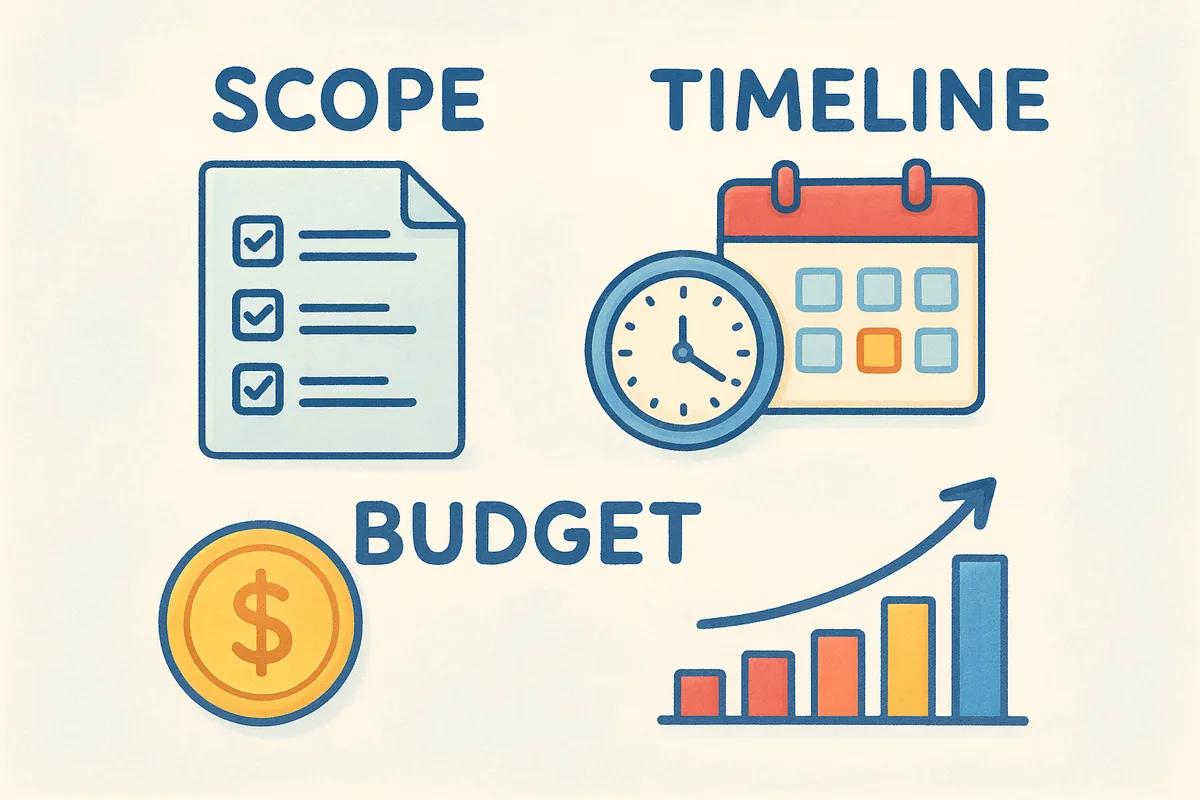
Scope, timeline, and budget
Budget conversations get easier when everyone can see the same numbers up front. List your software cost, any one-time data migration fees, and hours your team will spend on setup and training, since that internal time is a real cost even if no invoice shows up for it. Then lay out a realistic timeline with buffer weeks built in, because data cleanup almost always takes longer than anyone estimates.
| Phase | Typical duration | Key deliverable |
|---|---|---|
| Goal setting & scope | 3-5 days | Signed-off success metrics |
| Data audit & cleanup | 1-2 weeks | Migration-ready spreadsheet |
| Configuration & integration | 1-2 weeks | Pipelines, fields, email sync live |
| Testing & QA | 3-5 days | Bug list closed |
| Training & rollout | 2-4 weeks | Full team logging activity in CRM |
Roles, risks, and rollback plan
Every task in your template needs a name attached, not a department. Assign a project owner who has final say on configuration decisions, a data lead responsible for cleanup and import accuracy, and a training lead who runs sessions and answers questions after go-live. Without named owners, tasks drift and nobody notices until the deadline's already gone.
Risks deserve their own section too, since most CRM rollouts hit at least one of these:
- •Duplicate or outdated records getting imported alongside good data
- •Email sync issues with Gmail or Outlook that block reps from working inside the CRM
- •Low adoption because reps default back to spreadsheets when a step feels harder than the old way
- •Scope creep, where "quick fixes" during setup add weeks to the timeline
Write a rollback plan for each risk before launch, not after something breaks. If email sync fails on day one, know who fixes it and how long reps wait before falling back to their old workflow temporarily. That single decision, made in advance, prevents the panic that kills momentum in the first week.
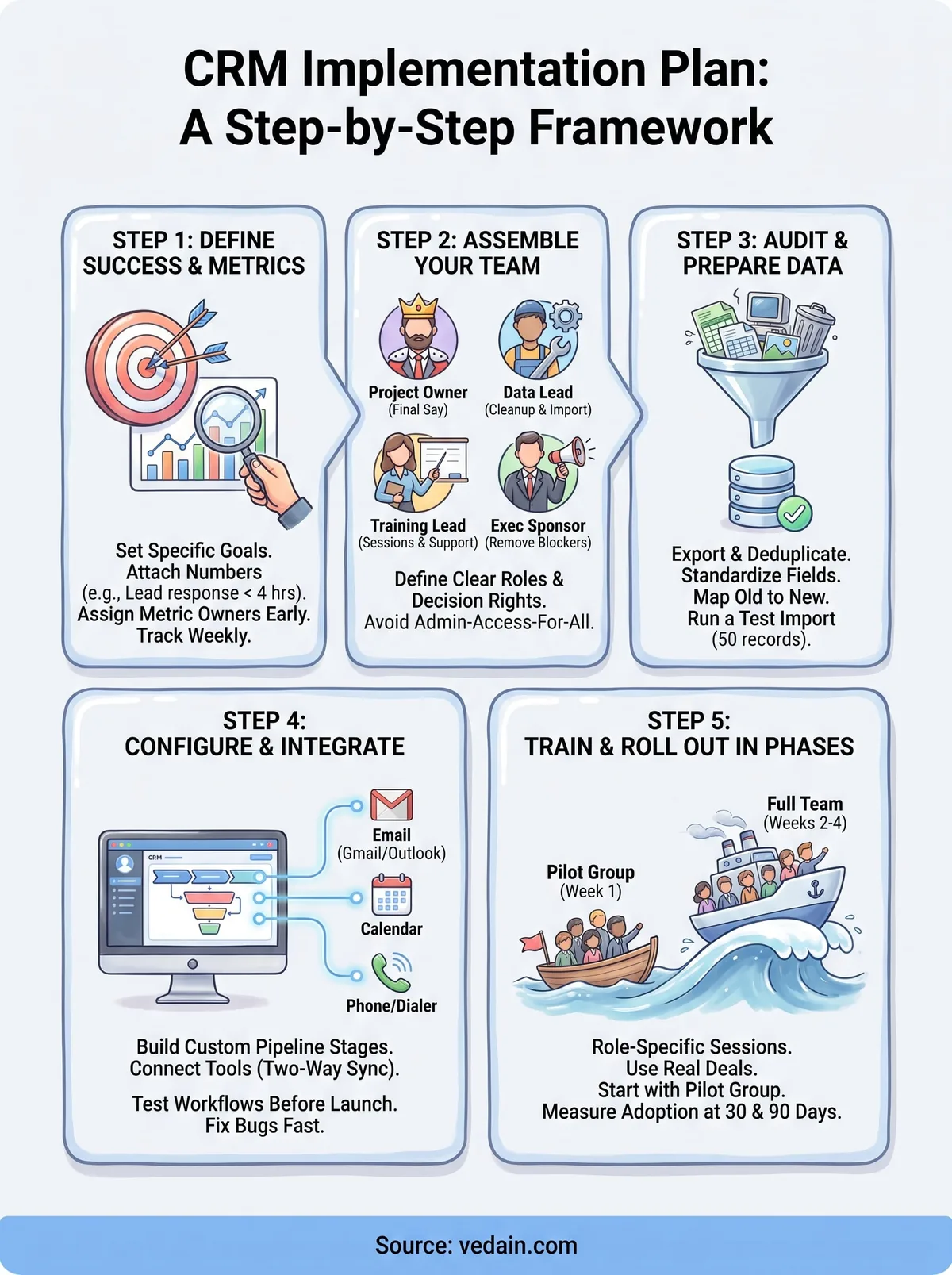
Step 1. Define your goals and success metrics
Start your crm implementation plan template with a single question: what breaks today that the CRM should fix? Maybe reps lose deals because follow-ups slip through email threads, or your manager can't tell which pipeline stage is stuck without asking five people. Write that problem down before you open any settings menu, because it's the only thing that tells you if the rollout worked. Vague goals like "improve sales visibility" don't survive contact with a busy sales floor.
Turn goals into numbers
Every goal needs a number attached, or you'll argue about success later instead of measuring it. Set a baseline metric you can pull from your current spreadsheet or old CRM export, then pick a target date 60 or 90 days out.
- •Lead response time: from "unknown" today to under 4 hours
- •Pipeline visibility: from 0% to 100% of open deals logged in the CRM
- •Data entry compliance: from scattered notes to 90% of reps logging activity daily
- •Forecast accuracy: from gut-feel estimates to a report you trust within 10%
If you can't put a number on it, it's not a goal, it's a hope.
Assign metric owners early
Goals without an owner get quietly dropped once the rollout gets busy. Name one person responsible for tracking each metric weekly, even if that person also has other jobs on the project. Most sales leaders already know that teams that track a metric weekly hit their targets more often than teams that check in monthly.
Document these goals inside the same tracker you're using for the rest of the plan, not in a separate slide deck nobody opens again. Once your goals and metrics are locked, you'll use them again in Step 5 to judge whether training actually stuck, so keep the wording consistent from the start.
Step 2. Assemble your team and assign ownership
Before you touch a single setting, decide who's actually running this project. A CRM implementation plan template with no named owners turns into a group chat full of "I thought you had that." Pick one person as project lead, someone with authority to make configuration calls without escalating every field name to a committee. That person doesn't need to be technical, but they do need time blocked on their calendar for this, not just a title.
Core roles you need filled
Most successful rollouts split the work across four roles, even on small teams where one person wears two hats. Skipping a role doesn't remove the work, it just means nobody's doing it until something breaks.
- •Project owner: final say on scope, timeline, and configuration decisions
- •Data lead: owns cleanup, deduplication, and the import itself
- •Training lead: builds session materials and answers questions post-launch
- •Executive sponsor: removes blockers and signs off on budget changes
If a task doesn't have a name next to it, assume it won't get done.
Set decision rights, not just tasks
Ownership means more than assigning a task, it means deciding who can say yes without a meeting. Write down who approves new custom fields, who signs off on the final pipeline structure, and who has veto power over integrations like Gmail or Outlook sync. Without this, small decisions stall for days waiting on someone who didn't realize they were supposed to weigh in.
Schedule a kickoff meeting where every named owner confirms their role out loud, in front of the team. Silence in that meeting usually means confusion, not agreement, so ask directly if anyone's unsure what they're responsible for. Teams using Vedain's module-level permissions can map these roles directly onto system access from day one, so the person who owns data cleanup is also the only one who can bulk-edit records during migration. That alignment between org chart and system permissions prevents a lot of the accidental damage that happens when everyone has admin access during setup.
Step 3. Audit and prepare your data for migration
Data migration is where most CRM timelines quietly double. Pull every contact, deal, and company record out of your old system or spreadsheets into one master file before you decide what's worth keeping. Skipping this audit means you'll import years of duplicate leads and dead deals straight into your new CRM implementation plan template, and clean data doesn't happen by accident after the fact.
Build your migration checklist
Your data migration checklist should cover more than just exporting a CSV. Work through these steps in order, and don't move to Step 4 until each one has a checkmark next to it:
- •Export everything from your current tool, including notes and attachments if possible
- •Deduplicate contacts and companies using email or domain as the matching key
- •Standardize fields like phone format, deal stage names, and date formats before import
- •Flag stale records, anything untouched for 12+ months, for archiving instead of migrating
- •Map old fields to new ones, since your new CRM's pipeline stages rarely match your old tool's exactly
Garbage in your spreadsheet becomes garbage in your CRM, just faster and better organized.
Decide what stays behind
Not every record deserves a spot in your new system. Old, cold leads that never converted after a year just clutter reports and skew your conversion funnel. Push those into an archive file instead of migrating them, and only bring forward records tied to active deals, recent contacts, or accounts your team still calls.
Run a test import with a small batch, maybe 50 records, before you migrate the full dataset. Verify field mapping worked correctly and that no duplicates slipped through, since catching an error in 50 records beats discovering it in 5,000. Your data lead from Step 2 should sign off on this test batch before the full migration runs, since that person owns the accuracy of everything that lands in the CRM going forward.
Step 4. Configure, integrate, and test your CRM
Configuration is where your plan turns into something reps actually click on. Build your pipeline stages to match how deals really move through your sales process, not some generic template that ships by default. Then set up custom fields for the data you actually track, like deal source or renewal date, and resist the urge to add fields nobody will fill in. Every extra field is a small tax on data entry, and reps skip fields that feel optional or confusing.
Connect the tools your team already uses
Integration work usually determines whether reps live in the CRM or keep bouncing back to their inbox. Set up two-way email sync for Gmail or Outlook first, since that's the integration reps notice within the first hour of using the tool. Platforms like Vedain CRM handle this natively, so logged emails and calendar events show up on the contact record without anyone copying and pasting.
- •Email sync: two-way, so replies log automatically on the right contact
- •Calendar sync: meetings tied to deals, not floating in a separate app
- •Lead forms: website submissions routed straight into the pipeline
- •Phone or dialer integration: if your team makes outbound calls daily
If reps have to leave the CRM to do their job, they'll eventually leave the CRM behind entirely.
Test before anyone else logs in
Run a full test cycle with your project owner and data lead before you open access to the wider team. Create a test deal, move it through every pipeline stage, send a test email, and confirm it logs correctly. Check that permissions match what you set in Step 2, so reps can't accidentally bulk-edit records they shouldn't touch. Fix every bug you find here, since a broken workflow discovered on day one of training kills trust fast and hands reps an easy excuse to go back to spreadsheets.
Step 5. Train your team and roll out in phases
Training decides whether your CRM implementation plan template turns into daily habit or a tool people quietly abandon after two weeks. Don't schedule one long demo call and call it done. Reps forget most of what they hear in a single session, and a rushed walkthrough leaves them guessing the moment something doesn't match what they saw on screen. Break training into short, role-specific sessions instead, so a rep learns exactly what they'll touch daily, not every admin setting they'll never open.
Roll out in waves, not all at once
Going live with your entire team on day one invites chaos, since ten people hitting bugs simultaneously buries your training lead in tickets. Pick a pilot group of two or three reps, ideally a mix of your most CRM-comfortable person and someone more resistant to change, and run them through a full week before opening access wider.

- •Week 1: Pilot group logs live deals, training lead shadows and collects friction points
- •Week 2: Fix workflow issues found in the pilot, then onboard the rest of the team in one session
- •Week 3: Full team live, training lead runs office hours for questions
- •Week 4: Compare metrics from Step 1 against your baseline
A staggered rollout catches your worst bugs before they hit your whole team at once.
Reinforce with real deals, not demo data
Skip the fake "Acme Corp" practice deals. Have reps log actual pipeline activity from their first session, since muscle memory forms faster on real stakes than on made-up scenarios. Keep a running FAQ document that your training lead updates after every question that comes up more than once, so the third rep who hits the same confusion finds an answer without waiting on a reply.
Revisit the metrics you set in Step 1 exactly 30 and 90 days after full rollout. If adoption lags, the fix is almost always a workflow that's harder than the old way, not a lack of reminders.
Putting your plan into action
A good crm implementation plan template isn't complicated, it just needs dates, named owners, and numbers you can check against reality in 30 and 90 days. Copy the phases above into your project tracker, fill in real names next to every task, and resist the urge to skip the data audit because it feels tedious. That step alone determines whether your team trusts the CRM or quietly drifts back to spreadsheets.
Getting the plan right matters more than which software you pick, but the software still shapes how much friction your team hits along the way. Choosing a platform with built-in email sync, no-code automation, and permissions that match your team roles removes half the setup headaches this guide walks through. If you're ready to run this plan on a tool built for exactly that, start your free trial with Vedain and see how fast day one actually goes.
Frequently Asked Questions
How long does a typical CRM implementation take?
A typical CRM implementation takes between 3 to 6 months for small to mid-sized businesses, though complex deployments can extend to 12 months or longer. The timeline depends on your organization's size, data complexity, and customization needs. HubSpot's CRM can be implemented faster (4-8 weeks) due to its user-friendly interface, while Salesforce implementations often require 6-12 months due to extensive customization options. Zoho and Pipedrive typically fall in the middle range at 2-4 months for standard implementations.
What is the average cost of CRM implementation?
CRM implementation costs typically range from $5,000 to $100,000+ depending on the software and company size. HubSpot's Professional plan ($800-1,200/month) has lower implementation costs, while Salesforce implementations average $25,000-$50,000 due to required consulting. Zoho CRM ($18-45/month per user) and Pipedrive ($12.50-99/month per user) offer more budget-friendly implementations, while Freshsales and Vedain provide mid-range options starting around $3,000-$10,000 for initial setup.
What are the key phases of a CRM implementation plan?
A CRM implementation plan typically includes five key phases: Planning & Assessment, Design & Configuration, Data Migration, User Training, and Go-Live & Support. During Planning, you define goals and select software (HubSpot, Salesforce, or Zoho); Design involves customizing workflows and fields; Data Migration transfers historical data; Training ensures user adoption; and Go-Live marks the official deployment with post-launch support. Most successful implementations follow this sequential approach regardless of whether you choose Pipedrive, Freshsales, or Vedain.
How do I choose between HubSpot, Salesforce, and Zoho for my CRM implementation?
Choose HubSpot for ease of use and fast implementation (best for small businesses under 50 employees), Salesforce for enterprise-level customization and scalability, and Zoho for cost-effective solutions with strong automation features. HubSpot's all-in-one platform costs $50-3,200/month, Salesforce ranges from $25-300/month per user with higher implementation costs, while Zoho CRM is $18-45/month per user with faster onboarding. For mid-market options, consider Pipedrive ($12.50-99/month), Freshsales ($15-115/month), or Vedain for industry-specific implementations.
What is the most common reason CRM implementations fail?
Poor user adoption is the most common reason CRM implementations fail, occurring in 35-50% of projects across platforms like Salesforce, HubSpot, and Zoho. Inadequate training, unclear change management strategies, and lack of executive sponsorship contribute significantly to adoption failures. To prevent this, invest in comprehensive user training programs, establish clear ROI metrics, involve end-users early in the design phase, and provide ongoing support during and after your CRM implementation with HubSpot, Pipedrive, Freshsales, or your chosen platform.
Should we use consultants for CRM implementation or do it in-house?
Use external consultants for complex implementations (especially Salesforce) when you lack internal expertise, though HubSpot and Zoho implementations can often be handled in-house. Consultants cost $150-300/hour but accelerate deployment and reduce errors, while in-house implementation saves money ($5,000-15,000) but requires dedicated resources and longer timelines. Consider a hybrid approach: hire consultants for planning and design phases, then handle configuration and training internally with platforms like Pipedrive or Freshsales that have lower complexity curves compared to Salesforce or Vedain enterprise solutions.