But not every CRM handles Outlook integration the same way. Some offer basic contact syncing. Others provide full two-way email sync, activity tracking, and the ability to log conversations automatically against deals and contacts. The difference between these approaches can mean hours saved, or wasted, every week for your sales team.
We built Vedain CRM with native two-way sync for Outlook (and Gmail), so we've spent a lot of time studying what makes an email integration actually useful versus just a checkbox on a features page. For this guide, we compared seven CRM platforms that integrate with Outlook, breaking down their features, pricing, and where each one fits best, so you can pick the right tool without the trial-and-error.
1. Vedain CRM
Vedain CRM is a cloud-based sales platform built for teams that want a complete sales operating system at a flat rate of $10 per user per month. It covers leads, deals, email, automation, and reporting without locking features behind higher-priced tiers, which makes it one of the stronger options if you're searching for the best CRM with Outlook integration at a predictable cost.
Outlook integration and email sync
Vedain connects to Outlook via two-way email sync, so every message you send or receive in your inbox automatically logs against the right contact or deal inside the CRM. You don't need to BCC yourself or copy threads manually. Sent and received emails appear in the contact timeline the moment they land, keeping your entire team's conversation history complete and accurate without any extra steps.
Sales workflow strengths for Outlook users
Your pipeline lives in a visual Kanban board where you can move deals between stages without jumping between your inbox and a separate tool. Vedain's smart filters and custom fields let you cut your pipeline by any combination of criteria, so you surface the deals that need action right now instead of scrolling through a cluttered list.

When your CRM and inbox share the same data layer, you cut the manual syncing that costs sales teams hours every single week.
Automation, sequences, and email warmup
Vedain includes a no-code workflow builder that triggers actions based on deal stage changes, contact activity, or email responses. You can build multi-step email sequences directly inside the platform and pair them with the built-in email warmup tool, which gradually improves your domain's deliverability over 21 days before you send outreach at scale. That combination of automation and warmup in one tool saves you from subscribing to separate services.
Who Vedain CRM fits best
Vedain works best for small to mid-sized sales teams that want a full-featured CRM without per-feature pricing. Teams running on Outlook that need automation, email sequences, and AI tools included in a single plan will find the most value here.
Vedain CRM pricing
Vedain charges a flat $10 per user per month with no feature gates, no hidden fees, and no credit card required to start a trial. Every feature, from email sync and workflows to email warmup and the AI agent marketplace, is available at that one price.
2. Microsoft Dynamics 365 Sales
Microsoft Dynamics 365 Sales is Microsoft's native enterprise CRM, built to operate inside the Microsoft ecosystem. If your team already runs on Microsoft 365, this platform offers the tightest available connection between your inbox and your customer data.
Outlook and Microsoft 365 integration depth
Dynamics 365 connects to Outlook through the Dynamics 365 App for Outlook, which lets you track emails, create contacts, and link messages to CRM records without leaving your inbox. Because both products share the same Microsoft infrastructure, contact and calendar data syncs automatically across the entire suite.
If your organization is already invested in Microsoft 365, Dynamics 365 removes most of the friction between your inbox and your CRM.
Sales pipeline, forecasting, and reporting
Your pipeline in Dynamics 365 includes built-in forecasting tools that pull directly from live deal data, giving sales managers a real-time view of quota attainment. Custom dashboards let you surface the exact metrics your team tracks without relying on a separate reporting tool.
Automation and AI features
Dynamics 365 ships with Microsoft Copilot, which summarizes email threads, generates meeting prep notes, and recommends next steps on open deals. Workflow automation runs through Power Automate, which connects to hundreds of business applications beyond the Microsoft stack.
Who Dynamics 365 fits best
Dynamics 365 works best for mid-to-large enterprises already running Microsoft 365, Teams, and Azure who need a CRM woven tightly into their existing tech stack rather than a standalone tool.
Dynamics 365 pricing
Dynamics 365 Sales starts at $65 per user per month for the Professional plan and $105 per user per month for Enterprise.
3. HubSpot CRM
HubSpot CRM is one of the most widely recognized sales platforms and a common reference point when teams look for the best CRM with Outlook integration. It offers a free tier with core CRM tools and paid plans that layer on more advanced sales automation and reporting.
Outlook add-in and inbox tools
The HubSpot Outlook add-in lets you log emails, track opens, and pull up contact records without leaving your inbox. You can also insert meeting links and email templates directly from Outlook, which cuts the time your team spends switching between tools.
Pipeline management and sales engagement features
HubSpot gives you a drag-and-drop deal pipeline with customizable stages and built-in activity tracking. Sales sequences and task queues help your team follow up consistently without relying on memory or manual reminders.
HubSpot's pipeline tools are solid, but the most useful sales features sit behind paid tiers that scale up in cost quickly.
Automation and integrations ecosystem
HubSpot connects to hundreds of tools through its native integrations marketplace. Workflow automation handles routine tasks like lead rotation, deal stage updates, and follow-up reminders, though more advanced automation requires a paid Sales Hub subscription.
Who HubSpot fits best
HubSpot works best for growing teams that want a widely recognized platform with a broad integrations library and are comfortable with a pricing model that increases as their feature needs expand.
HubSpot pricing
The CRM tier is free for core features. Paid Sales Hub plans start at $20 per user per month for Starter and increase significantly for Professional and Enterprise tiers.
4. Salesforce Sales Cloud
Salesforce Sales Cloud is the most widely deployed enterprise CRM in the world. It covers the full sales cycle from first contact to closed deal, and it connects to Outlook through a dedicated integration that keeps your inbox and CRM records aligned.
Outlook integration options and email capture
The platform connects to Outlook through the Salesforce Inbox add-in, which lets you log emails, view related CRM records, and create activities without leaving your inbox. Email capture settings let you decide exactly which messages get logged automatically, giving your team control over what ends up in the CRM.
Lead, opportunity, and account management
Your records in Salesforce follow a structured hierarchy across leads, contacts, accounts, and opportunities, so you always know where a prospect sits in your pipeline. Custom fields and page layouts let you configure each record type to match how your sales team operates.
Salesforce's record structure is one of the most flexible available, but it adds setup complexity that smaller teams may not need.
Automation, reporting, and customization
Flow automation handles multi-step processes triggered by record changes, and the built-in reporting engine covers pipeline snapshots, forecasting, and deal activity. If you're searching for the best CRM with Outlook integration for complex sales operations, Salesforce delivers strong reporting depth.
Who Salesforce fits best
Larger sales organizations with dedicated admins benefit most from Salesforce. Teams that need deep customization and enterprise-grade scalability will find the most value here.
Salesforce pricing
Plans start at $25 per user per month for Starter Suite and $100 per user per month for Pro Suite.
5. Zoho CRM
Zoho CRM is a feature-rich platform that covers the full sales cycle at a range of price points. It's a frequent comparison point when teams search for the best CRM with Outlook integration, largely because it includes email connectivity, multichannel tracking, and automation in a single package without requiring separate subscriptions.
Outlook integration and email context
The platform connects to Outlook through email sync and the Zoho CRM plug-in for Microsoft Outlook, which lets you log emails, create leads, and view contact details directly from your inbox. SalesInbox (available on higher plans) organizes your emails by CRM relevance so your team prioritizes conversations tied to active deals rather than sifting through a cluttered inbox.
Lead management and multichannel tracking
Your contact records in Zoho track interactions across email, phone, live chat, and social channels from a single view. You can score leads automatically based on activity, which helps your team focus attention on prospects most likely to convert without manually reviewing every record.
Zoho's multichannel tracking gives you a broader picture of prospect activity than a basic email-only integration can.
Automation, customization, and analytics
Built-in workflow rules and the Blueprint feature let you map your sales process step by step and trigger follow-up tasks based on stage changes. Custom modules and fields give you flexibility to configure the platform around your specific sales motion without developer help.
Who Zoho fits best
Teams that want multichannel tracking and moderate customization without enterprise-level costs will find the most value in Zoho. It's a strong fit for price-conscious small to mid-sized businesses that need more than a basic CRM but don't require the depth of Salesforce or Dynamics 365.
Zoho pricing
Zoho CRM plans start at $14 per user per month for Standard and reach $52 per user per month for Ultimate.
6. monday CRM
monday CRM is a flexible, visual sales platform built on the monday.com work operating system. Teams that want a highly configurable pipeline tool with straightforward Outlook connectivity will find it worth considering, though it takes a different approach than purpose-built sales CRMs.
Outlook integration and activity tracking
monday CRM connects to Outlook through email sync and the monday.com Outlook add-in, letting you log emails and link conversations to contacts or deals without leaving your inbox. Received and sent messages appear in the relevant item's activity log, so your team maintains a clear record of every touchpoint without manual data entry.
monday CRM's Outlook integration covers the basics well, but it lacks the depth of two-way sync that dedicated sales CRMs deliver for teams searching for the best crm with outlook integration.
Visual pipelines and team collaboration
Your deals live on a customizable board where you control every column, status label, and grouping. The visual layout works well for teams that manage both sales and project tasks in the same workspace, keeping all activity visible without switching between tools.
Automations and templates
monday CRM ships with pre-built automation recipes that trigger actions like status updates, notifications, and task assignments based on deal activity. A library of sales board templates lets you skip setup time and configure your pipeline in minutes rather than starting from scratch.
Who monday CRM fits best
monday CRM fits small teams that already use monday.com for project management and want a unified workspace rather than a dedicated CRM tool.
monday CRM pricing
Plans start at $12 per user per month for Basic and reach $28 per user per month for Pro.
7. eWay-CRM
eWay-CRM takes a fundamentally different approach from every other tool on this list. Rather than building a separate web app that connects to Outlook, eWay-CRM lives directly inside your Outlook client as a sidebar panel, making it the most inbox-native option for teams searching for the best CRM with Outlook integration.
Native CRM experience inside Outlook
eWay-CRM installs as a desktop add-in that turns your Outlook interface into a full CRM without opening a separate browser tab or application. You see contact records, deal history, and project details in a panel right next to your inbox the moment you click an email.
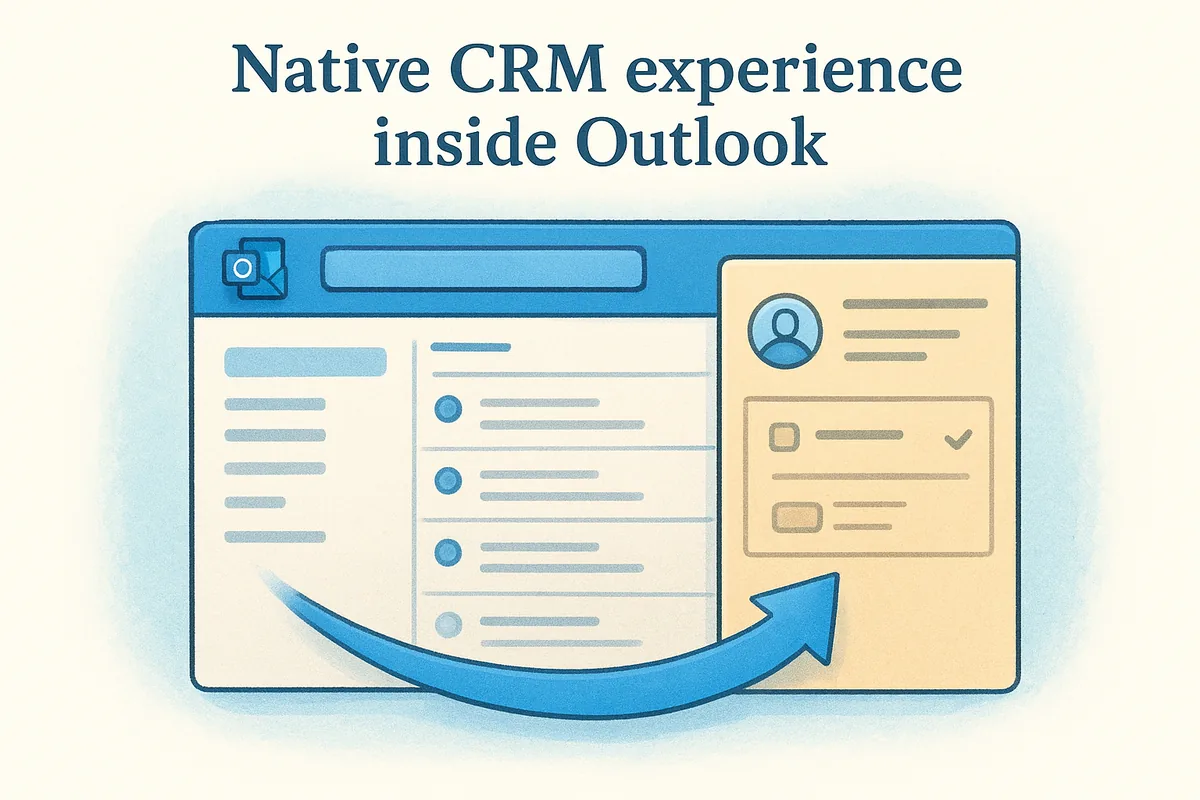
If your team spends most of their working day inside the Outlook desktop client, eWay-CRM removes the friction of switching tools entirely.
Contact, project, and deal management in the inbox
The platform tracks contacts, companies, deals, and projects from within the same Outlook panel. Each record surfaces email history, tasks, and linked deals in one view, so your team captures full context without copying data between applications.
Sharing, permissions, and offline access considerations
eWay-CRM syncs data through a shared company database, giving your team consistent records across users. Granular permissions control who can view or edit contacts, deals, or projects. One practical limitation: the full feature set requires the Windows Outlook desktop client, which makes it less suitable for teams running Outlook on Mac or primarily in the browser.
Who eWay-CRM fits best
eWay-CRM fits Windows-based sales teams that want a CRM embedded entirely within their desktop Outlook rather than managing a standalone platform alongside it.
eWay-CRM pricing
Plans start at $24 per user per month for the Basic plan.
Next steps
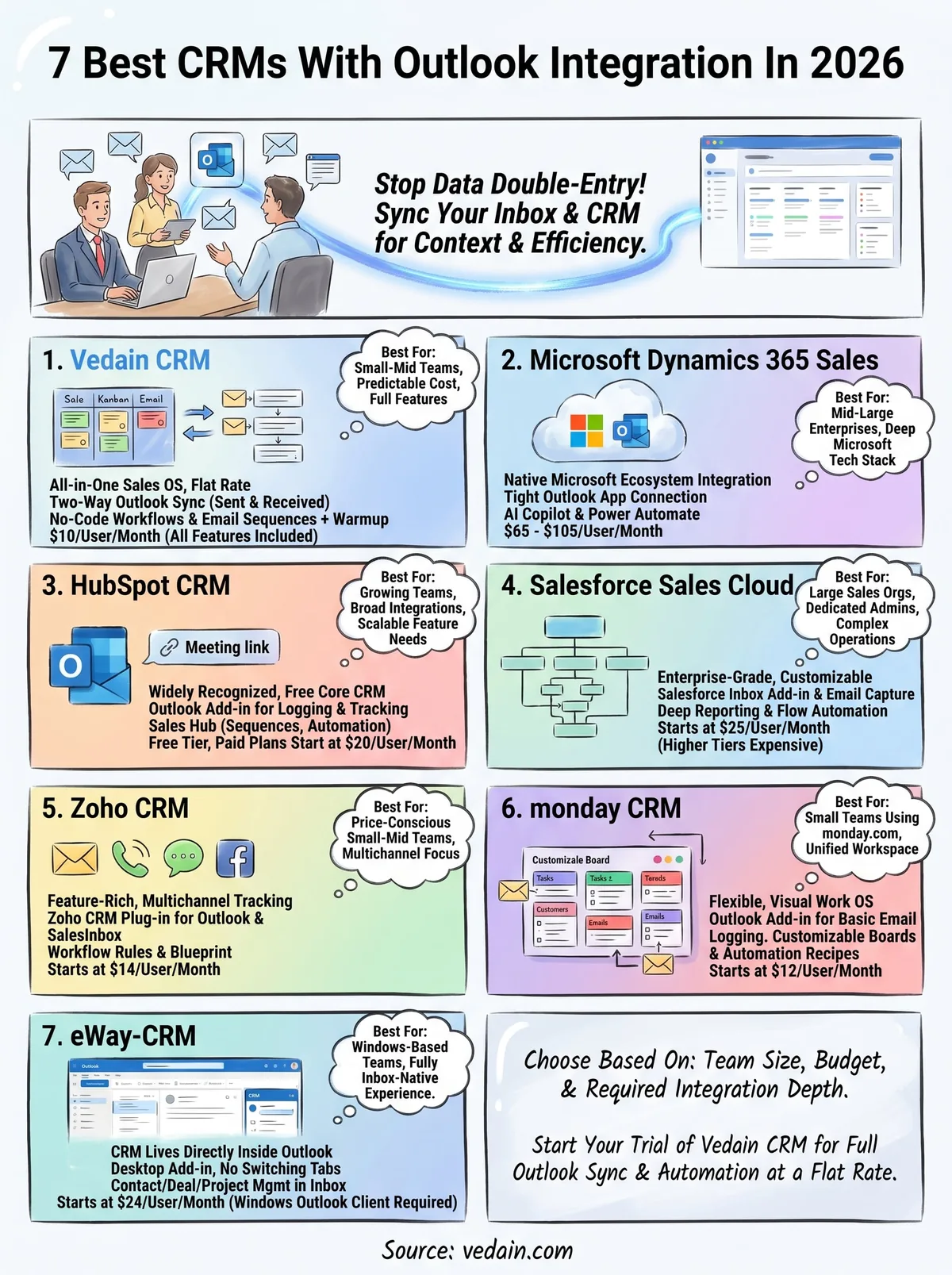
Every platform on this list connects to Outlook, but they handle that connection in very different ways. If you're choosing the best CRM with Outlook integration for your sales team, the right pick comes down to your team size, your budget, and how deeply you need email and automation to work together. Enterprise teams with existing Microsoft infrastructure will lean toward Dynamics 365, while small and mid-sized teams that want a complete feature set at a predictable cost will find the most value in a flat-rate platform.
Vedain CRM gives you two-way Outlook sync, email sequences, workflow automation, and email warmup all at $10 per user per month with no feature gates. You can get your pipeline connected and running in under five minutes without a credit card. If that matches what your team needs, start your free trial of Vedain CRM and see how it fits your sales process.
Frequently Asked Questions
Which CRM has the best Outlook integration for sales teams?
HubSpot offers the most seamless Outlook integration with automatic email logging, contact syncing, and meeting scheduling directly from your inbox at no extra cost on their Professional plan ($120/month). Salesforce and Zoho CRM also provide robust Outlook integration, but HubSpot's user-friendly interface makes it the top choice for sales teams seeking quick implementation without technical overhead.
Can you sync Outlook contacts with Salesforce CRM?
Yes, Salesforce fully supports Outlook contact syncing through both native integration and third-party connectors like Outlook CRM sync features. However, Salesforce's implementation is more complex than HubSpot or Pipedrive, requiring additional configuration and potentially custom development, making it better suited for larger enterprises with dedicated IT teams.
What is the cheapest CRM with Outlook integration?
Pipedrive offers one of the most affordable Outlook-integrated CRM options starting at $14/month for their Essential plan, providing email synchronization and contact management. While Freshsales starts at $19/month and Zoho CRM at $20/month, Pipedrive delivers the best value for small sales teams prioritizing Outlook connectivity without breaking their budget.
Does Zoho CRM integrate with Outlook email?
Yes, Zoho CRM provides native Outlook integration that allows automatic email tracking, contact sync, and calendar synchronization across all pricing tiers starting at $20/month. Unlike HubSpot which requires higher-tier plans for full email features, Zoho includes comprehensive Outlook functionality even in its entry-level plan, making it competitive for budget-conscious teams.
How does Freshsales Outlook integration compare to HubSpot?
Freshsales ($19/month) and HubSpot ($120/month) both offer automatic email logging and contact syncing with Outlook, but HubSpot provides more advanced features like conversation threading and AI-powered email insights. Freshsales is better for cost-conscious teams that need basic Outlook integration, while HubSpot suits organizations prioritizing sophisticated email automation and analytics capabilities.
Is Vedain CRM compatible with Microsoft Outlook?
Vedain CRM provides Outlook integration capabilities, though it is less widely adopted than alternatives like Salesforce, HubSpot, or Zoho CRM. For sales teams specifically seeking established Outlook compatibility with proven reliability and extensive integrations, HubSpot, Pipedrive, or Salesforce remain stronger choices with more comprehensive email management features.