CRM implementation services cover everything from mapping your sales process and migrating existing records to configuring pipelines, setting up automations, and training your team. Costs typically run from a few hundred dollars for a simple setup to tens of thousands for enterprise deployments with custom integrations. Data migration complexity and the number of users usually drive the price, and timeline expectations range from a single week to several months depending on how tangled your current systems are.
This article breaks down exactly what's included in a standard implementation, how pricing models compare across vendors, and the questions worth asking before you commit. We'll also cover why platforms built around no-code automation and straightforward setup, like Vedain, can cut implementation time and cost dramatically compared to heavier legacy systems, so you can decide what actually fits your team.
Why CRM implementation services matter
Most sales leaders buy a CRM expecting instant results, then watch adoption stall within weeks. Poor implementation is the reason. A tool that isn't configured around your actual sales process, with pipelines that don't match how deals really move and fields nobody bothers to fill in, becomes shelfware fast. The software itself rarely fails. The rollout does. That's why CRM implementation services exist: someone has to translate your messy, real-world sales process into a system your reps will actually use.
The real cost of a botched rollout
When a CRM launch goes sideways, the damage compounds quietly. Reps revert to spreadsheets and personal notes. Managers lose visibility into the pipeline right when they need it most. Leadership starts questioning the entire purchase, and renewal conversations get awkward twelve months later when usage reports show half your team never logged in past week three. Data migration mistakes make this worse. Duplicate contacts, missing deal history, and broken email threads erode trust in the new system almost immediately, and once a sales team decides a tool is unreliable, no amount of feature updates wins them back.
A CRM only pays for itself once your team trusts it enough to actually use it every day.
What good implementation actually fixes
A proper implementation process addresses the gaps that cause abandonment before they ever surface. Specifically, it should cover:
- •Process mapping: documenting how leads actually flow from first contact to closed deal, not how the org chart says they should
- •Field and pipeline configuration: building stages, custom fields, and deal statuses that match your terminology, not generic defaults
- •Clean data migration: deduplicating contacts and preserving deal history so reps aren't starting from zero
- •Integration setup: connecting email, calendar, and any lead-capture forms so data flows in automatically instead of manually
- •Team training: getting reps comfortable enough that logging a call takes ten seconds, not two minutes
Skip any one of these and you've built a system that looks complete on a demo call but falls apart under daily use.
Why this matters more for smaller teams
Enterprise companies can absorb a rough CRM launch. They have dedicated ops staff, budget for a redo, and enough runway to wait out a slow adoption curve. Startups and small sales teams don't have that cushion. If your five-person team spends its first month fighting the CRM instead of selling, that's a direct hit to revenue you can't easily recover. This is exactly why implementation complexity should factor into your platform choice from the start, not just price. A platform that takes five minutes to configure and doesn't require a consultant to set up a basic pipeline removes most of the risk that traditional implementation services exist to manage in the first place. Vedain was built around that idea: leads, pipelines, and email sync work out of the box, so the heavier parts of a CRM rollout shrink to a fraction of what legacy systems demand.
Understanding why implementation matters is really about understanding where the money actually goes after you sign a contract. It's not the software license that determines success. It's whether someone did the unglamorous work of mapping your process, cleaning your data, and getting your team to actually open the tool each morning.
How to implement a CRM system step by step
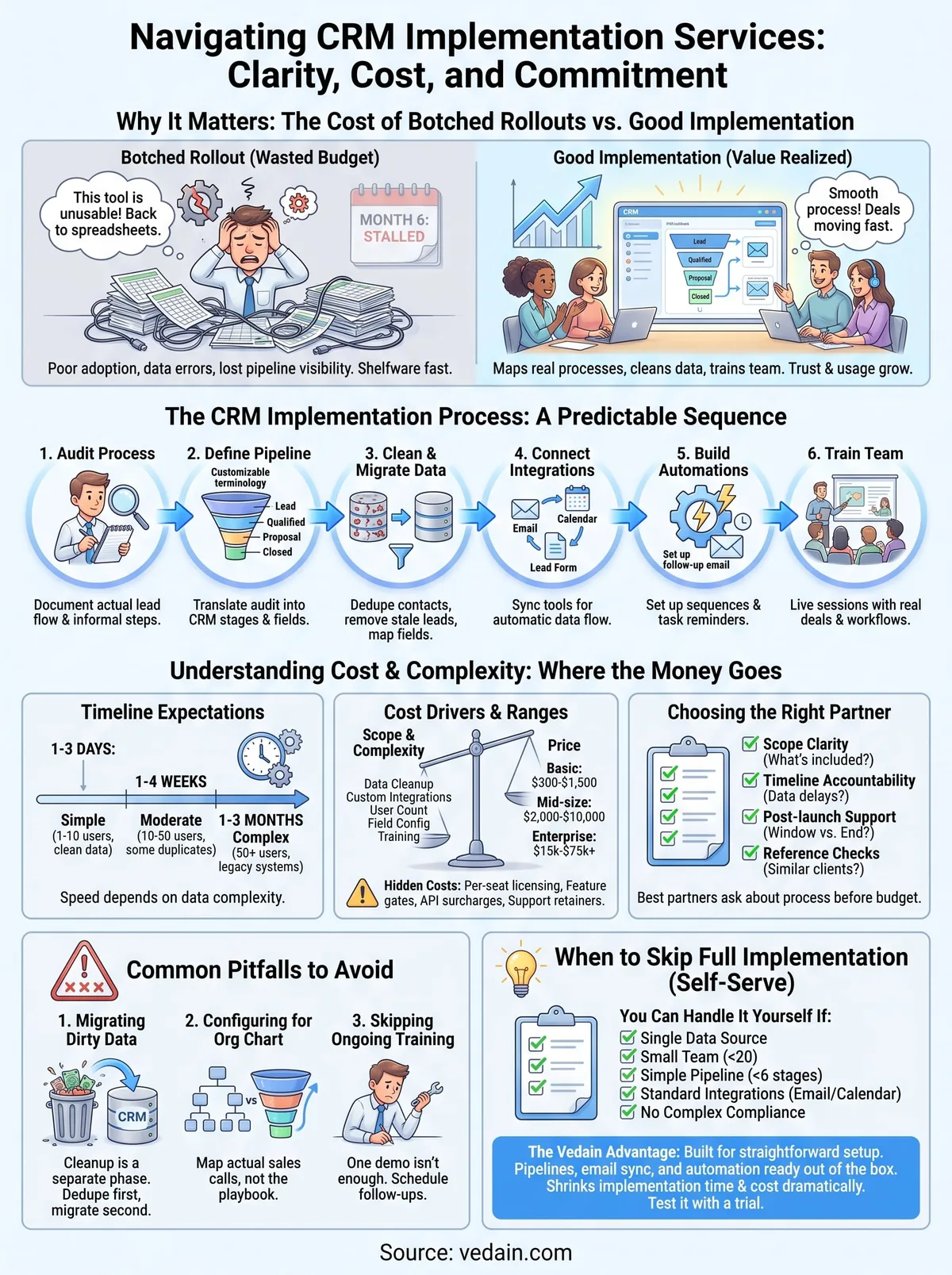
A CRM rollout follows a predictable sequence whether you hire a consultant or handle it yourself. Skipping steps is what turns a two-week project into a three-month slog. Here's the order that actually works:
- Audit your current process: write down every stage a deal actually passes through today, including the informal steps nobody documented.
- Define pipeline stages and fields: translate that audit into the CRM's structure, using your team's real terminology instead of generic labels like "Prospect" or "Qualified."
- Clean and migrate your data: dedupe contacts, remove stale leads, and map old fields to new ones before anything gets imported.
- Connect integrations: sync your email inbox, calendar, and any lead forms so data starts flowing automatically from day one.
- Build automations: set up follow-up sequences, task reminders, and notifications so reps aren't manually tracking every next step.
- Train the team: run a live session with real deals, not a generic demo, so reps see exactly how their day-to-day workflow changes.
- Monitor adoption: check login rates and data entry quality weekly for the first month and fix friction points immediately.
Every CRM implementation succeeds or fails based on whether step three and step six actually happen, not on which platform you chose.
Where timelines typically land
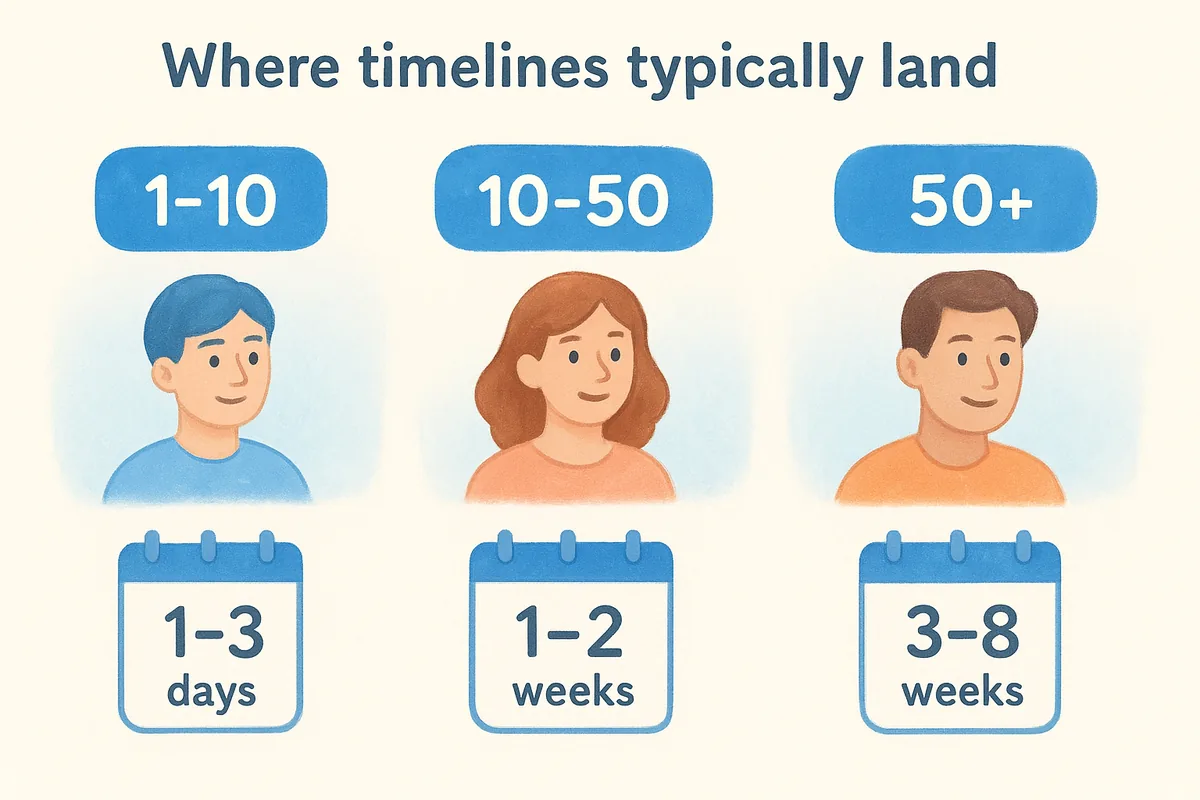
Speed depends almost entirely on data complexity and integration count, not the number of users. A five-person team with clean spreadsheet data can go live in a day. A fifty-person team migrating from three disconnected tools with years of messy records needs weeks just for the data cleanup step alone.
Where platform choice changes the math
Implementation steps don't disappear just because a platform is simpler, but several of them shrink dramatically. Vedain's setup process, for example, gets teams into a working pipeline in under five minutes because the pipeline, contact fields, and email sync are ready out of the box. That doesn't eliminate the need to map your process or clean your data. It just means you spend your time on the steps that actually matter instead of fighting default field structures that don't fit your business.
How much do CRM implementation services cost
Pricing for CRM implementation services varies wildly because vendors bundle wildly different scopes under the same label. A freelance consultant might charge $500 to configure a basic pipeline for a five-person team. A systems integrator handling a 200-user Salesforce rollout with custom API work can bill $50,000 or more before the first rep ever logs in. Most quotes fall somewhere in between, and the number that matters most is rarely the sticker price on the proposal. It's the hourly rate multiplied by however long your data cleanup actually takes.
Granular breakdowns help more than lump-sum quotes because they show you exactly where the money goes. Expect line items for discovery calls, data migration, integration setup, custom field configuration, and training sessions. Each of those can be billed hourly, at a flat project rate, or as a percentage of your annual license cost, so ask for the breakdown before comparing any two vendors side by side.
The real cost of a CRM implementation is measured in the hours your team spends fixing bad data, not the invoice from the consultant.
Typical price ranges by scope
Here's roughly what different implementation scopes run, based on common consulting rates across the CRM market:
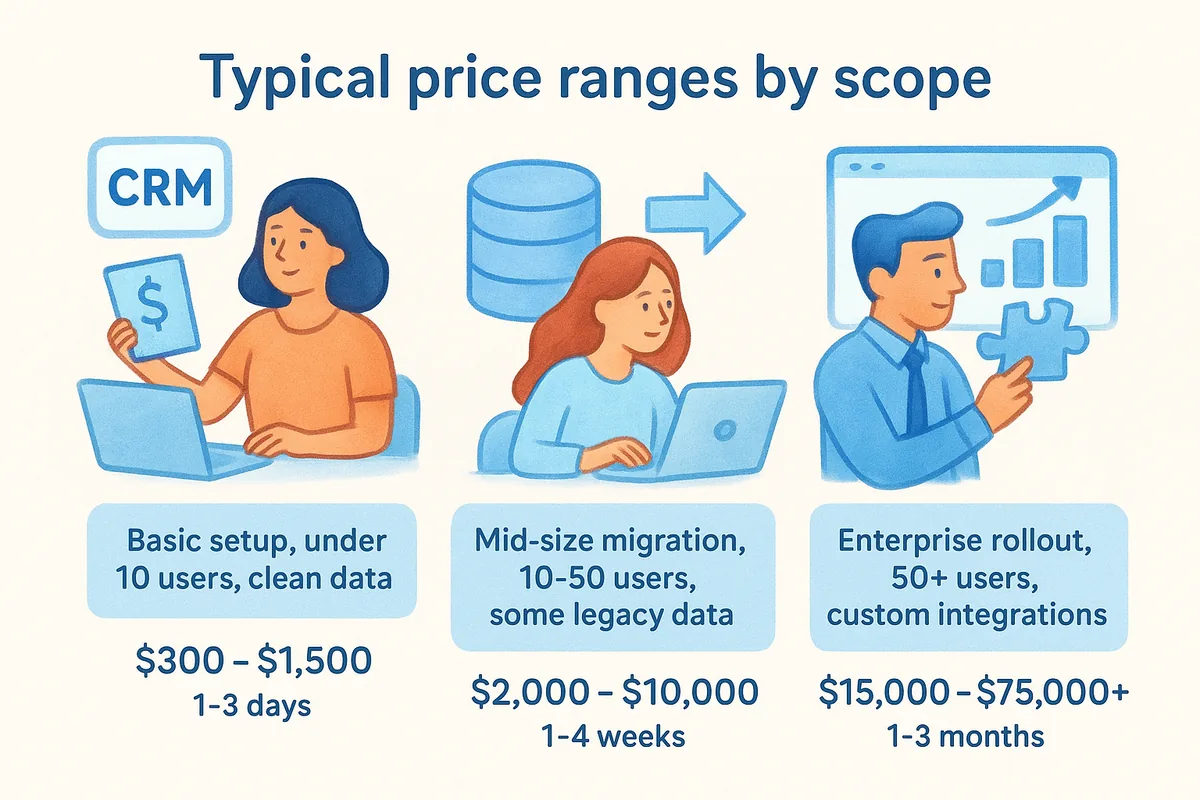
Rates shift depending on region, consultant experience, and whether the vendor charges separately for ongoing support after go-live.
Hidden costs that inflate the final bill
Unfortunately, quoted implementation fees rarely capture the full picture. Watch for these add-ons before signing:
- •Per-seat licensing that scales the software cost as your team grows, independent of the implementation fee
- •Feature gates that require upgrading to a higher plan just to unlock automation or reporting
- •API or integration surcharges for connecting tools you already use, like your email provider or lead forms
- •Post-launch support retainers billed monthly after the initial rollout ends
Vedain sidesteps most of this by charging a flat $10 per user per month that includes automation, email sync, and unlimited records, with no separate implementation fee for standard setups. You can check the full pricing breakdown before committing to anything heavier.
How to choose the right implementation partner
Picking a vendor for CRM implementation services feels a lot like hiring a contractor for your house. Everyone claims they can do the job, but only a few actually show up with a plan. Before you sign anything, ask for references from clients with a team size similar to yours, and check whether the partner has actually worked inside the platform you're buying, not just adjacent ones. A consultant who's implemented Salesforce a dozen times won't necessarily know the quirks of your specific tool, and that gap shows up in week two when your automations don't fire the way they promised.
The best implementation partner is the one who asks about your sales process before they ask about your budget.
Questions worth asking before you sign
Getting a straight answer to these questions upfront saves you from a painful renegotiation later:
- •Scope clarity: What exactly is included in the flat fee, and what triggers an extra charge?
- •Timeline accountability: What happens if data cleanup runs longer than estimated?
- •Post-launch support: Is there a support window after go-live, or does the relationship end the day training wraps up?
- •Reference checks: Can they connect you with a client of similar size who went live in the last six months?
Red flags that predict a rough rollout
Certain warning signs show up consistently before a project goes sideways. A vendor who quotes a price without ever asking about your data migration volume is guessing, not planning. One who pushes you toward a longer contract before showing you a working demo is selling a relationship, not a result. And any partner who can't explain how they'll clean duplicate records before import hasn't done this enough times to know it matters.
Smaller teams often find the smartest move is avoiding the partner search entirely. If your platform is simple enough to configure yourself, like setting up Vedain's pipeline and email sync in a single afternoon, you skip the vendor evaluation process altogether and put that budget toward actually selling. That's not an option for every rollout, especially ones involving custom integrations or hundreds of users, but it's worth ruling out before you start collecting proposals. The right partner, when you do need one, should feel less like a vendor and more like someone temporarily embedded on your team.
Common implementation pitfalls and how to avoid them
Even with a solid vendor and a clean plan, CRM implementation projects still go wrong in predictable ways. Most of these mistakes aren't technical. They're decisions made in week one that don't surface as problems until month three, when adoption numbers start dropping and someone finally asks why half the pipeline is empty.
Migrating data before cleaning it
Teams under deadline pressure often import everything from the old system just to hit a go-live date, duplicates, stale leads, and all. That decision haunts every report you pull for the next year. Fix this by treating data cleanup as its own phase with its own deadline, separate from the technical migration itself. Dedupe first, migrate second, never the reverse.
Bad data imported on day one stays bad data for the life of the CRM.
Configuring for the org chart instead of the sales floor
Managers sometimes design pipeline stages around how they wish deals moved, not how reps actually work them. The result is a pipeline nobody trusts because it doesn't match reality. Process mapping should start with shadowing actual sales calls, not reading the sales playbook someone wrote two years ago.
Skipping training beyond a single onboarding call
One demo session rarely sticks. Reps forget half of what they saw within a week, especially if they're mid-deal and don't have time to experiment. Effective teams schedule a short follow-up check two weeks after go-live, once reps have hit real friction points, and address those specifically instead of repeating the original walkthrough.
Treating go-live as the finish line
A surprising number of rollouts stall because everyone assumes the work ends once the system is live. Adoption actually gets decided in the first thirty days after launch, not during setup. Watch for these warning signs during that window:
- •Login rates dropping below daily use within the first two weeks
- •Deals stalling in the same stage far longer than your historical average
- •Custom fields sitting empty across most records, signaling reps don't understand or don't value them
- •Email sync going unused, with reps still copying threads manually into notes
Catching any of these early is far cheaper than fixing them three months later. Assign someone, even part-time, to own adoption tracking for that first month. A platform with a simpler learning curve, where reps see value on day one instead of week three, avoids most of these pitfalls by design rather than by policing usage after the fact.
When you can skip a full-scale implementation
Not every team needs a consultant, a discovery call, and a six-week rollout plan. Full-scale implementation services make sense when you're migrating hundreds of records from three disconnected tools or building custom integrations that touch your billing system. They make far less sense when you're a ten-person sales team with a clean spreadsheet and a straightforward process. Recognizing which category you fall into before you start collecting proposals saves you both money and time you could spend actually selling.
If your pipeline fits on a whiteboard, you probably don't need a consultant to build it in software.
Signs you can handle it yourself
Several signals point toward a self-serve rollout instead of a paid implementation engagement:

- •Single data source: your contacts live in one spreadsheet or one existing tool, not scattered across three systems with conflicting records
- •Small team size: under 20 users, where training happens in a single room instead of across departments and time zones
- •Simple pipeline: fewer than six deal stages that everyone already agrees on
- •Standard integrations only: you need Gmail or Outlook sync, not a custom API connection to internal software
- •No compliance overhead: you're not bound by industry-specific data handling rules that require specialized configuration
If you check most of these boxes, a self-serve setup gets you live faster than scheduling a kickoff call with an outside vendor.
What a lighter rollout actually looks like
Skipping a full implementation doesn't mean skipping the fundamentals. You still need to map your stages, clean your contact list, and connect your inbox. The difference is that a well-designed platform handles the technical heavy lifting itself, so those steps take an afternoon instead of a month. Vedain's free trial is built around exactly this scenario: no credit card required, working pipelines and email sync ready within five minutes, and no consultant standing between you and your first logged deal. For a team weighing whether to hire outside help, the honest test is simple. Open the trial, try to build your actual pipeline in it, and see how far you get without help. If you're stuck after twenty minutes, escalate to a partner. If you're not, you've already implemented your CRM.
Finding the right path for your CRM rollout
Most of what makes CRM implementation services worth paying for comes down to three things: clean data, a pipeline that matches how your reps actually sell, and enough training that logging a deal takes seconds, not minutes. Get those right and the platform underneath barely matters. Skip them and no amount of consulting saves the rollout.
Before you sign a contract or schedule a discovery call, be honest about which category your team falls into. A tangled, multi-system migration justifies a partner. A ten-person team with a spreadsheet doesn't. Testing that assumption costs nothing but twenty minutes.
Spin up Vedain and try building your actual pipeline yourself. If you're stuck, bring in help. If you're not, you've already saved the implementation fee and you're already selling.
Frequently Asked Questions
How much does CRM implementation cost?
CRM implementation costs typically range from $5,000 to $50,000+ depending on system complexity and company size. HubSpot's implementation services start around $3,000-$5,000 for small businesses, while Salesforce implementations can exceed $100,000 for enterprise deployments. Zoho and Pipedrive offer more budget-friendly options at $2,000-$10,000, whereas Vedain and Freshsales fall in the mid-range at $5,000-$25,000.
What is included in CRM implementation services?
CRM implementation services include system setup, data migration, user training, customization, and post-launch support. Most providers like HubSpot, Salesforce, and Zoho offer data cleaning, workflow configuration, integration with existing tools, and documentation as standard components. Advanced implementations may also include change management consulting and ongoing optimization services.
How long does it take to implement a CRM system?
CRM implementation typically takes 2-6 months for small to mid-sized businesses, depending on system complexity and data volume. HubSpot implementations can be completed in 4-8 weeks, while Salesforce enterprise deployments may take 6-12 months. Pipedrive and Zoho offer faster implementations (4-12 weeks) due to their user-friendly platforms, whereas Freshsales usually requires 6-10 weeks.
Do I need professional help to implement a CRM?
Professional CRM implementation is highly recommended for complex deployments, large datasets, and organizations requiring significant customization. While HubSpot and Pipedrive offer self-implementation options with built-in tutorials, Salesforce and enterprise Zoho instances typically require certified implementation partners. Vedain and Freshsales implementations benefit from professional services to ensure proper configuration and user adoption.
What is the difference between CRM implementation and deployment?
CRM implementation is the comprehensive process of setting up, customizing, and optimizing your entire system, while deployment is simply the go-live phase when the system becomes active. Implementation includes planning, data migration, training, and testing across all phases, whereas deployment focuses on launching the configured system to end users. Both HubSpot and Salesforce distinguish these phases, with implementation preceding deployment.
What are common CRM implementation challenges and how to avoid them?
Common challenges include poor data quality, insufficient user training, unclear requirements, and scope creep during the implementation process. To avoid these issues, establish clear objectives upfront, invest in data cleansing before migration, and allocate adequate training time—a practice emphasized by HubSpot, Salesforce, and Zoho implementation guides. Engaging stakeholders early and choosing experienced implementation partners like Vedain or certified providers reduces the risk of delays and failed adoption.