We built Vedain CRM to solve exactly this problem: give sales teams a complete system for managing contacts, tracking deals, and automating outreach, all at $10/user/month with zero feature gates. So we know what good contact management looks like from the inside out, and we know what to look for when evaluating the competition.
This guide breaks down 16 contact management tools worth considering in 2026. We compared features, pricing, ease of use, and real limitations, so you can skip the sales pages and make a decision based on what actually matters. Whether you're a solo founder or managing a team of 50, there's a solid option on this list for you.
1. Vedain CRM
Vedain CRM gives sales teams a complete platform without the usual trade-offs between features and cost. At $10 per user per month, you get contact management, pipeline tracking, automation, email sync, and AI tools, all with no feature gates or hidden fees.

Contact management and timelines
Vedain's contact management lets you store custom fields, notes, and tags on every record, and smart filters make it easy to segment your list by any combination of criteria. The contact timeline automatically logs every email, note, call, and deal update so your entire team has full visibility into every relationship.
You can also capture leads directly from your website using built-in lead forms that push new contacts straight into your CRM. Custom field support means you can shape the database to fit your sales process rather than working around a rigid structure.
Shared contact history eliminates the "who talked to them last" problem that quietly stalls most teams.
Pipeline and automation
The visual Kanban board shows your full pipeline at a glance, and you can build custom stages that match how your team actually sells. Managers get instant visibility into where every deal stands without pulling a separate report.
The no-code workflow builder automates lead assignment, stage-based triggers, and multi-step email sequences without any technical setup. The AI Agent Marketplace adds 30+ pre-built agents for data enrichment and content generation, cutting time spent on manual prospecting work.
Integrations and reporting
Vedain's two-way email sync connects with Gmail and Outlook, so every sent and received message updates the contact record automatically. Nothing requires manual logging, which means your data stays clean without extra effort from your team.
Built-in reports cover pipeline health, conversion funnels, and team leaderboards, and custom dashboards let you drag and drop widgets to track the numbers that matter most to your business. Monthly and quarterly sales target tracking is included at no extra cost.
Pricing
Vedain charges a flat $10 per user per month, and that covers everything: unlimited records, email warmup, automation, AI tools, two-way email sync, lead forms, and full reporting. No add-ons and no upgrade tiers means your costs stay predictable as your team grows.
Starting is low-friction: no credit card required for the free trial, and setup takes under five minutes. For sales teams evaluating the best contact management software on a fixed budget, this pricing model removes most of the usual risk.
2. HubSpot CRM
HubSpot CRM is one of the most widely used platforms in the contact management software space, and its free tier makes it a common first stop for teams that are just getting started. That said, costs rise fast once you need features beyond the basics.
Contact management and timelines
HubSpot stores contact records with full activity timelines, including emails, calls, meetings, and notes. The interface is clean and easy to navigate, and the association between contacts, companies, and deals keeps your data connected without manual linking.
The timeline view works well for teams that want a quick read on contact history without digging through multiple tabs.
Pipeline and automation
You can build multiple deal pipelines with custom stages and assign contacts to deals directly from the record. Automation is available through HubSpot's workflow tool, but most automation features sit behind paid plans, which means the free version limits what you can actually build.
Sequences for outreach are locked to Sales Hub paid tiers, so if automated email follow-up matters to your process, you will need to budget for an upgrade.
Integrations and reporting
HubSpot connects with hundreds of third-party tools through its app marketplace, and native integrations with Gmail and Outlook work on the free plan. Reporting dashboards are available across plans, though advanced custom reports require a paid subscription.
Pricing
HubSpot's free CRM covers basic contact management for unlimited users. Paid Sales Hub plans start at $15 per user per month (Starter) and jump significantly for Professional and Enterprise tiers, where most sales automation lives.
3. Pipedrive
Pipedrive built its reputation around activity-based selling, meaning it pushes you to focus on the actions that move deals forward rather than just the outcome. It works well for teams that want a structured, visual approach to sales, but it does have gaps when it comes to contact management depth and automation included at base price.
Contact management and timelines
Pipedrive stores contact and organization records with linked deals, activities, and email history. You can add custom fields and filter your contact list, though the filtering options are less flexible than what you get in some competing platforms. The activity timeline shows calls, emails, and tasks tied to each contact, which gives you a reasonable history view without much setup.
The contact database works best when your team logs activities consistently, since Pipedrive's value depends heavily on keeping records current.
Pipeline and automation
The visual pipeline is Pipedrive's strongest feature. You can build multiple pipelines, set custom stages, and move deals with a simple drag-and-drop interface. Workflow automation is available, but the number of active automations is capped by plan, so smaller budgets may hit limits before they cover every use case.
Email sequences and lead scoring sit on higher-tier plans, which means teams that need full outreach automation from day one will likely need to upgrade quickly.
Integrations and reporting
Pipedrive connects with over 400 third-party apps through its marketplace and includes native Gmail and Outlook sync on most plans. Reporting covers pipeline performance and activity metrics, and you can build custom reports, though deeper analytics require the Professional plan or above.
Pricing
Pipedrive's Essential plan starts at $14 per user per month (billed annually). Advanced runs $29, Professional $59, and Enterprise $99. If you need automation and email sync in the same plan, you will need at least the Advanced tier, which raises the real cost of entry for most sales teams.
4. Bigin by Zoho CRM
Bigin by Zoho CRM targets small businesses and startups that want a simple, affordable CRM without the complexity of a full enterprise platform. It strips Zoho CRM down to the essentials, which makes it quick to get started but also limits what growing teams can accomplish within the product.
Contact management and timelines
Bigin stores contact and company records with linked deals and activity logs. You can add custom fields and organize your contacts using tags, though the filtering and segmentation options are basic compared to more capable platforms.
The activity timeline covers calls, emails, and notes attached to each record, giving you a clear view of each relationship without much configuration required.
Pipeline and automation
Bigin supports multiple pipelines with custom stages, which makes it straightforward to map a simple sales process visually. Workflow automation is available but limited in scope, covering basic triggers like stage changes and task creation.
If your team needs multi-step email sequences or more complex automation logic, you will hit Bigin's ceiling quickly and likely need a different platform.
Bigin works well as an entry-level tool, but it is not built to scale with teams that have growing automation needs.
Integrations and reporting
Bigin connects with Zoho's own product ecosystem and a selection of third-party apps, including Gmail and Outlook. Reporting covers pipeline and deal metrics, but custom reporting options are narrow compared to most of the best contact management software choices on this list.
Pricing
Bigin offers a free plan for a single user. Paid plans break down as follows:
- •Express: $7 per user per month (billed annually)
- •Premier: $12 per user per month (billed annually)
5. Freshsales
Freshsales is Freshworks' dedicated sales CRM, built for teams that want AI-powered contact management and a clean interface without heavy implementation work. It sits in a competitive price range and covers the core features most sales teams need, though deeper capabilities require moving up from the entry-level plan.
Contact management and timelines
The platform stores contact and account records with activity timelines that log emails, calls, notes, and meetings in one view. You can add custom fields and organize contacts with tags and segments, making it easier to filter your list by criteria that match your sales process. The built-in lead scoring uses AI to rank contacts by engagement level, which helps your team prioritize outreach without manual review.
Pipeline and automation
You can build multiple deal pipelines with custom stages and move deals through a visual board. Workflow automation covers common triggers like deal stage changes, lead assignment, and follow-up tasks.
If your team runs high-volume outreach, note that email sequences and advanced automation sit behind the Growth plan and above.
Integrations and reporting
Freshsales connects natively with Gmail and Outlook for two-way email sync, and it integrates with other Freshworks products like Freshdesk for support handoffs. The reporting module covers pipeline metrics, deal forecasting, and activity summaries, with custom reports available on paid plans.
Pricing
The free plan covers up to three users and handles basic contact and deal management. Paid plans are structured as follows:
- •Growth: $9 per user per month (billed annually)
- •Pro: $39 per user per month (billed annually)
- •Enterprise: $59 per user per month (billed annually)
When evaluating the best contact management software at scale, keep in mind that most of Freshsales' automation and AI features require at least the Pro tier.
6. Copper
Copper is a Google Workspace-native CRM built for teams that run their entire sales workflow inside Gmail, Google Calendar, and Google Drive. If your team lives in Google's ecosystem, Copper removes a significant amount of manual data entry by pulling contact information and email history directly from your inbox.
Contact management and timelines
Copper auto-captures contact records from Gmail, so you do not have to add new contacts by hand every time a prospect emails you. The timeline view collects email history, calls, and notes in one place, and everything syncs with your Google account without any extra configuration.
If your team does not use Google Workspace, Copper loses most of what makes it worth considering against the best contact management software options on this list.
Pipeline and automation
Copper gives you a visual pipeline with drag-and-drop deal management and lets you create custom stages that match your sales process. Workflow automation covers common triggers like lead assignment and follow-up tasks, but advanced automation features are restricted to higher-tier plans, which pushes the real cost up for teams that need comprehensive coverage from the start.
Integrations and reporting
Because Copper is built around Google, it connects natively with Gmail, Google Calendar, and Google Drive without any friction. Third-party integrations run through Zapier and direct app connections, and the reporting module covers pipeline performance and activity metrics across all paid plans.
Pricing
Copper's plans break down as follows:
- •Starter: $9 per user per month (billed annually)
- •Basic: $23 per user per month (billed annually)
- •Professional: $49 per user per month (billed annually)
- •Business: $119 per user per month (billed annually)
7. Nimble
Nimble takes a relationship-first approach to contact management, pulling together social media profiles, email history, and contact records into a single unified view. It works well for individuals and small teams focused on building personal relationships rather than running high-volume pipelines, but it has real limitations once your sales process needs serious automation depth.
Contact management and timelines
Nimble's contact enrichment engine automatically pulls in social profile data, job titles, and company details when you add a new contact, cutting down on manual data entry. The unified activity timeline displays email conversations, social interactions, and notes in one place so you get a complete picture of each relationship without clicking between multiple tools.
Nimble's social data enrichment is useful for teams that rely heavily on LinkedIn outreach, but it is not a substitute for purpose-built pipeline management.
Pipeline and automation
You can build basic deal pipelines with custom stages inside Nimble, though the automation capabilities are limited compared to most of the best contact management software options on this list. Workflow automation covers simple reminders and task creation, but multi-step sequences and trigger-based logic are largely absent, which means teams with complex outreach processes will outgrow Nimble quickly.
Integrations and reporting
Nimble connects with Microsoft 365 and Google Workspace, and its browser extension lets you pull contact details from LinkedIn and social profiles without switching tabs. Reporting covers basic pipeline and activity metrics, though the depth falls short of what dedicated sales CRMs offer teams that need granular deal-level analysis.
Pricing
Nimble runs on a single flat plan with no tiered complexity:
- •Nimble Business: $24.90 per user per month (billed annually)
8. Streak CRM
Streak CRM lives entirely inside Gmail, turning your inbox into a functional CRM without making you switch between tabs or separate apps. It is a practical option for individuals and small teams that spend most of their day in email and want to avoid learning a new interface, but the Gmail dependency that makes Streak convenient also defines its ceiling.
Contact management and timelines
Streak pulls contact records directly from your Gmail conversations, so anyone you email becomes part of your database automatically. Each contact profile shows full email history and linked pipeline stages in one place, removing the need to manually copy conversation details into a separate system. You do not need to configure much to get started, which keeps the setup time short.
Pipeline and automation
You build pipelines as structured spreadsheet views inside Gmail, and you can customize stages to reflect your actual sales process. Basic automation handles email reminders and task creation, but if you need multi-step outreach sequences or complex trigger-based logic, Streak will not cover it without significant workarounds.
Streak works well as a lightweight option, but sales teams that need serious automation depth will outgrow it quickly.
Integrations and reporting
Streak connects natively with Google Workspace tools including Google Sheets, Calendar, and Drive. Reporting covers basic pipeline metrics and email tracking stats, though the depth falls short of what dedicated platforms in the best contact management software category provide.
Pricing
- •Free: $0 for individual use
- •Solo: $15 per user per month (billed annually)
- •Pro: $49 per user per month (billed annually)
- •Pro+: $69 per user per month (billed annually)
- •Enterprise: $129 per user per month (billed annually)
9. monday CRM
monday CRM is built on top of monday.com's work management platform, giving sales teams a familiar spreadsheet-style interface for tracking contacts and deals. It works well for teams that already use monday.com for project management and want to consolidate tools, but the pricing structure and seat minimums can catch smaller teams off guard.
Contact management and timelines
monday CRM stores contact and company records with custom fields, notes, and linked deals in a flexible grid view. You can organize your contacts using color-coded status columns and filters, which makes segmenting your list fairly straightforward. The activity log tracks updates, emails, and interactions tied to each record, though the timeline depth is less detailed compared to purpose-built platforms in the best contact management software category.
Pipeline and automation
monday CRM gives you a visual deal board with drag-and-drop stage management and custom pipeline layouts. The no-code automation builder handles common triggers like status changes, task assignments, and notifications, and you can run multiple pipelines across different sales processes.
Multi-step email sequences require higher-tier plans, so factor that into your budget if outreach automation is a core part of your process.
Integrations and reporting
monday CRM connects with Gmail and Outlook for email sync and links to hundreds of third-party apps through its marketplace. Reporting dashboards cover pipeline activity and deal metrics, with custom dashboard widgets available across most paid plans.
Pricing
- •Basic: $12 per seat per month (billed annually, 3-seat minimum)
- •Standard: $17 per seat per month (billed annually)
- •Pro: $28 per seat per month (billed annually)
- •Enterprise: Custom pricing
10. Zoho CRM
Zoho CRM is the full-featured sibling of Bigin, built for teams that have grown past entry-level needs and want a more capable platform. It covers a wide range of sales use cases, but the module complexity and tiered pricing mean smaller teams often pay for more than they use.
Contact management and timelines
Zoho CRM stores contact, lead, and account records with full activity timelines that log calls, emails, notes, and tasks. You can create custom fields, build filtered views, and segment your database by almost any criteria you define. The data enrichment feature pulls additional company and contact details from third-party sources, reducing the time your team spends filling in gaps manually.
Pipeline and automation
You can build multiple sales pipelines with custom stages and rules that guide your reps through each step. Zoho's automation engine handles lead assignment, stage triggers, and follow-up workflows, though the most powerful automation tools sit behind the Enterprise plan, which raises the cost significantly for teams that need full coverage.
If automation depth matters to your process, verify which tier actually covers your use case before committing.
Integrations and reporting
Zoho CRM connects with Gmail, Outlook, and the broader Zoho ecosystem, including Zoho Desk, Zoho Campaigns, and Zoho Analytics. Reporting covers pipeline performance, team activity, and conversion metrics, with advanced forecasting available on higher plans.
Pricing
- •Standard: $14 per user per month (billed annually)
- •Professional: $23 per user per month (billed annually)
- •Enterprise: $40 per user per month (billed annually)
- •Ultimate: $52 per user per month (billed annually)
Teams searching for the best contact management software with advanced reporting should budget for at least the Professional tier to avoid hitting feature walls early.
11. Close CRM
Close CRM is built specifically for inside sales teams that run high call and email volume. The platform treats outreach activity as the core workflow rather than contact data depth, which makes it a strong choice for outbound-heavy teams but a narrower option if rich contact management is your primary need.
Contact management and timelines
Close stores contact and lead records with unified communication histories that include calls, emails, and SMS in one timeline. You can add custom fields and use smart views to filter your list by activity status or deal stage, so your team gets a clear read on every relationship without switching tabs.
Pipeline and automation
Close includes visual pipeline tracking with custom stages and a built-in power dialer that separates it from most options in the best contact management software category. Automated email sequences and follow-up triggers are available across all paid plans, which means you do not need to upgrade just to run basic outreach workflows.
Close's outreach-first design works best for high-volume outbound teams, not teams that need deep deal management or complex automation logic.
Integrations and reporting
Close connects with Zapier, Slack, and a direct API for custom integrations, though its native app library is narrower than platforms like HubSpot or Salesforce. Reporting covers call activity, email performance, and pipeline metrics with exportable data available across all plans.
Pricing
Close uses a flat monthly structure for smaller teams and per-user pricing at higher tiers:
- •Startup: $49 per month (up to 3 users)
- •Professional: $99 per user per month (billed annually)
- •Enterprise: $139 per user per month (billed annually)
12. SugarCRM
SugarCRM targets mid-market and enterprise teams that need deep customization and flexibility without paying Salesforce-level prices. It started as an open-source project and has since become a full commercial platform, which means it carries both the benefits of serious configurability and the complexity that comes with it.
Contact management and timelines
The platform stores contact and account records with detailed activity histories that log calls, emails, meetings, and notes in one timeline. You can create custom fields and modules to shape the data structure around your specific sales process, which gives larger teams significant flexibility that simpler tools do not provide.
Pipeline and automation
You get multiple deal pipelines with custom stages and workflow automation covering lead routing, task creation, and follow-up triggers. SugarCRM's AI-powered forecasting tool, SugarPredict, analyzes contact data and deal history to surface which opportunities are most likely to close, giving your managers a clearer read on pipeline health.
If your team needs heavy customization and has technical resources to manage it, SugarCRM delivers more configurability than most options in the best contact management software category.
Integrations and reporting
SugarCRM connects with Gmail, Outlook, and a range of third-party platforms through its integration marketplace. Reporting covers pipeline analytics, team activity, and revenue forecasting, with dashboards you can configure to surface the metrics your sales managers prioritize most.
Pricing
Pricing details are not published openly; plans are quote-based and vary depending on team size and modules selected. Most teams should expect a starting point around $49 per user per month, with costs rising based on configuration and support needs.
13. Zendesk Sell
Zendesk Sell is the sales CRM built inside the Zendesk ecosystem, designed for teams that already use Zendesk Support and want to connect their customer service and sales data in one place. It handles the core workflows you would expect from the best contact management software, but the pricing and the tight tie to the broader Zendesk platform make it a stronger fit for support-driven organizations than pure sales teams.
Contact management and timelines
Zendesk Sell stores contact and company records with activity timelines that log calls, emails, notes, and meetings in a single view. You can build custom fields and smart lists to segment your contacts by stage, owner, or deal status, making it straightforward to prioritize outreach without manually sorting through your full database. The contact record also surfaces any open Zendesk Support tickets linked to that customer, so your reps know about existing issues before they pick up the phone.
Pipeline and automation
The platform gives you a visual deal pipeline with custom stages and drag-and-drop deal management. Automated triggers cover lead assignment, task creation, and follow-up reminders, though multi-step email sequences require a higher-tier plan, which affects your real cost of entry if outreach automation is central to your process.
If your team runs both support and sales in Zendesk, the unified customer view is a genuine advantage that standalone CRMs cannot replicate.
Integrations and reporting
Zendesk Sell connects with Gmail, Outlook, and Zendesk's broader product suite, plus third-party apps through its integration marketplace. Reporting covers pipeline performance, activity tracking, and revenue forecasting across all paid plans.
Pricing
- •Team: $19 per agent per month (billed annually)
- •Growth: $55 per agent per month (billed annually)
- •Professional: $115 per agent per month (billed annually)
14. Insightly
Insightly is a CRM that blends sales pipeline management with project delivery tracking, making it a practical option for service-based businesses that need to manage contacts, close deals, and then deliver on what they sold in the same platform. It covers the core features you would expect, but it is not the deepest option if pure contact management is your main priority.
Contact management and timelines
Insightly stores contact and organization records with activity timelines that log emails, calls, notes, and meetings in one place. You can add custom fields and use relationship linking to connect a contact to multiple organizations, projects, and deals simultaneously, which gives teams that manage complex accounts a cleaner way to track connections without duplicating records. A built-in business card scanner lets your reps add new contacts quickly after in-person meetings.
Pipeline and automation
Insightly gives you a visual pipeline with custom stages and workflow automation that covers task creation, field updates, and email alerts. Multi-step email sequences are limited compared to most best contact management software options in a similar price range, so outbound-heavy teams may find the outreach toolset shallow.
If your business hands deals off to a delivery team after closing, Insightly's native project management layer adds practical value that most pure sales CRMs do not include.
Integrations and reporting
Insightly connects with Gmail, Outlook, and third-party apps through its AppConnect integration layer. Reporting covers pipeline metrics, team activity, and custom dashboards across most paid plans.
Pricing
- •Plus: $29 per user per month (billed annually)
- •Professional: $49 per user per month (billed annually)
- •Enterprise: $99 per user per month (billed annually)
15. Salesforce Sales Cloud
Salesforce Sales Cloud is the market-leading enterprise CRM that most large organizations benchmark everything else against. It covers an enormous range of sales use cases and supports teams of virtually any size, but the implementation complexity and cost make it a poor fit for small teams looking for the best contact management software without a dedicated admin to manage it.
Contact management and timelines
Salesforce stores contact, account, and lead records with detailed activity timelines that log every call, email, meeting, and task tied to each relationship. You can create custom fields, page layouts, and record types to shape the contact database around your exact business requirements, giving enterprise teams a level of configurability that simpler platforms cannot match.
The depth of Salesforce's contact data structure is genuinely powerful, but it requires real setup time and ongoing admin work to keep it running cleanly.
Pipeline and automation
You get multiple deal pipelines with custom stages and a workflow automation engine that handles lead routing, approval processes, and multi-step triggers at scale. Einstein AI, Salesforce's built-in intelligence layer, adds predictive lead scoring and deal health signals to help your managers prioritize the pipeline without manual analysis.
Integrations and reporting
Salesforce connects with thousands of third-party apps through its AppExchange marketplace and supports native Gmail and Outlook sync. Reporting is comprehensive, covering pipeline forecasting, team activity, and revenue analytics at a level of detail that very few platforms can match.
Pricing
- •Starter Suite: $25 per user per month (billed annually)
- •Pro Suite: $100 per user per month (billed annually)
- •Enterprise: $165 per user per month (billed annually)
- •Unlimited: $330 per user per month (billed annually)
16. Bitrix24
Bitrix24 is a broad collaboration and CRM platform that packages contact management, project tools, HR features, and communication channels into a single product. That scope makes it appealing for teams looking to consolidate software costs, but the wide feature set also means the CRM side can feel less refined than dedicated platforms in the best contact management software category.
Contact management and timelines
Bitrix24 stores contact and company records with activity timelines that log calls, emails, notes, and meetings in one view. You can add custom fields and contact segments using filters, though the interface requires more clicks to navigate than most competitors, which slows down daily contact management work for smaller teams.
Pipeline and automation
The platform gives you multiple deal pipelines with custom stages and a built-in automation engine that handles lead assignment, stage triggers, and follow-up reminders. Basic automation is available on the free plan, but multi-step sequences and advanced workflow logic are restricted to paid tiers, so your real cost depends on how much process automation your team needs.
Bitrix24's automation tools cover the basics, but complex outreach workflows require careful plan selection before you commit.
Integrations and reporting
Bitrix24 connects with Gmail, Outlook, and a range of third-party apps through its marketplace. Reporting covers pipeline metrics, activity summaries, and team performance dashboards across most plans, though the reporting interface takes time to configure cleanly.
Pricing
Bitrix24 uses a per-account pricing model rather than per-user, which changes the math depending on your team size:
- •Free: $0 for unlimited users with limited features
- •Basic: $49 per month for up to 5 users (billed annually)
- •Standard: $99 per month for up to 50 users (billed annually)
- •Professional: $199 per month for up to 100 users (billed annually)
- •Enterprise: $399 per month for up to 250 users (billed annually)
Final take and next step
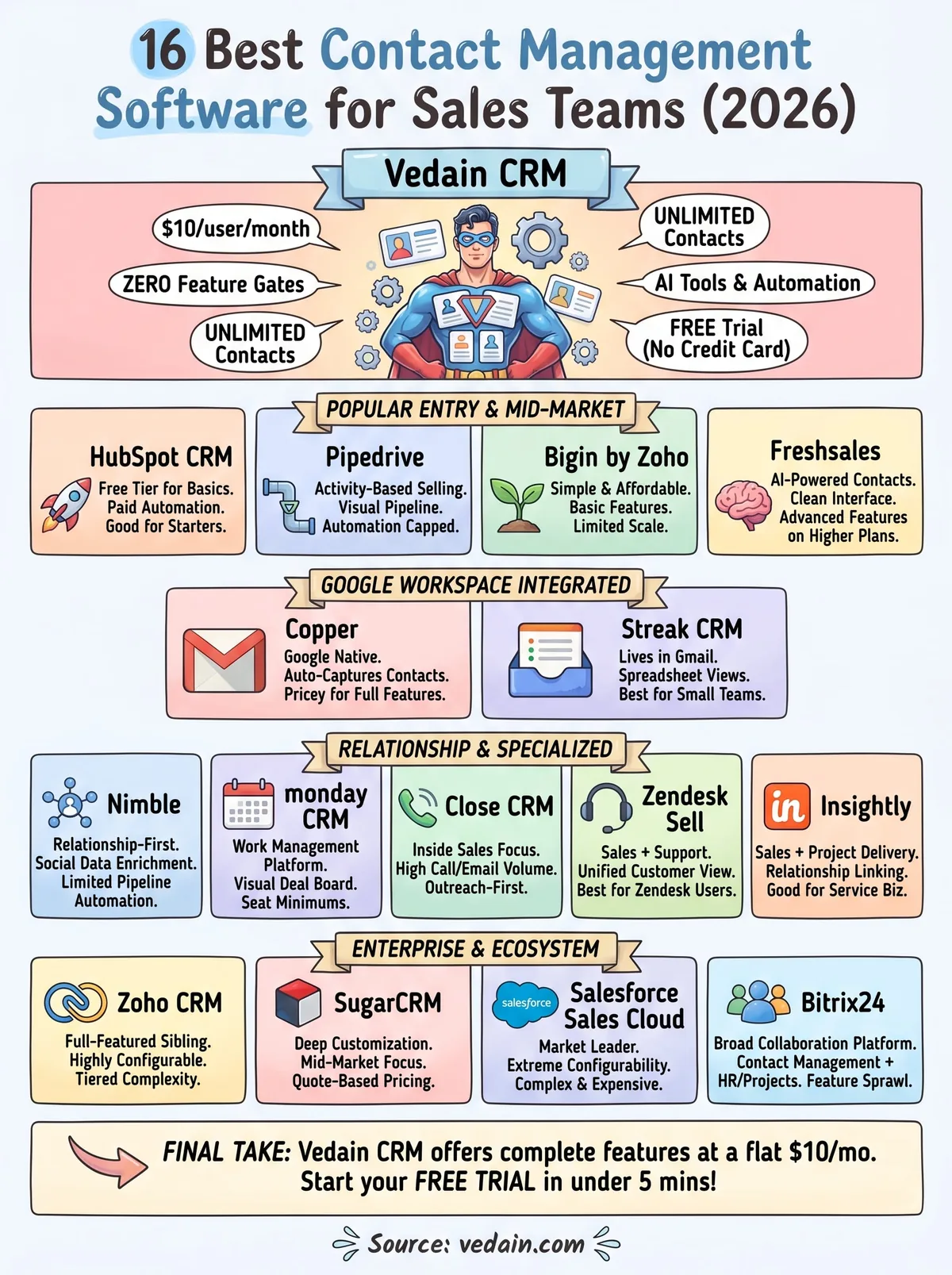
Every tool on this list handles the basics, but the right fit depends on what your team actually needs day to day. If you run Google Workspace exclusively, Copper or Streak make sense. If you manage enterprise accounts with a dedicated admin, Salesforce delivers. But if you want complete functionality without paying more as you grow, most of the options here will push you toward a higher tier before long.
Vedain CRM gives you everything covered in this guide, contact management, pipeline tracking, automation, email sync, AI tools, and reporting, at a flat $10 per user per month with no feature gates and no surprises. It is the best contact management software for sales teams that want full capability without the pricing complexity.
You can start in under five minutes with no credit card required. Try Vedain CRM free and see how it fits your process.
Frequently Asked Questions
What is the best contact management software for small sales teams?
Pipedrive and Freshsales are excellent choices for small sales teams, offering affordable pricing starting at $14-$19/month with intuitive contact organization features. HubSpot's free CRM tier is also popular for startups with basic contact management, email tracking, and pipeline visualization. These platforms require minimal setup and provide essential tools without overwhelming complexity that larger enterprise solutions like Salesforce demand.
How much does contact management software cost compared to Salesforce?
Salesforce's contact management starts at $165/month, making it significantly more expensive than competitors like Pipedrive ($14/month), Freshsales ($19/month), or Zoho CRM ($18/month). HubSpot's free plan offers basic contact management at no cost, while Vedain provides affordable mid-market solutions. For budget-conscious teams, Pipedrive and Zoho CRM deliver comparable functionality at a fraction of Salesforce's enterprise pricing.
Which contact management software integrates best with email and calendar?
HubSpot and Salesforce offer the most comprehensive email and calendar integrations, seamlessly syncing with Gmail, Outlook, and major productivity tools. Pipedrive excels with email tracking and native Gmail/Outlook integration for tracking opens and clicks directly from contacts. Freshsales and Zoho CRM also provide solid email synchronization, though Vedain's integration ecosystem is more limited compared to these market leaders.
What is the difference between Zoho CRM and HubSpot for contact management?
Zoho CRM ($18/month) offers more customization and advanced features at a lower price point, making it ideal for teams needing sophisticated workflows and automation. HubSpot prioritizes ease of use with an intuitive interface and free tier, better for teams prioritizing simplicity over customization. Both provide excellent contact segmentation and email integration, but Zoho scales better for complex enterprise needs while HubSpot wins on user adoption and quick onboarding.
Does Pipedrive have better contact management than Freshsales?
Both Pipedrive and Freshsales offer excellent contact management with similar pricing ($14-$19/month), but they excel in different areas. Pipedrive focuses on visual pipeline management and sales forecasting with superior deal tracking, while Freshsales emphasizes customer communication with built-in phone calling and better email sequencing. Your choice depends on whether you prioritize deal management (Pipedrive) or customer communication features (Freshsales).
Can contact management software replace your phone system?
Some contact management platforms like Freshsales and HubSpot offer integrated calling features, but they shouldn't fully replace a dedicated phone system for high-volume calling teams. Freshsales includes native calling with call recording, while HubSpot requires third-party integrations like Twilio or RingCentral. For comprehensive phone functionality, teams typically use CRM software alongside dedicated VoIP systems rather than as a complete replacement.