The good news: there are CRM tools built specifically for people who want to organize contacts, track conversations, and move deals forward without the bloat. Some cost nothing. Others, like Vedain CRM, give you a full sales toolkit, contacts, pipelines, email sync, automation, at a flat $10/user/month with zero feature gates. No surprise invoices. No "upgrade to unlock" popups.
This guide breaks down 10 contact management tools worth considering in 2026. We evaluated each one for ease of use, pricing transparency, core features, and how quickly you can actually get started. Whether you're a solo founder or managing a growing sales team, you'll find options here that fit your workflow, not the other way around.
1. Vedain CRM
Vedain CRM sits at the top of this list because it does something rare: it delivers a full sales platform without burying you in complexity. Setup takes under 5 minutes, there's no credit card required to start a trial, and the interface is clean enough that most sales reps can figure it out on their first day without reading a manual.
Why Vedain stays simple
Vedain was built for sales teams that want to move fast, not spend weeks configuring a tool. The platform ditches the tiered feature model that clutters most CRMs. Every user gets access to the full feature set from day one, including contact management, deal pipelines, email sync, and automation. That means you spend time selling, not toggling through settings pages trying to unlock what you already paid for.
When every feature is available from day one, your team adopts the tool faster and uses it consistently.
Key contact management features
Vedain gives you a solid foundation for simple contact management software without stripping out the features that actually matter. You get custom fields, notes, and smart filters on every contact record, so finding the right person takes seconds rather than minutes.
- •Leads & Contacts with custom fields, notes, and smart filters
- •Two-way email sync for Gmail and Outlook
- •Lead Forms to pull website visitors directly into your contact list
- •AI Agent Marketplace with 30+ agents for data enrichment
- •Custom Dashboards to surface contact and pipeline data at a glance
Best for
Vedain works best for small to mid-sized sales teams that need more than a simple address book but don't want the overhead of an enterprise CRM. If your team is currently stuck in spreadsheets or paying too much for a bloated tool, Vedain gives you a structured system that grows with you.
It also fits founders and team leads who want automation, reporting, and email campaigns all in one place without juggling five separate subscriptions to cover the basics.
Pricing
Vedain charges a flat $10 per user per month with no feature tiers, no hidden fees, and no surprise upgrades. Every feature listed above is included at that single price point.
2. Less Annoying CRM
Less Annoying CRM does exactly what its name promises. It strips away the complexity that makes most CRMs frustrating and gives small businesses a straightforward way to manage contacts and track follow-ups. If you've been burned by bloated software before, this tool is worth a close look.
Why Less Annoying CRM stays simple
The platform was built from the ground up for small businesses that don't want to spend hours configuring settings before they can log a single contact. There's one pricing tier, one set of features, and a clean interface that most users pick up in under an hour without any formal training.
When a CRM is designed for simplicity first, your team uses it every day instead of avoiding it.
Key contact management features
Less Annoying CRM covers the core needs of simple contact management software without overcomplicating the experience. You get contact records, notes, pipelines, and calendar sync all from one uncluttered screen.
- •Contact records with notes, files, and activity history
- •Pipeline tracking for open opportunities
- •Calendar and task management tied directly to contacts
- •Daily agenda emails summarizing your scheduled follow-ups
Best for
This tool works best for solo founders and very small teams who need an organized system to manage customer relationships without automation, advanced reporting, or anything else that adds weight to the process.
Pricing
Less Annoying CRM charges a flat $15 per user per month with a 30-day free trial and no long-term contracts required.
3. HubSpot CRM
HubSpot CRM is one of the most recognized names in the space, and its free tier gives individuals and small teams a surprisingly clean entry point for managing contacts without paying anything upfront. The platform is large, but you can ignore most of it and still get real value from the contact management side alone.
Why HubSpot can still feel simple
HubSpot's free plan gives you a usable contact database right out of the box. The contact records are well-organized, showing email history, call logs, and notes in one timeline view. You don't need to configure much before you can start adding contacts and tracking conversations with your prospects.
Starting with just the free tier lets you validate whether HubSpot fits your workflow before committing to any paid plan.
Key contact management features
For teams looking for simple contact management software, HubSpot covers the core needs with solid filtering and segmentation tools built in from the start.
- •Contact records with full activity timelines and communication history
- •Email tracking to see when contacts open your messages
- •Smart lists and segmentation filters for targeting specific groups
- •Forms to capture new contacts from your website automatically
Best for
HubSpot works best for solo users and early-stage teams who want a free starting point and are comfortable upgrading later. It suits marketing-heavy businesses more than pure sales teams focused on pipeline and deal tracking.
Pricing
HubSpot's CRM is free to start with no time limit, but features like sequences and automation sit behind paid plans starting at $20 per user per month.
4. Bigin by Zoho CRM
Bigin is Zoho's answer to the "we want a CRM but not Zoho CRM" problem. It's a pipeline-focused tool designed specifically for small businesses that find full-scale CRMs overwhelming. If you've looked at Zoho CRM and felt immediately lost, Bigin is a much lighter entry point into the same ecosystem.
Why Bigin stays simple
The platform cuts the feature set down to the essentials: contacts, pipelines, and basic automation. Zoho built it with a deliberate ceiling on complexity, which means you won't find yourself configuring modules you'll never use. The mobile app is solid, setup takes minutes, and the interface stays clean even as your contact list grows.
Starting with a tool built to stay small means you spend less time learning and more time selling.
Key contact management features
Bigin covers the core needs of simple contact management software with a clear focus on keeping contacts and pipeline stages connected in one view.
- •Contact and company records linked directly to pipeline stages
- •Built-in telephony for logging calls without leaving the platform
- •Workflow automation for basic follow-up tasks
- •Email integration with Gmail and Outlook
Best for
Bigin suits very small businesses and solopreneurs who want a structured pipeline alongside their contacts but don't need advanced reporting or AI-driven features. It's a natural fit for teams already in the Zoho ecosystem who want to start small before scaling up.
Pricing
Bigin offers a free plan for a single user. Paid plans start at $7 per user per month, billed annually.
5. Pipedrive
Pipedrive built its reputation on pipeline visibility, but its contact management side is just as strong. The platform is clean, fast, and most sales reps figure it out on their first day without reading documentation or sitting through a training session.
Why Pipedrive stays simple
The tool keeps things simple by anchoring every contact record to a deal or activity. You see who you need to follow up with, what was last discussed, and what comes next, all from a single organized view. The visual pipeline is the star of the show, but the contact layer underneath it is just as well-structured and easy to navigate.
When your contacts and deals live in the same place, nothing slips through the cracks.
Key contact management features
Pipedrive gives you the building blocks of simple contact management software with enough depth to support a real sales process without overwhelming you with settings.
- •Contact and organization records linked directly to deals and activities
- •Email sync with Gmail and Outlook for full conversation history
- •Smart contact data that auto-fills details from public sources
- •Activity scheduling tied to each contact record
Best for
Pipedrive works best for sales-focused teams that want a structured pipeline running alongside clean contact records. It suits small to mid-sized businesses that prioritize deal tracking over marketing automation or advanced contact enrichment.
Pricing
Pipedrive's plans start at $14 per user per month, billed annually. A 14-day free trial is available with no credit card required.
6. Copper
Copper is built for teams that live inside Google Workspace. Instead of asking you to switch between your inbox and a separate CRM tab, Copper embeds directly into Gmail, pulling contact details and conversation history into a sidebar right next to your emails.
Why Copper stays simple in Gmail
The platform removes the biggest friction point in contact management: manually logging emails. Because it syncs automatically with your Gmail inbox, every message, meeting, and file you exchange with a contact gets recorded without you lifting a finger. If your team already works in Google Workspace, the learning curve is almost nonexistent.
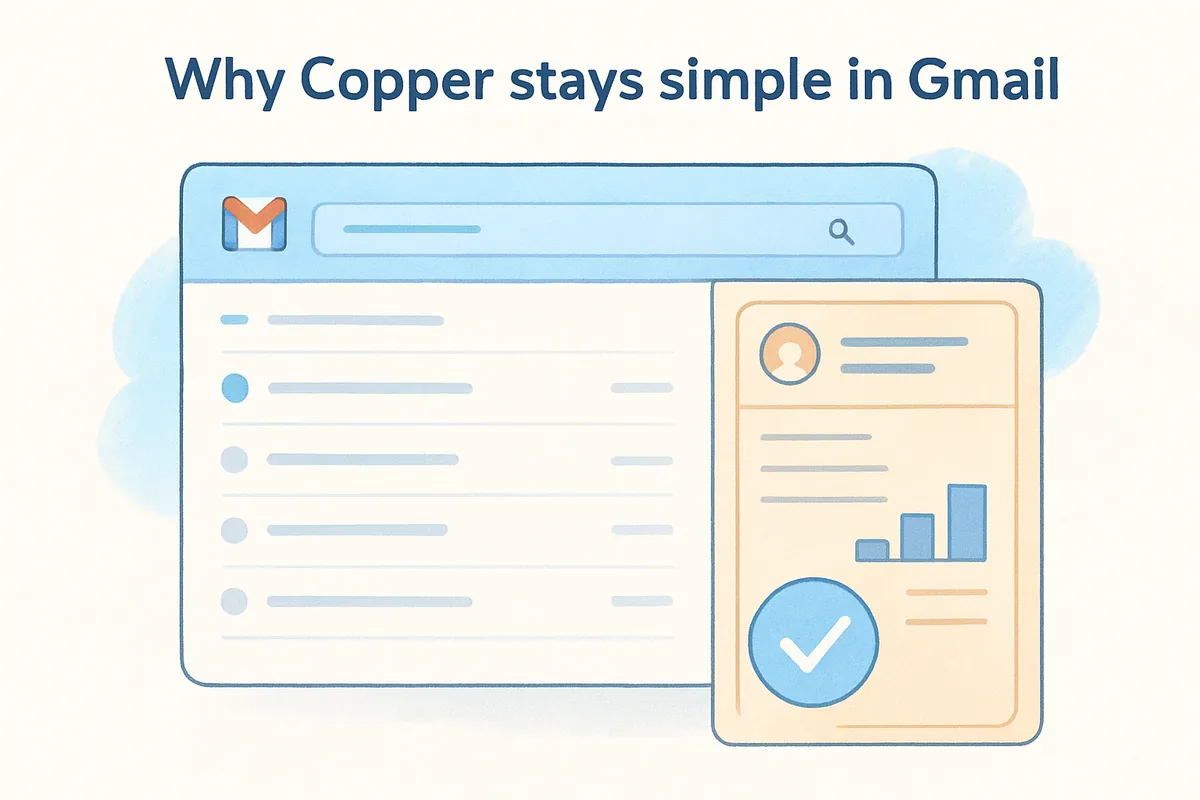
When your CRM lives where you already work, your team actually uses it consistently.
Key contact management features
Copper gives you simple contact management software functionality without making you leave your inbox to access it. Contact records update automatically as you communicate, so your data stays current without manual entry.
- •Auto-enriched contact records pulled from Gmail conversations
- •Pipeline tracking visible directly from your inbox sidebar
- •Google Calendar integration for scheduling follow-ups
- •Tag and filter contacts by deal stage or relationship type
Best for
Copper works best for Google Workspace teams that want their contact management to feel native to Gmail rather than bolted on. It suits service businesses and consultants who manage most of their client relationships through email and want a CRM that mirrors that reality.
Pricing
Copper's plans start at $12 per user per month, billed annually. A 14-day free trial is available with no credit card required.
7. Airtable
Airtable sits in a unique position on this list. It's not a traditional CRM, but for teams that already think in spreadsheet terms, it becomes a surprisingly capable contact management layer with almost no learning curve to overcome.
Why Airtable stays simple for spreadsheet users
If your team already organizes data in Excel or Google Sheets, Airtable will feel immediately familiar. The platform uses a grid layout at its core, but adds relational database logic that lets you link contacts to projects, deals, or companies without building anything from scratch. You set up your contact base once, and the interface just makes sense.

When your contact management tool looks like something your team already uses daily, adoption stops being a struggle.
Key contact management features
Airtable gives you a flexible foundation for simple contact management software that you shape around your own workflow rather than adapting to a rigid system. Your contact records can include any field type you need, from text and attachments to dropdowns and checkboxes.
- •Custom contact bases with unlimited field types
- •Linked records to connect contacts to deals or projects
- •Views including grid, gallery, and kanban layouts
- •Automations for basic follow-up reminders and status updates
Best for
Airtable fits non-sales teams and operations-focused users who need structured contact records without committing to a full CRM. It works well for project-based businesses managing client relationships alongside deliverables.
Pricing
Airtable offers a free plan for small teams. Paid plans start at $20 per user per month, billed annually.
8. Contacts+
Contacts+ takes a different approach from most tools on this list. Instead of starting with a pipeline and layering contacts on top, it starts with the contacts themselves, treating your address book as the product rather than an afterthought attached to a sales workflow.
Why Contacts+ stays simple for syncing
Contacts+ focuses on one job: keeping your contacts organized and synchronized across every device and account you use. It pulls together contacts from Google, iCloud, and social profiles and merges duplicates automatically so you're not managing three versions of the same person. If your biggest headache is scattered, out-of-date contact information, this tool solves that problem directly.
When your contacts are clean and current across every device, you spend less time searching and more time connecting.
Key contact management features
Contacts+ gives you a solid foundation for simple contact management software without adding pipeline or automation weight you may not need. The focus stays on data quality and accessibility.
- •Duplicate detection and merging across connected accounts
- •Enriched contact profiles with social data and job titles
- •Contact syncing across Google, iCloud, and Exchange
- •Smart tags for grouping and filtering contacts by type
Best for
Contacts+ works best for individuals and small teams who need a clean, synced contact database and nothing more. It suits freelancers and consultants who manage relationships through their phone and email rather than a formal pipeline.
Pricing
Contacts+ offers a free plan with basic syncing. Paid plans start at $9.99 per month for individuals.
9. Nimble
Nimble takes a relationship-first approach to contact management. Rather than building around pipeline stages or email workflows, it focuses on helping you understand who your contacts are and when to reach out to them based on social signals and communication history.
Why Nimble stays simple for networking
Nimble pulls contact details from LinkedIn and your email automatically, so you're not manually filling in job titles or company names. The platform builds a unified profile for each person you interact with, combining social data and email history into one clean record. If you manage a lot of relationships through networking rather than a formal sales process, this approach saves you significant time.
When your CRM enriches contact records automatically, you spend more time building relationships and less time doing data entry.
Key contact management features
Nimble gives you simple contact management software features with a clear emphasis on relationship context and smart outreach timing. Every contact record surfaces the information you need to have a relevant conversation without digging through your inbox first.
- •Unified contact profiles built from email and social data
- •Relationship strength scoring to prioritize your most important contacts
- •Follow-up reminders tied directly to each contact record
- •Browser extension to capture contacts from LinkedIn and websites
Best for
Nimble works best for sales professionals and business development teams that rely heavily on social networking and LinkedIn to build their pipeline. It suits relationship-driven businesses where context and timing matter more than pipeline velocity.
Pricing
Nimble's plans start at $24.90 per user per month, billed annually. A 14-day free trial is available with no credit card required.
10. Streak
Streak takes a similar philosophy to Copper but executes it differently. Rather than running as a sidebar next to Gmail, Streak builds directly into your inbox as a Chrome extension, turning your existing Gmail threads into a lightweight CRM without requiring you to open a separate tab or log anything manually.
Why Streak stays simple in Gmail
Streak converts your Gmail inbox into a fully functional pipeline and contact management system the moment you install it. You can group email threads into deal stages, add contact notes, and track follow-ups without ever leaving the email view you already use every day. For teams that resist switching tools, this approach removes the biggest barrier to consistent CRM adoption.
When your CRM requires zero context switching, your team stops treating it like extra work.
Key contact management features
Streak gives you a practical foundation for simple contact management software without forcing you to change how you already work in Gmail. Every feature connects back to your existing email activity.
- •Pipeline views built directly inside Gmail
- •Contact records pulled automatically from email threads
- •Email tracking to see when contacts open your messages
- •Mail merge for sending personalized bulk emails to contact lists
Best for
Streak works best for Gmail-first teams that want contact management and pipeline tracking without adopting a standalone CRM platform. It suits freelancers and small sales teams who handle most client communication through email.
Pricing
Streak offers a free plan for individual users. Paid plans start at $15 per user per month, billed annually.
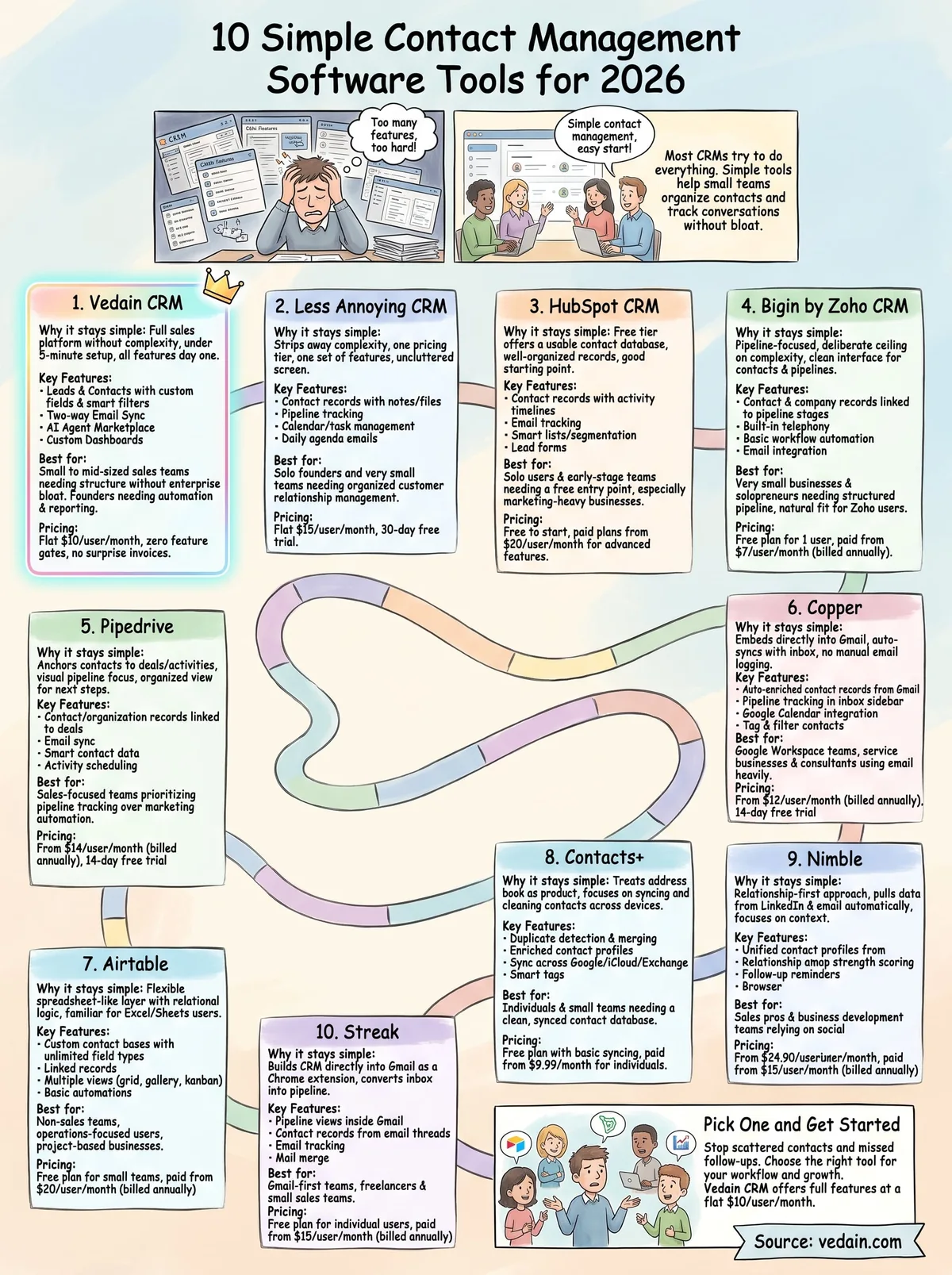
Pick one and get started
Every tool on this list solves the same core problem: scattered contacts and missed follow-ups cost you real deals. The right pick comes down to what your team already uses and how much you need the software to grow with you. If you work entirely in Gmail, Streak or Copper removes most of the friction. If you need a clean address book without heavy sales features, Contacts+ or Less Annoying CRM covers that well without the extra complexity.
For teams that want simple contact management software with real sales horsepower behind it, Vedain CRM stands out from the rest. You get contacts, pipelines, email sync, automation, and AI tools at a flat $10 per user per month with no feature gates and no upgrade pressure. Setup takes under five minutes, and no credit card is required to get started. Try Vedain CRM free today and see how fast your team gets organized.
Frequently Asked Questions
What is the cheapest contact management software for small businesses?
Zoho CRM offers the most affordable option with a free plan and paid plans starting at $20/month, making it ideal for small businesses on tight budgets. While HubSpot's free CRM is also popular, Zoho's paid tiers provide more advanced features at lower price points than Salesforce or Pipedrive, which typically start at $50-$99/month.
Is HubSpot or Salesforce better for contact management?
HubSpot is better for small to mid-sized businesses seeking simplicity with its intuitive interface and free plan, while Salesforce excels for enterprise-level organizations needing advanced customization and scalability. HubSpot's contact management focuses on ease-of-use with built-in marketing automation, whereas Salesforce requires more technical setup but offers deeper customization capabilities.
Can I manage contacts for free with Pipedrive or Freshsales?
Neither Pipedrive nor Freshsales offers a completely free plan, but both provide affordable paid tiers starting around $14-$19/month respectively. If you need a free contact management option, Zoho CRM or HubSpot's free plan are better alternatives that don't require a credit card.
What contact management software integrates best with other tools?
HubSpot offers the most extensive native integrations with over 1,000+ apps and has strong ecosystem support across marketing, sales, and service platforms. Zoho CRM and Salesforce also provide robust integration options, though HubSpot's integration marketplace is generally considered more user-friendly and comprehensive for SMBs.
Which contact management software has the best mobile app?
Salesforce and Pipedrive are widely praised for their mobile-first design, allowing sales teams to manage contacts seamlessly on smartphones. HubSpot, Zoho, and Freshsales also offer strong mobile apps, but Pipedrive's sales-focused mobile interface is often rated as the most intuitive for field teams.
Does Vedain offer contact management features like Zoho or HubSpot?
Vedain is a lightweight contact management solution designed for simplicity, offering basic contact organization features at a lower price point than HubSpot or Zoho. However, it lacks the advanced automation, reporting, and integration capabilities of HubSpot, Salesforce, or Zoho, making it better suited for very small teams prioritizing affordability over functionality.