The problem? Most CRMs either lock AI features behind expensive enterprise plans or bolt on "AI" as a marketing checkbox without real functionality. Small businesses end up paying more for less, or settling for tools that can't actually keep up. At Vedain CRM, we built our platform with AI baked into every tier at $10/user/month, no feature gates, no surprise invoices, because we believe automation shouldn't be a premium add-on.
To help you find the right fit, we compared 12 AI-powered CRMs that genuinely serve small businesses. This list covers pricing, standout AI capabilities, and where each tool falls short, so you can make a decision based on facts rather than sales pages. Whether you're a five-person startup or a growing team of 50, at least one of these platforms will match how you actually sell.
1. Vedain CRM
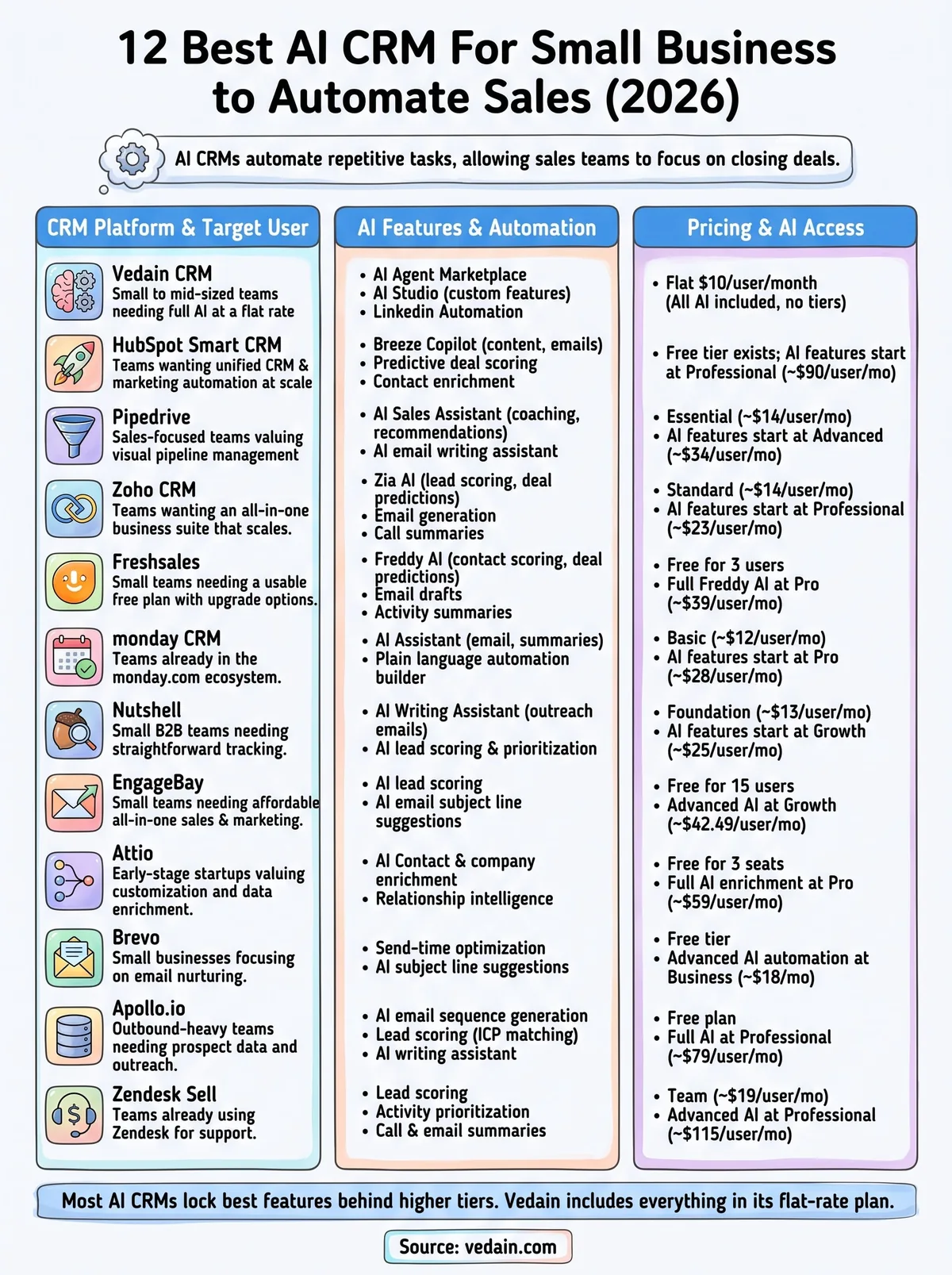
Vedain CRM is built specifically for sales teams that want AI capabilities without paying enterprise prices. At $10 per user per month, it gives you access to every feature the platform offers, including its full suite of AI tools, with no feature gates holding anything back. That positioning makes it one of the strongest candidates if you're evaluating an ai crm for small business on a limited budget.
AI Features and What They Automate
Vedain's AI runs across several parts of the platform rather than sitting in one isolated module. The AI Agent Marketplace includes over 30 pre-built agents that handle tasks like contact data enrichment, lead scoring, and content generation without requiring technical setup. You activate an agent, point it at your data, and it works automatically.
Beyond the marketplace, Vedain includes AI Studio, which lets you describe a CRM feature in plain English and the platform builds it for you. Need a custom field that auto-classifies leads by industry? Describe it, and AI Studio handles the logic. This is particularly valuable for small teams that don't have a developer on staff.
Vedain also includes LinkedIn Automation, which uses AI to generate and schedule posts directly from the CRM, helping your team stay visible with prospects without adding manual work to anyone's plate.
Who Vedain Fits Best
Vedain works best for small to mid-sized sales teams that need automation across the full sales cycle but can't justify paying $50 to $100+ per user for platforms like HubSpot or Salesforce. If your team runs on Gmail or Outlook and you want two-way email sync, pipeline management, and AI automation all in one flat-rate plan, Vedain is a strong fit.
It's also a solid match for teams that have outgrown spreadsheets but find enterprise CRMs bloated and overly complex. You get unlimited records and no per-feature charges, plus an automation builder that requires zero coding knowledge to use effectively.
Setup Time and Integrations
Vedain advertises setup in under five minutes, and that claim holds up for standard configurations. You connect your Gmail or Outlook account, import your contacts, and your pipeline is ready to use. No credit card is required to start a trial, which removes the friction most small businesses run into when evaluating new software.
Integrations cover the core tools most small business sales teams rely on, including email platforms and website lead capture forms through native lead form functionality. Built-in workflow automation connects internal CRM actions without requiring a third-party connector, which keeps your monthly tool costs lower than they would be on platforms that depend on Zapier for basic automation.
Pricing
Vedain uses a single flat rate of $10 per user per month. Every feature, every AI tool, and every automation is included at that price. There are no tiers, no add-ons, and no minimum seat requirements that force you to pay for users you don't have.
For a five-person sales team, that comes to $50 per month total. Compared to most competitors on this list, that's a fraction of the cost for a feature set that typically sits behind much higher price points.
2. HubSpot Smart CRM
HubSpot is one of the most recognized names in the CRM space, and its Smart CRM platform has grown into a substantial tool for teams that want marketing and sales under one roof. If you're evaluating an ai crm for small business, HubSpot will almost certainly show up in your search results, but its pricing structure deserves close attention before you commit to anything.
AI Features and What They Automate
HubSpot's AI layer, called Breeze, runs across multiple hubs and handles tasks like content generation, email drafting, and predictive deal scoring. Breeze Copilot functions as an in-app assistant that you can prompt to pull reports, summarize contact records, or write outreach emails directly inside the CRM without switching tabs.
Breeze Intelligence also enriches contact and company records automatically, pulling in firmographic data so your reps spend less time researching prospects and more time actually selling.
Who HubSpot Fits Best
HubSpot works best for teams that want CRM and marketing automation in a single platform and have the budget to support it at scale. It's particularly strong if your small business runs inbound marketing alongside direct sales, since the toolset covers both without requiring a separate tool for each function. Teams that prioritize deep reporting dashboards and a large third-party integration library will also find HubSpot a comfortable fit.
Setup Time and Integrations
HubSpot's free tier lets you get started quickly, but configuring AI features and multi-step automation workflows takes considerably more time than the onboarding materials suggest. The platform connects to over 1,000 apps through its marketplace, which covers most tools small business teams already rely on. For teams with complex existing tech stacks, that breadth is genuinely useful.
Pricing
HubSpot's free plan covers basic CRM functionality, but AI tools and advanced automation sit behind paid tiers. Sales Hub Starter begins at $15 per user per month, while the plans that unlock meaningful AI capabilities start at $90 per user per month on the Professional tier. For small teams that want the full AI feature set, the total monthly cost can climb well above what the entry-level pricing implies.
3. Pipedrive
Pipedrive built its reputation on visual pipeline management, and it remains one of the cleaner tools on the market for tracking deals from first contact to close. Over the past few years, the platform has layered in AI features, though how much value those features deliver depends heavily on which plan you select.
AI Features and What They Automate
Pipedrive's primary AI feature is the AI Sales Assistant, which analyzes your pipeline activity and surfaces recommendations like which deals are going cold, which activities to prioritize, and where your team is losing momentum. It functions more as a coaching layer than a full automation engine, flagging issues rather than resolving them automatically.
The platform also includes an AI email writing assistant that drafts outreach messages based on context from your contact records, which saves time for reps who send high volumes of cold or follow-up emails.
Who Pipedrive Fits Best
Pipedrive fits sales-focused teams that want a clean, intuitive interface and don't need heavy marketing automation attached to their CRM. If your team spends most of its time managing active opportunities through a structured pipeline, Pipedrive's visual Kanban layout and deal-tracking tools will feel natural from day one. It's a reasonable choice if you already have separate tools for email marketing and only need the CRM layer to handle pipeline visibility.
Setup Time and Integrations
Pipedrive connects to over 400 apps through its marketplace, covering tools like Gmail, Outlook, Slack, and Zapier for extended automation. Basic setup takes an afternoon for most small teams, though configuring AI features and workflow automations requires more time and applies only to higher-tier plans. Teams on the Essential plan will find the AI tooling largely out of reach without upgrading.
Pricing
Pipedrive's Essential plan starts at $14 per user per month, but the AI Sales Assistant and email writing tools require the Advanced plan at $34 per user per month or higher. For small teams evaluating an ai crm for small business, that pricing jump is worth factoring in before assuming the entry-level plan covers everything you need.
4. Zoho CRM
Zoho CRM has been building its platform for over two decades and now serves millions of users across businesses of all sizes. Its AI layer, called Zia, is one of the more developed AI features you'll find at a mid-market price point, though unlocking the full set requires navigating Zoho's tiered pricing structure more carefully than the homepage makes obvious.
AI Features and What They Automate
Zia handles a range of tasks including lead scoring, deal predictions, and pipeline anomaly detection. It flags when a deal is at risk of going cold, suggests the best times to contact specific leads based on historical engagement data, and can auto-assign incoming leads to the right rep using rules you define upfront.
Zia also generates email content and produces call summaries automatically, which cuts down the time your team spends on manual note-taking after customer interactions.
Who Zoho Fits Best
Zoho works well for teams that want an all-in-one business suite rather than a standalone CRM. If your company already uses Zoho Books, Zoho Desk, or other products in the Zoho ecosystem, the CRM connects tightly across all of them without extra configuration. It's also worth evaluating as an ai crm for small business if you anticipate scaling into more complex sales operations over the next few years and want a platform that can grow with you rather than requiring a migration later.
Setup Time and Integrations
Basic configuration takes one to two days for most small teams, but full AI setup and workflow automation requires more technical comfort than most other platforms on this list. Zoho connects to over 800 third-party apps, covering Gmail, Outlook, and the majority of tools that sales teams already rely on day to day.
Pricing
Zoho CRM's Standard plan starts at $14 per user per month, but Zia AI features do not appear until the Professional plan at $23 per user per month. The Enterprise tier at $40 per user per month unlocks deeper AI capabilities. For small teams that want meaningful AI from the start, the real entry cost sits well above the advertised base price.
5. Freshsales
Freshsales is the CRM product within the Freshworks ecosystem, a suite of business tools covering support, marketing, and sales. The platform has carved out a niche in the small business space by offering a free tier alongside paid plans that include progressively more automation and AI functionality. If your team is evaluating an ai crm for small business without a large upfront budget, Freshsales is worth a close look, though its AI depth depends on which plan you select.
AI Features and What They Automate
Freshsales runs its AI layer through Freddy AI, which handles contact scoring, deal predictions, and pipeline health summaries. Freddy scores incoming leads automatically based on engagement signals and profile data, so your reps can prioritize the accounts most likely to convert rather than working through a flat list.
Freddy AI Copilot also generates email drafts and summarizes contact activity, which reduces the manual prep work your team does before outreach calls or follow-up messages.
Who Freshsales Fits Best
Freshsales works best for teams already using other Freshworks products like Freshdesk for support or Freshmarketer for campaigns, since the integrations across the suite are native and require no additional setup. It also suits small sales teams that need a usable free plan to start and want the option to upgrade as their pipeline complexity grows. Teams that manage both inbound support tickets and outbound sales conversations in the same workflow will get the most out of the platform.
Setup Time and Integrations
Most teams can configure Freshsales in under a day for basic pipeline tracking. The platform connects natively to Gmail, Outlook, and Slack, and extends to broader tools through its marketplace. Freddy AI features activate at the paid tiers, so the initial free setup will not reflect the full AI experience your team would use at scale.
Pricing
Freshsales offers a free plan for up to three users with limited features. The Growth plan runs $9 per user per month billed annually, while the Pro plan with full Freddy AI access costs $39 per user per month. Teams that want complete AI functionality will need the Pro tier, which makes the effective cost higher than the entry price suggests.
6. monday CRM
monday CRM is the sales arm of monday.com's broader work management platform. It pairs visual board-based pipeline tracking with CRM functionality, which gives it a distinct feel compared to traditional sales tools. If your team already uses monday.com for project management, the CRM layer integrates naturally with your existing workflows without requiring a separate login or data migration.
AI Features and What They Automate
The platform includes an AI assistant that handles email composition, activity summarization, and follow-up suggestions based on deal context. You can use it to draft outreach messages, suggest next steps on specific deals, and auto-fill certain record fields using information already captured in your pipeline.
The AI also helps you build automation recipes in plain language, which lets non-technical team members set up triggered workflows without writing code or waiting on a developer.
Who monday CRM Fits Best
monday CRM fits teams that already operate within the monday.com ecosystem and want to extend those workflows into sales tracking without switching platforms. It works particularly well for businesses where sales and project delivery overlap, such as agencies or professional services firms, because the handoff between closing a deal and executing the work happens on the same platform. If you're evaluating an ai crm for small business that doubles as a project management tool, monday CRM is one of the few options that genuinely handles both functions.
Setup Time and Integrations
Setup is relatively quick for teams already familiar with monday.com's board structure. The platform connects natively to Gmail, Outlook, Slack, and Zoom, and expands to hundreds of additional tools through its app marketplace. Teams coming in fresh without any monday.com experience may find the interface more complex than a dedicated CRM and should plan for a steeper initial learning curve compared to purpose-built sales tools.
Pricing
monday CRM's Basic plan starts at $12 per seat per month billed annually, with a three-seat minimum. The Standard plan at $17 per seat per month adds automation and integrations, while AI features appear on the Pro plan at $28 per seat per month. For small teams that want full AI access, the real monthly cost sits noticeably higher than the entry-level price suggests.
7. Nutshell
Nutshell is a CRM built for small sales teams that want straightforward pipeline management without the complexity that comes with larger platforms. It positions itself as an accessible, affordable option for growing businesses, and its AI layer, while not as extensive as some competitors, handles the core automation tasks most small teams actually need day to day.
AI Features and What They Automate
The platform includes an AI writing assistant that drafts personalized outreach emails, follow-up messages, and contact summaries directly inside the CRM. You can generate email content based on contact and deal data without leaving your pipeline view, which cuts down the back-and-forth between your CRM and a separate drafting tool.
Nutshell also uses AI to score and prioritize leads based on engagement history and deal stage, helping your team focus effort on the accounts most likely to move forward rather than working a flat, unranked list.
Who Nutshell Fits Best
Nutshell works best for small B2B sales teams that want a clean interface, solid reporting, and basic AI assistance without paying for features they will never use. If you run a lean team and need an ai crm for small business that covers email automation, contact management, and pipeline tracking in one place without a steep learning curve, Nutshell fits that profile well. Teams that rely heavily on reporting to manage quota attainment will also appreciate the built-in leaderboards and pipeline snapshot tools that come standard across paid plans.
Setup Time and Integrations
Most teams get Nutshell fully configured within a few hours. The platform connects natively to Gmail, Outlook, and Slack, and extends to additional tools through Zapier and a native integration library. The onboarding process is straightforward, and most reps can start logging activity on day one without requiring administrator support or technical assistance.
Pricing
Nutshell's Foundation plan starts at $13 per user per month billed annually. The Growth plan, which includes the AI writing assistant and advanced reporting, runs $25 per user per month. Teams that want full AI access will need to budget for at least the Growth tier, as the entry plan covers only basic CRM functions.
8. EngageBay
EngageBay is an all-in-one CRM platform that combines sales, marketing, and customer support in a single tool, built specifically for small businesses that don't want to pay for multiple software subscriptions. If you're evaluating an ai crm for small business on a tight budget, EngageBay competes directly with HubSpot on features while pricing itself considerably lower across the board.
AI Features and What They Automate
EngageBay's AI layer handles lead scoring and contact engagement tracking automatically, flagging which leads show the strongest buying signals based on email opens, page visits, and interaction history. Reps can use that data to prioritize follow-up activity without manually reviewing every record in their pipeline.
The platform also includes AI-assisted email tools that suggest subject lines and content improvements based on past campaign performance, which helps your team improve open rates without relying on guesswork or external testing tools.
Who EngageBay Fits Best
EngageBay suits small teams that want marketing automation and CRM in one place without paying separately for each function. If your team handles both outbound sales and email marketing campaigns, the unified inbox and contact timeline give you a complete view of each prospect's history across both channels.
Teams switching from a disconnected stack of tools, like a standalone email platform combined with a basic contact manager, will find that EngageBay consolidates those functions into one interface and reduces the manual syncing that typically leads to duplicate or outdated records.
Setup Time and Integrations
Most teams can complete a basic EngageBay setup within a few hours. The platform connects natively to Gmail and Outlook and supports Zapier for broader integration coverage. The onboarding process is guided and does not require technical resources to complete.
Pricing
EngageBay offers a free plan for up to 15 users, which is one of the more generous free tiers on this list. Paid plans start at $11.04 per user per month billed annually on the Basic tier, with the Growth plan at $42.49 per user per month unlocking more advanced automation and AI features. Teams that need the full feature set should budget for at least the Growth tier.
9. Attio
Attio is a modern, data-driven CRM that leans heavily into flexible data modeling and automated contact enrichment. The platform is designed for teams that want to structure their customer data in a way that matches how they actually sell, rather than forcing their process into a rigid, predefined layout. If you're evaluating an ai crm for small business and your team values customization alongside automation, Attio stands out from most traditional CRM options on this list.
AI Features and What They Automate
Attio's AI layer focuses primarily on contact and company enrichment, pulling in data from across the web to fill in missing fields on your records automatically. When a new contact enters your CRM, the platform researches their role, company, and professional background without requiring your reps to do that manually before an outreach call.
The platform also uses AI to surface relationship intelligence, showing you which team members have the strongest existing connections to a given account, which helps you route outreach to the right person from the start rather than starting cold.
Who Attio Fits Best
Attio works best for early-stage startups and tech-forward teams that need a CRM they can customize from the ground up. If your sales motion is non-linear or your pipeline involves multiple stakeholders and complex deal structures, Attio's flexible object and relationship modeling gives you more control than most small-business CRMs allow. Teams that prioritize clean data over volume of contacts will get the most from what Attio offers.
Setup Time and Integrations
Attio connects natively to Gmail, Outlook, and Slack, and syncs contact and calendar data automatically once you authorize the connection. Initial setup takes a few hours, but configuring custom objects and pipeline stages to match your exact workflow may take additional time depending on how complex your sales process is.
Pricing
Attio offers a free plan for up to three seats with limited features. The Plus plan runs $34 per user per month, and the Pro plan costs $59 per user per month, which unlocks the full AI enrichment and automation capabilities. For small teams, the cost jumps significantly once you move past the free tier.
10. Brevo
Brevo, formerly known as Sendinblue, started as an email marketing platform before expanding into CRM territory with a dedicated sales module. That combination of email marketing and contact management makes it a distinct option if you're evaluating an ai crm for small business that handles both outbound campaigns and pipeline tracking without requiring two separate tool subscriptions.
AI Features and What They Automate
Brevo's AI capabilities focus primarily on email campaign optimization and send-time personalization. The platform analyzes engagement patterns across your contact list and schedules each email to reach a specific recipient when they are most likely to open it, rather than sending the same campaign at a fixed time to your entire audience.
This kind of send-time optimization can improve open rates for small businesses running regular campaigns without requiring your team to manually test timing across different audience segments.
The platform also includes AI-assisted subject line suggestions that draw on performance data from past campaigns, which helps your team write email copy that performs better from the start instead of relying on trial-and-error testing over multiple sends.
Who Brevo Fits Best
Brevo suits small businesses and early-stage teams that depend more on email nurturing than on pipeline-heavy direct sales management. If your process involves moving leads through automated email sequences before a rep engages personally, Brevo's combined marketing and CRM toolset gives you that workflow in one place. E-commerce businesses and service-based companies with high email volume will get the most out of what the platform offers at each pricing tier.
Setup Time and Integrations
Most teams get Brevo's core tools running in under an hour. The platform connects natively to WordPress, Shopify, and WooCommerce, which benefits small businesses that sell online and want their CRM data synced with their storefront. API access extends connectivity further for teams with technical resources available.
Pricing
Brevo uses a contact-based pricing model rather than a per-user fee, which keeps costs lower for larger teams with smaller lists. The free plan allows up to 300 emails per day. The Starter plan begins at $9 per month, and the Business plan starts at $18 per month, where advanced AI-driven automation and send-time personalization features become available.
11. Apollo.io
Apollo.io is a sales intelligence and engagement platform that combines a large prospect database with built-in CRM functionality and AI-powered outreach tools. Unlike traditional CRMs that start with pipeline management, Apollo leads with prospecting and contact data, giving small sales teams a single place to find leads, engage them, and track the resulting opportunities through to close.
AI Features and What They Automate
The AI engine handles email sequence generation and lead scoring across both the prospecting and outreach stages. The AI writing assistant drafts personalized outreach emails based on prospect data pulled directly from Apollo's database, so your reps can build and send targeted sequences without spending hours on manual research and composition before each campaign.
The platform's AI scoring model ranks prospects by how closely they match your ideal customer profile, so your team focuses on the contacts most likely to respond rather than working through unranked lists.
Who Apollo.io Fits Best
For outbound-heavy sales teams that want to combine prospecting and pipeline tracking in one tool rather than managing a separate lead database alongside their CRM, Apollo is a natural fit. If your team spends significant time building lead lists before engaging prospects, Apollo's database of over 275 million contacts removes that step and feeds qualified leads directly into your workflow. The platform works best when your primary bottleneck is finding the right people, not managing existing customer relationships.
Setup Time and Integrations
Apollo connects natively to Gmail, Outlook, Salesforce, and HubSpot, which lets you run it alongside an existing CRM if your team already has one in place. Basic setup takes a few hours, and most teams can run their first outreach sequence on day one. The LinkedIn integration also allows your reps to pull contact data directly from profiles into Apollo without manual data entry.
Pricing
Apollo offers a free plan with limited monthly credits. Paid plans start at $49 per user per month on the Basic tier, with the Professional plan at $79 per user per month unlocking full AI features and higher export limits. For small teams evaluating an ai crm for small business, that pricing represents a significant jump from free to fully featured compared to flat-rate alternatives.
12. Zendesk Sell
Zendesk Sell is the sales CRM arm of the broader Zendesk platform, designed to give teams that already use Zendesk for customer support a connected sales layer without requiring a separate tool stack. The platform brings together contact management, pipeline tracking, and communication tools in one interface, and its AI capabilities are built around the same Zendesk AI infrastructure that powers its support products.
AI Features and What They Automate
Zendesk Sell's AI focuses on lead scoring and activity prioritization, helping your reps identify which prospects to contact and when, without requiring manual review of every open opportunity. The platform analyzes deal activity and engagement signals, then flags accounts that need attention so your team works from a ranked list rather than a flat queue.
The AI also generates call and email summaries automatically after interactions are logged, cutting down the time your reps spend on post-call admin work before moving to the next prospect.
Who Zendesk Sell Fits Best
Zendesk Sell works best for teams that already run customer support through Zendesk and want their sales and support data to share a single contact record. If your small business handles a significant volume of support tickets alongside active sales conversations, that unified contact view prevents your team from sending sales outreach to customers who already have unresolved issues open.
Teams evaluating an ai crm for small business where support and sales overlap will find Zendesk Sell a practical option for that specific use case, though teams without an existing Zendesk footprint will not get the same value from the platform's core differentiator.
Setup Time and Integrations
Most teams complete a standard Zendesk Sell setup in under a day. The platform connects natively to Gmail and Outlook for two-way email sync, and integrates directly across the Zendesk suite without additional configuration. Third-party tools extend through the Zendesk Marketplace, covering the core software most small sales teams already rely on.
Pricing
Zendesk Sell's Team plan starts at $19 per user per month billed annually. The Growth plan runs $55 per user per month, and the Professional plan comes in at $115 per user per month, where the more advanced AI features become available. For small teams that want full AI access from day one, Zendesk Sell sits among the more expensive options on this list.
Next Steps
Every platform on this list handles the basics of contact and pipeline management, but the differences show up in pricing transparency, AI depth, and how quickly your team can actually get value from the tool. If you need a full-featured ai crm for small business without paying premium prices for features that should come standard, the gap between options like Zendesk Sell or Apollo and a flat-rate platform becomes significant fast.
Before you commit to any platform, map your team's actual workflow against the AI features each tool includes at the plan you can afford. Most platforms lock their best automation behind higher tiers, which means the advertised starting price rarely reflects what you will pay once you add the capabilities your team needs.
Vedain includes every feature at $10 per user per month, no gates, no add-ons. If that sounds like a better starting point, try Vedain CRM free and see how it fits your pipeline today.
Related reading
What small teams should actually pay in 2026
Benchmark per-seat monthly pricing across the market: enterprise AI suites at $75–150 plus implementation; mid-market tools at $30–60 with AI frequently metered or sold as add-on SKUs; value platforms at $10–25 with AI included. For a team of five, the annual spread between the top and bottom bands is $4,000–9,000 — real money at any stage, decisive money before Series A. Vedain sits at $10/user/month with AI chat, scoring, drafting and the agent marketplace included, and no credit packs for core workflows.
Do the hidden-cost math explicitly for your shortlist: base seat price + every AI add-on SKU + realistic overage on any metered feature + onboarding fees, multiplied by your seat count, over twelve months. Vendors make the left side of that equation prominent and the rest discoverable only at checkout. Our CRM pricing comparison lays out twelve tools side by side with the real totals if you want the full landscape before shortlisting.
The two-week evaluation that settles it
Skip the feature-matrix spreadsheet — it rewards whoever wrote the most marketing copy. Put your top two tools through a live trial with this script. Days 1–2: connect email, import your real lead list, install the chat widget on your actual site, and give the assistant your real pricing and product facts. Days 3–7: work normally and let the system observe; note every time the chat assistant answered something correctly at an hour nobody was working. Days 8–12: work exclusively from the scored list and send AI-drafted follow-ups, edited where needed. Days 13–14: count three numbers — median time-to-first-touch, follow-ups actually sent versus your old baseline, and meetings booked by the assistant unattended.
The winner is usually obvious by day ten, and it's frequently not the tool that demoed best — demo AI runs on curated data; trial AI runs on your messy reality. For a compressed version of this method you can run in a single sitting, see our guide to evaluating any CRM in 10 minutes.
Frequently Asked Questions
Which AI CRM is best for small business sales automation?
The best AI CRM for small business sales automation in 2026 is Vedain ($10/user/month) for budget-conscious teams, HubSpot ($90/user/month) for marketing-integrated automation, and Zoho CRM ($14/user/month) for cost-effective mid-range AI. Vedain includes an AI sales agent, lead scoring, and email automation with no add-ons. HubSpot's Breeze AI is more powerful but 9x the price.
What sales tasks can AI CRM automate for small businesses?
AI CRM can automate: (1) lead scoring and prioritization, (2) follow-up email sequences triggered by prospect behavior, (3) meeting scheduling and calendar sync, (4) deal stage progression when conditions are met, (5) pipeline health alerts when deals stall, (6) contact data enrichment from LinkedIn and company databases, and (7) sales forecasting with confidence intervals. These automations typically save 5-8 hours per rep per week.
How long does it take to set up an AI CRM for a small business?
Most modern AI CRMs take 1-3 days to set up for a small business: Day 1 — import contacts/leads from spreadsheet or previous CRM, connect email (Google/Microsoft), configure deal pipeline stages. Day 2 — set up automation rules, configure lead scoring weights, create email templates. Day 3 — train team (2-3 hours per rep). Legacy platforms like Salesforce require weeks or months and typically need implementation consultants.
Do I need technical expertise to use an AI CRM?
No. Modern AI CRMs like Vedain, HubSpot, and Pipedrive are designed for non-technical sales teams. AI features like lead scoring and email drafting work automatically once you connect your email and import contacts. You don't need to train machine learning models or write code. The exception is Salesforce — Einstein AI requires admin configuration and often a dedicated Salesforce admin ($80-120K/year salary).
What is the ROI of AI CRM for small businesses?
Small businesses using AI CRM typically see: 25-40% increase in lead response speed (AI drafts and sends initial emails faster), 15-30% improvement in deal close rate (better prioritization means reps focus on winnable deals), 5-8 hours/week saved per rep on data entry and follow-up. At $50/hour loaded cost, 6 hours/week × 48 weeks = $14,400/rep/year in saved time — versus $120-1080/year in AI CRM cost. ROI is typically 10-50x.
Can a small business afford an AI CRM?
Yes. AI CRM now starts at $10/user/month (Vedain) — a 5-person team pays $50/month, or $600/year. Even mid-range options like Zoho CRM with Zia AI cost $14-52/user/month. The expensive AI CRMs (Salesforce Einstein at $75/user/month extra, HubSpot Breeze at $90/user/month total) are primarily for large teams. Small businesses have more affordable options than ever in 2026.