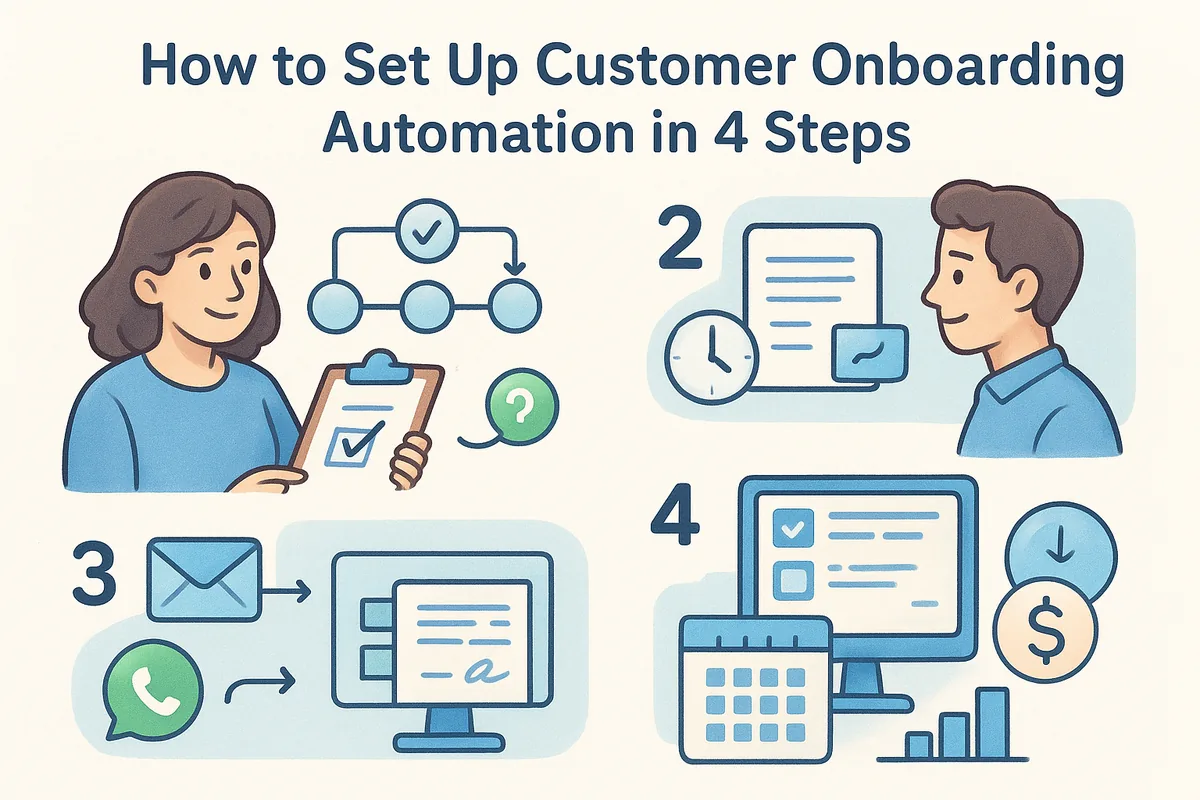
The problem is what happens right after a deal closes. The owner celebrates, then someone has to send the welcome email, chase the signed contract, raise the invoice, find a slot for the kickoff and brief the delivery team. In India and the UAE you add WhatsApp follow-ups and GST invoices on top. Steps slip, the client waits, and the first thing your new customer learns about you is silence. The same is true whether you call it customer onboarding or client onboarding process automation.
This guide walks through four steps in the order you should build them. The examples use Vedain CRM, which includes no-code workflows, email sequences, WhatsApp Business messaging, a booking page and GST invoices. The method works on any stack. Where Vedain does not do something, such as e-signature, we say so and show the workaround.
Why automate onboarding and what to automate
Automate every onboarding step that is repetitive, rule-based and time-sensitive, and keep the conversations that need judgment for a person. That rule gives you a clear shortlist and stops you from automating things that should stay human.
What customer onboarding automation covers
Customer onboarding automation replaces the manual handoffs between "yes" and "first result". Teams that sell services call it client onboarding automation, and teams that sell software call it customer onboarding. The mechanics are identical. Each automated step fires from a trigger (an event or a delay) and runs an action (send, create, assign or remind).
Here is how common manual steps map to automated replacements:
| Manual step | Trigger | Automated action | Feature to use |
|---|---|---|---|
| Writing the welcome email | Deal moves to Won | Send a templated welcome email with next-step links | Workflow + email template |
| Messaging the client on WhatsApp | Deal moves to Won | Send an approved WhatsApp template that points to the email | WhatsApp Business (usage-based extra) |
| Chasing the signed contract | Contract unsigned after 2 and 4 days | Send a reminder, then create a call task for the owner | Workflow delay + task |
| Raising the invoice | Contract marked signed | Send a GST invoice or payment link | Invoicing + payment links |
| Finding a kickoff slot | Welcome email sent | Client picks a time on your booking page | Booking page |
| Briefing the delivery team | Deal moves to Won | Create and assign the kickoff task bundle | Workflow + tasks |
| Noticing a client has gone quiet | No activity by day 14 | Create a check-in task for the owner | Workflow + task |
What to have in place first
Five prerequisites save you from rebuilding later. Without them, the automation sends the right message from a broken setup.
- •A clearly defined Won stage in your pipeline that only moves when a client has actually agreed.
- •A connected sending mailbox (Gmail or Microsoft 365) in good health. Welcome emails that land in spam defeat the whole exercise, so check your mailbox health score first.
- •Phone numbers captured with the client's consent to be contacted on WhatsApp.
- •Written drafts of your welcome email, contract email and check-in email.
- •One named owner for the whole process, so a broken step has someone to fix it.
Automate the steps that are repetitive, rule-based and time-sensitive, and leave judgment calls to people.
Step 1. Map the journey and choose a trigger
Write down every step from signature to first result, then pick the single event that starts the chain. Do this on paper before you open any software. Automating a messy process only makes the mess faster.
List every step from signature to first result
Sit with the person who handles onboarding today and write the steps in order. Add three columns: who does it, how long it should take, and whether the client is waiting on it. Imagine a six-person team in Pune selling monthly marketing retainers. Their map might look like this:
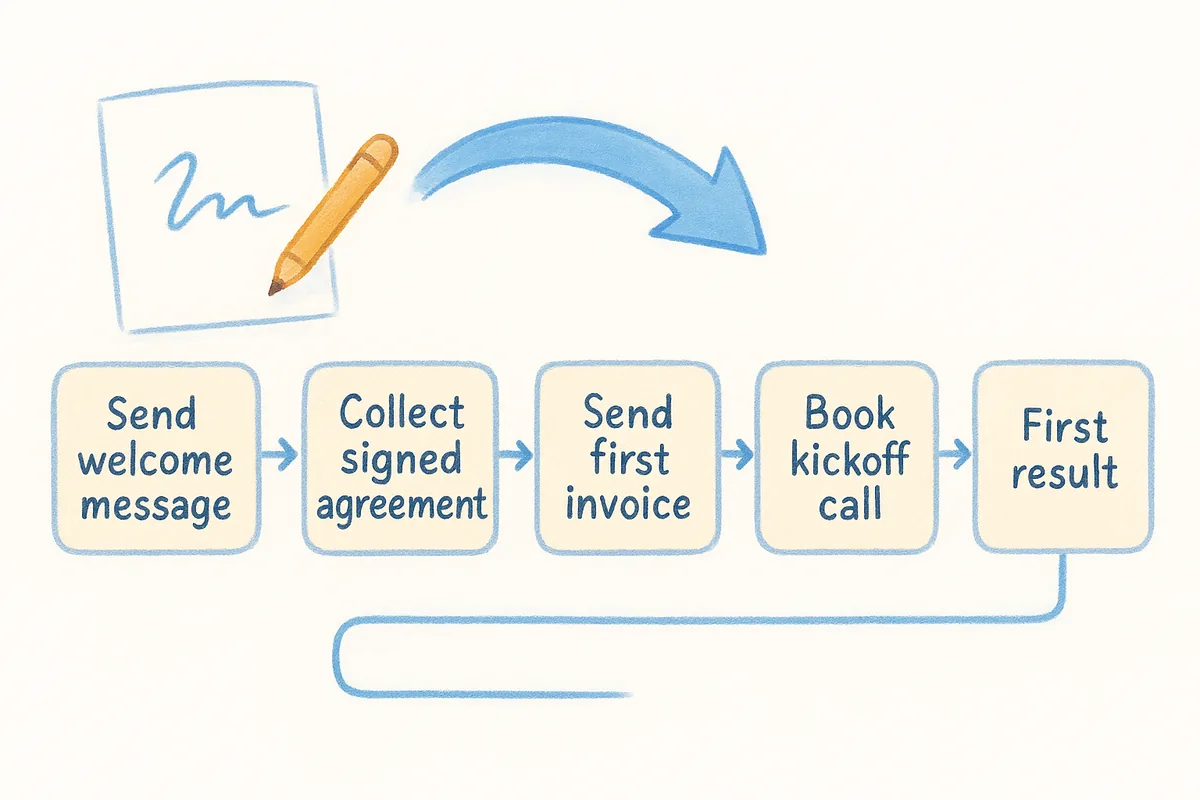
| Step | Owner | Target time | Client waiting? |
|---|---|---|---|
| Send welcome message | Account owner | Same day | Yes |
| Collect signed agreement | Account owner | 2 days | Yes |
| Send first invoice | Finance | After signing | Yes |
| Book kickoff call | Account owner | Within 3 days | Yes |
| Create delivery tasks | Delivery lead | Before kickoff | No |
| Brief the delivery team | Account owner | Before kickoff | No |
Every row where the client is waiting is a candidate for automation first. Rows where the client is not waiting, such as creating tasks, are worth automating too, but they cost you time rather than goodwill.
Choose one trigger and one finish line
Pick one trigger and one finish line. The trigger is the event that starts everything, and the best one is a deal moving to Won. Do not trigger on "proposal sent" or "verbal yes". Those fire onboarding messages to people who have not committed, and a premature welcome email looks careless.
The finish line is the moment the client first gets real value. For an agency it might be the first campaign report. For a software seller it might be the first completed setup step. Name it now, because Step 4 measures how long it takes to reach it.
One clear trigger and one named finish line turn onboarding from a habit into a process you can measure.
Step 2. Automate the welcome, paperwork and payment
Send the welcome, contract link and payment request automatically from the moment a deal is won, and make each one a single, clear ask. The goal is that the client knows what happens next within minutes, not days.
Send a welcome email and a WhatsApp message
Start with the welcome email, because it carries the rest of the journey: three links and one promise. Here is a template you can paste into your CRM. Replace the merge fields with your CRM's own syntax.
- •Subject: Welcome to [Company], {{first_name}}. Here is what happens next
- •Opening line: Thanks for choosing us. Your onboarding starts today, and these three steps get you to your first result.
- •Link 1: Sign the agreement (link to your signing tool)
- •Link 2: Book your kickoff call (link to your booking page)
- •Link 3: Share your access details or brief (link to a form or shared folder)
- •The promise: Your invoice follows as soon as the agreement is signed, and [Owner name] is your contact for any question.
In India and the UAE, buyers often respond faster on WhatsApp than on email. Send a short WhatsApp message in parallel that points back to the email. Business-initiated WhatsApp messages need an approved template, so submit yours ahead of time. In Vedain, WhatsApp Business is a usage-based extra on top of the $10 plan: a one-time registration of ₹1,500, a platform fee of ₹1,000 a month that includes 1 admin and 5 users (extra users ₹250 per user per month), and Meta's per-message charges of ₹0.98 for marketing and ₹0.14 for utility and authentication messages, with service replies free. Those per-message rates are for India; check the current figures, and the rates for UAE numbers, on the product page before you budget.
Handle contracts without in-CRM e-signature
Vedain has no built-in e-signature, so the contract step needs a signing tool you already use. The workaround is simple. Your welcome email carries a link to the agreement in that tool, and a Zapier, Make or webhook connection moves the deal forward when the document is signed.
Add a reminder rule. If the contract is not signed after 2 days, send a polite nudge. If it is still unsigned after 4 days, create a task for the owner to call. Most contract delays are forgetfulness, so a reminder solves them without a human having to remember to chase.
Invoice and collect payment automatically
Once the contract is signed, send the invoice or a payment link. Vedain issues GST invoices and payment links in INR, AED and USD, which covers most India and UAE client work without a separate billing tool. Trigger the invoice from the signed status, not from Won, so you never bill a client who has not agreed.
Every message in the first week should carry one clear next step, so the client never has to guess.
Step 3. Automate kickoff tasks and handoffs
Create the internal tasks and the kickoff booking automatically, and add escalation rules so a stalled client reaches a person. This step protects your team's time on the inside, while Step 2 protects the client's experience on the outside.
Create tasks and book the kickoff call
Add your booking page link to the welcome email so clients choose their own slot instead of trading messages. Then set up a task bundle that appears when the deal is won. A typical bundle for a services team includes:
- •Review the signed agreement and scope (owner, due in 1 day)
- •Create the client workspace or shared folder (delivery lead, due in 2 days)
- •Prepare the kickoff agenda (owner, due before the call)
- •Add the client's contacts and billing details to the account record (owner, due in 1 day)
Assign each task to a person automatically, not to a shared pool. Tasks owned by everyone are done by no one. In a CRM with no-code workflows, this is a single rule that runs when the stage changes.
Add escalation rules for human touchpoints
Automation should hand the client to a person when something looks wrong. Build rules for the cases that matter most: a large deal, an unsigned contract, or a client who has gone quiet. Here is a blueprint you can copy into a workflow builder:
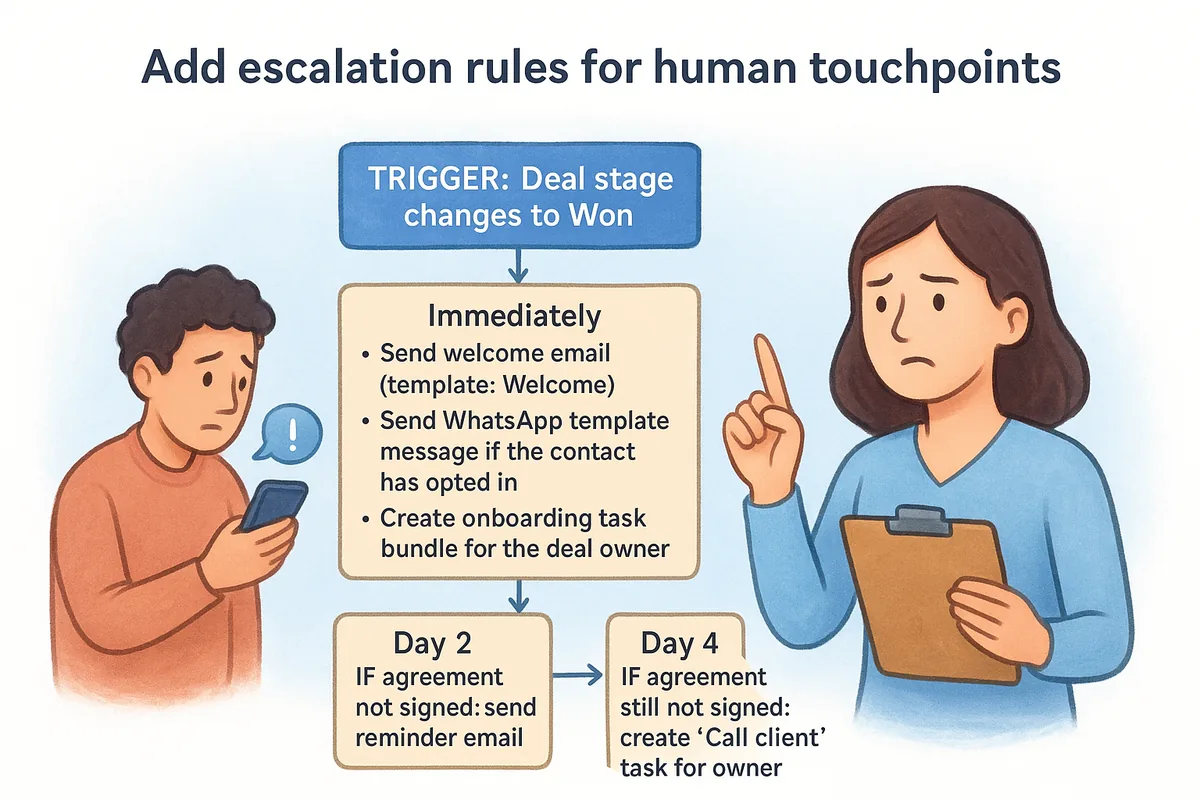
The Day 14 rule is the most useful one on the list. It turns a silent client into a visible task before they become a churn risk.
Good automation knows when to stop and hand the client to a person.
Step 4. Measure, test and keep the human touch
Track a handful of numbers, compare them against what you did manually, and fix the step where clients stall. Measuring is what separates a workflow you set up once from an onboarding process that gets better.
Track the numbers that show where clients stall
You do not need a dashboard full of metrics. These five are enough to start, and each ties to a step you built:
| Metric | What it tells you | How to calculate |
|---|---|---|
| Time to first value | How fast clients reach the finish line | Days from Won to first value |
| Contract turnaround | Whether Step 2 works | Days from Won to signed |
| Days to first payment | Whether invoicing is smooth | Days from Won to paid |
| Kickoff booked rate | Whether clients engage | Booked kickoffs divided by won deals |
| 30-day retention | Whether onboarding sticks | Active clients at day 30 divided by clients onboarded |
- •Time to first value: days from Won to the finish line you named in Step 1.
- •Contract turnaround: days from the welcome email to a signed agreement.
- •Kickoff booking rate: the share of new clients who book a kickoff from the welcome email without a chaser.
- •Days to payment: days from invoice sent to invoice paid.
- •Escalations: how many clients hit the day 14 check-in or another escalation rule each month.
Review them by month and by deal size. An average can hide a segment that always stalls at the same step. If kickoff bookings are low, rewrite the welcome email. If contracts are slow, shorten the agreement or send the reminder earlier.
Check the payoff with your own numbers
Work out the savings before and after, using your own figures. As an illustration, say your team onboards 20 new clients a month and each one takes about 3 hours of manual work: welcome messages, contract chasing, invoicing, scheduling and task creation. That is 60 hours a month. If automation cuts the human time to about 1 hour per client for the kickoff conversation, you spend 20 hours, and you save 40 hours a month.
Now the cost side. Vedain has one plan at $10 per user per month (₹500 or AED 25), with every CRM feature included. If five people touch onboarding, that is $50 a month, or ₹2,500 or AED 125. Annual billing gets two months free, and the 14-day trial needs no credit card. If your workflow includes the WhatsApp step, add its usage-based fees: ₹1,000 a month for the platform (which covers those five users plus one admin) and a ₹1,500 one-time registration. Messages are small by comparison. Two utility messages per client, such as the welcome and a reminder, is 40 messages a month for 20 clients, or about ₹6 at ₹0.14 each. That puts the email-and-WhatsApp version at roughly ₹3,500 a month, plus ₹1,500 in the first month. Compare the 40 hours against that, using your own hourly cost, and you have your answer.
Keep a person in the loop where it counts
Automation should make the human moments better, not remove them. Keep a call or voice note for your largest clients, and have the owner read the welcome email replies personally. Ask new clients one question at day 14: "What was confusing about getting started?" The answers show you what no metric can, and they tell you which message to rewrite next.
Measure time to first value, then fix the one step where clients stall.
Start with one trigger
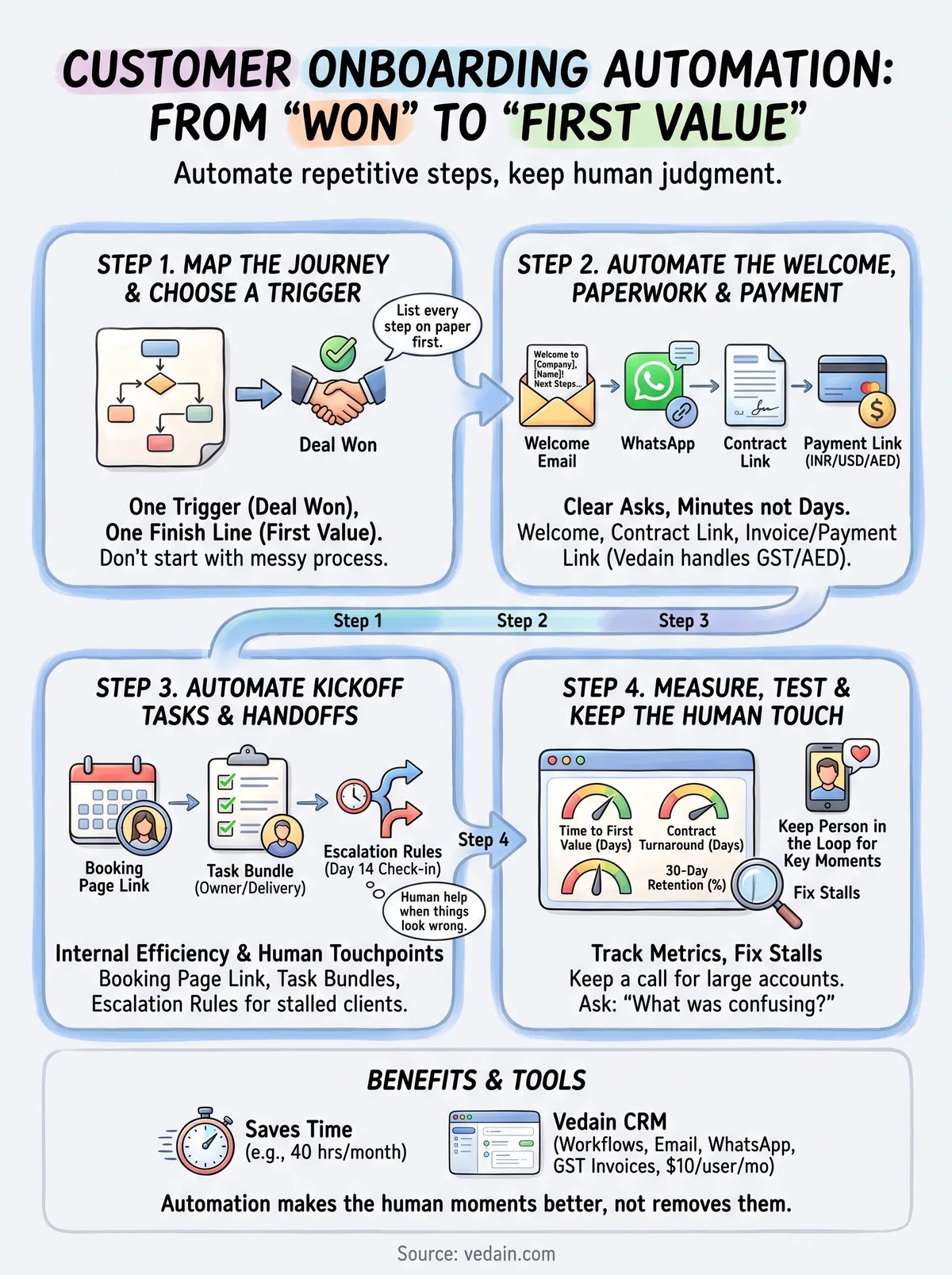
Customer onboarding automation works when it stays simple: one trigger, a welcome that gives three clear next steps, an invoice that follows the signature, and tasks that appear without anyone remembering them. Build those four things first, measure time to first value, and add rules only where clients stall. Keep a person in the loop for large accounts and silent clients.
If you want to build this on a CRM that costs one flat price per user, you can start your 14-day free trial of Vedain CRM. No credit card is needed, and you can use the welcome email and workflow blueprint above as your starting point.
Frequently Asked Questions
What is customer onboarding automation?
It is a set of rules that runs your onboarding steps without manual work once a trigger fires, usually a deal moving to Won. Typical actions are a welcome email, a contract link, an invoice, a kickoff booking and internal tasks. People stay involved for the conversations that need judgment.
What should I automate in client onboarding first?
Start with the steps where the client is waiting on you: the welcome message, the contract link and the invoice or payment link. Then automate internal tasks and the kickoff booking. Leave large-account calls and problem conversations to a person.
What is the best trigger for an onboarding workflow?
A deal moving to a Won stage that only changes when the client has actually agreed. Triggering on a proposal or a verbal yes sends onboarding messages to people who have not committed. Trigger the invoice later, from the signed contract, so you never bill too early.
Can I automate onboarding messages on WhatsApp?
Yes, but business-initiated WhatsApp messages need a Meta-approved template, so submit yours before you go live. In Vedain, WhatsApp is a usage-based extra: ₹1,500 one-time registration, ₹1,000 a month platform fee with 1 admin and 5 users included (₹250 per extra user), plus Meta per-message charges such as ₹0.14 for utility messages in India.
How do I handle contracts if my CRM has no e-signature?
Put a link to the agreement in your existing signing tool in the welcome email, and use Zapier, Make or a webhook to update the deal when it is signed. Add reminder rules at 2 and 4 days so unsigned contracts get chased automatically. Vedain works this way because it has no built-in e-signature.
How do I measure whether onboarding automation is working?
Track time to first value, contract turnaround, kickoff booking rate, days to payment and the number of escalations. Compare them with your manual baseline and review them by month and deal size. Fix the single step where clients stall most before adding more rules.