If you're searching for crm implementation best practices, you want specifics, not theory: what to configure first, how to keep data clean, which automations actually save time versus which ones just look impressive in a demo. This article gives you exactly that, drawn from what separates sales teams that hit their targets from ones that abandon their CRM within a year.
Below are nine best practices for crm adoption and optimization, covering everything from pipeline structure to reporting discipline. Each one is something you can implement this week, whether you're rolling out a new system or trying to rescue one that's already gathering dust.
1. Choose a CRM that matches your workflow and budget
Getting this first choice right matters more than any feature you configure later, because the wrong platform undermines every other best practice crm teams try to layer on top.
What it means
Matching a CRM to your workflow means picking software that mirrors how your sales team actually sells, not how a vendor's demo makes selling look. A five-person startup closing deals in days needs something different than a 200-rep enterprise team running a six-month sales cycle. Workflow fit should drive the decision before brand recognition or feature count does, and budget transparency should factor in just as heavily since many platforms hide the real cost until you're locked in.
Why it matters for ROI
Tools bought for the wrong reasons get abandoned, and abandoned CRMs are pure sunk cost. Teams that pick platforms matching their actual sales motion see faster adoption and see reps logging activity without being forced to.
The CRM that gets used beats the CRM with the most features every time.
How to put it into practice
Run a short evaluation before you commit to any platform, and if you want a longer version, work through this 9-step checklist for choosing a CRM:
- •List your must-have features (pipeline stages, email sync, automation) versus nice-to-haves
- •Map your current sales process and check if the CRM supports it without heavy customization
- •Calculate the true monthly cost per user, including add-ons and integrations, using a breakdown of what CRM software actually costs
- •Test the setup time; if it takes weeks, that's a red flag
- •Confirm pricing won't change as you add users or unlock features
Vedain, for example, prices at a flat $10 per user per month with no feature gates, which removes the guesswork of budgeting for a growing team.
Common mistakes to avoid
Skipping a trial run and buying based on a sales pitch alone is the most common misstep teams make. Overbuying enterprise features you'll never touch inflates cost without adding value, while underbuying a bare-bones tool forces you to switch platforms again within a year, wasting the time already spent on setup and training.
2. Set clear goals and KPIs before implementation
Before you configure a single pipeline stage, decide what success actually looks like, ideally written down in a CRM implementation plan with owners and deadlines. Teams that skip this step end up with a CRM full of data and no way to tell if it's working.
What it means
Setting goals before implementation means defining the numbers you want to move, like win rate, average deal size, or sales cycle length, before you start building fields and automations around them. Your CRM KPIs should trace back to a business outcome, not just "track more stuff."
Why it matters for ROI
Without a target, you can't measure whether the CRM paid for itself. Vague goals produce vague reports, and vague reports get ignored by leadership at budget time.
If you can't name the number your CRM should move, you're not ready to implement it.
How to put it into practice
Pick three to five metrics before rollout and build your setup around them:
- •Lead response time
- •Pipeline conversion rate by stage
- •Average deal size and cycle length
- •Rep activity (calls, emails, meetings logged)
- •Quota attainment per rep or team
Configure dashboards and reports to track these from day one, not six months later, and you can build a custom sales dashboard without IT help in an afternoon.
Common mistakes to avoid
Chasing vanity metrics like total contacts stored tells you nothing about revenue impact. Equally common is setting so many KPIs that reps drown in data entry instead of selling, which defeats the entire purpose of adopting a CRM.
3. Keep your data clean, accurate, and up to date
A CRM full of duplicate contacts and stale deal stages is worse than no CRM at all, because it gives your team false confidence in numbers that don't reflect reality. This is one of the crm industry best practices that gets ignored the most, mostly because cleanup feels tedious compared to closing deals.
What it means
Clean data means every record has accurate contact details, current deal stages, and no duplicate entries pulling your pipeline reports in different directions. Customer data management isn't a one-time cleanup project, it's an ongoing habit built into how reps log activity.
Why it matters for ROI
Dirty data skews forecasts, wastes rep time chasing dead leads, and erodes trust in the system entirely.
A CRM is only as reliable as the data your team bothers to keep accurate.
Once reps stop trusting the numbers, they stop using the tool, and you're back to spreadsheets.
How to put it into practice
Build these habits into your weekly routine:
- •Run a duplicate check monthly using built-in merge tools
- •Require mandatory fields (email, deal stage, next action) before a record saves
- •Archive or delete leads that have gone cold for 90+ days
- •Assign one person to own data quality, even part-time
Vedain's custom fields and smart filters make it easy to spot incomplete or outdated records fast.
Common mistakes to avoid
Letting reps skip required fields to save time creates gaps that compound over months. Importing bulk lists without deduplication first is another frequent error that buries your pipeline in noise.
4. Automate workflows to cut manual work
Manual data entry is the fastest way to kill CRM adoption. Reps didn't sign up to sell so they could spend their afternoons updating deal stages and typing follow-up emails by hand.
What it means
Workflow automation means letting the CRM handle repetitive tasks, like sending follow-up emails, updating deal stages, or assigning new leads, without a rep touching a keyboard. No-code automation should replace the busywork that eats into actual selling time, not add another layer of complexity reps have to manage.
Why it matters for ROI
Every minute a rep spends on data entry is a minute not spent talking to prospects. Teams that automate the routine steps see faster lead follow-up and fewer deals slipping through the cracks from simple forgetfulness.
Automation only pays off when it removes work reps hated doing, not when it just adds more rules to babysit.
How to put it into practice
Start small and expand once the basics run smoothly:
- •Auto-assign new leads based on territory or rep availability
- •Trigger follow-up reminders when a deal sits untouched for 5+ days
- •Send automated welcome emails when a lead enters the pipeline
- •Move deals to the next stage automatically when key actions complete
Vedain's no-code workflow builder lets you set these rules in plain language without a developer.
Common mistakes to avoid
Overbuilding automation before you understand your process creates rules that fire incorrectly and frustrate reps. Automating a broken process just makes mistakes happen faster.
5. Integrate your CRM with the tools your team uses
A CRM that lives in isolation from your inbox, calendar, and marketing tools forces reps to work across five tabs just to close one deal. That friction is exactly what pushes teams back toward spreadsheets and sticky notes.
What it means
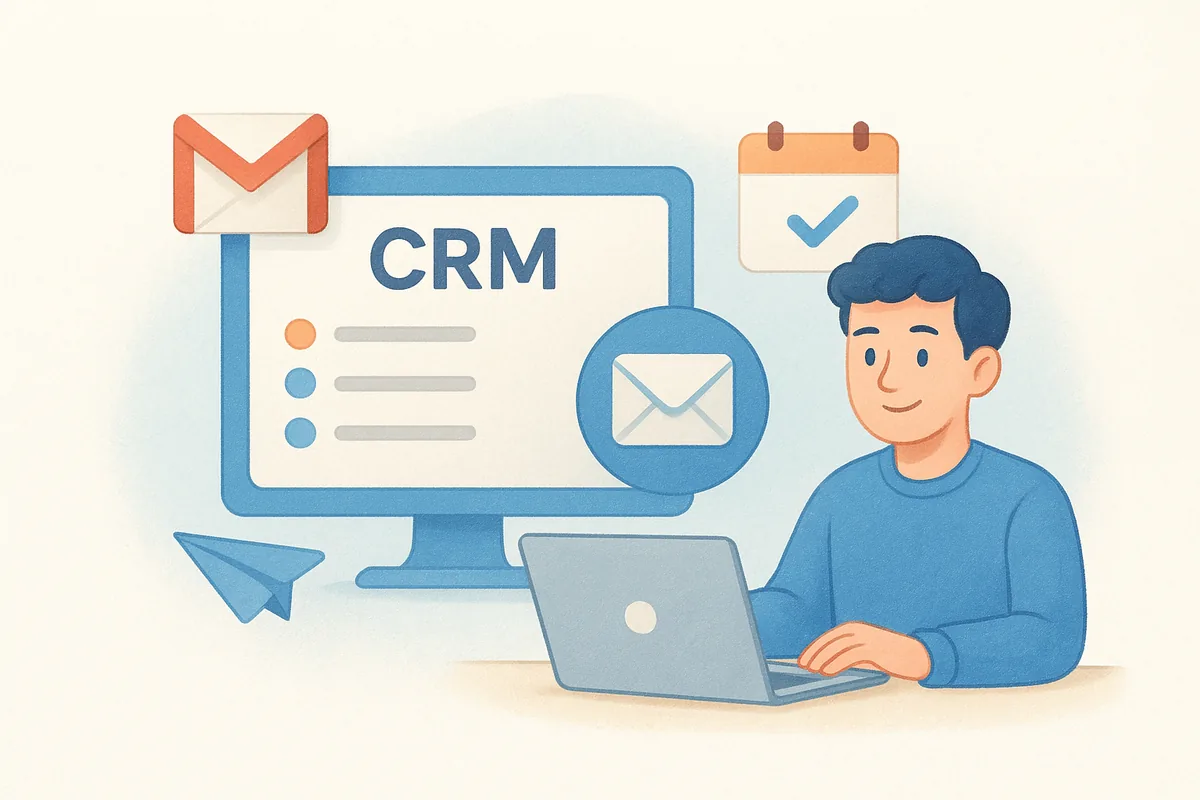
Integration means your CRM talks to the software your team already uses daily, especially email. Two-way email sync with Gmail or Outlook keeps every conversation logged automatically, so reps aren't forwarding threads or copy-pasting notes into a separate system.
Why it matters for ROI
Disconnected tools create duplicate work and blind spots. Connected systems mean a rep can see the full history of a lead, deal, and conversation in one place, which shortens follow-up time and reduces the chance a deal goes cold from a missed email.
A CRM that doesn't talk to your inbox is just another app reps have to remember to update.
How to put it into practice
Prioritize integrations that touch your daily workflow first:
- •Connect Gmail or Outlook for two-way email sync
- •Sync your calendar so meetings log automatically
- •Link lead capture forms directly to your pipeline
- •Add marketing or ad platforms only after the core stack works reliably
Vedain's email integration syncs both directions out of the box, no middleware required.
Common mistakes to avoid
Chasing every available integration before the basics work creates a tangled setup nobody trusts. Skipping email sync entirely, meanwhile, guarantees reps keep two records of every conversation.
6. Train your team and track adoption and ROI
Even the best-fit CRM fails if reps never learn to use it properly, and training gets skipped more often than any other step in a rollout. This is where best crm practices separate teams that see real returns from teams that just paid a monthly bill for software nobody opens.
What it means
Training means teaching reps not just where buttons live, but why each habit, like logging calls or updating deal stages, matters for their own commission. Driving real CRM adoption means checking who's actually using the system weekly, not assuming it happened after one onboarding call.
Why it matters for ROI
Unused features are wasted spend, and a rep who never opens the CRM produces zero reportable data. Measuring usage tells you where the rollout is stalling before it costs you a full quarter.
A CRM you paid for but nobody opens isn't a tool, it's a subscription you forgot to cancel.
How to put it into practice
- •Run a 30-minute training session per feature, not one long overview
- •Check login frequency and record counts weekly for the first two months
- •Assign a power user on each team to answer quick questions
- •Review team permissions so reps only see what's relevant to their role
Common mistakes to avoid
Treating training as a one-time event guarantees knowledge gaps resurface. Never checking adoption data means you find out the rollout failed only after reps have already quit using it.
Turning best practices into everyday CRM habits
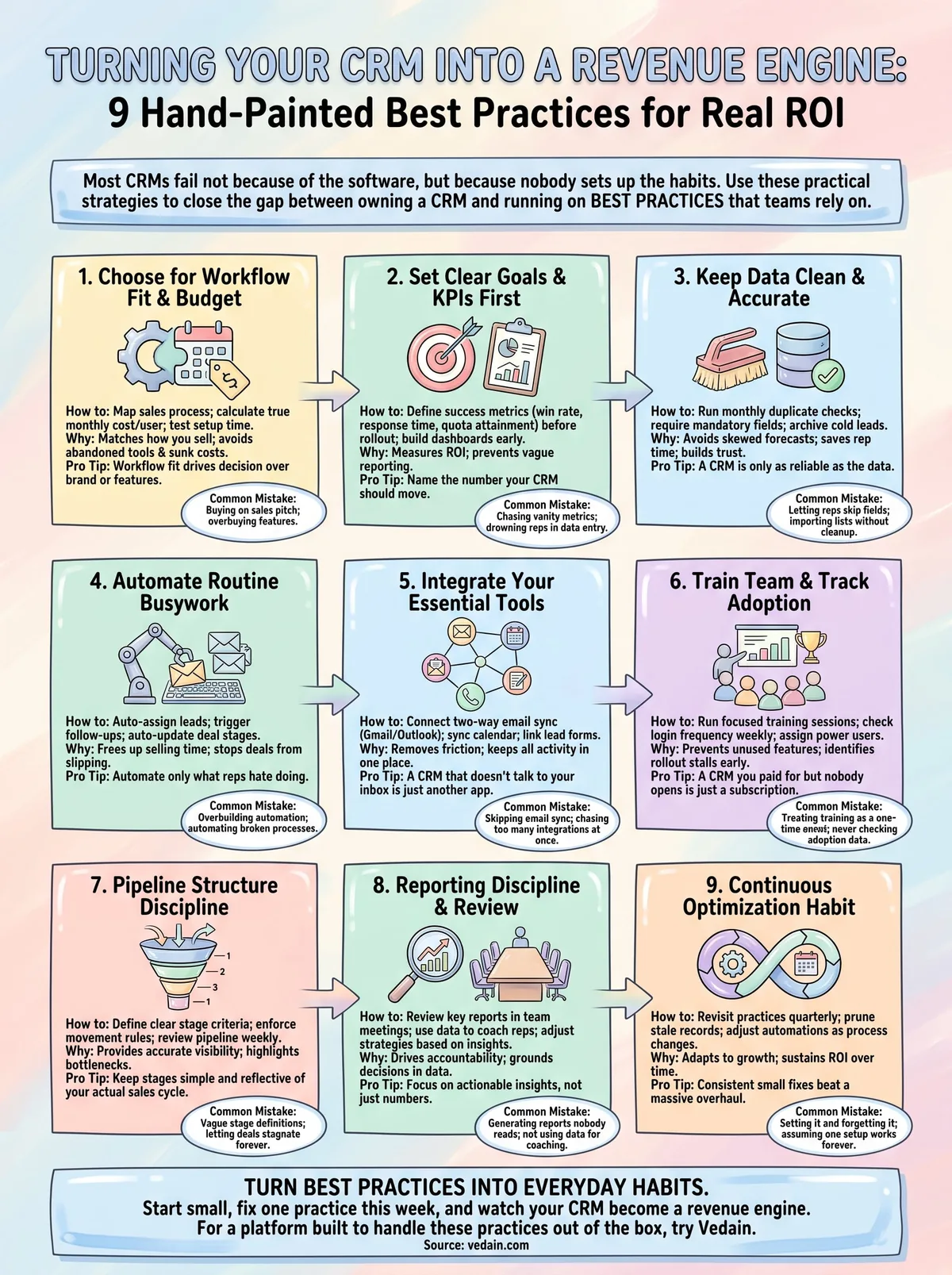
None of these nine practices work as a one-time setup. Picking the right platform, cleaning your data, automating the busywork, and training your team all need to become habits your reps repeat without thinking, not a checklist you run through once during onboarding. The teams that get real ROI from a CRM are the ones who revisit these steps quarterly, checking adoption numbers, pruning stale records, and adjusting automations as their sales process changes.
Start small if you're overwhelmed. Pick one practice from this list, the one costing you the most deals right now, and fix it this week before moving to the next. Consistent small fixes beat a massive overhaul nobody sustains past month two.
If your current setup is fighting you at every step, the platform itself might be the problem. Try Vedain free for 14 days, see how it handles all nine of these practices out of the box, and decide for yourself in under five minutes.
Frequently Asked Questions
What is the best CRM for maximizing ROI in 2026?
The best CRM for ROI depends on your business size and budget, but HubSpot, Salesforce, and Zoho are top performers in 2026. HubSpot's free tier and affordable paid plans ($50-3,200/month) make it ideal for startups, while Salesforce (starting at $165/month) excels for enterprise automation and AI-driven insights. Zoho CRM ($14-65/month) offers exceptional value for small businesses, whereas Pipedrive ($14-119/month) specializes in sales-focused ROI with visual pipeline management.
How much ROI can you expect from implementing a CRM system?
Businesses typically see 23-28% improvement in sales productivity and 25% faster sales cycles within the first year of CRM implementation. Organizations using advanced CRM features like Salesforce's Einstein AI or HubSpot's predictive analytics report average ROI of 300-400% over three years. The key is proper implementation, team adoption, and leveraging automation features—companies that fail to do so average only 10-15% ROI.
Should I choose Salesforce or HubSpot for better ROI in 2026?
HubSpot delivers better ROI for small-to-mid-market businesses due to lower costs ($50-3,200/month) and faster implementation, while Salesforce provides superior ROI for enterprises needing advanced customization and AI capabilities at $165-500+/month. HubSpot's all-in-one platform reduces vendor fragmentation costs, whereas Salesforce's Einstein AI and Vedain's specialized modules offer deeper analytics for large-scale operations. Your choice depends on company size, technical resources, and budget allocation.
What CRM features directly impact ROI the most?
Automation, AI-powered analytics, and pipeline management have the highest ROI impact by reducing manual work and improving conversion rates. HubSpot's workflow automation and Salesforce's Einstein predictive scoring can reduce sales cycle time by 20-30%, while Pipedrive's visual pipeline and Freshsales's AI-powered lead scoring directly increase deal closure rates. Integration capabilities with your existing tools (accounting, marketing, support) are also critical—companies with well-integrated stacks see 2.5x higher ROI than siloed systems.
Is Zoho CRM worth it for ROI compared to competitors?
Zoho CRM ($14-65/month) delivers exceptional ROI for budget-conscious businesses, offering 70-80% of Salesforce's functionality at 30% of the cost. Compared to Pipedrive ($14-119/month) and Freshsales ($15-79/month), Zoho provides more customization options and better integration with Zoho's broader ecosystem (books, invoice, projects). However, Salesforce and HubSpot provide superior AI/ML capabilities and scalability for enterprises prioritizing advanced analytics over cost savings.
How long does it take to see ROI from a CRM implementation?
Most businesses see measurable ROI within 3-6 months of proper CRM implementation, with quick wins including reduced administrative time and improved data accuracy. Companies using HubSpot or Freshsales typically achieve ROI faster (3-4 months) due to ease of implementation, while Salesforce and Vedain implementations may take 6-9 months due to complexity but deliver higher long-term returns. The timeline depends heavily on data quality, team adoption rates, and whether you're replacing legacy systems or building from scratch.