MODULEAlready on Vedain? An admin installs Orders & Inventory from the Marketplace inside your existing workspace — no new login, no migration.Enable it →
Quote, order, dispatch, invoice, paid. In your CRM.
Orders & Inventory picks up where the deal ends. Convert an accepted quote into a sales order, dispatch it in parts with delivery challans, keep stock counts honest, raise the tax invoice from what actually shipped and collect advances with payment links. When the order is delivered, the customer goes back to the salesperson who won it.
Included in the Growth plan at $10/user/month (₹500 · AED 25). An admin installs it from the Marketplace. 14-day free trial, no card.
app.vedain.com
SO · DC · CNSales orders, delivery challans and credit notes numbered by financial year in India, within GST’s 16-character limit
CGST · SGST · IGSTGST split by place of supply for Indian workspaces, with HSN/SAC on every line
StockOn hand, reserved and available for every stock-tracked product, with a full movement history
IncludedNo add-on fee: Orders & Inventory is part of the $10/user/month Growth plan
How an order moves
From accepted quote to paid invoice.
Most CRMs stop when the deal is won. Orders & Inventory covers the steps that come after it, on the same customer, deal and quote records your team already uses: confirm the order, dispatch it, deliver it, bill it, collect the money and come back for the next order. Nothing is retyped into a second system.
01Quote becomes an orderClick “Convert to order” on an accepted quote, or start one from a deal, lead, contact, account or the Orders page. Lines, customer, currency and payment terms carry over.
02Confirm and ask for an advanceConfirming checks the lines, the customer and any required fields, and records the original sales executive. Ask for no advance, a percentage or a fixed amount.
03Dispatch in partsEach dispatch gets a delivery challan and takes the goods out of stock. Record transporter, vehicle, LR and e-way bill details. Services are marked complete instead.
04Mark it deliveredYour team marks each dispatch delivered, with an optional proof-of-delivery file, or records a failed delivery and chooses what happens next.
05Invoice what shippedRaise a draft tax invoice from what was dispatched, from everything left, or from a single dispatch. Advances already received are applied to it.
06Get paid, then follow upSend payment links on your own gateway or record payments by hand. After delivery, the customer goes back to the original sales executive for a follow-up.
What you get
Everything between “yes” and “paid”, on one record.
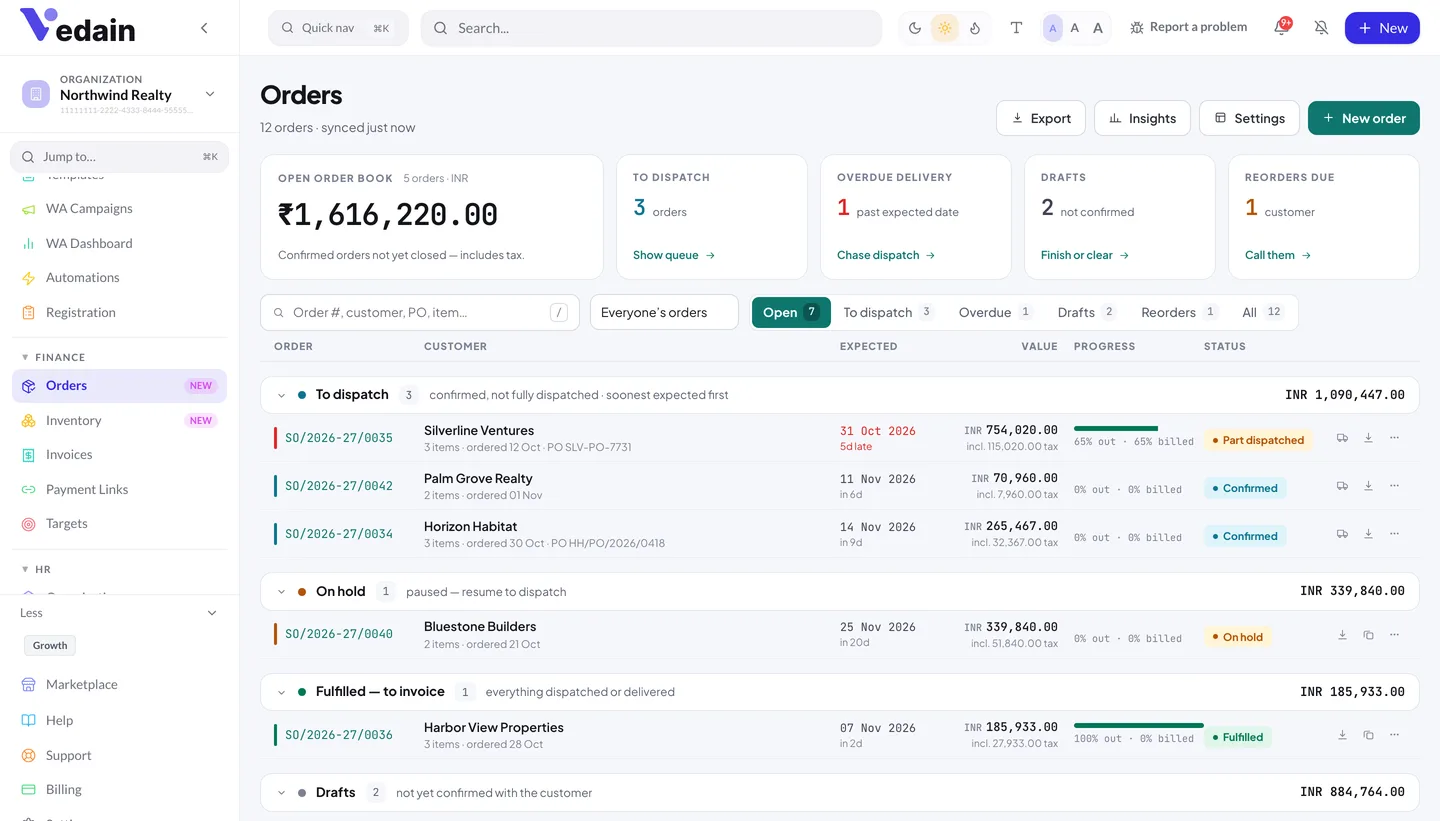
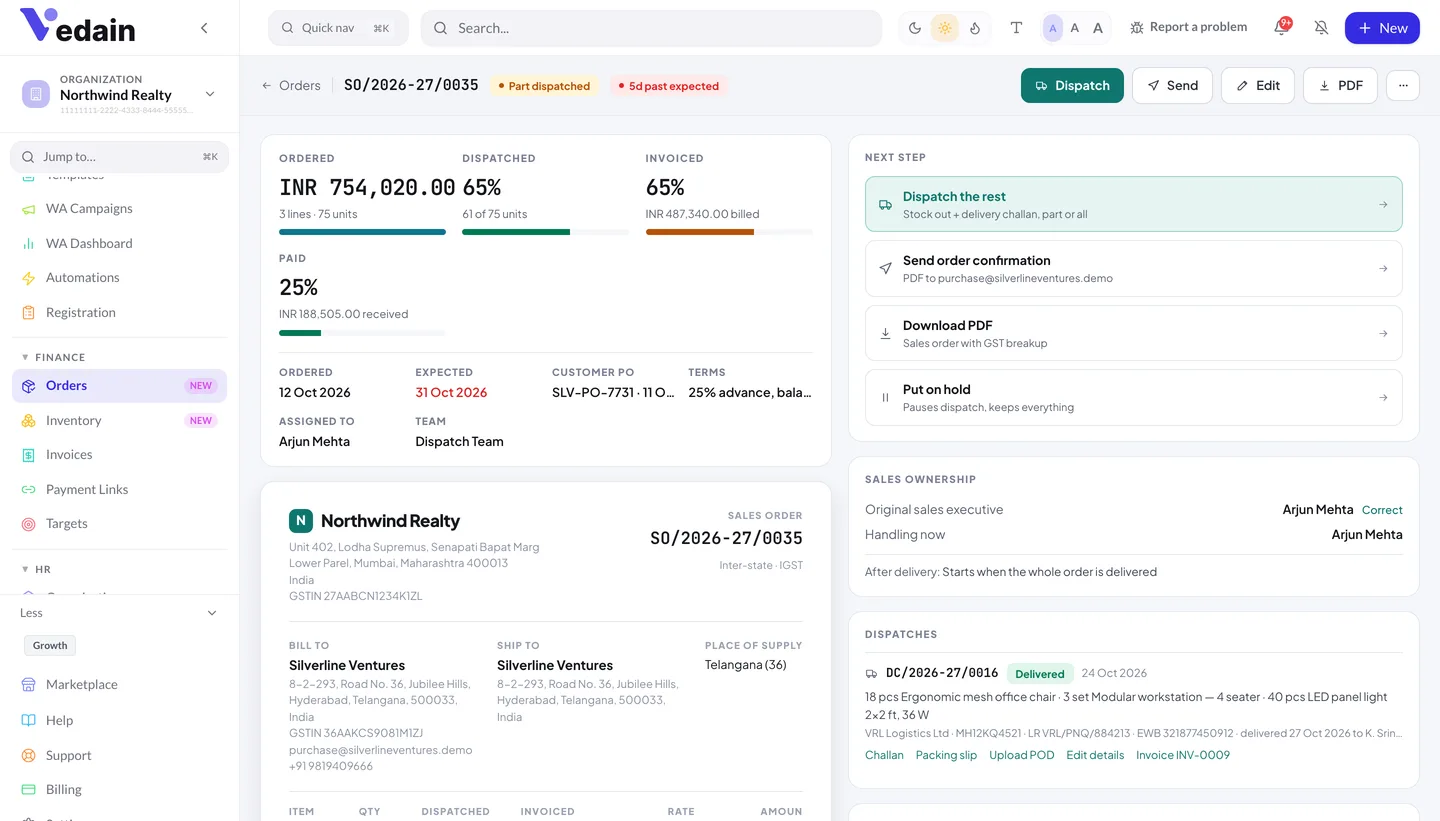
Every order carries its lines, dispatches, challans, invoices, credit notes, payments, notes and activity log in one place. A progress strip shows ordered, dispatched, invoiced and paid at a glance, so sales, operations and accounts are all looking at the same numbers.
Sales orders from quotes, deals, leads or accounts
Part dispatches with delivery challans
Stock on hand, reserved and available
Transport and e-way bill details recorded and printed on the challan (India)
Tax invoices from what was dispatched, with CGST/SGST/IGST split for Indian workspaces
Credit notes with optional restock
Advances and payment links on your own Razorpay, Stripe or PayPal account
In-app low-stock alerts and a “Stock Running Low” workflow trigger
Post-delivery follow-ups and reorder reminders for the original sales executive
Insights plus eight order and stock reports
The guide
How Orders & Inventory works, step by step
A walk through each part of the module: what it does, the choices you make, and where it stops. Each part links to its step-by-step guide in the Vedain Help Centre.
Who Orders & Inventory is for
For a business that ships goods or delivers a job, winning the deal is where the real work starts. The order has to be confirmed, packed, dispatched, delivered, billed and paid, and somebody has to know where each order stands at every point. Usually that knowledge lives in a spreadsheet, a billing tool and a dispatch register that never quite agree with the CRM. Orders & Inventory puts those steps inside Vedain, next to the deal that produced the order.
It is built for businesses that sell goods, services or a mix of both. Indian workspaces get CGST, SGST and IGST worked out by place of supply, HSN and SAC codes, and financial-year numbering for sales orders, challans and credit notes. Workspaces in the UAE and other countries get one tax per line, using the label and rates from their own tax settings, with “State / emirate” on addresses and amounts in words such as “UAE Dirhams … Fils”.
Traders and distributors: part dispatches, delivery challans, stock counts and low-stock alerts.
Manufacturers selling finished goods: customer PO numbers, ship-to addresses, and transport and e-way bill details printed on the challan.
Service firms: service lines are marked complete instead of dispatched, with no challan and no stock movement.
Sales-led teams: the salesperson who won the order is recorded, and gets the customer back after delivery.
From quote to sales order without retyping
An order can start in four places: “Convert to order” on an accepted quote, “+ New order” in a deal’s Orders card, “Create order” on a lead, contact or account, or “New order” on the Orders page. Converting a quote copies its lines, customer, currency, payment terms and notes, and marks the quote accepted. Vedain won’t create a second live order from the same quote.
The customer’s name, email, phone, GSTIN and billing address are filled in from the linked account, then the contact, then the lead. An order holds up to 300 lines, each with a name, description, HSN/SAC, unit, quantity, unit price, discount % and tax rate, and each marked as goods or a service. “Add from catalog” brings in a product with its item type, HSN/SAC and unit, and “Add to catalog” saves an item you typed on the fly.
The editor also holds the order date, expected delivery, customer PO number and date, the assigned person and team, billing and ship-to addresses, place of supply, payment terms, notes printed on the order and internal notes. Payment terms come with presets such as “100% advance”, “50% advance, 50% before dispatch”, “Against delivery” and Net 15 to Net 60. Admins can hide sections a business never uses, such as the discount column, and add custom fields (text, number, checkbox, date or dropdown). Required custom fields are checked when the order is confirmed, not while it is still a draft.
“Confirm order” checks there is at least one line, a customer name and any required fields, and records the original sales executive. After that an order can be put on hold with a reason and a review date (Vedain creates a review task for that day), resumed, cancelled with a reason while nothing has been dispatched, invoiced or paid, or duplicated into a new draft for a repeat customer.
Goods can leave in as many dispatches as you need. “Dispatch goods” sends what is ready now and “Dispatch the rest” clears the balance; you can’t dispatch more than is left on a line. Each dispatch gets its own delivery challan number and takes the quantity out of stock. Goods and services are dispatched separately, and an order on hold has to be resumed before anything leaves.
A dispatch records the date, transporter, mode (road, rail, air, ship, courier or hand), vehicle number, LR or docket number and date, a tracking link and the expected delivery date. Indian workspaces also get transporter ID, e-way bill number, e-way bill date, valid-until date and distance, and these can be added after the goods have left with “Add e-way bill”. Vedain records the e-way bill details and prints them on the challan. It doesn’t generate e-way bills or file anything with the government portal: you create the bill on the portal and enter the number here.
Every dispatch prints as a “Challan” with values or a “Packing slip” without prices, using your default invoice template. When the goods arrive, someone on your team clicks “Mark delivered” and records who received them, with an optional proof-of-delivery file: one JPG, PNG, WEBP, HEIC or PDF per dispatch, up to 7.5 MB. There is no courier feed, so delivery status is what your team records.
If a delivery fails, you record the reason and choose what happens next: try again on a new date, send the goods back to processing (the stock returns and the lines reopen), put the order on hold, or cancel it. Vedain opens a high-priority “Resolve failed delivery” task and alerts the original sales executive. A dispatch that hasn’t been delivered or invoiced can also be cancelled, which puts the stock back.
Every product is either goods or a service. Goods track stock by default, and you can switch tracking off for a product; services never track stock. For each stock-tracked item the Inventory page shows on hand, reserved and available. Reserved is the quantity on confirmed orders that hasn’t been dispatched yet, and available is on hand minus reserved. Summary tiles show stock value at cost, low stock, out of stock and over-committed items, and a “Needs attention” view lists only the items with a problem.
Stock changes only through recorded entries. “Stock in” logs goods received with the supplier name, bill or GRN number and unit cost, and the unit cost updates the product’s cost price. “Adjust” adds or removes stock with a reason: stock count, damaged, lost or missing, found, sample or other. Dispatches, returns and cancelled dispatches post their own movements, and “History” shows every movement with the balance after it and who made it. Opening balances or a stock count can be imported from a CSV of up to 5,000 rows, either setting the balance or adding to it.
By default a dispatch that would take on-hand stock below zero is blocked, and two people dispatching at the same moment can’t both take the last units. Businesses that dispatch before booking stock in can switch on “Allow dispatch without enough stock”. Reserved stock is shown for planning; it doesn’t stop another order’s dispatch from using those units.
When an item falls to its reorder level, Vedain sends an in-app notification to your workspace admins and fires the “Stock Running Low” workflow trigger, which you can use to create a task or notify a colleague. Stock is held as one figure per product, so the module suits a business working from a single stock location.
Billing follows what actually happened. On an order you can choose “Invoice what’s dispatched”, “Invoice everything left”, a pro forma for the full order or for the advance only, or “Invoice this” on a single dispatch. Each invoice starts as a draft for you to review and send. A line can’t be billed beyond its ordered quantity across all its tax invoices, pro formas never count as billed, and any advance already received is applied to the tax invoice, oldest payment first.
For Indian workspaces GST is worked out per line. If the place of supply is in your state, the rate splits into CGST and SGST; if it is another state, it becomes IGST; a buyer outside India is treated as an export and zero-rated. Place of supply comes from the override on the order, else the ship-to state, else the state in the customer’s GSTIN, else the billing state. Documents show rate-wise rows such as “CGST 9%” and “SGST 9%”, HSN/SAC per line, your GSTIN and state, and the amount in words. GSTIN format is checked, but it isn’t looked up on the GST portal.
Sales orders, delivery challans and credit notes are numbered by financial year, for example SO/2026-27/0001, with prefixes you can change. The numbers restart on 1 April and stay within GST’s 16-character limit. Invoices keep your existing invoice series (INV-0001 by default), which doesn’t restart each year. For e-invoicing you can enter the IRN, acknowledgement number and date and the signed QR text on the invoice, and the PDF prints the QR. Vedain records these details; it doesn’t generate the IRN or connect to the GST portal.
Returns and corrections go through credit notes raised against an issued tax invoice, with a reason: return, short supply, damaged, price correction, discount or other. Restock puts tracked goods back into inventory, the credit reduces the invoice balance, and anything above the balance is recorded as refund due. Outside India, documents carry one tax per line at the rates you set, labelled from your tax settings, with calendar-year numbering such as SO/2026/0001.
Ask for an advance when you create the order: none, a percentage or a fixed amount. Once the order is confirmed you can create a payment link for the advance, the balance or a custom amount, never more than is due. Links are created on your own Razorpay, Stripe or PayPal account, connected in Settings → Payments, so the money goes straight to you, gateway fees are your gateway’s, and Vedain takes no commission. Razorpay is the default for rupee orders and Stripe for other currencies, and order links also appear on the Payment Links page.
A link payment is recorded when someone clicks “Check” on the link: Vedain asks Razorpay or Stripe whether it was paid and records the receipt once. PayPal has no status check, so PayPal payments are recorded by hand. Manual payments can be recorded as bank transfer, UPI, cash, cheque, card or other methods, with an optional reference, and never for more than the balance due.
“Send order confirmation” emails the customer the sales-order PDF, with a pay-online button when an advance is due and a gateway is connected. Four automatic customer updates (order confirmed, goods dispatched, services completed and delivered) can be switched on one by one in Order settings; all four are off until you turn them on. The dispatch email carries the challan PDF, transporter, vehicle, LR or docket number, e-way bill number and tracking link. These emails are sent by Vedain’s mail service with replies going to your company email address, not from a salesperson’s own mailbox.
Each update can also go out on WhatsApp using an approved Utility template. WhatsApp is a paid extra on Vedain: each message uses one utility credit, refunded if the send fails. There is no customer portal; customers get emails, PDFs and payment links.
Each order has an assigned person, a team, or both. By default everyone with Orders access sees every order. Switch “Who handles orders” to “Only the assigned person and their team” and people see their own and their team’s orders, team leads see their members’ orders, and admins and managers still see everything. Every reassignment is written to the order’s activity log.
When an order is confirmed, Vedain records the original sales executive: the deal owner if the order came from a deal, otherwise the order owner. Reassigning the order to operations or accounts never overwrites it, so Insights and follow-ups still credit the person who won the business. Only an admin can correct it, with a reason that is kept on record.
Once every dispatch is delivered, the order locks. An admin can still fix a mistake with “Correct”, giving a reason, and each changed field is kept in a corrections audit. Access follows Vedain’s roles: Orders and Inventory are separate permissions, and raising invoices or credit notes also needs Invoices access, which the default Sales Rep role doesn’t have. That keeps billing with the people who should own it.
After delivery: follow-ups, reorders and repeat business
When the whole order is delivered, or the services are complete, the linked deal goes back to the original sales executive. They get a high-priority “Post-delivery follow-up” task with a checklist after two business days, and a notification. If that person has left, the task goes to a backup you choose, else a manager, else an admin. You can change the number of days or switch the handover off.
“Record follow-up” captures whether the goods arrived, whether the customer is using them, how you shared how-to-use information, satisfaction, any issue, a next follow-up date and the expected reorder date. An issue opens a high-priority task, a follow-up date opens a task, and “Yes, using it” can move the deal to a “Product Using” stage.
Set “Customer reorders after” on a product, in days, or a default cycle for the workspace, and Vedain works out each customer’s expected reorder date from the delivery date. A daily check then creates a “Reorder due” task and a notification for the original sales executive ahead of that date, seven days by default. The default cycle is zero, so there are no reminders until you set one. Nothing is ordered automatically: the reminder prompts a conversation. The Reorders tab lists what is due now and in the next 90 days, and “Repeat purchase” starts a new deal at the stage you pick, optionally with a draft order of the same items, without reopening the delivered order.
Insights, reports and the open order book
The Orders page opens on the open order book: how many orders sit in each status, open value per currency, and deliveries past their expected date. Tabs split the list into Open, To dispatch, Overdue, Drafts, Reorders and All, search covers order number, customer, customer PO and item name, and the list can be exported to CSV.
Orders → Insights covers the last 90 days by default, up to a year: cancellation reasons, delivery, a stage funnel, orders waiting for a follow-up, usage and satisfaction, and a table by original sales executive with orders, value, delivered, follow-ups, repeat purchases started and confirmed, and overdue tasks.
The Reports page adds eight reports: Open Order Book, Pending Dispatch, Dispatched, Not Invoiced, Sales by Product, Sales by Customer, Order Value Trend, Stock Summary & Valuation, and Low Stock. They respect order visibility and permissions and can be sent on a schedule. They run from the Reports page and can’t be added to custom dashboards.
Workflows and the deal
Twelve order and stock events are available as workflow triggers: New Order Created, Order Status Changed, Order Assigned / Reassigned, Order Dispatched, Order Delivered, Order Completed (services), Order Delivery Failed, Post-delivery Follow-up Recorded, Reorder Due, Order Payment Recorded (manual payments, and online payments once Check records them), Order Invoiced and Stock Running Low. They run in the background and never hold up the order. Conditions can check status, total, currency, owner, team, expected date, place of supply and more, and actions include creating tasks, notifying users, assigning the order to a team, webhooks and delays. Send Email and Send WhatsApp go to the order’s customer by default. There are no order-specific actions, so a workflow can’t create or dispatch an order.
On the deal page, an Orders card lists the deal’s orders with status and percent dispatched, and the quote card offers “Convert to order” or “View order”. Order events can move the deal: order confirmed, on hold, cancelled, delivery cancelled and product using each go to a stage with that name if your pipeline has one, to any stage you pick, or nowhere. Every stage change is kept in the deal’s stage history with who, when, why, and whether a person, an automation or an order moved it.
Getting started
An admin installs Orders & Inventory from the Marketplace; until then the Orders and Inventory menus stay hidden. In Order settings, check your GSTIN and the state you supply from (Indian workspaces), change the document prefixes if you want your own, and choose which customer updates to switch on. In the product catalog, mark each item as goods or a service and add HSN/SAC codes, reorder levels and reorder days. Then import your opening stock from a CSV, connect Razorpay, Stripe or PayPal in Settings → Payments, and convert your next accepted quote.
Better to know now than after you have moved your orders in. These are not part of the module today.
Purchase orders and suppliersNo purchase orders, supplier records or payables. The supplier on a stock-in is a free-text name.
Multiple warehousesOne stock figure per product: no locations, bins or stock transfers.
Batches, serials and expiryNo batch or lot numbers, serial numbers or expiry dates.
ManufacturingNo bill of materials, kits or assembly, and no unit-of-measure conversion.
Government filingE-way bills and e-invoice (IRN) details are recorded and printed, not generated or filed. No GST return filing or GSTR-1 export.
Automatic reorderingReorders and low stock create reminders and alerts. Nothing is ordered or purchased automatically.
Courier integrationsYou can store a tracking link, but there is no live carrier tracking or label printing.
Automatic payment matchingLink payments are recorded when someone clicks “Check”. Refunds are recorded as refund due, not processed through the gateway.
Customer portalNo order-tracking page or customer sign-off. Customers get emails, PDFs and payment links.
Order imports and store syncNo CSV import of orders, no Shopify or WooCommerce orders flowing in, and no Tally export of orders, challans or stock.
Pricing rules and approvalsNo price lists, customer-specific pricing, credit limits or order approvals.
Recurring orders and FXNo subscription orders and no currency conversion: values are totalled per currency.
Part of Vedain, not bolted on
Orders & Inventory works on the same records, permissions and reports your team already uses — one platform, one price.
Does Orders & Inventory cost extra?No. It is included in Vedain’s single Growth plan at $10/user/month (₹500 · AED 25), with every CRM feature. An admin installs it from the Marketplace. The only usage-based cost is optional WhatsApp customer updates, which use WhatsApp utility credits, and payment links carry your own gateway’s fees with no Vedain commission. There is a 14-day free trial with no card; there is no free plan.
Does Vedain generate e-way bills or e-invoices?No. You can record e-way bill details (number, date, valid until, distance, transporter ID and vehicle) on a dispatch, and Vedain prints them on the challan and includes them in the dispatch email. For e-invoicing you can enter the IRN, acknowledgement number and date and the signed QR text, and the invoice PDF prints the QR. Generating and filing them still happens on the government portals.
How does GST work on orders?For Indian workspaces each line has a GST rate. Same-state supplies split into CGST and SGST, other states get IGST, and buyers outside India are treated as zero-rated exports. Place of supply comes from the order override, ship-to state, customer GSTIN or billing state, in that order. Documents show HSN/SAC, rate-wise tax rows and financial-year numbering. Cess, reverse charge and SEZ supplies are not modelled.
Can I use it in the UAE or another country?Yes. Outside India, each line carries one tax at the rate you set, and documents label it from your workspace’s tax settings. Nothing is preset for you, so enter your own rates on products or lines. Numbering runs by calendar year (SO/2026/0001), addresses use “State / emirate”, and AED amounts are written in words as UAE Dirhams and Fils.
Will my customers get emails automatically?Only if you switch them on. The four customer updates (order confirmed, goods dispatched, services completed and delivered) are all off by default and are turned on one by one in Order settings. You can also send the order confirmation by hand. Emails come from Vedain’s mail service with replies going to your company email address.
How does a payment link get marked as paid?Someone clicks “Check” on the link. Vedain asks Razorpay or Stripe whether it was paid and records the payment once. PayPal has no status check, so PayPal payments are recorded by hand, as are bank transfers, UPI, cash and cheques.
Is stock reserved for confirmed orders?Reserved is shown for planning: available stock is on hand minus the quantity on open orders that hasn’t been dispatched. It doesn’t block another order from dispatching those units. What is enforced is on-hand stock: by default a dispatch can’t take stock below zero, unless you switch that check off.
Does it reorder automatically for my customers?No. When products have a reorder cycle, the original sales executive gets a “Reorder due” task and notification before the expected date, seven days ahead by default. They make the call; “Repeat purchase” then starts a new deal and, if you like, a draft order with the same items.
Can sales reps raise invoices from orders?Not with the default Sales Rep role. Raising invoices and credit notes needs Invoices permission as well as Orders. Admins have it, and an admin can give it to other roles in Settings.
Can I import my existing orders and stock?Stock, yes: import a CSV of up to 5,000 rows to set opening balances or add to current stock, matched by item code and then name. Products can be bulk-imported too. Orders can’t be imported from a CSV; they are created in the app.
Does it work for services as well as goods?Yes. A line can be goods or a service. Service lines are marked complete instead of dispatched, with no challan number and no stock movement. Services never track stock.
Orders & Inventory is included in your Vedain plan. Install it from the Marketplace, convert your next accepted quote, and follow it all the way to paid.