We tested and researched the tools real estate teams use to pull Bayut leads straight into their CRM, from native integrations to Zapier-based workflows and custom API connections. You'll see which options sync instantly, which need manual setup, and which fit small brokerages versus larger agencies managing hundreds of listings and leads daily.
Below are the 10 best ways to connect Bayut to a CRM in 2026, including where a platform like Vedain fits with its lead capture automation and no-code workflows for routing inquiries the moment they arrive. Whether you're switching from spreadsheets or replacing a clunky setup, you'll find an option that matches your team's size, budget, and technical comfort.**
1. What to look for in a Bayut CRM integration
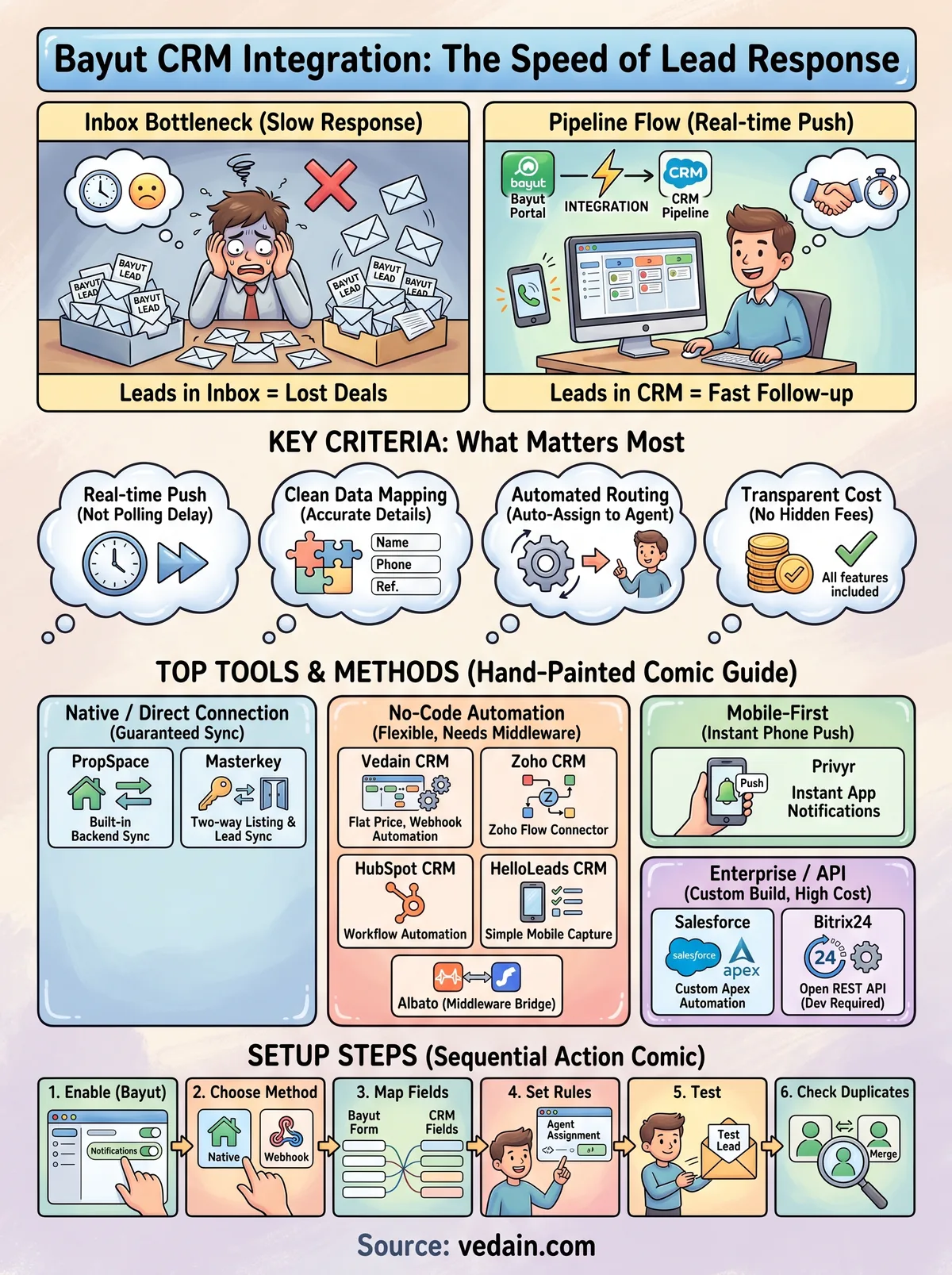
Not every connection between Bayut and a CRM works the same way, and the differences matter more than most vendors admit. Some tools pull leads through Bayut's official lead API in real time, others rely on email parsing that can lag by minutes or drop formatting, and a few depend on third-party middleware like Zapier or Albato that adds another point of failure. Before you commit to any bayut crm integration, check whether the sync is push-based (Bayut sends the lead the moment it's submitted) or pull-based (your CRM checks periodically). Push-based setups are almost always faster and more reliable for a business where response time decides whether you close the deal.
A CRM that syncs Bayut leads in seconds beats one with more features but a five-minute delay.
Speed isn't the only factor. Data mapping matters just as much: does the integration bring over the lead's phone number, property reference, budget, and inquiry message cleanly, or do you end up manually re-entering details because the fields don't match? A sloppy mapping setup wastes the time you just saved by automating the connection in the first place.
Questions to ask before you pick a tool
- •Does it support real-time lead push, or does it rely on polling and delays?
- •Can it also pull leads from other portals like Dubizzle or Property Finder CRM integration options, so you're not building a separate workflow for each?
- •Does it include automatic lead assignment and routing, so leads land with the right agent without manual sorting?
- •What happens to duplicate leads when the same buyer inquires twice?
- •Is there a native app or does it require a paid Zapier plan to function?
- •How transparent is the pricing, and are automation or integration features locked behind higher tiers?
Budget deserves equal weight here. Many CRMs advertise low entry prices but gate lead automation, email sync, or API access behind premium plans, which means the real costs, plans, and hidden fees of CRM software make a working Bayut integration pricier than the sticker suggests. Teams switching from spreadsheets or a clunky legacy setup should also weigh how much setup time each option demands, since a tool that takes a developer a week to configure isn't practical for a five-person brokerage that needs leads flowing today. Keep these criteria in mind as you go through the ten options below, or work through a full buying guide for UAE property agents, because the best fit depends on your team's size, technical comfort, and how many other lead sources you need to plug in alongside Bayut.
2. Vedain CRM
Vedain built its reputation on transparent pricing rather than portal-specific integrations, but that doesn't mean it's a weak fit for Bayut leads. The platform connects through webhook-based automation and its Lead Forms module, letting you route Bayut inquiries into your pipeline via Zapier or a direct API call without paying extra for the privilege, since automation isn't locked behind a premium tier here.
How the Bayut integration works
Agencies typically wire Bayut to Vedain using a Zapier or webhook connection that fires the moment a lead submits an inquiry. The lead lands in Vedain's Leads & Contacts module with custom fields already mapped, and a no-code workflow can instantly assign it to an agent, send a welcome email, or trigger an SMS, all without a developer.
Key features
- •Visual Kanban pipeline for tracking Bayut leads through each deal stage
- •No-code Workflows builder for instant lead assignment and follow-up sequences
- •Two-way Gmail and Outlook sync so replies to Bayut inquiries stay logged
- •Email Warmup to protect deliverability when following up at volume
- •Custom dashboards showing lead source performance, including Bayut versus other portals
Pricing
Vedain charges a flat $10 per user per month, covering every feature, including automation, integrations, and unlimited records. There's no tiered gating and no credit card required to start a trial. Full details sit on the Vedain pricing page.
Best for
Brokerages that want one CRM for Dubai real estate teams handling Bayut leads, email, and reporting without paying more as their team or lead volume grows.**
3. Zoho CRM
Zoho CRM has built a name in the Gulf real estate market largely because of its Zoho Flow connector, which many Bayut-focused agencies use to bridge the portal's lead API without touching code. Its appeal lies in being part of a broader Zoho suite, so agents already familiar with what Zoho CRM does out of the box can plug Bayut leads into a system they know.
How the Bayut integration works
Agencies connect Bayut to Zoho CRM through Zoho Flow or a third-party connector like Albato, mapping the inquiry fields to Zoho's lead module. Once configured, new Bayut submissions create a lead record automatically and can trigger a Zoho CRM workflow, such as assigning the lead to a territory-based agent or firing a notification through Zoho Cliq.
An integration that requires a separate automation tool just to work adds a cost most brokerages don't budget for upfront.
Key features
- •Zoho Flow for no-code connections between Bayut and dozens of other apps
- •Territory management for routing leads by property location
- •Built-in AI assistant (Zia) for lead scoring
- •Multichannel communication tracking across email, WhatsApp, and calls
Pricing
Zoho CRM starts around $14 per user per month on the Standard plan, but workflow automation and advanced lead assignment rules require the Enterprise tier, which runs closer to $40 per user per month. Bayut-specific automation through Zoho Flow may need its own paid plan depending on task volume, so the real cost climbs fast for growing teams.
Best for
Agencies already invested in the Zoho ecosystem who don't mind paying more as they unlock the automation tiers needed for reliable Bayut CRM integration.
4. HubSpot CRM
HubSpot markets itself as an all-in-one growth platform, and plenty of Dubai agencies use it for marketing before they ever touch Bayut leads. Its strength for real estate teams comes from workflow automation and reporting, though where HubSpot works well and where it falls short matters here, since connecting Bayut requires third-party middleware with no native portal plugin built by HubSpot itself.
How the Bayut integration works
Brokerages typically route Bayut leads into HubSpot through Zapier or Make, using a webhook that captures the inquiry and pushes it into HubSpot's contacts and deals objects. Some teams instead forward Bayut's lead notification emails to a HubSpot inbox, where the platform's email parsing creates a contact automatically, though this method is slower and less reliable than a direct webhook.
Relying on email forwarding to catch portal leads means accepting delay as the price of a free workaround.
Key features
- •Workflow automation for lead scoring, assignment, and follow-up sequences
- •Deal pipelines with customizable stages for property sales cycles
- •Marketing hub integration for retargeting Bayut inquiries with ads
- •Detailed reporting dashboards on lead source ROI
Pricing
HubSpot's free CRM tier exists, but meaningful automation for bayut crm integration sits behind the Sales Hub Professional plan, starting around $90 per user per month when billed annually, as this full per-seat cost breakdown for HubSpot shows. Zapier's paid tiers add further cost once you exceed the free plan's task limits, which most active brokerages hit within weeks.
Best for
Larger agencies already running HubSpot's marketing tools who can absorb the higher price for unified reporting across ads, email, and Bayut lead performance in one dashboard.
5. Bitrix24
Bitrix24 pitches itself as a free-forever CRM with enterprise features baked in, which makes it a magnet for smaller Gulf brokerages watching every dirham. Real estate teams like its built-in telephony and task management, and its open API means developers can wire up a Bayut connection without buying a separate integration platform.
How the Bayut integration works
Most agencies connect Bayut to Bitrix24 through a webhook or REST API call that pushes lead data straight into Bitrix24's CRM module. Some teams use Albato or Make as a middle layer if they lack in-house developer time, mapping the inquiry's name, phone, and property reference into custom fields automatically. Once the lead lands, Bitrix24's automation rules can trigger a call task or WhatsApp message within seconds.
An integration built on raw API access works great until your developer leaves and nobody else can maintain it.
Key features
- •Native telephony and call recording for tracking Bayut lead follow-up
- •Kanban and Gantt views for managing both leads and property listings
- •Open REST API for custom Bayut CRM integration without third-party fees
- •Built-in task automation tied to CRM stage changes
Pricing
Bitrix24's free plan supports only 1–2 users and caps storage and automation rules tightly. Paid plans start around $49 per month billed annually ($69 monthly) for 5 users on the Basic tier, scaling to $99 ($144 monthly) for Standard, so costs jump quickly once a brokerage outgrows the free tier's limits and starts weighing Bitrix24 alternatives for UAE brokerages.
Best for
Technically capable teams comfortable building or maintaining their own API connection who want to avoid recurring integration fees.
6. PropSpace
PropSpace holds a unique position on this list because it's built by the same parent company that owns Bayut, which means the connection isn't a bolt-on integration but a native pipeline baked into the product. Agencies that list heavily on Bayut and its sister portal Dubizzle often choose PropSpace precisely because the sync doesn't rely on Zapier, webhooks, or any third-party middleware at all.

How the Bayut integration works
Because PropSpace and Bayut share the same corporate ecosystem, leads flow through a direct backend connection rather than an API you have to configure yourself. New inquiries appear in the CRM automatically, tagged with the listing reference and portal source, and agents get notified without anyone setting up a single automation rule.
Owning the pipe end to end removes the failure points that plague every third-party Bayut connector.
Key features
- •Native Bayut and Dubizzle sync with zero manual configuration
- •Property listing management synced directly to portal ads
- •Lead distribution rules based on agent workload or property zone
- •Built-in mobile app for on-site viewings and follow-up logging
Pricing
PropSpace doesn't publish flat public pricing; instead it quotes based on team size and listing volume, and brokerages typically report costs starting in the low hundreds of dollars per month. You'll need to contact their sales team for an exact figure, which makes budgeting less predictable than flat-rate competitors.
Best for
Agencies whose lead volume comes almost entirely from Bayut and Dubizzle, and who value a guaranteed native connection over broader CRM flexibility or price transparency.
7. Masterkey
Masterkey is another CRM built specifically for the UAE property market, and like PropSpace, it markets itself around tight portal connections rather than general-purpose sales features. Agencies choosing between the two often land on Masterkey for its listing management tools, since it doubles as a portal syndication platform that pushes properties out to Bayut, Property Finder, and Dubizzle from one dashboard, which matters for UAE agencies handling listings and closures.
How the Bayut integration works
Masterkey connects to Bayut through a licensed API partnership, meaning leads generated from your listings flow directly into the CRM without a Zapier step or manual email forwarding. The same connection also pushes your property data back out to Bayut, so price changes or new listings sync both ways instead of requiring separate updates on the portal and in the CRM.
A two-way sync means the CRM and the portal never fall out of step with each other.
Key features
- •Two-way listing sync with Bayut, Property Finder, and Dubizzle
- •Automated lead deduplication across multiple portals
- •Commission tracking and deal closure workflows built for brokerages
- •WhatsApp integration for instant lead follow-up
Pricing
Masterkey doesn't list public per-user pricing on its site, and most brokerages go through a sales consultation to get a quote based on listing volume and team size. Reports from agencies using the platform suggest costs land in a similar range to PropSpace, often several hundred dollars per month depending on the package, which makes it harder to budget for than a flat-rate CRM.
Best for
Brokerages managing listings across multiple UAE portals who want bayut crm integration bundled with syndication tools, rather than a standalone sales CRM with lead capture bolted on afterward.
8. Salesforce
Salesforce carries a reputation as the enterprise standard for CRM, and some of the larger Gulf developers and brokerages run their entire sales operation on it. Connecting Bayut to Salesforce isn't a plug-and-play affair though, since there's no official Bayut connector in the AppExchange, and most teams end up building or buying a custom integration to make it work.

How the Bayut integration works
Brokerages generally route Bayut leads into Salesforce through MuleSoft, Zapier, or a custom REST API integration built by an in-house or contracted developer. The webhook captures the lead payload from Bayut and maps it into Salesforce's Lead object, often triggering an Apex flow that assigns the record based on territory or property type. Because Salesforce charges for API calls and platform events at higher volumes, teams processing hundreds of Bayut leads a month need to budget for that overhead too.
Enterprise-grade flexibility comes with enterprise-grade setup costs, and Bayut leads are no exception.
Key features
- •Custom Apex automation for lead routing and scoring
- •Deep reporting through Salesforce dashboards and Einstein Analytics
- •AppExchange marketplace for add-on real estate tools
- •Extensive role-based permission controls for large teams
Pricing
Salesforce's Sales Cloud starts near $25 per user per month on the Starter tier, but the automation and API access most Bayut integrations need typically require the Core plan (formerly Enterprise), priced around $195 per user per month. Add integration development costs on top, and Salesforce quickly becomes the most expensive option on this list, which sends many smaller brokerages looking at lighter Salesforce options for small teams.
Best for
Large developers and enterprise brokerages with dedicated IT resources who need deep customization far beyond simple bayut crm integration and can absorb the licensing and development costs that come with it.
9. Privyr
Privyr targets the solo agent and small team crowd who want lead capture on their phone rather than a full desktop CRM suite. Its whole design philosophy centers on mobile-first lead management, which fits Dubai's real estate market where agents often close deals from a car or a viewing rather than a desk.

How the Bayut integration works
Unlike CRMs that need a webhook or Zapier setup, Privyr connects to Bayut through a built-in native integration you activate directly in the app settings. Once linked, new inquiries push straight to your phone as a lead card with the buyer's contact details, property reference, and message already filled in, ready for a call or WhatsApp follow-up within seconds.
A native app-level connection beats a chain of third-party tools when speed on mobile is the priority.
Key features
- •Instant push notifications for new Bayut leads on iOS and Android
- •One-tap WhatsApp, call, or SMS follow-up from the lead card, useful if you're following up with property leads on WhatsApp
- •Automated drip messages triggered on lead capture
- •Simple pipeline stages built for solo agents, not large sales teams
Pricing
Privyr runs on a tiered subscription model starting around $24 per month for the base plan, with Bayut integration and automated messaging reserved for higher tiers closer to $40 to $60 per month. There's no per-seat flat rate like some competitors on this list, so costs scale differently depending on how many automation features your team actually uses.
Best for
Independent agents and small teams who want a direct Bayut CRM integration on their phone without managing pipeline stages, reporting dashboards, or a full sales operating system.
10. HelloLeads CRM
HelloLeads built its name on lead capture for field sales teams across India and the Gulf, and its simple mobile interface makes it a low-friction pick for brokerages that don't want a heavyweight CRM just to catch Bayut inquiries. Small teams juggling WhatsApp, calls, and portal leads often gravitate here because the setup takes minutes, not weeks.
How the Bayut integration works
HelloLeads connects to Bayut through a Zapier or webhook bridge rather than a native plugin, so you'll map the inquiry fields once during setup and let the automation handle the rest. Once wired, new leads appear instantly in the mobile app with the buyer's number, property reference, and message intact, and a tag marks the source as Bayut so agents can filter by portal later.
A CRM that fits in your pocket beats one that only works from a desk when leads come in during a viewing.
Key features
- •Instant lead capture with source tagging for Bayut and other portals
- •Bulk WhatsApp and SMS messaging from the lead list
- •Simple follow-up reminders and call logging built for field agents
- •Team performance reports without a steep learning curve
Pricing
HelloLeads starts near $10 per user per month on its Starter plan, though automation and integration features like the Bayut webhook connection typically require the Advanced tier, priced closer to $25 per user per month. Free trials are available, but the free plan itself caps lead volume tightly.
Best for
Small real estate teams that want a quick bayut crm integration without the reporting depth or pipeline complexity larger brokerages need.
11. Albato
Albato works as pure integration middleware, not a CRM itself, but it deserves a spot here because so many of the connections above lean on it behind the scenes. Think of it as a cheaper, more flexible alternative to Zapier for wiring Bayut into whatever sales tool you already run, whether that's Zoho, HubSpot, Bitrix24, or a spreadsheet you're not ready to abandon yet.
How the Bayut integration works
Brokerages set up Albato by connecting Bayut's lead notification webhook to a trigger, then mapping the fields to whichever CRM sits on the other end. Once configured, the automation runs continuously in the background, pulling new inquiries and pushing them into your CRM's lead module within seconds, no developer required. You can also branch the workflow, sending the same lead to a Google Sheet for backup while it lands in your CRM.
Middleware only earns its cost if it saves you from building and maintaining a custom API connection yourself.
Key features
- •Visual automation builder for connecting Bayut to dozens of CRMs and apps
- •Multi-step workflows that branch a single lead into several destinations
- •Built-in data formatting to clean up phone numbers and duplicate entries
- •Lower per-task pricing compared to Zapier for high-volume brokerages
Pricing
Albato offers a free tier with limited monthly tasks, while paid plans start around $9 per month and scale based on task volume, making it noticeably cheaper than Zapier for teams processing large batches of Bayut leads daily.
Best for
Teams that already picked a CRM without native Bayut support and need an affordable, no-code bridge to make the bayut crm integration work without hiring a developer.
12. How to set up your Bayut CRM integration
Getting a bayut crm integration live doesn't require a development team in most cases, but skipping steps causes the failures agencies complain about most. Start by confirming whether your CRM offers a native Bayut connector or needs a middleware layer like Zapier or Albato, since that decision shapes every step after it. Log into your Bayut agent dashboard first and check whether lead notification webhooks are enabled for your account, because some agencies never activate this setting and wonder why leads only arrive by email, then set up webhooks for Zapier or Make on the CRM side.
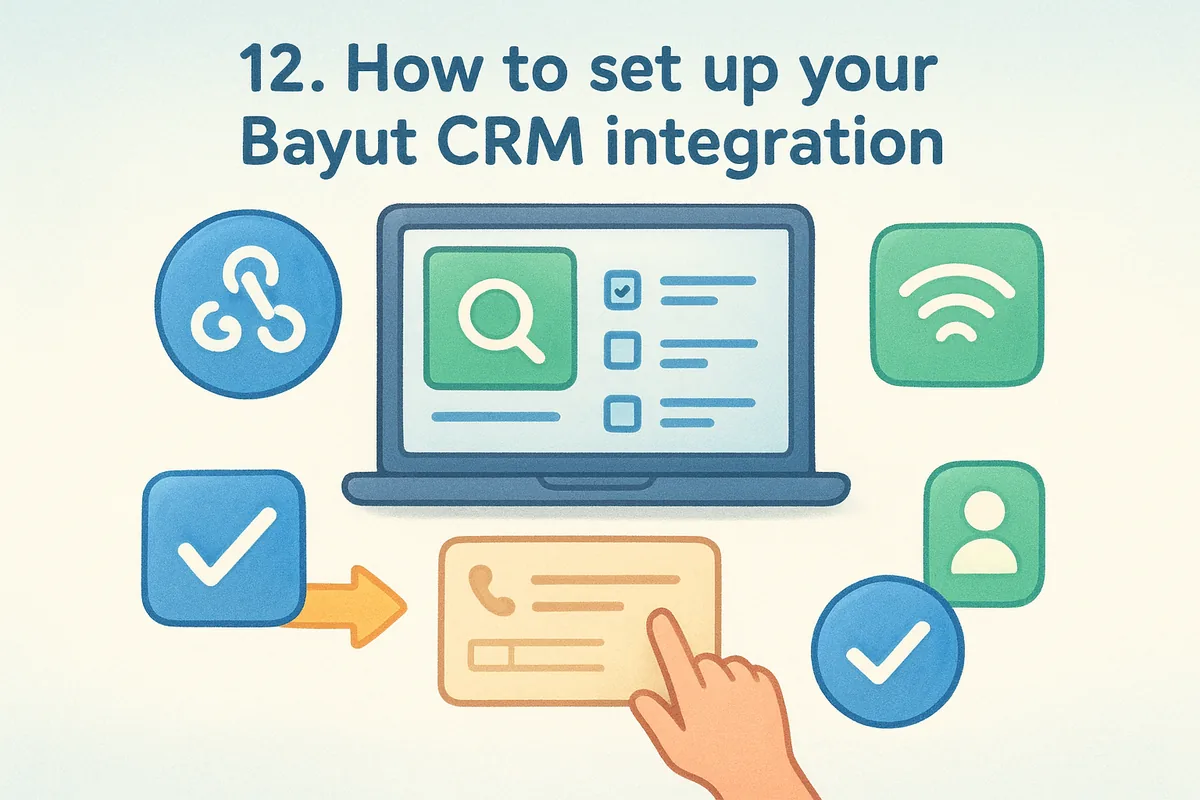
A working integration starts with confirming the webhook is switched on, not with picking a CRM.
Once that's confirmed, follow a straightforward sequence:
- Enable lead notifications in your Bayut agent portal settings.
- Choose your connection method: native app, Zapier, webhook, or API, using this guide to no-developer lead capture setup if you're unsure.
- Map the lead fields (name, phone, property reference, message) to your CRM's contact and deal records.
- Set up automatic assignment rules so leads route to the right agent instantly.
- Send a test inquiry through a live listing to confirm the lead lands correctly.
- Check duplicate handling so repeat inquiries from the same buyer don't create separate records.
Testing matters more than most teams admit. Run at least three sample leads through the connection before trusting it with live traffic, and watch whether the phone number format and property reference come through clean. Finally, document the setup somewhere your team can find it later, since integrations built by one person and never written down tend to break quietly the day that person leaves. A properly tested connection saves you from the exact problem this guide started with: leads sitting untouched while a competitor calls first.
Finding the right fit for your team
The right bayut crm integration comes down to matching connection speed and cost to how your team actually works. Enterprise brokerages with developers on staff can justify Salesforce or a custom API build. Solo agents want Privyr's push notifications on their phone. Teams juggling multiple portals lean toward PropSpace or Masterkey for native syncing. But if you want real-time lead capture, no-code automation, and pricing that doesn't creep up as you add users, that's a narrower list.
Vedain fits that gap without forcing you into a premium tier just to unlock webhook automation or email sync. Every feature, from Lead Forms to the Workflows builder, ships at the same flat rate whether you're a five-person brokerage or scaling past fifty seats. Before you commit to a pricier competitor, see what Vedain's flat all-inclusive plan costs your team.
Frequently Asked Questions
Does Bayut have a native CRM integration with HubSpot?
Bayut does not have a native integration with HubSpot, but you can connect them through third-party automation platforms like Zapier or Make (formerly Integromat) to sync leads and property data. HubSpot's pricing starts at $20/seat/month for the Starter plan, making it an affordable option for real estate teams seeking CRM functionality alongside Bayut's property listings. Salesforce and Zoho connect the same way (through middleware such as Zapier, Zoho Flow, or a custom API build) if you need deeper automation capabilities.
What is the best CRM software to integrate with Bayut for real estate agents?
Pipedrive is widely considered the best CRM to integrate with Bayut for real estate agents due to its deal-focused pipeline and affordable pricing starting at $14/month. Vedain also offers specialized real estate CRM features that pair well with Bayut's marketplace data, particularly for Middle Eastern agents. Salesforce and Zoho are enterprise alternatives if you need advanced reporting and multi-team management, though they cost significantly more ($195+ and $40+ per user per month respectively for the automation tiers).
Can I sync Bayut property listings directly to Salesforce CRM?
You cannot sync Bayut listings directly to Salesforce without a middleware solution, but you can use API connectors or automation tools like Zapier to transfer property data and leads between platforms. Salesforce Sales Cloud starts at $25/user/month (Starter Suite), with the Core edition most integrations need at $195/user/month, and provides robust tracking for property pipelines and client interactions. This integration approach is more expensive than alternatives like Pipedrive but offers superior customization for large real estate teams.
Is Zoho CRM compatible with Bayut integration?
Zoho CRM is compatible with Bayut through Zapier, Zoho Flow, or connectors like Albato, allowing you to automate lead capture and property data synchronization starting at $14/user/month for the Standard plan. Zoho's affordable pricing makes it competitive with HubSpot for small to mid-sized real estate agencies using Bayut. However, Pipedrive and Vedain offer simpler pipeline workflows if lead follow-up is your primary focus.
What automation tools work best for Bayut CRM integration?
Zapier and Make are the top automation platforms for Bayut CRM integration, supporting connections to HubSpot, Salesforce, Zoho, and Pipedrive without requiring custom coding. Zapier's free plan includes 100 monthly tasks, while paid plans start at $19.99/month for higher volume integration needs. Make offers similar functionality with a lower price point, making it ideal for budget-conscious real estate teams seeking reliable Bayut-to-CRM data flow.
How much does it cost to integrate Bayut with a CRM system?
Integration costs depend on your chosen CRM and automation platform: Zapier integration typically costs $0-$19.99/month, while CRM software ranges from $10/user/month (Vedain) and $14/user/month (Pipedrive) to $195/user/month (Salesforce Core). HubSpot Sales Hub Starter starts at $20/seat/month, Zoho at $14/user/month, and Vedain is one flat $10/user/month plan (₹500 · AED 25). Most integrations require only the CRM subscription plus a mid-tier Zapier plan, totaling $50-$100/month for small agencies.