This article answers the practical question agencies keep asking, and complements our wider guide on how to choose a real estate CRM in the UAE: which CRMs actually connect to Property Finder well, and what does that connection get you? We looked at lead routing speed, listing sync reliability, and how much manual data entry each option removes from your agents' day.
Below you'll find 10 tools worth considering in 2026, ranging from dedicated real estate platforms to flexible general-purpose CRMs like Vedain that use lead forms, workflows, and email sync to capture and act on Property Finder leads automatically. Each entry covers pricing, setup effort, and where it fits best, so you can pick the option that matches your team's size and budget without paying for features you'll never use.
1. Vedain CRM
Vedain earns the top spot on this list because it treats the Property Finder lead problem as a workflow problem, not a listings-sync problem. Vedain CRM doesn't try to be a real estate-specific portal manager. Instead, it gives you the lead capture, routing, and follow-up automation that turns a Property Finder inquiry into a tracked deal within seconds, without forcing your team to learn a bloated real estate suite. That focus on the sales side, paired with a flat $10 per user per month rate, is why so many independent agencies switch to it after outgrowing a spreadsheet or a Property Finder-only dashboard.
How it integrates with Property Finder
Property Finder doesn't expose a public API for direct CRM syncing, so the practical path is connecting the portal's lead notifications and web forms into Vedain through its lead capture and qualification tools and no-code workflow builder. Agencies typically forward Property Finder lead emails into a dedicated inbox that Vedain's inbox-synced CRM setup reads automatically, or they route leads through a Zapier-style webhook straight into a Vedain lead form. From there, an automated workflow assigns the lead to an agent, fires a welcome email, and drops the contact into your pipeline with zero manual entry.
A lead that sits in an inbox for twenty minutes is already colder than one your CRM assigned in twenty seconds.
- Set up a Property Finder lead forwarding rule to a dedicated inbox
- Connect that inbox through Vedain's email sync
- Build a workflow that parses the incoming lead and creates a contact and deal
- Add auto-assignment rules based on territory or agent workload
- Trigger a follow-up sequence within minutes of lead creation
Key features for listings and leads
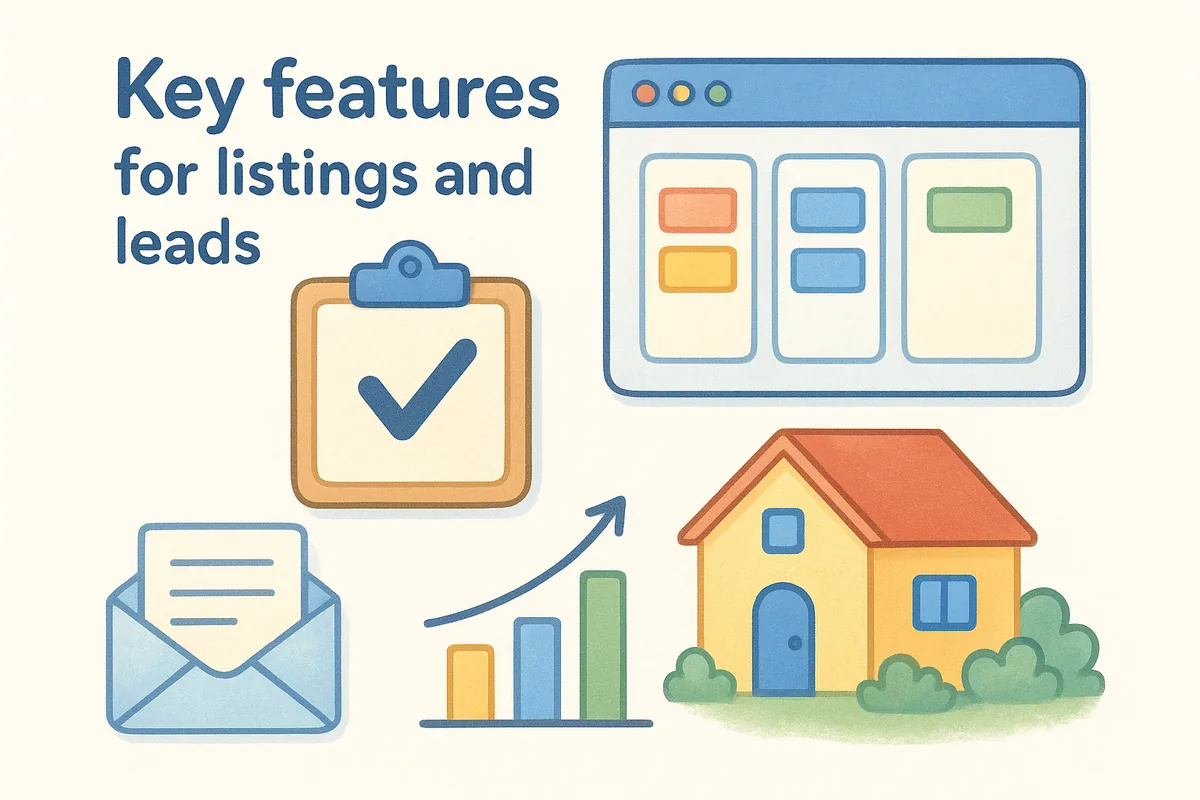
Once a Property Finder lead lands inside Vedain, the platform's core features take over the follow-up and tracking work that agents used to do by hand. The visual Kanban pipeline gives every listing inquiry a stage, so nothing gets forgotten between first contact and closed deal, and smart filters let you segment leads by property type, budget, or source in a couple of clicks.
- •Custom fields for property reference numbers, unit type, and budget range
- •Kanban-style deal pipeline for tracking each inquiry from lead to closing
- •Multi-step email sequences for nurturing leads who aren't ready to view yet
- •AI agents that enrich contact records and draft follow-up copy
- •Reports and conversion funnels showing which listings generate the most serious inquiries
Who it's for
As a CRM built for Dubai property agents, Vedain fits agencies and independent brokers who want Property Finder leads handled inside a real sales system, not buried in a portal dashboard, without paying for enterprise real estate software they'll barely touch. Teams already using Gmail or Outlook for daily communication get the most value, since the email sync does most of the heavy lifting.
- •Boutique agencies and teams of 5-50 agents managing multiple Property Finder listings
- •Brokerages that also list on Bayut or Dubizzle and want one CRM for every source
- •Founders who want automation without hiring a CRM administrator
Pricing
Unlike most competitors on this list, Vedain charges one flat rate with no feature gates: $10 per user per month, full stop. Everything you need for Property Finder lead handling, including lead forms, workflows, email sync, and reporting, ships in that price. You can check current details on Vedain's pricing page and start a 14-day trial without entering card details.
- •$10/user/month, billed monthly or annually
- •No separate charge for workflows, email sync, or reporting
- •Unlimited contact and deal records included
- •Free trial with no credit card required
2. PropSpace
PropSpace is owned by the same parent company behind Property Finder, which makes it the closest thing to a native option on this list. PropSpace was built specifically for Gulf real estate brokerages, so the sync with Property Finder listings isn't bolted on through webhooks or email forwarding, it's part of the product's core design. That pedigree matters if your business runs almost entirely on Property Finder traffic and you want one vendor accountable for the whole pipeline.

How it integrates with Property Finder
Because Propertyfinder Group owns both platforms, PropSpace offers a direct listing sync that pushes property data and lead notifications between the two systems without manual exports. Agents publish or update a listing once inside PropSpace, and it reflects on the portal automatically, while inbound inquiries land in the CRM with the source and property reference already attached.
When the CRM and the portal share an owner, the integration stops being a workaround and becomes a feature.
Key features for listings and leads
Listing management sits at the center of PropSpace, and the lead tools are built around that same property-first structure rather than a generic contact record, the same challenge covered in our guide to managing listings, leads, and closures in the UAE.
- •Two-way listing sync with Property Finder and other Propertyfinder Group portals
- •Automated lead distribution to agents based on listing ownership
- •Property matching that suggests inventory to leads based on stated preferences
- •Built-in call tracking and WhatsApp logging for agent activity
Who it's for
PropSpace suits mid-sized to larger brokerages that list almost exclusively on Property Finder and want a CRM purpose-built around portal listings rather than general sales pipelines. Agencies juggling large inventories across multiple offices tend to get the most value, since the property-matching and listing tools assume real estate workflows from the start. Smaller teams or those splitting leads across Bayut, Dubizzle, and international portals may find the platform narrower than they need.
Pricing
PropSpace doesn't publish flat public rates the way Vedain does; pricing runs through custom quotes based on agent count, listing volume, and which modules you add. Expect a sales conversation before you see a number, and budget for setup and onboarding fees on top of the monthly subscription. That opacity is worth weighing against the convenience of a native Property Finder connection.
3. Bitrix24
Bitrix24 shows up on almost every real estate CRM shortlist because of its sheer feature count, and the Gulf market is no exception. Bitrix24 bundles CRM, task management, telephony, and even a website builder into one platform, which appeals to agencies that want a single login for everything rather than stitching together separate tools. That breadth comes with a steeper learning curve than most dedicated real estate options, so plan for a longer rollout than a simple lead-forms setup.
How it integrates with Property Finder
Since Property Finder has no open API, Bitrix24 connects the same way most general CRMs do: through email parsing, webforms, or a third-party connector built by a local implementation partner. Agencies typically set up an automation rule that watches a dedicated inbox for Property Finder lead notifications and creates a new CRM deal automatically, tagging it with the source. Some Gulf-based Bitrix24 resellers also offer paid middleware that maps Property Finder webhook data directly into custom fields, which saves setup time if your budget covers it.
The more moving parts an integration needs, the more things break when Property Finder changes its email format.
Key features for listings and leads
Bitrix24's real estate usefulness comes less from portal-specific tools and more from its general automation depth once a lead lands inside.
- •Automated lead distribution rules based on agent workload or territory
- •Built-in telephony and WhatsApp Business integration for follow-up calls
- •Kanban and Gantt-style views for tracking deals through each stage
- •Document generation for offer letters and rental contracts
Who it's for
Bitrix24 fits agencies that already juggle marketing, HR, or project management inside Bitrix24's broader suite and want their Property Finder leads flowing into the same system rather than a separate real estate tool. Teams comfortable configuring automation rules themselves, or with an implementation partner on retainer, get the most out of it. Smaller agencies wanting a quick, out-of-the-box Property Finder connection may find the setup heavier than necessary and are usually better served by lighter Bitrix24 alternatives for UAE teams.
Pricing
Unlike Vedain's flat per-user model, Bitrix24 prices by tiered plans with user caps rather than pure per-seat billing, which can complicate budgeting as your team grows. Free plans exist but cap out quickly on automation rules and storage, pushing most real estate teams toward paid tiers that run well past $10 per user once you add the modules Property Finder lead handling actually needs.
4. Zoho CRM
Zoho CRM appeals to agencies already using other Zoho apps like Zoho Books or Zoho Campaigns, since the whole suite shares data and login credentials. Zoho CRM brings a mature automation engine and a genuinely large marketplace of connectors, which makes it one of the more flexible general-purpose options for handling Property Finder leads once you get past the initial setup. Pricing sits well above Vedain's flat rate once you add the modules real estate teams typically need, so it's worth seeing how Zoho's modules stack up against one flat rate before weighing the extra flexibility against the extra cost.
How it integrates with Property Finder
Zoho relies on the same workaround every non-native CRM on this list uses: email parsing and webforms, since Property Finder keeps its lead API closed to third parties. Zoho Flow, the platform's automation and integration layer, can watch a dedicated inbox for Property Finder notification emails and push parsed lead data into a new record, tagging the source and property reference along the way. Some agencies instead route Property Finder leads through a Zapier or Make.com connection into Zoho's webform capture endpoint, which tends to be more reliable than parsing raw email text.
An integration built on email parsing only works as well as the CRM's ability to adapt when the sender changes their template.
Key features for listings and leads
Zoho's real estate value comes from its automation depth and reporting rather than any portal-specific tooling.
- •Blueprint automation for enforcing a consistent follow-up process on every lead
- •Zia AI assistant for lead scoring and predicting which inquiries convert
- •Custom modules for tracking property reference numbers and unit details
- •Multichannel messaging including WhatsApp and SMS follow-up
Who it's for
Zoho CRM suits agencies already invested in the wider Zoho ecosystem, or teams with an internal admin comfortable configuring Zoho Flow automations without outside help. Larger brokerages that need heavy customization and don't mind a longer setup period tend to get the most value here. Smaller teams wanting a Property Finder connection working within the hour usually find the configuration more involved than a dedicated lead-forms setup like Vedain's.
Pricing
Zoho CRM's paid tiers start around $14 per user per month and climb past $50 for the plans that unlock the automation and AI features most Property Finder integrations depend on. Email parsing through Zoho Flow often requires a separate add-on subscription, which pushes the real monthly cost higher than the sticker price suggests.
5. HubSpot CRM
HubSpot brings a polished interface and a genuinely useful free tier, which is why so many agencies test it before committing to a paid real estate stack. HubSpot CRM started as a marketing tool and still shows that heritage, with landing pages, email sequences, and reporting that outclass most dedicated real estate platforms. The catch for Property Finder users is the same one you'll see across this list: no native portal connection, so you're building the bridge yourself or paying someone to build it for you.
How it integrates with Property Finder
HubSpot connects to Property Finder the way most non-real-estate CRMs do, through forms and workflow automation rather than a direct feed. Agencies typically forward Property Finder lead notification emails into a dedicated inbox, then use HubSpot's email-to-CRM logging or a Zapier connection to turn those emails into new contacts. HubSpot's own workflow tool then takes over, assigning the lead to an agent and firing a follow-up sequence, provided the parsing step correctly extracts the property reference and contact details from Property Finder's email format.
A CRM that markets itself as marketing-first will always need extra setup for portal leads it wasn't built to receive.
Key features for listings and leads
HubSpot's real estate usefulness comes from its marketing automation, not any property-specific tooling.
- •Visual workflow builder for routing and nurturing Property Finder leads
- •Native landing pages and forms for capturing overflow inquiries off-portal
- •Deal pipelines with customizable stages for tracking viewings through to close
- •Reporting dashboards that break down lead source performance over time
Who it's for
HubSpot suits agencies that already run marketing campaigns through the platform and want Property Finder leads flowing into the same system as their website and social traffic. Teams with a marketing hire comfortable building workflows get the most value here. Smaller agencies focused purely on sales follow-up, without a marketing function to justify the extra tooling, often find HubSpot's strengths sitting outside what a Property Finder integration actually needs.
Pricing
HubSpot's free CRM tier covers basic contact and deal tracking, but the workflow automation needed for Property Finder lead routing sits behind the Sales Hub Professional plan, which starts around $90 per user per month with a required onboarding fee, as our breakdown of HubSpot's cost per seat explains. That's a steep jump from Vedain's flat $10 rate for teams that only need lead capture and follow-up, not a full marketing suite, and the side-by-side look at HubSpot's tiers versus a flat rate makes the gap obvious.
6. Salesforce
Salesforce is the name every enterprise real estate group eventually considers, mostly because their board already trusts it for other departments. Salesforce offers unmatched customization through its Sales Cloud platform, and with tools like Apex and Flow Builder, a skilled admin can technically build almost anything, including a full Property Finder integration. That power comes at a cost in both price and complexity that most independent agencies and small brokerages simply don't need.

How it integrates with Property Finder
Getting Property Finder leads into Salesforce almost always means custom development, since there's no official connector for either platform. Agencies typically hire a Salesforce partner to build a middleware layer using tools like MuleSoft or a third-party integration platform such as Zapier or Workato, which watches a dedicated inbox for Property Finder notifications and maps the parsed data into Salesforce leads. Larger brokerages sometimes commission a custom API bridge instead, but that requires ongoing developer support to maintain when Property Finder's email format changes.
Salesforce can do almost anything a real estate team needs, but almost nothing arrives ready out of the box.
Key features for listings and leads
Salesforce's strength lies in what you can build on top of the platform rather than what ships by default.
- •Custom objects for tracking property listings, unit references, and viewing schedules
- •Einstein AI for lead scoring based on historical conversion data
- •Flow Builder for multi-step automation once a lead enters the system
- •AppExchange marketplace with third-party real estate add-ons for an extra fee
Who it's for
Salesforce fits large, well-funded brokerages with an internal admin or a Salesforce consultant on retainer, and enough transaction volume to justify the build cost. Groups managing multiple brands or regions under one umbrella tend to get real value from the customization. Independent agencies or teams under 20 agents rarely see a return on the investment and usually want Salesforce's power without the implementation overhead, especially when the Property Finder connection alone requires paid development work before the CRM does anything useful.
Pricing
Salesforce Sales Cloud starts around $25 per user per month for its most limited tier, but the automation and customization needed for a working Property Finder setup usually requires the Core edition (which replaced Enterprise in September 2026) at roughly $195 per user per month. Add implementation costs for the custom integration work, and the real first-year cost for a mid-sized team can run into tens of thousands of dollars before a single lead gets routed automatically.
7. Pipedrive
Pipedrive built its reputation on being the CRM salespeople actually enjoy using, and that visual-first design translates well to real estate teams juggling multiple listings at once. Pipedrive keeps its feature set narrower than Zoho or Salesforce, focusing almost entirely on pipeline visibility and deal progression rather than marketing or customer support tools. That focus makes it a lighter lift for agencies that just want Property Finder leads visible and moving through stages, without wading through modules they'll never touch.
How it integrates with Property Finder
Pipedrive has no direct connector for Property Finder, so agencies lean on the same email-to-lead workaround used across most of this list. A dedicated inbox catches Property Finder notification emails, and Pipedrive's built-in email parsing or a Zapier automation converts each one into a new deal, tagging the source and property reference in custom fields. Some teams instead route leads through Pipedrive's web forms, forwarding Property Finder inquiries via a middleware step so the data lands cleanly rather than depending on inconsistent email formatting.
A pipeline view only helps if leads actually make it into the pipeline, and that still depends on the parsing step working every time.
Key features for listings and leads
Pipedrive's real strength for Property Finder leads is visual clarity once a deal exists in the system.
- •Drag-and-drop pipeline stages built around viewing, offer, and closing steps
- •Activity reminders that flag leads with no follow-up scheduled
- •Custom fields for property reference, unit type, and budget
- •Insights reports showing conversion rates by lead source
Who it's for
Pipedrive suits small to mid-sized agencies that want a clean, visual pipeline without the automation depth of Zoho or the customization overhead of Salesforce, and our comparison for small UAE sales teams covers where that fit holds. Teams that value simplicity over feature breadth, and don't need built-in email campaigns or a marketing suite, tend to stick with it longest. Agencies wanting deeper reporting or native listing management typically outgrow it faster than they expect.
Pricing
Pipedrive's entry-level plan starts around $14 per user per month, but the automation features needed for reliable Property Finder lead routing usually require the Growth or Premium tier, pushing real costs to roughly $39 to $59 per user monthly (billed annually). Email parsing add-ons and Zapier subscriptions often sit outside that price, adding to the total before a single lead gets assigned automatically.
8. PropCRM
PropCRM markets itself directly at Gulf real estate agencies, and its pitch is straightforward: a CRM built around portal leads from day one, rather than a general sales tool retrofitted for real estate. PropCRM leans hard into the regional market, with support for Arabic-language interfaces and pricing quoted in AED alongside USD. Agencies that want a vendor speaking their exact market, rather than a global platform localized after the fact, tend to gravitate here first.
How it integrates with Property Finder
PropCRM advertises a built-in Property Finder connector rather than a pure email-parsing workaround, though the depth of that connection varies by plan and often still relies on the portal's lead notification emails behind the scenes. Setup typically involves whitelisting a forwarding address with Property Finder and configuring PropCRM's lead capture rules to tag incoming inquiries with the correct listing reference automatically. Some resellers bundle onboarding support to configure this connector, which shortens the setup timeline compared to building your own email-parsing rules from scratch.
A vendor that builds specifically for one region usually understands that region's lead formats better than a global platform ever will.
Key features for listings and leads
PropCRM's feature list stays close to what a Property Finder-focused agency actually needs day to day, without the marketing or enterprise bloat found in bigger platforms.
- •Listing inventory management synced with agent assignments
- •Automated lead distribution based on property ownership or territory
- •WhatsApp integration for the follow-up channel most Gulf buyers actually use, one of several WhatsApp CRM options for UAE businesses
- •Arabic and English interface toggle for mixed-nationality sales teams
Who it's for
PropCRM fits smaller to mid-sized brokerages operating primarily in the UAE or wider Gulf market that want a regionally-focused vendor over a global CRM. Teams that value local support and Arabic-language capability over deep customization or a broad app marketplace tend to find PropCRM a comfortable fit. Agencies expanding beyond the Gulf, or wanting a CRM that also handles non-real-estate sales, will likely find the platform too narrow.
Pricing
PropCRM doesn't publish transparent flat-rate pricing the way Vedain does; quotes typically depend on agent count and which listing modules you need, similar to PropSpace's model. Expect a sales call before you get a firm number, and factor in onboarding costs for the Property Finder connector setup, which some resellers charge separately from the monthly subscription.
9. Ruby CRM
Ruby CRM markets itself as a lightweight, real estate-focused platform built for smaller Gulf agencies that don't need the enterprise weight of Salesforce or the marketing bulk of HubSpot. Ruby CRM keeps its interface simple, with a strong emphasis on mobile access for agents who spend most of their day out at viewings rather than at a desk. That mobile-first design makes it a reasonable pick for teams whose agents rarely open a laptop between Property Finder inquiries and closing a deal.
How it integrates with Property Finder
Ruby CRM has no direct API partnership with Property Finder, so agencies rely on the same email forwarding setup used across most non-native tools on this list. A dedicated inbox catches the portal's lead notification emails, and Ruby's parsing rules extract the contact details and property reference before creating a new lead record automatically. Some resellers offer paid setup assistance to configure this parsing correctly, since Ruby's out-of-the-box templates aren't tuned to Property Finder's exact email format the way a native connector would be.
A CRM built for mobile agents still needs a reliable inbox behind the scenes to catch every lead before it goes cold.
Key features for listings and leads
Ruby CRM's feature set stays narrow and mobile-focused, which suits agencies that want speed over depth.
- •Mobile app with push notifications for new Property Finder leads
- •Simple pipeline stages built around viewing and offer steps
- •Basic reporting on lead source and agent response time
- •WhatsApp click-to-call from within the lead record
Who it's for
Ruby CRM fits small agencies and independent brokers who spend most of the day in the field and need a system that works well from a phone, not a desktop dashboard. Teams that don't require deep automation or multi-step email sequences tend to be satisfied with what Ruby offers. Agencies planning to scale past a handful of agents, or wanting reporting depth beyond basic lead-source tracking, usually outgrow it within a year or two.
Pricing
Ruby CRM prices per agent with tiers that start modestly but climb once you add mobile push notifications and WhatsApp integration as separate add-ons. Expect to pay somewhere in the $15 to $25 per user per month range once the modules a Property Finder integration actually needs are included, still without the flat, all-inclusive structure Vedain offers.
10. Sell.Do
Sell.Do rounds out this list as a real estate-specific CRM built primarily for the Indian and Gulf property markets, with a heavy focus on channel partner and broker network management alongside direct sales. Sell.Do positions itself around high-volume developer sales rather than boutique agency work, which shows in features built for managing hundreds of leads across multiple projects and sales teams at once. If your business sells new developments rather than resale listings, that project-centric structure fits more naturally than a generic pipeline tool.
How it integrates with Property Finder
Sell.Do advertises portal integrations across several major listing sites, and Property Finder connectivity typically runs through the same lead-capture API approach the platform uses for other portals, pulling inquiry data directly into the CRM without manual email forwarding in most setups. Where that native connector isn't available on your plan, the fallback is the same email-parsing workaround used elsewhere on this list, watching a dedicated inbox for Property Finder notifications and converting them into leads automatically.
A property finder crm integration works best when the portal connection survives contact with a real inbox full of formatting changes.
Key features for listings and leads
Sell.Do's tools lean toward developer and channel-sales workflows more than solo-agent pipelines.
- •Multi-project lead management for developers selling several communities at once
- •Automated lead distribution across in-house teams and external broker channels
- •Call center integration with recording for compliance and training
- •Campaign ROI tracking tied directly to each portal source
Who it's for
Sell.Do suits developers and large brokerages managing multiple projects and broker networks simultaneously, particularly in markets where channel partner sales make up a big share of volume, alongside off-plan sales and agent commission tracking. Organizations with a dedicated CRM administrator and call center operations get the most out of the platform's depth. Independent agents or small teams handling a handful of listings will likely find Sell.Do's project-management orientation heavier than what a straightforward Property Finder lead flow actually requires.
Pricing
Sell.Do doesn't publish flat public pricing; quotes depend on lead volume, number of projects, and whether you need call center or channel-partner modules. Expect a sales consultation and setup fees before committing, with monthly per-user costs that typically land well above Vedain's flat $10 rate once the portal integration and call tracking modules are included.
Finding the integration that fits your workflow
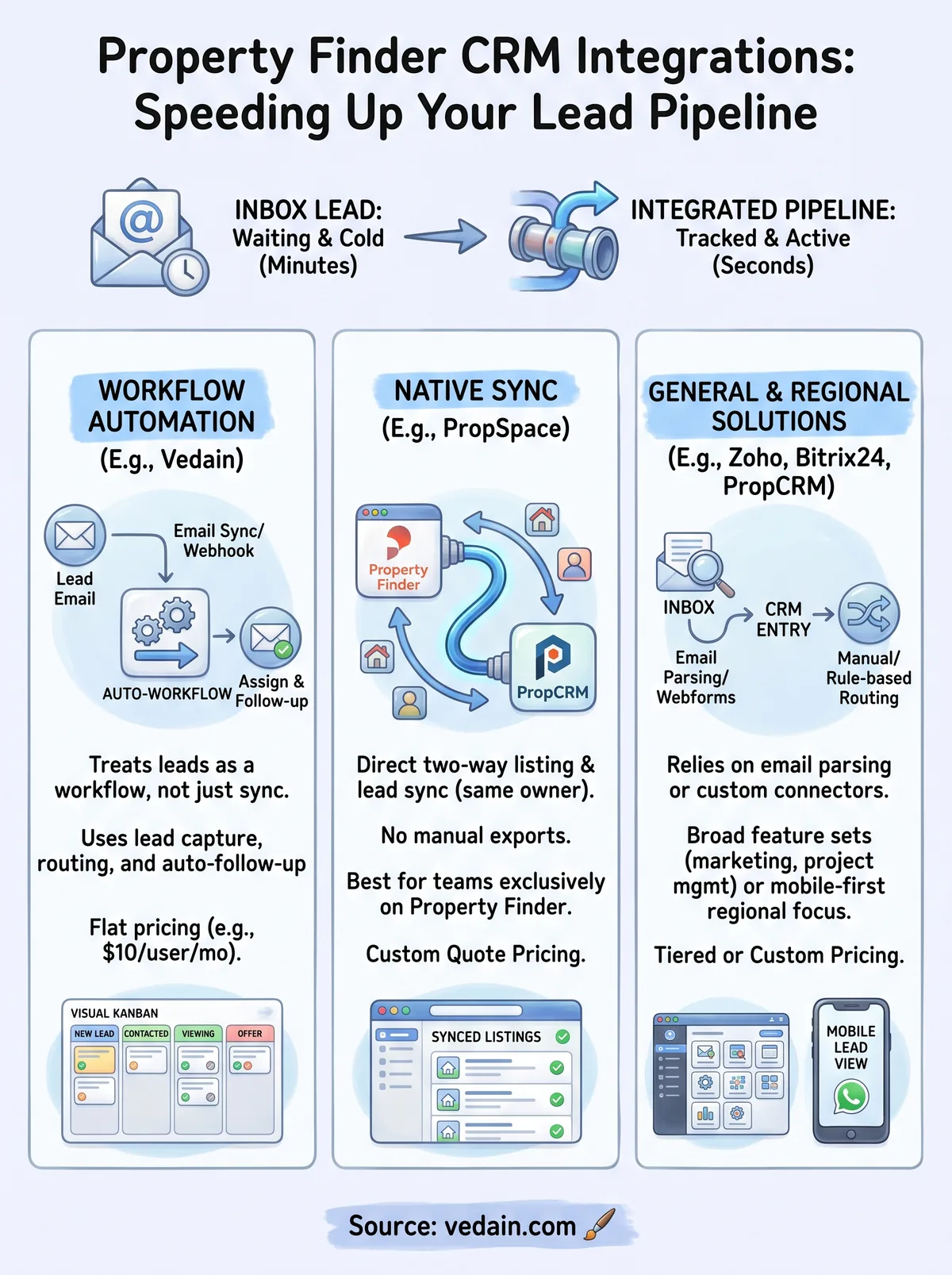
Every option on this list solves the same core problem in a different way. Native tools like PropSpace and PropCRM buy you a tighter portal connection but lock you into regional vendors with opaque pricing. Enterprise platforms like Salesforce and Zoho give you customization depth most agencies never actually use, at a cost most agencies can't justify. The best property finder crm integration isn't the one with the most modules, it's the one your team will actually set up correctly and keep running when Property Finder changes its email template again.
If you want that setup to take an afternoon instead of a quarter, and you'd rather not pay extra for workflows, email sync, or reporting you'd get gated behind a higher tier elsewhere, that's exactly what Vedain was built for. See what Vedain's flat $10 plan includes and start routing Property Finder leads into a real pipeline today.
Related reading
Frequently Asked Questions
What is the best CRM for real estate property finders in 2026?
The best CRM for property finders depends on your needs, but HubSpot and Salesforce are top choices for enterprise teams, while Pipedrive excels for smaller agencies due to its intuitive interface and affordable pricing starting at $14/month. Vedain specializes specifically in real estate workflows, offering property-specific features that competitors like Zoho may require customization to achieve. Most property finders benefit from Salesforce's robust lead management (from $25/user/month on Starter Suite) or HubSpot's integration capabilities, though your choice should factor in team size and budget.
How much does Property Finder CRM integration cost?
Property Finder CRM integration costs vary by platform: HubSpot Sales Hub Starter starts at $20/seat/month, Salesforce begins at $25/user/month, Pipedrive offers plans from $14/user/month, and Zoho CRM starts at $14/user/month. Vedain is one flat plan at $10/user/month (₹500 · AED 25) with every feature included. Most integrations are included in base pricing, but advanced API integrations or custom development may incur additional costs ranging from $500-$5,000 depending on complexity.
Can I integrate Property Finder with HubSpot?
Yes, Property Finder leads can be routed into HubSpot through email parsing and third-party platforms like Zapier, turning lead notifications into contacts automatically. There's no native HubSpot connector for Property Finder, so setup complexity varies. Competitors like Salesforce and Pipedrive also support Property Finder integration, but HubSpot's user-friendly interface makes it easier for non-technical users to establish these connections without coding knowledge.
Which CRM integrates best with multiple property listing platforms?
Salesforce offers the most customizable multi-platform integration capabilities, connecting to Property Finder, Rightmove, Zoopla, and other listing services through custom API or middleware work. HubSpot and Pipedrive also support multiple property platforms via Zapier and Make (formerly Integromat); like Salesforce, none of them ships a native Property Finder connector. Vedain ships a Real Estate playbook (property fields, buyer/seller stages) and captures portal leads through lead forms, email sync, and workflows, making it more efficient than Zoho for agents managing leads across multiple sites.
Is Pipedrive or HubSpot better for real estate property agents?
HubSpot is better for larger real estate teams needing comprehensive marketing automation and reporting, with pricing starting at $20/seat/month, while Pipedrive is ideal for solo agents and small teams prioritizing visual sales pipelines at just $14/month. Pipedrive's simplicity and mobile app make it superior for field-based property agents, whereas HubSpot excels at lead nurturing and client communications. Salesforce, Zoho, and Vedain offer alternatives, but the HubSpot vs. Pipedrive decision typically comes down to team size and whether you need marketing features beyond basic CRM.
What features should a property finder CRM have in 2026?
Essential features include property image galleries, automated lead distribution, appointment scheduling, transaction history tracking, and integration with major listing platforms like Property Finder and Rightmove. CRMs like HubSpot (from $20/seat/month) and Salesforce (from $25/user/month) can be configured for most of these, Vedain ($10/user/month) covers lead distribution, scheduling, and reporting but not listing galleries, while Pipedrive and Zoho require additional apps to achieve feature parity. Your property finder CRM should also offer mobile access for field showings, document management for contracts, and analytics dashboards to track conversion rates and agent performance.