
This guide answers the question directly: which CRMs actually work for legal practices in 2026, and why. We looked at client intake automation, pipeline visibility for referrals and consultations, and how well each platform handles sensitive client data without forcing you into enterprise-priced tiers just to get basic features like email sync or workflow automation.
Below you'll find ten CRMs worth your time, from legal-specific platforms built for case management to flexible, all-inclusive tools like Vedain that let small and mid-sized firms automate intake and follow-ups without paying per-feature add-ons, and you can also see the top CRM platforms ranked for 2026 if your search goes beyond legal practices. Each entry covers pricing, standout features, and who it fits best, so you can shortlist the right option without wasting a trial period on the wrong software.
1. Vedain CRM
Vedain isn't built specifically for legal practices, but that's actually part of its appeal for smaller firms tired of paying for features they never touch. It's an affordable all-in-one CRM at $10 per user per month, with no feature gates separating "starter" plans from the tools you actually need, like workflow automation or email sync. For solo practitioners and small firms handling intake, referrals, and client follow-ups without a dedicated legal ops team, that simplicity matters more than a conflict-check module you'll rarely use.

A crm for law firms shouldn't force you to buy an enterprise tier just to automate a follow-up email.
Key features
Vedain gives you custom fields for tracking matter type, referral source, or intake status, plus a visual Kanban pipeline for moving prospects from initial consultation to signed engagement. Two-way email sync with Gmail and Outlook means every client email logs automatically against the right contact, which matters when you need a paper trail for billing disputes or ethics questions. The no-code workflow builder lets you automate reminders for follow-ups, document requests, or intake deadlines without touching a line of code, and lead forms let you capture website inquiries directly into your pipeline.
- •Deal pipeline with drag-and-drop stages for intake, consultation, and retention
- •Email campaigns for automated intake nurture sequences
- •Team permissions so paralegals and attorneys see only what they need
- •Custom dashboards for tracking referral sources and conversion rates
- •AI Agent Marketplace for enriching contact data automatically
Best for
Boutique firms, solo attorneys, and small practices that need solid pipeline visibility and intake automation but don't want to pay legal-software premiums for case management features they'll never use, much like any other CRM for professional services firms handling proposals and retainers. If your firm already runs case management through a separate tool and just needs a lean CRM to handle leads, referrals, and client communication, Vedain fits that gap well.
Pricing
Vedain charges a single flat rate of $10 per user per month, and that price includes the full CRM feature set: email sync, workflow automation, email warmup, unlimited records, and the AI agent marketplace. There's no tiered pricing, no per-feature upsell, and no credit card required to start a trial. You can see a full CRM cost comparison across vendors before you commit.
Pros and cons
Pros:
- •Transparent, all-inclusive pricing with no hidden add-ons
- •Setup takes under five minutes, no IT involvement needed
- •Strong automation for intake and follow-up sequences
- •Email warmup feature helps outbound intake emails avoid spam folders
Cons:
- •No built-in conflict-of-interest checking
- •Lacks legal-specific billing or trust accounting features
- •Not purpose-built for large firms managing complex litigation caseloads
2. Clio
Clio is the name most attorneys hear first when they start shopping for legal software, and for good reason. It's built specifically as legal practice management software with CRM features layered in, covering everything from client intake to billing and trust accounting. Firms that need case management, document automation, and client relationship tracking in one system often land here before looking anywhere else.
A true crm for law firms needs to bridge client intake and case management, not just track deals.
Key features
Clio Grow, the firm's intake and CRM module, handles lead capture through customizable intake forms, automated follow-up sequences, and e-signature collection for engagement letters. It syncs with Clio Manage, so once a lead converts, their matter and documents carry over without re-entering data. You also get:
- •Court date and deadline tracking tied to matter records
- •Built-in trust accounting for compliant billing
- •Document automation for engagement letters and intake forms
- •Referral source reporting to see which channels convert best
Best for
Firms that want case management and CRM functionality under one roof, particularly practices already committed to Clio's broader ecosystem for billing and document handling. Solo attorneys and small firms with straightforward intake needs will find it capable, though the CRM piece works best when paired with the full Clio suite rather than standalone.
Pricing
Clio Grow starts around $49 per user per month when billed annually, separate from Clio Manage, which adds its own cost on top. Bundling both modules pushes total spend well past what a flat-rate CRM charges, and pricing tiers gate features like advanced automation behind higher plans, which is exactly how hidden CRM fees add up.
Pros and cons
Pros:
- •Deep integration between intake and case management
- •Strong document automation and e-signature tools
- •Established reputation among legal practices
Cons:
- •Higher cost when combining Grow and Manage modules
- •Steeper learning curve for teams new to legal software
- •CRM features feel secondary to the case management core
3. MyCase
MyCase built its reputation as all-in-one legal practice management software, and its CRM capabilities have grown alongside its case management core. Firms already comfortable with Clio's approach often shortlist MyCase next, since it covers similar ground: intake, communication tracking, and billing, but with a slightly different pricing structure and a simpler interface that smaller firms tend to prefer.
Key features
MyCase centers its client relationship management around a shared inbox that logs every email, text, and call against the right matter, so nothing gets lost between intake and case work. Its lead capture forms feed directly into a pipeline view, and automated intake workflows send follow-up messages without manual triggers.
- •Secure client portal for document sharing and messaging
- •Text messaging integrated into client communication logs
- •Task automation tied to matter deadlines
- •Built-in time tracking and invoicing
Best for
Small to mid-sized firms that want case management and light CRM functionality bundled together, especially practices that value client-facing tools like the secure portal over deep sales pipeline reporting. Firms handling family law, personal injury, or immigration cases with high client-communication volume tend to get the most value here.
A crm for law firms should make it easy to see every client touchpoint in one thread, not scattered across email and text.
Pricing
MyCase pricing starts around $39 per user per month for its Basic plan, with Pro and Advanced tiers running higher and gating features like advanced reporting and workflow automation behind the top plan. Add-ons for e-signature and payment processing can push monthly costs up further.
Pros and cons
Pros:
- •Client portal simplifies communication and document sharing
- •Text messaging built into the client record
- •Reasonably intuitive interface for non-technical staff
Cons:
- •Advanced automation locked behind higher-priced tiers
- •CRM reporting less robust than dedicated sales-focused platforms
- •Add-on costs for e-signature and payments add up quickly
4. Lawmatics
Lawmatics markets itself as legal client relationship management software first, case management second, which flips the priority order you see with Clio and MyCase. It focuses almost entirely on intake automation, marketing, and client experience, leaving actual case work to whatever practice management tool you already run alongside it. Firms that treat intake as a distinct workflow, separate from matter handling, tend to appreciate that focus.

Key features
Lawmatics builds its entire platform around automating the intake funnel, from first inquiry to signed retainer. Its visual automation builder triggers emails, texts, and tasks based on where a lead sits in your pipeline, much like other lead management platforms built for small businesses, and its marketing tools let firms run drip campaigns targeting past clients or referral sources.
- •Custom intake forms with conditional logic
- •Automated document generation for retainer agreements
- •Marketing analytics tracking referral source ROI
- •Two-way calendar sync for consultation scheduling
A crm for law firms built for intake alone still needs a plan for what happens after the client signs.
Best for
Marketing-minded firms, particularly personal injury and family law practices, that generate high lead volume and need sophisticated nurture sequences to convert inquiries into signed clients. Firms without a strong existing case management system will need to pair Lawmatics with something else, since it doesn't handle billing or document storage at a deep level.
Pricing
Lawmatics doesn't publish flat rates publicly. Pricing typically starts around $59 to $69 per user per month depending on tier, and quotes often require a sales call, which slows down comparison shopping compared to platforms with transparent, listed pricing.
Pros and cons
Pros:
- •Excellent intake automation and lead nurturing
- •Strong marketing analytics for tracking referral performance
- •Flexible automation builder for custom intake workflows
Cons:
- •No native case management, requires a separate tool
- •Pricing isn't transparent without a sales conversation
- •Overkill for solo attorneys with modest lead volume
5. HubSpot
HubSpot shows up on nearly every CRM shortlist, and law firms are no exception, especially those that already lean on its marketing tools or want a free-tier entry point before committing budget. It's not built for legal work at all, so you won't find matter fields, trust accounting, or intake-specific templates out of the box. What you get instead is a flexible, general-purpose CRM that firms customize themselves, which works fine if you have the time to build it out but adds friction if you just want case-ready fields on day one.
Key features
HubSpot's free plan covers basic contact management, deal pipelines, and email tracking, and paid tiers add marketing automation, custom reporting, and workflow builders. Firms use custom properties to approximate matter type or referral source, though it takes manual setup that a legal-specific crm for law firms wouldn't require, one of several tradeoffs worth weighing before choosing HubSpot.
- •Custom deal pipelines for tracking intake stages
- •Marketing Hub add-on for email campaigns and landing pages
- •Reporting dashboards with granular filtering
- •Native integrations with hundreds of third-party apps
A general CRM can track your pipeline, but you'll spend setup hours building what a legal-focused platform ships with already.
Best for
Firms with marketing-heavy intake strategies, in-house staff comfortable configuring custom properties, and practices already using HubSpot's marketing tools for SEO or paid ads. It suits larger firms with dedicated ops staff more than solo attorneys who want something ready to use immediately.
Pricing
HubSpot's free CRM covers basic use, but Sales Hub Professional runs around $90 per user per month, and Marketing Hub pricing scales separately based on contact volume, so it helps to know what a HubSpot seat really costs. Costs climb fast once you need automation and reporting beyond the free tier.
Pros and cons
Pros:
- •Free tier available for very basic use
- •Extensive third-party integrations
- •Scales well for firms with marketing operations
Cons:
- •No legal-specific fields or workflows out of the box
- •Paid tiers get expensive quickly
- •Requires significant setup time to fit legal intake
6. PracticePanther
PracticePanther positions itself as an all-in-one legal practice management tool, with CRM features bolted on to handle intake and client communication. Firms considering it usually come from a background of scattered spreadsheets and want something that combines billing, calendaring, and lead tracking without juggling three separate subscriptions. It leans more toward practice management than pure CRM, so the sales-pipeline view feels like an add-on rather than the core product.
Key features
PracticePanther centers around a matter-based workflow, where every lead, once converted, carries its intake notes and communication history straight into the case file. Automated task reminders keep follow-ups from slipping, and built-in payment processing lets firms collect retainers directly from the CRM.
- •Lead capture forms embeddable on firm websites
- •Task automation tied to matter deadlines
- •Native e-signature for engagement letters
- •Time tracking and invoicing built into the same system
Choosing a crm for law firms often comes down to whether you want billing baked in or a lean tool focused only on the pipeline.
Best for
Solo attorneys and small firms that want practice management and light CRM functionality under one subscription, especially those handling straightforward intake without complex marketing needs. Firms already committed to a separate case management platform will find the CRM piece redundant rather than additive.
Pricing
PracticePanther's Solo plan starts around $49 per user per month, with Essential and Business tiers running higher and unlocking features like advanced reporting and custom workflows. Add-ons for payment processing carry their own transaction fees on top of the subscription cost.
Pros and cons
Pros:
- •Combines billing, calendaring, and CRM in one platform
- •Built-in payment processing simplifies retainer collection
- •Reasonably easy setup for solo practitioners
Cons:
- •CRM functionality feels secondary to practice management
- •Pricing climbs quickly with add-ons and higher tiers
- •Less pipeline visibility than dedicated sales-focused tools
7. Zoho CRM
Zoho CRM sits in an interesting spot for legal practices: it's a general-purpose sales platform, like HubSpot, but priced far more aggressively and bundled with a wider suite of business apps. Firms already using Zoho Books or Zoho Desk sometimes adopt Zoho CRM by default, since the modules connect natively. It won't hand you matter fields or trust accounting out of the box, but its customization engine is deep enough that firms with some technical patience can build a workable intake pipeline without paying legal-software prices.
Key features
Zoho's Blueprint feature, one piece of how Zoho CRM works in practice, lets you define step-by-step intake processes with required fields at each stage, which approximates the structured workflow legal teams need. Its AI assistant, Zia, scores leads and flags follow-up tasks, and the platform layers on modules for email marketing, social monitoring, and even a client portal through Zoho's broader ecosystem.
- •Custom modules and fields for matter type or referral source
- •Multichannel communication log across email, phone, and social
- •Workflow automation for follow-up sequences
- •Zia AI for lead scoring and next-action suggestions
A crm for law firms built on a general sales platform only pays off if you're willing to configure it yourself.
Best for
Firms comfortable with hands-on setup, particularly those already invested in other Zoho products, or practices that want enterprise-style customization without enterprise pricing. It suits ops-minded partners more than solo attorneys who want a ready-made intake system on day one.
Pricing
Zoho CRM's small business tiers range from roughly $14 to $52 per user per month, with automation, AI features, and advanced reporting reserved for the higher tiers. The entry-level plans feel limited fast once a firm needs real workflow automation.
Pros and cons
Pros:
- •Affordable entry pricing compared to legal-specific tools
- •Deep customization for firms willing to configure it
- •Wide ecosystem of connected business apps
Cons:
- •No legal-specific fields or compliance features
- •Advanced automation gated behind pricier tiers
- •Setup requires more time than purpose-built legal CRMs
8. Pipedrive
Pipedrive built its name on visual pipeline management, and that focus shows the moment you log in. It's a sales-first CRM designed for teams that live and die by deal stages, which makes it a natural fit for firms that treat client acquisition like a sales funnel rather than a case-management afterthought. Law firms adopt it less often than Clio or MyCase, but plaintiff-side practices running high lead volume through paid ads or referral networks tend to like its simplicity.
Key features
Pipedrive's core strength is its drag-and-drop pipeline, which lets you customize stages for intake, consultation, and signed retainer without much configuration, though it's worth seeing what Pipedrive leaves out next to a flat-rate CRM. Its automation builder handles follow-up emails and task creation, and the platform layers on AI-powered deal insights that flag stalled leads before they go cold.
- •Customizable pipeline stages for intake and consultation tracking
- •Email sync with open and click tracking
- •Workflow automation for follow-up sequences
- •Revenue forecasting and reporting dashboards
A crm for law firms built for sales pipelines works well for intake, but you'll still need somewhere to store the actual case files.
Best for
Firms with a strong existing case management tool that just need a lean, visual pipeline for tracking leads and referrals. Personal injury and immigration practices running high inquiry volume through marketing campaigns often prefer Pipedrive's simplicity over heavier legal-specific platforms, and immigration teams can compare CRMs built for immigration consultants as well.
Pricing
Pipedrive's plans start around $14 per user per month for the Lite tier (billed annually), climbing to roughly $79 for the Premium and Ultimate plans that unlock advanced automation and reporting. Legal-specific fields and compliance features aren't part of any tier, since Pipedrive wasn't built with law firms in mind.
Pros and cons
Pros:
- •Intuitive, visual pipeline that's easy to customize
- •Affordable entry-level pricing
- •Strong email tracking and automation tools
Cons:
- •No legal-specific fields or case management features
- •Advanced automation locked behind higher tiers
- •Requires pairing with a separate practice management tool
9. Litify
Litify takes a different approach entirely: it's built on top of the Salesforce platform, which means firms get enterprise-grade infrastructure and reporting out of the box, but also inherit Salesforce's complexity and price tag, the reason many smaller firms look for a Salesforce option without the admin overhead. Large personal injury firms, mass tort practices, and multi-office operations gravitate toward Litify because it scales in ways smaller, purpose-built legal CRMs can't. Solo attorneys and small firms almost never need what Litify offers, and the implementation timeline reflects that.

Key features
Because Litify runs on Salesforce, firms inherit that platform's reporting engine along with legal-specific modules for matter management, document automation, and referral tracking. Its intake module routes leads based on custom criteria like practice area or jurisdiction, and case teams can track litigation milestones alongside client communication in the same record.
- •Matter and litigation lifecycle tracking
- •Referral and lead routing based on custom rules
- •Document generation tied to matter templates
- •Advanced reporting inherited from the Salesforce ecosystem
A crm for law firms running mass tort or high-volume litigation needs infrastructure most small practices will never touch.
Best for
Large firms, mass tort practices, and multi-office operations with dedicated IT staff or a Salesforce administrator on hand. Firms with fewer than a dozen attorneys will find the setup effort and cost hard to justify against what a lean CRM already covers.
Pricing
Litify doesn't list public pricing, and quotes require a sales consultation, with costs running well into the hundreds per user monthly once Salesforce licensing gets factored in. Implementation fees add further cost before a firm sees any return.
Pros and cons
Pros:
- •Enterprise-grade reporting and scalability
- •Strong fit for mass tort and high-volume litigation
- •Deep customization through Salesforce's ecosystem
Cons:
- •Expensive, with pricing hidden behind sales calls
- •Requires Salesforce expertise to configure and maintain
- •Overkill for solo attorneys or small firms
10. Law Ruler
Law Ruler rounds out this list as another legal-specific intake platform, built primarily for high-volume practices like personal injury and mass tort firms that need to move fast on incoming leads. It leans heavily on lead response speed, tracking how quickly staff follow up on new inquiries and flagging delays before a lead goes cold. Firms that treat intake speed as a competitive advantage, rather than an afterthought, tend to be the ones who get the most out of it.
Key features
Law Ruler's standout feature is its automated lead scoring, which ranks incoming inquiries by likelihood to convert based on source, case type, and response history. Built-in call tracking ties phone inquiries directly to marketing campaigns, so firms running paid ads can see exactly which channels produce signed clients rather than just raw call volume, the same job lead source tracking software handles in other industries.
- •Automated call and text follow-up sequences
- •Lead source tracking tied to marketing spend
- •Document generation for retainer agreements
- •Integration with popular case management platforms
A crm for law firms focused on lead speed only earns its keep if your firm's follow-up process can actually keep pace with it.
Best for
High-volume intake operations, particularly personal injury and mass tort firms running significant paid advertising, that need tight tracking between marketing spend and signed clients. Smaller firms with modest lead volume will find the call-tracking and lead-scoring tools more robust than they actually need.
Pricing
Law Ruler doesn't publish pricing publicly, and quotes require a sales call, with costs typically starting in the range of $100 to $150 per user per month depending on the modules included. Implementation and onboarding fees can add further cost before a firm goes live.
Pros and cons
Pros:
- •Strong lead scoring and call tracking for marketing ROI
- •Built for high-volume, fast-response intake environments
- •Integrates with several established case management tools
Cons:
- •Pricing isn't transparent without a sales conversation
- •Overkill for solo attorneys or low-volume practices
- •Steeper cost than general-purpose or flat-rate CRMs
11. Key features every law firm CRM should have
Before you commit to any platform, run it against a checklist of what a modern CRM should actually do, reflecting how legal work happens rather than how a generic sales team operates. Every strong crm for law firms needs to handle intake speed, referral tracking, and communication logging without forcing your staff into workarounds. Skip a feature here and you'll end up patching the gap with a spreadsheet within a month, which defeats the point of switching software in the first place.
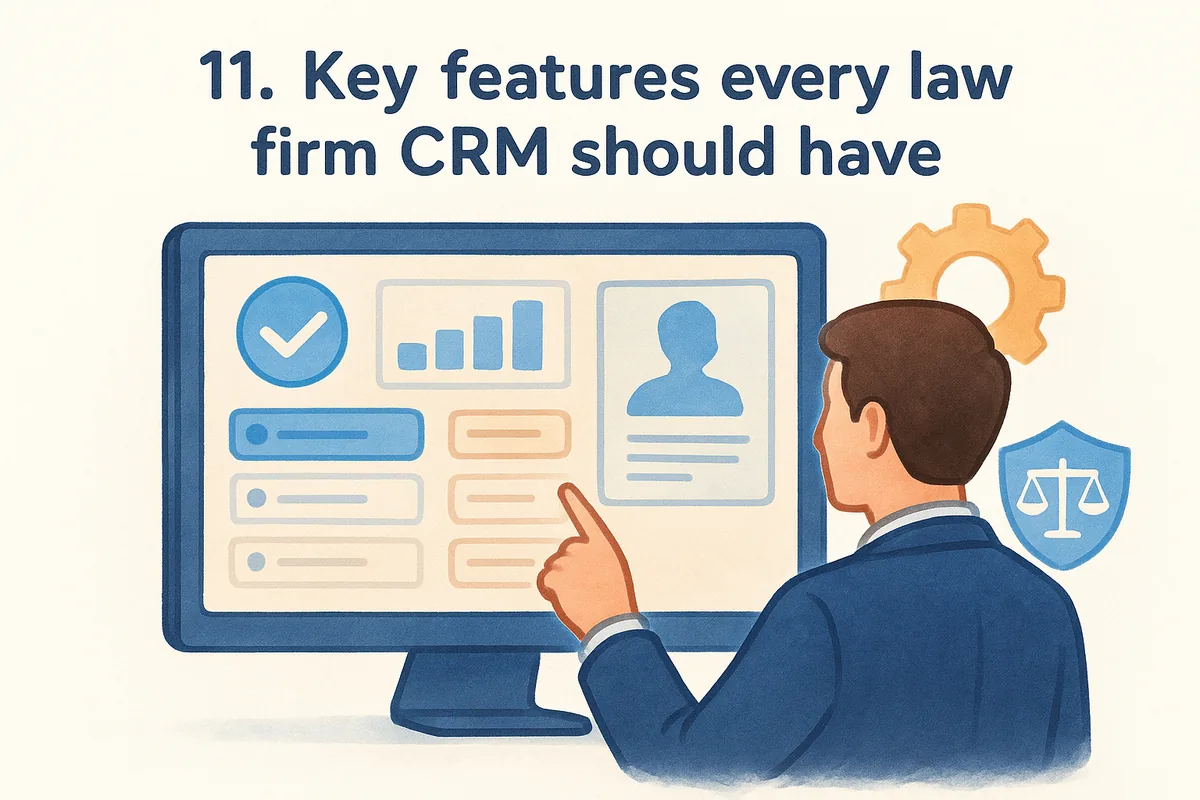
The best crm for law firms doesn't just track leads, it protects the record of every client interaction you'll need later.
The non-negotiable feature list
Use this table to compare platforms feature by feature instead of relying on marketing pages that all sound the same.
| Feature | Why it matters |
|---|---|
| Two-way email sync | Logs every client message automatically, so nothing gets lost between intake and matter work |
| Custom fields | Tracks matter type, referral source, and jurisdiction without generic labels |
| Workflow automation | Sends follow-up reminders and intake tasks without manual triggers |
| Visual pipeline | Shows exactly where each lead sits, from inquiry to signed retainer |
| Role-based permissions | Keeps sensitive client data visible only to staff who need it |
| Lead capture forms | Pulls website inquiries directly into your pipeline instead of a shared inbox |
Granular team permissions deserve special attention, since law firms handle privileged information that shouldn't sit visible to every user by default. Reporting matters just as much: without a clear view of conversion rates by referral source, you can't tell which marketing spend actually produces signed clients. Automation rounds out the list, because manual follow-up simply doesn't scale once your intake volume grows past a handful of leads a week.
12. How to choose the right CRM for your law firm
Matching a platform to your firm's actual workflow matters more than chasing the longest feature list. Solo attorneys need speed and simplicity, while multi-office firms need permissions and reporting depth. Start by mapping your intake process on paper before you demo a single tool, then check which platforms fit that map instead of forcing your process to fit the software, and work through the nine questions to ask before buying a CRM.
Choose a crm for law firms based on your intake volume and case complexity, not on which name you've heard the most.
Match your firm size to the platform's design
Small firms and solo practitioners generally do better with lean, flat-rate tools like Vedain that skip legal-specific bloat, while high-volume personal injury or mass tort operations often need the infrastructure that Litify or Law Ruler provide. Somewhere in between sit firms that want case management and CRM combined, which points toward Clio, MyCase, or PracticePanther.
Decide if you need built-in case management or a standalone CRM
Platforms like Lawmatics and Pipedrive handle intake and pipeline tracking well but leave case management to a separate tool, so factor that second subscription into your budget comparison. Bundled tools cost more upfront but cut down on data re-entry between systems.
Run the trial against a real intake scenario
Before signing an annual contract, use a ten-minute method for evaluating any CRM and test each shortlisted platform against these questions:
- •Does it log emails and calls automatically, or does staff have to enter data manually?
- •Can you set role-based permissions in under ten minutes?
- •Does the pricing page list every cost, or does automation require an upsell call?
- •Will your team actually use the pipeline view daily, or will it sit ignored?
Pricing transparency deserves its own line item on that checklist. Firms that get burned by hidden add-on costs after the trial period almost always trace it back to skipping this step, so read the fine print before your card gets charged.
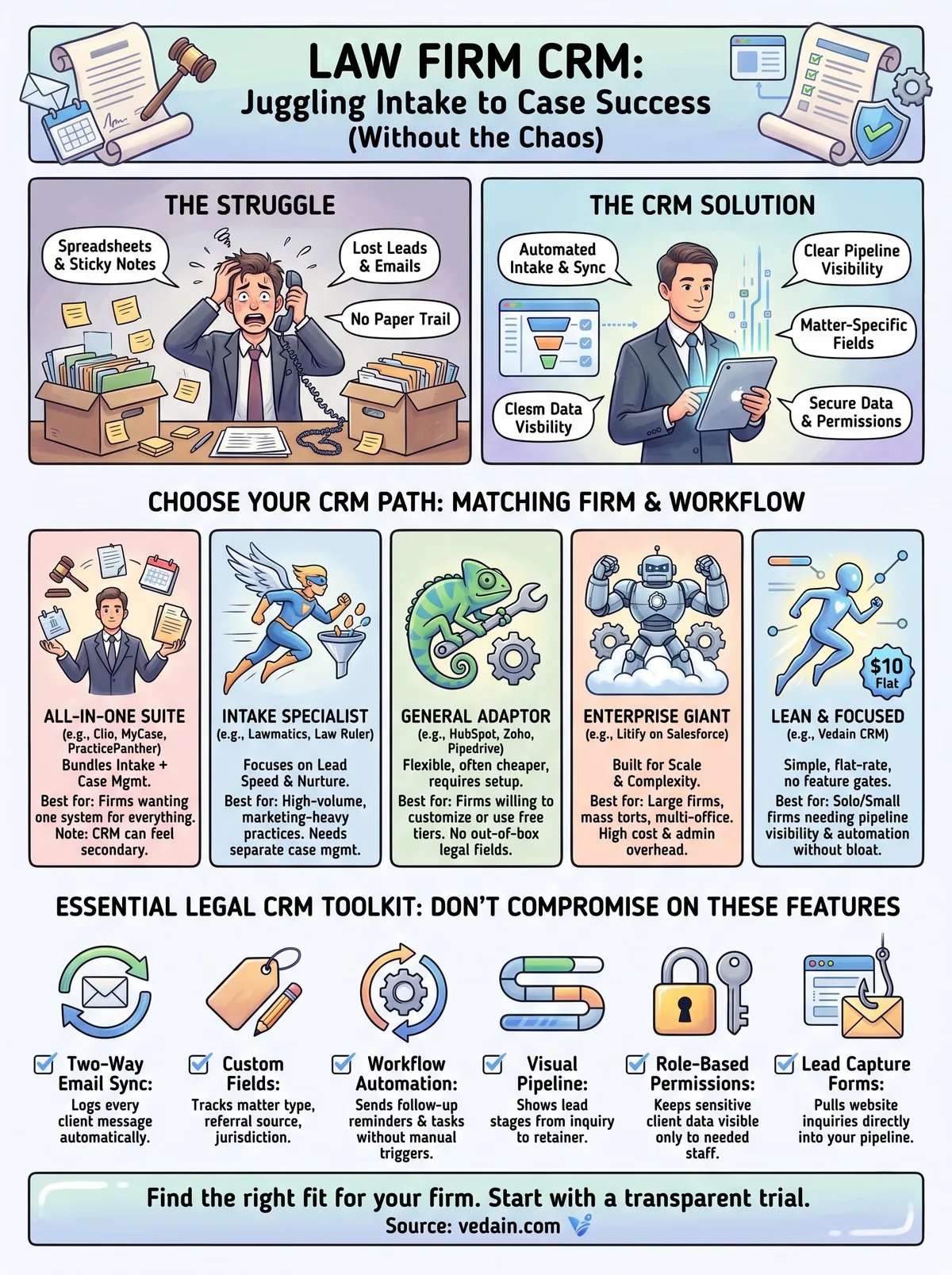
Finding the right CRM fit for your firm
Every platform on this list solves a different problem, so stop looking for the single "best" option and start matching software to your actual intake volume. Litify and Law Ruler make sense for mass tort operations running hundreds of leads a month. Clio and MyCase fit firms that want case management bundled with client tracking. Solo attorneys and small practices usually just need reliable pipeline visibility and automated follow-ups without paying for modules they'll never touch.
That's the gap Vedain fills. You get custom fields, email sync, and workflow automation at one flat rate, with no feature gates forcing an upgrade just to automate an intake reminder. Setup takes under five minutes, and no credit card is required to try it.
If you're tired of comparing tiers and hidden add-on fees, see exactly what's included in Vedain's flat-rate plan and start your trial today.
Frequently Asked Questions
What is the best CRM for small law firms on a budget?
Zoho CRM is the best budget-friendly option for small law firms, starting at just $14 per user per month with legal-specific features. While HubSpot's free tier offers basic functionality and Pipedrive provides affordable sales pipeline management at $11/month, Zoho delivers the most comprehensive legal practice management tools at the lowest cost. For firms with minimal budgets, Zoho's free plan covers up to 3 users with essential client management capabilities.
Can Salesforce be used for law firm client management?
Yes, Salesforce can be used for law firm client management, but it requires significant customization and typically costs $165+ per month per user, making it expensive for most firms. While Salesforce offers powerful customization through Salesforce Legal Cloud, many law firms find more specialized solutions like Vedain or HubSpot's legal templates more practical and cost-effective. Salesforce works best for large firms with dedicated IT resources to manage implementation and ongoing administration.
Which CRM integrates best with legal practice management software?
Vedain is specifically designed to integrate with legal workflows and pairs seamlessly with practice management tools, making it the top choice for integrated legal operations. HubSpot also offers strong integration capabilities with popular legal software through its App Marketplace, while Zoho provides native connectors for legal-adjacent applications. Pipedrive and Salesforce require more manual integration work or custom development to connect with specialized legal practice management platforms.
Is HubSpot CRM good for law firms?
HubSpot CRM is good for solo practitioners and small law firms, especially those managing client relationships and marketing, with a free tier and paid plans starting at $45/month. However, HubSpot lacks specialized legal features compared to Vedain or Zoho, so it's better suited for firms focusing on business development rather than complex case management. For full legal practice needs, firms often need to combine HubSpot with additional legal practice management software rather than using it as a standalone solution.
What CRM features do law firms need most?
Law firms need CRM features including client relationship tracking, matter/case management, billing integration, document management, and compliance tools—which Vedain and Zoho provide natively. Essential features also include secure data encryption, role-based access controls, and audit trails for regulatory compliance, which all major platforms like HubSpot, Salesforce, and Pipedrive offer. Additionally, firms require calendar integration, email tracking, and workflow automation to manage multiple cases and deadlines efficiently.
How much does a CRM cost for a law firm with 10 attorneys?
For a 10-attorney firm, CRM costs range from $1,400-$16,500+ annually depending on the platform: Zoho costs approximately $1,680-$2,400/year, Pipedrive runs $1,320-$3,300/year, HubSpot ranges $5,400-$10,800/year, and Salesforce exceeds $19,800/year. Vedain and specialized legal CRMs may offer firm-based pricing rather than per-user models, potentially reducing costs for larger teams. Total investment should also factor in implementation, training, and integration with existing practice management software, which can add $2,000-$10,000 initially.