This list skips the generic "top CRM" roundups and focuses on platforms built for the same job Close handles: managing calls, deals, and email outreach for small, fast-moving sales teams. Each option below gets judged on real pricing (not the marketing page number), setup time, and whether automation and email sync come standard or cost extra. Some tools trade calling features for stronger email workflows. Others match Close on outbound calling but undercut it on price per seat.
We'll walk through eight tools worth testing, including where Vedain fits for teams that want email automation and lead tracking without paying per feature tier. You'll see who each platform suits best, what it costs at scale, and where it falls short, so you can pick a replacement without burning another trial period figuring out the fine print.
1. Vedain CRM
Vedain is a cloud-based CRM built for sales teams who got tired of watching their bill grow every time they wanted a feature that should've been included. It handles leads, deal pipelines, email outreach, and automation under one flat price, which makes it one of the more direct close crm alternatives for teams that lean on email and workflow automation more than cold calling.
Key features
Vedain packs a full sales toolkit into a single plan instead of splitting features across tiers.
- •Deal Pipeline with a visual Kanban board for tracking opportunities stage by stage
- •Two-way email sync for Gmail and Outlook, so messages log automatically against contacts
- •Email Campaigns with multi-step automated sequences for outreach and follow-up
- •Workflows, a no-code automation builder for tasks, reminders, and lead routing
- •Email Warmup that improves domain deliverability with a gradual warmup ramp
- •AI Agent Marketplace with 30+ pre-built agents for data enrichment and content generation
- •Custom Dashboards and Sales Targets for tracking team performance against goals
Pricing
Vedain charges a single flat rate of $10 per user per month, with every feature included from day one. There's no calling add-on, no automation tier, no separate charge for email sync or warmup. You can start a trial without a credit card, and setup typically takes under five minutes.
One flat price per seat means your invoice never grows just because your team started using more features.
Best for
Vedain fits small to mid-sized sales teams and startups that run outreach primarily through email rather than phone calls, and want automation, reporting, and AI tools without upgrading plans to unlock them. Teams switching from Close because seat costs or add-on fees got out of hand will find the pricing model refreshingly simple.
Limitations to consider
Vedain's built-in calling campaigns cover everyday outbound calls, though teams that rely on high-volume power or predictive dialing may still want a dedicated dialer. It's also a newer platform than legacy players like Zoho or HubSpot, so its third-party integration library is smaller and still growing. If deep customization or an established app marketplace matters more to you than price transparency, weigh that before switching.
2. Pipedrive
Pipedrive built its reputation on pipeline visualization, and it still does that better than most CRMs on this list. Sales reps who think in stages and deal stages tend to find the interface intuitive within their first session, which explains why it's remained a go-to pick for teams comparing close crm alternatives with a calling-heavy workflow.
Key features
Pipedrive centers everything around its visual pipeline, then layers on calling and automation as you move up plans.
- •Visual deal pipeline with customizable stages and drag-and-drop cards
- •Built-in calling with click-to-call and call recording on higher tiers
- •Workflow automation for repetitive tasks like follow-up emails and deal rotation
- •Email sync and templates, though full two-way sync requires a paid add-on on some plans
- •Revenue forecasting and customizable reports
Pricing
Plans start around $14 per user per month billed annually and climb to roughly $79 per user per month for the top tier. Automation, advanced reporting, and higher email quotas sit behind those upper plans, so the sticker price on the entry tier rarely reflects what a growing team actually pays.
The plan that looks cheapest on Pipedrive's pricing page rarely stays that way once your team needs automation or advanced reporting.
Best for
Pipedrive suits sales teams that prioritize pipeline visualization over deep marketing features, especially reps who came from spreadsheet-based tracking and want a simple visual upgrade.
Limitations to consider
Costs escalate fast once you need automation, email sync at scale, or advanced reporting, since those live in higher tiers rather than the base plan.
3. HubSpot CRM
HubSpot is the CRM most sales teams have already tried, thanks to its free tier and massive brand presence. It works well as an entry point, but the free plan is a gateway, not a destination. Once you need automation, sequences, or reporting, HubSpot pushes you toward its paid tiers, which climb fast compared to flatter-priced close crm alternatives.
Key features
HubSpot bundles CRM basics with marketing and service tools, which is its main draw for teams that want everything under one login.
- •Free CRM core with contact management, deal tracking, and email logging
- •Sales sequences for automated email follow-ups (paid tiers only)
- •Marketing Hub integration for landing pages, forms, and ad tracking
- •Reporting dashboards with customizable data views
- •Meeting scheduling and live chat tools built into the same platform
Pricing
The free plan covers basic contact and deal tracking. Sales Hub Starter runs about $20 per user per month, but automation, sequences, and custom reporting require the Professional tier, which jumps to roughly $90 per user per month billed annually ($100 monthly). That gap catches a lot of growing teams off guard.
HubSpot's free plan is a great trial, but the real automation tools live several hundred dollars away.
Best for
HubSpot suits teams already using its marketing tools who want CRM data in the same ecosystem, or businesses testing CRM software for the first time without budget for a paid tool yet.
Limitations to consider
Costs jump sharply between the Starter and Professional tiers, and many features sales teams expect standard, like sequences and advanced automation, sit locked behind that higher price point.
4. Freshsales
Freshsales (part of Freshworks) leans on built-in AI scoring to help reps prioritize which leads to call first, a feature that sets it apart from other close crm alternatives still relying on manual list sorting. It also ships with phone and email in the same interface, so reps aren't juggling separate tools mid-call.
Key features
Freshsales bundles calling, AI insights, and pipeline tracking into one dashboard.
- •Freddy AI for lead scoring and deal insights
- •Built-in phone with call recording and click-to-call
- •Visual sales pipeline with drag-and-drop deal stages
- •Workflow automation for task assignment and follow-ups
- •Email tracking with open and click notifications
Pricing
The Growth plan starts around $9 per user per month billed annually, which looks competitive on paper. But AI scoring, advanced automation, and custom reporting require the Pro or Enterprise tiers, pushing real costs to $39-$59 per user per month for teams that want the features Freshsales is known for.
The AI features that make Freshsales worth choosing sit two pricing tiers above the plan most reviews quote.
Best for
Freshsales suits teams that want AI-assisted lead prioritization alongside built-in calling, particularly sales orgs juggling a high volume of inbound leads that need quick triage.
Limitations to consider
The entry-level plan feels stripped down compared to competitors, and reaching feature parity with tools like Vedain's flat-rate model means paying for a higher tier than the advertised price suggests.
5. Nutshell CRM
Nutshell markets itself as the CRM for teams that hate CRMs, and it backs that up with a simpler setup than most close crm alternatives on this list. Small sales teams that got overwhelmed by Salesforce or HubSpot tend to land here because the interface asks less of them from day one.
Key features
Nutshell keeps its feature set focused on pipeline management and light automation rather than trying to be everything at once.
- •Visual pipeline board with customizable stages
- •Built-in email sequences for automated outreach
- •Sales automation for task reminders and lead assignment
- •Reporting dashboards covering pipeline and team performance
- •Native calling on higher-tier plans only
Pricing
Nutshell's Foundation plan starts around $13 per user per month billed annually. The Pro plan, which unlocks automation and advanced reporting, runs closer to $42 per user per month. Calling features require the top-tier Power AI plan, pushing costs even higher for teams that want a full outbound setup.
Nutshell's entry price looks reasonable until you realize calling sits behind its most expensive plan.
Best for
Nutshell suits small teams new to CRM software who want an approachable interface and don't need heavy calling infrastructure right away. It also works well for teams that value responsive customer support during onboarding.
Limitations to consider
Nutshell's automation and calling features live in higher tiers, so the advertised entry price doesn't reflect what most growing teams end up paying. Reporting also feels limited compared to more analytics-focused platforms once your pipeline grows past a few hundred deals.
6. Zoho CRM
Zoho CRM is the Swiss Army knife of the sales software world, bundling CRM with dozens of other Zoho apps for finance, HR, and marketing. That breadth makes it appealing to businesses already inside the Zoho ecosystem, but it also means the interface carries more menus and settings than most sales reps want to learn just to log a call, a common complaint among people researching close crm alternatives with simpler onboarding.
Key features
Zoho packs an enormous feature list, though not all of it ships standard on entry plans.
- •Multichannel communication across email, phone, social, and live chat
- •Zia AI for lead scoring, sentiment analysis, and sales predictions
- •Workflow automation with blueprint-based process builders
- •Custom modules and fields for tailoring the CRM to specific industries
- •Zoho ecosystem integration with Zoho Books, Desk, and Campaigns
Pricing
Plans start at $14 per user per month for the Standard tier and climb to $52 per user per month for Ultimate. Zia AI, advanced workflow blueprints, and custom modules mostly require Enterprise or Ultimate, so teams chasing Zoho's headline automation features often pay closer to $40-$52 per seat.
Zoho's cheapest plan gets your foot in the door, but the automation everyone mentions in reviews lives near the top of the pricing ladder.
Best for
Zoho suits businesses already running other Zoho products who want their CRM data connected to invoicing, support, and marketing tools without extra integration work.
Limitations to consider
The sheer number of settings and modules creates a steeper learning curve than flatter tools, and reaching full automation capability means budgeting for Enterprise-level pricing rather than the advertised entry rate.
7. Insightly CRM
Insightly started as a project management tool before adding CRM features, and that lineage still shows in how it structures deals, tasks, and projects together. For teams that need to track a sale through to delivery, not just close it, Insightly bridges a gap most close crm alternatives leave to a separate app.
Key features
Insightly's strength is connecting the sales process to what happens after the deal closes.
- •Project management tools for post-sale delivery and onboarding
- •Custom pipelines for both sales and non-sales workflows
- •Workflow automation with email notifications and task creation
- •Relationship linking to map contacts across companies
- •Reporting dashboards with custom report builders
Pricing
Plans start at $29 per user per month for the Plus tier, rising to $99 per user per month for Enterprise. Workflow automation and advanced permissions require the Professional tier or higher, so smaller teams often pay more than expected just to get automation working.
Insightly charges enterprise-level prices for automation features that flatter platforms bundle into a $10 base plan.
Best for
Organizations that manage client work after the sale, like agencies or consultants who need project tracking baked into their CRM, get the most value from Insightly's dual pipeline structure.
Limitations to consider
Pricing climbs quickly for a tool with calling features that feel like an afterthought compared to dedicated sales CRMs. Teams focused purely on outbound sales may find the project management layer adds complexity without matching benefit.
8. Capsule CRM
Capsule CRM keeps things deliberately simple, positioning itself as the CRM for small businesses that want contact management and light pipeline tracking without a steep learning curve. It's one of the more understated close crm alternatives on this list, favoring a clean interface over a long feature checklist, which suits teams that got overwhelmed setting up more complex platforms.
Key features
Capsule focuses on relationship tracking and keeps automation intentionally lightweight.
- •Contact and organization management with custom fields and tags
- •Visual sales pipeline with drag-and-drop deal tracking
- •Basic workflow automation for task creation and email alerts
- •Email tracking with Gmail and Outlook integration
- •Reporting on sales performance and pipeline health
Pricing
Capsule's Starter plan runs about $18 per user per month, with the Growth plan at $36 and Advanced at $54 per user per month billed annually. Automation and custom reporting require Growth or higher, so a small team wanting more than basic contact storage pays closer to $36 per seat than the entry number suggests.
Capsule's simplicity is the selling point, but automation still costs extra once you outgrow the Starter tier.
Best for
Capsule suits very small sales teams or solo founders who want straightforward contact and deal tracking without configuring workflows or dashboards on day one.
Limitations to consider
Capsule lacks built-in calling entirely, and its automation tools stay basic even on higher tiers compared to platforms built specifically for sales outreach. Teams that outgrow simple contact tracking will likely need to migrate again within a year or two.
Finding the right fit for your sales team
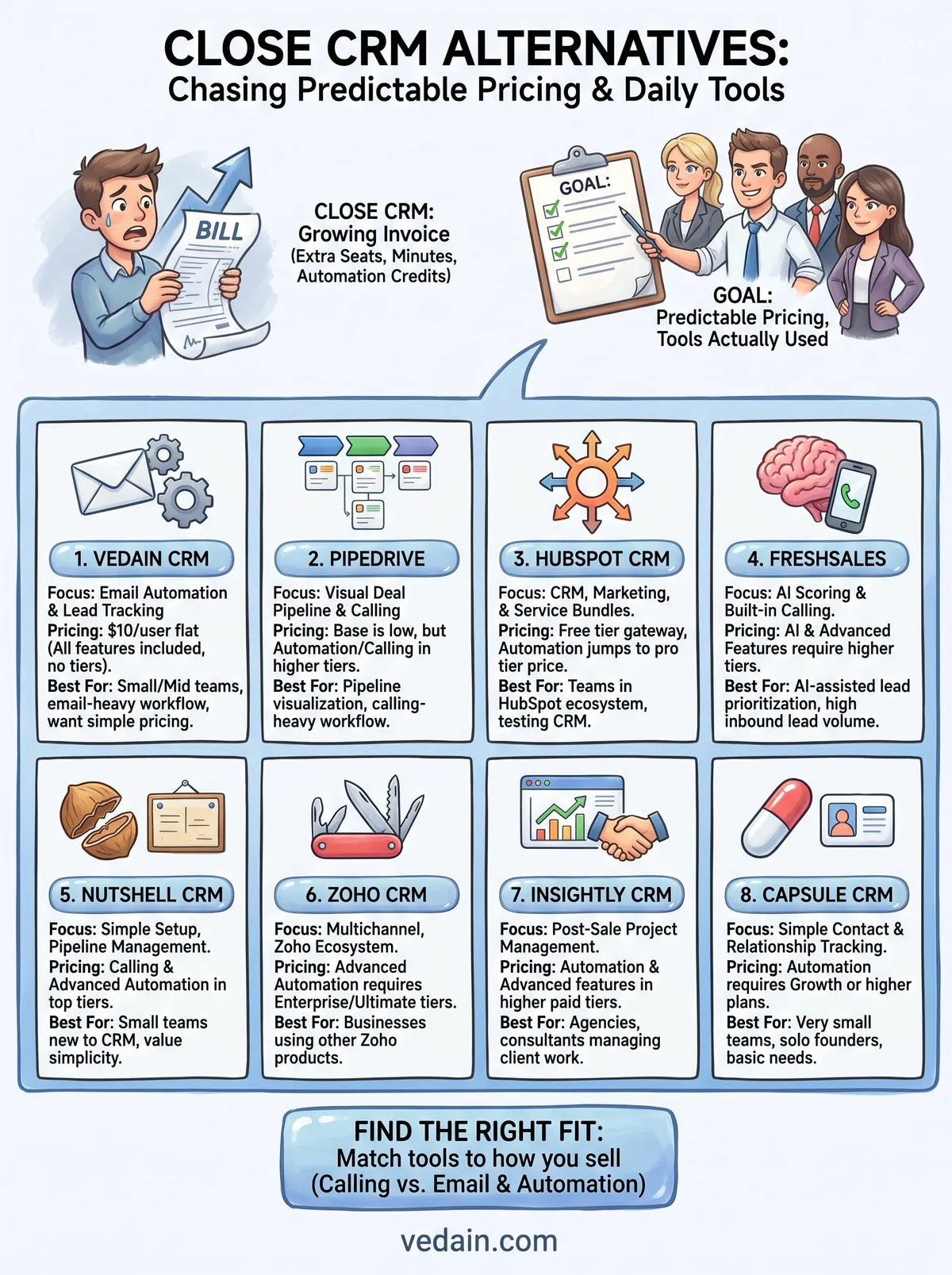
Every CRM on this list solves the same core complaint about Close: pricing that grows faster than your team does. Pipedrive and Nutshell win on visual pipelines but hide automation behind upper tiers. HubSpot and Zoho offer breadth if you're already inside their ecosystems, while Insightly and Capsule serve narrower use cases like post-sale delivery or solo contact tracking. Freshsales brings AI scoring, but at a price that jumps once you want the good stuff.
Match the tool to how your team actually sells. If calling drives your pipeline, Pipedrive or Freshsales make sense. If email outreach, automation, and predictable billing matter more, Vedain covers that ground at one flat rate with nothing locked behind a higher tier.
You don't need another trial cycle to figure out which fits. Start a free Vedain trial and see your pipeline running in under five minutes, no credit card required.
Frequently Asked Questions
What is the best Close CRM alternative?
The best Close CRM alternatives in 2026: Vedain ($10/user/month) for budget-focused teams that don't need a power dialer, Pipedrive + JustCall ($39 + $30/user = $69/user) for teams wanting a dialer at Close-comparable cost, HubSpot ($90/user) for marketing-integrated teams, and Salesforce + Salesloft for enterprise outbound teams. Close is uniquely positioned for high-volume calling teams (50+ calls/day) — for lighter calling activity, any of these alternatives save $30-90/user/month.
What does Close CRM do better than HubSpot?
Close CRM does better than HubSpot for: (1) built-in power and predictive dialer for high-volume outbound calling, (2) SMS/text messaging directly within the CRM, (3) call coaching features (call recording, call listen-in, barge), (4) activity-based reporting focused on call volume and connection rates, (5) call queue management for SDR teams. HubSpot does better for: inbound lead management, marketing automation, SEO and content tools, and teams that don't rely heavily on phone outreach.
Why would a company leave Close CRM?
Companies leave Close CRM when: (1) they reduce outbound calling activity and can't justify the $35-139/user/month cost of its team plans, (2) they need stronger marketing integration than Close offers, (3) they grow into enterprise needs that require Salesforce's complexity, (4) they're a non-US team that doesn't need US-focused dialer features, or (5) price sensitivity increases as team size grows — Close at $99/user for 20 reps = $1,980/month vs Vedain at $200/month. The ROI calculation changes as call volume per rep decreases.
Is there a Close CRM alternative with a built-in dialer?
Close CRM alternatives with built-in dialers: Freshsales (from ₹749/user/month billed annually, includes Indian number dialer), Aircall + HubSpot ($30 + $90/user), JustCall + Pipedrive ($30 + $39/user), Kixie + any CRM ($35-55/user). For US/global teams needing a power dialer at lower cost than Close, Kixie ($35/user) + Pipedrive ($39/user) = $74/user total — comparable to Close Growth ($99/user) with more flexibility. For Indian teams, Freshsales' built-in dialer is the cleanest solution.
Can Pipedrive replace Close CRM for outbound sales?
Pipedrive can partially replace Close CRM for outbound sales: it has email sequences, activity tracking, and pipeline management comparable to Close. What's missing: a built-in power dialer (requires JustCall or Aircall add-on at $30+/user/month), predictive dialing, and SMS within the CRM. For teams doing 10-30 calls/day, Pipedrive + JustCall ($69/user/month total) works well and costs about 30% less than Close Growth ($99/user/month). For teams doing 50+ calls/day, Close's native dialer provides better workflow efficiency.
What CRM should outbound sales teams use instead of Close?
Outbound sales teams considering Close alternatives should evaluate by call volume: Under 20 calls/day per rep → Pipedrive ($39/user) or Vedain ($10/user) with a lightweight phone app like JustCall. 20-50 calls/day → Pipedrive + JustCall or Freshsales with its built-in dialer (cheaper than Close). 50-100+ calls/day → Close CRM is genuinely purpose-built and the alternatives require patchwork integrations. Very high volume → Salesforce + Salesloft or Outreach for enterprise-grade outbound infrastructure.