This list covers the eight tools worth your time in 2026, based on how well they capture source data automatically, connect it to deal outcomes, and report on it without extra spreadsheet work. You'll see where each one shines, where it falls short, and what it costs once you factor in the add-ons most vendors don't mention upfront.
We built this comparison from a sales-tool perspective, not a marketing-analytics one, because tracking a source only matters if it tells you which channels close deals, not just which ones generate clicks. You'll find full-featured CRMs with built-in attribution alongside standalone tracking tools, so you can pick based on whether you need a new system or just better visibility inside the one you already run.'
1. Vedain CRM
Vedain built its lead source tracking around the deal pipeline itself, not as a bolt-on report you check once a month. Every lead that enters the system, whether it comes through a lead capture form on your website, an email reply, or a manual entry, carries source data with it into the Kanban pipeline, so you see attribution and deal stage in the same view. That matters if you're trying to answer a specific question: which channel is actually closing revenue, not just filling your top of funnel.
Key features
Vedain's source tracking lives inside a full sales operating system, so you're not stitching together a tracking tool and a separate CRM.
- •Lead Forms that auto-tag captured leads with the originating page and campaign
- •Custom fields on every lead record to log channel, campaign, or referral partner
- •Smart filters to segment your pipeline by source and compare close rates
- •CRM reports and sales analytics with conversion funnels that show source-to-close performance
- •Team leaderboards that reveal which reps convert specific lead sources best
- •Workflows that auto-route leads by source or auto-tag them based on how they arrived
A lead source is only useful data once it's sitting next to the deal it eventually became, or didn't.
Because these features sit inside one platform, you get attribution reporting without paying for a second tool or exporting data into a spreadsheet to make sense of it.
Best for
Vedain fits sales teams who want lead source tracking baked into the same system they use to run their pipeline, not a separate analytics dashboard they have to check independently. It suits startups and small to mid-sized sales teams currently juggling a CRM plus a bolt-on attribution tool, since consolidating both into one $10-per-user platform usually cuts costs while removing a data-sync headache. Companies switching from HubSpot or Salesforce, where attribution reporting is often locked behind higher pricing tiers, tend to find Vedain's approach refreshingly direct.
Pricing
Vedain charges a flat $10 per user per month, and that single rate includes lead source tracking, unlimited records, email sync, workflow automation, and reporting. There's no separate attribution add-on, no reporting tier you have to upgrade into, and no per-contact pricing that punishes you for growing your list. You can start a trial without entering a credit card, and most teams report full setup, including form and email integration, in under five minutes. Check current plan details on the Vedain CRM pricing page.
2. HubSpot Marketing Hub
HubSpot built its reputation on inbound marketing, and its Marketing Hub extends that into fairly detailed lead source tracking software capabilities, especially if you're already inside the HubSpot ecosystem for your website and email. The platform pulls source data from form fills, ad clicks, and organic search, then ties it to contact records that flow into HubSpot's CRM. Teams already paying for HubSpot's marketing tools often find the attribution layer a natural extension rather than a new purchase.
Key features
HubSpot's attribution tools go deep, but most of the useful reporting sits behind higher-tier plans rather than the entry-level package.
- •Multi-touch attribution reporting across email, ads, and organic channels
- •Contact timeline showing every touchpoint before a deal closes
- •Campaign tracking that ties spend to specific source performance
- •Custom attribution models for weighting first-touch versus last-touch credit
- •Integration with HubSpot CRM so source data lives alongside deal records
Attribution reporting only earns its keep when it's included in the price you're already paying, not sold back to you as an upgrade.
Best for
Organizations already running HubSpot's full stack, meaning CMS, email, and CRM, get the most value here since source data flows without extra integration work. Marketing teams that need granular, multi-touch attribution models for reporting to leadership will appreciate the depth. Smaller sales teams who just want to know which channel closed a deal, without building out a full marketing operations setup, may find the platform heavier than they need.
Pricing
HubSpot's Marketing Hub starts free with limited features, but real attribution reporting requires the Professional tier, which runs roughly $800 per month for the core Marketing Hub bundle, plus required onboarding fees that HubSpot bills separately. Enterprise-level attribution modeling pushes costs into the thousands monthly depending on contact volume. Check HubSpot's official pricing page directly, since tier boundaries and contact limits shift often.
3. Cometly
Cometly built its name in the paid ads space, tracking every click from Facebook, Google, and TikTok campaigns down to the closed deal. Instead of stopping at form submissions like most marketing attribution tools, Cometly pushes conversion data back into the ad platforms themselves, so your campaigns optimize toward leads that actually turn into revenue rather than just cheap clicks. Agencies and paid-ad-heavy teams tend to gravitate here because the tool was built around ad spend efficiency first, sales visibility second.

Key features
Cometly leans hard into closing the loop between ad spend and revenue outcomes, which sets it apart from broader sales source tracking platforms.
- •Server-side tracking that survives ad blockers and iOS privacy restrictions
- •Revenue attribution synced directly back to Facebook and Google Ads
- •Call tracking that ties phone leads to the ad or keyword that generated them
- •CRM integrations with Salesforce, HubSpot, and other pipeline tools
- •Cohort reporting showing which campaigns produce leads that convert weeks later
Attribution data is only worth collecting if it feeds back into your ad spend decisions, not just a dashboard nobody checks.
Best for
Cometly suits paid advertising teams and agencies managing significant ad budgets across Meta and Google, where shaving wasted spend off underperforming campaigns matters more than deal-stage visibility. It works best for businesses that already run a separate CRM, and agencies weighing their options can compare CRM tools built for marketing agencies before adding the attribution layer connecting ad platforms to closed revenue. Teams without meaningful paid ad spend will find much of the tool's value irrelevant.
Pricing
Cometly starts around $500 per month for its base plan, scaling upward based on tracked sessions and ad spend volume. There's no flat per-user rate, so costs climb as your traffic grows, and most plans require an annual commitment to unlock the lower published rate. Check Cometly's official pricing page for current tiers before committing.
4. Ruler Analytics
Ruler Analytics focuses on closed-loop marketing attribution for B2B teams with longer sales cycles, where a lead might touch your site five times over three months before ever booking a call. The tool tracks every visit, form fill, and call back to the original marketing source, then pushes that data into your CRM so sales reps see the full journey behind each lead. Ruler positions itself less as a sales source tracking add-on and more as the connective layer between marketing spend and CRM revenue data.
Key features
Ruler's strength is stitching together multiple touchpoints across a long buying cycle rather than tracking a single conversion event.
- •Multi-touch attribution that maps every visit before a form fill or call
- •Call tracking with dynamic number insertion tied to campaign source
- •CRM sync with Salesforce, HubSpot, and Pipedrive for closed-loop reporting
- •Custom attribution models including first-touch, last-touch, and linear
- •Offline conversion tracking for leads that convert outside the website
Attribution built for a five-touch B2B sale looks nothing like attribution built for a single ad click, and using the wrong model wastes both.
Best for
Ruler suits B2B marketing teams running longer sales cycles where a single lead source rarely tells the full story. Companies juggling multiple channels, including paid search, organic content, and outbound calls, benefit from Ruler's ability to weight credit across the entire journey rather than crediting only the last touch. Smaller teams with simple, short sales cycles will likely find the setup more complex than their pipeline actually requires.
Pricing
Ruler Analytics doesn't publish flat pricing on its site; instead, plans are quoted based on monthly website traffic and tracked conversions, with most reported starting points landing between $500 and $900 per month. Annual contracts are typically required to access published rates, and onboarding support is usually bundled into the first month. Contact Ruler directly for a quote specific to your traffic volume.
5. CallRail
CallRail built its name tracking phone calls back to marketing sources, and that focus still defines the product even as it's expanded into form and chat tracking. If your leads come through a call more often than a form fill, dynamic number insertion swaps the phone number shown to each visitor based on the ad, keyword, or page that brought them there, so you know exactly which campaign generated that ringing phone. Service businesses, from law firms to home contractors, rely on CallRail heavily because their conversion event is almost always a phone conversation, not a checkout page.
Key features
CallRail's tracking centers on the call itself, with enough surrounding detail to connect that call to a marketing source and a sales outcome.
- •Dynamic number insertion that swaps tracking numbers per visitor and source
- •Call recording and transcription for reviewing how leads actually pitch themselves
- •Form tracking that captures source data alongside phone conversions
- •Conversation intelligence that flags keywords indicating a qualified lead
- •Multi-channel attribution spanning calls, texts, forms, and chat
A closed deal that started with a phone call is worthless data if you can't trace that call back to the ad that triggered it.
Best for
CallRail suits service-based businesses where phone calls, not web forms, are the primary lead conversion event, including legal, medical, home services, and automotive dealerships. Marketing agencies managing call-heavy client campaigns also lean on CallRail to prove which ads are driving actual phone leads rather than form spam. Companies with a sales source tracking need centered on digital form fills rather than calls will find better value in capturing website leads automatically into a CRM instead.
Pricing
CallRail's plans start around $50 per month for a base tier covering limited call tracking, with pricing scaling based on tracking numbers and minutes used. Full-featured plans with conversation intelligence and multi-channel attribution run higher, often exceeding $150 per month before add-ons. Check CallRail's official pricing page for current tier breakdowns, since minute overages can push actual costs well past the advertised base rate.
6. WhatConverts
WhatConverts started as a lead tracking tool for small marketing agencies who needed a simple way to show clients exactly which campaigns produced calls, forms, chats, and transactions. Every lead gets tagged with source, medium, campaign, and keyword the moment it comes in, then that tag follows the lead through to a manual close status you set yourself. Unlike platforms built around deep marketing analytics, WhatConverts keeps the interface simple enough that a non-technical sales rep can mark a lead won or lost without needing a dashboard tutorial.
Key features
WhatConverts covers the four common lead types in one unified log, which is where most agencies find the real value.
- •Lead tracking log that unifies calls, forms, chats, and transactions in one feed
- •Dynamic number insertion for call source tracking down to keyword level
- •Manual lead scoring so reps can tag leads as qualified, won, or lost
- •Google Ads and Analytics integration for closing the loop on ad spend
- •Custom reports built for agency client reporting rather than internal sales use
A tracking tool only earns trust from a sales team when marking a lead "won" takes ten seconds, not ten fields.
Best for
WhatConverts fits marketing agencies managing multiple client accounts who need to prove campaign performance without building a custom dashboard for each one, though a CRM built for digital agencies handles the new-business pipeline side better. Small businesses running their own paid search and needing straightforward lead source tracking software without a CRM's full pipeline overhead also do well here, since the tool doesn't try to replace deal management. Larger sales organizations wanting automated attribution tied directly to revenue reporting will likely outgrow the manual scoring approach fairly quickly.
Pricing
WhatConverts starts at $30 per month for its base plan, which covers limited call tracking minutes and lead volume, with pricing scaling up based on tracking numbers and monthly leads captured. Higher tiers unlock deeper Google Ads integration and additional users, typically landing between $80 and $150 per month for growing agencies. Check WhatConverts' official pricing page for exact tier breakpoints, since lead volume overages can shift your actual bill mid-cycle.
7. Dreamdata
Dreamdata built its platform around B2B revenue attribution, pulling data from every tool in your stack, including ad platforms, your CRM, and your product analytics, into a single model that maps the entire buyer journey. Instead of tracking one form fill or one call, Dreamdata stitches together every touchpoint an account has with your company before a deal closes, which suits companies selling to buying committees rather than individual leads. Revenue operations teams tend to reach for Dreamdata when spreadsheet-based attribution stops scaling with their pipeline volume, usually alongside an operational CRM running the day-to-day workflow.
Key features
Dreamdata's data model centers on accounts and revenue, not individual leads, which changes how the reporting reads compared to simpler lead source tracking software.
- •Account-based attribution that tracks every buying committee member's touchpoints
- •Revenue modeling connecting marketing spend directly to closed-won ARR
- •Data warehouse integration pulling from Salesforce, HubSpot, and ad platforms
- •Custom attribution models for weighting multi-touch B2B journeys
- •Pipeline velocity reporting showing which sources shorten sales cycles
Attribution built around accounts, not individual leads, matches how B2B deals actually get won.
Best for
Dreamdata fits revenue operations teams at B2B companies with committee-based buying and sales cycles measured in months rather than days. Companies already running a modern data stack, with a warehouse and multiple marketing tools feeding into it, get the most value since Dreamdata was built to sit on top of that infrastructure. Smaller teams selling to individual buyers with short cycles will find the account-based model adds complexity they don't need.
Pricing
Dreamdata doesn't publish flat pricing, quoting instead based on tracked website traffic, connected data sources, and account volume. Reported starting points land around $999 per month for growing teams, with enterprise plans running considerably higher depending on integration count. Annual contracts are the norm, and onboarding typically involves a dedicated implementation period before reporting goes live. Contact Dreamdata directly for a quote matched to your data stack.
8. Dealfront
Dealfront, formed from the merger of Leadfeeder and Echobot, identifies the companies visiting your website even when they never fill out a form, then layers in intent signals and contact data so your sales team can chase accounts already showing buying interest. Rather than waiting for a lead to self-identify, Dealfront deanonymizes site traffic down to the company level, tying that visit back to the ad, referral, or organic search that brought them in. European B2B teams lean on it heavily, partly because it was built with GDPR compliance as a core requirement rather than an afterthought.
Key features
Dealfront's core value sits in visitor identification, with intent data layered on top to help you prioritize which anonymous visits are worth a sales follow-up.
- •Website visitor identification that reveals company names behind anonymous traffic
- •Intent data flagging accounts researching topics related to your product
- •Source tracking connecting identified visits back to campaigns and channels
- •CRM integrations with Salesforce, HubSpot, and Pipedrive for pipeline handoff
- •Contact database for reaching decision-makers at identified companies
A visitor you can name is worth more than a hundred anonymous sessions, because a name is something sales can actually act on.
Best for
Outbound-heavy B2B sales teams targeting European markets get the most value here, since Dealfront's compliance-first approach and contact database skew toward that region, and it slots in beside the other sales prospecting tools for B2B teams. Companies running account-based marketing programs will appreciate pairing visitor identification with intent data to time outreach better. Teams focused purely on inbound form conversions, without an outbound motion to feed, will find much of the platform underused.
Pricing
Dealfront doesn't publish flat pricing, quoting plans based on website traffic volume and contact database access. Reported starting points land around $200 to $300 per month for smaller teams, climbing well past $1,000 monthly once you add the full sales intelligence database. Contact Dealfront directly for a quote matched to your traffic and outbound needs.
Picking the right fit for your team
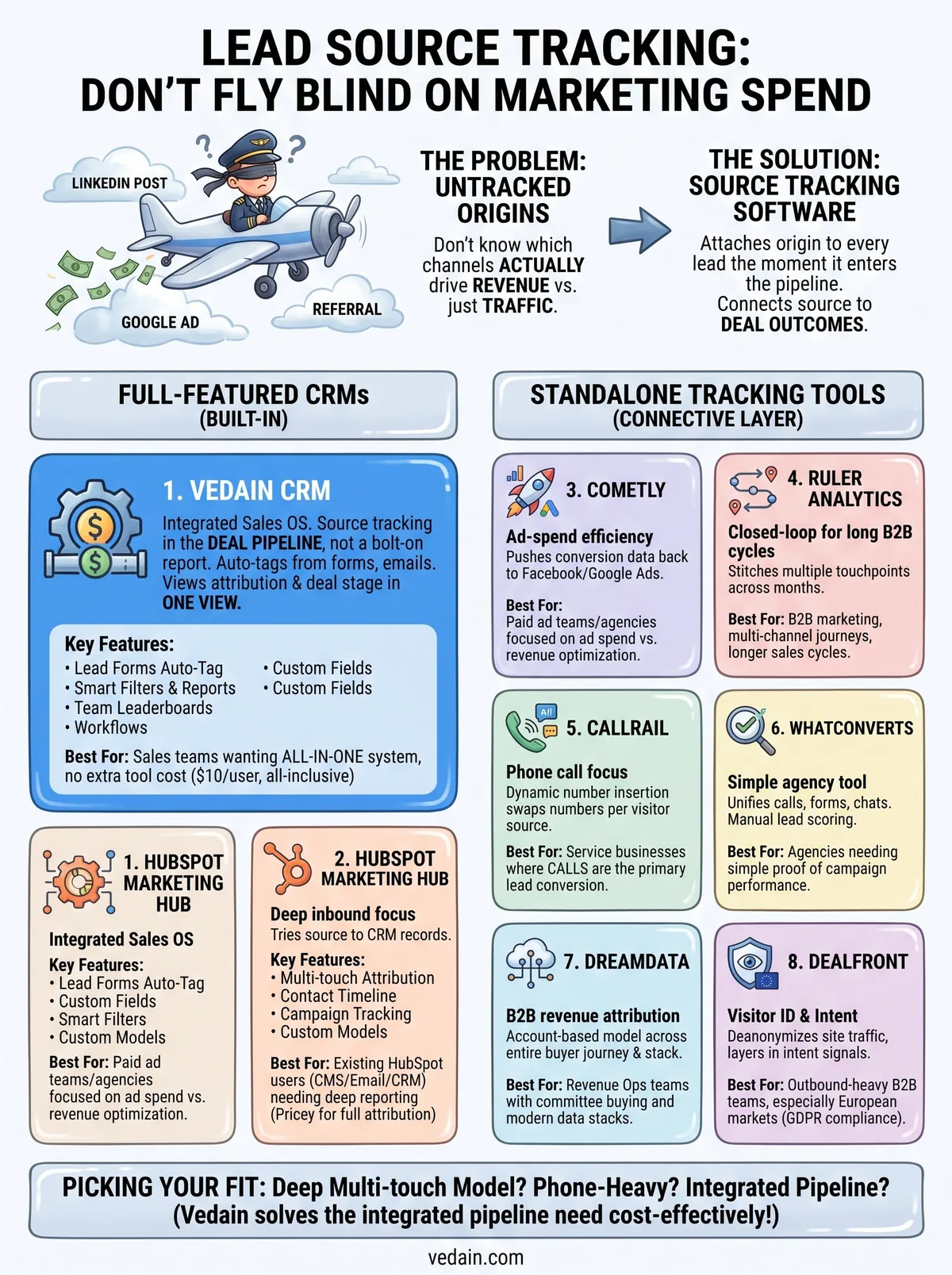
Your choice comes down to what you're actually trying to answer. If you need deep multi-touch modeling for a six-month B2B sales cycle, Dreamdata or Ruler Analytics earn their higher price tags. If phone calls drive your pipeline, CallRail or WhatConverts track that better than any CRM add-on. But if you just want to know which channel closed which deal, without paying separately for a tracking platform and a pipeline tool, that's a different problem, and it's the one Vedain was built to solve.
Most teams don't need a standalone attribution stack. They need source data sitting next to the deal it produced, inside the same system reps already use every day. Vedain gives you that for $10 per user, with no reporting tier to unlock later. Start your free Vedain trial and see your first tagged lead move through the pipeline before lunch.
Frequently Asked Questions
What is the best lead source tracking software for small businesses?
Vedain (a flat $10/user/month) and Pipedrive (from $14/user/month, billed annually) are strong lead source tracking picks for small businesses thanks to affordable pricing and intuitive interfaces that don't require technical expertise. While HubSpot and Salesforce offer lead tracking, they're better suited for enterprise teams, whereas Pipedrive's visual pipeline and built-in lead source attribution make it ideal for startups tracking multiple channels like email, web forms, and referrals.
How much does lead source tracking software cost compared to HubSpot?
Lead source tracking software varies significantly in price: Vedain is a flat $10/user/month, Pipedrive starts at $14/user/month and Zoho CRM at $14/user/month (both billed annually), while HubSpot's free plan has limitations and paid Sales Hub plans begin at $20/seat/month (with real attribution reporting on Marketing Hub Professional at roughly $800/month). Salesforce starts at $25/user/month for Starter Suite, with Pro Suite at $100, though HubSpot remains popular for companies already invested in the HubSpot ecosystem.
Can you track multiple lead sources in Salesforce and HubSpot?
Yes, both Salesforce and HubSpot support tracking multiple lead sources through custom fields and attribution models, but they require more setup than specialized tools. Pipedrive and Zoho CRM offer simpler multi-source tracking with pre-built lead source fields and clearer attribution reporting without extensive configuration, making them more accessible for teams new to lead source analytics.
What lead source tracking features does Vedain offer?
Vedain records a source on every lead as it arrives (lead forms, email, IndiaMART and Justdial, Meta lead ads, live chat, imports or manual entry), lets you add custom fields for channel, campaign or referral partner, filter the pipeline by source, and report source-to-close conversion in its funnels and dashboards. It's all included in the flat $10/user/month price, so you get source tracking inside the same system that runs your pipeline rather than in a separate attribution tool.
Is Zoho CRM better than HubSpot for tracking lead sources?
Zoho CRM and HubSpot both track lead sources effectively, but Zoho CRM offers better value from $14/user/month (billed annually) with more customization options for lead source fields and automation. HubSpot excels in user-friendliness and integration ecosystem, but Zoho's lower cost and flexible lead source tracking make it preferable for budget-conscious teams, while Salesforce users appreciate deeper customization at enterprise scale.
How do I choose between Pipedrive, Salesforce, and HubSpot for lead tracking?
Choose Pipedrive if you prioritize simplicity and affordability (from $14/user/month) with visual lead tracking; select HubSpot if you need seamless marketing automation integration and don't mind higher costs as you move past Starter ($20/seat/month); and pick Salesforce if you require enterprise-level customization and have dedicated IT support. Zoho CRM and Vedain serve as strong middle-ground alternatives offering robust lead source tracking at lower price points than HubSpot and Salesforce.