This guide skips the sales pitches and gets straight to what matters: which tools actually fit a small support team's budget and workflow in 2026. You'll find a side-by-side look at ticketing, automation, and reporting features across ten platforms, so you can match a tool to your team size and ticket volume instead of guessing.
We built this list from the angle we know best at Vedain, running lean sales and customer operations without enterprise pricing or bloated feature tiers. If your support team also touches sales conversations or lead follow-up, you'll notice a few of these picks pair well with a flat-rate CRM like ours. Below, we break down pricing, standout features, and the best fit for growing teams so you can pick with confidence, not guesswork.
1. Freshdesk
Freshdesk is one of the most recognized names in help desk software for small business teams, built by Freshworks as a ticketing system that scales from a two-person support inbox to a multi-channel operation with hundreds of agents. It's the tool most people mean when they search for an affordable alternative to Zendesk, and it earns that reputation through a long-running free tier (retired in 2025 for new users) and a pricing ladder that doesn't punish you for growing.
How it works
Freshdesk centers on a shared ticket inbox that pulls in email, chat, phone, and social messages into one queue, then routes them using rules you set up without touching code. Agents work from a single dashboard with canned responses, collision detection (so two people don't reply to the same customer twice), and SLA timers that flag tickets before they breach. The platform also bundles a knowledge base builder and a community forum module, which cuts down repeat tickets by letting customers self-serve answers to common questions.
A shared inbox only earns its keep once your automation rules actually route tickets correctly, so test them before you go live.
Automation is where Freshdesk separates itself from a plain shared inbox. You can build workflows that auto-assign tickets by keyword, tag, or customer type, and the Freddy AI add-on layers in suggested replies and sentiment detection on paid plans.
Who it's for
Freshdesk suits small support teams that expect to outgrow a bare-bones tool within a year or two. It's a strong pick if you're fielding tickets across multiple channels, like email plus a contact form plus social DMs, and need one place to manage all of it. Support-only teams without a sales component tend to get the most value here, since Freshdesk doesn't try to double as a CRM. If your team also needs to track deals alongside tickets, pairing it with one of the affordable CRM options for small businesses keeps each tool focused on what it does best.
Pricing
Freshdesk retired its permanent free plan in 2025; a Free Program now gives up to two agents six months free, which is enough for a very small team just getting started. Paid plans add automation, SLAs, and reporting depth as you move up.
| Plan | Price (per agent/month, billed annually) | Best for |
|---|---|---|
| Free Program | $0 for 6 months | Up to 2 agents |
| Growth | $19 | Small teams needing automation |
| Pro | $55 | Multi-channel teams needing SLAs and custom reporting |
| Enterprise | $89 | Larger teams needing advanced security and AI features |
Watch the annual-billing catch: monthly pricing runs noticeably higher on every paid tier, so budget for a yearly commitment if you want the rates above.
2. Zendesk
Zendesk is the name most support leaders default to when they think of enterprise-grade help desk software for small business operations that plan to scale fast. It started as a simple ticketing tool and grew into a full customer service suite with messaging, voice, and a help center builder, all wrapped in a polished interface that agents pick up quickly.
How it works
Zendesk organizes support around a unified agent workspace that pulls in email, chat, voice, and social channels so reps never have to switch tabs mid-conversation. Triggers and automations handle routing, escalation, and follow-up nudges based on rules you configure in the admin panel, and the platform's reporting suite (Explore) lets you build custom dashboards on ticket volume, first response time, and CSAT. Zendesk also ships with a bot-driven AI agent for answering repetitive questions before they ever reach a human.
The more channels you connect, the more Zendesk's automation pays for itself, but that same depth means a longer setup than a bare-bones ticketing tool.
Setup takes longer than Freshdesk's, mostly because Zendesk's flexibility invites more configuration decisions upfront: trigger conditions, business rules, and workspace layouts all need attention before your team goes live.
Who it's for
Zendesk fits small businesses that expect real growth in ticket volume and want a platform that won't need replacing at 50 or 100 agents. Teams already juggling multiple support channels, especially voice, get more out of Zendesk than teams handling only email. It's a heavier lift for a two-person support desk that just wants a shared inbox.
Pricing
Zendesk's entry-level Support Team plan starts around $19 per agent per month billed annually (Suite Team is $55), climbing to $115+ for advanced AI and workflow features. Add-ons like advanced voice or WFM push the real cost higher than the sticker price suggests, so budget for extras before committing.
3. Help Scout
Help Scout takes a different approach from Freshdesk and Zendesk by hiding the "help desk" feel entirely. It presents tickets as email threads inside a shared inbox called a Mailbox, so agents work in an interface that looks and feels like Gmail rather than a ticketing dashboard. That design choice makes it one of the most approachable options for a small business support team that wants zero learning curve.
How it works
Help Scout organizes conversations into shared inbox software style mailboxes, each with its own workflows, saved replies, and assignment rules. Collision detection stops agents from double-replying, and light users (a free seat type for occasional collaborators like a founder or a product manager) can jump into tickets without eating into your paid agent count. The Docs module adds a simple knowledge base, and Beacon, Help Scout's embeddable widget, surfaces relevant articles and a contact form directly on your site.
A help desk that reads like your inbox gets adopted faster than one that requires training.
Reporting stays lean compared to Zendesk's Explore suite, covering conversation volume, response times, and customer satisfaction, but skipping deep custom dashboards.
Who it's for
Small teams that value simplicity over configurability tend to love Help Scout. It suits founders answering their own tickets, agencies managing client support, and any team that finds Zendesk's setup process overkill. If your workflows are straightforward, email-based, and don't need multi-channel routing across voice or social, Help Scout gets you running in a day, not a week. Teams already comfortable with a flat-rate CRM for sales will appreciate a support tool with the same no-nonsense pricing philosophy.
Pricing
Help Scout charges per user on three tiers: Standard at $25/user/month, Plus at $45/user/month, and Pro at $75/user/month. Unlike Freshdesk, Help Scout still has a free plan (up to 5 users, 1 inbox), plus a 15-day trial of paid tiers.
4. HubSpot Service Hub
HubSpot Service Hub brings ticketing into the same ecosystem as HubSpot's CRM, marketing, and sales tools, so support tickets and customer records live on one timeline. Small businesses already running HubSpot for marketing or sales tend to gravitate here first, since adding Service Hub means no new contact database to sync. It's a strong pick if you want your customer service software to talk directly to your sales pipeline without middleware.
How it works
Service Hub organizes tickets in a shared inbox tied to each contact's full history, so an agent sees past emails, deals, and support cases without switching tools. Automation runs through HubSpot's workflow builder, letting you route tickets, trigger follow-up tasks, or escalate based on ticket properties. Knowledge base, live chat, and customer feedback surveys (NPS, CSAT) ship as native modules rather than bolt-ons.
A help desk built into your CRM only pays off if you're already using that CRM for sales, otherwise you're paying for integration you don't need.
Reporting draws from the same dashboard used across HubSpot's other hubs, so support metrics sit next to sales and marketing data automatically.
Who it's for
Businesses already invested in HubSpot's marketing or sales tools get the most value here, since the ticketing layer inherits contact data for free. Teams starting from scratch on help desk software for small business operations, with no existing HubSpot footprint, usually find cheaper standalone options that don't require buying into a broader ecosystem.
Pricing
Service Hub's Starter tier begins around $20/seat/month (from $7 on annual promo), but the real functionality (workflows, custom reporting, SLAs) sits behind Professional at roughly $90–$100/seat/month plus a $1,500 onboarding fee, then Enterprise near $150/seat/month, as the Service Hub plans and seat minimums show in detail. Costs climb quickly once you add more seats or bundle in HubSpot's Marketing and Sales hubs, so work out HubSpot's cost per user across every hub before committing.
5. Zoho Desk
Zoho Desk slots into the broader Zoho ecosystem, which already includes CRM, invoicing, and project tools, making it a natural pick for small businesses that want their help desk software to connect with other back-office systems they already run. It's less flashy than Zendesk but covers the core ticketing basics well, and Zoho's pricing tends to undercut the bigger names at every tier.
How it works
Zoho Desk organizes tickets by channel and department, with a multi-department setup that lets you separate, say, billing questions from technical support without building custom filters from scratch. Automation runs through "Blueprints," a visual workflow builder that maps out each stage a ticket should pass through, from first response to resolution, with alerts if a step stalls. The platform also includes Zia, Zoho's AI assistant, which tags ticket sentiment and suggests replies on higher-tier plans.
A help desk that shares a login with your CRM and invoicing tools saves setup time, but only if you're already committed to that ecosystem.
Context panels pull in customer details automatically when both tools run together, so it helps to know what Zoho CRM is and how it works before deciding, since agents get order history or deal status without leaving the ticket screen.
Who it's for
Small businesses already using other Zoho products get the fastest payoff here, since data flows between apps without extra integration work. Teams that need departmental separation, like a company handling both product support and billing disputes, will find Zoho Desk's structure genuinely useful. Support desks that don't need CRM overlap can look elsewhere for something simpler.
Pricing
Zoho Desk offers a free plan for up to three agents, then scales through Standard at $14/agent/month, Professional at $23/agent/month, and Enterprise at $40/agent/month, all billed annually. Monthly billing costs noticeably more (Standard is $20/agent/month billed monthly), so annual commitment is the better deal if you're staying put for a year.
6. HappyFox
HappyFox positions itself as a straightforward alternative to the bigger names on this list, built for teams that want solid ticketing without a steep learning curve or an enterprise price tag. It's a private, US-based company that has quietly served small businesses and mid-market teams for over a decade, and that stability shows in a product that feels finished rather than half-built. If you're comparing help desk software for small business operations that need reliability over flash, HappyFox earns a spot on your shortlist.

How it works
HappyFox runs on a shared inbox model with smart rules that auto-assign, tag, and prioritize tickets based on conditions you set once and forget. Agents work from a clean dashboard that supports email, chat, social, and phone channels, plus a built-in knowledge base editor for self-service articles. The platform's task management module lets support teams track internal follow-ups alongside customer tickets, which is a feature many competitors bolt on as an afterthought.
A help desk that handles internal tasks and customer tickets in one place keeps small teams from juggling two separate tools.
Reporting covers the standard set (response times, ticket volume, agent performance) through prebuilt dashboards, without the steep customization curve of Zendesk's Explore suite.
Who it's for
Small teams that want dependable ticketing without spending a week on setup tend to like HappyFox best. It suits businesses handling a steady, moderate ticket volume across a few channels, rather than high-volume operations needing deep AI routing. Teams that value a flat, predictable support tool over one that requires constant configuration will feel at home here.
Pricing
HappyFox prices per agent, starting around $29/agent/month on its Basic tier, moving up through Team and Pro plans that add automation depth and reporting, with costs rising into the $70-plus range for advanced tiers. Annual billing brings the effective rate down noticeably compared to paying month to month.
7. Hiver
Hiver takes the opposite approach from Zendesk and Freshdesk by living entirely inside Gmail instead of asking your team to learn a new dashboard. It turns shared inboxes like support@ or help@ into a lightweight help desk without forcing agents to leave their inbox, which makes it one of the fastest tools on this list to roll out. For a small business support team already running on Google Workspace, that familiarity is the whole pitch.
How it works
Hiver adds ticketing features directly on top of Gmail: assigning emails to specific agents, tagging status, setting up shared drafts for internal review before a reply goes out, and tracking SLAs without ever opening a separate app. Automation rules handle routing and escalation based on keywords or sender, and a lightweight analytics panel shows response times and agent workload. Hiver also supports shared inboxes for Outlook, so teams split across email providers aren't locked out.
Keeping support inside the inbox your team already lives in removes the biggest barrier to adoption: a new tool nobody wants to learn.
Knowledge base and live chat modules exist as add-ons rather than core features, so you're building a full support stack piece by piece rather than getting it all in one plan.
Who it's for
Small teams already running Gmail or Outlook for support, without a dedicated ticketing tool, get the quickest win from Hiver. It suits businesses that want help desk software for small business operations without asking agents to change how they work day to day. Teams needing deep automation or multi-channel routing across chat and social will outgrow it faster than teams sticking to email alone.
Pricing
Hiver's Growth plan starts around $25/agent/month and Pro runs about $55/agent/month, billed annually ($35 and $65 monthly). Higher tiers unlock automation depth and analytics that Growth skips.
8. Front
Front blends a shared inbox with a full customer communication platform, built for teams that handle support tickets, sales replies, and internal collaboration through the same set of channels. It looks and feels like an email client at first glance, but underneath sits real ticketing logic: assignment rules, SLAs, and analytics that a plain inbox can't offer. Businesses that outgrew a shared Gmail account but aren't ready for a heavyweight ticketing suite often land on Front next.
How it works
Front centralizes email, SMS, live chat, and social messages into one workspace, then lets teams assign conversations to specific reps while keeping everyone else looped in through internal comments. Rules automate routing based on subject line, sender, or channel, and a shared calendar of drafts stops two teammates from replying to the same customer at once. The platform's analytics suite tracks response times, workload per rep, and customer satisfaction, all viewable in dashboards you can share with the wider team.
A tool that looks like email but enforces ticketing discipline behind the scenes wins over teams who hate the idea of "support software."
Workflow automation extends further with Front's rules engine, which can tag, snooze, or reassign messages automatically once conditions you set are met, cutting down manual triage during busy weeks.
Who it's for
Growing teams that split time between sales, support, and account management benefit most from Front's blended inbox model. It suits small business support team setups where the same people juggle customer questions and outbound follow-up, much like a ticketing system linked to your CRM records, since Front doesn't force a hard line between the two. Pure high-volume support desks needing deep automation may find Front's feature set thinner than Zendesk's or Freshdesk's.
Pricing
Front's Starter plan runs about $25/agent/month for small teams, moving to Professional around $65/agent/month, then Enterprise near $105/agent/month (billed annually) for larger operations needing advanced permissions and analytics. All tiers bill per seat, so costs scale directly with headcount, and annual commitments shave a noticeable percentage off the monthly rate.
9. Gorgias
Gorgias builds its entire product around one type of business: ecommerce. Where Freshdesk and Zendesk try to serve every industry, Gorgias goes deep on Shopify, BigCommerce, and Magento integrations, pulling order details, tracking numbers, and refund history straight into the ticket view. If you run a small online store, this is the closest thing to ecommerce help desk software built specifically for your workflow rather than adapted to it.

How it works
Gorgias centers on a shared inbox that merges email, live chat, SMS, and social messages from Instagram and Facebook into one queue, with order data displayed alongside every conversation. Agents can issue refunds, apply discount codes, or edit orders directly from the ticket, without switching to your store's admin panel. Automation rules, called "macros" and "rules," handle repetitive requests like order status questions or return policy replies, and Gorgias's AI agent can resolve simple tickets on its own before a human ever sees them.
A help desk that can actually touch your store's orders saves more agent time than one that only reads about them.
Revenue tracking sits inside the reporting suite too, showing which support conversations led to a completed sale, a metric most generic ticketing tools don't track at all.
Who it's for
Small ecommerce brands running Shopify or a similar platform get the clearest payoff from Gorgias, especially stores fielding a steady stream of order-status and return questions, and it pairs naturally with one of the CRMs built for ecommerce stores. Service businesses without a storefront won't find much use for its core integrations and should look elsewhere on this list.
Pricing
Gorgias prices by ticket volume rather than agent seats, starting at $10/month for 50 tickets (Starter), with Basic at about $50/month billed annually for 300 tickets, then climbing through higher tiers as volume grows. That pricing model rewards lean teams but can get expensive fast once your ticket count spikes during sales events.
10. Intercom
Intercom rounds out this list as the most chat-first tool here, built around a messenger widget that lives on your website or app rather than a traditional ticket queue. It started as a live chat and onboarding tool before folding in full help desk features, so it still feels more like a product-led communication platform than a classic support desk. Companies that already lean on conversational support over email tickets tend to find Intercom the most natural fit on this list.
How it works
Intercom's core is the Messenger, a chat widget with an AI assistant that captures conversations from your site, in-app screens, and email into a shared Inbox. Its AI agent, Fin AI, resolves a large share of common questions on its own using your help center content, only handing off to a human when a query needs judgment. Automation runs through Workflows, letting you route conversations by user attributes like plan tier or signup date, and product tours, tooltips, and banners ship as native modules alongside the ticketing layer.
A help desk built for chat-first support struggles once your queue fills with email tickets it wasn't designed to prioritize.
Reporting covers conversation volume, resolution time, and Fin's automated resolution rate, giving you a clear read on how much of your queue AI is actually handling.
Who it's for
SaaS companies and product-led businesses running in-app support get the most out of Intercom, especially teams already investing in onboarding flows and proactive messaging. Small businesses running mostly on email tickets, without a product surface for a chat widget, will find better value in Freshdesk or Help Scout instead.
Pricing
Intercom's Essential plan starts around $39/seat/month, with Advanced and Expert tiers climbing past $99/seat/month once you add Fin AI resolutions and custom reporting, which are billed separately per resolution beyond a base allowance.
Finding the right fit for your team
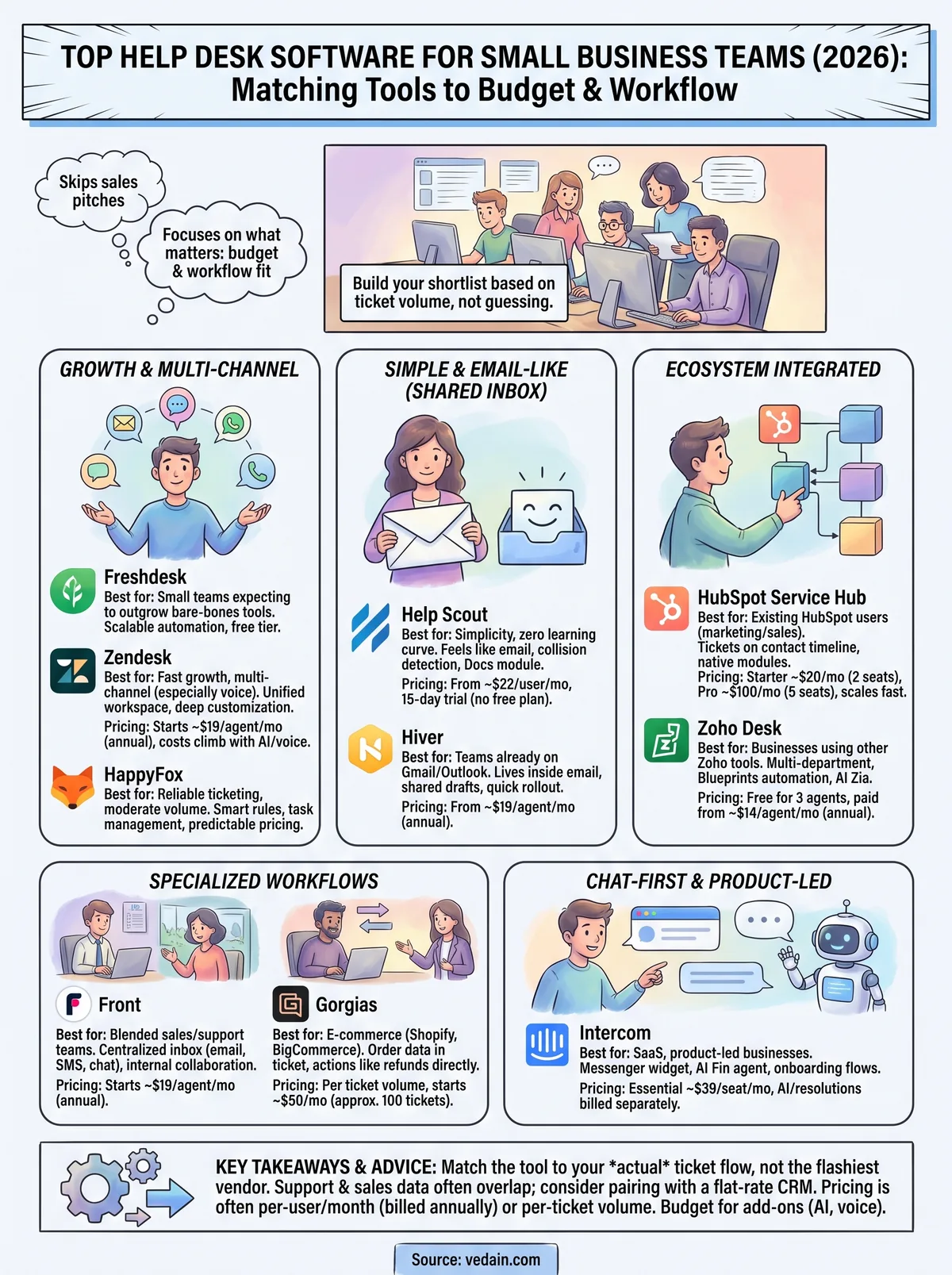
No single tool on this list wins for every small business. Freshdesk and Zendesk make sense once your ticket volume justifies real automation. Help Scout and Hiver fit teams that want zero learning curve. Gorgias only earns its price tag if you're running an online store, and Intercom only pays off if chat is already how your customers reach you. Match the tool to your actual ticket flow, not the vendor with the flashiest homepage, and you'll avoid paying for features your team never touches.
One pattern shows up across nearly every pick here: support and sales data rarely stay separate for long. If your team fields tickets today and needs to follow up on deals tomorrow, running a flat-rate CRM alongside your help desk keeps both sides connected without paying for a bloated all-in-one suite. See how a $10-per-user plan with every feature included compares to what you're already paying.
Frequently Asked Questions
What is the best help desk software for small businesses under $50 per month?
Zoho Desk and Vedain are excellent affordable options for small businesses, with Zoho Desk Standard at $14/agent/month (billed annually) and Vedain at a flat $10/user/month that includes its support desk. Both platforms provide ticketing, automation, and reporting features comparable to more expensive solutions like HubSpot Service Hub ($90+/seat/month for Professional) and Salesforce Service Cloud. For budget-conscious teams, these options deliver enterprise-level functionality without the premium pricing.
Can help desk software integrate with CRM platforms like HubSpot and Salesforce?
Yes, most modern help desk solutions integrate seamlessly with major CRM platforms including HubSpot, Salesforce, Zoho CRM, and Pipedrive. These integrations sync customer data, support tickets, and communication history across systems, eliminating manual data entry and improving team efficiency. Zoho Desk integrates natively with the Zoho ecosystem and Vedain's support desk is built into its CRM, while both also support third-party platforms through APIs and middleware solutions.
What help desk software is best for omnichannel customer support?
HubSpot Service Hub, Salesforce Service Cloud, and Zoho Desk excel at omnichannel support, managing interactions across email, chat, social media, and phone in a single platform. Vedain also provides a support desk alongside live chat and email inside its CRM, consolidating customer conversations. These platforms ensure no customer inquiry falls through the cracks regardless of which channel they contact you through.
Do small business help desk tools include AI-powered chatbots?
Yes, modern help desk software increasingly includes AI-powered chatbots and automation features to reduce support tickets. Salesforce Service Cloud, HubSpot, and Zoho Desk all offer built-in AI capabilities for intelligent ticket routing, suggested responses, and automated customer interactions. Even more affordable options like Vedain are adding AI features to help small teams handle higher ticket volumes without proportional staffing increases.
What's the difference between help desk software and CRM software?
Help desk software like Zoho Desk focuses specifically on managing customer support tickets and service requests, while CRM platforms like HubSpot, Salesforce, Vedain and Pipedrive manage the entire customer lifecycle including sales, marketing, and support. Many companies now use integrated solutions that combine both functions, with HubSpot and Salesforce offering unified platforms that serve both purposes seamlessly. Small businesses may choose specialized help desk tools or all-in-one CRM suites depending on their workflow needs.
Which help desk software offers the best mobile app for support agents?
HubSpot Service Hub, Salesforce Service Cloud, and Zoho Desk all provide robust mobile apps allowing agents to respond to tickets from anywhere. Vedain and Pipedrive also offer mobile-optimized interfaces for on-the-go support management. Mobile accessibility is critical for small businesses with distributed teams, enabling agents to resolve customer issues quickly without being desk-bound.