This article gives you a straight comparison of the 10 best shared inbox tools on the market in 2026, built for teams that actually need to coordinate email, not just forward it around. We looked at collision detection, assignment rules, pricing transparency, and how well each tool connects to the rest of your sales stack, because a shared inbox that lives in isolation from your CRM just creates another silo.
Below, you'll find tools ranging from dedicated inbox platforms to CRMs with built-in email sync like Vedain that fold shared email management into a broader sales workflow with two-way Gmail and Outlook sync, deal pipelines, and automation baked into one flat-rate plan. Whether you need a simple team inbox or a system that turns emails directly into tracked deals, you'll know which option fits your team size and budget by the end.
1. What is shared inbox software?
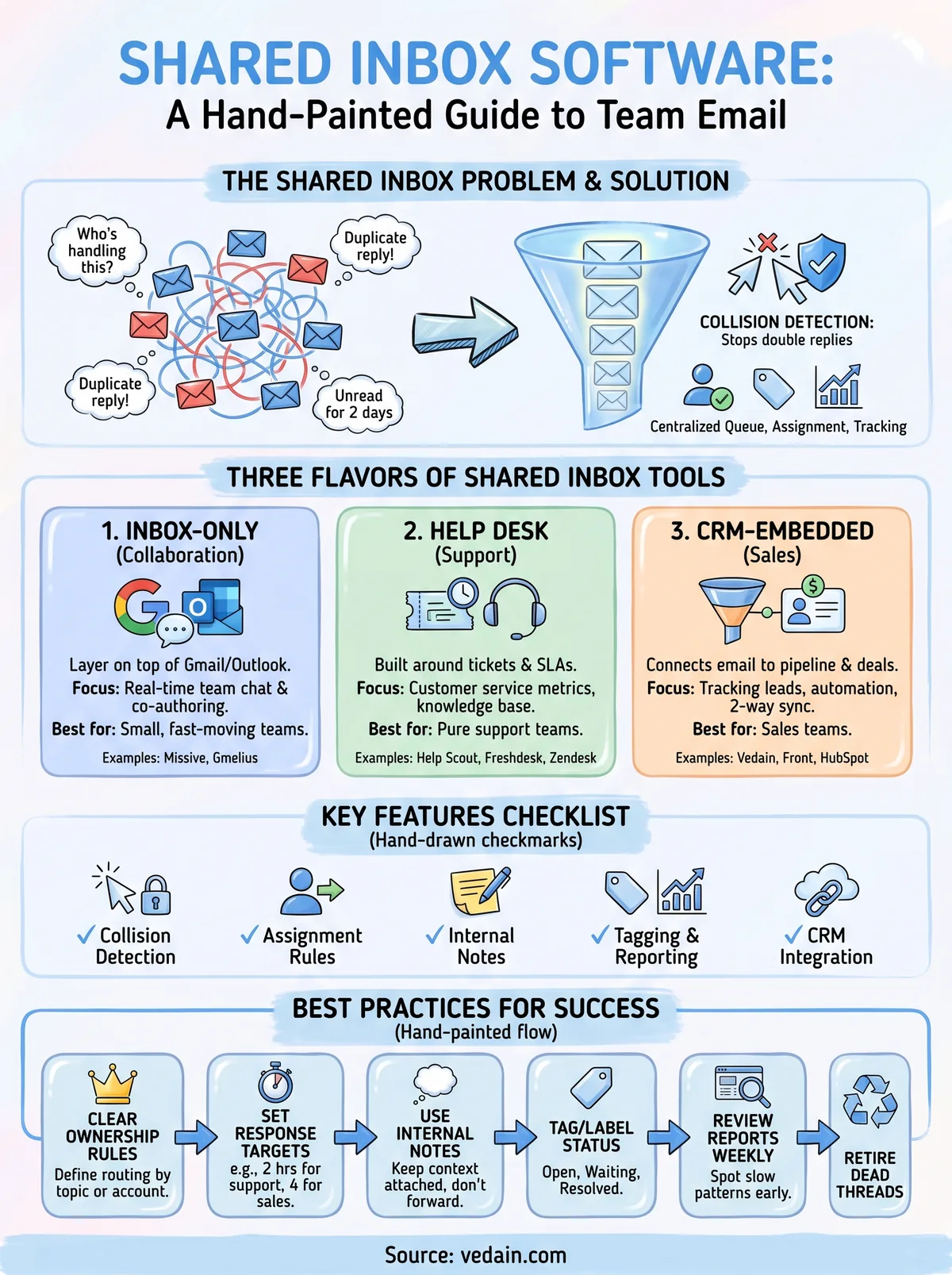
Shared inbox software gives a team one email address, like support@yourcompany.com or sales@yourcompany.com, that multiple people can access, reply from, and manage together. Instead of forwarding messages between colleagues or CC'ing half the department on every thread, everyone works from the same centralized email queue. Each message gets assigned to a specific person, tracked through resolution, and logged so nobody duplicates work or lets a lead go cold.

Under the hood, most tools solve the same core problem: collision detection. Without it, two reps open the same email, both start typing a reply, and the customer gets two different answers minutes apart. Good shared inbox platforms show a small indicator when someone else is viewing or drafting a reply, so you don't step on each other. Beyond that, the better tools add assignment rules, internal notes that never reach the customer, tagging, and reporting on response times.
A shared inbox only earns its name when it stops two people from replying to the same customer twice.
Where these tools start to differ is scope. Some are pure team email management layers that sit on top of Gmail or Outlook and add collaboration features without touching anything else in your business. Others, like help desk and ticketing software, add ticketing workflows, SLAs, and customer satisfaction surveys on top of the inbox. And a third category, which includes CRMs like Vedain, treats the inbox as one part of a bigger system where an email thread can become a tracked deal, a lead record, or an automated follow-up sequence.
Here's a quick way to think about the three flavors you'll run into in this list:
- •Inbox-only collaboration tools (Missive, Gmelius): built to add teamwork features directly inside Gmail or Outlook without changing how you use email day to day.
- •Help desk platforms with shared inbox features (Help Scout, Freshdesk, Zendesk, Hiver, Helpwise): built around support tickets, SLAs, and customer service metrics, with the inbox as one entry point among several channels.
- •CRM-embedded inboxes (Vedain, HubSpot Service Hub, Front): built so an email isn't just answered, it's connected to a contact record, a pipeline stage, or a workflow that fires automatically.
Which category fits your team depends on whether you're mostly answering support questions, mostly chasing sales leads, or both. Keep that distinction in mind as you read through the ten options below.
2. Vedain CRM – best for sales teams needing CRM and inbox
Vedain earns the top spot here because it solves a problem the other tools on this list don't even try to fix: your inbox and your pipeline are usually two disconnected systems. If your team's main job is closing deals rather than answering support tickets, a CRM-embedded shared inbox beats a standalone inbox tool every time, because you're not copying details from email into a separate deal record by hand.
How it works
You connect your Gmail or Outlook account, and Vedain's shared email inbox with CRM sync moves email two ways, so replies sent from the CRM or from your regular inbox stay matched to the right contact and deal automatically. Every message lands against a lead record instead of floating in a generic queue, and teammates see the full email history the moment they open a deal card.
Key features
- •Two-way Gmail and Outlook sync tied to contact and deal records
- •Visual Kanban pipeline that updates as emails move a deal forward
- •No-code workflow automation triggered by inbox activity
- •Automated warmup that protects deliverability for outbound sales emails
- •Custom dashboards showing response times alongside pipeline metrics
Who it's for
Vedain fits sales teams, not pure support desks. If your reps spend their day emailing leads, following up on quotes, and moving deals through stages, a shared inbox that's blind to pipeline stage just adds friction. It's built for teams of five to a few hundred users who want one flat rate.
Pricing
Vedain charges a single flat rate of $10 per user per month, no tiers, no add-on fees for email sync, automation, or warmup. That's a meaningful gap versus tools that gate collaboration features behind higher plans.
3. Missive – best for real-time email collaboration
Missive built its reputation on one thing: making a shared inbox feel like a group chat instead of a queue. If Vedain's strength is tying email to a pipeline, Missive's strength is speed. It's one of the closest things to real-time email collaboration you'll find, with teammates seeing each other's cursors and draft replies as they type.
How it works
Missive layers a chat-style collaboration interface directly over your existing Gmail, Outlook, or IMAP inboxes. Teammates open the same thread and see live typing indicators, internal comments threaded next to the email, and instant reassignment without leaving the conversation. It also folds in Slack-style team chat, SMS, and social channels into the same interface, so you're not switching apps to loop someone in.
A shared inbox that shows you're both typing is worth more than one that just says "assigned."
Key features
- •Live collision detection with typing indicators, not just a lock icon
- •Threaded internal comments and @mentions inside each email
- •Rules engine for auto-assigning and tagging incoming messages
- •Built-in team chat and SMS alongside email
- •Snooze, templates, and keyboard-first navigation
Who it's for
Missive suits small, fast-moving teams, agencies, startups, and support pods that live in email all day and want tighter team email management without adopting a full help desk or CRM. It's less suited to teams that need pipeline tracking or deal reporting.
Pricing
Missive starts around $18 per user per month for its Starter plan, with higher tiers adding rules, analytics, and larger team sizes, plus a free plan capped at two users. Compared to Vedain's flat $10 per user, you're paying more here for chat-style collaboration without any CRM functionality attached.
4. Front – best for enterprise CRM-embedded email
Front positions itself as the enterprise answer to the same problem Vedain solves for smaller sales teams: email shouldn't live apart from your customer data. It's built for larger companies running support, sales, and account management out of the same shared inbox platform, with enough workflow depth to satisfy IT and operations teams who need audit trails and integrations.
How it works
Front connects to Gmail, Outlook, and generic email accounts, then wraps them in a workspace where messages route through customizable rules, SLAs, and analytics dashboards. Conversations sync with Salesforce, HubSpot, and other CRMs that connect to Outlook and Gmail, so reps see customer history without leaving the inbox. Front also supports channels beyond email, like live chat and SMS, all funneled into the same assignment queue.
Key features
- •Rule-based routing across email, chat, and SMS
- •Two-way CRM sync (Salesforce, HubSpot) for context inside every thread
- •SLA tracking and analytics dashboards for team performance
- •Shared drafts, internal comments, and approval workflows
- •API and integration marketplace for custom setups
Enterprise inbox tools earn their price by connecting to everything else you already run, not by reinventing email itself.
Who it's for
Front fits mid-size to enterprise companies with dedicated ops or RevOps staff to configure routing rules and maintain integrations. It's overkill for a five-person sales team that just wants deals tracked alongside email, which is where a flat-rate tool like Vedain fits better.
Pricing
Front's plans start around $25 per seat monthly for its Starter tier (billed annually), climbing to $65 for Professional and $105 for Enterprise, with advanced automation and CRM integrations reserved for higher tiers. Compared to Vedain's single $10 flat rate covering CRM and inbox together, Front charges more the deeper you go into automation.
5. Help Scout – best for customer-focused support teams
Help Scout takes a different angle from the tools above it on this list: it's built first for customer support, with the shared inbox as one piece of a bigger help desk. Teams that live and die by response time and customer satisfaction scores tend to outgrow a plain team inbox tool fast, and Help Scout fills that gap without the enterprise bloat of Zendesk.
How it works
Messages sent to a shared address land in Help Scout as conversations, each tied to a customer profile that shows order history, past tickets, and custom properties. Agents reply from a clean, email-like interface while internal notes, saved replies, and automatic workflows run in the background. Everything routes through folders and tags rather than a raw inbox, which keeps large support volumes organized.
Key features
- •Shared inbox with collision detection and internal notes
- •Customer profiles showing full conversation history
- •Docs knowledge base built into the same platform
- •Workflows for auto-tagging, routing, and follow-ups
- •Reporting on response time, resolution time, and satisfaction ratings
A support inbox is only as good as the customer context sitting behind every reply.
Who it's for
Help Scout suits small to mid-sized customer support teams that want a lighter alternative to Zendesk without sacrificing reporting or a knowledge base. It's less useful for sales teams tracking deals, since it has no pipeline or forecasting built in.
Pricing
Help Scout has a free plan for up to 5 users, then starts at $25 per user per month on its Standard plan and climbs to $45 on Plus and $75 on Pro for advanced permissions and reporting. That's noticeably more than Vedain's flat $10 per user, though Help Scout's focus stays squarely on support rather than sales pipelines.
6. Hiver – best for Gmail-native shared inboxes
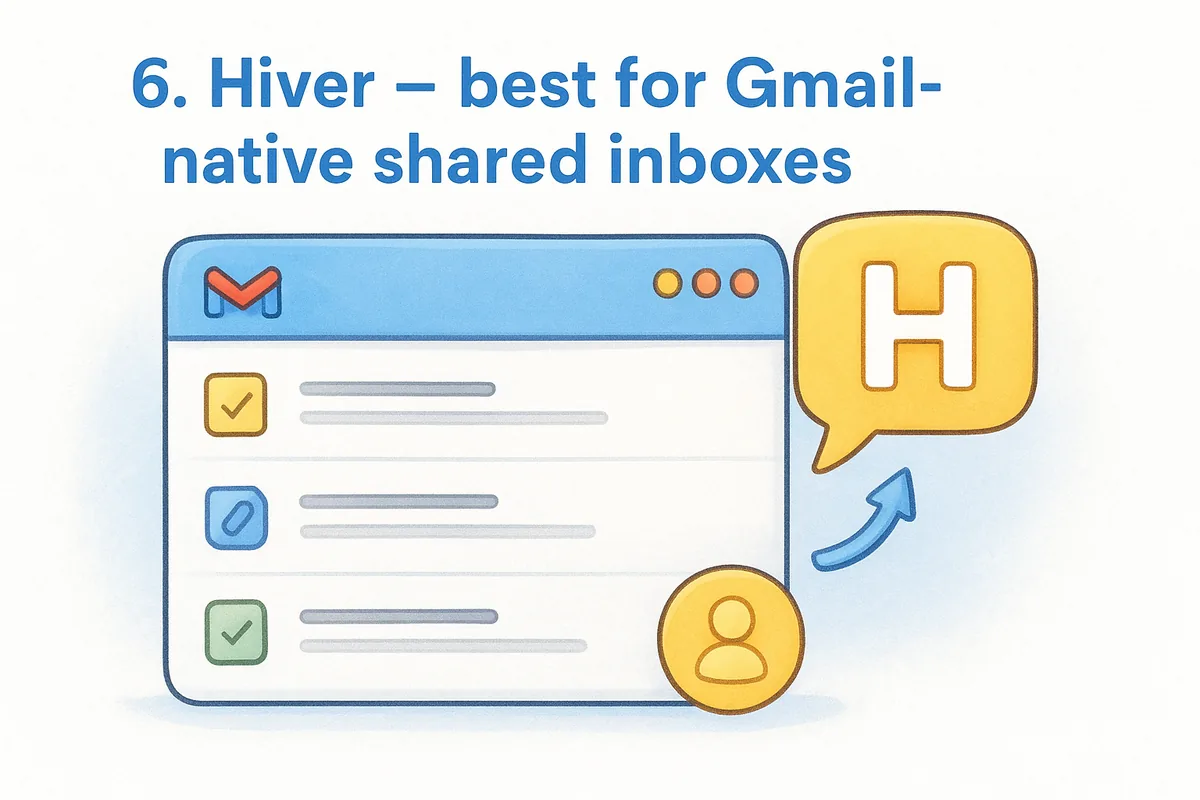
Hiver takes a different approach than Front or Missive: instead of wrapping your email in a new interface, it lives directly inside Gmail. If your team refuses to leave Gmail for a separate app, Hiver is the Gmail-native shared inbox that keeps everyone in the tool they already know, which cuts down on training time and adoption headaches.
How it works
Hiver installs as a Gmail add-on, turning any Google Workspace inbox into a shared queue without a separate login or interface. Emails get assigned, tagged, and tracked right inside Gmail's existing layout, and collision alerts pop up when a teammate is already drafting a reply. It also extends to shared inboxes on Outlook, though Gmail remains its strongest fit.
The best inbox tool is sometimes the one that doesn't ask your team to learn a new app.
Key features
- •Native Gmail and Outlook integration with no separate app to learn
- •Email assignment, status tags, and collision detection inside Gmail
- •Shared drafts and internal notes attached to threads
- •SLA tracking and automated escalations
- •Analytics on response time and agent workload
Who it's for
Hiver fits Google Workspace teams, particularly support and ops groups who want light help desk features without migrating off Gmail. It suits smaller teams more than large enterprises needing deep customization, and it lacks the pipeline or deal-tracking layer that sales-focused teams get from a CRM like Vedain.
Pricing
Hiver's plans start around $25 per user per month for the Growth tier, rising to $55 per user for Pro (billed annually) with advanced automation and analytics. That puts it well above Vedain's flat $10 per user, especially once you need the automation features bundled into Vedain by default.
7. Freshdesk – best for budget-conscious support teams
Freshdesk targets teams that want help desk features without the price tag that comes with Zendesk or Front. It's Freshworks' support platform, and the shared inbox sits as one channel inside a broader ticketing system built for budget-conscious support teams that still need automation and reporting.
How it works
Emails sent to a shared address convert into tickets automatically, each one routed by rules you set based on keywords, sender, or priority. Agents work from a ticket queue rather than a raw inbox, with collision detection warning when a colleague already has a ticket open. Freshdesk also folds in chat, phone, and social channels, so email is one entry point among several feeding the same queue.
Cheap support software still needs to stop two agents from answering the same ticket twice.
Key features
- •Ticket-based shared inbox with collision detection
- •Automation rules for routing, prioritization, and SLA escalation
- •Knowledge base and self-service portal built in
- •Freddy AI for suggested replies and ticket summarization
- •Multichannel support spanning email, chat, and phone
Who it's for
Freshdesk suits small support teams watching their budget closely, especially those who need ticketing structure but don't want to pay enterprise prices for it. It's a weaker fit for sales teams, since there's no deal pipeline, and its permanent free plan was retired in 2025.
Pricing
Freshdesk no longer has a permanent free plan (a Free Program gives up to two agents six months free), then starts at roughly $19 per agent monthly for Growth, climbing to $55 per agent for Pro (billed annually) with advanced automation. Vedain's flat $10 per user still undercuts Freshdesk's paid tiers while adding a full sales pipeline Freshdesk doesn't offer.
8. Zendesk – best for enterprise-scale support operations
Zendesk sits at the top of the help desk market for a reason: it handles the volume and complexity that smaller tools like Freshdesk or Hiver weren't built for. If you're running enterprise-scale support operations across dozens of agents and multiple regions, Zendesk's shared inbox comes wrapped in a ticketing system built to handle that scale without falling apart.
How it works
Emails sent to a shared address become tickets inside Zendesk's Agent Workspace, where routing rules, triggers, and automations sort them by priority, topic, or customer tier. Collision detection flags when a colleague already has a ticket open, and agents work from a unified view that also pulls in chat, phone, and social messages. Admins configure complex workflows through triggers and business rules that most smaller tools don't attempt.
Enterprise support tools justify their price by handling complexity, not by keeping things simple.
Key features
- •Ticket-based shared inbox with collision detection across channels
- •Advanced triggers and automations for routing and escalation
- •Omnichannel support spanning email, chat, voice, and messaging apps
- •AI-powered agent assist and customer-facing bots
- •Deep reporting and customizable dashboards for large support orgs
Who it's for
Zendesk fits large support organizations with dedicated admins to build and maintain routing logic. It's a poor fit for small teams or sales-focused groups, since the learning curve and cost outweigh what a lean team actually needs.
Pricing
Zendesk starts around $19 per agent monthly for Support Team, climbing to $115 per agent for Suite Professional, with Enterprise quote-only. That's a steep jump from Vedain's flat $10 per user, which includes CRM functionality Zendesk doesn't offer at all.
9. HubSpot Service Hub – best for HubSpot ecosystem users
If your team already runs marketing and sales through HubSpot, Service Hub's shared inbox makes sense as a default choice rather than a deliberate one. It bolts a conversations inbox onto the same contact records your marketing and sales teams already touch, which matters most for companies that don't want a fourth tool bridging email to their CRM.
How it works
Service Hub's shared inbox, called Conversations, pulls email, live chat, and form submissions into one queue tied directly to HubSpot contact records. Every reply logs against the contact timeline automatically, so a support rep sees the same deal history, marketing emails, and past tickets that a sales rep would see. Collision detection and ticket assignment work much like the help desk tools above, but the payoff is deeper integration with HubSpot's CRM data rather than a standalone inbox experience.
A shared inbox built into your CRM only pays off if you're already living inside that CRM every day.
Key features
- •Unified inbox for email, live chat, and forms tied to contact records
- •Ticket pipelines with automation and SLA tracking
- •Shared knowledge base and customer feedback surveys
- •Playbooks and canned responses for common questions
- •Reporting synced with HubSpot's broader marketing and sales dashboards
Who it's for
Service Hub fits HubSpot ecosystem users already paying for Marketing Hub or Sales Hub who want their support inbox to share the same contact database. It's a weak choice for teams not already on HubSpot, since the pricing only makes sense bundled with other hubs.
Pricing
Service Hub starts free for basic conversations, then jumps to roughly $20 per seat monthly for Starter and about $90–$100 per seat for Professional, as the full Service Hub pricing breakdown shows. Vedain's flat $10 per user still costs less while including its own CRM, not a bolt-on inbox.
10. Gmelius – best for automation inside Gmail
Gmelius takes the Gmail-native approach that Hiver pioneered and pushes it further into workflow automation. Where Hiver focuses on assignment and collision detection, Gmelius adds a visual automation builder and rules that trigger actions across your whole Google Workspace, making it a stronger fit for teams that want automation inside Gmail rather than just shared visibility over a queue.
How it works
Gmelius installs as a Gmail add-on, turning any shared address into a collaborative inbox without leaving Google's interface. Teams assign emails, leave internal notes, and track status directly inside Gmail, while a separate workflow builder lets you set up rules that move emails between shared labels, notify Slack channels, or update linked boards automatically. It also syncs shared inboxes with Google Calendar and Google Sheets, keeping automation inside tools your team already touches daily.
Automation only helps if it lives where your team already works, not in a tab they forget to open.
Key features
- •Shared Gmail inbox with collision detection and internal notes
- •Visual workflow automation builder tied to Gmail labels
- •Kanban-style boards for tracking email-based tasks
- •Two-way sync with Slack, Google Calendar, and Sheets
- •Shared team analytics on response time and workload
Who it's for
Gmelius suits Google Workspace teams that want lightweight automation without adopting a full help desk platform. Small ops and support teams already committed to Gmail get the most value here, though teams needing a sales pipeline or deal tracking won't find either inside Gmelius.
Pricing
Gmelius starts around $12 per user monthly for its Basic plan, rising past $69 per user for Fluid tiers with advanced automation and reporting. Vedain's flat $10 per user stays cheaper at every tier while adding CRM functionality Gmelius doesn't attempt to offer.
11. Helpwise – best for affordable multichannel support
Helpwise rounds out this list as the budget pick for teams that need more than email but can't justify Zendesk-level pricing. It combines a shared team inbox with WhatsApp, SMS, and social channels in one place, aiming squarely at small support and sales teams who want multichannel coverage without the enterprise price tag.
How it works
Teams connect a shared email address, WhatsApp Business number, or social account, and Helpwise routes every message into one queue with assignment rules and collision detection. Agents reply from a single interface regardless of channel, and internal notes stay attached to each thread so nobody replies blind. Automation rules handle routing based on keywords, sender, or channel, cutting down manual sorting.
Multichannel support only works if every channel lands in the same queue, not five separate apps.
Key features
- •Shared inbox for email, WhatsApp, SMS, and live chat in one queue
- •Collision detection and internal notes on every thread
- •Automation rules for routing, tagging, and SLA alerts
- •Canned responses and a shared knowledge base
- •Basic reporting on response time and agent workload
Who it's for
Small support and sales teams juggling multichannel customer communication on a tight budget fit Helpwise best. It works well for teams that need WhatsApp or SMS alongside email but don't need the deal pipeline or automation depth a CRM provides.
Pricing
Helpwise starts around $15 per user monthly for its Standard plan, with higher tiers past $54 per user adding advanced automation and reporting. That's still more than Vedain's flat $10 per user, and Helpwise offers no pipeline or lead-tracking features for teams that need email tied to deals rather than just tickets.
12. Free shared inbox options: Google and Outlook
Before you pay for anything, check whether Google Workspace or Microsoft 365 already covers what you need, the same way you'd check a free CRM plan first, since both suites include a free shared inbox option if your team already pays for the license. Google offers a Collaborative Inbox through Google Groups, and Microsoft ships shared mailboxes with every Microsoft 365 business plan at no extra cost.

Setting either one up takes minutes, not days. Google Groups lets you create a group address, add members, and tag conversations as "Assigned to me," "Duplicate," or "No Action Needed" right inside Gmail. Microsoft's shared mailbox works the same way inside Outlook, letting several people send and receive from one address, with access controlled through the admin center.
Free shared inboxes handle small volume fine; they fall apart the moment two people reply at once without warning.
Neither option includes real collision detection, the feature that stops two teammates from drafting replies to the same email at the same time. There's no reporting on response times, no SLA tracking, and no visibility into who's already working a thread. For a two- or three-person team fielding a handful of emails a day, that trade-off is fine at $0. Once volume climbs past a few dozen messages daily, or a customer gets two conflicting answers to one question, you've outgrown what Google or Microsoft built for, and it's worth knowing when to upgrade from free Google tools.
Here's how the two compare before you commit either one to daily use:
13. How to choose the right shared inbox software
Picking the right tool starts with an honest look at what your team actually does all day. If reps spend most of their time chasing leads and closing deals, you need a CRM-embedded shared inbox like Vedain that ties every email to a contact and a pipeline stage, not just a ticket queue, which is why it helps to compare CRMs built for sales teams first. If your team fields customer questions instead, a help desk platform with SLA tracking and a knowledge base, like Help Scout or Freshdesk, will serve you better.
Match the tool to your existing email habits next. Teams that live inside Gmail all day tend to stick with native add-ons like Hiver or Gmelius rather than switching to a separate interface, while teams juggling multiple channels benefit from a platform like Helpwise or Front that pulls WhatsApp, chat, and SMS into the same queue.
The right shared inbox fits how your team already works; the wrong one asks your team to change how it works for the tool.
Before you commit, run through this checklist, and if a CRM is on the table, this checklist for picking the right system goes deeper:
- •Does it include real collision detection, not just an assignment tag?
- •Does pricing stay flat as your team grows, or does it climb per feature?
- •Does it connect to your CRM, or create a second system to maintain?
- •Can you test it free without a credit card before rolling it out?
- •Does support response time reporting exist, or are you flying blind?
Once you've answered those five questions honestly, most of the ten options above will already be off your list, leaving one or two that actually fit.
14. Shared inbox best practices for smoother teamwork
Buying the right tool solves half the problem. The other half comes down to how your team actually uses it day to day. Even the best shared inbox software falls apart if nobody agrees on who owns what, so set a few ground rules before you roll anything out to the whole team.
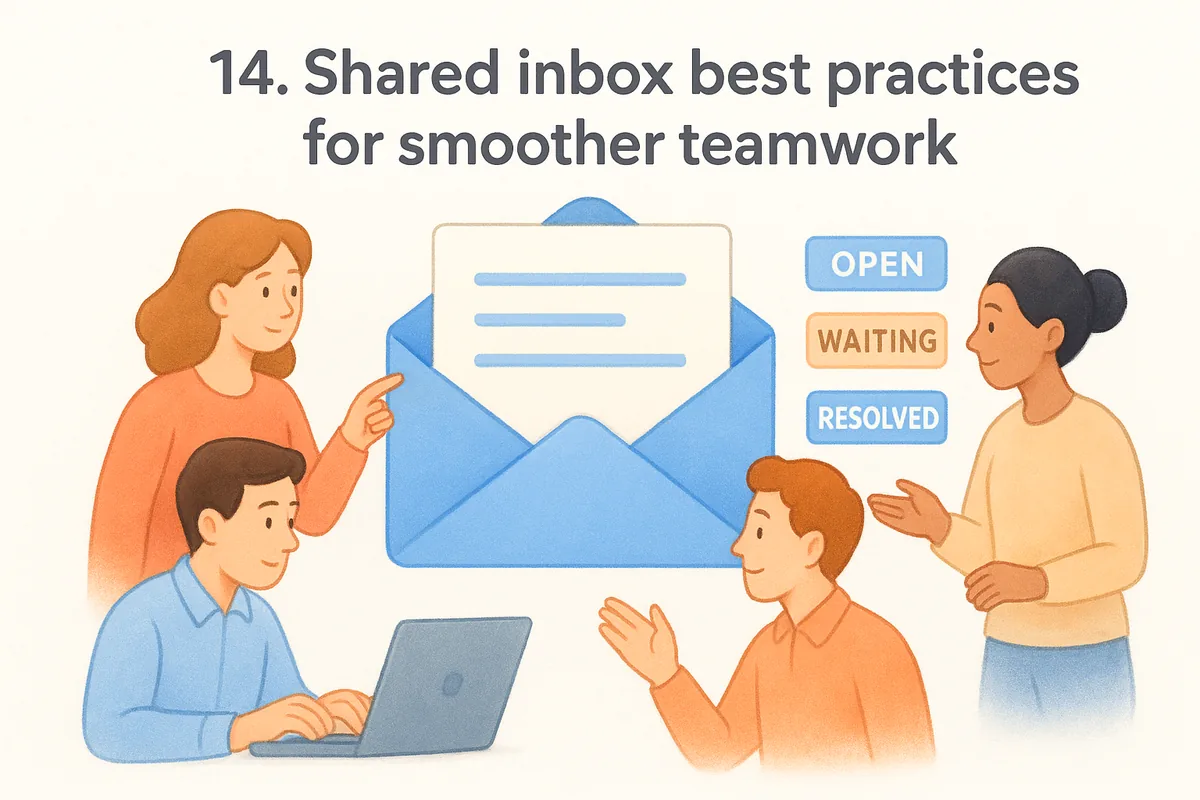
Assign clear ownership rules first. Decide whether emails route by topic, by account, or round-robin, and write that rule down somewhere everyone can see it. Skipping this step is how you end up back at square one: two people replying to the same customer with different answers.
Tools stop collisions; rules stop confusion about who's supposed to reply in the first place.
Beyond ownership, a few habits keep a shared inbox from sliding back into chaos:
- •Set a response time target (like two hours for support, four for sales) and hold the team to it.
- •Use internal notes instead of forwarding, so context stays attached to the thread instead of scattered across DMs.
- •Tag or label emails by status (open, waiting, resolved) so nobody has to ask what's already handled.
- •Review response time reports weekly, not monthly, using reporting dashboards so slow patterns get caught before customers notice.
- •Retire dead threads on a schedule instead of letting old emails pile up and hide the ones that still need action.
Getting the whole team to actually adopt the tool and follow these habits matters more than which tool you pick. A $10-per-seat plan with disciplined use beats an enterprise platform where half the team still CCs everyone out of habit. Treat the shared inbox as a shared responsibility, not just shared software, and the tool you chose earlier in this list will do its job the way it's meant to.
Finding the right fit for your team
Ten tools, one decision: match the software to the work your team actually does, not the features that sound impressive on a landing page. Support teams fielding customer questions all day belong on a help desk platform with SLAs and a knowledge base. Sales teams chasing leads and closing deals need something different, an inbox that already knows what a contact record and a pipeline stage are.
That's the gap shared inbox software built for support tickets can't close, and it's exactly where Vedain fits. Two-way Gmail and Outlook sync, collision-free assignment, and a visual pipeline all live under one flat rate instead of a stack of add-ons. No enterprise contract, no feature gates, no guessing what the next tier costs.
If your reps are still juggling a shared inbox and a separate CRM, stop paying for two systems that don't talk to each other. Try Vedain free for 14 days and see your emails turn into tracked deals in minutes.
Frequently Asked Questions
What is the cheapest shared inbox software compared to HubSpot and Salesforce?
The cheapest shared inbox solutions are Zoho Desk at $14/month and Pipedrive's basic plan at $14/month, making them significantly more affordable than HubSpot's $50/month inbox feature or Salesforce's enterprise pricing. Vedain also offers competitive pricing for small teams starting at $20/month. These budget-friendly options provide essential shared inbox features without the premium price tag of larger platforms.
Can you use HubSpot's shared inbox with Salesforce?
HubSpot and Salesforce operate as separate platforms with limited native integration for shared inbox features, though both offer APIs for custom integration solutions. If you need a unified shared inbox across multiple platforms, dedicated tools like Zoho Desk or Pipedrive work better as standalone solutions. Most organizations choose one primary CRM for their shared inbox rather than attempting to bridge HubSpot and Salesforce inbox functionality.
Which shared inbox software integrates best with Gmail and Outlook?
Pipedrive and Zoho Desk offer the most seamless Gmail and Outlook integrations among shared inbox tools, allowing direct email sync and unified team collaboration. HubSpot also provides strong email integration across both platforms, though at a higher price point. Vedain supports both Gmail and Outlook with straightforward setup, making it a solid mid-range option for email-centric teams.
Is Zoho Desk better than HubSpot for shared inbox collaboration?
Zoho Desk is better than HubSpot for shared inbox collaboration if you prioritize affordability and dedicated support tools, starting at $14/month versus HubSpot's $50/month. HubSpot offers more advanced AI features and broader CRM integration, making it superior for teams wanting an all-in-one platform. Your choice depends on whether you need a specialized shared inbox solution (Zoho) or integrated CRM functionality (HubSpot).
What shared inbox features does Pipedrive offer that Salesforce doesn't?
Pipedrive offers a more intuitive shared inbox interface with better email collaboration tools and lower costs ($14/month base) compared to Salesforce's complex, enterprise-focused email management. Pipedrive's inbox streamlines team handoffs and assignment workflows more efficiently than Salesforce's traditional CRM approach. However, Salesforce excels in enterprise customization and advanced automation if you need those capabilities at a higher investment level.
How much does shared inbox software cost per month in 2026?
Shared inbox software pricing ranges from $14-20/month for budget options like Zoho Desk and Pipedrive, $50/month for HubSpot's inbox feature, and $100+/month for Salesforce's premium email collaboration. Vedain offers mid-range pricing around $20-30/month with solid features for small to mid-sized teams. Most providers offer tiered pricing models, so costs scale based on users, storage, and advanced features.