This list cuts through that confusion. You'll find 12 tools worth your time in 2026, each evaluated on real criteria: pipeline visualization, automation depth, email integration, and what happens to your bill once you add a few team members. No fluff about "industry-leading" features. Just what each platform does well and where it falls short.
We built and use one of these tools ourselves, Vedain CRM, so you'll see our take on where it fits alongside HubSpot, Pipedrive, Close, and others. But this isn't a sales pitch dressed up as a comparison. You'll get honest pricing breakdowns and feature comparisons so you can match the right tool to your team's size, budget, and how you actually sell.
1. Vedain CRM
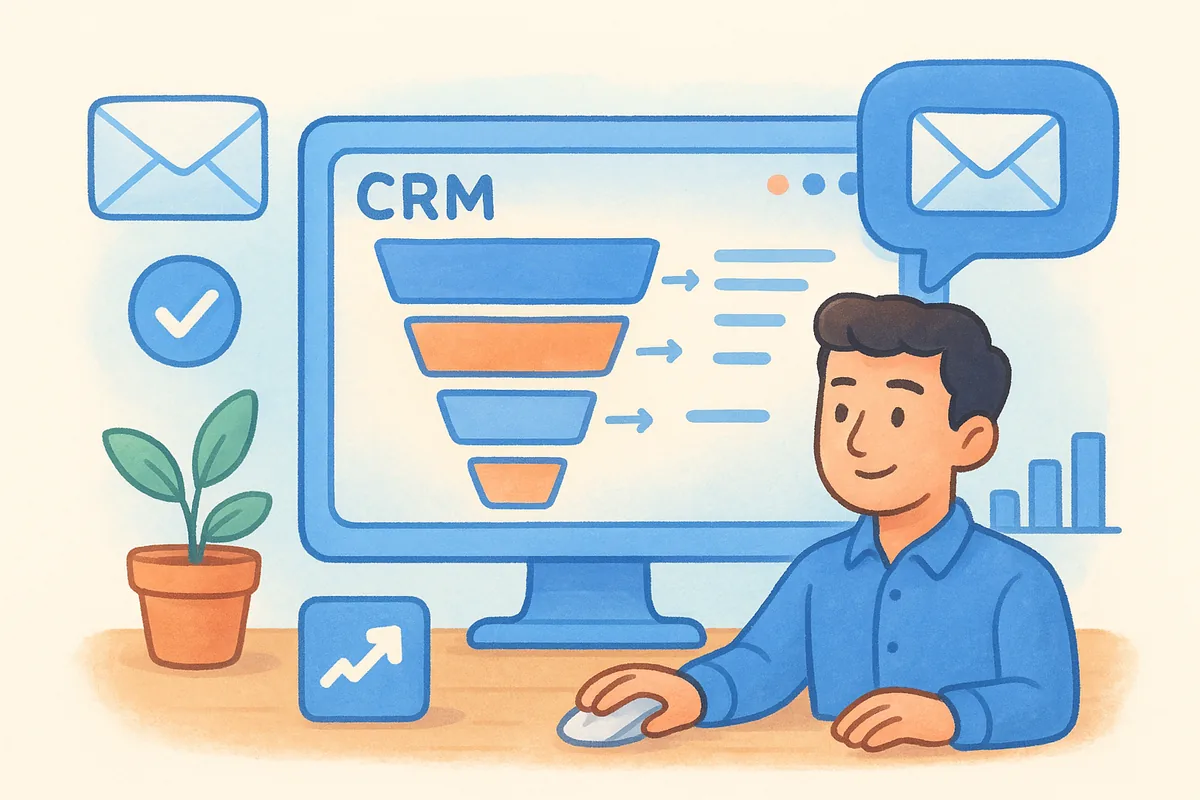
Vedain CRM builds its entire pitch around one idea: a sales funnel tool shouldn't punish you for growing. It combines a visual deal pipeline with email automation, lead capture forms, and AI-powered content tools in a single flat-rate plan. If you've ever hit a paywall in the middle of setting up a workflow on another platform, this is the opposite experience. Every feature ships in the base plan, including things competitors treat as premium add-ons like email warmup and unlimited contact records.
Key features
The platform covers the full funnel from first touch to closed deal, not just the pipeline stage.
- •Kanban-style deal pipeline with drag-and-drop stages and custom fields
- •Two-way email sync with Gmail and Outlook, so replies and opens track automatically
- •No-code workflow builder for follow-ups, lead scoring, and internal notifications
- •Multi-step email campaign sequences for nurturing leads before they hit sales
- •Email warmup tool that improves domain deliverability with a gradual sending ramp
- •Website lead capture forms that feed directly into the pipeline
- •30+ prebuilt AI agents for data enrichment and content generation
- •Custom dashboards and reports for pipeline health and team performance
Pricing
Vedain charges $10 per user per month, flat, with no tiers and no feature gates. That single number covers everything above, from email warmup to AI agents to unlimited records. There's a free trial with no credit card required, and setup typically takes under five minutes.
One flat price for every feature means you never have to guess what your next invoice will look like.
Compare that to most funnel platforms, where the entry-level plan strips out automation or caps your contact list, and you end up paying two or three times the sticker price just to get parity.
Pros and cons
Honest evaluation means naming the tradeoffs, not just the highlights.
Pros:
- •Single flat rate with zero hidden fees or feature tiers
- •Fast setup, live in minutes without a sales call
- •Built-in email warmup, rare at this price point
- •AI agents for data enrichment included at no extra cost
Cons:
- •Smaller third-party integration marketplace than long-established players like HubSpot
- •No dedicated landing page builder, so you'll pair it with a separate page tool if you need one
- •Newer brand with a shorter track record than legacy CRMs
Best for
Small to mid-sized sales teams who are tired of paying extra for basics deserve a look here. Teams already using Gmail or Outlook get immediate value from the two-way sync, and founders who want automation without hiring an admin to manage it will appreciate the no-code workflows. If your priority is a complete, affordable sales funnel software package without surprise upsells, Vedain earns a spot on your shortlist.
2. ClickFunnels
ClickFunnels built its name on the funnel-first philosophy: forget the traditional website, sell through a sequence of purpose-built pages instead. It's the tool most people picture when they hear sales funnel software, and for good reason. Russell Brunson's platform popularized order bumps, one-click upsells, and drag-and-drop page building for non-designers, and it still leads on raw funnel-building muscle.
Key features
ClickFunnels focuses almost entirely on the page and offer side of selling rather than deep CRM functionality.
- •Drag-and-drop funnel builder with prebuilt templates for webinars, product launches, and lead magnets
- •One-click upsells and order bumps to increase average order value
- •Built-in affiliate management (Backpack) for running your own referral program
- •Basic email and SMS automation through Follow-Up Funnels
- •A/B split testing on pages without extra plugins
Pricing
ClickFunnels 2.0 starts around $81 per month billed annually for the Basic plan, jumping to roughly $248 per month for Pro-level automation and more funnels. Contact limits and team seats scale with the tier, so a growing list often forces an upgrade sooner than expected.
Funnel-building power comes at a price that climbs fast once you need more than one or two funnels live.
Pros and cons
Pros:
- •Deep library of proven funnel templates
- •Strong community and training resources
- •Built-in affiliate program tools
Cons:
- •Pricing escalates quickly past the entry tier
- •CRM and pipeline features feel like an afterthought
- •Steeper learning curve for anyone outside the funnel-marketing niche
Best for
Coaches, course creators, and marketers running offer-driven launches will get the most from ClickFunnels. If your business lives and dies by high-converting landing pages and upsell sequences rather than a traditional sales pipeline, it's worth the cost. Teams needing robust lead tracking alongside funnels should look further down this list.
3. Systeme.io
Systeme.io built its reputation as the budget alternative to ClickFunnels, and it earns that reputation honestly. The platform bundles funnels, email marketing, course hosting, and even a basic affiliate program into one dashboard, aiming squarely at solo entrepreneurs who can't justify stacking five separate subscriptions. It won't out-design ClickFunnels, but it covers more ground for less money.
Key features
Systeme.io packs a surprising amount of functionality into its free and entry-level tiers, which is rare among sales funnel software options.
- •Funnel and landing page builder with templates for opt-ins, sales pages, and webinars
- •Built-in email marketing with automation rules and broadcast campaigns
- •Course and membership site hosting without a separate platform
- •Native affiliate program management for recruiting and paying referral partners
- •Automation rules that trigger tags, emails, and workflow steps
Pricing
Systeme.io offers a genuinely usable free plan capped at 2,000 contacts and three funnels. Paid tiers start at $17 per month (Startup) and climb to $47 per month (Webinar) and $97 per month (Unlimited), each unlocking more contacts, funnels, and automation steps.
A free plan that actually includes automation and course hosting is unusual in this category, and it's Systeme.io's strongest selling point.
Pros and cons
Pros:
- •Free tier with real functionality, not just a trial
- •Course and membership hosting included, no separate LMS needed
- •Simple pricing with only four tiers total
Cons:
- •Templates and design flexibility trail ClickFunnels and Kartra
- •Deal pipeline and CRM features are minimal compared to dedicated sales tools
- •Support response times can lag during peak hours
Best for
Bootstrapped founders and course creators who need funnels, email, and a place to host content without paying for three separate tools will find Systeme.io hard to beat on price. It suits solo operators more than sales teams tracking multiple reps against a shared pipeline, so growing teams should weigh it against options built for collaboration.
4. Kartra
Kartra positions itself as the all-in-one marketing suite for people who don't want to stitch together five different tools. Beyond funnels and pages, it packs in helpdesk software, video hosting, and a full checkout system, so you can run an entire online business from one login. That breadth makes it heavier than ClickFunnels or Systeme.io, but it also means fewer gaps to fill with third-party apps.
Key features
Kartra's strength is bundling commerce and marketing tools that usually live in separate subscriptions.
- •Funnel and campaign builder with pre-built "Done-For-You" campaigns by niche
- •Native checkout and shopping cart with upsells, subscriptions, and split-pay options
- •Video hosting with engagement tracking baked into pages
- •Helpdesk and live chat for customer support inside the same dashboard
- •Behavior-based automation that tags and segments contacts as they move through a funnel
Pricing
Kartra's Starter plan runs about $99 per month, capped at 2,500 leads and one custom domain. The Growth plan jumps to roughly $189 per month (annual) for 12,500 contacts, and the Professional tier climbs higher still as your list and domain count grow. Contact caps, not just features, drive most upgrade decisions here.
Kartra charges for how many leads you store, so a list that grows fast can outrun your plan before your revenue does.
Pros and cons
Pros:
- •Genuinely all-in-one, including checkout and helpdesk
- •Done-For-You campaign templates save setup time
- •Video and membership tools rival dedicated platforms
Cons:
- •Pricing tiers are based on lead volume, which punishes list growth
- •Interface feels dense with menus compared to lighter competitors
- •Steeper learning curve for teams new to funnel software
Best for
Digital product sellers and course creators who want checkout, support, and funnels under one roof will get the most value from Kartra. If you're already paying for a help desk and a video host separately, consolidating into Kartra can offset its higher entry price. Teams with lean contact lists but complex sales processes may find the lead-based pricing model works against them as they scale.
5. GetResponse
GetResponse started as an email marketing platform and grew a full funnel builder on top of that foundation, which shows in how well its automation and deliverability hold up compared to funnel-first tools. It bundles landing pages, webinar hosting, and a Conversion Funnel feature that maps out the entire buyer journey from ad click to purchase. For teams that care more about email performance than page design flair, that heritage matters.
Key features
GetResponse leans on its email roots while adding funnel and commerce tools around the edges.
- •Conversion Funnel wizard that builds a complete funnel, from ad to landing page to email sequence
- •Built-in webinar hosting for lead generation and product launches
- •Marketing automation with visual workflow builder and behavior-based triggers
- •Landing page and pop-up builder with A/B testing
- •E-commerce tools including abandoned cart emails and product recommendations
Pricing
GetResponse prices by contact count rather than flat tiers. The Email Marketing plan starts around $19 per month for 1,000 contacts, while Marketing Automation runs closer to $59 per month at the same list size. The Conversion Funnel feature and webinar hosting require the higher tiers, so budget-conscious teams often end up paying for automation they don't fully use just to unlock funnel mapping.
Contact-based pricing rewards small lists but can quietly double your bill once your audience grows past a few thousand.
Pros and cons
Pros:
- •Strong email deliverability and automation depth
- •Webinar hosting included, no separate tool needed
- •Conversion Funnel gives a clear visual of the buyer journey
Cons:
- •Funnel and page design options trail dedicated sales funnel software like ClickFunnels or Kartra
- •Contact-based pricing scales fast with list growth
- •CRM and pipeline features are lighter than sales-focused platforms
Best for
Email-first marketers running webinars or product launches will find GetResponse's automation and deliverability worth the price. Teams that already lean on email as their primary channel gain more from this platform than those needing a heavy sales pipeline or deep page customization.
6. ActiveCampaign
ActiveCampaign made its name on email automation long before "funnel software" became a category, and that pedigree still shows. It layers a CRM and sales pipeline on top of its automation engine, so you get behavior-based triggers that most sales funnel software platforms can't match, paired with a pipeline view that's functional if not flashy. Marketers who care about segmentation depth tend to gravitate here first.
Key features
Automation is the core product, and everything else supports it.
- •Visual automation builder with hundreds of trigger and action combinations
- •Native CRM and sales pipeline with deal stages and task reminders
- •Site and event tracking that feeds contact scoring automatically
- •Predictive sending and content tools powered by built-in machine learning
- •Landing pages and forms for basic lead capture
Pricing
ActiveCampaign scales by contact count and feature tier. The Starter plan begins around $15 per month (billed annually) for 1,000 contacts, while Plus, which adds the CRM and sales automation, starts near $49 per month. Pro and Enterprise tiers climb higher and unlock predictive sending and advanced reporting.
Automation depth is the reason people choose ActiveCampaign, not the pipeline or page builder.
Pros and cons
Pros:
- •Best-in-class automation logic and branching
- •Strong deliverability reputation among email marketers
- •CRM included at the mid-tier, not gated behind Enterprise
Cons:
- •Page and funnel design tools feel secondary to email
- •Pricing rises quickly as contact lists grow
- •Interface has a learning curve for non-technical users
Best for
Teams that already think in automation sequences, rather than static funnels, will feel at home here. If your sales process depends on nuanced behavioral triggers and you're willing to build your pipeline around email logic, ActiveCampaign rewards the effort. Businesses wanting a visual funnel builder as the centerpiece should look elsewhere on this list.
7. HubSpot
HubSpot needs little introduction. It's the default answer when someone asks about CRM and marketing software, and its free tier gets more people through the door than any tool on this list. The catch is that HubSpot's real funnel-building power, the marketing automation, custom reporting, and multi-step sequences, lives behind paid Marketing Hub and Sales Hub tiers that get expensive fast once your team or contact list grows.
Key features
HubSpot's ecosystem spans marketing, sales, and service in one connected system.
- •Deal pipeline and contact CRM, free for up to 2 users
- •Marketing automation workflows for email, lead scoring, and nurture sequences
- •Landing pages and forms tied directly to contact records
- •Detailed reporting dashboards with custom attribution models
- •Native integrations across its own Marketing, Sales, and Service Hubs
Pricing
The free CRM covers basic contact and deal tracking for up to 2 users. Marketing Hub Starter begins around $20 per month, but the Professional tier, where automation and funnel reporting actually get useful, jumps to roughly $890 per month for the marketing suite alone. Sales Hub follows a similar pattern, so a small team wanting real automation often pays far more than the entry price suggests.
HubSpot's free plan is the hook, but the funnel features that matter most sit behind its most expensive tiers.
Pros and cons
Pros:
- •Massive integration marketplace and documentation
- •Free CRM handles basic pipeline tracking indefinitely
- •Reporting and attribution rival dedicated analytics tools
Cons:
- •Professional and Enterprise pricing jumps sharply between tiers
- •Contact-based pricing punishes list growth
- •Onboarding and setup often require a consultant or agency
Best for
Companies already invested in the HubSpot ecosystem, or those with budget for Professional-tier automation, get real value here. Startups and lean sales teams chasing full funnel automation without a five-figure annual bill should weigh HubSpot's pricing curve carefully before committing.
8. Keap
Keap, formerly Infusionsoft, targets small businesses that need CRM, automation, and invoicing bundled into one system rather than stitched together from separate apps. It's been in the small-business automation space longer than most names on this list, and that experience shows in how deep its automation and follow-up sequences go. The tradeoff is a setup process that often requires guided onboarding rather than a quick self-serve start.
Key features
Keap leans on automation and business operations rather than flashy page design.
- •Lead capture through forms, landing pages, and a built-in appointment scheduler
- •Automation builder for follow-up sequences, tagging, and pipeline stage changes
- •Native invoicing and payments, so quotes and billing live inside the CRM
- •Sales pipeline with deal tracking and task automation
- •Text and email campaign tools with pre-built templates for common sales scenarios
Pricing
Keap no longer sells feature tiers: one platform starts at $299 per month billed monthly (about $249 per month billed annually) with two users included and extra users at $39 each. Additional contacts and users push the bill higher fast, and most new accounts also pay a one-time onboarding fee.
Keap's automation depth comes bundled with a price and setup process built for businesses that budget for it upfront.
Pros and cons
Pros:
- •Strong automation for follow-up and lead nurturing
- •Invoicing and payments included, no separate billing tool needed
- •Long track record with small-business support resources
Cons:
- •Entry pricing is high compared to other sales funnel software on this list
- •Mandatory onboarding fee adds to the upfront cost
- •Interface feels dated next to newer competitors
Best for
Service-based businesses that invoice clients directly and want automation, payments, and a pipeline in one place will get the most from Keap. Teams on a tighter budget or those wanting fast, self-serve setup should compare costs carefully before committing.
9. GoHighLevel
GoHighLevel started as a white-label tool for marketing agencies and grew into a full sales funnel software suite that agencies resell under their own brand. It bundles funnels, CRM, SMS, calendars, and even reputation management into one dashboard, which explains why so many agencies use it to run client accounts instead of juggling five separate logins. The learning curve is steep, but few tools pack this much functionality per seat.
Key features
GoHighLevel's appeal comes from consolidating tools agencies would otherwise buy separately.
- •Funnel and website builder with drag-and-drop pages and templates
- •Built-in CRM and pipeline with deal stages and task automation
- •Two-way SMS and call tracking alongside email in one inbox
- •White-label option to resell the platform under your own agency brand
- •Reputation management tools for review requests and responses
Pricing
The Starter plan runs about $97 per month for a single account, while the Unlimited plan jumps to roughly $297 per month for unlimited sub-accounts, a common need for agencies managing multiple clients. A Pro/White Label tier near $497 per month adds SaaS reselling rights.
GoHighLevel's pricing makes sense fast for agencies billing multiple clients, but it's steep for a single in-house sales team.
Pros and cons
Pros:
- •Deep feature set covering funnels, CRM, and communication in one tool
- •White-label reselling turns the platform into its own revenue line for agencies
- •SMS and call tracking built in, not bolted on
Cons:
- •Interface complexity overwhelms teams that just need a simple pipeline
- •Entry pricing is high for solo users or small in-house teams
- •Support quality varies depending on your plan tier
Best for
Marketing agencies managing multiple client accounts get the clearest return here, since the white-label and sub-account structure was built for that exact workflow. In-house sales teams wanting a straightforward pipeline without the agency-focused complexity will likely find better fits elsewhere on this list.
10. Leadpages
Leadpages sticks to a narrow lane and does it well: landing pages, pop-ups, and alert bars built for speed and conversion, without the funnel-building extras that pad out ClickFunnels or Kartra. It's the choice for teams who already have a CRM or email tool and just need pages that load fast and convert visitors into leads. Real estate agents, coaches, and local service businesses make up a big chunk of its user base, and the templates reflect that.
Key features
Leadpages keeps its feature list tight and focused on page performance rather than full sales funnel software breadth.
- •Drag-and-drop landing page builder with mobile-responsive templates
- •Built-in A/B testing on unlimited pages, even on lower tiers
- •Pop-ups and alert bars for opt-ins without a separate page
- •Real-time conversion analytics on every published page
- •Payment collection through Stripe integration on checkout pages
Pricing
Plans now run Pro, Business, Grow and Optimize, starting around $12 per month billed annually ($15 monthly) and reaching $80 per month billed annually for Optimize. There's no free tier, though a 7-day trial is available.
Leadpages charges a fair price for pages alone, but you'll need a separate tool for email automation and pipeline tracking.
Pros and cons
Pros:
- •Fast page load times, which directly help conversion rates
- •Unlimited A/B testing even on the entry plan
- •Simple enough to launch a page in under an hour
Cons:
- •No native CRM or deal pipeline
- •Automation depends entirely on third-party integrations
- •Template design feels dated compared to newer builders
Best for
Solo consultants and small local businesses who already use a separate CRM or email platform and just need reliable, fast-loading pages will get the most value here. Teams wanting funnel building, automation, and pipeline tracking in one login should look at a more complete platform instead.
11. Thrive Suite
Thrive Suite takes a different approach than everything else on this list: it's a bundle of WordPress plugins rather than a standalone platform. If you already run your site on WordPress and don't want to migrate your funnel to a separate hosted tool, Thrive Suite lets you build pages, opt-in forms, quizzes, and even courses without leaving your existing site. It's less a sales funnel software platform and more a toolkit that turns WordPress into one.
Key features
Each tool in the suite handles a different piece of the funnel, and you install only the ones you need.
- •Thrive Architect page builder for landing pages, sales pages, and opt-ins
- •Thrive Leads for opt-in forms, pop-ups, and list-building campaigns
- •Thrive Quiz Builder for interactive lead-generation quizzes
- •Thrive Ultimatum for countdown timers and scarcity campaigns
- •Thrive Apprentice for hosting courses and gated content
Pricing
Thrive Suite costs $299 per year for unlimited sites and every plugin in the bundle, or roughly $30 per month if billed monthly. There's no per-contact pricing since it's a WordPress add-on, not a hosted platform with its own database.
Buying the whole suite for one flat annual fee beats paying for six separate WordPress plugins one at a time.
Pros and cons
Pros:
- •Flat annual price regardless of site count or traffic
- •No contact-based pricing since your list lives in your own email tool
- •Deep page and conversion-testing features for WordPress users
Cons:
- •Requires a WordPress site and hosting, unlike hosted funnel builders
- •No native CRM, email sending, or pipeline tracking
- •Performance depends on your hosting quality and theme compatibility
Best for
WordPress-loyal marketers and bloggers who already have hosting and an email provider sorted out will get the most from Thrive Suite. Anyone wanting an all-in-one hosted platform without managing WordPress plugins and updates should look elsewhere.
12. Instapage
Instapage rounds out this list as the enterprise-grade landing page platform built for teams running heavy ad spend across multiple campaigns. Where Leadpages targets solo operators, Instapage targets marketing teams who need to launch dozens of personalized pages fast and prove which ones actually move the needle. Its AdMap feature, which visually connects every ad to its matching landing page, is something no other tool on this list offers.
Key features
Instapage focuses on page performance and personalization at scale rather than full sales funnel software breadth.
- •AdMap visualization connecting ad campaigns directly to matching landing pages
- •Dynamic Text Replacement that personalizes page copy based on ad click source
- •Built-in heatmaps and analytics for conversion insight on every page
- •Collaboration tools for real-time team feedback and approval workflows
- •Server-side A/B testing with statistically significant results reporting
Pricing
Instapage's Building plan starts around $99 per month billed annually, covering up to 30,000 unique visitors and five published pages. The Converting plan, which unlocks AdMap and dynamic personalization, requires a custom quote and typically runs well into four figures monthly for agencies managing large ad budgets.
Instapage earns its price tag through ad-to-page personalization, not through funnel or pipeline features you'd get elsewhere.
Pros and cons
Pros:
- •AdMap gives genuine clarity on which ads drive which conversions
- •Heatmaps and analytics built in, no third-party tool needed
- •Collaboration features suit larger marketing teams well
Cons:
- •No CRM, pipeline, or email automation whatsoever
- •Converting plan pricing requires a sales call, not transparent online
- •Overkill and overpriced for teams running a handful of simple pages
Best for
Paid media teams and agencies running high-volume ad campaigns across multiple audiences will justify Instapage's cost through AdMap and personalization alone. Smaller teams without a serious ad budget should look at Leadpages or a bundled platform instead.
13. How to choose the right sales funnel software
Most buyers start by comparing feature lists, but the smarter approach is to map your sales process first and then look for a tool that fits it. A solo coach selling one course needs pages and email, not a full CRM with team permissions. A five-person sales team closing B2B deals needs a visual pipeline and reporting more than a fancy checkout page. Write down how leads actually reach you today, whether that's ads, referrals, or a website form, before you compare a single platform.
Pricing structure matters as much as the feature list itself. Contact-based pricing, like GetResponse or ActiveCampaign use, punishes you exactly when your marketing starts working and your list grows. Lead-based pricing, like Kartra's, does the same thing from a different angle. Flat per-user pricing, the model Vedain CRM uses, keeps your bill predictable no matter how many contacts or emails you send.
The best sales funnel software for you is the one whose pricing model won't punish you for growing.
Run through this checklist before you commit to a plan:
- •Does it match your channel? Page-first tools like ClickFunnels suit offer-driven launches; CRM-first tools like Vedain suit ongoing sales pipelines.
- •What's excluded from the entry tier? Automation, email sync, and reporting are often gated behind higher plans.
- •How does pricing scale? Check whether costs rise with contacts, leads, or seats, and estimate your bill a year from now, not today.
- •Can your team actually use it? A powerful tool nobody adopts is worse than a simple one everyone opens daily.
- •Is there a real trial? Test with your own leads and email account before paying, not just a demo video.
Once you've answered those five points honestly, the shortlist usually narrows itself down fast.
Finding the funnel tool that fits your business
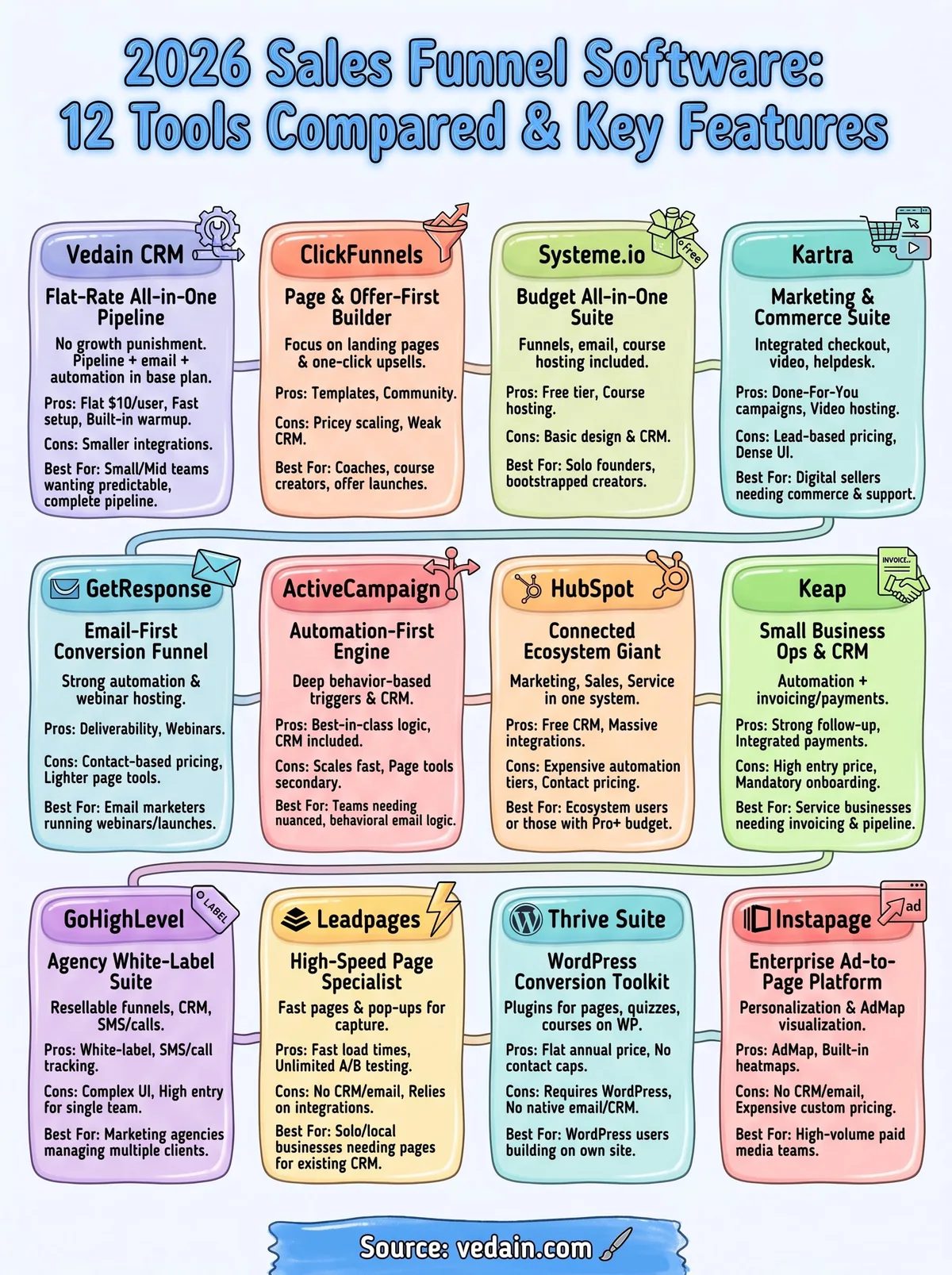
Every tool on this list solves a different piece of the funnel puzzle. ClickFunnels and Kartra win on page design, ActiveCampaign wins on automation logic, and Instapage wins if your budget runs through paid ads. But most sales teams don't need twelve features bolted together, they need a complete pipeline that doesn't punish growth with hidden fees or contact caps that creep up every quarter.
Go back to the checklist before you sign anything: map your channel, check what's excluded from the entry tier, and test the trial with real leads instead of demo data. Pricing structure matters more than any single feature, since a cheap plan that doubles at 2,500 contacts isn't actually cheap.
If you want a pipeline, email sync, and automation without the tier games, start your free Vedain CRM trial and see how fast a flat-rate funnel tool can get you selling.
Frequently Asked Questions
What is the best sales funnel software for small businesses in 2026?
Pipedrive is widely considered the best sales funnel software for small businesses, offering intuitive pipeline management starting at $14/user/month (Lite, billed annually). It provides visual sales tracking without the complexity of enterprise solutions like Salesforce, while being more affordable than HubSpot's Sales Hub Professional plan at $90/seat/month. Freshsales also competes well in this space with strong CRM features at lower price points, making it ideal for teams under 50 people.
How much does HubSpot compare to Salesforce for sales funnel management?
HubSpot's Starter plan begins at $7/seat/month billed annually ($20 monthly) with basic funnel tracking, while Salesforce's Sales Cloud starts at $25/user/month (Starter Suite), with Pro Suite at $100 for more advanced customization. HubSpot offers better automation and reporting for small-to-mid-market companies, whereas Salesforce excels in enterprise-level complexity and integration capabilities. For mid-market teams, Zoho CRM provides a middle-ground alternative starting at $14/user/month (billed annually) with comparable funnel visualization to both platforms.
Which sales funnel software has the best automation features?
HubSpot leads the market with superior workflow automation and AI-powered sales sequences included in higher-tier plans. Salesforce Einstein offers advanced AI automation for large enterprises, but requires significant investment, with the most advanced features in higher editions such as Core ($195/user/month) and Advanced ($395). Vedain and Pipedrive provide solid automation at more accessible price points, though HubSpot's native automation integrations make it the strongest choice for teams prioritizing efficiency over cost.
Can Zoho CRM compete with HubSpot and Salesforce for enterprise sales funnels?
Zoho CRM can effectively compete with HubSpot and Salesforce for enterprise sales funnels at a fraction of the cost, at $14-52/user/month billed annually ($20-65 monthly) depending on features. While Salesforce offers more advanced customization and HubSpot provides superior marketing integration, Zoho delivers robust pipeline management, automation, and reporting suitable for growing enterprises. Zoho's strength lies in affordability and flexibility, making it ideal for companies seeking enterprise-grade functionality without premium pricing.
What sales funnel software integrates best with existing business tools?
Salesforce has the most extensive integration ecosystem with thousands of native apps and custom API capabilities for enterprise stacks. HubSpot offers excellent pre-built integrations with marketing and customer service platforms, while Pipedrive excels at integrating with email and communication tools through Zapier and native connectors. Freshsales and Zoho CRM also provide strong integration options within their respective ecosystems, though Salesforce remains the gold standard for complex, multi-tool environments.
Which sales funnel software offers the best reporting and analytics for sales teams?
HubSpot provides the most user-friendly sales analytics and forecasting dashboards, particularly for revenue pipeline visibility and sales team performance. Salesforce Einstein Analytics delivers more advanced predictive analytics and custom reporting for enterprise users, though it requires technical expertise to fully leverage. Pipedrive and Freshsales offer solid visual reports and funnel analytics that are easier to use than Salesforce but less comprehensive than HubSpot, making them better for teams prioritizing simplicity over depth.