The right answer depends on how deep you need that sync to go. Some teams just want emails logged against contacts automatically. Others need full two-way email sync, meeting scheduling, and pipeline tracking without leaving their inbox. This guide breaks down nine platforms built to handle Outlook well, so you can match the integration depth to what your sales process actually requires.
We tested each option for setup speed, sync reliability, and pricing transparency, since hidden fees and clunky feature gates are what usually push teams to switch CRMs in the first place. You'll find a mix of well-known names and leaner alternatives, including where Vedain fits for teams that want full Outlook sync without paying extra for it.
1. What to look for in a CRM that integrates with Outlook
Before you compare individual platforms, it helps to know what actually separates a genuine Outlook integration from a shallow one. A lot of CRMs claim Outlook compatibility, but that can mean anything from a basic Outlook plugin that logs the occasional email to a fully synced system where contacts, calendars, and deal stages update automatically in both directions. Two-way sync is the feature that matters most here: without it, you're stuck manually re-entering data every time a prospect replies.
Sync depth and reliability
Start by checking whether the CRM syncs emails, calendar events, and contact records, or just one of the three. Some tools only pull emails into a timeline view, which is fine for basic tracking but useless if you also want meeting scheduling or automatic contact creation from new senders. Sync reliability matters just as much as sync depth. A CRM that drops emails or duplicates contacts after a sync error will cost you more time than it saves, so look for platforms with a track record of stable Outlook APIs rather than third-party connectors that break with every Microsoft update.
A CRM only earns the label "Outlook-integrated" if it syncs emails and calendars both ways, automatically, without manual exports.
Setup time and technical overhead
Next, think about how much IT involvement the integration requires. Some platforms need an admin to configure server-side sync through Microsoft 365, which can take days if your IT resources are limited. Others let a sales rep connect their own inbox in a few clicks. If your team doesn't have a dedicated IT person, fast setup should weigh heavily in your decision, since a complicated rollout often means half your reps never finish connecting their inbox.
Pricing structure and feature gates
Watch closely for how each vendor prices the Outlook integration itself. Many CRMs bury email sync, contact history, or calendar sync behind a mid-tier or top-tier plan, which means the entry-level price you see in marketing isn't what you'll actually pay once you need real Outlook functionality. Others charge per-seat add-ons for features like automated sequences or reporting. Quick reference for what to check before you commit:
- •Does two-way email sync come standard, or is it a paid add-on?
- •Are calendar sync and meeting scheduling included, or sold separately?
- •Is there a cap on synced contacts or emails per user?
- •Does the free trial require a credit card, and does it include the Outlook integration?
- •Are automation and reporting features locked to higher tiers?
Team permissions and scale
Remember that Outlook integration isn't just a solo-user feature. If multiple reps share accounts or work the same territory, you need granular permissions so one person's inbox sync doesn't expose another rep's private threads. Growing teams should also confirm the CRM scales cleanly from five users to fifty without renegotiating pricing tiers or losing sync performance. With these criteria in mind, here's how nine popular CRMs for Outlook stack up in practice.
2. Vedain CRM
Vedain built its two-way email sync for Gmail and Outlook as a core part of the platform, not a bolt-on feature reserved for higher tiers. Every message you send or receive through Outlook logs automatically against the matching contact and deal, so reps never have to manually forward emails into the CRM or copy notes from their inbox into a separate tab. For a team that spends most of its day in Outlook, that's the difference between a CRM you actually use and one you fight against.
How it integrates with Outlook
Connecting Outlook takes a few minutes: you authorize access through OAuth, and Vedain starts syncing your inbox and calendar without needing IT to configure anything server-side. Once connected, emails thread automatically under the right contact record, and calendar events tied to deals show up on the pipeline without extra clicks. This matters because fast setup means your whole team can be live the same day, rather than waiting on an admin to schedule a rollout.
A CRM that syncs Outlook out of the box, with no setup tickets and no paywall, is worth more than one with a longer feature list you can't afford to unlock.
Standout features
Beyond email sync, Vedain includes a visual deal pipeline, no-code workflow automation, and an AI Agent Marketplace with over 30 pre-built agents for tasks like data enrichment and content drafting. Email warmup is built in too, which helps new sending domains build deliverability over 21 days, something most CRMs charge extra for or skip entirely.
Pricing
Vedain charges a flat $10 per user per month, and that price includes everything: email sync, automation, unlimited records, and reporting. There's no credit card required to start a trial, and no separate tier you need to upgrade to just to get Outlook integration working properly.
| Plan | Price | Outlook Sync Included |
|---|---|---|
| All-inclusive | $10/user/month | Yes, no upgrade needed |
Best for
Vedain suits small to mid-sized sales teams that want full Outlook CRM integration without paying more as they add users or turn on automation. If you've been burned by feature gates elsewhere, this is the straightforward alternative.
3. Salesflare
Salesflare built its reputation on automating data entry for small B2B sales teams, and its Outlook integration is a big part of that pitch. Instead of asking reps to log meetings and emails by hand, the CRM pulls contact details, email signatures, and calendar activity straight from Outlook and builds contact and company records on its own. Automated data entry is the whole selling point here, which makes it a strong fit for founders and small teams who don't want a dedicated admin managing the CRM.
How it integrates with Outlook
Salesflare offers a native Outlook add-in alongside a full two-way email sync, so messages, opens, and clicks show up against the right contact automatically. It also scans email signatures to fill in job titles, phone numbers, and social profiles without manual input. Setup runs through the Microsoft add-in store, so most reps can connect their inbox in a few minutes without IT involvement.
Salesflare's real advantage isn't the sync itself, it's how much contact data it fills in for you without anyone typing a thing.
Standout features
Beyond Outlook sync, Salesflare tracks website visits from known contacts, auto-logs meetings from your calendar, and builds a visual pipeline that updates itself as emails come in. It also sends automated follow-up reminders when a deal has gone quiet, which helps solo reps avoid letting leads slip.
Pricing
Salesflare's plans run from roughly $29 to $99 per user per month depending on billing term and tier, with the Outlook and email tracking features available starting on the base plan. Annual billing brings the per-user cost down noticeably compared to paying monthly.
| Plan | Approx. Price | Notes |
|---|---|---|
| Growth | ~$29/user/mo | Core Outlook sync, pipeline |
| Pro | ~$49/user/mo | Adds automation, permissions |
| Enterprise | ~$99/user/mo | Custom reporting, support |
Best for
Salesflare fits small B2B teams, agencies, and consultants who want a CRM that fills itself in from Outlook activity rather than one built for heavy manual customization.
4. HubSpot CRM and Sales Hub
HubSpot pairs a free CRM core with a paid Sales Hub layer, and Outlook connectivity is one of the more polished parts of the platform. The Outlook add-in sits directly in your inbox, letting reps log emails, track opens, and pull contact history without switching windows. HubSpot markets itself as an all-in-one growth platform, but for teams focused purely on sales, the Outlook experience is really what you're paying for once you move past the free tier.
How it integrates with Outlook
HubSpot's Outlook integration works through a native add-in plus a separate two-way email sync that logs conversations against contact timelines automatically. You also get meeting scheduling links that check your Outlook calendar in real time, so prospects book directly into open slots. Setup is straightforward for individual reps, though larger rollouts with custom email domains sometimes need IT to whitelist the sync through Microsoft 365 admin settings.
HubSpot's Outlook sync is genuinely strong, but the price you pay for that polish climbs fast once you need more than basic tracking.
Standout features
Beyond email sync, HubSpot offers deal pipelines, email sequences, call logging, and a reporting dashboard that pulls from every synced Outlook interaction. The Sales Hub tier adds playbooks and forecasting, and the broader HubSpot ecosystem connects to marketing and service tools if your company needs those later.
Pricing
The free CRM includes basic Outlook logging, but real sales automation sits in Sales Hub, which starts around $20 per user per month on the Starter plan and climbs steeply at Professional and Enterprise tiers, where seat minimums and add-on costs apply.
| Plan | Approx. Price | Outlook Features |
|---|---|---|
| Free CRM | $0 | Basic email logging |
| Starter | ~$20/user/mo | Two-way sync, sequences |
| Professional | ~$100/user/mo | Automation, forecasting |
Best for
HubSpot suits teams that already plan to adopt marketing or service tools alongside sales, and don't mind paying more as headcount and feature needs grow.
5. Zoho CRM
Zoho CRM appeals to teams already using other Zoho apps, and its Outlook integration reflects that broader ecosystem approach. The Zoho CRM Plug-in for Microsoft Outlook lets reps sync contacts, emails, tasks, and calendar events between the two platforms, though getting the most out of it often means configuring multiple settings rather than flipping one switch. For teams comfortable with a bit more setup in exchange for deep customization, Zoho delivers.
How it integrates with Outlook
Installing the plug-in gives you a sidebar inside Outlook where reps can save emails to CRM records, create leads from new senders, and view deal history without switching apps. Calendar sync runs both ways, so meetings booked in Zoho appear in Outlook and vice versa. Larger teams sometimes need an admin to configure the plug-in through Microsoft 365 group policy, which adds setup time compared to a self-serve OAuth connection.
Zoho's Outlook plug-in works well once configured, but expect more setup steps than platforms built around a single-click connection.
Standout features
Zoho CRM's strength lies in customization: you can build custom modules, workflow rules, and scoring formulas without touching code. The platform also includes Zia, an AI assistant that predicts deal outcomes and flags best times to contact leads, plus a broader suite of Zoho apps for invoicing, support, and marketing that connect natively if your business needs them.
Pricing
Zoho CRM's paid tiers range from about $14 to $52 per user per month billed annually, with Outlook sync available starting on the Standard plan. Advanced automation, AI features, and custom modules require the Enterprise tier, which raises the effective cost for teams that want full functionality.
| Plan | Approx. Price | Outlook Sync |
|---|---|---|
| Standard | ~$14/user/mo | Basic sync, plug-in |
| Professional | ~$23/user/mo | Adds automation |
| Enterprise | ~$40/user/mo | Full Zia AI, custom modules |
Best for
Zoho CRM fits teams already invested in the Zoho ecosystem, or ones that want deep customization and don't mind a longer setup process to get their Outlook workflow fully configured.
6. Pipedrive
Pipedrive built its name on a simple, visual pipeline, and its Outlook integration follows that same philosophy: keep things easy to see and easy to act on. Reps who spend their day sending proposals and following up get a clear view of where each deal sits, right from their inbox, without digging through menus. For teams that value pipeline visibility over deep customization, Pipedrive's Outlook connection does exactly what it needs to and little else.
How it integrates with Outlook
Pipedrive connects to Outlook through its native email sync, which threads incoming and outgoing messages against the matching contact and deal automatically. Calendar sync works both ways too, so meetings booked in Pipedrive show up in Outlook and scheduling links check your real-time availability. Setup runs through OAuth, so individual reps can connect their own inbox in a few minutes without waiting on IT, though larger teams may want an admin to standardize sync settings across users.
Pipedrive's Outlook sync isn't the deepest on this list, but it's reliable enough that reps stop thinking about it after day one.
Standout features
Beyond email and calendar sync, Pipedrive offers a highly visual Kanban-style pipeline, activity reminders that nudge reps when a deal goes quiet, and an AI-powered sales assistant that flags deals needing attention. The platform also includes a document tracker that shows when a prospect opens a proposal sent through Outlook, which helps reps time their follow-ups better.
Pricing
Pipedrive's plans range from about $14 to $79 per user per month billed annually, with Outlook email sync included starting on the entry-level Lite plan. Automation, revenue forecasting, and advanced reporting require the Growth tier or higher, which pushes the real cost up for teams that want more than basic sync.
| Plan | Approx. Price | Outlook Features |
|---|---|---|
| Lite | ~$14/user/mo | Email sync, basic pipeline |
| Growth | ~$39/user/mo | Automation, scheduling |
| Ultimate | ~$79/user/mo | Full reporting, permissions |
Best for
Pipedrive suits sales teams that want a straightforward, visual pipeline with dependable Outlook sync, without needing the deeper customization or AI tooling that pricier platforms build their pitch around.
7. Freshsales by Freshworks
Freshsales targets teams that want AI-assisted selling without the steep learning curve of a bigger platform, and its Outlook integration reflects that same focus on quick wins. Freddy AI, the platform's built-in assistant, scores leads and suggests next actions based on synced email activity, so reps get guidance instead of just a log of past messages. If your team wants a CRM that tells you what to do next rather than just recording what already happened, Freshsales earns a look.
How it integrates with Outlook
Freshsales connects to Outlook through a native add-in plus server-side two-way email sync, so messages and calendar events attach automatically to the right contact and deal. Reps can also send templated emails and track opens directly from the Outlook sidebar without switching to the CRM tab. Setup for individual users takes a few minutes through OAuth, though syncing shared mailboxes or multiple domains usually needs an admin to configure permissions in Microsoft 365 first.
Freshsales earns its keep by turning synced Outlook activity into lead scores and next-step suggestions, not just a timeline of old emails.
Standout features
Beyond Outlook sync, Freshsales includes built-in phone calling, AI-driven deal insights, and a visual pipeline that flags deals likely to stall based on activity patterns. The platform also supports multi-channel outreach, letting reps combine email, phone, and chat touchpoints in one sequence without leaving the CRM.
Pricing
Freshsales runs from about $9 to $59 per user per month billed annually, with Outlook sync available starting on the Growth plan. Freddy AI features and advanced automation are reserved for the Pro and Enterprise tiers, so smaller teams may need to upgrade sooner than expected to get the AI-driven suggestions that make the platform stand out.
| Plan | Approx. Price | Outlook Features |
|---|---|---|
| Growth | ~$9/user/mo | Email sync, basic pipeline |
| Pro | ~$39/user/mo | Freddy AI, automation |
| Enterprise | ~$59/user/mo | Advanced reporting, permissions |
Best for
Freshsales fits sales teams that want AI-guided prioritization layered on top of Outlook activity, particularly ones already comfortable with the broader Freshworks suite for support or marketing.
8. ActiveCampaign
ActiveCampaign started as an email marketing tool and grew into a full CRM, and that history shows in how it treats Outlook. Rather than positioning itself as a pure sales pipeline tool, it leans on marketing automation paired with sales tracking, so Outlook activity feeds into broader customer journeys instead of just a contact timeline. Teams that blend sales outreach with nurture campaigns tend to get the most value here.
How it integrates with Outlook
Connecting ActiveCampaign to Outlook happens through a native add-in that logs sent and received emails against contact records, plus calendar sync for meeting tracking. It supports two-way email sync, though some deeper automation triggers, like moving a contact between pipeline stages based on a reply, require configuring workflow rules after the initial connection. Setup for a single rep takes a few minutes through OAuth, but teams running multiple shared inboxes usually need an admin to map permissions in Microsoft 365 first.
ActiveCampaign syncs Outlook fine, but its real strength is what happens after the email lands, not the sync itself.
Standout features
Beyond Outlook sync, ActiveCampaign's automation builder lets you trigger multi-step email sequences, SMS messages, and deal stage changes from a single workflow canvas. Its lead scoring engine factors in email opens, website visits, and form fills, and the platform includes a visual pipeline alongside its marketing tools, so sales and nurture activity live in one place.
Pricing
ActiveCampaign's CRM and sales features come bundled into its Plus tier and above, running roughly $49 to $145 per month depending on contact volume and billing term, with pricing scaling based on your contact list size rather than a flat per-seat rate.
| Plan | Approx. Price | Outlook Features |
|---|---|---|
| Plus | ~$49/mo | Email sync, basic automation |
| Pro | ~$79/mo | Lead scoring, deeper automation |
| Enterprise | ~$145/mo | Custom reporting, permissions |
Best for
ActiveCampaign suits teams that want marketing automation and sales tracking under one roof, especially ones already running email nurture campaigns alongside their Outlook-based sales outreach.
9. Salesforce Sales Cloud
Salesforce dominates enterprise CRM conversations, and its Outlook integration reflects that scale: powerful, configurable, and built for IT teams rather than a single rep clicking connect. Salesforce for Outlook has actually been replaced by the newer Outlook Integration and Einstein Activity Capture, which together handle the sync work older plug-ins used to struggle with. If your organization already runs Salesforce for other departments, extending it to Outlook makes sense, but expect a real implementation project rather than a same-day setup.
How it integrates with Outlook
Getting Salesforce talking to Outlook properly means installing the Outlook Integration add-in and enabling Einstein Activity Capture, which handles the two-way email sync and calendar matching in the background. This isn't a one-click OAuth flow for most orgs. An admin typically configures it through Salesforce setup, maps permissions, and decides which activity data syncs automatically versus what reps log manually. Once running, emails and meetings attach to leads, contacts, and opportunities without extra clicks from the rep's side.
Salesforce syncs Outlook thoroughly once it's configured, but getting there usually means an admin project, not a five-minute connection.
Standout features
Beyond email and calendar sync, Salesforce Sales Cloud offers deep pipeline customization, forecasting tools, and Einstein AI features that score leads and suggest next steps based on synced activity. Its AppExchange marketplace adds thousands of third-party integrations, and permission structures scale to organizations with hundreds of reps across multiple regions.
Pricing
Sales Cloud starts around $25 per user per month on the Starter tier and climbs to $395 per user per month for the Advanced edition (formerly Unlimited), with Einstein Activity Capture and advanced automation often requiring higher tiers or add-on licenses.
| Plan | Approx. Price | Outlook Features |
|---|---|---|
| Starter | ~$25/user/mo | Basic sync setup |
| Pro Suite | ~$100/user/mo | Activity Capture, forecasting |
| Core+ (formerly Enterprise) | ~$195/user/mo | Full Einstein AI, custom permissions |
Best for
Salesforce Sales Cloud fits larger organizations with dedicated admin resources that need extensive customization and already rely on Salesforce elsewhere in the business.
10. eWay-CRM
eWay-CRM takes a different approach than everything else on this list: instead of syncing to Outlook from the outside, it installs directly inside Outlook and turns your inbox into the CRM itself. There's no separate app to open, no browser tab to switch to. For teams that genuinely never want to leave Outlook, this native Outlook CRM design is the whole pitch.
How it integrates with Outlook
eWay-CRM runs as an add-in that lives permanently in the Outlook ribbon, adding CRM fields, contact history, and deal tracking right into the email window you're already reading. Because it's built on the Outlook object model rather than a separate API connection, contacts, tasks, calendar events, and emails stay in sync automatically without a background sync job that can lag or fail. Setup means installing the add-in on each machine, and larger teams typically need an admin to deploy it through Microsoft 365 or a shared server database rather than letting each rep self-serve.
eWay-CRM doesn't sync with Outlook so much as become part of it, which is exactly what makes it feel different from every add-on based tool on this list.
Standout features
Beyond deep Outlook integration, eWay-CRM includes project tracking, document management tied to deals, and workflow automation for repetitive sales tasks. It also supports offline access, since it's built on the Outlook desktop client rather than a purely cloud-based interface, which matters for reps who travel or work with unreliable connections.
Pricing
eWay-CRM offers a free tier for small teams with limited users and records, while paid plans run from roughly $10 to $25 per user per month depending on features and deployment type.
| Plan | Approx. Price | Outlook Features |
|---|---|---|
| Free | $0 | Basic add-in, limited records |
| Premium | ~$10-25/user/mo | Full sync, automation, reporting |
Best for
eWay-CRM suits small businesses and teams already fully committed to the Outlook desktop app who want the CRM to feel like a native extension rather than a connected third-party tool.
11. How these Outlook CRMs compare side by side
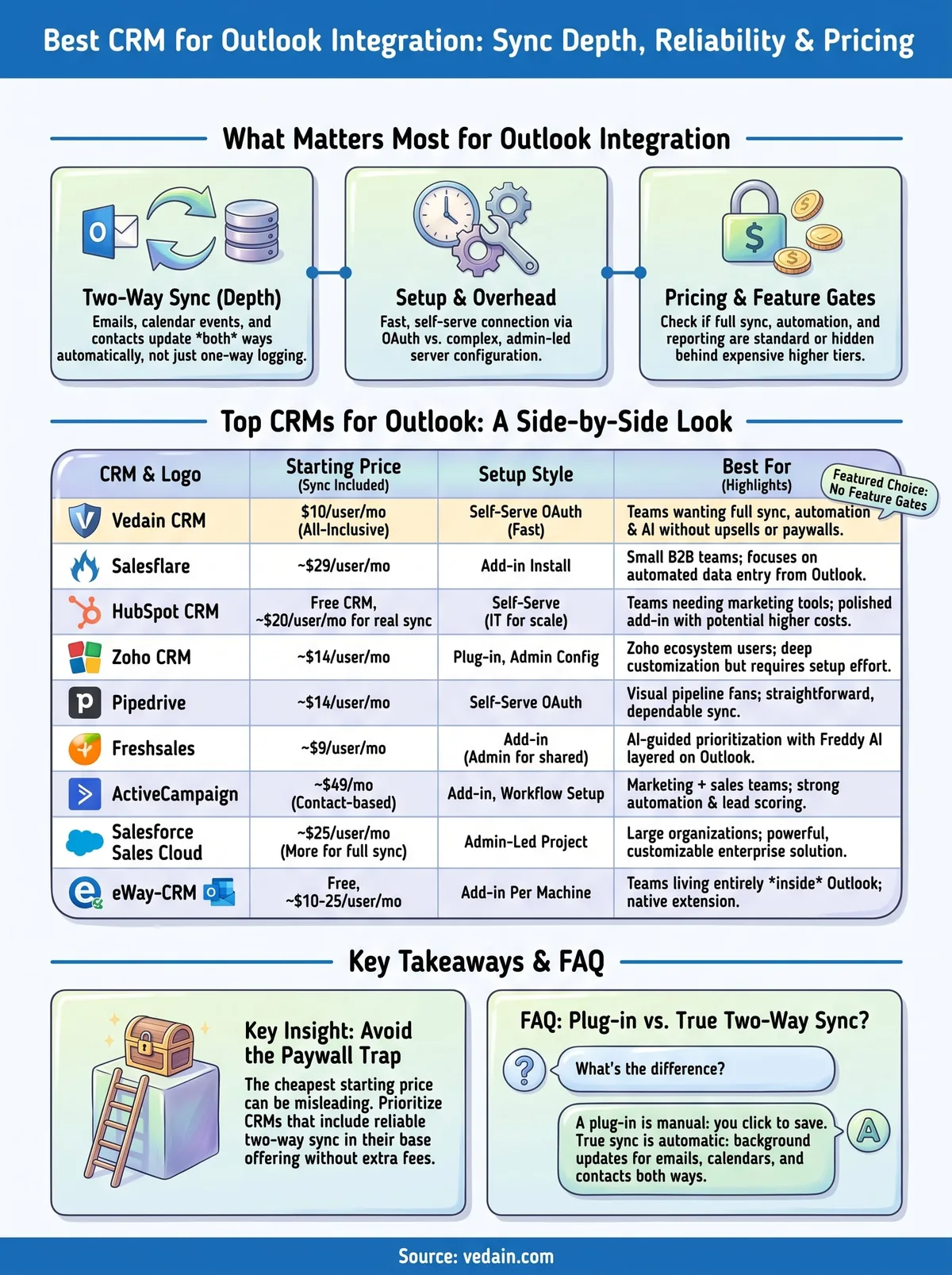
Looking at nine platforms one at a time makes it easy to lose the forest for the trees, so here's the side-by-side comparison you can scan before committing to a demo call. Pricing below reflects the entry point where genuine two-way Outlook sync is available, not just a free tier that logs the occasional email.
| CRM | Starting Price (Outlook sync included) | Setup Style | Best For | |---|---|---| | Vedain CRM | $10/user/mo, all features included | Self-serve OAuth | Teams wanting full sync with no upsells | | Salesflare | ~$29/user/mo | Add-in install | Small B2B teams, auto data entry | | HubSpot CRM | $0 free, ~$20/user/mo for real sync | Self-serve, IT for scale | Teams also wanting marketing tools | | Zoho CRM | ~$14/user/mo | Plug-in, admin config | Zoho ecosystem users | | Pipedrive | ~$14/user/mo | Self-serve OAuth | Visual pipeline fans | | Freshsales | ~$9/user/mo | Add-in, admin for shared inboxes | AI-guided prioritization | | ActiveCampaign | ~$49/mo (contact-based) | Add-in, workflow setup | Marketing plus sales teams | | Salesforce Sales Cloud | ~$25/user/mo, more for full sync | Admin-led project | Large orgs already on Salesforce | | eWay-CRM | Free tier, ~$10-25/user/mo paid | Add-in per machine | Teams that live entirely in Outlook |
Patterns emerge fast once you line these up. Flat, all-inclusive pricing is rare: Vedain and eWay-CRM are really the only two that don't push Outlook sync, automation, or reporting behind a higher tier. Everyone else on this list charges more once you want the full picture, whether that's Freddy AI on Freshsales or Einstein Activity Capture on Salesforce.
The cheapest CRM on the list rarely matters as much as which one keeps Outlook sync out of the paywall entirely.
Setup complexity tracks closely with company size, too. Platforms built for enterprise buyers, Salesforce especially, assume you have an admin who can spend days configuring permissions, while Vedain, Pipedrive, and Salesflare are built around a rep connecting their own inbox in minutes. If your team doesn't have dedicated IT support, weight that setup column heavily before you weight the feature list.
Choosing the right fit for your team
Nine platforms, one real question: does the CRM sync Outlook by default, or do you have to pay more and wait longer to get there? Enterprise tools like Salesforce win on depth but demand an admin project. Lightweight add-ins like eWay-CRM win on simplicity but cap out fast for growing teams. Everything in between charges extra once you want automation, AI scoring, or reporting layered onto that sync.
If your team just wants reliable Outlook sync without a paywall creeping up every time you add a feature, that's the gap Vedain was built to close. Flat pricing, no tier to climb, no setup ticket to file. Connect your inbox, and your pipeline updates itself from day one.
Start a free trial of Vedain CRM and see your Outlook inbox sync in minutes, not days.
Frequently Asked Questions
Does Outlook have a built-in CRM?
Outlook itself doesn't include a true CRM, though Microsoft 365 offers a lightweight Contacts app and basic categorization tags that some solo users stretch into a makeshift system. Native CRM functionality like deal pipelines, automation, or team reporting simply isn't there, which is why so many Outlook-heavy sales teams end up layering a dedicated CRM on top of their inbox instead of trying to force Outlook to do a job it wasn't built for.
What's the difference between a plug-in and true two-way sync?
A plug-in usually just adds a sidebar or button inside Outlook that lets you manually save an email to a CRM record. True two-way sync works in the background without you clicking anything, pulling new emails, replies, and calendar events into the CRM automatically while also pushing CRM updates back into Outlook. If you're evaluating the best CRM for Outlook integration for your team, ask vendors directly which model they use, since the marketing language often blurs the two. A plug-in asks you to remember to log the email; real sync never gives you the chance to forget.
Is it safe to connect a CRM to a work Outlook account?
Generally yes, provided the vendor uses OAuth authentication rather than asking for your raw email password. OAuth authentication means the CRM never sees your credentials directly, and you can revoke access at any time from your Microsoft 365 admin settings without changing your password. Check Microsoft's own guidance on connected apps and permissions if your IT team needs to approve the connection before rollout.
Will switching CRMs disrupt my existing Outlook workflow?
Switching rarely causes major disruption if the new CRM offers a self-serve OAuth connection, since reps can reconnect their inbox in minutes without losing existing email history. Vendors with admin-led setups, like Salesforce, tend to involve more downtime during migration, so factor that into your timeline if your team can't afford a multi-day transition .