Here's the direct answer: below are nine ready-to-use templates covering the sequences most sales teams actually need, welcome series, trial nurture, abandoned demo follow-up, re-engagement, and more. Each one includes the subject lines, timing, and messaging structure so you can copy the framework and swap in your own product details today, not next month.
We built these from patterns that show up again and again in high-performing sales sequences, the kind that move a lead from "maybe later" to booked call. You'll see why timing between emails matters as much as the copy, and where most drip campaigns quietly lose people. If you're already running email through Gmail or Outlook, you can load these straight into a no-code workflow automation builder like Vedain and have your first sequence live in under an hour, no separate automation tool required.
1. Welcome series template
A welcome series is the first automated sequence most teams build, and for good reason. It greets every new lead, trial signup, or newsletter subscriber the moment they raise their hand, before they forget why they signed up in the first place. This is the template that sets the tone for every email that follows, so it's worth getting right before you build anything else.
A welcome series doesn't sell anything on day one. It earns the right to sell later.
How it works
The sequence triggers automatically when someone joins your list, fills out a lead form, or creates an account. Automated triggers, the kind you build with CRM automation rules, remove the manual work of spotting new signups and firing off an email yourself. Instead of one generic "thanks for signing up" note, you spread the introduction across three to five emails, each with a single job: confirm the signup, introduce your product, show proof it works, and invite a next step. This staged approach is one of the most common email drip campaign templates because it mirrors how people actually decide to trust a new brand, gradually, not all at once.
Who it's for
This template suits any business capturing leads through a website form, gated content, or free trial signup. It's especially useful for SaaS companies and service businesses where the buying decision takes more than one touchpoint. If you're using something like Vedain's lead capture form builder, the welcome series is the natural first workflow to connect to that form.
Sample email sequence and timing
Pro tips to boost results
Keep the first email short and skip the sales pitch entirely, it should read like a human wrote it, not a marketing department. Consider these adjustments once your base sequence is live:
- •Personalize the sender name so it comes from a real person, not "Team@yourcompany"
- •Segment by signup source so a demo request gets different copy than a free ebook download, one of the simplest email segmentation strategies to start with
- •Watch open rates on email 1 closely, a weak start usually means your subject line needs work, not your whole sequence, so review the email subject line best practices first
- •Add a reply prompt in at least one email asking a simple question, replies boost deliverability for every email after
Once this sequence proves itself, you can build the next one on the same logic.
2. Lead nurturing template
Most leads aren't ready to buy the day they show up. A lead nurturing sequence keeps you visible while a prospect compares options, reads reviews, or waits for budget approval, and you can build a nurture workflow that runs on autopilot instead of manually following up every few days. This is one of the more versatile email drip campaign examples because you can stretch it over weeks or months depending on your sales cycle.
Nurturing isn't about staying top of mind, it's about staying useful until the timing works.
How it works
The sequence runs on a slower cadence than a welcome series, often spacing emails three to seven days apart. Each message delivers something a buyer actually needs at that stage: a comparison guide, a case study, an answer to a common objection. Behavioral triggers matter here too, if a lead clicks a pricing link or revisits your site, that's a signal to speed up the sequence or route them to sales.
Who it's for
This template fits businesses with longer sales cycles, think B2B software, consulting, or anything over a few hundred dollars. Sales teams already tracking leads in a deal pipeline get the most value here, since a Kanban deal tracker lets the nurture sequence pause or exit automatically once a lead books a call.
Sample email sequence and timing
Pro tips to boost results
Exit leads from the sequence the moment they book a meeting or reply, nothing kills trust faster than a canned email arriving after a real conversation already started.
- •Score leads by engagement with lead scoring in your CRM so hot prospects get faster follow-up
- •Rotate content formats, mix video, articles, and short case studies
- •Set a hard exit rule tied to your CRM's deal stage changes, as covered in this CRM follow-up sequence setup guide
3. Trial-to-paid onboarding template
Free trials fail more often from neglect than from a bad product. A trial-to-paid sequence guides new users toward the moment they see real value, then nudges them toward a card on file before the trial clock runs out. Think of it as a countdown that teaches instead of just reminding.
A trial that ends in silence almost always ends in churn.
How it works
The sequence starts the moment someone signs up for a trial and runs on a schedule tied to your trial length, usually 14 or 30 days. Activation milestones drive most of the logic here, so instead of sending every email on a fixed date, you branch the sequence based on what the user has actually done. Someone who hasn't logged in by day 3 needs a different nudge than someone who's already built their first pipeline.
Who it's for
This template is built for SaaS companies offering self-serve or low-touch free trials, especially ones where the value isn't obvious in the first five minutes, and a CRM built for SaaS trials keeps every signup visible. If your team runs trials through Vedain's workflow automation, you can trigger these emails directly off signup and activation events without a separate tool.
Sample email sequence and timing
Pro tips to boost results
Split the sequence by behavior, not just date, so active users get upgrade prompts while inactive ones get a re-onboarding push instead of a hard sell.
- •Trigger a human follow-up for high-value accounts nearing expiration
- •Show usage data in the email itself, like deals created or emails sent
- •Offer a short extension to engaged users who just need a few more days
4. Abandoned cart recovery template
Carts get abandoned for boring reasons: a distracted buyer, a stalled approval, or a price that needs a second look. An abandoned cart sequence catches that moment before it turns into a lost sale, whether you're selling a $40 product or a $4,000 subscription with a self-serve checkout. For B2B teams, this template doubles as an abandoned quote or proposal follow-up, same logic, different label.
The best recovery email doesn't chase the sale, it removes the one reason someone stopped.
How it works
The sequence fires when someone adds an item to a cart or opens a quote but doesn't complete checkout within a set window, usually one to four hours. Cart data triggers pull in the exact product or plan they were looking at, so the email feels specific instead of generic. Spacing stays tight at first, then widens, since urgency fades fast after the first day.
Who it's for
This template fits ecommerce businesses directly, but it also works for sales teams sending self-serve quotes or checkout links through tools like Vedain's deal pipeline, where a prospect views pricing but doesn't submit payment.
Sample email sequence and timing
Pro tips to boost results
Keep the first email friendly, not aggressive, most people abandon by accident, not intent.
- •Show the exact item or plan left in the cart with an image or name
- •Save the incentive for email 3, leading with a discount trains people to abandon on purpose
- •Test send time, some audiences respond better to a same-day nudge than an overnight one
5. Post-purchase follow-up template
Winning the sale is only half the job. A post-purchase sequence keeps the relationship warm right after checkout, when a customer is most likely to actually use what they bought, leave a review, or notice a feature they'd pay more for later. Skip this step and you're leaving loyalty on the table.
The sale isn't the finish line, it's where the real relationship starts.
How it works
The sequence triggers the moment payment clears or an order ships, then walks the customer through setup, first use, and satisfaction checks over the following weeks. Order confirmation triggers kick off the first email automatically, so nobody waits around wondering if their purchase went through. Later emails shift from logistics to value, checking whether the product met expectations and pointing toward support resources before small issues turn into refund requests.
Who it's for
This template works for ecommerce brands shipping physical goods, but it's just as useful for service businesses and software teams closing a deal in a deal pipeline. Any business where the first 30 days after purchase determine whether a customer sticks around should be running this.
Sample email sequence and timing
Pro tips to boost results
Time the review request after the customer has had a real chance to use the product, asking too early gets rushed, low-effort feedback.
- •Include a direct support link in every email so friction never builds up
- •Segment by product type since a first-time buyer needs different guidance than a repeat customer
- •Flag negative replies for a human to handle immediately, before they become a public complaint
6. Re-engagement or win-back template
Every list has contacts who used to open every email and now open none. A win-back sequence gives them one last, deliberate push before you quietly remove them from your active list. Done well, this template also protects your sender reputation, since mailing dead addresses month after month drags down deliverability for everyone else on your list.
A win-back email isn't about begging for attention, it's about earning a clean answer.
How it works
The sequence triggers once a contact hits a set inactivity threshold, usually 60 to 90 days without an open or click. Inactivity triggers pull the list automatically so you're not manually scrubbing spreadsheets every quarter. The tone shifts across the sequence, starting friendly, then direct, then final, ending with a clear choice: re-engage or get removed.
Who it's for
This template fits any business running regular email campaigns, from SaaS companies with dormant trial users to ecommerce brands sitting on old subscriber lists. If you're managing sequences through Vedain's email campaign software, you can build the inactivity segment once and let it feed this sequence automatically.
Sample email sequence and timing
Pro tips to boost results
Offer something concrete in email one, a feature update or relevant offer, instead of a generic "we miss you" line that gives no reason to click.
- •Make the opt-out easy in the final email, a clean exit helps protect your sender reputation
- •Track reactivation separately from your regular open rates to measure this sequence's real value
- •Suppress reactivated contacts from future win-back sends until they go quiet again
7. Upsell and cross-sell template
Existing customers are the cheapest revenue you'll ever generate, yet most teams only email them when it's renewal time. An upsell and cross-sell sequence flags the moment a customer is getting real value from what they already bought, then points them toward the next logical purchase. Done right, it feels like a recommendation from someone paying attention, not a sales pitch bolted onto your newsletter.
The best upsell email doesn't introduce a new product, it finishes a story the customer already started.
How it works
The sequence triggers off usage milestones rather than a calendar date, things like hitting a plan limit, using a feature heavily, or completing a purchase that pairs naturally with another product. Instead of pitching everything you sell, each email focuses on one specific upgrade tied to something the customer is already doing. This kind of targeted drip email sequence converts better than a blanket promotion because the timing does most of the persuading.
Who it's for
This template suits SaaS companies with tiered pricing and ecommerce brands with complementary products, but it also works for sales teams managing renewals through a deal pipeline, where an account nearing a usage cap is an obvious upgrade candidate.
Sample email sequence and timing
Pro tips to boost results
Base every email on real account data, not a generic sales calendar, since a customer who hasn't hit the trigger yet will just see it as noise.
- •Show the actual limit or usage number the customer is approaching
- •Time the offer to renewal, so an upgrade lines up with a payment they're already making
- •Route replies to sales, not a shared inbox, so momentum doesn't stall
8. Renewal reminder template
Contracts don't renew themselves, and waiting until the invoice date to mention it is how you lose accounts to silence. A renewal reminder sequence gives a customer enough runway to budget, ask questions, or flag a problem before the deadline forces a rushed decision, the same logic behind policy renewal management with a CRM. This is one of the simplest email drip campaign templates to build, but skipping it is one of the fastest ways to bleed recurring revenue.
A renewal that surprises the customer is already halfway to being canceled.
How it works
The sequence triggers off the contract or subscription end date, usually starting 60 or 30 days out depending on your typical decision cycle. Countdown triggers pull the renewal date straight from the account record, so the timing stays accurate even as dates shift or contracts get extended. Early emails focus on value delivered so far, later ones get specific about dates, pricing, and next steps, ending with a direct ask to confirm.
Who it's for
This template fits any business running annual or multi-month contracts, from SaaS subscriptions to service retainers. Sales teams tracking renewal dates inside a deal pipeline get the most out of this sequence, since the renewal stage can trigger the emails automatically instead of relying on someone remembering to check a spreadsheet.
Sample email sequence and timing
Pro tips to boost results
Give the account owner visibility into every reply, a renewal question left unanswered for two days can turn into a cancellation.
- •Include the exact renewal price so nobody's surprised by the invoice
- •Flag at-risk accounts for a call instead of relying on email alone
- •Offer an early-renewal incentive to lock in commitment before the deadline pressure builds
9. Educational content series template
Some prospects and customers just need to get smarter about your space before they'll buy or expand. An educational content series teaches instead of pitches, building trust through genuinely useful information that happens to position your product as the obvious answer once the reader's ready. It's one of the more patient email drip campaign templates on this list, but patience is exactly what long, considered purchases need.
Teach well enough and the sale takes care of itself.
How it works
The sequence runs on a fixed weekly or biweekly cadence rather than triggering off a single action, since the goal is steady education, not urgency. Each email tackles one concept, myth, or skill related to your product category, building toward a bigger idea by the final email. Content-first sequencing keeps every message useful even if the reader never buys, which is what separates this template from a disguised sales pitch.
Who it's for
This template suits B2B companies selling into complex or unfamiliar categories, plus any business where prospects need to understand a problem before they'll recognize the solution. It also works well as a standalone lead magnet series, independent of any specific deal in your pipeline.
Sample email sequence and timing
Pro tips to boost results
Resist the urge to mention your product before the final email, credibility built early pays off later.
- •Repurpose existing content like blog posts or webinars instead of writing from scratch
- •Ask a question in each email to gauge which topics land
- •Track click-through to your resources, not just opens, to measure real engagement
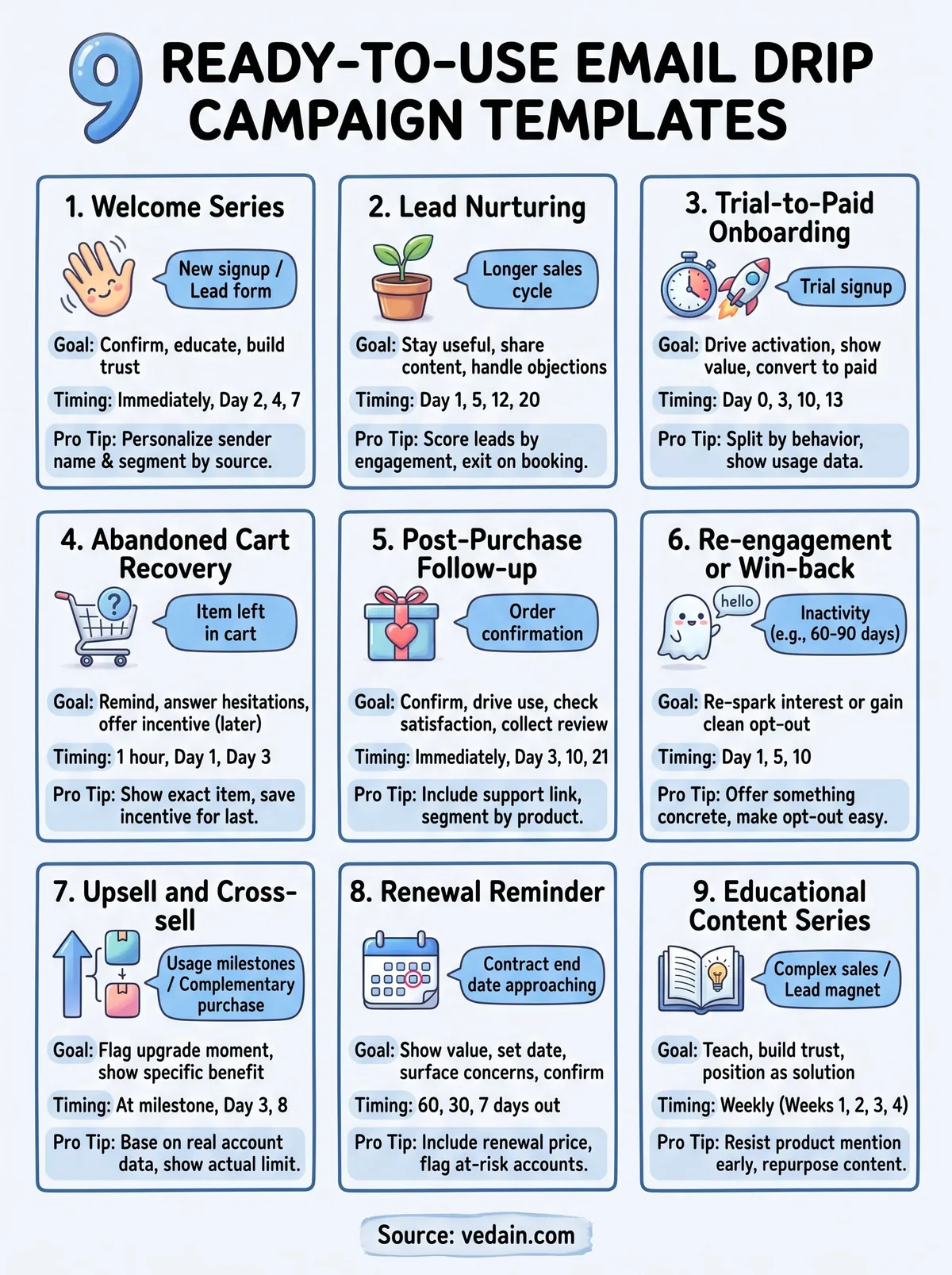
Putting these templates to work
Nine templates won't help if they sit in a doc you never open. Pick the one solving your most urgent problem right now, probably the welcome series or trial-to-paid sequence, and build that first. Getting one drip campaign live this week beats planning the perfect nine-sequence system you'll launch someday.
Once that first sequence is running, the rest get easier. You already have the subject lines, timing, and structure, so each new template is mostly swapping in your own product details and connecting it to the right trigger, a signup, a usage milestone, a renewal date approaching.
Building these by hand across separate tools gets messy fast. A CRM that already holds your leads, deals, and email history makes triggering these sequences off real account activity far simpler than juggling a bolted-on email tool. Try Vedain CRM free for 14 days and get your first sequence live today.
Frequently Asked Questions
What is the best email drip campaign template for B2B lead nurturing?
A B2B lead nurturing template typically includes 5-7 emails spaced over 2-3 weeks, focusing on educational content, case studies, and value propositions. Platforms like HubSpot (starting at $50/month) and Pipedrive ($14/month basic) offer pre-built B2B templates that segment leads by industry and company size. These templates outperform generic sequences by 40-60% in conversion rates, making them ideal for longer sales cycles common in B2B environments.
How many emails should be in a drip campaign sequence?
Most effective drip campaigns contain 5-9 emails sent over 2-4 weeks, though optimal length depends on your industry and audience. HubSpot research shows that 7-email sequences generate the highest engagement, while Salesforce customers report diminishing returns after 10 emails. Shorter sequences (3-5 emails) work better for e-commerce, while B2B typically benefits from longer, more detailed campaigns.
What's the difference between drip campaigns in HubSpot vs Salesforce vs Zoho?
HubSpot ($50-3200/month) offers the most user-friendly drag-and-drop automation builder with pre-built templates, while Salesforce ($165-330/month) provides more advanced customization for enterprises but requires steeper learning curves. Zoho CRM ($12-55/month) delivers affordable automation with good template libraries, and Pipedrive ($14-99/month) excels at sales-focused sequences; Freshsales ($15-115/month) and Vedain offer budget-friendly alternatives with solid template libraries but fewer advanced segmentation options.
Can I personalize email drip campaign templates with customer data?
Yes, all modern CRM platforms allow dynamic personalization using customer data fields like name, company, industry, and purchase history. HubSpot, Salesforce, and Pipedrive support conditional logic to show different content based on customer attributes, while Zoho and Freshsales offer similar personalization at lower price points. Personalized drip campaigns typically see 20-30% higher open rates compared to generic templates.
What email drip campaign template works best for cart abandonment?
Cart abandonment templates typically include 3-4 emails: the first within 1 hour showing the abandoned cart, the second after 24 hours with product benefits, and a final discount offer after 3 days. Platforms like Shopify-integrated HubSpot and Freshsales automate this natively, while Pipedrive and Zoho require basic e-commerce plugin setup. These sequences recover 10-15% of abandoned carts on average, making them among the highest ROI drip campaigns.
How do I measure the success of my email drip campaign templates?
Track key metrics including open rates (typically 20-40%), click-through rates (2-5%), conversion rates, and unsubscribe rates within your CRM platform. HubSpot and Salesforce provide detailed analytics dashboards, while Zoho ($12+/month), Pipedrive, and Freshsales offer comparable reporting at lower costs. A/B testing subject lines and send times in these platforms typically improves performance by 15-25% over baseline templates.