Here is the short answer. The best option depends on whether you send marketing broadcasts or sales sequences tied to deals. Pure marketing tools suit newsletters and big lists. A CRM with built-in campaigns suits teams that want replies, pipeline stages, and outreach in one place. Several tools below also have free plans, though most cap contacts or sends.
This guide compares 10 platforms side by side, covering features, pricing, pros and cons, and free options. We build Vedain CRM, which includes multi-step campaigns, email warmup, and Gmail and Outlook sync for $10 per user per month, so it is on the list. We judge it by the same criteria as every other tool, and you can decide where it fits.
1. Vedain CRM
What it does best
Vedain CRM keeps email campaigns inside the CRM, so every send is tied to a lead, a deal, and a reply. You build a multi-step sequence, enroll contacts, and watch responses land on the same record your reps already use. There is no export, no sync job, and no second login.
Because two-way sync with Gmail and Outlook is built in, replies stay attached to the contact and the whole thread is visible to your team. That is the gap in most tools on this list. Marketing platforms send well, then lose the conversation once a prospect answers.
Campaigns work best when every send, reply, and deal stage lives in one record.
Key features
The campaign tools sit inside a larger sales system, so you get outreach and pipeline management in one product. These are the parts that matter for email work:
- •Multi-step email campaigns with automated sequences
- •Email warmup that builds domain reputation over 21 days
- •Two-way sync for Gmail and Outlook
- •No-code workflows that trigger actions from lead activity
- •Lead forms for capturing website sign-ups straight into the CRM
- •Reports and analytics, including pipeline reports, conversion funnels, and team leaderboards
- •AI Agent Marketplace with 30+ pre-built agents for data enrichment and content generation
Pricing and free options
Pricing is flat. Every user pays $10 per user per month, and every feature is included, with no tiers, no feature gates, and unlimited records. In any email campaign software comparison, per-contact billing is what usually hurts as your list grows. Here, your cost follows headcount instead.
There is no permanent free plan, so this is not the pick if you need a free forever tier. Billing is available in USD, INR, and AED.
Pros and cons
Here is the honest tally. The strengths come from the all-in-one design, and the weaknesses come from the same place.
Pros
- •Campaigns, replies, and deals share one record
- •Warmup and automation included at the base price
- •Predictable cost with no contact-based overage
- •Fast setup for teams with no IT support
Cons
- •No permanent free plan, only a trial
- •Per-seat pricing adds up for very large teams that only send email
- •Built for sales outreach, not for ecommerce newsletters with product feeds
Who it's best for
Pick Vedain if your emails exist to move deals forward. Sales teams, founders, and small agencies running outbound sequences get the most from it, especially if they already live in Gmail or Outlook and want warmup, follow-ups, and pipeline tracking without stitching three tools together.
Skip it if your main job is sending weekly newsletters to a huge subscriber list or running ecommerce promotions. Dedicated marketing platforms further down this list handle that work better.
2. Brevo
What it does best
Brevo bills by emails sent, not contacts stored, which makes it a strong budget pick when you have a large list and send rarely. You can keep 50,000 subscribers and pay only for the messages you actually send.
It also covers more channels than most rivals. You get SMS, WhatsApp, and transactional email in one account, so a newsletter, an order receipt, and a text reminder share one contact database.
Brevo bills for what you send, so a large, quiet list costs you very little.
Key features
Brevo started as an email sender and grew into a broader messaging suite. The tools you will use most for campaigns are:
- •Drag-and-drop email editor with templates and A/B testing
- •Marketing automation with welcome series and abandoned cart flows
- •Transactional email and SMS through the same account
- •Signup forms and landing pages for list building
- •Built-in lightweight CRM for contacts and deals
Pricing and free options
In any email campaign software comparison, Brevo stands out for its permanent free plan with unlimited contacts. The catch is a daily send cap and Brevo branding on your emails. Prices below are approximate starting points, so confirm them on Brevo's pricing page before you buy.
Pros and cons
Pricing by send volume is the main strength, and it also causes the main complaint. Here is the tally.
Pros
- •Free plan with unlimited contacts
- •Email, SMS, and WhatsApp in one place
- •Cheap entry price for low-volume senders
Cons
- •Free plan caps you at 300 emails a day
- •Costs climb fast if you send frequently
- •The built-in CRM is thin next to a dedicated sales CRM
Who it's best for
Choose Brevo if you run a small business with a big list and send a few campaigns a month. It also suits teams that need transactional email alongside marketing sends, such as online shops and SaaS products.
Look elsewhere if your reps need sequences tied to deal stages and replies. Brevo sends well, but its sales tooling is basic.
3. MailerLite
What it does best
MailerLite wins on simplicity. The editor is clean, the automation builder is visual, and most people send a first campaign within an hour of signing up. You do not need a dedicated marketer to get value from it.
It also keeps pricing low for small lists, which makes it a favorite with creators, freelancers, and small shops. They get polished newsletters without paying for features they never touch.
MailerLite does fewer things than the big suites, and it does them with less friction.
Key features
The feature set is deliberately narrow. These are the tools you will use most for campaigns:
- •Drag-and-drop editor with ready-made email blocks
- •Visual automation workflows for welcome series and re-engagement
- •Landing pages, pop-ups, and signup forms for list building
- •A/B testing and auto resend to people who did not open
- •Ecommerce integrations with Shopify and WooCommerce
- •Paid newsletters through Stripe
Pricing and free options
For budget buyers, this email campaign software comparison favors MailerLite's free plan, though it is small. Paid tiers are billed by subscriber count. Figures below are approximate and have changed before, so confirm them on MailerLite's pricing page.
Pros and cons
MailerLite's strengths come from keeping things light. The weaknesses show up once your needs grow.
Pros
- •Easy to learn, with a clean interface
- •Free plan good enough for a first newsletter
- •Low entry price for small lists
Cons
- •Cost rises with every subscriber you add
- •Automation is less flexible than ActiveCampaign
- •No real sales CRM, so deal tracking needs another tool
Who it's best for
Choose MailerLite if you are a solo creator, blogger, or small business that mainly sends newsletters and wants a tool you can learn in an afternoon. It also suits teams that value design quality over deep automation.
Skip it if your reps need sequences tied to deals and replies. MailerLite sends well, but it does not track pipeline stages.
4. ActiveCampaign
What it does best
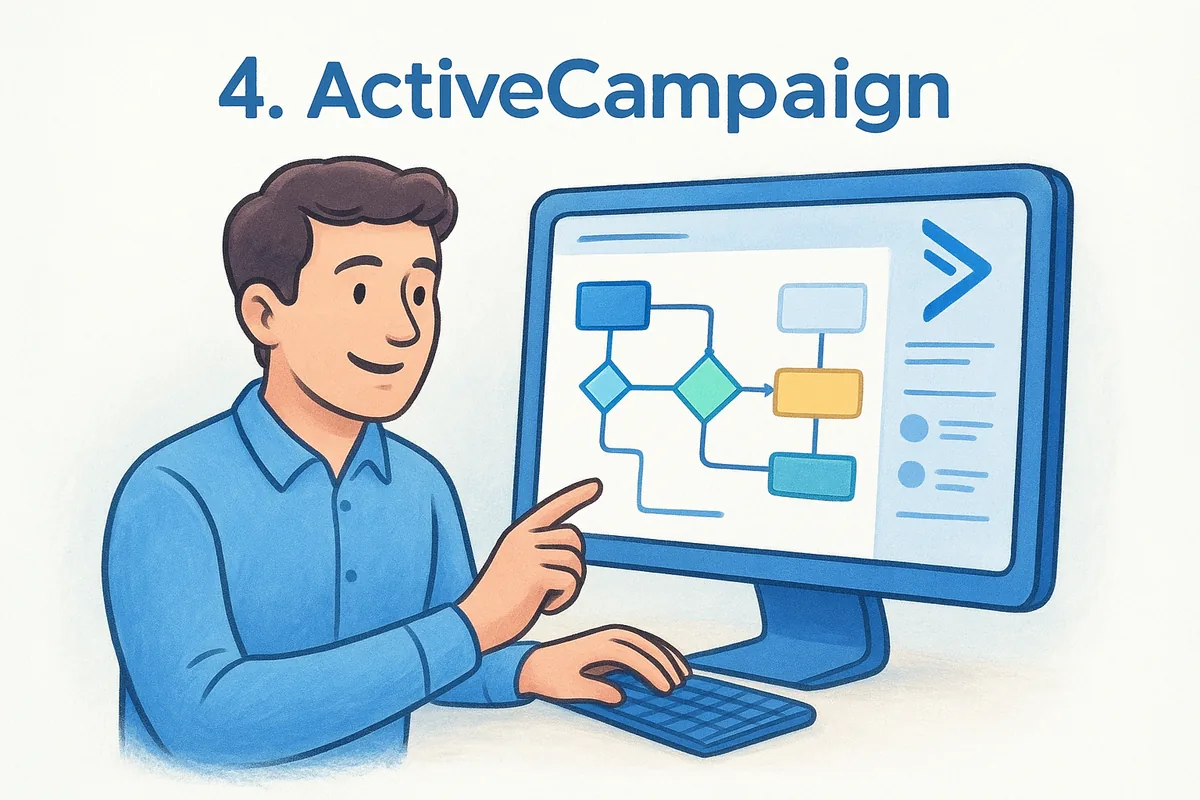
ActiveCampaign is the automation specialist on this list. Its visual builder lets you branch on opens, clicks, page visits, tags, and purchases, so a contact's behavior decides what arrives next. Most tools here handle a welcome series. This one handles a full customer journey.
Behavior data also feeds lead scoring and segmentation. A contact who views your pricing page three times can trigger a task for a sales rep, with no manual checking.
ActiveCampaign wins on automation depth, and you pay for it in both money and setup time.
Key features
The platform centers on automation, with a sales CRM layered on top. These are the parts that matter for campaigns:
- •Visual automation builder with hundreds of ready-made recipes
- •Conditional content that changes an email based on contact data
- •Lead and contact scoring to flag buyers who are ready
- •Site tracking that ties page visits to automations
- •Built-in CRM with deal pipelines, available on higher plans
- •SMS and 900+ integrations for broader outreach
Pricing and free options
Any fair email campaign software comparison has to say this plainly: ActiveCampaign is rarely the cheapest option. There is no permanent free plan, only a 14-day trial. Prices scale with contact count, and the figures below are approximate for 1,000 contacts on annual billing, so confirm them on ActiveCampaign's pricing page.
Pros and cons
The strengths and weaknesses both trace back to how much the tool can do.
Pros
- •Deepest automation among the marketing-first tools here
- •Strong segmentation and lead scoring
- •Sales CRM included on Plus and above
Cons
- •Steeper learning curve than MailerLite or Brevo
- •Costs rise with every contact you add
- •Key features sit behind higher tiers
Who it's best for
Choose ActiveCampaign if you have a marketer or ops person who will build and maintain complex journeys. It suits growing B2B companies and ecommerce brands that want behavior-based email and are willing to pay for it.
Small teams without that person should look elsewhere. If you want sales sequences and pricing that does not rise with list size, a flat-rate CRM like Vedain is simpler to run.
5. HubSpot Marketing Hub
What it does best
HubSpot Marketing Hub is the all-in-one suite for teams that want email, CRM, forms, landing pages, and reporting under one login. Every email ties back to a contact record, so you can see which campaigns produced real pipeline, not just opens.
The free CRM at its core is also the easiest on-ramp in this category. You start free, then add paid features as the team grows.
HubSpot is excellent while you stay on the free tier, and expensive the moment you outgrow it.
Key features
Marketing Hub covers the full campaign cycle, and its automation and attribution tools sit on paid plans. The parts you will use most:
- •Drag-and-drop email editor with smart content and A/B testing
- •Workflow automation for nurture sequences (Professional and up)
- •Landing pages, forms, and pop-ups for list building
- •Lead scoring and lifecycle stages to hand buyers to sales
- •Campaign attribution reports tied to revenue
- •1,000+ integrations plus native links to Sales Hub and Service Hub
Pricing and free options
In any email campaign software comparison, HubSpot is where the bill jumps. Free tools include email marketing with HubSpot branding and a monthly send cap, plus the free CRM. Paid prices below are approximate, so confirm them on HubSpot's site.
Extra contacts raise the price on every paid tier, and mandatory onboarding fees apply to Professional and Enterprise.
Pros and cons
HubSpot's strengths come from its breadth. Its weaknesses are almost all about cost.
Pros
- •Generous free CRM and email tools
- •Best-in-class reporting and attribution
- •Polished, well-documented, large support community
Cons
- •Automation sits behind a steep Starter-to-Professional price jump
- •Contact-based billing grows quickly
- •Onboarding fees and add-ons raise the true cost
Who it's best for
Choose HubSpot if you are a mid-sized B2B company with a dedicated marketing team and budget to match. It also suits startups that want to begin on the free plan and accept the later price jump.
Small sales teams on a tight budget should look elsewhere. If you want outreach, warmup, and pipeline for a flat per-seat price, Vedain costs a fraction of HubSpot's paid tiers.
6. Mailchimp
What it does best
Mailchimp is the most recognized name in email marketing, and its edge is a beginner-friendly all-rounder. You get a polished editor, hundreds of templates, and email, landing pages, and social posting in one dashboard, so a small business can run its whole marketing routine from one place.
Its reach also helps. Nearly every ecommerce platform, CMS, and form tool has a Mailchimp integration, so connecting your stack rarely needs custom work.
Mailchimp is easy to start with, but the bill grows faster than most beginners expect.
Key features
Mailchimp is owned by Intuit, and recent updates lean on AI. These are the tools you will use most for campaigns:
- •Drag-and-drop editor with 100+ templates and AI-assisted copy
- •Customer Journey builder for welcome, abandoned cart, and re-engagement flows
- •Segmentation and send-time optimization on paid plans
- •Landing pages, signup forms, and a simple website builder
- •300+ integrations including Shopify, WooCommerce, and Salesforce
Pricing and free options
In any email campaign software comparison, Mailchimp's free plan is the one most people already know, though it has shrunk over the years. Paid tiers scale with contact count. Figures below are approximate for 500 contacts, so confirm them on Mailchimp's pricing page.
Costs jump with every audience tier. Duplicate and inactive contacts can inflate your bill, so archive them regularly.
Pros and cons
Familiarity is the main strength here, and price creep is the main complaint.
Pros
- •Beginner-friendly editor and large template library
- •Huge integration catalog
- •Free plan to test the basics
Cons
- •Free plan is tight on contacts and sends
- •Contact-based pricing climbs quickly
- •Sales tooling is limited, so deal tracking needs another product
Who it's best for
Choose Mailchimp if you are a small business or first-time marketer who wants a recognizable tool, plenty of templates, and easy integrations. It also suits teams already running a store on a platform that connects natively.
Skip it if you have a large list on a tight budget, or if your reps need replies and deal stages tied to every send. A flat per-seat CRM like Vedain avoids contact-based pricing entirely.
7. Constant Contact
What it does best
Constant Contact wins on hands-on support. You can reach a real person by phone, chat, or email, which is rare among email tools at this price. For a team without a dedicated marketer, that matters more than one more automation recipe.
It also handles event marketing well. You can build a registration page, send invitations, and track RSVPs from one account, which suits local businesses and nonprofits.
Constant Contact sells peace of mind, and its support is the main reason people stay.
Key features
The platform is built for small organizations that want guidance more than customization. These are the tools you will use most for campaigns:
- •Drag-and-drop editor with templates and AI content suggestions
- •Automation for welcome series and birthday emails (Standard and up)
- •Event registration, surveys, and polls inside the same account
- •SMS marketing and social posting for extra reach
- •Landing pages and signup forms for list building
- •Integrations with Shopify, WooCommerce, Salesforce, and QuickBooks
Pricing and free options
There is no permanent free plan, only a short free trial, so confirm its current length on the pricing page. Plans are billed by contact count. The figures below are approximate for up to 500 contacts, and they rise as your list grows.
In any email campaign software comparison, this is a mid-priced option. You pay for support and simplicity, and the cost climbs with every contact tier.
Pros and cons
Support and ease of use are the draw. Limited depth and contact-based billing are the trade-offs.
Pros
- •Phone, chat, and email support included
- •Strong event and survey tools
- •Quick to learn for first-time senders
Cons
- •No permanent free plan
- •Automation is locked behind Standard
- •Less design and automation flexibility than rivals
- •No real sales CRM for deals and replies
Who it's best for
Choose Constant Contact if you run a local business, nonprofit, or event-driven organization and want a person to call when something breaks. It suits owners who send a few campaigns a month and value help over advanced features.
Look elsewhere if you have a large list on a tight budget or need sequences tied to deal stages. A flat per-seat CRM like Vedain keeps outreach and pipeline together without contact-based pricing.
8. Moosend
What it does best
Moosend delivers automation at a low price. Its workflow builder gives you branching, conditions, and ecommerce triggers that many rivals reserve for their pricier tiers, and paid plans include unlimited sends.
It also leans hard into ecommerce. Product recommendations, abandoned cart emails, and countdown timers are built in, so an online shop can run revenue-focused campaigns without extra plugins.
Moosend gives you serious automation on a small budget, as long as your goal is marketing email.
Key features
Moosend is a focused marketing tool, and the features reflect that. Here is what you will use most for campaigns:
- •Visual automation builder with ready-made recipes for welcome and win-back flows
- •Product recommendations and abandoned cart emails for online stores
- •Countdown timers that add urgency to promotions
- •Landing pages and signup forms for list building
- •Segmentation, A/B testing, and transactional email on paid plans
Pricing and free options
In this email campaign software comparison, Moosend is one of the cheapest paid options, but it has no permanent free plan. You get a free trial of about 30 days instead. Prices scale with list size, and the figures below are approximate, so confirm them on Moosend's pricing page.
Pros and cons
The low price and automation depth are the draw. The thin ecosystem is the trade-off.
Pros
- •Strong automation for the money
- •Ecommerce tools built in
- •Unlimited sends on paid plans
Cons
- •No permanent free plan
- •Smaller template and integration library than bigger names
- •No sales CRM, so replies and deals live elsewhere
Who it's best for
Choose Moosend if you run a small online store or lean marketing team that wants behavior-based automation without paying for a full suite. It suits owners who already have a clear email strategy and just need an affordable engine to run it.
Look elsewhere if your reps need replies, warmup, and pipeline stages tied to every send. A flat per-seat CRM like Vedain keeps outreach and deals together without contact-based pricing.
9. Omnisend
What it does best
Omnisend is built for ecommerce stores, and it shows in the details. Product pickers, cart contents, and order data flow straight into your emails, so a campaign can show the exact item a shopper left behind.
Its second strength is omnichannel automation. Email, SMS, and push notifications run in one workflow, so a single abandoned cart flow can send an email first, then a text if the shopper stays quiet.
Omnisend turns shopping behavior into email and SMS flows that chase revenue, with no extra plugins.
Key features
The platform is narrow by design. These are the tools you will use most for campaigns:
- •Pre-built ecommerce automations for welcome, abandoned cart, and browse abandonment
- •Email, SMS, and web push inside the same workflow
- •Segmentation by shopping behavior, such as order value and products viewed
- •Pop-ups, signup forms, and a spin-to-win wheel for list growth
- •Revenue reports that tie sales to each campaign
- •Native integrations with Shopify, WooCommerce, and BigCommerce
Pricing and free options
Among free options in this email campaign software comparison, Omnisend's plan is one of the smallest, but it includes automation. Paid tiers scale with contacts, and SMS costs extra through credits. Figures below are approximate, so confirm them on Omnisend's pricing page.
Pros and cons
The strengths come from the ecommerce focus. The weaknesses come from the same narrow scope.
Pros
- •Ready-made automations that work with little setup
- •Email, SMS, and push in one workflow
- •Clear revenue reporting per campaign
Cons
- •Free plan allows very few sends
- •SMS credits add to the monthly bill
- •No sales CRM, so replies and deals live elsewhere
Who it's best for
Choose Omnisend if you run an online store on Shopify, WooCommerce, or BigCommerce and want cart recovery and repeat-purchase flows working this week. It suits owners who value SMS alongside email and want revenue numbers per campaign.
Look elsewhere if you sell through a sales team. Reps need replies, warmup, and deal stages tied to every send, and a flat per-seat CRM like Vedain covers that without contact-based pricing.
10. Kit
What it does best
Kit, formerly ConvertKit, is built for creators who earn from their audience. Bloggers, podcasters, course sellers, and newsletter writers use it to turn subscribers into buyers without a marketing team.
Simplicity drives the design. Instead of rigid lists, you tag each subscriber by interest or purchase and send to the tags that fit. Sorting people this way takes minutes, and it keeps one person from sitting on three separate lists.
Kit is built to sell to an audience, not to follow up with a pipeline.
Key features
The platform stays narrow on purpose. These are the tools you will use most for campaigns:
- •Visual automation builder with sequences and tag-based triggers
- •Landing pages and signup forms for list building
- •Paid newsletters and digital product sales with built-in checkout
- •Kit Recommendations, where creators promote each other's newsletters
- •Clean email editor that favors plain, personal-looking messages
- •Integrations with Shopify, Teachable, WordPress, and Zapier
Pricing and free options
In this email campaign software comparison, Kit has one of the most generous free plans by subscriber count, covering up to 10,000 subscribers. Paid tiers scale with list size, and the figures below are approximate for 1,000 subscribers, so confirm them on Kit's pricing page.
Automation sits on the paid plans, and cost rises with every subscriber tier.
Pros and cons
Kit's strengths come from its focus on creators. Its weaknesses show up once you need sales features.
Pros
- •Large free plan for building an audience
- •Tagging is easier than managing multiple lists
- •Built-in tools to sell products and paid newsletters
Cons
- •Automations and sequences require a paid plan
- •Price climbs quickly as your list grows
- •No sales CRM, so replies and deals live elsewhere
Who it's best for
Choose Kit if you are a creator, coach, or course seller who wants to grow a newsletter and sell digital products from one account. It suits solo operators who value a clean workflow over deep reporting.
Look elsewhere if you sell through a sales team. Reps need replies, warmup, and deal stages tied to every send, and a flat per-seat CRM like Vedain covers that without contact-based pricing.
Picking the right platform for your team
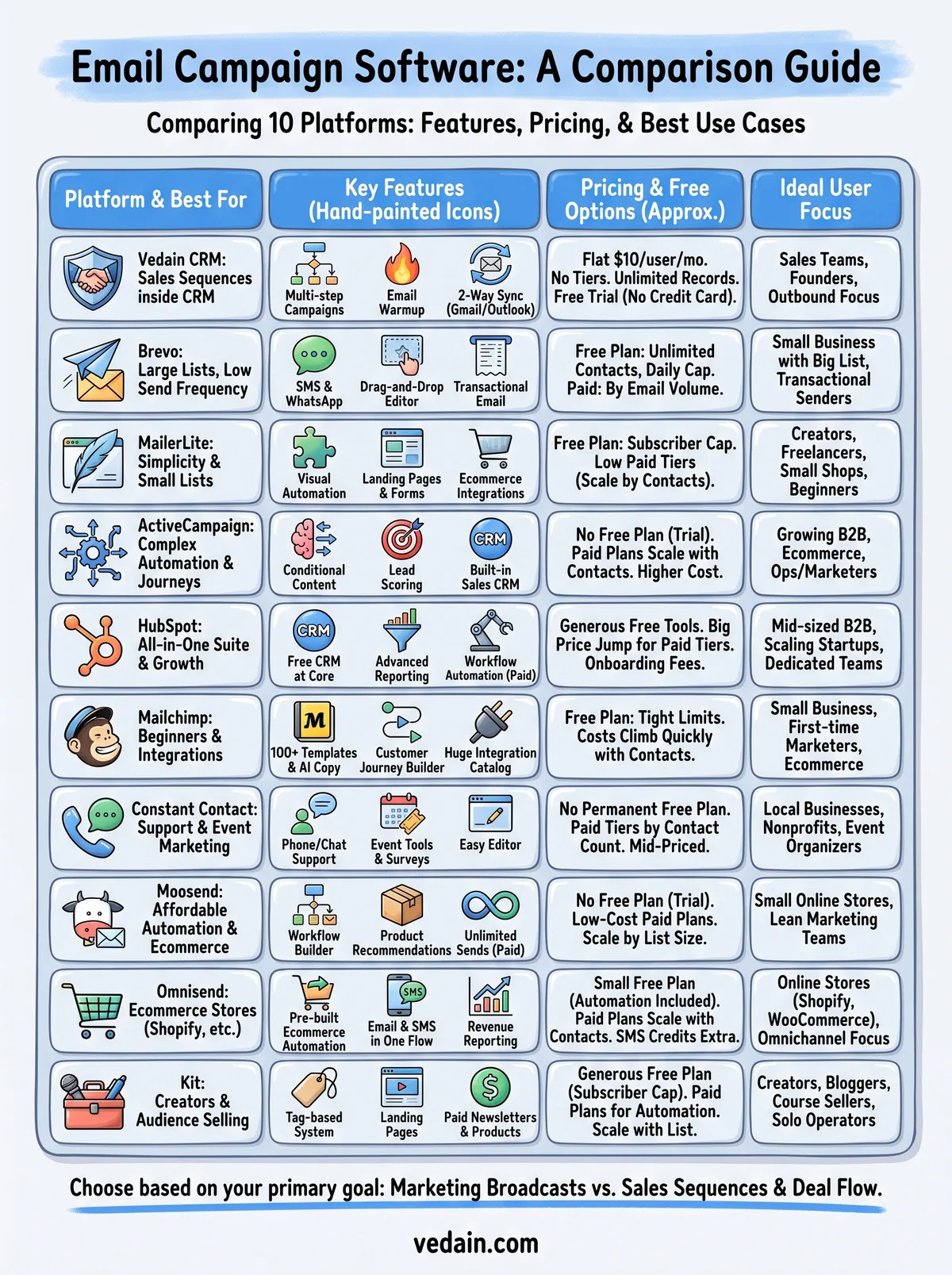
Every email campaign software comparison comes down to one question: what is the email for? If you send newsletters, promotions, or creator content, Brevo, MailerLite, Mailchimp, Omnisend, and Kit fit well. If you need behavior-based journeys, ActiveCampaign and Moosend give you deeper automation at different price points.
Sales teams face a different problem. Replies, follow-ups, and deal stages matter more than open rates, and contact-based pricing gets expensive as your list grows. Shortlist two or three tools, run a real campaign in each trial, and check the true cost at your list size.
If your emails exist to close deals, start your free Vedain CRM trial. You get campaigns, warmup, and pipeline tracking for $10 per user per month, and no credit card is required.
Related reading
- •10 Best Email Tracking Software Options for Gmail & Outlook
- •10 Best Cold Email Software Tools for Outreach in 2026
- •9 Email Drip Campaign Templates You Can Use Today
- •12 Best Sales Sequence Software for Outreach (2026)
Frequently Asked Questions
What is the best email campaign software for small businesses in 2026?
HubSpot's Email Marketing tool is the best option for small businesses, offering a free tier with unlimited contacts and $45/month paid plans that include automation and analytics. Zoho Campaigns is another excellent choice at $20/month for startups, providing similar features without the complexity of enterprise platforms like Salesforce. Both outperform Pipedrive's email capabilities since they're specifically designed for campaign management rather than sales pipeline focus.
How much does professional email marketing software cost per month?
Email campaign software pricing ranges from free to $500+ monthly depending on features and list size. HubSpot starts at $45/month, Zoho Campaigns at $20/month, and Salesforce's Email Studio requires enterprise contracts starting at $1,000+/month. Mid-range options like Vedain offer specialized solutions typically between $99-$299/month for advanced segmentation and automation.
Is HubSpot better than Salesforce for email marketing campaigns?
HubSpot is better for email marketing specifically, offering intuitive drag-and-drop builders and stronger automation at a lower price point ($45-$3,200/month), while Salesforce Email Studio is better integrated with enterprise CRM systems but requires technical setup and higher costs. If you need standalone email campaign capabilities, HubSpot wins; if you need deep Salesforce CRM integration, Salesforce is the choice. Zoho and Pipedrive offer middle-ground alternatives for businesses not requiring enterprise-level complexity.
What email marketing features should I look for in 2026?
Essential features include A/B testing, advanced segmentation, automation workflows, and detailed analytics—all standard in HubSpot, Zoho, and Salesforce platforms. Look for AI-powered subject line optimization, dynamic content personalization, and integration with your existing CRM like Pipedrive or Vedain. Mobile responsiveness and deliverability tracking are non-negotiable, as 60%+ of emails are opened on mobile devices.
Can I use Pipedrive for email marketing campaigns?
Pipedrive is primarily a sales CRM with basic email capabilities, not a dedicated email campaign platform, making it unsuitable for complex marketing automation. For email marketing, you'd need to integrate Pipedrive with specialized tools like HubSpot, Zoho Campaigns, or Vedain through native connectors. If email campaigns are your priority, choosing HubSpot or Zoho directly provides better features and ROI than combining Pipedrive with external tools.
What's the difference between email marketing software and CRM email features?
Email marketing software like HubSpot's Email Marketing and Zoho Campaigns specializes in mass campaigns, segmentation, and nurture sequences for audiences, while CRM email features like Salesforce's or Pipedrive's focus on individual sales communication and pipeline management. CRM email tools are better for one-to-one sales conversations; marketing platforms excel at one-to-many campaigns with robust analytics. Many businesses use both—Vedain and HubSpot bridge this gap by combining CRM and marketing functionality.