Most buyers get stuck on the same problem. Every vendor says "omnichannel", "AI-powered" and "easy to set up", yet free plans cap you at two or three agents, and a cheap seat price can climb once you add AI or automation. This article compares six options on price, free tiers, limits and fit, then gives you a selection checklist and a five-agent cost example.
We build Vedain CRM, which includes a support desk, so it sits first with its limits stated plainly. The other prices come from published vendor pricing and change often, so confirm them on each vendor's page before you buy.
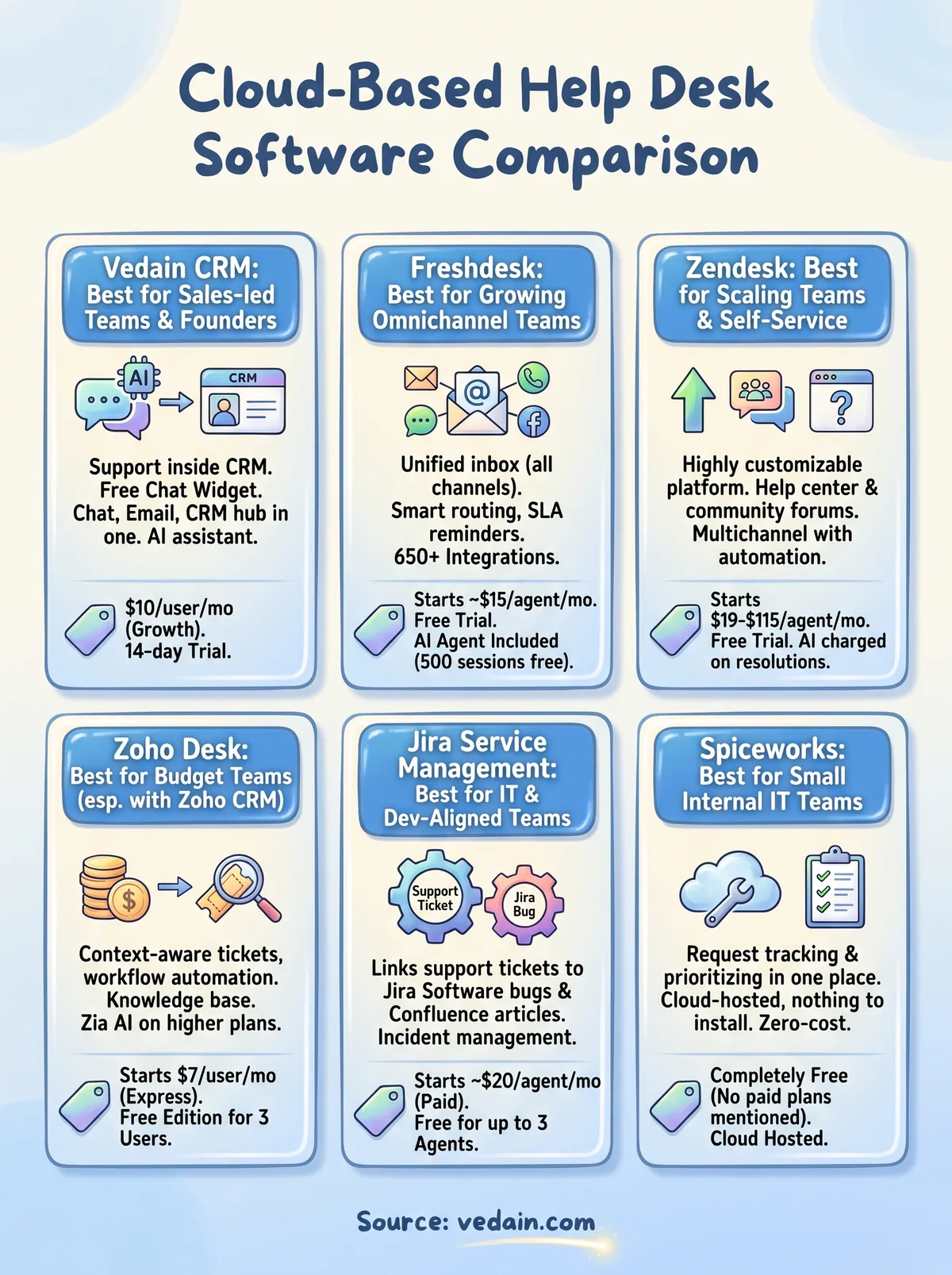
1. Vedain CRM
How it works and who it suits
Vedain CRM is a cloud sales CRM with a website Live Chat widget, an AI assistant and a Support Desk built in, so support conversations sit next to the contacts and deals they belong to. It suits sales-led teams and founders who answer customer questions by chat and do not want to pay for a separate ticketing tool. Setup takes less than five minutes.
- •Chat widget on unlimited pages, with AI answers for 100 conversations a month
- •Every chat saved as a lead in the CRM
- •Live Chat and Support Desk replies from the Vedain inbox
- •Full CRM, email campaigns and feature hub tools in the same account
Vedain is not an IT service desk. If you need incident, asset or change management for internal IT requests, pick a dedicated tool from the rest of this list.
If your support starts as a sales conversation, one tool for chat and CRM beats syncing two.
Pricing and limits
The Growth plan costs $10 per user per month (₹500 or AED 25) with every feature included and no tiers. Annual billing gives two months free, about $8.33 per user per month. You get a 14-day free trial with no credit card. There is no free CRM plan.
The live chat widget is different. It is free forever for businesses that do not need to reply live from the Vedain inbox. Team members who only answer chat and support take a Chat & support agent seat at $5 per month, and each CRM seat includes one free agent seat, up to 3.
2. Freshdesk
How it works and who it suits
Freshdesk turns email, chat, phone and social messages into tickets in one shared workspace, then categorizes, routes and tracks them to resolution. Freshworks positions it for growing customer support teams that want one inbox for every channel. It is a good default when you need a proper ticketing queue and expect to add agents.
- •Unified inbox across email, chat, phone and social media
- •Intelligent ticket routing and SLA reminders and escalations
- •Self-service knowledge base and customizable reports
- •Integrations across 650+ Marketplace apps
Freshdesk is the safe middle choice: broad features, mid-range seat prices, and room to grow.
Pricing and limits
Published listings put the entry paid plan at about $15 per agent per month. Freddy AI Agent is included on every plan, with the first 500 sessions free and additional sessions at US$49 per 100. The Freddy AI Copilot add-on costs US$29 per agent per month from the Pro plan.
Watch two limits. The wide feature range can overwhelm a small team, and the lowest paid plan leaves out features such as custom roles and skills-based routing. Check which plan holds the features you need before you compare seat prices.
3. Zendesk
How it works and who it suits

Zendesk is a highly customizable support platform with a help center, community forums and a large app marketplace. It suits support teams that expect to scale and that can budget for it. Its self-service tools reduce ticket volume, and its automation and analytics hold up as teams grow from a handful of agents to a full operation.
- •Multichannel ticketing with automation and AI-powered suggestions
- •Help center and community forums for self-service
- •Customizable dashboards and scheduled reports
- •Extensive app marketplace, including Slack notifications
Zendesk rewards teams that will use its depth and punishes teams that only need a shared inbox.
Pricing and limits
Recent published figures, billed annually, list Support Team at US$19 per agent per month, Suite Team at US$55 and Suite Professional at US$115. Suite Enterprise is quoted by sales. AI agents are included on Suite and Support plans and charged on verified resolutions. Zendesk Copilot is a separate add-on at US$50 per agent per month on Professional plans and above.
The catch is cost creep. Add-ons accumulate, and the learning curve is steeper than with simpler tools. Small teams on a tight budget usually do better elsewhere.
4. Zoho Desk
How it works and who it suits
Zoho Desk is a multichannel help desk with context-aware ticket views, workflow automation and a knowledge base. It suits budget-conscious teams, especially those already running Zoho CRM, because the two connect directly and give agents a fuller view of each customer. Zia, Zoho's AI assistant, is built into the Professional and Enterprise plans rather than metered per resolution.
- •Multichannel ticketing with automation and workflows
- •Web forms, ticket templates and email response templates
- •Customizable reports and a self-service knowledge base
- •Zia AI for tagging and suggestions on higher plans
For the lowest published paid seat price on this list, Zoho Desk is hard to beat.
Pricing and limits
Billed annually, Express costs US$7 per user per month, Standard US$14, Professional US$23 and Enterprise US$40. The free edition covers three users, which makes Zoho Desk one of the few real free options for a very small team.
The limit is tier sprawl. Channels, AI and automation vary by plan, so verify that the tier you can afford actually includes the channels you use. A plan that looks cheap can turn out incomplete.
5. Jira Service Management
How it works and who it suits
Jira Service Management is Atlassian's cloud service desk, built for IT and engineering-adjacent teams. It links a support ticket directly to a bug in Jira Software and to knowledge articles in Confluence, so nothing gets lost between support and developers. It suits IT teams and dev-aligned support teams that already use Atlassian tools.
- •Incident and service request management with automation rules
- •Deep integration with Jira Software and Confluence
- •Automatic ticket assignment and prioritization
- •Scales from a small pilot to enterprise service management
If your tickets end up as engineering work, Jira Service Management removes the handoff.
Pricing and limits
A free plan covers up to 3 agents, and paid plans start at about $20 per agent per month. Advanced ITSM features sit behind the Premium tier, so check what your IT process needs before you assume the entry plan is enough.
Expect an onboarding curve. It is powerful, but it is not the simplest tool to pick up cold, and teams new to Atlassian products often find it heavy. A team that only wants a shared support inbox will find lighter choices easier.
6. Spiceworks Cloud Help Desk
How it works and who it suits
Spiceworks Cloud Help Desk is a free, cloud-hosted tool for tracking, prioritizing and managing user requests in one place. It suits small internal IT teams that need a ticket queue without a budget line for software. Because it is hosted, you run no server and install nothing locally.
- •Request tracking and prioritization in one place
- •Cloud hosting with nothing to install or patch
- •A zero-cost way to move off email and spreadsheets
It is geared to internal IT requests, so it is a weaker fit for customer-facing support across chat and social channels.
A free help desk is worth using when your real problem is untracked email, not missing features.
Pricing and limits
The price is free, which is the whole appeal. The trade-off with any free tool is what sits outside the price: feature depth, reporting, support and how the product is funded. Read the current terms on the Spiceworks page before you move a team onto it, and confirm what happens if you outgrow it.
If you expect to need SLA tracking, deeper reporting or customer channels within a year, treat Spiceworks as a starting point and plan your exit to a paid tool from the beginning.
How to choose cloud help desk software
Cloud, hosted and on-premise explained
Cloud help desk software and hosted help desk software mean the same thing in practice: the vendor runs the servers, and your team logs in through a browser. Updates, backups and security patches are the vendor's job. On-premise software runs on servers you own, which gives you full control and full responsibility for hardware, patching and downtime.
Pick on-premise only when data-residency or regulatory rules require customer data to stay on infrastructure you control. For everyone else, cloud wins on setup speed, access from any device and subscription pricing you can scale by seat.
Side-by-side comparison
The table lists the starting price, trial or free option and best fit for each tool. Seat prices come from recent published listings, mostly billed annually, and change often.
| Tool | Starting price | Free plan or trial | Best for |
|---|---|---|---|
| Vedain CRM | $10/user/month (about $8.33 annual) | 14-day trial, no card; free live chat widget | Sales-led teams that want chat and support inside a CRM |
| Freshdesk | About $15/agent/month | Free trial (check length) | Growing omnichannel support teams |
| Zendesk | $19/agent/month (Support Team), $55 (Suite Team) | Free trial (check length) | Teams scaling support with self-service |
| Zoho Desk | $7/user/month (Express) | Free edition for 3 users | Budget teams, especially on Zoho CRM |
| Jira Service Management | About $20/agent/month | Free for up to 3 agents | IT and dev-aligned teams |
| Spiceworks Cloud Help Desk | Free | Free | Small internal IT teams |
Free help desk software: what to expect
Free help desk software comes in three forms: a permanently free tool, a free plan capped by agents, and a time-limited trial. Spiceworks is the first kind, Zoho Desk (3 users) and Jira Service Management (3 agents) are the second, and Vedain's 14-day trial is the third. Vedain also offers a free live chat widget on its own.
The cap is the real price. A free plan that stops at three agents forces a paid upgrade the day you hire a fourth, so compare the paid seat price too. A trial is only useful if you load it with real tickets.
Checklist and a five-agent cost example
Run your shortlist through these questions before you commit:
- •Which channels do customers use: email, chat, phone, social?
- •Does routing and SLA tracking exist on the plan you can afford?
- •Does it have a knowledge base for self-service?
- •How is AI priced: included, per agent or per resolution?
- •Does it integrate with your CRM, chat and messaging tools?
- •Who handles security, and can you set role-based access?
- •What is the total cost at your seat count, not the entry price?
Here is the monthly cost for five agents at the entry prices above:
- •Zoho Desk Express: 5 × $7 = $35
- •Zoho Desk Standard: 5 × $14 = $70
- •Freshdesk entry paid plan: 5 × $15 = $75
- •Zendesk Support Team: 5 × $19 = $95
- •Jira Service Management paid plan: 5 × $20 = $100
- •Vedain Growth plan: 5 × $10 = $50, or about $41.67 billed annually, with the full CRM included
Free plans no longer apply at five agents, and AI add-ons come on top. Compare the same billing term for every tool.
Price the plan you will need in a year, not the one on the pricing page headline.
Pick one and test it with real tickets
The right cloud-based help desk software is the one that fits your channels, your team size and the seat count you will reach in a year. Zendesk and Freshdesk lead for customer support, Zoho Desk wins on price, Jira Service Management and Spiceworks serve IT teams, and a CRM with built-in chat suits sales-led teams. Shortlist two, load each with real tickets, and compare the total cost.
If your support begins as a sales conversation and you want chat, leads and deals in one place, start a 14-day Vedain trial. No credit card is needed, and setup takes less than five minutes.
Frequently Asked Questions
What are the top 10 helpdesk software?
Ten commonly shortlisted tools are Zendesk, Freshdesk, Zoho Desk, Jira Service Management, Help Scout, Hiver, Intercom, HubSpot Service Hub, Freshservice and LiveAgent. This article compares six of them in depth, including Spiceworks and Vedain. Which ten matter to you depends on whether you run customer support or internal IT.
What are cloud-based software programs?
Cloud-based software programs are applications that the provider hosts on its own servers and that you use through a browser, usually on a subscription. You install nothing and the provider handles updates, backups and infrastructure. Cloud help desk tools are one example.
What is the best IT helpdesk software?
For IT teams that work alongside developers, Jira Service Management is the strongest fit on this list. Small IT teams on a zero budget can start with Spiceworks Cloud Help Desk. Teams that want a dedicated IT service management product can also look at Freshservice.
What are the top 5 ticketing systems?
For customer support, Zendesk, Freshdesk and Zoho Desk are the usual top three. For IT, Jira Service Management and Freshservice lead most shortlists. Pick by channel mix, team size and how you want AI priced.
Is there free cloud-based help desk software?
Yes. Spiceworks Cloud Help Desk is free, Zoho Desk has a free edition for three users, and Jira Service Management is free for up to three agents. Vedain's live chat widget is free forever, with AI answers for 100 conversations a month. Every free help desk has a ceiling, so learn it before you move your queue.
Is cloud-based help desk software secure?
Reputable providers manage the infrastructure, patches and backups, which often beats what a small team can do on its own servers. Your part is access control, so use role-based permissions and remove former employees promptly. Check each vendor's security and compliance documentation before storing sensitive data.