Inside reps live in a short loop of calls, emails, WhatsApp messages and follow-ups. A CRM that makes them log every touch by hand loses data by Friday. A CRM with surprise add-on bills loses the budget by quarter end. Most ranked lists skip both problems and simply score feature checklists.
This guide covers seven options in one format: how each works for inside sales, what it costs, and where it falls short. I judged them on five things: calling and email capture, sequences, lead capture from the channels you actually use, price transparency and setup speed. Vedain is our product and sits first, so I state its gaps plainly. Competitor prices change often, so I describe plan structure and send you to each vendor's pricing page instead of quoting numbers that go stale.
1. Vedain CRM
How it supports inside sales
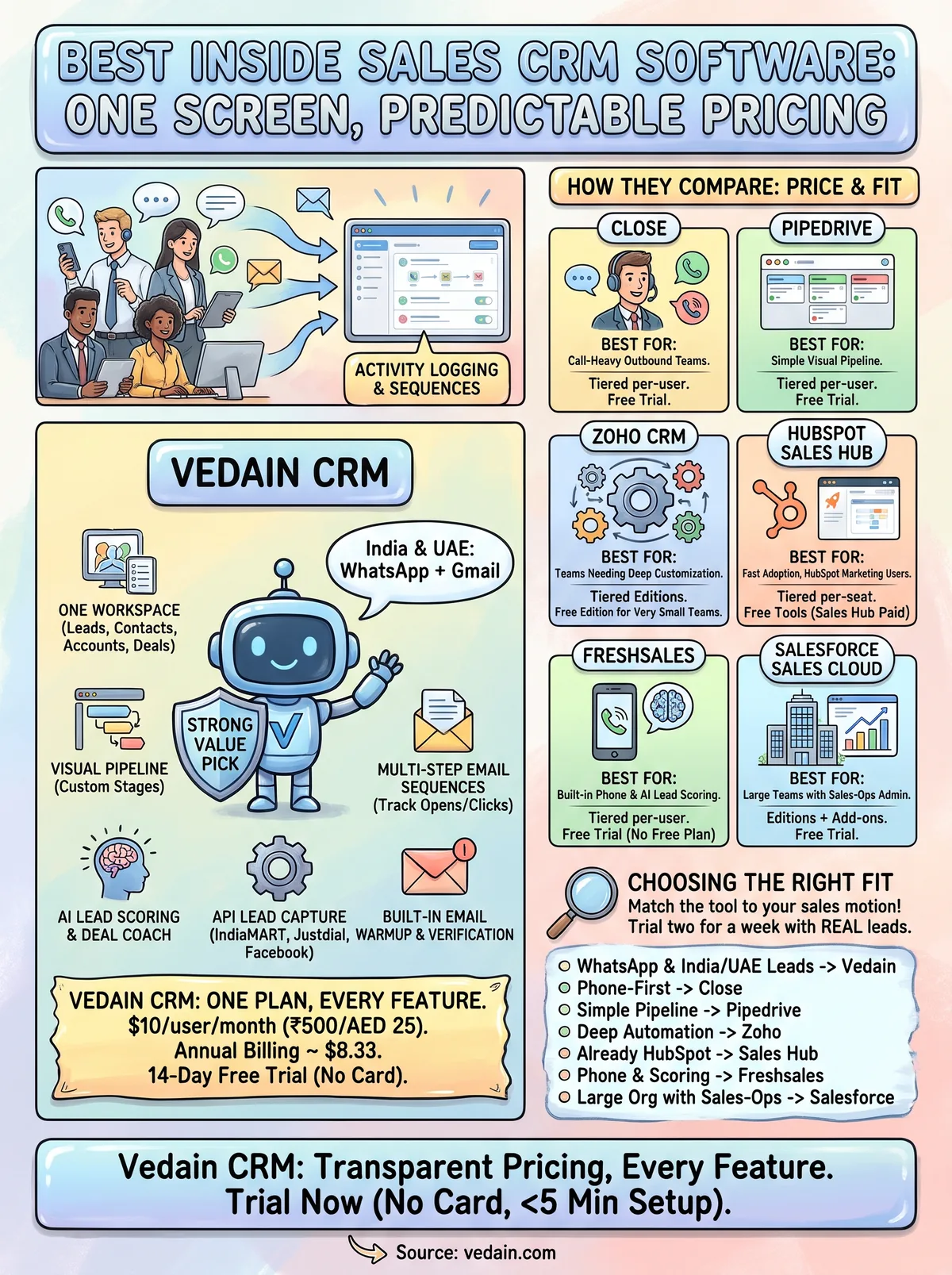
Vedain CRM gives reps one workspace for leads, contacts, accounts and deals, with a visual pipeline and custom stages. Two-way Outlook (Microsoft 365) and Gmail (over IMAP) sync keeps email threads on the record without copy and paste. Multi-step email sequences track opens and clicks, and a drag-and-drop designer with 130+ templates gets a cadence live quickly. Calling campaigns, no-code workflows, AI lead scoring and an AI deal coach cover the daily routine of working a list and deciding who to chase next.
Every CRM feature sits in one plan, so no rep hits a paywall in the middle of a cadence.
Lead capture is where it differs most from US-built tools. IndiaMART and Justdial leads arrive through API, Facebook and Instagram Lead Ads feed the pipeline directly, and Bayut, Property Finder and Dubizzle enquiries are parsed from a synced mailbox. Deliverability is built in as well. Email warmup works as a gradual sending ramp on real sends, backed by a mailbox health score and email verification. Quick checks are free, the first 50 mailbox checks are free, and after that each costs $0.005. Setup takes under five minutes.
Pricing and trial
Vedain has one plan at $10 per user per month (₹500 or AED 25) with every CRM feature included. Annual billing gives two months free, which works out to about $8.33 per user per month. The 14-day free trial needs no credit card, and there is no free plan. If you do not subscribe after the trial, the workspace is paused, and you can subscribe later and pick up where you left off. Some extras are usage-based and billed separately:
- •WhatsApp Business: ₹1,500 one-time registration, plus a ₹1,000 monthly platform fee covering 1 admin and 5 users (extra users cost ₹250 each per month). Meta's per-message rates apply on top: ₹0.98 for marketing, ₹0.14 for utility and authentication, and free service replies. Credits are prepaid.
- •LinkedIn lookups through ContactOut: ₹5 per email and ₹10 per phone number found.
- •AI data clean-up and email verification: charged per use from your wallet.
Who it suits and where it falls short
Vedain suits small and mid-sized B2B teams in India and the UAE, from solo founders to teams of around 50 reps, especially those who sell on WhatsApp and buy leads from IndiaMART or Justdial. It is also a fit if you are leaving HubSpot, Zoho or Pipedrive over cost. Know the gaps before you trial it:
- •No native iOS or Android apps. It is a mobile-responsive web app.
- •The interface is English only, with no Arabic.
- •No LinkedIn automation such as connection requests or Sales Navigator import. The Chrome extension only captures profiles.
- •No e-signature.
2. Close
How it supports inside sales

Close is a CRM built around the call-and-email workflow of reps who spend most of the day in outreach. It combines built-in calling, SMS and email with contact and deal tracking, so every call and message lands on the lead's timeline. Sequences standardize outbound touches across long lists, and email and calendar sync keeps context attached to the record.
Close is the pick when the phone, not the pipeline board, is your main tool.
Managers get pipeline views that show what is moving and what is stuck. The tradeoff is that reporting quality depends on reps logging consistently and updating stages the same way. Teams that need very custom dashboards will find reporting less direct than in a larger suite.
Pricing and trial
Close sells tiered per-user plans with a free trial and no permanent free plan. Higher tiers add more automation and reporting. Prices change, so read the current numbers on Close's pricing page.
- •Check which tier unlocks sequences and workflow automation.
- •Check how calling is billed in your country before you commit.
Who it suits and where it falls short
Close fits outbound-heavy teams that qualify by phone and want little admin overhead. It is a weaker match if your buyers mostly talk on WhatsApp, because you should confirm WhatsApp support for your region before you rely on it. Other limits:
- •Advanced routing and territory rules need careful setup.
- •Reporting depth lags full CRM suites.
3. Pipedrive
How it supports inside sales
Pipedrive is a pipeline-first CRM. Reps see a visual board of deal stages, with reminders and a clear next action on each deal. Automation rules create tasks when a deal moves between stages, and email tracking attaches open and click signals to contact activity. Managers can filter for overdue work and review pipeline and activity reports each week.
Pipedrive wins on how fast a new rep understands the screen.
Calling and scheduling usually run through telephony and calendar integrations, so calling quality depends on the provider you connect. Deeper attribution reporting and lead scoring are lighter than in analytics-first tools.
Pricing and trial
Pipedrive sells tiered per-user plans and offers a free trial but no permanent free plan. Advanced automation and reporting sit in the higher tiers. Prices change, so check its pricing page.
- •Confirm which tier includes sequences and automation limits.
- •Price any calling or WhatsApp integration as a separate line.
Who it suits and where it falls short
Pipedrive suits small teams that want a simple board and care more about next steps than deep analytics. It is less comfortable for complex lead routing or territory models. Watch for:
- •Extra configuration for assignment rules.
- •Forecast quality that depends on reps updating stages.
4. Zoho CRM
How it supports inside sales
Zoho CRM offers lead scoring, telephony integration, workflow automation and pipeline analytics in one record model. Stage-based triggers create tasks and update fields when deals move. Lead assignment rules help during busy inbound periods, and dashboards summarize pipeline health and rep activity. Zoho is headquartered in India, and many Indian and Gulf teams already know its wider app family.
Zoho gives you the most knobs to turn, which is a strength only if someone will turn them.
That depth has a price in time. Workflow depth raises setup effort and the learning curve, and small teams can feel buried by customization they never use.
Pricing and trial
Zoho lists several editions with per-user pricing. It has also listed a free edition for very small teams alongside paid editions. Check the pricing page for the current user limit, edition names and prices, because all three change.
- •Confirm which edition includes the automation and sequence features you need.
- •Ask whether telephony and WhatsApp are included or paid add-ons.
Who it suits and where it falls short
Zoho suits teams that want deep customization and can invest in setup, or already use other Zoho apps. It is a poor fit for a founder who wants to sell on day one. Tradeoffs:
- •Cadence setup can feel complex for small teams.
- •Conflicting automation rules need governance as the team grows.
5. HubSpot Sales Hub
How it supports inside sales
HubSpot Sales Hub ties email tracking, meeting scheduling and call recording to a deal pipeline. Activity from each rep lands on one timeline per contact and deal. Sequences and task automation create next steps, and reports show pipeline movement against rep activity. Adoption is fast because the interface is familiar.
HubSpot is easy to start and easy to outgrow your budget on.
The catch is depth by tier. Deeper outbound automation, calling and customization depend on the tier or add-on, and customization gets tangled when several pipelines and properties interact.
Pricing and trial
HubSpot offers free CRM tools, while Sales Hub itself is paid and tiered by seat. Features such as sequences and automation vary by tier. Prices change, so read the current Sales Hub pricing page.
- •Compare tiers by the exact features your cadence needs.
- •Check what happens to the bill when you add reps or contacts.
Who it suits and where it falls short
HubSpot suits teams that want quick adoption or already run HubSpot marketing. It is a weaker fit for price-sensitive teams that need calling, sequences and automation together. Limits:
- •Calling often depends on integrations.
- •Forecast-style reporting needs disciplined data entry.
6. Freshsales
How it supports inside sales
Freshsales packs built-in phone, email, activity timelines and AI-based lead scoring into one CRM. Call logging and email tracking attach history to the right contact. Visual workflow automation assigns tasks and moves records by trigger, and dashboards show pipeline health and rep activity together. Freshworks started in Chennai, so the product is familiar to many Indian teams.
Freshsales is the closest thing to an all-in-one tool among the large vendors.
Telephony and email sync behavior can vary by setup, and permissions need care so records do not become cluttered. Deeper forecasting depends on how you configure stages and fields.
Pricing and trial
Freshsales currently lists no free plan. It sells tiered per-user plans and offers a free trial, so confirm the trial length on its pricing page. Prices change.
- •Check which tier includes workflow automation and lead scoring.
- •Check how calling is priced in your country.
Who it suits and where it falls short
Freshsales suits inside teams that want phone, email and scoring in one tool without stitching apps together. It is less convincing for nonstandard sales motions. Watch for:
- •Extra configuration for unusual workflows.
- •Setup differences in telephony and email sync.
7. Salesforce Sales Cloud
How it supports inside sales
Salesforce Sales Cloud is an enterprise CRM with lead routing, opportunity tracking, forecasting dashboards and assignment rules. Activity timelines keep call and email history on each record, and managers get stage-based rollups across many reps. Sales Engagement add-ons extend it toward cadences.
Salesforce is the right answer to a sales-ops problem, not a speed-of-selling problem.
Nothing here is quick. Mapping lead sources, stage logic and permissions usually needs an admin and ongoing governance, and telephony or email integrations can depend on add-ons.
Pricing and trial
Salesforce sells Sales Cloud in several editions, with add-ons priced on top, and offers a free trial. Prices and edition names change, so check the current page.
- •Add the admin or consultant time to your total cost.
- •Price each add-on you expect to need.
Who it suits and where it falls short
Salesforce suits large inside sales organizations with a sales-ops owner who needs standard pipelines, forecasting and reporting across many reps. It is overbuilt for a team of five. Limits:
- •Advanced reporting needs complex configuration.
- •Permission structures make the interface feel heavy.
How the seven compare at a glance
Weigh these tools on cost per rep, speed to set up and channel fit, not on feature counts. Vedain publishes one price, so I list it exactly. For the rest, plan names and prices change, so confirm on each vendor's pricing page.
Side-by-side table
| Tool | Starting price | Free plan or trial | Best for |
|---|---|---|---|
| Vedain CRM | $10/user/month (₹500 or AED 25); about $8.33 on annual billing | 14-day free trial, no card; no free plan | India and UAE teams selling over WhatsApp and email |
| Close | Tiered per-user plans, see vendor page | Free trial | Call-heavy outbound teams |
| Pipedrive | Tiered per-user plans, see vendor page | Free trial, no permanent free plan | Simple visual pipeline |
| Zoho CRM | Tiered per-user editions, see vendor page | Free edition for very small teams, check limits | Teams that want deep customization |
| HubSpot Sales Hub | Tiered per-seat plans, see vendor page | Free CRM tools; Sales Hub is paid | Fast adoption, HubSpot marketing users |
| Freshsales | Tiered per-user plans, see vendor page | Free trial, no free plan | Built-in phone and AI lead scoring |
| Salesforce Sales Cloud | Editions plus add-ons, see vendor page | Free trial | Large teams with a sales-ops admin |
Which one fits your team
Match the tool to how your reps actually sell. If you are not sure, trial two for a week with real leads.
- •WhatsApp and IndiaMART or Justdial leads: Vedain.
- •Phone-first outbound: Close.
- •Simple pipeline, small team: Pipedrive.
- •Deep automation, willing to configure: Zoho CRM.
- •Already on HubSpot: Sales Hub.
- •Phone, email and scoring in one tool: Freshsales.
- •Large org with a sales-ops owner: Salesforce Sales Cloud.
What an 8-rep team pays on Vedain
Take eight users, one of them an admin, selling over WhatsApp. The seat cost is 8 × ₹500 = ₹4,000 per month (or 8 × $10 = $80, or 8 × AED 25 = AED 200). On annual billing the dollar price is $800 a year, because two months are free. WhatsApp adds a ₹1,000 platform fee that covers 6 users, plus 2 extra users at ₹250 each, so ₹1,500 per month.
Assume 1,000 marketing messages at ₹0.98 and 2,000 utility messages at ₹0.14. That adds ₹980 and ₹280.
| Line | Monthly cost |
|---|---|
| 8 seats at ₹500 | ₹4,000 |
| WhatsApp platform fee (₹1,000 plus 2 × ₹250) | ₹1,500 |
| 1,000 marketing messages | ₹980 |
| 2,000 utility messages | ₹280 |
| Total | ₹6,760 |
The first month adds the ₹1,500 one-time registration, so ₹8,260. Price the same team on every competitor page, including calling and WhatsApp add-ons, before you compare.
Compare totals for your real team, not the starting price on a pricing page.
Pick the CRM your reps will actually use
An inside sales CRM earns its price when reps log less and follow up more. Judge each option on how it captures calls, email and WhatsApp, how much the full team really costs, and how fast you can get selling. Close, Pipedrive, Zoho CRM, HubSpot Sales Hub, Freshsales and Salesforce each fit a specific team shape. Vedain fits India and UAE teams that want transparent pricing and every feature in one plan.
If that sounds like your team, start a 14-day free trial of Vedain CRM. No credit card is needed, and setup takes under five minutes.
Frequently Asked Questions
What does a CRM do for inside sales teams?
A CRM for inside sales records every call, email and message on the lead's timeline and shows which deals need action today. It runs sequences so no follow-up is missed, and it turns that activity into pipeline reports. Without it, reps keep this in inboxes and spreadsheets.
Which inside sales CRM is best for a small business?
Pick the one your reps can start using this week. Vedain, Pipedrive and Close are the lightest to set up, and Vedain adds WhatsApp and Indian lead sources. Zoho and Salesforce reward teams with time to configure them.
Is there a free inside sales CRM?
Some vendors offer limited free tiers. HubSpot offers free CRM tools, and Zoho has listed a free edition for very small teams, but limits change. Vedain has no free plan, only a 14-day trial with no credit card.
How much does inside sales CRM software cost?
Vedain costs $10 per user per month, or about $8.33 on annual billing, with every feature included. Others use tiers, and calling, WhatsApp and add-ons often cost extra. Always price your full team with the features you need.
Do I need a built-in dialer?
If most of your day is phone work, yes, a built-in or well-integrated dialer saves clicks and logs calls automatically. If your buyers use WhatsApp and email, strong messaging and sequences matter more. Check how each tool handles calling in your country.
Can an inside sales CRM capture IndiaMART and Justdial leads?
Vedain captures both through API, along with Facebook and Instagram Lead Ads, website forms and CSV imports. Most other tools need a connector or a Zapier-style workflow, so verify each source before you buy.