The right tool tells you the moment someone opens your email, clicks a link, or forwards it to a colleague. That data changes how you follow up. Instead of blasting reminders into the void, you can time your next touch based on real behavior, prioritize hot leads who are actually engaging, and stop wasting effort on contacts who never opened your message at all.
We tested and researched the top options built for Gmail and Outlook users, from lightweight browser extensions to full sales platforms that track opens as part of a bigger pipeline. Below you'll find ten tools worth considering, including where each one shines, what it costs, and who it fits best, whether you're a solo rep or running a full sales team.
1. Vedain CRM
Vedain CRM built its email tracking directly into a full sales platform, the way the best CRMs with inbox integration do, so you're not bolting a tracker onto Gmail and hoping it plays nice with everything else. The moment you connect your inbox through Vedain's two-way email sync with Outlook (Microsoft 365) and sending from Gmail, every sent message gets a read receipt, and every click on a link inside that email logs back to the contact record automatically. You see opens, clicks, and reply activity right next to the deal it's tied to, and how open and click tracking actually works is worth understanding if you're juggling more than a handful of prospects at once.

Key features
Beneath the tracking layer sits a genuine CRM, and that's the real differentiator here. Vedain pairs open and click notifications with a visual Kanban pipeline, so a tracked email isn't just a notification, it's a signal that moves a deal forward.
- •Two-way Gmail and Outlook sync with real-time open and click alerts
- •Multi-step email campaigns with A/B testing that pause or branch based on whether a prospect opened or clicked
- •A gradual email warmup ramp that builds domain reputation, so your tracked emails actually land in the inbox
- •No-code workflows that trigger tasks or follow-up sequences the instant a tracked email is opened
- •Custom dashboards showing open rates and click rates by rep, campaign, or pipeline stage
Most email trackers stop at a notification. Vedain turns that same open event into a pipeline action.
Pricing
Pricing is where Vedain separates itself from nearly every name on this list. Instead of gating email tracking, automation, or unlimited contacts behind a premium tier, Vedain charges one flat rate: $10 per user per month, with every feature included from day one. There's no separate "tracking add-on," no cap on tracked sends, and no credit card required to start a trial. Compare that to tools that charge per tracked email or unlock click tracking only on their top-tier plan, and the math favors Vedain fast once you're sending real volume.
| Plan | Price | Email tracking included | Feature gates |
|---|---|---|---|
| Vedain CRM | $10/user/month | Yes, unlimited | None |
| Typical competitor entry tier | $15-30/user/month | Often limited or add-on | Common |
Best for
Teams outgrow standalone trackers fast, and that's exactly where Vedain fits. If you started with a browser extension just to see opens and now need a place to actually manage the leads those opens generate, Vedain replaces both tools at once. It suits sales teams of five to five hundred who want tracking, pipeline management, automation, and reporting under one flat price rather than stitching together three separate subscriptions. Solo founders doing their own outreach benefit too, since the five-minute setup means you're tracking emails the same day you sign up, not after a week of configuration.
2. Salesflare
Salesflare markets itself as a CRM built for small businesses that hate manual data entry, and its email tracking feature is one of the more polished implementations you'll find outside a dedicated platform. It logs opens, link clicks, and even website visits from tracked contacts, then automatically builds a timeline of every touchpoint without you lifting a finger. If your team is tired of updating fields by hand, Salesflare's auto-fill approach to contact data plus its tracking layer is a real selling point.
Key features
Beyond the basic open notification, Salesflare pulls in signals most Gmail tracking tools skip entirely.
- •Live open and click tracking with desktop notifications the moment a prospect engages
- •Automatic contact and company enrichment pulled from email signatures and social profiles
- •Website visitor tracking that flags when a tracked lead comes back to your site
- •Visual pipeline with drag-and-drop deal stages tied to tracked email activity
- •Meeting and call logging synced automatically from your calendar
Salesflare's biggest strength isn't the tracking itself, it's how little manual work you do to keep the data current.
Pricing
Salesflare runs three tiers, starting at $29 per user per month billed annually (or $35 monthly), climbing to $49 and $99 for the Pro and Enterprise plans. Email tracking is included on every tier, which is a fair trade-off, but the entry price sits well above flat-rate alternatives, and features like team performance dashboards and advanced automation stay locked to the higher tiers. For a small team of two or three, that starting price adds up fast compared to platforms with a single all-inclusive rate.
Best for
Freelancers and small B2B teams who value automatic data capture over deep customization will get the most out of Salesflare. It suits founders selling into other businesses who want a CRM that fills itself in while still surfacing solid open and click data on every sent email. Teams needing granular permissions or heavy workflow customization may find themselves boxed in by the higher tiers faster than expected.
3. HubSpot Sales Hub
HubSpot needs no introduction, and its Sales Hub product folds email tracking into a much larger sales and marketing ecosystem. Once you connect Gmail or Outlook, every tracked email fires a real-time notification when it's opened, and HubSpot logs that activity straight into the contact timeline alongside marketing touches, form fills, and support tickets. If your company already runs HubSpot's marketing or service tools, the tracking data slots into a record you're already using, which is the platform's real advantage over standalone trackers.
Key features
HubSpot layers tracking on top of a genuinely deep contact database, so opens and clicks become part of a much richer profile.
- •Real-time open and click notifications delivered as desktop or Slack alerts
- •Document tracking that shows how long a prospect spent on an attached PDF or proposal
- •Sequences that queue follow-ups based on whether a tracked email was opened
- •Meeting scheduling links embedded directly in tracked emails
- •Shared inbox reporting across the whole team's tracked send volume
HubSpot's tracking works best when it feeds a system you're already running, not as a standalone habit.
Pricing
Cost is where HubSpot gets complicated. Basic email tracking is free with a HubSpot account, but the useful automation, unlimited sequences, and reporting sit behind Sales Hub Starter at $20 per user per month, climbing sharply into Professional and Enterprise tiers that run into the hundreds per month once you add seats and add-ons, as a closer look at what Sales Hub really costs per seat shows.
| Tier | Price | Tracking depth |
|---|---|---|
| Free | $0 | Basic open notifications |
| Starter | $20/user/month | Sequences, templates |
| Professional | $100+/user/month | Advanced automation, reporting |
Budget-conscious teams often get surprised by how fast the per-seat cost multiplies once you need more than basic tracking.
Best for
Companies already invested in HubSpot's marketing or CMS products get the most value here, since tracking data flows into the same dashboards. Smaller teams that just want reliable open notifications without the broader ecosystem may find the pricing steep for what they'd actually use, which is worth weighing against the wider case for and against HubSpot.
4. Mailbutler
Mailbutler takes a different approach than the CRMs on this list. It's a browser and email client add-on that layers email tracking directly on top of your existing Gmail or Outlook inbox rather than asking you to work from a separate dashboard. Once installed, you get a small icon next to each sent message showing exactly when it was opened, how many times, and on what device, all without leaving the inbox you already know.
Key features
Mailbutler focuses on making your existing email client smarter instead of replacing it, and the feature set reflects that philosophy.
- •Read receipts showing open time, open count, and device type per email
- •Link tracking that reports clicks on individual URLs inside your message
- •Send later scheduling so tracked emails go out at the best time for the recipient
- •Snooze and follow-up reminders triggered when a tracked email goes unopened
- •Email templates and signatures with tracking baked into every send
Mailbutler works best when you want tracking inside Gmail or Outlook itself, not a new tool to check.
Pricing
Mailbutler runs a tiered structure starting with a limited free plan, then Professional at around $10.60 per user per month billed annually, Business at roughly $17.80, and an Enterprise tier for larger teams with custom pricing. Read receipts and basic tracking come on the free tier, but link tracking, unlimited templates, and team features stay locked behind the paid plans. That structure puts Mailbutler in a similar price range to flat-rate CRMs, except here you're paying for an add-on layer rather than a full pipeline and reporting system underneath it.
Best for
Solo professionals and small teams who already live inside Gmail or Outlook and don't want to manage a separate CRM will find Mailbutler a comfortable fit. It suits consultants, recruiters, and account managers who need solid tracking and scheduling without restructuring their workflow around a new platform. Teams that eventually need pipeline visibility, automated sequences, or team-wide reporting on tracked activity will likely outgrow the add-on format and should look at CRM options sized for small teams instead.
5. Mailsuite (formerly Mailtrack)
Mailsuite started life as Mailtrack, one of the earliest browser extensions to put a simple checkmark next to your sent Gmail messages so you'd know at a glance when someone opened them. The rebrand added more depth, but the core idea hasn't changed: lightweight email tracking that lives inside Gmail rather than a separate app you have to open. Install the extension, send an email, and a pair of checkmarks turns blue the moment your recipient reads it, the same visual language WhatsApp users already recognize.
Key features
Mailsuite keeps its feature set focused on the inbox rather than trying to become a full sales platform.
- •Real-time read receipts shown as checkmarks directly in your Gmail sent folder
- •Link tracking that reports individual clicks inside a sent message
- •Email scheduling to queue messages for the best send time
- •Team tracking for shared inboxes, so managers see open rates across reps
- •Mail merge for sending tracked emails to a list without leaving Gmail
Mailsuite proves you don't need a dashboard to know if your email got opened, sometimes a checkmark is enough.
Pricing
Mailsuite offers a free plan with unlimited tracked emails but caps some features like link tracking and removes branding only on paid tiers. Paid plans start around $4.99 per user per month for Pro, moving up to Business tiers near $9.99 for team-level reporting and mail merge at scale. That entry price undercuts nearly every other tool on this list, though you're trading a lower cost for a much narrower feature set than a full CRM.
Best for
Solo users and small teams who want dead-simple Gmail tracking without learning a new interface will appreciate Mailsuite's minimal footprint. It suits freelancers, recruiters, and individual salespeople sending a moderate volume of one-off emails who just need a reliable open notification. Anyone managing a pipeline with multiple deal stages, automated follow-ups, or team-wide reporting on tracked activity will bump into Mailsuite's ceiling fast and need a more complete platform instead.
6. Yesware
Yesware built its name as one of the original email tracking tools for sales reps working out of Gmail or Outlook, and it still carries that sales-first identity today. Install the add-on and every sent message gets a read receipt, showing not just whether a prospect opened your email but how many times and from what location, which helps you tell a curious skim from a genuine second read. It's aimed squarely at reps who live in their inbox all day and want tracking data without switching tabs.
Key features
Yesware layers a few sales-specific tools on top of basic open tracking that push it closer to a lightweight sales engagement platform than a simple extension.
- •Real-time read receipts with open count and recipient location
- •Link and attachment tracking showing which parts of an email got engagement
- •Email templates with built-in tracking on every send
- •Automated follow-up campaigns that adjust based on whether a prospect opened or replied
- •Reporting dashboards for team-wide open and reply rates
Yesware treats a tracked open as the start of a sequence, not just a notification to glance at and forget.
Pricing
Yesware's pricing climbs quickly once you need more than the basics. The Pro plan runs about $19 per user per month billed annually, Premium jumps to roughly $45, and Enterprise pricing requires a custom quote. Tracking itself is included from the Pro tier up, but advanced reporting, team analytics, and higher send volumes stay locked behind the pricier plans, which puts Yesware well above flat-rate alternatives once you scale past a couple of reps.
| Plan | Price (annual) | Includes |
|---|---|---|
| Pro | ~$19/user/month | Tracking, templates, campaigns |
| Premium | ~$45/user/month | Team analytics, Salesforce sync |
| Enterprise | Custom | Advanced admin controls |
Best for
Sales reps and small teams who want tracking bundled with lightweight sequence software for sales outreach will feel at home with Yesware. It suits outbound-heavy roles where reply rates and follow-up timing matter more than deep pipeline visualization. Teams that need a full CRM underneath their tracking data, rather than an inbox add-on, will likely find themselves paying Premium prices for features a flat-rate platform includes by default.
7. BIGContacts
BIGContacts positions itself as a CRM for small businesses first, with email tracking as one piece of a broader contact management system rather than the headline feature. Connect your Gmail or Outlook account, and every tracked email logs its open and click activity straight into the contact's timeline, right next to notes, deal history, and past support tickets, much like other CRMs built around Outlook integration. That context matters if you're the kind of team that treats every inbound touch as part of a longer relationship, not a one-off cold email.
Key features
BIGContacts leans on its contact database more than flashy tracking dashboards, and the feature list reflects that priority.
- •Email open and click tracking logged automatically to each contact record
- •Task and reminder automation triggered when a tracked email goes unopened past a set window
- •Custom fields and tagging for segmenting contacts by tracked engagement
- •Bulk email tracking for newsletters and outreach sent to larger lists
- •Reporting dashboards covering open rates alongside deal and pipeline metrics
BIGContacts treats a tracked open as one data point in a customer's full history, not an isolated alert.
Pricing
BIGContacts runs a tiered structure starting at $9.99 per user per month for the Individual plan, moving to $29.99 for Business, and $54.99 for the Enterprise tier when billed annually. Email tracking is available starting on the entry tier, but bulk tracking, advanced automation, and deeper reporting require the Business plan and above. That structure puts the useful tracking features noticeably higher than the advertised entry price, a pattern worth checking closely if you're comparing sticker prices across tools on this list.
Best for
Small businesses that want a CRM built around long-term contact relationships, with tracking folded in rather than front and center, will find BIGContacts a solid match. It suits teams juggling customer service and sales activity for the same contacts, where knowing an email got opened matters less on its own and more as part of the full account history. Reps who only care about fast, standalone open notifications without a CRM wrapped around them will likely find lighter, cheaper tools on this list a better fit.
8. Streak CRM
Streak takes the unusual step of building an entire CRM inside Gmail itself, rather than syncing to it from an outside app. Install the Chrome extension and your inbox grows extra columns and pipeline views without ever leaving Gmail's interface. Email tracking here works the same way: every tracked message gets a small icon showing opens and click activity, logged right next to the pipeline stage that email belongs to. For teams who refuse to add another tab to their workday, that's a real draw.
Key features
Streak's feature list reads like Gmail got a sales upgrade rather than like a separate product bolted onto your inbox.
- •Real-time open and click tracking shown as icons directly in Gmail's sent folder
- •Customizable pipelines for sales, support, or hiring, all built from Gmail labels and views
- •Mail merge for sending tracked emails to a list without a separate tool
- •Snippets and templates with tracking included on every send
- •Mobile app that mirrors tracking data from the desktop extension
Streak's real trick is making a CRM disappear into an inbox you already check fifty times a day.
Pricing
Streak offers a free plan capped at basic tracking and a limited number of tracked emails per day, which works for very light use. Paid tiers start at $49 per user per month for Pro (billed annually), then $69 for Pro+ and $129 for Enterprise, each unlocking higher tracking limits, more pipelines, and deeper reporting. Compared to flat-rate platforms, the jump from free to Pro happens fast once your send volume grows past a trickle, and Enterprise pricing puts Streak well above most tools on this list for teams that need real scale.
Best for
Gmail loyalists who want pipeline tracking without switching context will get the most out of Streak. It suits solo founders, recruiters, and small teams comfortable running their whole sales process from inside Gmail rather than a dedicated dashboard. Teams needing built-in email warmup, multi-channel automation, or granular permissions across a larger roster will find Streak's Gmail-first design starts to feel limiting once headcount and complexity grow, and are better served by dedicated pipeline management software.
9. Mixmax
Mixmax started as a Gmail extension focused on making sales emails more interactive, and email tracking is still the feature most reps notice first. Send a message through Mixmax and you get a live feed of opens, link clicks, and even how far a recipient scrolled through an attached document. It layers that tracking data on top of interactive elements like polls and one-click scheduling, so a tracked email doubles as a small landing page rather than a plain message.
Key features
Mixmax pushes past basic read receipts into engagement tracking that most inbox add-ons skip.
- •Real-time open, click, and download tracking with desktop notifications
- •Interactive email elements like polls, calendar slots, and surveys embedded directly in the message
- •Sequences that branch follow-ups based on tracked opens or replies
- •Salesforce sync that logs tracked activity straight to CRM records
- •Team analytics showing open and reply rates across the whole roster
Mixmax treats an email less like a message and more like a mini web page you can track click by click.
Pricing
Mixmax runs a free plan with limited tracked sends per day, then climbs to SMB at $34 per user per month, Growth at $65, and a custom Enterprise tier for larger rosters, all billed annually. Tracking itself works on every tier, but sequences, Salesforce integration, and team-wide reporting stay locked to the pricier plans. That pricing puts Mixmax at the higher end of this list, closer to full sales engagement platforms than a simple tracker, which matters if your team just wants to know when an email got opened without paying for interactive email design.
Best for
Outbound teams that already run Salesforce and want tracked email activity synced automatically will get the most value from Mixmax, though it's worth comparing against purpose-built tools for sending outbound email at scale. It suits sales orgs that lean on interactive content like scheduling links and polls to boost reply rates, not just teams chasing a simple open notification. Smaller teams or solo reps on a tight budget will likely find the SMB tier pricier than the feature set justifies compared to flat-rate alternatives that bundle tracking with a full pipeline for less.
10. GetNotify
GetNotify is about as bare-bones as email tracking software gets, and that simplicity is the whole point. There's no browser extension to install and no CRM to log into. You just add "@getnotify.com" after the recipient's address in the To field, and GetNotify sends you an email notification the moment your message gets opened, showing the time, date, and how many times it was read. It works with Gmail, Outlook, Yahoo, and pretty much any email client, since the tracking happens through the address itself rather than a plugin tied to one platform.
Key features
GetNotify strips tracking down to the essentials, and that narrow focus is exactly why some users stick with it for years.
- •Read receipts by email sent to your inbox with open time, date, and count
- •No installation required, works from any device or email client
- •Multiple recipient tracking on a single sent message
- •Free plan with unlimited tracked emails, ad-supported
- •Optional caller-style tracking showing repeat opens over several days
Sometimes you don't need a dashboard, you just need to know an email got opened, and GetNotify answers that one question and stops.
Pricing
GetNotify's free tier tracks unlimited emails but tacks a small ad onto the bottom of every message you send, which some recipients notice and some don't care about. The paid version removes that ad for a flat $10.90 for a full year, not per month, making it the cheapest option on this entire list by a wide margin. There's no tiered feature structure to navigate and no per-seat pricing to calculate for a team, since GetNotify is built around individual use rather than shared reporting.
Best for
Anyone who wants a single answer to "did they open this?" without adopting new software will find GetNotify's minimal approach appealing. It suits students, freelancers, and casual senders tracking a handful of important emails rather than running outbound campaigns at volume. Sales teams needing pipeline context, click tracking, or team reporting alongside their opens should look elsewhere on this list, since GetNotify never tries to be more than a notification.
11. How to choose the right email tracking software
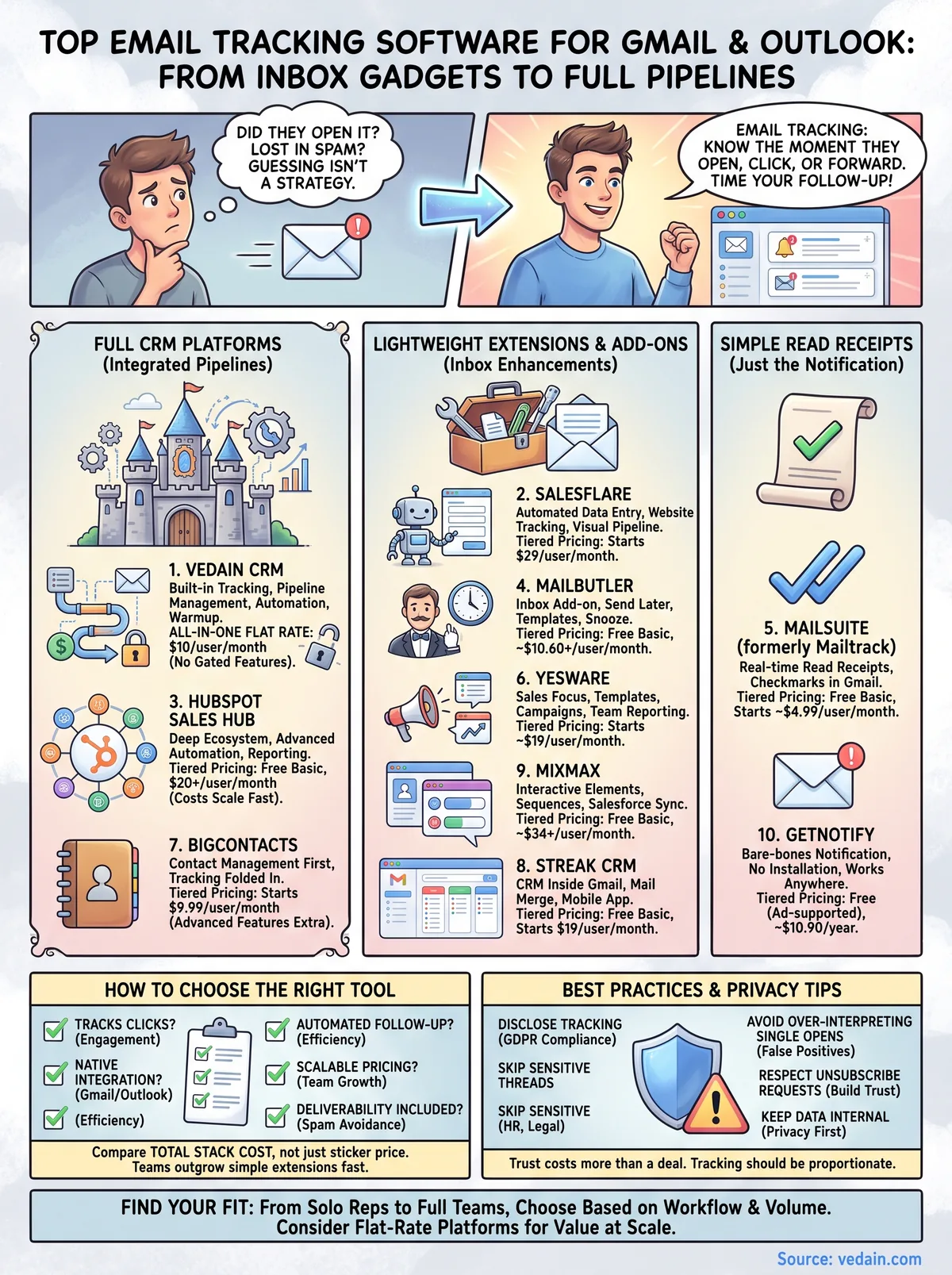
Ten tools solve the same basic problem in different ways, so the right pick depends on how you actually work, not which name shows up first in a search. Before you commit to a subscription, get clear on whether you need a simple read receipt tool bolted onto Gmail or a full system that turns tracked opens into pipeline action. That single question eliminates half this list immediately.
Budget matters just as much as features, but not in the way most buyers assume. A $5-a-month browser extension looks cheap until you add a second tool for pipeline tracking and a third for reporting, and suddenly you're paying more than a single flat-rate platform would have cost from the start. Compare the total stack you'd need to build, not just the sticker price of one tracker, and check how sales software costs stack up vendor by vendor before you commit.
The cheapest tracker on paper often costs more once you add the tools it doesn't include.
Run through this checklist before you sign up, and if you're weighing a full platform, pair it with the nine steps for picking a CRM:
- •Does it track clicks, not just opens? A read receipt tells you someone saw the subject line; click data tells you they engaged with your pitch.
- •Does it work natively with Gmail or Outlook, or does it require a separate app you'll forget to check?
- •Can it trigger a follow-up automatically when an email goes unopened, or do you still have to remember on your own?
- •Does pricing scale per seat or stay flat as your team grows past two or three people?
- •Is deliverability part of the package? Tracking an email that lands in spam tells you nothing useful, so review the 15 proven ways to stay out of the spam folder first.
Teams sending a handful of one-off emails a week can get away with a lightweight extension like Mailsuite or GetNotify. Teams running actual outreach campaigns, managing a pipeline, and following up systematically outgrow that setup fast, and that's when a platform like Vedain CRM that bundles tracking, automation, and deliverability into one flat price starts paying for itself instead of adding to your monthly bill.
12. Email tracking best practices and privacy tips
Sending a tracked email isn't just a technical choice, it's a privacy decision too, and the rules around email open tracking are tightening every year. Under the EU's GDPR and similar laws in California and elsewhere, tracking pixels that collect personal data without consent can land you in real legal trouble, especially if you're sending to contacts in the EU or UK. Check the European Commission's GDPR guidance if you send email into Europe regularly, since the penalties scale with company size and repeat violations.

Beyond legal exposure, tracking has a trust cost that's easy to underestimate. Recipients who discover a hidden pixel in a routine email, especially from someone they didn't expect to be monitored by, often feel deceived, and that feeling sticks to your brand longer than any single sale is worth.
A tracked email that damages trust costs you more than the deal it was meant to close.
Good practice comes down to a few habits that cost nothing but attention:
- •Disclose tracking in cold outreach when your jurisdiction requires it, or at minimum in a privacy policy covering GDPR and CCPA rights if you send bulk campaigns
- •Skip tracking on sensitive threads like HR matters, legal correspondence, or personal messages where monitoring feels invasive
- •Avoid over-interpreting a single open, since prefetching by email clients and spam filters can trigger false opens that have nothing to do with genuine reader interest, which is exactly why a campaign can show a 0% or 100% open rate
- •Respect unsubscribe and do-not-track requests immediately rather than treating them as optional
- •Keep tracked data internal, not shared with third parties beyond your own sales reporting
Teams that build these habits into their outreach routine rarely run into pushback, because the tracking stays proportionate to the relationship. Vedain's built-in warmup and compliance-minded sending features, covered under its email integration, exist partly for this reason: deliverability and trust go hand in hand, and a tool that respects both tends to outperform one that treats every open as fair game.
Finding the right tracker for your workflow
Every tool on this list answers the same question, did they open it, but the ten of them get there in very different ways. A free checkmark extension works fine if you send a handful of one-off emails a week. Running actual outreach with follow-ups, pipeline stages, and team reporting is a different job entirely, and that's where a lightweight tracker starts costing you more in patched-together subscriptions than a single platform would.
Pick based on your actual sending volume and team size, not the flashiest feature list. If you're still stitching together a browser extension, a separate CRM, and a third tool for deliverability, email tracking software that bundles all three at one flat rate solves more than the open-rate question. Vedain includes tracking, automation, and warmup for $10 per user, no gated tiers. Try Vedain CRM free for 14 days and see your first tracked open today.
Related reading
Frequently Asked Questions
Is email tracking legal in Gmail and Outlook?
Yes, email tracking is legal when you disclose it to recipients and comply with CAN-SPAM and GDPR regulations. Most professional email tracking tools like HubSpot, Salesforce, and Pipedrive include compliance features to help you stay within legal boundaries. However, you must inform recipients that you're tracking opens and clicks, and provide opt-out options to avoid potential legal issues.
How much does email tracking software cost?
Email tracking software ranges from free to $300+ per month depending on features and users. HubSpot offers a free plan with basic tracking, while Salesforce and Zoho CRM provide tracking starting at $25-$165 monthly. Vedain and Pipedrive also offer affordable options between $15-$99 per month for small teams.
Can I use email tracking software with Gmail and Outlook at the same time?
Yes, most email tracking tools work seamlessly with both Gmail and Outlook simultaneously. HubSpot, Salesforce, Zoho, Pipedrive, and Vedain all support both email platforms through browser extensions or native integrations. This allows you to track emails across multiple accounts without switching between different software solutions.
Does email tracking work if someone uses dark mode?
Email tracking may have reduced accuracy in dark mode since it relies on pixel-based technology to detect opens. While tools like HubSpot and Salesforce continue to function in dark mode, they may not register every open reliably. Zoho and Pipedrive offer more advanced tracking methods that provide better dark mode compatibility than traditional pixel tracking.
What's the difference between email tracking and read receipts?
Email tracking automatically monitors opens and clicks without requiring recipient action, while read receipts ask for confirmation that someone opened your email. HubSpot, Salesforce, and Zoho all provide email tracking that works without recipient interaction, whereas read receipts depend on the recipient's email client allowing notifications. Tracking gives you passive data collection, while receipts provide explicit acknowledgment.
Can email tracking software track attachments and downloads?
Yes, advanced email tracking solutions can monitor attachment downloads and document interactions. HubSpot and Salesforce offer enhanced tracking that shows when recipients download files and how long they engage with them. Pipedrive and Zoho provide similar capabilities, though some features may require higher-tier pricing plans compared to basic open and click tracking.