This article answers the question directly: which CRMs actually fit how agencies work, and what makes them different from generic sales software. We looked at pricing transparency, ease of setup, and how well each tool handles client relationships alongside deal tracking, since agencies need both without paying for bloated enterprise tiers.
Below you'll find eight CRMs worth considering in 2026, part of our wider look at the best CRMs for agencies, including where Vedain fits for agencies that want flat-rate pricing with no feature gates. We'll break down pipeline visibility, email integration, automation, and reporting for each option, so you can match the tool to your team's size and workflow instead of guessing based on marketing pages.
1. What to look for in a CRM for creative agencies
Agencies don't sell the way a typical B2B software company sells. You're managing retainer renewals, project scopes that shift mid-flight, and client relationships that span months or years past the initial deal close, the same pattern a CRM built for proposals and retainers is designed around. A generic agency CRM software built for transactional sales cycles will force you to bend your workflow to fit its pipeline stages, instead of the other way around. Before you compare specific tools, it helps to know what a modern CRM should actually do for how creative teams operate.
Client and project visibility, not just deals
Most CRMs assume a deal closes and the relationship ends. Agencies need the opposite: a system that keeps tracking the client after the contract is signed, through onboarding, active projects, and renewal conversations. Look for custom fields and pipeline stages you can rename to match your own process (discovery, proposal, kickoff, active retainer, renewal) rather than being stuck with generic "lead, qualified, negotiation, closed" labels that don't reflect agency work.
A CRM that treats client relationships as ongoing, not just deals to close, is the difference between a tool that fits agencies and one that doesn't.
Email and communication integration
Your team lives in Gmail or Outlook, sending proposals, project updates, and check-ins all day. A CRM that doesn't sync two-way with your inbox creates duplicate work: you end up copying email threads into the CRM manually, which nobody does consistently. Prioritize CRMs with native email sync, so every client conversation logs automatically against the right contact and deal record.
Automation without complexity
Agencies rarely have a dedicated RevOps person to configure complex automation platforms. You need workflow automation you can build without code, something a project manager or account lead can set up in an afternoon, not something that requires a consultant or a week of onboarding calls. Useful automations for agency teams include:
- •Auto-assigning new leads to the right account manager based on service type
- •Sending follow-up reminders when a proposal sits untouched for a set number of days
- •Moving a deal to "onboarding" and triggering a welcome sequence the moment it closes
- •Flagging retainer clients approaching renewal 30 or 60 days out
Pricing that scales with your team
Agency margins are thinner than most industries realize, and headcount fluctuates with project load. A CRM that charges extra for automation, email sync, or reporting on top of a per-seat fee gets expensive fast once you add a few account managers and freelancers. Compare the real cost per user, not just the advertised entry price, and check whether the features you actually need sit behind a higher tier, which is where a genuinely low-cost CRM separates itself from a cheap entry plan.
Keep this list in mind as you read through the options below. Some tools nail deal tracking but fall short on client communication; others handle email beautifully but charge extra for the automation an agency actually needs day to day.
2. Vedain CRM
Vedain built its platform around one idea: agencies shouldn't pay extra for features that should already be included. As a flat-rate CRM for creative agencies, Vedain bundles email sync, automation, and reporting into a single $10-per-user-per-month plan, so a five-person studio and a fifty-person shop pay the same price per seat for the same feature set.
Paying one flat rate for every feature means your agency never has to choose between growth and staying within budget.
Key features
- •Visual Kanban pipeline you can rename to match your agency's own stages, from discovery call to signed retainer
- •Two-way Gmail and Outlook sync that logs client emails automatically against contacts and deals
- •No-code workflow builder for automating proposal follow-ups, onboarding sequences, and renewal reminders
- •Email warmup tool that improves deliverability over 21 days, useful for agencies running outbound email campaigns for new business
- •AI Agent Marketplace with 30+ pre-built agents for enriching lead data and drafting content
- •Custom dashboards and team leaderboards to track account manager performance across active client rosters
Pricing
Vedain charges $10 per user per month across the board, with no separate tiers gating automation, email sync, or reporting behind a higher price. That single number covers every feature in the platform, including unlimited records and the AI tools most competitors sell as paid add-ons. Signing up for a trial doesn't require a credit card, and setup typically takes under five minutes.
Best for
Shops that have outgrown spreadsheets but don't want to pay enterprise prices for basic CRM functions will find Vedain's model easy to justify to a founder watching margins closely. Teams juggling freelancers and full-time staff benefit from a price that doesn't punish headcount growth, and agencies already living in Gmail or Outlook get client communication logged without any extra setup work.
3. HubSpot CRM
HubSpot built its reputation as an all-in-one marketing and sales platform, and plenty of agencies use it for that reason alone. Its free CRM tier attracts small shops that want contact management and basic deal tracking without paying anything upfront, though the real agency value shows up once you connect its marketing hub for campaign tracking alongside client pipelines.
Key features
- •Marketing Hub integration that connects landing pages, forms, and email campaigns directly to CRM contact records
- •Customizable deal pipelines with drag-and-drop stages for tracking proposals through project close
- •Two-way email sync for Gmail and Outlook, logging conversations against contacts automatically
- •Meeting scheduling tools that eliminate the back-and-forth of booking client calls
- •Reporting dashboards that break down deal velocity and campaign performance by team member
- •App marketplace with hundreds of integrations for project management and invoicing tools
Pricing
HubSpot's free tier covers basic contact and deal management, but agencies quickly hit its limits once they need automation or advanced reporting. The Starter plan begins around $20 per user per month, and costs climb fast once you add Marketing Hub or Sales Hub features, which are sold as separate products with their own tiers. A mid-sized agency running email campaigns and automation can end up paying several times the entry price once seats and add-ons stack up, as a full breakdown of what HubSpot costs per user makes clear.
HubSpot's free tier is a real starting point, but the moment your agency needs automation or campaign tracking, expect the bill to grow with every add-on.
Best for
Agencies already invested in HubSpot's marketing tools, or those planning to run heavy inbound campaigns alongside client management, get the most value from the ecosystem. Teams that only need straightforward deal and contact tracking may find themselves paying for marketing features they never touch, since HubSpot's pricing structure rewards agencies that use the full suite rather than just the CRM piece. If your shop wants a single flat rate instead of stacked hub pricing, it's worth weighing HubSpot against a flat-rate CRM before committing to a paid tier.
4. Pipedrive
Pipedrive built its name on visual, sales-first pipelines, and that focus makes it a popular pick for agencies that want a straightforward tool for tracking deals without a steep learning curve. Unlike HubSpot, Pipedrive doesn't try to be a full marketing suite bolted onto a CRM. It stays narrowly focused on pipeline management, which agencies running lean sales teams often appreciate when evaluating a crm for creative agencies that won't force them into unused marketing tools.
Key features
- •Drag-and-drop visual pipeline with unlimited custom stages for tracking proposals through project kickoff
- •Activity-based selling reminders that prompt account managers to follow up before a deal goes cold
- •Email sync with Gmail and Outlook, though full two-way sync requires a higher-tier plan
- •Workflow automation for recurring tasks like sending proposal templates or scheduling check-ins
- •Reporting dashboards showing deal velocity, win rates, and revenue forecasts by team member
- •Native integrations with tools like Trello and Slack for teams managing project handoffs alongside sales
Pricing
Plans start around $14 per user per month on the Essential tier, but that entry price strips out automation and advanced reporting, both of which agencies tend to need once they're managing more than a handful of active clients. Getting full email sync, automation, and revenue forecasting typically means moving up to the Advanced or Professional tiers, which push the real cost closer to $30 to $50 per user per month depending on the features your team actually uses.
The advertised entry price rarely reflects what an agency ends up paying once automation and reporting get added to the cart.
Best for
Solo account managers and small teams that want a clean, visual pipeline without extra clutter will feel at home in Pipedrive's interface. Teams with fewer than ten seats who only need basic deal tracking can get by on lower tiers, but agencies planning to scale headcount or add automation should budget for the jump to higher pricing tiers, or look at cheaper alternatives to Pipedrive, before committing to the platform long-term.
5. Copper
Copper built its entire product around Google Workspace, and that focus shows the moment you open it. If your agency runs on Gmail, Google Calendar, and Google Drive for client work, Copper feels less like a separate tool bolted onto your inbox and more like an extension of it. That native fit makes it a common shortlist entry for agencies searching for a crm for creative agencies that doesn't require retraining staff on a whole new interface.
Key features
- •Deep Gmail and Google Workspace integration, pulling contact details, files, and calendar events directly into client records
- •Visual pipeline boards for tracking proposals and projects through custom stages
- •Automatic activity logging, so emails and meetings attach to the right contact without manual entry
- •Relationship insight tools that flag contacts going cold based on email response patterns
- •Project and task tracking built into the same interface as the sales pipeline
- •Reporting dashboards for pipeline value, win rates, and team activity
Pricing
Copper's plans start around $29 per user per month on the Basic tier when billed annually, with Professional and Business tiers running roughly $69 and $134 per user per month respectively. Automation, advanced reporting, and higher storage limits sit behind those upper tiers, so agencies planning to automate follow-ups or onboarding sequences should expect to land on Professional rather than the entry plan.
A CRM built tightly around Google Workspace only pays off if your agency actually lives inside Gmail and Google Calendar every day.
Best for
Google Workspace shops get the clearest value here, since Copper's contact enrichment and activity logging rely on that ecosystem to work well. Agencies split between Outlook and Gmail, or those using a mix of email providers across freelancers and staff, won't see the same benefit and may find the Google-first design limiting. Teams that want relationship tracking baked into their existing inbox, without adding a separate app to check daily, are the best match for Copper's approach.
6. Zoho CRM
Zoho built one of the broadest software ecosystems in business software, and its CRM sits at the center of a suite that stretches into invoicing, project management, and even help desk tools. For agencies already running Zoho Books or Zoho Projects, adding Zoho CRM means one login covers client relationships, billing, and project delivery, which cuts down on the app-switching that eats into billable hours.
A CRM that plugs into your billing and project tools saves time only if your agency actually uses the rest of that ecosystem.
Key features
- •Multi-channel communication tracking that logs email, phone, live chat, and social media touches against a single contact record
- •Customizable pipeline stages and modules, letting agencies rename fields to match discovery, proposal, and retainer workflows
- •Zia AI assistant that scores leads and flags deals at risk of stalling based on activity patterns
- •Workflow automation for routing new leads, sending follow-up emails, and updating deal stages
- •Native integration with Zoho Books, Zoho Projects, and Zoho Campaigns for agencies using the wider suite
- •Reporting dashboards with customizable widgets for pipeline value, conversion rates, and team activity
Pricing
Zoho CRM's paid tiers start around $14 per user per month on the Standard plan, climbing to roughly $23, $40, and $52 per user per month on the Professional, Enterprise, and Ultimate tiers. Automation, AI scoring, and advanced reporting sit behind the higher tiers, so a shop wanting Zia's lead scoring or multi-step workflow automation should plan on Enterprise pricing rather than the entry-level plan. A free tier exists for up to three users, but it strips out most of the automation and reporting agencies rely on day to day.
Best for
Agencies already running other Zoho products get the clearest payoff, since the CRM shares data with Zoho Books and Zoho Projects without extra setup. Teams comfortable navigating a feature-dense interface, and willing to spend time configuring modules to fit their workflow, tend to get more value than shops wanting something they can set up in an afternoon. If your agency wants automation and AI scoring without climbing through four pricing tiers to unlock them, it's worth comparing Zoho's real cost per feature against Zoho alternatives with simpler pricing before signing an annual contract.
7. Monday sales CRM
Monday.com started as a project management tool, and its sales CRM still carries that DNA. Boards, timelines, and color-coded status columns feel familiar to anyone who's used Monday for creative project tracking, which makes Monday sales CRM an easy sell to agencies that already run client work through the platform and want their pipeline living in the same place instead of a separate app.
A CRM that looks like your project boards only helps if your team is already living inside those boards every day.
Key features
- •Fully customizable pipeline boards with color-coded stages, matching the same visual style as Monday's project management boards
- •Built-in project and task management, letting agencies move a client straight from closed deal into active production without switching tools
- •Email sync and templates for sending proposals and follow-ups directly from the CRM
- •No-code automation recipes for assigning leads, updating deal status, and notifying account managers
- •Time tracking and workload views, useful for agencies billing by the hour alongside retainer work
- •Dashboards combining sales data with project delivery metrics on the same screen
Pricing
Monday sales CRM starts around $12 per user per month on the Basic plan, with Standard, Pro, and Enterprise tiers running roughly $17, $28, and custom pricing respectively. Automation and integrations are limited on the lower tiers and capped by monthly action counts, so agencies running heavier automation across multiple client accounts often need to move up to Pro to avoid hitting those limits mid-month. Minimum seat requirements also apply on most plans, which can push the real monthly cost higher than the advertised per-seat number for smaller teams.
Best for
Agencies already using Monday.com for project management get the most value, since sales data and delivery timelines sit in one connected workspace instead of two disconnected tools. Creative teams that think visually, and want a CRM that looks and feels like the project boards they use daily, will find the interface intuitive from day one. Shops without an existing Monday.com setup, or those needing heavier automation without hitting action caps, should weigh the tiered pricing carefully and consider a purpose-built Monday.com CRM alternative before switching over.
8. Dubsado
Dubsado takes a different approach than the rest of this list. Instead of positioning itself as a sales pipeline tool, Dubsado built its platform around the full client lifecycle that solo creatives and small agencies actually live through: lead capture, proposals, contracts, invoicing, and scheduling, all under one login. Freelance designers, photographers, and small studios that treat client management as more of an operations problem than a sales problem gravitate toward Dubsado over a traditional crm for creative agencies setup.
Key features
- •Customizable lead capture forms that feed directly into a client workflow, from inquiry to signed proposal
- •Built-in contracts and e-signatures, removing the need for a separate document tool during client onboarding
- •Automated invoicing and payment scheduling, including recurring retainer billing
- •Workflow automation that sends proposals, reminders, and onboarding emails on a set schedule
- •Scheduling tool for booking discovery calls without email back-and-forth
- •Client portal where customers can view proposals, sign contracts, and pay invoices in one place
Pricing
Dubsado charges a flat $20 per month for a single user on its Starter plan, with the Premier plan running $40 per month for unlimited users. That structure differs sharply from the per-seat pricing used by most CRMs on this list, which makes Dubsado unusually affordable for solo operators but potentially limiting once an agency needs role-based permissions or team-level reporting.
A tool built for client workflow, not deal pipelines, only fits agencies that don't need to forecast revenue across a sales team.
Best for
Solo freelancers and very small creative studios handling their own sales, onboarding, and invoicing without a dedicated sales team will find Dubsado's all-in-one workflow genuinely useful. Photographers, designers, and consultants who need contracts and payment collection baked into client communication get more direct value here than from a pipeline-first CRM. Agencies with multiple account managers, or anyone needing serious pipeline forecasting and team reporting, will outgrow Dubsado's sales tracking quickly and should look toward a purpose-built CRM instead.
9. Salesforce Sales Cloud
Salesforce built the CRM category most other tools on this list get compared against, and its Sales Cloud product still sets the bar for enterprise pipeline management. Few creative agencies actually need that scale, but some larger shops with dedicated sales departments and complex client hierarchies choose Salesforce Sales Cloud anyway, usually because a client or partner already runs on it and integration matters more than simplicity.
Key features
- •Highly customizable pipeline objects and fields, letting large agencies model complex approval chains and multi-stakeholder deals
- •Einstein AI tools for lead scoring, forecasting, and flagging deals at risk based on historical patterns
- •Extensive workflow automation through Flow Builder, capable of handling multi-department approval processes
- •AppExchange marketplace with thousands of integrations, covering everything from invoicing to project management
- •Advanced reporting and dashboards, with drill-down analytics across teams, regions, and account types
- •Role-based permission structures suited to agencies with layered account management and regional teams
Pricing
Sales Cloud starts around $25 per user per month on the Starter tier, climbing to roughly $80, $165, and $330 per user per month on the Professional, Enterprise, and Unlimited tiers. Automation, AI forecasting, and advanced reporting live behind the higher tiers, so agencies wanting Einstein's lead scoring or serious workflow automation should expect Enterprise-level pricing rather than the entry plan. Implementation often requires a certified admin or consultant, which adds a real cost most smaller shops don't budget for upfront.
Enterprise-grade customization comes with enterprise-grade setup time, and most creative agencies never need either.
Best for
Larger agencies with dedicated sales operations staff and complex, multi-stakeholder deal cycles get the most out of Salesforce's depth. Firms already required to integrate with a client's or partner's Salesforce instance benefit from staying inside the same ecosystem rather than syncing data across platforms. Smaller studios and freelancers looking for a straightforward crm for creative agencies without hiring an admin to configure it should look at Salesforce alternatives for small business, since Salesforce's complexity and setup cost rarely match the pace of project-based agency work.
10. How to choose the right CRM for your agency
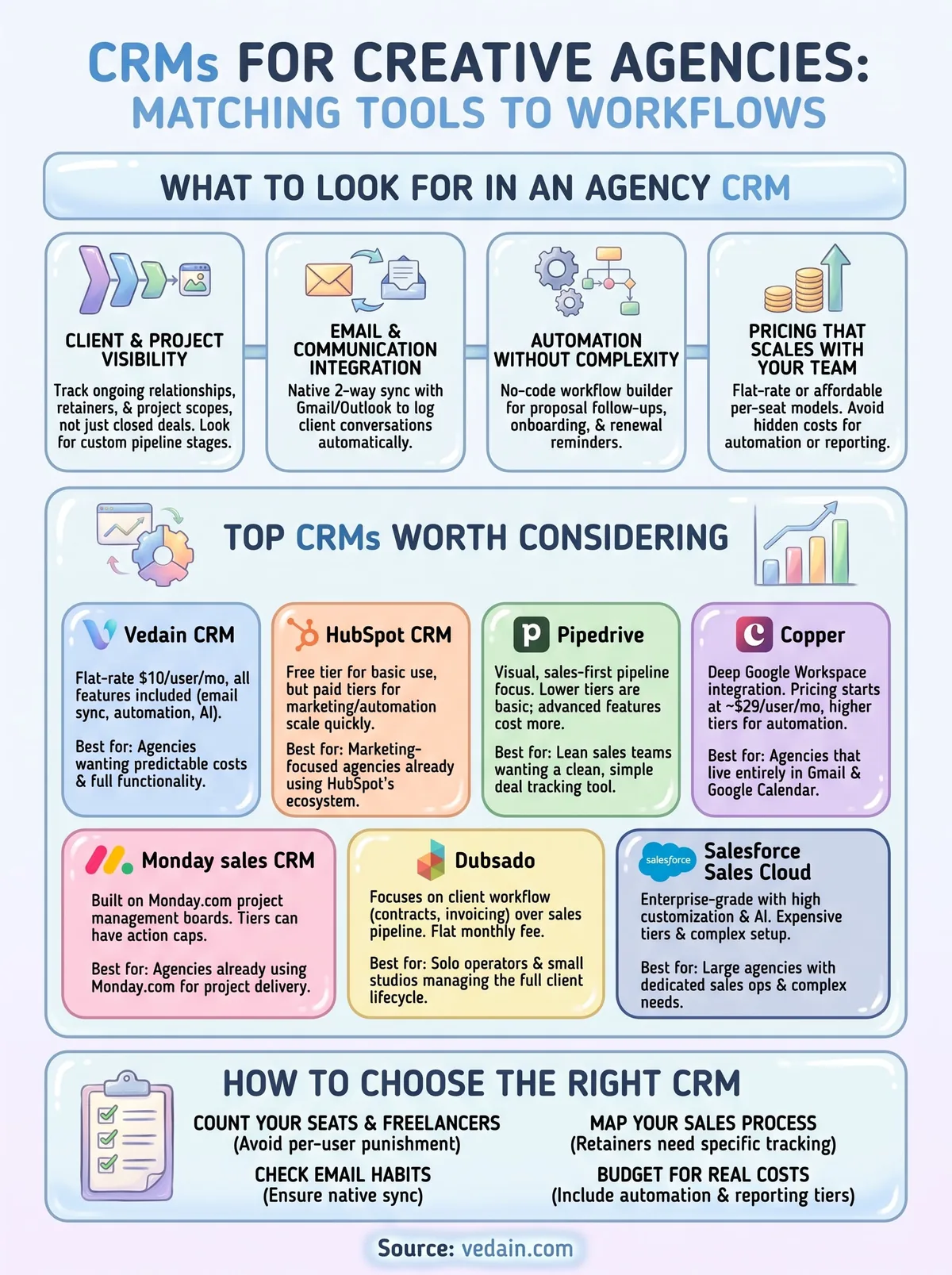
Choosing between eight solid options comes down to matching the tool to how your team actually works, not to which one has the longest feature list, and a step-by-step CRM selection checklist keeps that comparison honest. Start by counting your seats and freelancers, since per-user pricing models punish agencies that scale headcount up and down with project load. Then look at your email habits: if your whole team lives in Gmail or Outlook all day, a CRM without native two-way sync will always feel like extra work layered on top of your inbox instead of a tool that fits into it.
Next, map your actual sales process against each platform's pipeline flexibility. Agencies selling retainers need renewal tracking and recurring revenue reporting, not just a "closed won" stage that treats every deal as a one-time transaction. Owners running lean shops without a dedicated ops person should weight no-code automation heavily, since a CRM that needs a consultant to configure workflows defeats the point of buying software meant to save time.
The right CRM for your agency is the one that fits your actual sales process today, not the one with the most features you might use someday.
Budget deserves its own gut check. Run the math on what CRM software really costs once you add the automation, reporting, and email sync tiers your team will actually need, not just the advertised entry price. A marketing agency CRM that looks cheap on the pricing page can double or triple in real cost once you unlock the features you signed up for in the first place.
Whichever direction you lean, test the tool with your real pipeline data before committing to an annual contract. A free trial or month-to-month plan reveals friction points a demo call never will, and agencies that skip this step often end up migrating again within a year.
11. Frequently asked questions
What's the best CRM for a small creative agency on a tight budget?
Flat-rate pricing matters most when your team is small and every dollar counts. Vedain's $10-per-user pricing covers automation, email sync, and reporting without upsells, which makes it a natural fit for shops under ten people. Dubsado's unlimited-user Premier plan at $40 per month also works well if you're managing client workflow more than a sales pipeline.
Do creative agencies actually need a CRM, or will a spreadsheet work?
Spreadsheets hold up fine until you're juggling more than a handful of active proposals and retainers at once. Once follow-ups start slipping and nobody remembers who last emailed a client, a dedicated CRM for creative agencies starts paying for itself in recovered deals alone, as this plain-English explanation of what a CRM does lays out.
A spreadsheet tracks what happened. A CRM reminds you what needs to happen next.
Which CRMs integrate with project management tools agencies already use?
Monday sales CRM keeps sales and delivery on the same boards if you're already running Monday.com for projects. Zoho CRM connects natively to Zoho Projects and Zoho Books for agencies in that ecosystem, while most other tools on this list, including Vedain, integrate with Slack, Trello, and similar apps through direct connections or Zapier.
Is HubSpot's free CRM good enough for an agency, or do you need a paid plan?
HubSpot's free tier handles basic contact and deal tracking fine for very early-stage shops, though it helps to know what free CRM plans really include before relying on one. Agencies running automation, email campaigns, or advanced reporting outgrow it fast, and the jump to paid Marketing Hub or Sales Hub tiers adds up quickly compared to a flat-rate CRM with everything bundled in.
How long does it take to set up a CRM for an agency?
Setup time varies widely by platform, and so does how hard a CRM is to learn. Vedain advertises under five minutes to get a pipeline running with no credit card required for the trial, while Salesforce and Zoho's Enterprise tiers often need a certified admin and several weeks of configuration before your team can use them day to day. Copper and Pipedrive land somewhere in between, usually a few hours to import contacts and build out custom stages.
Picking the CRM that fits your agency
Every tool on this list solves a real problem, but not the same problem for every agency. Salesforce and Zoho reward shops with dedicated ops staff and complex approval chains. Dubsado fits solo operators who need contracts and invoicing more than pipeline forecasting. Copper and Monday work best when your agency already lives inside their ecosystems. The rest fall somewhere between, charging more as you unlock the automation and reporting your team actually needs day to day.
If you're weighing a crm for creative agencies against a growing headcount and a tight margin, the math usually points toward flat pricing that doesn't punish you for scaling. That's the gap Vedain was built to close: one rate, every feature, no upsells waiting behind a higher tier. Try Vedain free for 14 days and see how it fits your pipeline before your next contract renewal forces the decision for you.
Related reading
- •8 Best CRMs for Architects in 2026
- •8 Best CRMs for Travel Agencies in 2026
- •9 Best CRMs for Photographers in 2026
Frequently Asked Questions
What's the best CRM for a small creative agency on a tight budget?
Flat-rate pricing matters most when your team is small and every dollar counts. Vedain's $10-per-user pricing covers automation, email sync, and reporting without upsells, which makes it a natural fit for shops under ten people. Dubsado's unlimited-user Premier plan at $40 per month also works well if you're managing client workflow more than a sales pipeline.
Do creative agencies actually need a CRM, or will a spreadsheet work?
Spreadsheets hold up fine until you're juggling more than a handful of active proposals and retainers at once. Once follow-ups start slipping and nobody remembers who last emailed a client, a dedicated CRM for creative agencies starts paying for itself in recovered deals alone, as this plain-English explanation of what a CRM does lays out. A spreadsheet tracks what happened. A CRM reminds you what needs to happen next.
Which CRMs integrate with project management tools agencies already use?
Monday sales CRM keeps sales and delivery on the same boards if you're already running Monday.com for projects. Zoho CRM connects natively to Zoho Projects and Zoho Books for agencies in that ecosystem, while most other tools on this list, including Vedain, integrate with Slack, Trello, and similar apps through direct connections or Zapier.
Is HubSpot's free CRM good enough for an agency, or do you need a paid plan?
HubSpot's free tier handles basic contact and deal tracking fine for very early-stage shops, though it helps to know what free CRM plans really include before relying on one. Agencies running automation, email campaigns, or advanced reporting outgrow it fast, and the jump to paid Marketing Hub or Sales Hub tiers adds up quickly compared to a flat-rate CRM with everything bundled in.
How long does it take to set up a CRM for an agency?
Setup time varies widely by platform, and so does how hard a CRM is to learn . Vedain advertises under five minutes to get a pipeline running with no credit card required for the trial, while Salesforce and Zoho's Enterprise tiers often need a certified admin and several weeks of configuration before your team can use them day to day. Copper and Pipedrive land somewhere in between, usually a few hours to import contacts and build out custom stages.